92% Off – Specimen: Lifetime License | Advanced Typography Tool and Font Organizer – for Mac

Stop wasting hours searching for the perfect typeface and start organizing, comparing, and installing beautiful typefaces instantly. Grab your Specimen license right now at a 92% Discount to upgrade your design process and eliminate creative bottlenecks permanently.
✔ Lifetime License. ✔ Free Product Updates ✔ 24×7 Customer Support
Specimen Mac App Review at a Glance
Many creative professionals struggle with massive, unorganized typography libraries that severely slow down their creative process. Finding the right typeface often becomes a frustrating chore, dealing with corrupted files, duplicate installations, and a complete lack of proper visual comparisons. Apple’s default utility leaves power users wanting more, leading to wasted hours and compromised design decisions. Designers need a reliable method to sort through thousands of files without crashing their system or losing their creative momentum. If you frequently design user interfaces, marketing materials, or complex websites, dealing with disorganized typefaces is a massive hindrance to your daily productivity.
Specimen is an advanced, professional-grade typography application explicitly built to resolve these frustrating workflow bottlenecks.
What is Specimen
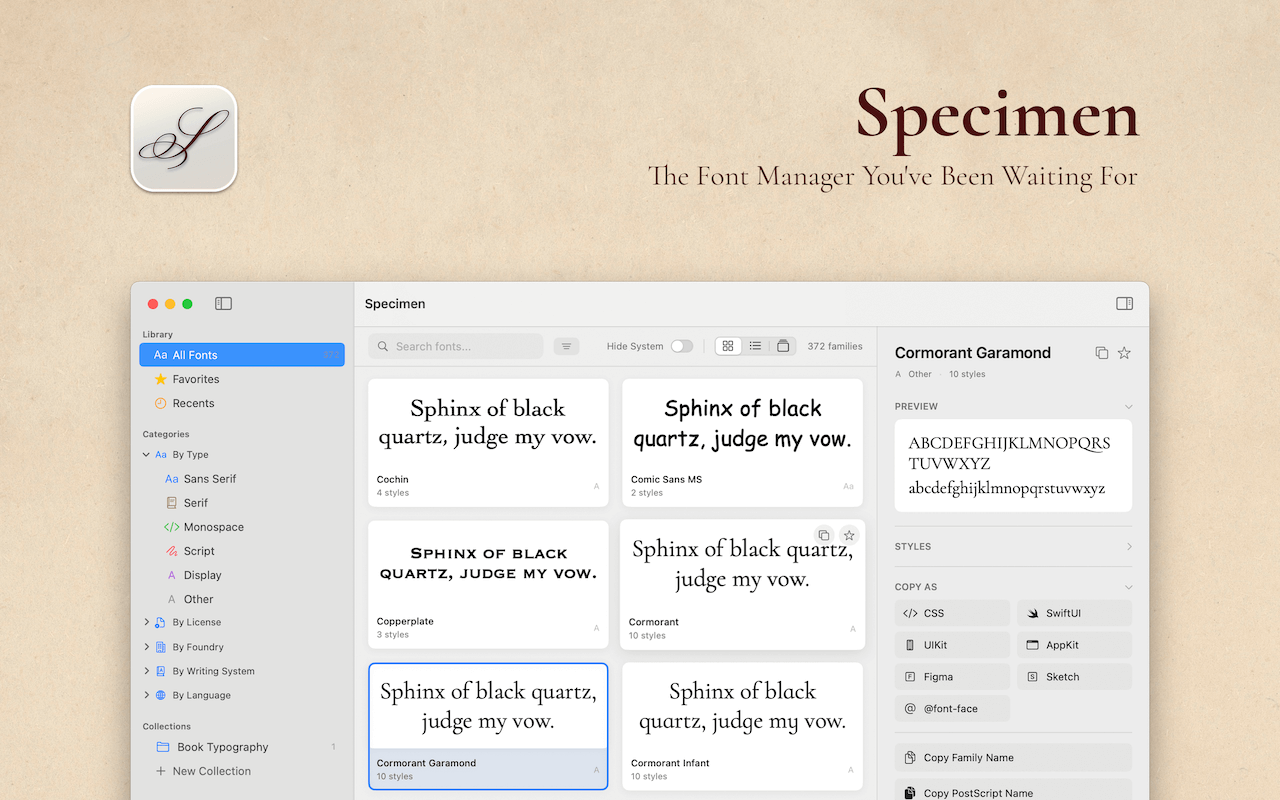
Specimen is a revolutionary font management application engineered exclusively for the macOS environment, providing a strictly superior alternative to standard system utilities. At its core, it functions as a centralized hub where creative professionals can visually inspect, thoroughly analyze, and efficiently categorize their entire collection of typefaces. The software reads deeply into the metadata of every installed file, pulling critical information regarding writing systems, supported languages, foundries, and specific commercial licenses. This deep-level metadata extraction allows the software to offer filtering capabilities that are fundamentally impossible to achieve using basic file browsers or default system tools.
Operating as a native macOS application, Specimen delivers incredible speed and total reliability, ensuring it feels like a natural extension of your Apple computer. It is strictly optimized for macOS Tahoe while maintaining complete backward compatibility with macOS 13.5 Ventura and newer operating systems. Because it is compiled as a Universal binary, the application runs with astonishing performance on both legacy Intel processors and the latest Apple Silicon chips. This optimized architecture guarantees that scrolling through a library containing tens of thousands of typefaces remains perfectly smooth, entirely free from the lag or stuttering that plagues lesser applications.
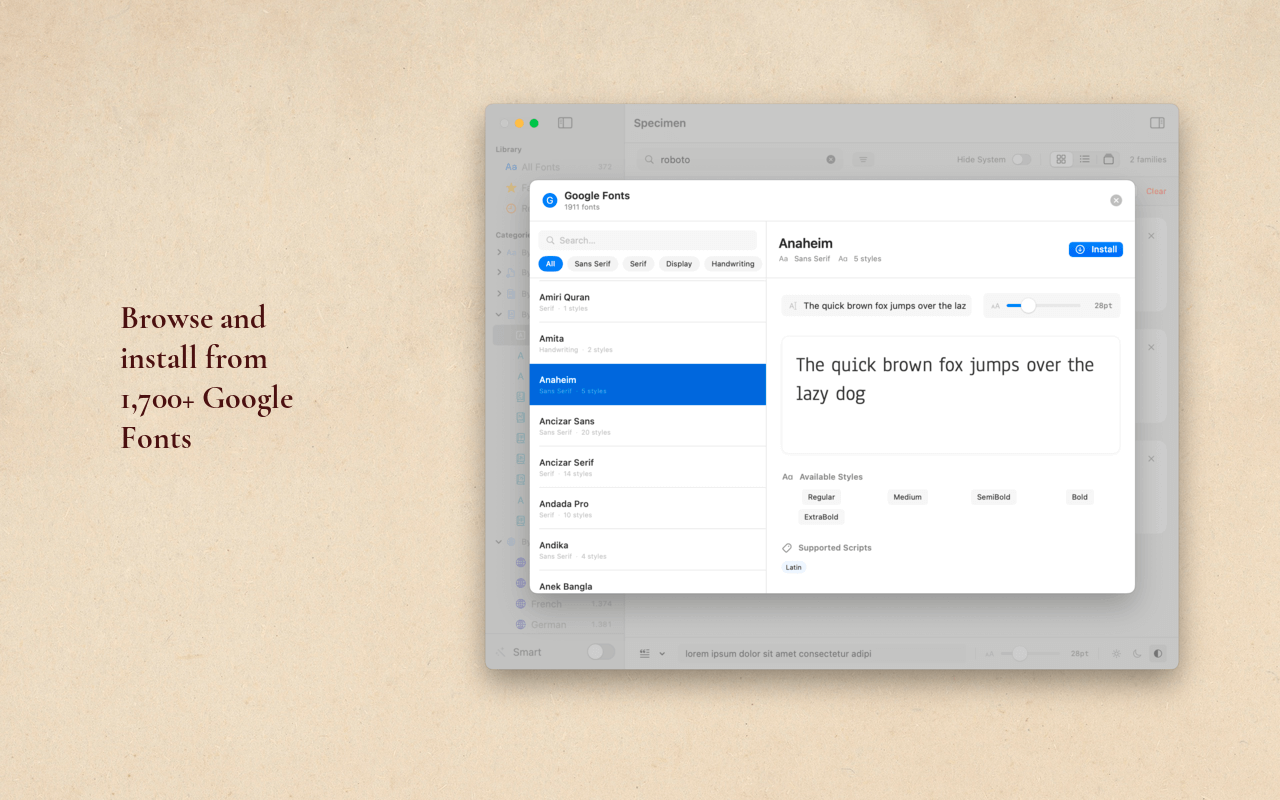
Beyond mere local file management, this application acts as a direct bridge to the world’s most popular web font repositories. It integrates directly with major online libraries, bringing thousands of high-quality, completely free typefaces directly to your desktop. You do not need to open a web browser, download a zip file, extract it, and manually install the contents anymore. The software securely handles the entire acquisition pipeline internally, downloading and safely installing new styles into your user directory with a single click. This seamless integration drastically accelerates the prototyping phase of any design project.
Key Benefits
This section details the primary advantages of integrating this software into your daily routine. Review the following descriptive lead-in paragraphs carefully to understand exactly how this application will significantly improve your design operations and file organization.
- Massive Time Savings Through Smart Organization
The primary benefit of utilizing this software is the sheer amount of time you will save during the typeface selection process. By utilizing advanced filtering options based on writing systems, foundries, and language support for twenty-four distinct languages, you can instantly narrow down a library of thousands into a highly curated list of viable options. The automatic family grouping feature keeps your visual interface completely clutter-free by merging complex families like Roboto into single, manageable entries. This intelligent organization prevents you from aimlessly scrolling through endless lists, allowing you to focus your valuable time entirely on actual design work. - Absolute Confidence in Client Presentations
When proposing design directions to high-level clients, presentation quality is absolutely critical. This application allows you to generate highly professional type specimen PDFs instantly, featuring beautifully rendered waterfall previews, complete character sets, and detailed metadata. Instead of manually designing specimen boards in external vector software, you can export perfect reference documents in seconds. This ensures your clients receive polished, clearly formatted documentation of your typographic choices, significantly raising their confidence in your professional design services. - Guaranteed System Stability and Cleanliness
Corrupted font files are notorious for causing mysterious system crashes and severely slowing down design applications. The built-in diagnostic scanning capability completely eliminates this risk by meticulously checking your entire library for zero-glyph files, legacy DFONT formats, and exact duplicates. By identifying and safely removing these problematic files, you ensure that your operating system, alongside your heavy creative applications, runs smoothly without unexpected interruptions. Keeping your typography directory totally clean is essential for maintaining a highly reliable professional workstation. - Seamless Handoff Between Design and Development
Bridging the gap between visual design and software engineering is often a source of tremendous friction. This application completely solves this handoff problem by providing exact code declarations in seven different programming formats with a single click. Developers can instantly copy flawless CSS rules, perfect SwiftUI modifiers, or exact UIKit initializers directly from the inspector panel. This completely eliminates frustrating typographical errors in source code, ensuring that the final coded product visually matches the original design mockup with absolute, pixel-perfect accuracy.
Specimen Mac App serves as the ultimate Font Book replacement, offering an incredibly beautiful interface designed specifically for typography lovers and creative professionals. It provides a complete suite of professional tools neatly packaged inside an elegant interface, entirely removing the complexity usually associated with advanced typography management. You can browse, organize, compare, and instantly install new typefaces without ever leaving the application window.
Choosing this software means deciding to prioritize your professional efficiency and creative accuracy. The application accurately reads font metadata to detect license types, ensuring you remain legally compliant when working on commercial client projects. Furthermore, the built-in diagnostic tools guarantee that your operating system remains perfectly stable by identifying and isolating corrupted files or legacy formats that cause system-wide crashes. This is not just a viewing utility; it is a comprehensive command center for your entire typographic ecosystem.
This application is meticulously designed for graphic designers, UI/UX professionals, frontend developers, and brand strategists who demand absolute precision in their typographic choices. Graphic designers will appreciate the ability to generate professional PDF specimens for client presentations. Frontend developers will highly value the one-click code export functionality that generates flawless CSS, SwiftUI, and UIKit declarations. Ultimately, anyone who works closely with typography will drastically improve their daily workflow, saving countless hours previously spent managing disorganized font directories.
Features
Here is a highly detailed and comprehensive list of the key features that make this software a remarkably valuable addition to your professional typography needs:
- Professional Smart Organization: This powerful filtering engine allows you to easily sort your collection by font type, writing system, language support for twenty-four languages, foundry origin, or legal license type.
- Automatic Family Grouping: This intelligent grouping mechanism automatically merges related typeface families like Roboto, Roboto Condensed, and Roboto Mono to keep your library completely organized.
- Advanced Smart Collections: These automated collections dynamically gather typefaces that match your specific criteria, such as name patterns, writing systems, or exact language support requirements.
- Beautiful Visual Previews: The application offers three distinct view modes including Grid, List, and Carousel formats alongside customizable preview text with adjustable sizes and light or dark backgrounds.
- Interactive Grid View: This visual grid layout displays font previews perfectly, making it ideal for getting a massive overview and comparing different typefaces visually with family names and style counts.
- Compact List View: This streamlined vertical list displays the font name, style count, and a brief preview, which is perfect for quickly scanning through a massively large typography database.
- Focused Carousel View: This full-width presentation shows one specific font at a time, allowing you to use arrow keys to navigate and conduct a focused examination of individual typefaces.
- Instant Quick Look: By simply pressing the Spacebar, you can open a remarkably large preview interface featuring a beautiful waterfall display and the complete character set for immediate inspection.
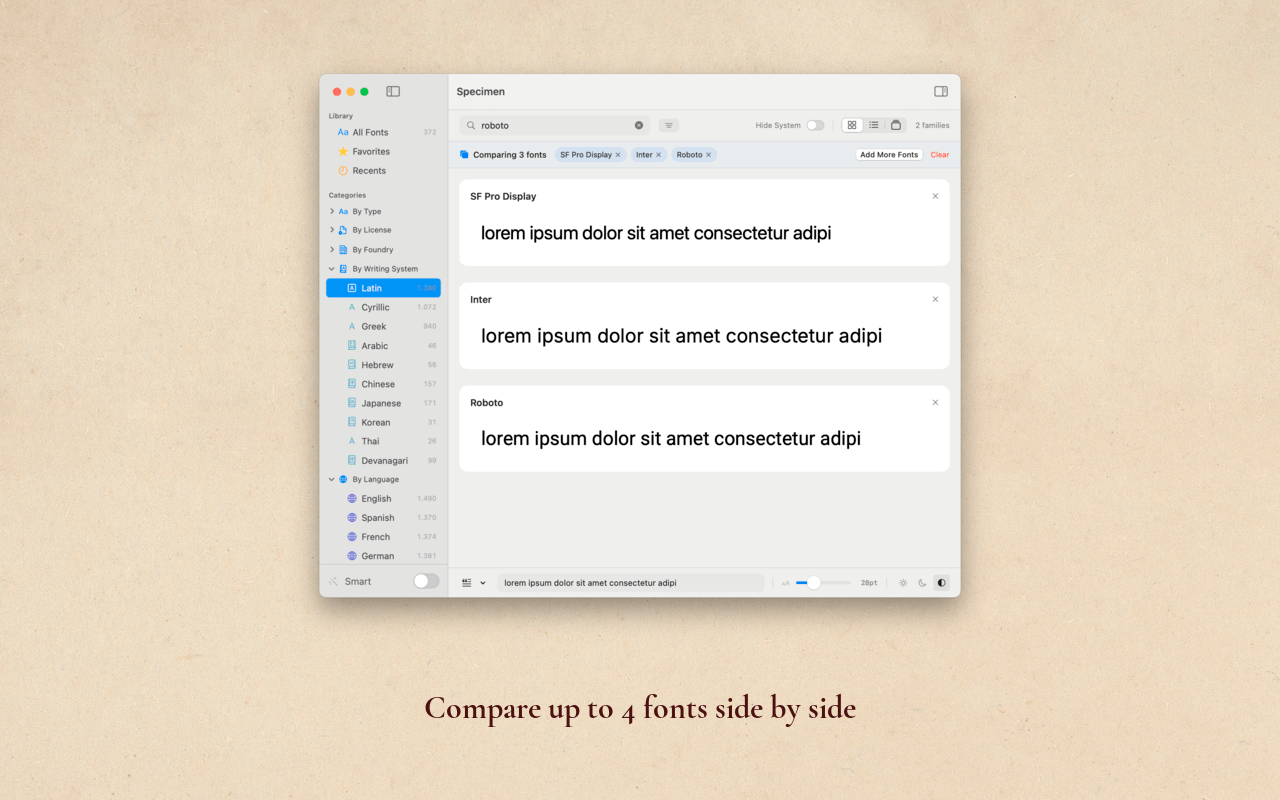
- Advanced Side-by-Side Comparison: This critical evaluation tool allows you to accurately compare up to four different fonts simultaneously using identical custom preview text.
- Seamless Comparison Adding: You can effortlessly add items to your evaluation board by clicking the dedicated compare icon, using the right-click context menu, or utilizing the quick keyboard shortcut.
- Synchronized Compare View: When entering this specialized mode, all selected typefaces perfectly align horizontally, allowing you to evaluate small anatomical differences before committing to a final design choice.
- Integrated Font Discovery Engine: You can effortlessly browse, preview, and natively install fresh typefaces from massive online repositories directly inside the application interface without requiring API keys.
- Google Fonts Integration: This module grants you immediate access to over one thousand seven hundred highly popular web fonts, completely ready for instant download and immediate local installation.
- Fontshare Curated Collection: This specialized integration provides direct access to a highly curated selection of premium free typefaces meticulously designed by the Indian Type Foundry.
- Comprehensive Diagnostic Health Check: This automated maintenance utility deeply scans your entire local directory to detect, isolate, and report any files that could potentially compromise system stability.
- Critical Error Detection: The scanner successfully identifies fundamentally broken files, including completely corrupted fonts, unreadable file structures, and empty files containing exactly zero glyphs.
- Warning and Info Alerts: The system clearly warns you about exact file duplicates and outdated legacy formats while informing you of missing common glyphs within specific typeface styles.
- Complete Variable Font Support: This modern typographic feature provides full support for next-generation variable fonts, giving you infinite control over a single file’s appearance.
- Interactive Axis Controls: You can utilize responsive sliders to smoothly adjust weight, width, slant, and optical size in absolute real-time to see exactly how the glyphs behave.
- Clear Variable Identification: The user interface distinctly marks these special files with a bright purple badge in the inspector, instantly differentiating them from standard static files.
- Professional PDF Specimen Export: This automated layout generator allows you to create highly polished, professional type specimen documents for client review or personal reference archives.
- Comprehensive Export Contents: The generated document strictly includes a massive primary preview, a cascading waterfall at multiple sizes, all available distinct styles, and highly detailed font metadata.
- Developer-Friendly Code Extraction: This specialized programming utility allows software engineers to easily copy exact typography declarations to paste directly into their active codebases.
- Extensive Format Support: You can extract exact syntax for seven distinct formats including standard CSS, Apple’s SwiftUI, legacy UIKit, macOS AppKit, complete @font-face rules, Figma specifications, and Sketch data.
- Detailed Information Inspector: This deeply informative side panel immediately reveals comprehensive technical details regarding whichever specific typeface family you currently have selected.
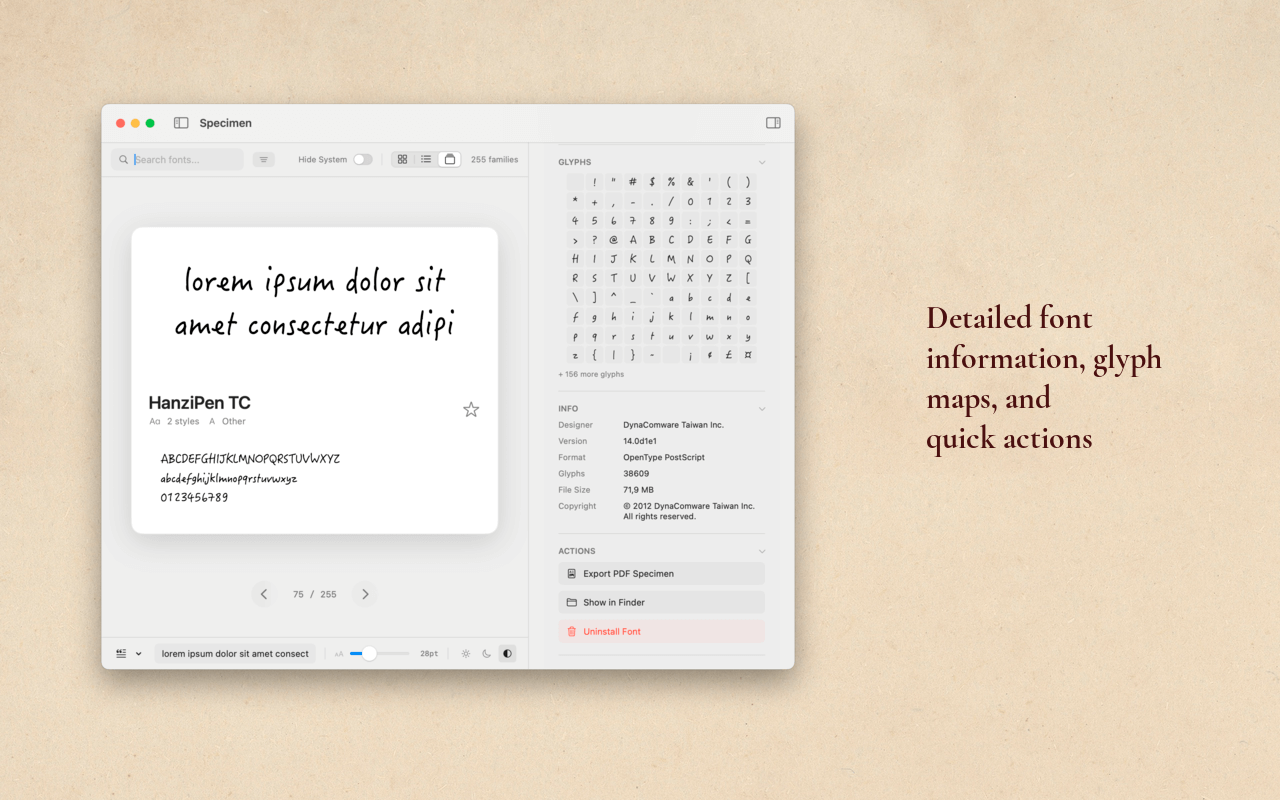
- Extensive Metadata Display: The dedicated information section clearly displays the exact PostScript name, technical file format, total glyph count, exact disk location, version number, original designer, and copyright status.
- Interactive Glyph Map: This detailed character grid displays the first two hundred and fifty-six distinct characters of the file, complete with a convenient hover preview for tight inspection.
- Intelligent License Type Detection: This automated legal utility accurately infers the exact usage rights associated with a file based entirely on deeply embedded manufacturer metadata.
- Clear Usage Categorization: The software reliably categorizes your library into System, Open Source, Commercial, or Unknown licenses, heavily reducing the risk of accidental copyright infringement on commercial jobs.
Requirements
Before installing this typography application, please review the specific system requirements necessary to run the software smoothly on your machine. Meeting these strict technical specifications ensures maximum operational performance, software stability, and complete compatibility with your computer’s hardware architecture.
- macOS 13.5 (Ventura) or later
- Optimized for macOS Tahoe
- Universal binary for Intel and Apple Silicon
Downloads
Examine exactly how Specimen operates according to your specific creative needs. Download the trial edition for free to test the software thoroughly by clicking the secure download button below.
This evaluation period allows you to deeply inspect the user interface, run diagnostic checks on your local files, and completely verify the performance benefits before making any financial commitment.
BUY NOW
Specimen is currently available for an incredibly affordable retail price of $29.99. But, you can now get your Specimen premium lifetime license with our exclusive 92% discount offer. This special software offer is available for a strictly limited time!
By purchasing the premium tier, you receive a full license, priority technical support, and continuous application updates. Securing your professional license today guarantees that you will forever maintain total control over your typographic assets, drastically speeding up your daily graphic design operations and development handoffs.

" />
Professional Font Manager for Mac with Variable Fonts Support, Smart Collections, and Developer Code Export.
- Please Notes:
- You may be directed to the bundle page, but it is possible to purchase the software individually.
- If you're having difficulty locating the product on the bundle page, please utilize the browser's search feature.
- Get an additional $3 discount on all orders more that $30.
- LEGITIMATE: All apps are authentic and have original licenses obtained directly from the creators via contracts.
- INSTANT ACCESS: Fully activated macOS Apps & Windows Software with instant downloads & license key access.
- Device Activation: 1 Device
- Minor Updates Included Only
- Lifetime License
Platforms: Mac OS X

Iconize BEST OFFER

Fluent Mac App BEST OFFER
TextSniper: Lifetime License BEST OFFER

SurFlex Screen Recorder - Lifetime License BEST OFFER

Cisdem DVD Burner (Mac): Lifetime License BEST OFFER

Downie 4 for Mac BEST OFFER

Permute: Permanent License BEST OFFER
Specimen Giveaway
UnAvailable at this moment!

To access the giveaway, kindly provide your email address. Please refrain from closing this page after signing in to receive instructions on how to access the offer at no cost.
NOTES:
– All prices shown here are in listed USD (United States Dollar).
– Such promotional programs are subject to change without notice, from time to time in our sole discretion.
– Data may vary based on different systems or computers.
Thanks for reading Specimen Mac App Review & Enjoy the discount coupon. Please Report if Specimen Discount Coupon/Deal/Giveaway has a problem such as expired, broken link, sold out, etc while the deal still exists.
font manager mac, typography software, font book alternative, variable fonts viewer, mac typography tool, organize fonts mac, compare typefaces, google fonts installer, fontshare browser, font health check, corrupted font scanner, pdf font specimen, css font generator, swiftui font code, figma font export, smart font collections, graphic design tools, ui ux typography, font license detector, macos font organizer, developer font tool, professional typography app, font previewer mac, apple silicon font app, typography workflow tool