80% Off – Quip: Lifetime License | AI Clipboard Manager & Text Expander with iCloud Sync, Unlimited History – for Mac

Keep every copy, paste faster, and stay organized with Quip—get the macOS standalone license now at a 80% discount and simplify your daily workflow.
✔Lifetime License. ✔ Free Product Updates ✔ 24×7 Customer Support
Quip Review at a Glance
If you’ve ever copied a link, a code snippet, or a paragraph of text—then copied something else and watched the first item vanish—you already know the core problem: the default clipboard is fragile. That “one-slot” clipboard forces you to interrupt your work, dig through tabs, re-open documents, and re-copy content you just had seconds ago.
Quip mac app by BZG LLC, fixes that by remembering what you copy and making it easy to search, organize, and paste again—across Mac, iPhone, and iPad using iCloud sync. Instead of treating copied content as temporary, Quip treats it as useful material you’ll likely reuse: project links, support replies, code blocks, invoice numbers, addresses, or frequently pasted phrases.

What is Quip
Quip is a modern, intelligent clipboard manager and text expander built for macOS and iOS/iPadOS. It stores what you copy so you can keep it, search it instantly, edit it, organize it into collections, and paste it again later—minutes, days, or months after you first copied it.
On Mac, Quip can run as a convenient sidebar or pop out into a full window, making it easy to reference while you write emails, code, edit documents, or handle customer conversations. On iPhone and iPad, Quip provides access to your clipboard history and organization tools, plus a dedicated keyboard that lets you paste saved items directly into any app with a tap, keeping your flow steady.

Quip also includes “Quip Intelligence,” a set of automatic cleanup tools that reduce duplicate items, normalize formatting, clean URLs, and keep code readable. And on supported systems (macOS 26+), Quip can integrate an on-device Apple Intelligence layer that helps summarize long clipboard items, filter out content you don’t want saved, and suggest the best collection for new items—while keeping processing private.
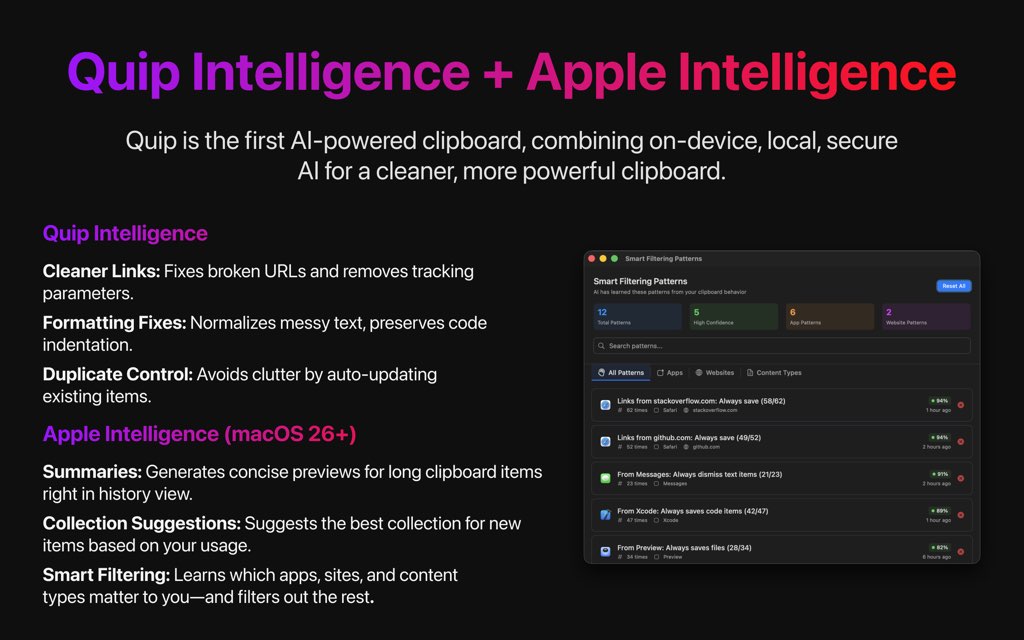
This is not just “clipboard history.” Quip combines an intelligent clipboard manager with a text expander so your most common items become fast triggers you can type anywhere. You can also capture text from places that normally won’t let you copy (like presentations, locked PDFs, videos, and images) using a dedicated capture shortcut, turning visual information into editable text in seconds.

Quip is built for people who want control as much as convenience. You choose what gets saved (everything you copy or only items copied with a special shortcut), you can exclude apps, set auto-delete rules, and ignore sensitive items. The goal is simple: keep your clipboard useful, searchable, and clean—without turning it into a cluttered dumping ground of duplicates, broken URLs, and messy formatting noise.
Finally, Quip is designed for the Apple ecosystem. It syncs across macOS, iOS, and iPadOS, supports continuity workflows, and offers a dedicated iOS keyboard so you can paste from your clipboard history inside any app without bouncing around. If you work across devices, Quip helps your clipboard feel like one consistent workspace instead of three separate islands.
Key Benefits
The benefits below focus on what you get day-to-day: fewer interruptions, faster reuse of common text, and a clipboard that doesn’t fight your organization habits.
- Work with a clipboard that remembers everything you copied (and stays searchable).
- Paste faster with text triggers for your most-used replies, links, and snippets using shortcuts.
- Keep content synchronized across Mac, iPhone, and iPad via iCloud.
- Reduce clutter automatically with cleanup tools like duplicate prevention and URL cleanup.
- Control privacy with app exclusions, auto-delete options, and rules to avoid saving sensitive data.
- Capture text from “uncopyable” sources (slides, locked PDFs, images, video frames) in seconds.
Quip saves clipboard items with structure and context, so you can search by type, date, or app, then paste what you need without hunting through open windows. It also supports rich text and code editing directly inside the app, so your stored snippets stay clean and usable instead of becoming outdated screenshots or messy text dumps later.
Because different people have different privacy needs, Quip lets you control what enters your history. You can set it to save everything you copy with the normal copy shortcut, or only save items copied using a separate shortcut—so your clipboard history stays intentional, not accidental, especially around passwords, financial fields, or personal messages.
And when you move between Mac and mobile, Quip keeps your snippets consistent. You can copy on one device and paste on another, access collections and shortcuts on iOS, and use continuity tools like Continuity Camera to bring scanned info into your clipboard flow quickly—without breaking concentration mid-task.
Features
Below is a comprehensive list of the key features that make the software a valuable addition to your needs:
- History: Stores unlimited clipboard history so you can keep and reuse what you copied.
- Retention: Keeps items forever by default, with optional shorter retention settings.
- Previews: Shows visual previews for different content types to spot items quickly.
- Sync: Seamlessly syncs clipboard history across Mac, iPhone, and iPad via iCloud.
- iCloud: Uses your Apple ecosystem for cross-device availability and continuity.
- Continuity: Works with Universal Clipboard behavior with optional controls.
- Privacy: Built with privacy-first controls to help avoid saving sensitive content.
- Exclude: Exclude specific apps from being captured into clipboard history.
- Autodelete: Automatically delete items based on your preferences and rules.
- Modes: Two capture modes let you decide exactly what gets saved to history.
- Always: Save everything copied across macOS using the standard copy shortcut.
- Manual: Save only items copied with a separate rebindable shortcut.
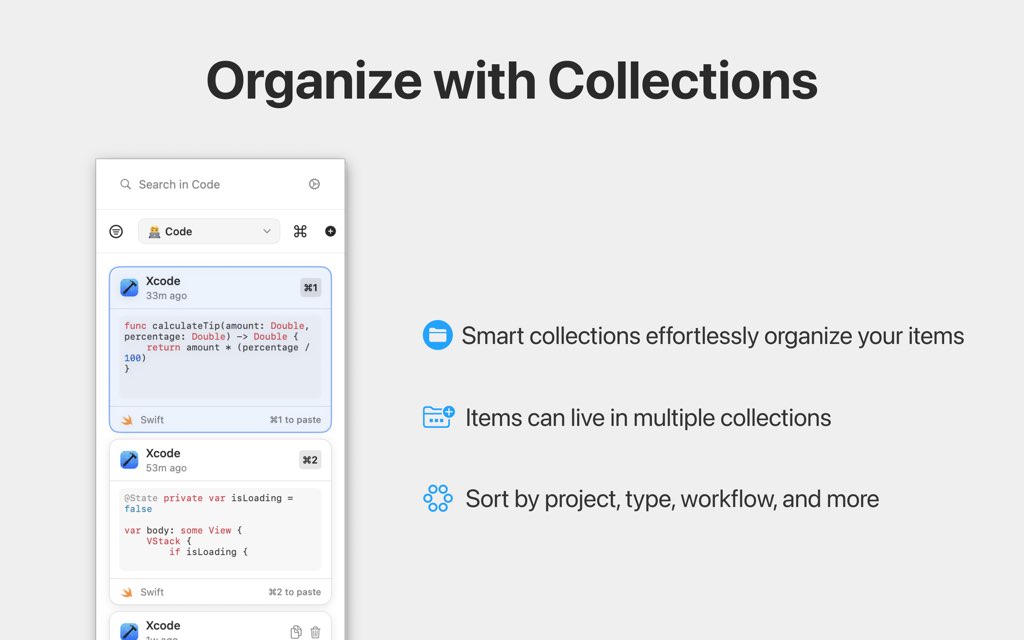
- Collections: Organize clips into flexible collections for projects and workflows.
- Multiadd: Save one item into multiple collections for cross-project reuse.
- Pinned: Pin important items so they stay easy to find.
- Smart: Smart Collections automatically group items using rules.
- Rules: Group by app, content type, or time to keep history structured.
- AutoSort: Keeps new items organized with minimal manual effort.
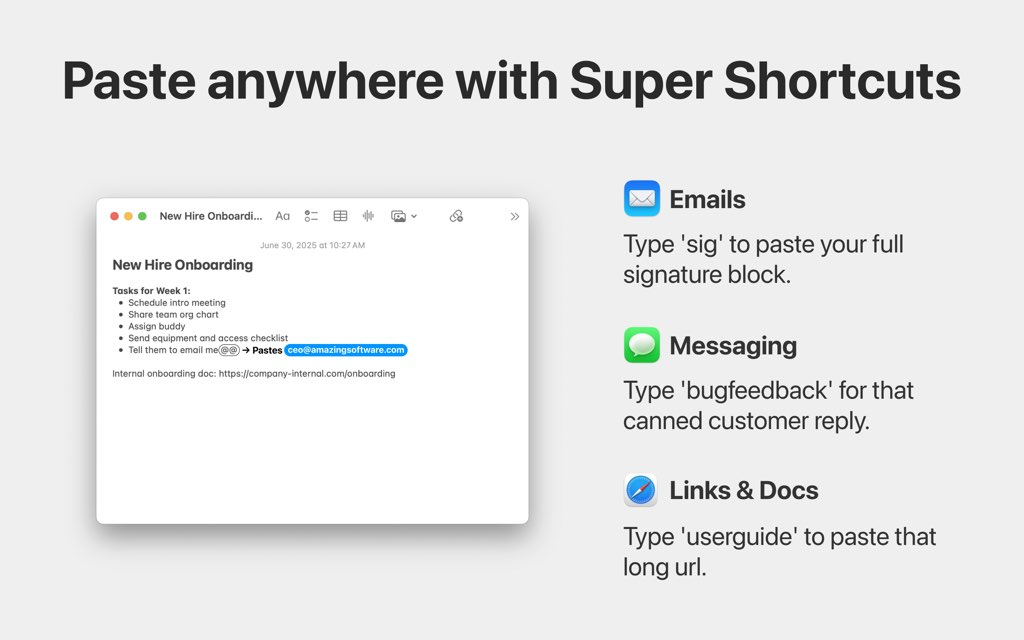
- Shortcuts: Turn any saved item into a typed trigger you can paste anywhere.
- Triggers: Use short phrases like “sig” to paste longer blocks instantly.
- Syncing: Keeps shortcuts consistent across devices.
- Capture: Copy text from sources that are normally not selectable or copyable.
- LockedPDF: Extract text from locked PDFs when selection is blocked.
- VisualText: Capture text from slides, images, and video frames using a shortcut.
- Intelligence: Automatically cleans and maintains clipboard history.
- Duplicate: Updates an existing item instead of storing repeated duplicates.
- Normalize: Cleans whitespace and standardizes formatting.
- URLFix: Cleans URLs by removing tracking parameters and fixing formatting.
- Tracking: Removes common tracking parameters for cleaner links.
- Repair: Fixes formatting issues that break copied links.
- Code: Preserves code formatting with proper indentation and line endings.
- Indent: Keeps code blocks readable when reused.
- LineEnds: Prevents glitches when pasting across tools.
- Search: Instantly find items with powerful search and filters.
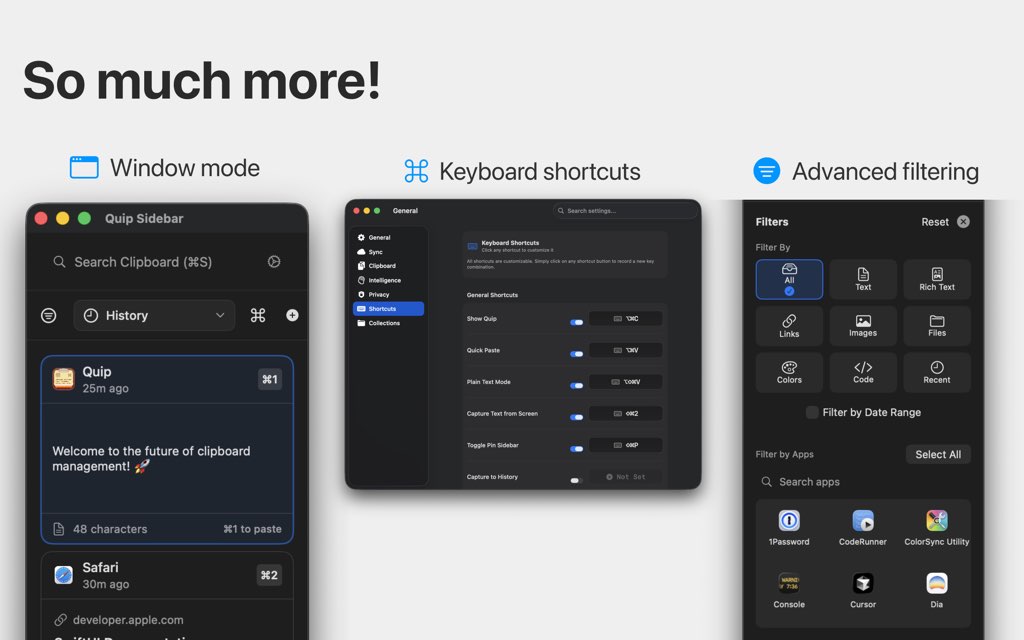
- Filters: Search by type, date, or app.
- Instant: Results appear immediately so you stay in flow.
- Editing: Edit or create items directly inside Quip.
- RichText: Maintain formatting for templates and checklists.
- InlineCode: Keep code snippets organized.
- Popout: Use Quip as a sidebar or standalone window.
- Sidebar: Keep it visible for quick access.
- Window: Open a larger view for heavy reuse.
- Rebind: Customize shortcuts to match your workflow.
- CustomKeys: Map actions to keys that fit your setup.
- Consistency: Keep shortcuts consistent across tools.
- AppleAI: On-device Apple Intelligence helps organize clipboard history on macOS 26+.
- Summaries: Create scannable previews for long items.
- Suggest: Recommend collections for new items.
- iOS: Full access on iPhone and iPad.
- Keyboard: Paste saved items inside any iOS app.
- Handoff: Supports cross-device workflows and continuity.
Requirements
Before purchasing, confirm the basics below so Quip matches your devices and workflow needs.
- Mac requires macOS 14.014.014.0 or later
- iPhone requires iOS 18.118.118.1 or later
- iPad requires iPadOS 18.118.118.1 or later
- iCloud sync requires an Apple ID signed into iCloud and sufficient iCloud storage space
- Apple Intelligence features require macOS 26+26+26+ and compatible Apple hardware for on-device models support
Downloads
See how Quip behaves with your real clipboard habits by checking the developer’s official page for any trial, demo, or free edition options, then install and test your preferred capture mode and collections setup.
If a trial is offered at the time you buy, use it to verify the details that matter most: your search speed, your shortcut triggers, and your privacy rules (excluded apps, sensitive-item handling, and auto-delete behavior) so you feel confident before committing to a permanent setup choice.
BUY NOW
Quip is available as a standalone macOS license starting at $19.99, and you can currently get the Quip Mac App for $4.00 only (Massive Savings: 80% Off — Limited Time), as a promotional standalone license (subject to terms on the developer’s site) for strong long-term value fast.

" />
AI Clipboard Manager & Text Expander with iCloud Sync, Unlimited History, Smart Collections, Super Shortcuts, Privacy-First Controls
- Please Notes:
- You may be directed to the bundle page, but it is possible to purchase the software individually.
- If you're having difficulty locating the product on the bundle page, please utilize the browser's search feature.
- Get an additional $3 discount on all orders more that $30.
- LEGITIMATE: All apps are authentic and have original licenses obtained directly from the creators via contracts.
- INSTANT ACCESS: Fully activated macOS Apps & Windows Software with instant downloads & license key access.
- Number of devices: 1
- Subject to the terms at https://www.bzgapps.com/terms
- Single Mac license for use with Quip 1.x - optional major upgrades in the future
- Does not include access to iOS app
- Minor Updates Included Only
- Lifetime License
Platforms: Mac
" />
AI Clipboard Manager & Text Expander with iCloud Sync, Unlimited History, Smart Collections, Super Shortcuts, Privacy-First Controls
- Number of devices: 1
- Subject to the terms at https://www.bzgapps.com/terms
- Single Mac license for use with Quip 1.x - optional major upgrades in the future
- Does not include access to iOS app
- Minor Updates Included Only
- Lifetime License
Platforms: Mac

AllClips BEST OFFER

Smart Clip: 1 Year License, 3 PCs BEST OFFER
Bauerapps RightNote Professional EXCLUSIVE

Vov Sticky Notes BEST SELLER

AllMyNotes Organizer Deluxe Edition: Lifetime License, 12-month Free Upgrades BEST SELLER
BZG Quip Mac App Giveaway
Unavailable at this moment!

To access the giveaway, kindly provide your email address. Please refrain from closing this page after signing in to receive instructions on how to access the offer at no cost.
NOTES:
– All prices shown here are in listed USD (United States Dollar).
– Such promotional programs are subject to change without notice, from time to time in our sole discretion.
– Data may vary based on different systems or computers.
Thanks for reading BZG Quip Mac App Review & Enjoy the discount coupon. Please Report if BZG Quip Mac App Discount Coupon/Deal/Giveaway has a problem such as expired, broken link, sold out, etc while the deal still exists.