
92% Off – Plus AI Lifetime | AI Writing Assistant, AI PDF Summarizer, AI Grammar Fixer, AI Text Translation – for Mac

Write faster on your Mac with AI — create cleaner emails, shorter summaries, clearer translations, and better drafts in seconds. Get Plus AI Lifetime at a 92% discount now and save time on everyday writing.
✔ Lifetime License ✔ Free Product Updates ✔ 24×7 Customer Support
Review at a Glance
Writing on a Mac can take more time than it should. A quick email turns into several rewrites, a long article takes too long to summarize, and a difficult paragraph may need extra effort just to make sense. Plus AI is designed to reduce that friction by bringing practical AI writing help directly into your daily workflow, so you can work faster without jumping between multiple apps and tabs.
What is Plus AI?
Plus AI is a macOS text assistant that brings AI-powered writing help to your keyboard workflow. Instead of acting like a separate writing platform that demands a full switch in context, it functions more like a responsive assistant that appears when you need help with selected text. That makes it suitable for people who prefer to stay inside their current app while getting AI support for revision, translation, summaries, and explanations.
At its core, Plus AI Mac App is designed for text efficiency. It helps users handle common writing tasks faster by applying preset or custom prompts to the text they select. The product focuses on practical jobs such as cleaning up grammar, shortening long passages, clarifying wording, rephrasing ideas, and translating text. This keeps the app useful across school, work, research, and personal communication.
It is also important to define what Plus AI is not. It is not a bundled OpenAI subscription, and it does not include an API key from ChatGPT Plus. Users must connect their own OpenAI API key for the app to function. This setup gives users direct control over their own OpenAI access, while Plus AI provides the native Mac interface and text-assistant workflow around it.
Key Benefits
Below is a clear overview of the main benefits that make Plus AI a helpful tool for Mac users who work with text every day. These points focus on speed, convenience, flexibility, and compatibility, which are the areas that matter most for buyers comparing AI writing tools.
- Saves time on routine writing tasks by handling summaries, rewrites, corrections, and translations faster.
- Works inside your normal Mac workflow so you do not need to keep switching between apps and browser tabs.
- Makes selected text easier to revise with prompt actions for grammar, paraphrasing, simplification, and explanation.
- Helps with long documents and PDFs by giving users a faster way to ask questions and locate useful information.
- Supports custom prompts so users can shape the app around recurring tasks and preferred writing styles.
- Fits different kinds of users including students, office workers, freelancers, writers, and document-heavy professionals.
- Stores your API key on your device for a more reassuring setup from a credential-handling perspective.
- Runs natively on Intel and Apple Silicon Macs for better platform alignment and broad Mac hardware support.
- Supports current macOS versions with a requirement of macOS 13 or later and compatibility with macOS Tahoe.
- Clarifies the OpenAI API key requirement upfront so buyers can make an informed decision before purchasing.
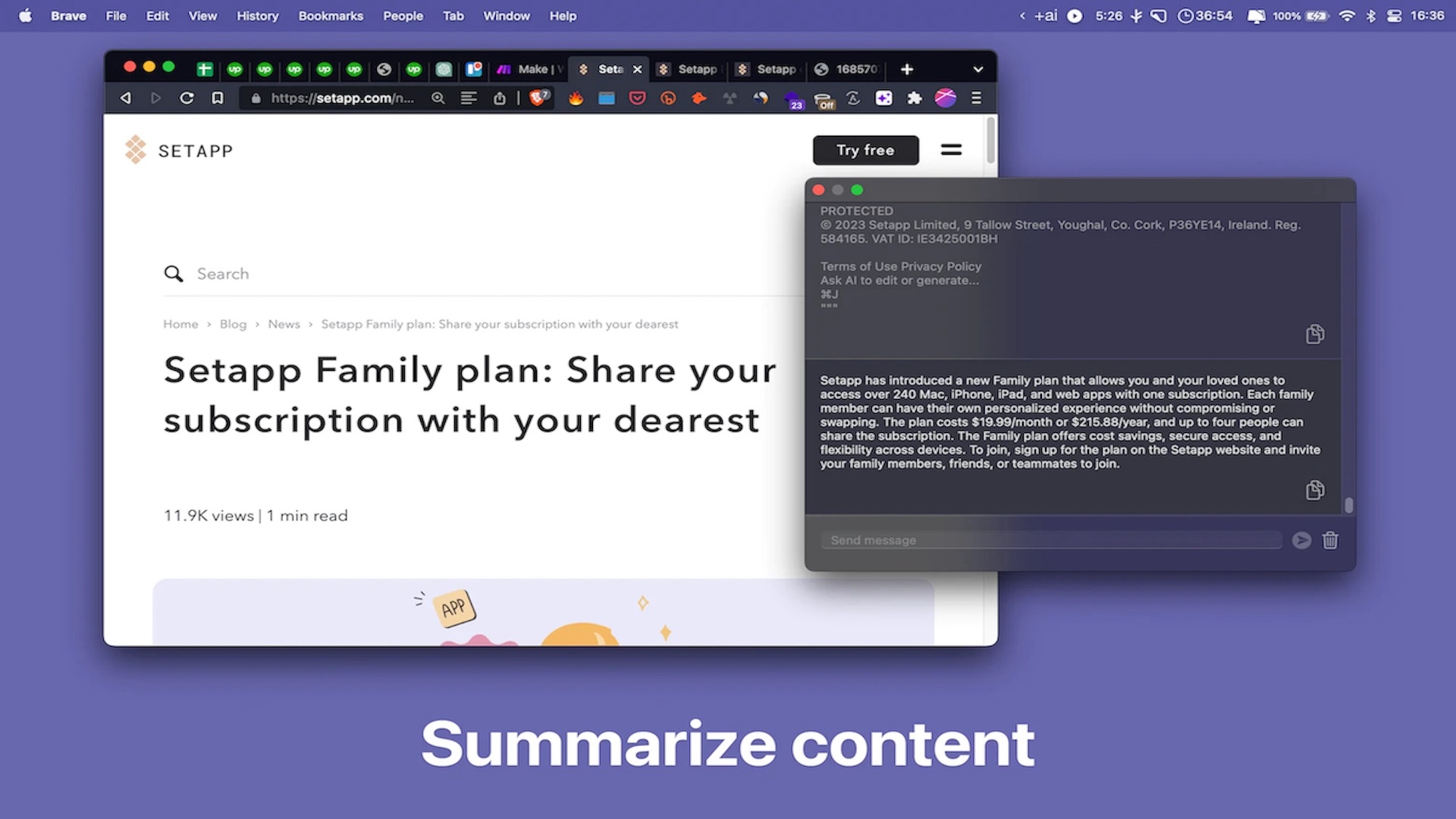
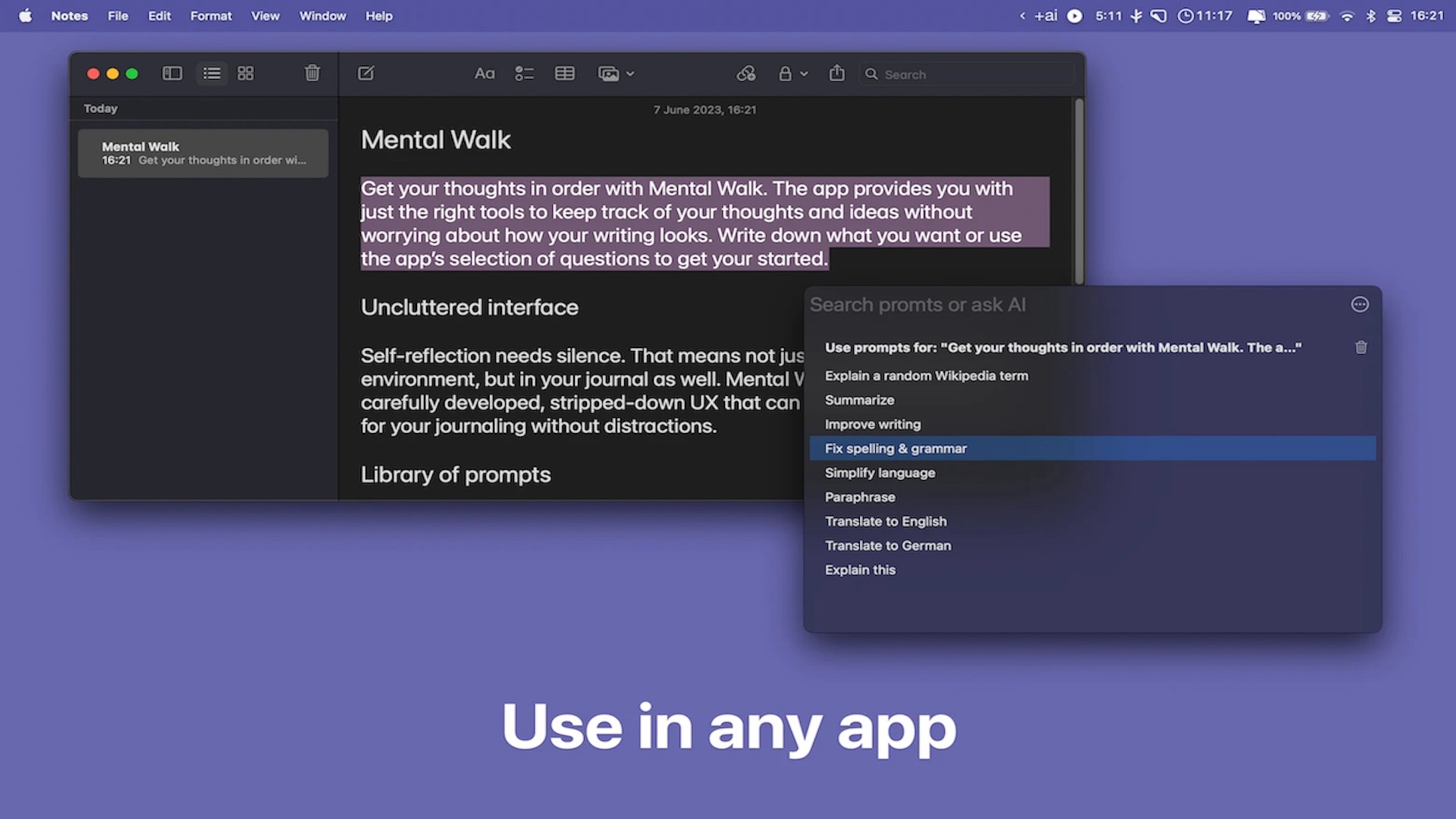
Plus AI is an AI text assistant for macOS that helps you write, revise, summarize, explain, paraphrase, and translate text with speed and simplicity. Instead of forcing you into a separate workspace for every task, Plus AI for Mac works with a hotkey, letting you trigger help right when you need it. Highlight text, press Option-Space, and send your selected content to the assistant for quick action inside your existing routine.
This approach matters because most writing tasks are small but frequent. You may need to fix grammar in a message, simplify a dense paragraph in a report, paraphrase a sentence for clarity, or turn a long note into a short summary. Plus AI helps with those repeated tasks in a way that feels natural on Mac, giving you quick text support without interrupting your momentum.
The software is especially useful for people who write all day but do not want heavy, complicated tools. Students can summarize reading material, office workers can revise emails, freelancers can polish client communication, and researchers can ask for quick explanations of selected text. Anyone who handles text across several Mac apps can benefit from a tool that brings AI help closer to the point of work.
One of the most practical parts of Plus AI Mac App is its cross-app use on Mac. The product is designed to work in any Mac app, which means you are not limited to a single editor or browser page. You can highlight a sentence in notes, a block of text in a document, or a draft in an email window, then call Plus AI from the keyboard and get assistance right away. That saves time and cuts down on copy-paste work.
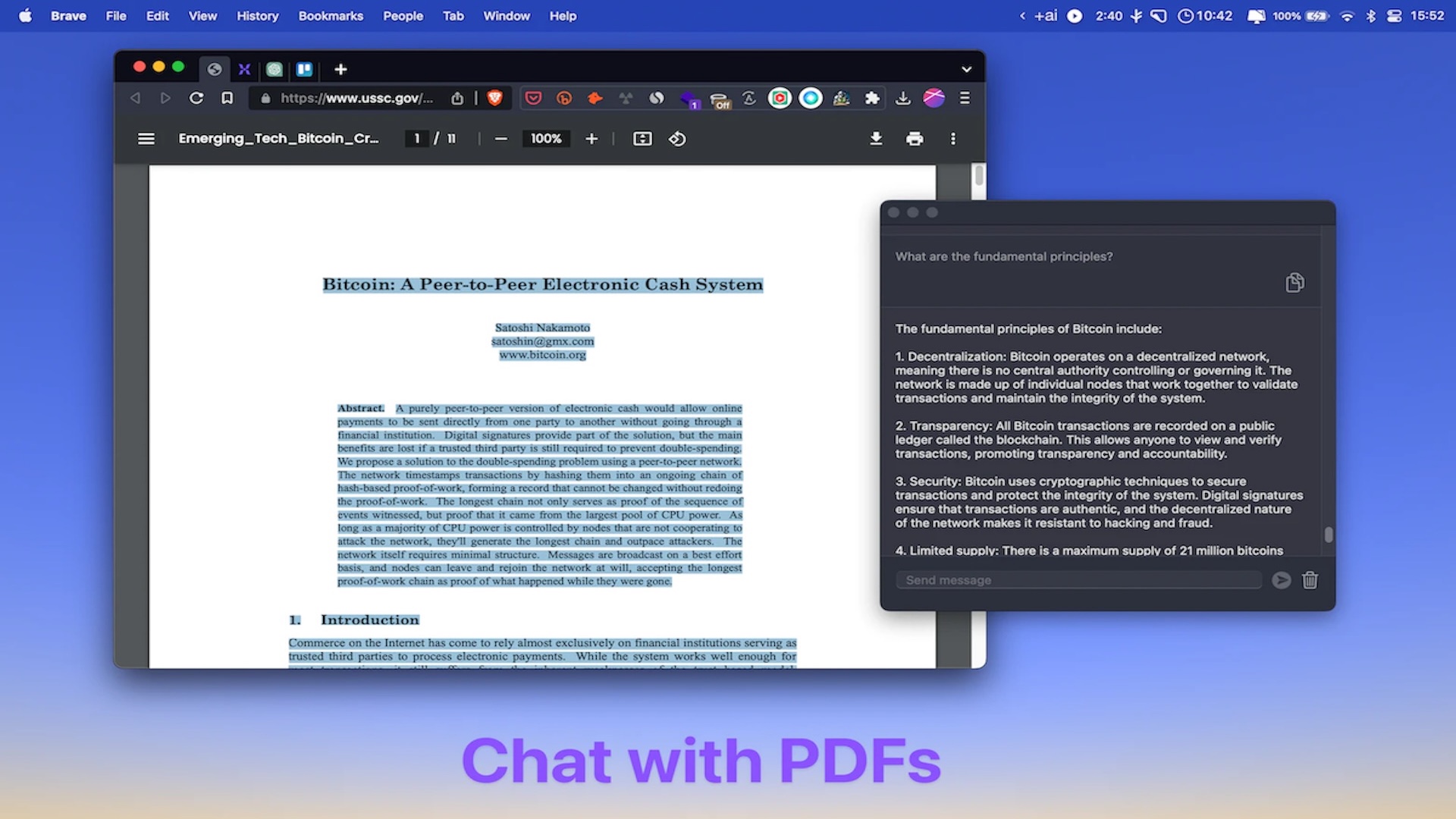
Plus AI also supports chatting with PDFs, which is a major benefit for users who deal with manuals, study material, reports, or long reference files. Instead of reading page after page to find one answer, you can use the tool to ask questions and get help understanding the content. This can reduce reading time and make large documents less tiring to handle, especially when you only need the main point or a quick explanation.
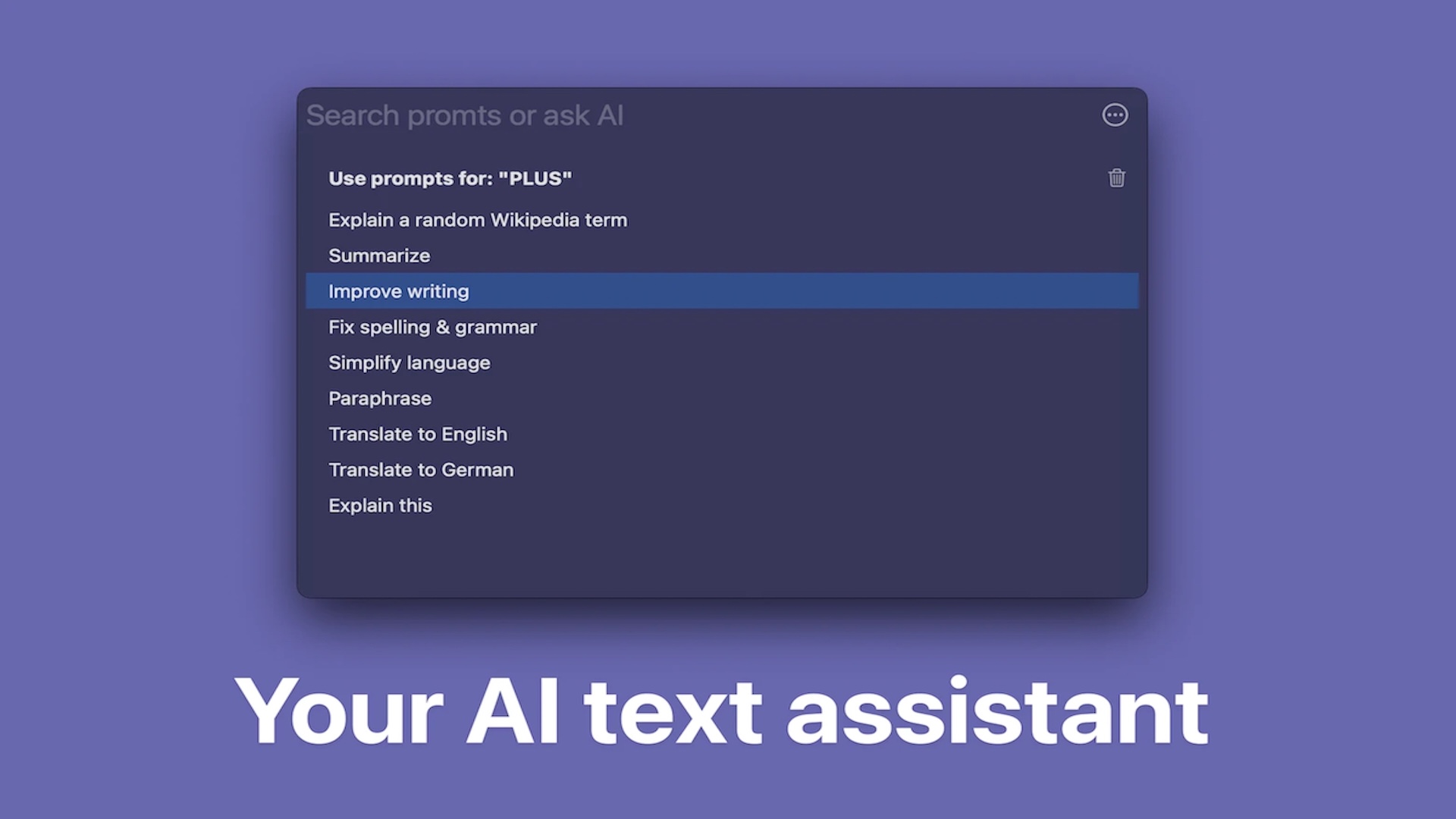
For writing quality, Plus AI for Mac gives you several prompt-driven actions that cover common everyday needs. You can ask it to improve writing, fix spelling and grammar, simplify language, paraphrase, summarize, or explain text. These are the kinds of tasks that often slow people down, especially when they are working under time pressure. Having them available in a fast, keyboard-first Mac tool makes the product practical, not just interesting.
Translation is another key strength of Plus AI. The provided prompt options include Translate to English and Translate to German, giving users a direct path for common language tasks. If you receive foreign-language text, need to prepare bilingual material, or want help understanding content in another language, Plus AI gives you a quick route without forcing you into a separate translation site.
The software also supports custom prompts, which gives users more control over how they work. That means you are not limited to the preset actions. You can build your own prompt workflows for recurring jobs such as changing tone, generating short explanations, preparing social captions, rewriting text for a specific audience, or converting text into a more formal or more casual style. This flexibility makes Plus AI useful for both simple tasks and more personalized writing routines.
Another important point is privacy and key storage. According to the product details, your OpenAI API key is securely stored on your device and is never shared elsewhere. For users who care about where credentials are stored, this is a meaningful detail. Local storage adds reassurance, especially for people using the tool regularly in personal or professional writing sessions.
It is also important to understand how Plus AI Mac App is licensed and powered. Plus AI requires your own OpenAI API key to operate. This is a core requirement, not an optional extra. The product description clearly notes that a ChatGPT Plus subscription is separate and managed by OpenAI, and that subscription does not provide an API key for use with Plus AI. That distinction helps buyers avoid confusion before purchase.
For many users, this requirement is not a problem. In fact, bringing your own API key can be a practical setup because it gives you direct control over API usage on your OpenAI account. Still, buyers should know in advance that Plus AI is not a bundled all-in-one AI subscription. It is a Mac AI assistant app that connects to your own OpenAI API access, making it best suited for users comfortable with that arrangement.
The product notes also mention that free OpenAI API key usage can face instability during peak demand times. This is another helpful clarification for buyers, because it sets realistic expectations. If performance varies, the app itself may not be the cause. In many cases, response speed and reliability are influenced by API demand on the OpenAI side, so it is wise to keep that in mind during setup and daily use.
From a platform perspective, Plus AI is built natively for both Intel and Apple Silicon Macs. That native support is important for buyers who want software that feels at home on macOS rather than something that feels patched together. The app requires macOS 13 or later and is also noted as fully compatible with the latest version of macOS Tahoe, which adds confidence for users running newer systems.
This native Mac focus gives Plus AI a practical edge for people who care about responsiveness, compatibility, and clean desktop use. Intel Mac users and Apple Silicon users are both supported, so the app fits a broad range of hardware still in use. If you want an AI writing assistant designed specifically for Mac instead of a browser-only workaround, this product fits that need very well.
Why choose Plus AI instead of relying only on browser-based AI tools? The answer is convenience. Plus AI is built around quick access, selected text, prompt actions, and direct workflow support inside Mac apps. When people need help with text, they usually want it at that exact moment, not after opening extra tabs and manually moving content around. Plus AI shortens that path.
That convenience can matter just as much as the AI output itself. A tool that is easy to trigger gets used more often, and a tool that supports many small writing tasks becomes part of the daily routine. Plus AI is not trying to replace every writing platform. Instead, it focuses on being a fast assistant for real writing tasks that happen throughout the day, which makes it easier to justify for students, professionals, creators, and general Mac users.
Students can benefit from summarizing study material, clarifying difficult sections, translating references, and rephrasing draft content. Professionals can use it to refine emails, shorten meeting notes, simplify dense communication, and create clearer messages. Writers and freelancers can paraphrase sections, test alternate phrasings, and speed up revision. Researchers and document-heavy users can get value from PDF chat and explanation tools.
The app is also a good fit for users who want simple AI support without a steep learning curve. The prompt list already includes common tasks, so new users can start quickly. At the same time, custom prompts keep the app useful over the long term, because you can adapt it to your writing habits instead of adjusting your habits to the software.
In short, Plus AI is a Mac-focused AI text assistant built for speed, convenience, and everyday usefulness. It helps with writing, grammar correction, summarization, translation, explanation, paraphrasing, and PDF-based work, all while staying close to your normal Mac workflow. If you want faster text handling across your apps and you already have or plan to get an OpenAI API key, Plus AI is a practical option worth serious consideration.
Features
Below is a comprehensive list of the key features that make the software a valuable addition to your needs:
- AI Writing Assistant — Helps you create, edit, and improve text faster across everyday tasks.
- Email Writing — Drafts clear and professional emails in seconds.
- Presentation Text — Generates concise and structured slide content.
- General Text Creation — Produces high‑quality text for any writing need.
- System‑Wide Access — Works in any Mac app without switching tools.
- Global Hotkey (Option‑Space) — Activates Plus instantly on selected text.
- Text Highlight Interaction — Applies AI actions to any highlighted text.
- Prompt‑Based Actions — Uses ready‑made prompts to perform common writing tasks.
- Summarize — Condenses long text into key points.
- Improve Writing — Enhances clarity, tone, and flow.
- Fix Spelling & Grammar — Corrects errors automatically.
- Simplify Language — Makes complex text easier to understand.
- Paraphrase — Rewrites text while keeping the original meaning.
- Explain This — Breaks down and explains selected content.
- Explain a Random Wikipedia Term — Provides a quick explanation of a random concept.
- Translate to English — Converts text into English.
- Translate to German — Converts text into German.
- Custom Prompts — Lets you create personalized AI commands.
- User‑Defined Instructions — Tailors AI behavior to your specific needs.
- Creative Transformations — Generates poems or custom text styles from input.
- PDF Chat Support — Enables interaction with PDF documents.
- Ask Questions About PDFs — Extracts and explains information from PDFs.
- PDF Summarization — Creates concise summaries of document content.
- Local API Key Management — Uses your own OpenAI API key securely.
- On‑Device Storage — Keeps your API key stored locally and private.
- No Key Sharing — Ensures your API key is never sent elsewhere.
- macOS Native Performance — Designed specifically for Mac hardware.
- Apple Silicon Support — Optimized for M‑series processors.
- Intel Mac Support — Fully compatible with Intel‑based Macs.
- macOS 13+ Requirement — Runs on modern macOS versions.
- macOS Tahoe Compatibility — Works with the latest macOS release.
- Usage Transparency — Clearly separates Plus AI from ChatGPT subscriptions.
- No Included API Key — Requires users to supply their own OpenAI API key.
- Independent from ChatGPT Plus — ChatGPT Plus does not provide an API key for use.
- Peak Demand Notice — Informs users of possible instability with free API usage.
Requirements
Before purchasing or installing, review the requirements below so setup goes smoothly. These details are especially important because Plus AI depends on both your Mac environment and your own OpenAI API access.
- Operating System — macOS 13 or later is required.
- Hardware — Supports Intel Macs and Apple Silicon Macs.
- API Access — Requires your own OpenAI API key to operate.
- ChatGPT Plus Note — ChatGPT Plus is separate and does not provide an API key for Plus AI.
- Internet Access — An internet connection is generally needed to send requests through the OpenAI API.
- Latest macOS Support — The app is listed as compatible with macOS Tahoe.
- Usage Expectation — Free OpenAI API access may face instability during peak demand times.
Downloads
If you want to test the workflow first, check the official product page for the latest trial or demo availability before purchase. In the details provided here, a specific free trial or demo is not clearly listed, so buyers should confirm current access options directly with the seller or developer. This is the safest way to verify trial status, installation details, and any limits attached to a test version.
If a trial is offered, it can help you confirm a few important things: how well the hotkey workflow fits your daily writing, how useful the prompt presets feel in your own apps, and how smoothly the tool handles your preferred use cases such as summaries, grammar fixes, translation, or PDF chat. Testing is especially helpful for users new to API-based AI apps, because it gives a practical view of setup and everyday use.
BUY NOW
Plus AI is currently priced at $39.99 for a lifetime license on the official website.
For a limited time, you can get Plus AI Lifetime at an exclusive 92% discount.
This is a limited-time offer, so don’t miss out.

" />
AI Writing Assistant with Custom Prompts, Summarize PDFs, Fix Grammar, Translate Text, Improve Emails and Presentations for macOS 13+
- Please Notes:
- You may be directed to the bundle page, but it is possible to purchase the software individually.
- If you're having difficulty locating the product on the bundle page, please utilize the browser's search feature.
- Get an additional $3 discount on all orders more that $30.
- LEGITIMATE: All apps are authentic and have original licenses obtained directly from the creators via contracts.
- INSTANT ACCESS: Fully activated macOS Apps & Windows Software with instant downloads & license key access.
- Device Activation: 3 Devices
- Major & Minor Updates Included
- Lifetime License
Platforms: MacOS
When you purchase Plus AI, you are getting more than a simple text box. You are paying for a native Mac application, a fast keyboard-based AI workflow, support for selected text in any Mac app, PDF chat, custom prompts, and a setup that uses your own OpenAI API key. For users who work with text every day, that convenience can justify the purchase very quickly.
What buyers typically receive with the premium purchase should include the licensed app and access to its core features on supported macOS systems. Based on the provided product details, users can expect a software license for Plus AI, access to its AI text assistant tools, support for Intel and Apple Silicon Macs, and compatibility with macOS 13 or later. Support and updates should be confirmed on the official sales page, since those terms can vary by seller policy or version.
If your work regularly involves emails, drafts, notes, documents, translations, or PDF reading, Plus AI can pay back its cost through time saved. The biggest value is not just the AI output itself, but how quickly you can trigger it during real work. Buy now if you want a Mac-focused AI assistant that keeps writing help close at hand and fits neatly into your day-to-day workflow.

MacPilot BEST OFFER

PasteJet BEST OFFER

VibeSonic Pro BEST OFFER

Fluent Mac App BEST OFFER

AIChatSuite Lifetime Deal BEST OFFER
Plus AI Lifetime Giveaway
Unavailable at this moment!
To access the giveaway, kindly provide your email address. Please refrain from closing this page after signing in to receive instructions on how to access the offer at no cost.
NOTES:
– All prices shown here are in listed USD (United States Dollar).
– Such promotional programs are subject to change without notice, from time to time in our sole discretion.
– Data may vary based on different systems or computers.
Thanks for reading Plus AI Review & Enjoy the discount coupon. Please Report if Plus AI Lifetime Deal Discount Coupon/Deal/Giveaway has a problem such as expired, broken link, sold out, etc while the deal still exists.