Gievaway – Tatasoft Disk Clone: Free License Key | Clone HDD to SSD, Migrate OS, Sector-by-Sector Copy – for Windows

Clone Your Hard Drive Effortlessly — Get Tatasoft Disk Clone Full Version with a License Key For Free Today and Protect Your Data in Just 3 Simple Steps!
Free Full Version!
Tatasoft Disk Clone Review at a Glance
Every computer user has faced the frustration of a failing hard drive, a sluggish system, or the overwhelming task of migrating data to a new machine. For users upgrading an old hard drive to a faster SSD, replacing a deteriorating disk, or simply wanting a reliable backup of their entire system, the process can feel daunting — hours of reinstalling Windows, reconfiguring settings, and restoring applications one by one. The risk of data loss during these transitions is real, time-consuming, and stressful. There has to be a better way.
Tatasoft Disk Clone eliminated the complexity of hard drive migration and backup for Windows users. With a clean, intuitive interface and a powerful cloning engine, it allows you to clone your system disk, upgrade from HDD to SSD, copy partitions, and create bootable backups — all in just a few clicks, without the need to reinstall your operating system or lose any of your valuable data.
What is Tatasoft Disk Clone
Tatasoft Disk Clone is a professional disk cloning software for Windows that enables users to create an exact copy of their hard drive or partition with minimal effort. It supports cloning between internal and external HDDs, SSDs, USB flash drives, SD cards, and memory cards, making it a truly versatile storage migration tool for a wide range of use cases.
At its core, Tatasoft Disk Clone uses an intelligent cloning engine that supports both file-based and sector-by-sector cloning, giving users the flexibility to copy only the used data or create an exact 1:1 replica of any disk. The software fully supports Windows 11, 10, 8.1, 8, 7, Vista, and multiple Windows Server editions, ensuring broad compatibility for both personal and professional environments.
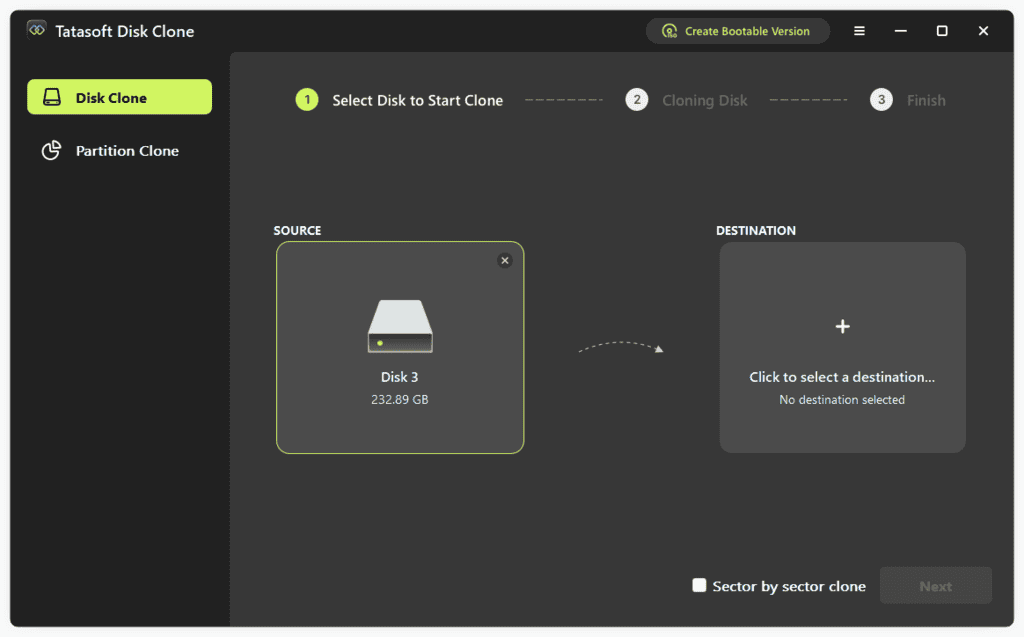
With Tatasoft Disk Clone, the entire migration process is broken down into just 3 straightforward steps: select your source disk, configure the destination disk layout, and click Clone. The software handles the rest — including ensuring that the cloned system disk remains fully bootable, so you can immediately resume work without skipping a beat.
The software is built with data safety at the forefront of its design. Even if the cloning process is interrupted unexpectedly, the data on the source disk remains fully protected. This reliability makes Tatasoft Disk Clone a trusted choice for anyone who cannot afford data loss during the migration process.
Key Benefits
Tatasoft Disk Clone is packed with advantages that make it the go-to solution for disk migration and backup tasks on Windows. The following benefits highlight why users across skill levels rely on this tool to protect and migrate their data:
- No Need to Reinstall Windows — Migrate your entire operating system, installed programs, and personal files to a new disk without reinstalling Windows or reconfiguring any settings, saving hours of setup time.
- Bootable Cloned Disk — After cloning your system disk, the destination drive is automatically made bootable, allowing you to switch to your new drive and start working immediately.
- Safe and Reliable Cloning — Source data remains fully protected throughout the cloning process, even if an unexpected interruption occurs.
- Clone to a Smaller Disk — With the smart file-based copy option, you can clone a larger HDD to a smaller SSD as long as the actual data fits on the destination drive.
- Flexible Cloning Options — Choose between a full disk clone, partition clone, or sector-by-sector clone depending on your specific needs and available time.
- Portable Windows OS — Copy your entire system disk to an external hard drive to create a portable Windows environment that you can boot from on any compatible machine.
- Broad Device Compatibility — Clone not just HDDs and SSDs, but also USB flash drives, SD cards, and other digital storage devices from leading brands worldwide.
- WinPE Bootable Disk Support — Create a WinPE bootable version of the software to clone or restore your system even when Windows fails to boot.
- Time-Saving Workflow — The simple 3-step cloning process means even novice users can complete a full disk migration without needing technical expertise.
From home users looking to speed up their computer with a new SSD, to IT professionals managing multiple machines, to business users who need a dependable system backup strategy — Tatasoft Disk Clone delivers a fast, safe, and efficient cloning experience that consistently exceeds expectations.
Features
Below is a comprehensive breakdown of the powerful features that make Tatasoft Disk Clone a highly capable disk cloning solution for Windows users at every experience level:
- Smart Copy — Intelligent cloning that adapts to your destination disk size and cloning requirements.
- Clone Identical Hard Drive — Creates a perfect copy of the source disk with all data, partitions, and settings preserved exactly as they are.
- Autofit Destination Disk — Automatically adjusts partition sizes on the destination disk to make the best use of available space during cloning.
- Copy to a Smaller Disk — Allows you to clone a disk or partition to a smaller destination by copying only the used files and skipping empty sectors.
- Move Windows 11/10 Without Reinstalling — Migrate your OS, installed applications, and data to a new disk in just a few clicks.
- OS Migration — Moves the entire Windows operating system, including all installed applications and system settings, to the new disk seamlessly.
- Bootable System Disk — Ensures the cloned system disk boots successfully on the new hardware without requiring any additional manual configuration.
- External Hard Drive Boot — Clone the system to an external hard drive to access your Windows environment or recover from a system failure anywhere.
- Upgrade HDD to SSD — A fast, reliable method to replace your old mechanical drive with a high-performance solid-state drive.
- Full System Transfer — Moves all system files, programs, and personal data from the HDD to the SSD in one seamless operation.
- Clone Larger HDD to Smaller SSD — Supports cloning from a larger HDD to a smaller SSD as long as the SSD has sufficient space for all existing data on the source disk.
- Performance Improvement — Delivers faster system speeds, improved stability, reduced noise, and better power efficiency after completing the SSD upgrade.
- Clone Selected Partitions — Copy specific disk partitions independently for targeted backup or data migration.
- Exact Partition Copy — Creates a precise replica of the selected partition, including all files, folder structures, and settings.
- Backup Specific Partitions — Allows you to back up only the partitions that matter most, without cloning the entire disk.
- Migrate Data to Another Device — Transfers selected partition data to a new drive or computer quickly and with full accuracy.
- Sector-Level Cloning — Create an exact 1:1 copy of any disk or partition at the deepest sector level.
- Sector-by-Sector Copy — Clones every sector of the source disk, including empty ones, creating an identical byte-for-byte duplicate of the original.
- Intelligent Sector Cloning — Clones only the used sectors of the disk while intelligently skipping bad sectors to avoid interruptions during the process.
- Full Disk Accuracy — Guarantees that the cloned disk is an exact replica, suitable for forensic-level duplication or critical system backups.
- Flexibility to Clone HDD or SSD — Comprehensive cloning support for all major storage device types and brands.
- Internal and External Storage — Supports cloning of both internal drives installed in the computer and external drives connected via USB or other interfaces.
- USB Flash Drives and SD Cards — Extends cloning capabilities to USB drives, SD cards, and memory cards from all leading brands.
- Customizable Partition Layout — Lets you modify the size and structure of partitions on the destination disk before the cloning process begins.
- Make a Portable Windows OS — Turn any external drive into a fully portable, bootable Windows environment.
- System and App Migration — Copies the entire system disk, including installed applications and important user files, to an external hard drive.
- Boot on Any Machine — The cloned external drive can boot on any compatible Windows computer, giving you full access to your work environment on the go.
- Instant Recovery Option — Provides an immediate fallback if the primary system crashes, letting you resume work from the external drive without delay.
- Create WinPE Bootable Disk — Build a WinPE rescue environment for cloning or restoring systems that won’t boot normally.
- Boot from USB or CD/DVD — Creates a bootable WinPE media on a USB flash drive or CD/DVD to access the cloning software without a running operating system.
- Clone Without Windows — Perform full disk or partition cloning operations even on a system where Windows has crashed or is completely non-functional.
- System Restore Access — Use the WinPE environment to restore the cloned system back to the original computer when the primary OS fails to load.
Requirements
Tatasoft Disk Clone is designed to work across a wide range of Windows systems and storage devices. Below are the full technical requirements needed to run the software effectively on your machine:
Supported Devices:
- PC Brands: Dell®, HP®, Acer®, Asus®, Huawei®, Lenovo®, and more
- Macs: MacBook Air, MacBook Pro, iMac, iMac Pro, Mac mini, Mac Pro
- HDD/SSD Brands: HP®, Samsung®, Seagate®, Toshiba®, WD®, LaCie®, Intel®, Adata®, and more
- USB Drive Brands: Samsung®, SanDisk®, Kingston®, WD®, Corsair®, Patriot®, PNY®, Verbatim®, Silicon Power®, and more
- SD Card Brands: SanDisk®, Transcend®, Toshiba®, Lexar®, Integral®, SP®, PNY®, Kingston®, and more
- Other digital storage devices
Supported Operating Systems:
- Windows 11 / 10 / 8.1 / 8 / 7 / Vista
- Windows Server 2022 / 2019 / 2016 / 2012 R2 / 2012 / 2008 R2 / 2008 / 2003 R2 / 2003
- Mac OS: macOS 26 Tahoe, macOS 15 Sequoia, macOS 14 Sonoma, macOS 13 Ventura, macOS 12 Monterey, macOS 11 Big Sur, Mac OS X 10.9 – 10.9
Supported File Systems:
- FAT16 / FAT32 / exFAT
- NTFS / NTFS5
Hardware Requirements:
- Disk Space: At least 100 MB of free space
- CPU: At least 1 GHz processor
Downloads
Put Tatasoft Disk Clone through its paces before making any commitment — because seeing its powerful disk cloning capabilities working on your own system is the best way to build confidence in your purchase. The free trial edition gives you direct, hands-on access to the software’s core features, allowing you to verify its performance, device compatibility, and ease of use at absolutely no cost. Click the button below to get the free trial version of Tatasoft Disk Clone and experience seamless disk cloning for yourself.
DOWNLOADS
Windows/Mac
BUY NOW
Tatasoft Disk Clone normally costs $39.95 per year. For a limited time, you can get the full version free by claiming a License Key in the Giveaway tab below. This is a time‑limited offer, so make sure to act quickly before it expires.

The Migration Kit for Windows 11 BEST OFFER

Flashboot Pro: Lifetime License BEST SELLER
O&O DiskImage Professional Edition: 5-PC License (Perpetual) BEST SELLER
EaseUS Disk Copy Pro: Lifetime upgrades License BEST OFFER
Donemax Disk Clone: Lifetime Lciense BEST OFFER

AOMEI Partition Assistant Professional Edition + Lifetime Free Upgrades (2 Computers/license) BEST SELLER

WinToHDD Professional for Windows BEST SELLER
4DDiG Partition Manager BEST OFFER

Emergency Boot Kit: Lifetime License BEST SELLER
EaseUS Todo Backup Home 2026: Lifetime Upgrades BEST SELLER
Qiling Disk Master Professional BEST SELLER
AOMEI Backupper 8 Professional: Lifetime Upgrades BEST SELLER

WinToUSB Professional BEST SELLER

NIUBI Partition Editor Professional Edition: Lifetime upgrades BEST SELLER

Tenorshare 4DDig Windows Boot Genius BEST SELLER
Tatasoft Disk Clone Key Giveaway
Available now: Free License Key For a Limited Time!
To access the giveaway, kindly provide your email address. Please refrain from closing this page after signing in to receive instructions on how to access the offer at no cost.

NOTES:
– All prices shown here are in listed USD (United States Dollar).
– Such promotional programs are subject to change without notice, from time to time in our sole discretion.
– Data may vary based on different systems or computers.
Thanks for reading Tatasoft Disk Clone Review & Enjoy the discount coupon. Please Report if Tatasoft Disk Clone Discount Coupon/Deal/Giveaway has a problem such as expired, broken link, sold out, etc while the deal still exists.


![[NEW LINK #3] Giveaway – Wise Duplicate Finder Pro 2.1.8: Free License Key | Full Version- for Windows](https://thesoftware.shop/wp-content/uploads/thumbs_dir/Wise-Duplicate-Finder-Pro-Box-shot-rfosjop0x66673s8v3f7btxkr7fybxnquajurhtztk.png)