Giveaway – 4Easysoft Blu-ray Player: Free 1-year License Code | Region-Free 4K UHD Blu-ray & DVD Player – for Windows

Turn Your PC into a Home Theater: Play Blu-ray, DVD, ISO, and 4K Videos with Cinema-Grade Picture and Dolby Audio—Get Your 1-Year License Code Today for Free and Start Watching Instantly!
Free Full Version!
4Easysoft Blu-ray Player Review at a Glance
For many movie lovers, Blu-ray and DVD collections sit unused because modern laptops and desktops struggle with region codes, unsupported formats, choppy playback, or missing menus. At the same time, 4K video files, ISO backups, and mixed-format libraries can be hard to manage in one reliable player, especially when you want smooth playback, clear visuals, and theater-like audio on a computer.
That is exactly the problem 4Easysoft Blu-ray Player is designed to solve, giving you a simple, high-quality way to play nearly any disc or media file on your PC or Mac.
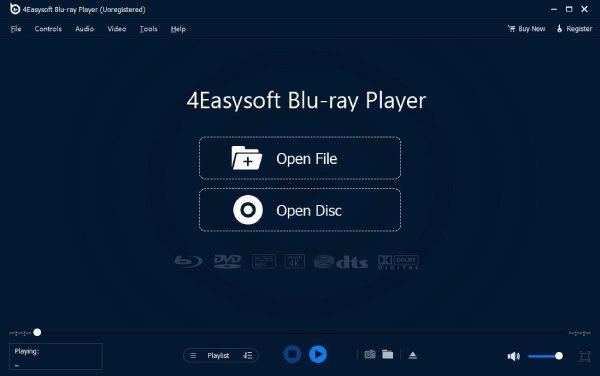
What Is 4Easysoft Blu-ray Player?
4Easysoft Blu-ray Player is a desktop media player application for Windows and Mac that focuses on high-quality Blu-ray, DVD, ISO, and digital file playback. It acts like a virtual home theater on your computer, combining 4K video support, region-free disc playback, and premium surround sound formats in a single, user-friendly program.
This software supports Blu-ray discs, Blu-ray folders, DVD discs, DVD folders, ISO images, and more than 500 video and audio formats, including popular options like MP4, MKV, AVI, MOV, MP3, and FLAC. It preserves Blu-ray and DVD menus, chapters, audio tracks, and subtitle streams, giving you flexibility similar to a standalone hardware player but with the extra convenience of running directly on your computer.
The software is also built for everyday convenience. With intuitive playback controls, customizable hotkeys, and a clean interface, you can play, pause, seek, adjust volume, and switch tracks without complication. A built-in playlist manager lets you organize Blu-ray titles, DVD chapters, and individual video clips into playlists, ideal for TV marathons, course material, or curated movie nights. You can resume playback from where you left off, so your long series or ongoing film studies never lose their place.
Key Benefits
This section highlights the practical advantages of using 4Easysoft Blu-ray Player so shoppers can quickly see how it will improve their everyday viewing experience.
- All-in-one playback for discs and files – Replace multiple players with one tool that handles Blu-ray, DVD, ISO images, and 500+ media formats on your PC or Mac.
- Region-free Blu-ray and DVD support – Enjoy imported discs from different regions without extra hardware or firmware tricks, keeping your entire collection useful.
- Cinema-grade 4K picture quality – Get crisp detail and vivid color from 4K Ultra HD content, with AI-driven upscaling that refines lower-resolution videos during playback.
- Immersive Dolby TrueHD and DTS-HD audio – Experience rich surround sound that brings movies, concerts, and anime to life on your speakers or headphones.
- Smooth performance with hardware acceleration – Let your GPU handle intensive decoding for 4K, HDR, and high-bitrate files, reducing strain on your CPU and minimizing stutter.
- Smart playlist management for binge-watchers – Group episodes, movie trilogies, or training clips into playlists and resume them later from exactly where you stopped.
- Customizable playback controls and hotkeys – Tailor keyboard shortcuts, aspect ratio, effects, and screenshots to match your personal viewing routine.
- User-friendly interface for all levels – An organized, intuitive layout makes it easy for beginners and advanced users to handle discs, ISOs, and digital libraries.
- Ideal for study, work, and entertainment – Film students, language learners, professionals using training DVDs, and casual viewers all benefit from precise control and stable playback.
Features
The following section gives a detailed breakdown of the main features and their sub functions so buyers can clearly understand how this software fits into day-to-day use and mixed-format libraries.
- Play Blu-ray Disc/Folder/ISO File – High-quality Blu-ray playback with full navigation support for collectors and HD enthusiasts.
- Original Menu Support – Access Blu-ray menus, chapters, and bonus content just like on a standalone player.
- Multi-track Subtitles – Switch between multiple subtitle languages and tracks during playback for imported or multi-language discs.
- Blu-ray Folder & ISO Playback – Load ripped Blu-ray folders or ISO images from local storage without burning them back to disc.
- Play DVD Disc/Folder/ISO File – Smooth DVD playback with full control over chapters, audio tracks, and subtitles.
- Chapter Navigation – Jump quickly to specific scenes or sections using chapter markers.
- Audio Track Selection – Choose from available language or commentary tracks for flexible viewing.
- DVD Folder/ISO Support – Play DVD backups directly from folders or ISO files for convenience and drive longevity.
- Play Video/Audio Files (500+ Formats) – Versatile player for most common and advanced media formats, including SD, HD, and UHD files.
- Popular Formats (MP4, MKV, AVI, MOV) – Open your entire digital collection without format conversion.
- High-quality Audio (FLAC, MP3, AAC) – Enjoy music tracks, concert recordings, and movie soundtracks with clean playback.
- 4K Video File Support – Handle standalone 4K files with stable decoding and crisp visuals.
- 4K UHD High Quality – Support for 4K Ultra HD resolution to show fine details and rich color.
- AI Upscaling for Lower Res Videos – Improve the clarity of SD and HD content by refining edges and textures in real time.
- HDR-Friendly Playback – Maintain smooth performance when playing HDR and high-bitrate 4K files with compatible hardware.
- Accurate Color and Contrast – Present movies with balanced brightness and contrast so dark scenes remain clear.
- Lossless Dolby Audio – Theater-grade audio output for a powerful, immersive soundstage.
- Dolby TrueHD Support – Get high-fidelity sound with detailed dynamics for Blu-ray movies and concert discs.
- DTS-HD Master Audio – Enjoy precise surround effects with supported audio systems and headphones.
- Configurable Audio Channels – Adjust audio devices, channels, and volume for different setups and listening preferences.
- AI Upscaling & Hardware Acceleration – Modern performance features that keep playback smooth and responsive.
- GPU-Based Decoding – Offload heavy 4K and high-bitrate decoding tasks to your graphics card to reduce CPU load.
- Near-HD Quality from SD Sources – Make older DVDs and low-resolution files look significantly sharper and more detailed on large screens.
- Optimized for Older Systems – Maintain fluid playback on modest hardware by using efficient decoding and optimization.
- Create and Manage Playlists – Organize your viewing sessions with custom playlists for discs and digital files.
- Episode & Chapter Playlists – Combine Blu-ray/DVD chapters or episodes into one list for continuous playback.
- Save and Edit Playlists – Store your playlists for future use and adjust them anytime as your viewing needs change.
- Resume Playback History – Let the software remember where you left off, even across multiple titles.
- Easy Playback Control – Intuitive interface and hotkeys simplify everyday use.
- Play/Pause/Seek Controls – Use clear on-screen buttons or keyboard shortcuts to control playback.
- Adjust Aspect Ratio – Fit video to your display by stretching, zooming, or using full screen without noticeable distortion.
- Flexible Speed & Navigation – Move backward or forward quickly through scenes for reviews or study sessions.
- Audio & Subtitle Customization – Tailor each viewing session to your language and accessibility needs.
- On-the-Fly Audio Switching – Change audio tracks instantly during playback without restarting the movie.
- Subtitle Track Selection – Choose from internal or external subtitle files in multiple languages.
- Subtitle Sync & Style Options – Adjust subtitle timing and display style for more comfortable reading.
- Video Effects and Adjustments – Fine-tune how your video looks to match your display and personal taste.
- Brightness and Contrast Control – Make dark scenes visible or reduce glare for better clarity.
- Hue and Saturation Tweaks – Adjust color tone and intensity to suit your monitor or projector.
- Preset and Manual Settings – Use quick presets or custom sliders based on what you prefer.
- Quick Screenshot Function – Capture still images from your videos in real time.
- One-Click Snapshots – Save key scenes for reviews, presentations, or wallpapers with a single click.
- Custom Hotkeys for Screenshots – Assign your own shortcut keys to capture frames instantly.
- JPG/PNG Output Options – Store screenshots in widely compatible image formats.
Requirements
To run #THE SOFTWARE with optimum reliability and performance, your system should match the following requirements:
System Requirements for Windows OS:
- Supported Windows OS: Windows 11, 10, 8.1, 8, 7, Vista, XP (SP2 or later)
- CPU Requirements: 1GHz Intel/AMD CPU or above
- RAM Requirements: 2 GB RAM or more
- Hard Disk Space: 150 MB of hard-disk space
System Requirements for Mac OS:
- Supported macOS: macOS X 10.9 or above (including macOS Tahoe 26)
- CPU Requirements: 1GHz Intel® processor and Apple M1/M2/M3/M4/M5 chip
- RAM Requirements: 1 GB RAM or more
- Hard Disk Space: 100 MB of hard-disk space
Downloads
Get a clear sense of how 4Easysoft Blu-ray Player fits your viewing habits by trying the software before committing to paid renewal.
You can install the program, load Blu-ray/DVD discs, ISO files, and 4K videos, and test real-world playback with your own media to confirm quality and compatibility.
BUY NOW
4Easysoft Blu-ray Player normally costs $14.95 per month, providing premium Blu-ray, DVD, ISO, and 4K playback on your computer. But right now you can secure a 1-year license with a registration code at no extra cost via the Giveaway tab, making it an exceptional deal for anyone ready to upgrade their media experience. This limited-time arrangement gives you a long period of full-feature use while keeping your budget in check.

Aiseesoft Blu-ray Player: Lifetime License BEST OFFER

Aiseesoft Burnova: Lifetime License BEST SELLER

DVDFab DVD to Blu-ray Converter: Lifetime BEST OFFER

AnyMP4 Blu-ray Toolkit for Windows BEST OFFER

PlayerFab All-in-one BEST OFFER
Aiseesoft BD Software Toolkit - Lifetime BEST OFFER

Leawo Blu-ray Ripper BEST SELLER

Leawo Blu-ray to MKV Converter (PC/Mac) EXCLUSIVE

Roxio Creator NXT Pro 9 BEST SELLER

Nero Platinum Suite 2026 BEST SELLER
4Easysoft Blu-ray Player Key Giveaway
Available Now: Free 1-year License Key For A Limited Time!

To access the giveaway, kindly provide your email address. Please refrain from closing this page after signing in to receive instructions on how to access the offer at no cost.

NOTES:
– All prices shown here are in listed USD (United States Dollar).
– Such promotional programs are subject to change without notice, from time to time in our sole discretion.
– Data may vary based on different systems or computers.
Thanks for reading 4Easysoft Blu-ray Player Review & Enjoy the discount coupon. Please Report if 4Easysoft Blu-ray Player Discount Coupon/Deal/Giveaway has a problem such as expired, broken link, sold out, etc while the deal still exists.




![[NEW LINK #2] Giveaway – Audials Music 2026 SE: Free Lifetime License | Full Version – for Windows](https://thesoftware.shop/wp-content/uploads/thumbs_dir/Audials-Music-2026-Special-Edition-Review-Download-Free-Giveaway-rfy5w62nqt1wed8um44g6por66u091ewvwgo4935i0.png)