

90% Off – Fluent: Lifetime License | Native Mac Copilot for Any Mac App – for Mac

Stop juggling browser tabs and bring the power of advanced AI directly into your daily workflow with the ultimate native macOS assistant. Get Fluent with a lifetime license today to automate tasks, refine writing, and chat with your documents instantly without ever leaving your current window.
✔ Lifetime License. ✔ Free Product Updates ✔ 24×7 Customer Support
Fluent Review at a Glance
The Problem: Context Switching Kills Productivity
Working on a Mac typically involves a chaotic dance between applications. You write an email in one window, but you need to check facts in a PDF, translate a phrase in a browser, and reformat text in a chat application. Traditionally, using Artificial Intelligence to help with these tasks meant constantly switching context: copying text from your active window, opening a browser, pasting it into a chat interface, waiting for a response, and then pasting it back. This friction breaks your flow.
Furthermore, standard AI responses often sound robotic, requiring heavy editing to match your personal tone. You waste time prompting the model to sound like you, only to get generic results. Privacy is another major concern; pasting sensitive work data into cloud-based web forms feels risky for many professionals.
Fluent AI Mac App solves that problem by putting a fast, native macOS Smart Panel inside everywhere you write.
What is Fluent?
Fluent is a native macOS application designed to integrate Artificial Intelligence directly into the operating system layer, effectively acting as an intelligent interface between you and your applications. It is not just another wrapper for a website; it is a fully native tool built for speed and ergonomic efficiency. At its core lies the Smart Panel, a floating interface that you can summon instantly over any application. This panel understands what you are doing—it captures the text you have selected, the contents of your clipboard, or the entire context of the window you are working in.

Fluent Mac App connects you to the world’s most powerful AI providers, including OpenAI, Google (Gemini), Anthropic (Claude), Grok, Mistral, and Perplexity. It also supports Apple Intelligence and allows you to run local LLMs directly on your machine using MLX or Ollama for complete privacy. With Fluent AI, you are not locked into a single model; you can switch between over 500 distinct models depending on the task at hand. Beyond simple chat, Fluent for Mac utilizes a native RAG (Retrieval-Augmented Generation) engine and Memory capabilities. This allows the software to learn your specific writing style, access a local database of your documents, and generate content that genuinely sounds like you, rather than a generic machine.
Key Benefits to Your Workflow
Unmatched Privacy and Security
For users handling sensitive data, Fluent AI offers a robust solution. The application is designed with a “privacy-first” architecture. Fluent does not collect, process, or store telemetry or any user data. There are no cloud servers operating the application logic; the only server connection is a brief, fully encrypted check to verify your license key. Importantly, there is no user authentication system, meaning the software cannot link your usage to an identity profile. Your History and generated images are stored locally on your machine. For the ultimate security, you can utilize local models (like Llama 3 running via MLX) to ensure that no text ever leaves your device. Even when using cloud providers like OpenAI, your API keys are stored securely in the macOS Keychain.

Ergonomic Efficiency with the Smart Panel
The Smart Panel is the defining feature of Fluent. It eliminates the need to arrange windows side-by-use. You can configure the panel to follow your mouse cursor for immediate access or pin it to a specific location on your screen. When not in use, it minimizes to a small “pill” that stays out of the way but remains ready for action. This allows you to perform complex tasks—like summarizing a long PDF, rewriting a slack message for clarity, or generating code snippets—without losing sight of your primary workspace. The panel is built to be fast and fluid, utilizing native macOS frameworks rather than sluggish web technologies.
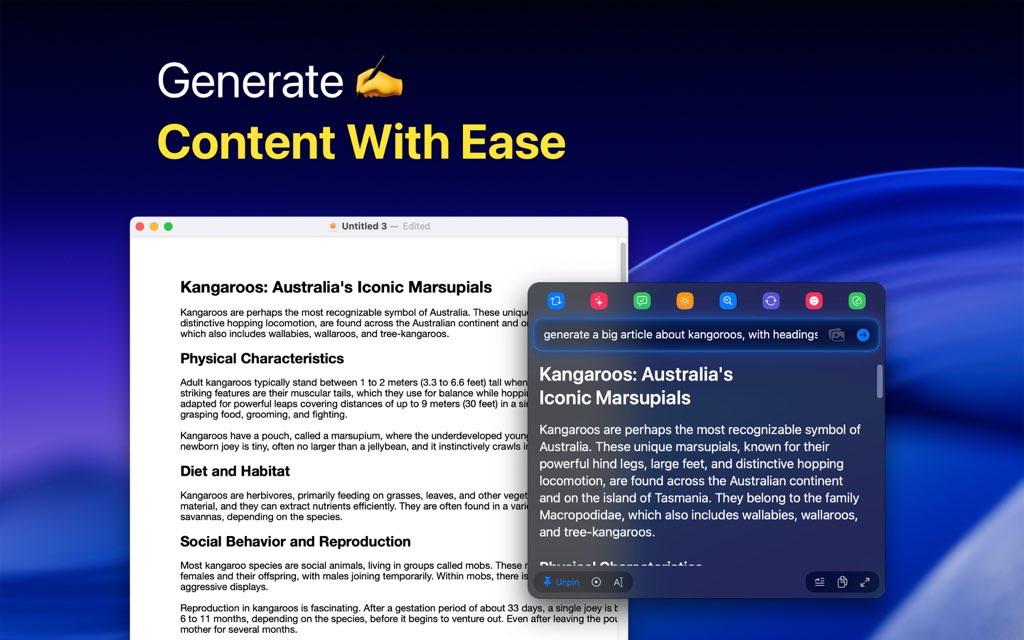
Write Like Yourself, Not a Robot
One of the most significant frustrations with AI is the “AI accent”—the overly formal, generic tone that plagues generated text. Fluent Mac App solves this with its native RAG engine and Memory integration. By indexing your previous writings and documents locally, Fluent AI acts as a “second brain.” When you ask it to draft an email or write a report, it references your stored context to replicate your unique voice, humor, and formatting style. This ensures that you can generate content that sounds authentic. You can instruct it to “write like the world’s top marketers” or maintain your specific coding style, and it will adapt instantly.

Seamless App Integration via MCP
Fluent Mac App is supercharged by the Model Context Protocol (MCP). This technology allows Fluent to connect with external data sources and internal macOS apps seamlessly. It comes with 9 built-in integrations for essential tools like Finder, Calendar, and Reminders, and offers access to a catalog of nearly 7000 external MCP servers. This means you can ask Fluent AI to “find the contract I worked on last week” or “schedule a meeting based on this email,” and it will execute the action directly. This transforms the software from a passive chatbot into an active agent capable of automating complex interactions on your Mac.
Who Needs Fluent Mac App?
Power Users and Developers: If you rely on speed and customization, Fluent AI is built for you. You can create custom actions, set specific hotkeys, and utilize local MLX models on Apple Silicon to avoid API costs and latency. The ability to preserve original formatting in code blocks and documentation makes it an essential tool for technical workflows.
Writers and Marketers: The ability to refine text, fix grammar, and adjust tone without losing your personal voice is invaluable. Fluent AI allows you to instantly rephrase content across Slack, Notion, and Mail, ensuring your communication is always professional and impactful.
Privacy-Conscious Professionals: Lawyers, doctors, and enterprise employees who cannot risk sending data to public cloud models will find Fluent’s local model support and strict no-telemetry policy to be the safer choice for integrating AI into their daily tasks.
Features
Below is a comprehensive list of the key features that make the software a valuable addition to your needs:
- Smart Panel — A fast floating panel you can call in any macOS app to run AI actions with instant context.
- Global App Context Capture — Automatically uses selected text, clipboard, or visible window content.
- Follow Mouse or Pin — Appears near your cursor or stays pinned anywhere on screen.
- Minimized Pill Mode — Shrinks into a small always-ready button for quick access.
- Standalone Chat Mode — Works as an independent chat for documents, images, and prompts.
- Universal App Integration — Use AI inside every macOS app without switching tools.
- Works in Any App — Supports Slack, Mail, Notion, browsers, editors, and more.
- Formatted Content Handling — Refines text while preserving headings, lists, and links.
- Auto Insert — Instantly inserts or replaces text back into the active app.
- AI Writing & Editing — Improve and generate text with the right tone and intent.
- Tone & Style Adjustment — Rewrites content to match a desired voice or mood.
- Grammar & Clarity Fixes — Corrects mistakes and improves readability.
- Translation & Localization — Translates content while keeping formatting intact.
- Reply Generation — Drafts smart replies for email, chat, and documents.
- Multi-Model AI Support — Access hundreds of AI models from one interface.
- Cloud Providers — Supports OpenAI, Google, Anthropic, Grok, Mistral, Straico, and more.
- OpenRouter Access — Unlocks hundreds of additional models through one provider.
- Bring Your Own Provider — Works with any OpenAI-compatible API.
- Local Model Support — Runs MLX, Ollama, or LM Studio models fully on-device.
- Custom Actions & Shortcuts — Automate AI tasks tailored to your workflow.
- Action Builder — Create custom AI actions with variables and prompts.
- Keyboard Shortcuts — Trigger actions instantly with configurable hotkeys.
- Reusable Presets — Save actions for repeated use across apps.
- Document & Image Chat — Interact with files and visuals using AI.
- Chat with Documents — Ask questions and refine content from PDFs, notes, and files.
- Image & Screenshot Support — Attach and analyze images directly in prompts.
- Comparison & Follow-Ups — Ask iterative questions and compare outputs easily.
- Memory & Native RAG Engine — Generate content that sounds like you.
- Writing Style Memory — Learns and matches your personal writing style.
- Local Knowledge Base — Uses your files and notes as private reference data.
- Always-On Context — Applies memory automatically without repeated setup.
- MCP & Tool Integrations — Extend Fluent with powerful workflows and tools.
- Built-in macOS Integrations — Works with Finder, Calendar, Reminders, and more.
- External MCP Servers — Connects to thousands of third-party tools and services.
- Custom Tools — Build your own tools inside integrations for consistent results.
- Scheduled & Autonomous Actions — Turn AI tasks into automated workflows.
- Scheduled Runs — Execute actions at specific times or intervals.
- Early Agent Support — Lays groundwork for autonomous Mac automation.
- Privacy & Security — Your data stays on your Mac.
- No Telemetry — No data collection, tracking, or analytics.
- Local Encrypted History — Stores chat history securely on-device.
- Local Memory Storage — Keeps personal memory data fully offline.
- Encrypted API Keys — Safely stored in macOS Keychain.
- Minimal License Verification — Only verifies license with encrypted checks.
- Native macOS Experience — Designed to feel fast and natural on Mac.
- Native Performance — Built specifically for macOS for speed and responsiveness.
- Apple Intelligence Support — Integrates with Apple’s AI features where available.
- Apple Silicon Optimization — Optimized for M-series Macs and local MLX models.
- Flexible Pricing & Distribution — Simple access with long-term value.
- Freemium Model — Core features available for free.
- Lifetime Unlock Option — One-time purchase for full access.
- Mac App Store Distribution — Easy installation and updates.
- Family Sharing — One purchase works for up to five family members.
Requirements
To run #THE SOFTWARE with optimum reliability and performance, your system should match the following requirements:
- macOS 14.2 or later (Sonoma or newer).
- 8GB RAM minimum (required for basic operation).
- 16GB RAM recommended (for smoother performance and multitasking).
- Apple Silicon (M1/M2/M3) or Intel-based Mac (standard features).
- Apple Silicon chip required specifically for running local MLX models.
Downloads
Get the free edition/trial of Fluent Mac App, run a few real actions (rewrite, translate, reply, summarize), and see how Smart Panel + Auto Insert feels in Slack, Mail, Notion, and your browser—then upgrade only if it saves you time.
Try Fluent AI in your own Mac apps and writing scenarios first, so you can confirm the panel workflow, formatting behavior, and provider setup fit your day‑to‑day needs.
BUY NOW
Fluent is available for $49.99 for 1 Mac. But, you can now get Fluent Mac App with a Lifetime license with our exclusive 90% discount sale. This offer is available for a limited time!

" />
Native AI Assistant for macOS | Bring ChatGPT, Claude & Local Models to Any App | Context-Aware Smart Panel with RAG Memory & MCP | Privacy-First Workflow Automation Tool
- Please Notes:
- You may be directed to the bundle page, but it is possible to purchase the software individually.
- If you're having difficulty locating the product on the bundle page, please utilize the browser's search feature.
- Get an additional $3 discount on all orders more that $30.
- LEGITIMATE: All apps are authentic and have original licenses obtained directly from the creators via contracts.
- INSTANT ACCESS: Fully activated macOS Apps & Windows Software with instant downloads & license key access.
- Device Activation: 1 Device
- Major & Minor Updates Included
- Lifetime License
Platforms: Mac OS X
" />
Native AI Assistant for macOS | Bring ChatGPT, Claude & Local Models to Any App | Context-Aware Smart Panel with RAG Memory & MCP | Privacy-First Workflow Automation Tool
- 1 Mac
- Lifetime upgrades
- Context awareness
- MCP support
- Memory (RAG)
- Chat with documents & pictures
- Customizable actions with shortcuts
- 500+ models available (using your own API key)
- Local models for full privacy
- Custom AI providers
- Dynamic variables in prompts
- Support in Discord, Email, Forum
- 14-day moneyback guarantee without any questions.
Platforms: Mac OS X
" />
Native AI Assistant for macOS | Bring ChatGPT, Claude & Local Models to Any App | Context-Aware Smart Panel with RAG Memory & MCP | Privacy-First Workflow Automation Tool
- 2 Macs
- Lifetime upgrades
- Context awareness
- MCP support
- Memory (RAG)
- Chat with documents & pictures
- Customizable actions with shortcuts
- 500+ models available (using your own API key)
- Local models for full privacy
- Custom AI providers
- Dynamic variables in prompts
- Support in Discord, Email, Forum
- 14-day moneyback guarantee without any questions.
Platforms: Mac OS X
" />
Native AI Assistant for macOS | Bring ChatGPT, Claude & Local Models to Any App | Context-Aware Smart Panel with RAG Memory & MCP | Privacy-First Workflow Automation Tool
- 3 Macs
- Lifetime upgrades
- Context awareness
- MCP support
- Memory (RAG)
- Chat with documents & pictures
- Customizable actions with shortcuts
- 500+ models available (using your own API key)
- Local models for full privacy
- Custom AI providers
- Dynamic variables in prompts
- Support in Discord, Email, Forum
- 14-day moneyback guarantee without any questions.
- Enjoy 40% off when you purchase 3 or more licenses (only $29 per license instead of $49)
Platforms: Mac OS X

HitPaw Online BEST OFFER

Parallels Desktop for Mac BEST SELLER

Vovsoft AI Requester GIVEAWAY

AIChatSuite Lifetime Deal BEST OFFER
75% Off – Ashampoo AI Assistant | AI Assistant for Easy Creation, Editing and Translation of Texts BEST OFFER
Fluent Mac App Giveaway
Unavailable at this moment!

To access the giveaway, kindly provide your email address. Please refrain from closing this page after signing in to receive instructions on how to access the offer at no cost.
NOTES:
– All prices shown here are in listed USD (United States Dollar).
– Such promotional programs are subject to change without notice, from time to time in our sole discretion.
– Data may vary based on different systems or computers.
Thanks for reading Fluent Mac App Review & Enjoy the discount coupon. Please Report if Fluent Discount Coupon/Deal/Giveaway has a problem such as expired, broken link, sold out, etc while the deal still exists.





![[NEW KEY #2] Giveaway – iTop Easy Desktop PRO v4.x: Free License Key | Full Version – for Windows](https://thesoftware.shop/wp-content/uploads/thumbs_dir/iTop-Easy-Desktop-PRO-Review-Download-Discount-Coupon-rfosnoibytn1jfzcjbl4fbn3n5r41mioe2d56twrdk.png)

