
85% Off – Iconize: Lifetime License | One‑Click App Icon Generator (Mac, iOS, Windows, Android, WatchOS, Favicon) – for Mac

Get a complete, platform-ready icon set in minutes with Iconize—drag your source image in, pick targets (Mac/iOS/Android/web), click Generate, and ship faster.
✔ Lifetime License. ✔ Free Product Updates ✔ 24×7 Customer Support
Iconize Review at a Glance
Shipping apps and websites often means creating a long list of icon sizes, formats, and platform variations—then re-checking padding, corners, and safe areas again and again. Iconize reduces that repetitive work into a simple workflow: add your source image, adjust a few visual options, export the icon pack you need, and get back to building.

What is Iconize
Iconize is a macOS app icon generator focused on producing “all your app icons” with a one-click workflow. The app supports creating icon outputs for Mac, iOS, Android, and website favicon use cases.
You add your main icon image via drag‑and‑drop, then Iconize generates the export set for the platforms you pick. Input is flexible: the App Store description notes you can use any image format your Mac recognizes.
Iconize also includes configuration options for cases where your source icon still needs polishing, including rounded corners and padding controls to help conform to guidelines. Options like these are valuable when you want one master mark to adapt cleanly across multiple platform looks.

Why this product exists
Icon production is a perfect example of work that is simple, but rarely “small.” Details like padding, corner rounding, and different platform requirements can force you into rework, especially when you update branding mid‑project or when you want a version of the icon that feels more aligned with platform guidelines.
Iconize is positioned to handle the mechanical parts for you: you provide the artwork, choose output platforms, optionally adjust padding and rounded corners, and export. Control stays with you for visual tuning, while the busywork moves into an automated step.
Key Benefits
The biggest payoff is time saved on repetitive resizing and exporting, plus more predictable outputs across platforms. Benefits like these matter most when you ship updates frequently or maintain multiple apps.
- Faster icon pack generation from a single source image, using a one-click workflow.
- Multi-platform coverage (Mac, iOS, Android, and website favicon use cases) from one tool.
- Simple drag‑and‑drop input so you can start quickly with common image formats.
- Visual tuning via padding and rounded corners, helpful when aligning to platform guidelines.
- A lightweight workflow designed to complete quickly on your Mac.
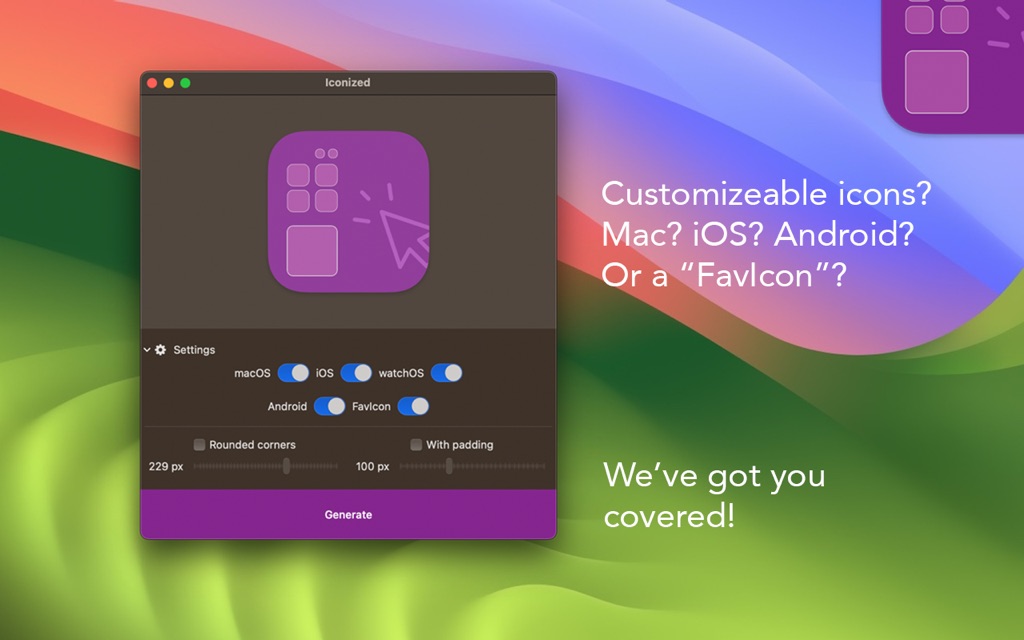
Iconize is a Mac app designed to generate app icons “with one click,” including support for icon sets for Mac, iOS, Android, and even a favicon for a website. It’s built around a straightforward drag‑and‑drop process, so you can start from almost any image format your Mac already opens and let the app do the production work.
Instead of juggling separate templates for each platform, Iconize focuses on a quick, repeatable pipeline: bring in one master image, apply optional rounding and spacing adjustments, then export to disk. Speed is central to the product message—the app aims to finish the full process quickly, so you spend less time waiting and more time iterating on your actual design.
If you’re a developer who needs icons for App Store submissions, a designer preparing assets for multiple devices, or a small team shipping cross‑platform releases, Iconize is meant to keep icon output consistent across targets while staying easy to operate. Consistency matters most when you are producing multiple builds or updating branding, and a repeatable generator helps reduce small mistakes that can slip into manual resizing.
Who benefits most
If you build software, you already know that icons have a long tail of requirements. Makers working on indie apps can use one master image and rapidly output multi-platform assets without living inside a design tool for every size.
Designers and agencies can use a tool like this as a production assistant. Teams that support multiple clients can standardize how icons are exported, so results are predictable and handoffs are smoother.
Web creators also benefit when they need a favicon alongside app assets. Web work often gets delayed by missing small assets, and an exported favicon set helps keep releases tidy and complete.
Features
Below is a comprehensive list of the key features that make the software a valuable addition to your needs:
- Multi‑Platform Icon Generation – Create icons for all major platforms from one source image.
- macOS App Icons – Generates correctly sized icons that follow macOS guidelines.
- iOS App Icons – Exports all required iPhone and iPad icon sizes automatically.
- Android App Icons – Produces Android‑ready icon sizes for app projects.
- Website Favicons – Creates favicon files suitable for modern browsers.
- Drag‑and‑Drop Workflow – Start icon creation instantly with a simple drag‑and‑drop action.
- Instant Image Import – Drop any supported image file directly into the app.
- Wide Format Support – Accepts any image format macOS can open.
- Icon Customization Tools – Adjust your icon to match platform guidelines before export.
- Rounded Corners – Apply corner rounding to match system icon styles.
- Padding Control – Add spacing around the icon to meet design requirements.
- Optional Adjustments – Customize only when needed, or export as‑is.
- Selective Platform Export – Export icons only for the platforms you choose.
- Platform Selection – Pick macOS, iOS, Android, favicon, or any combination.
- Guideline‑Ready Output – Automatically follows size and format rules per platform.
- Fast Local Processing – Generates icons quickly using your Mac’s hardware.
- On‑Device Generation – No uploads or cloud processing required.
- Near‑Instant Results – Icon sets are created in seconds.
- Simple Export Process – Save generated icons to disk with minimal steps.
- One‑Click Generate – Create all selected icons with a single button.
- Custom Export Folder – Choose exactly where your icons are saved.
- Modern macOS Support – Designed for current Apple hardware and software.
- macOS 11.0+ Compatibility – Works on modern versions of macOS.
- Apple Silicon Support – Optimized for M1, M2, M3, and M4 Macs.
Requirements
Before installing, check that your Mac meets the basic software requirements and that your environment aligns with your deployment plans. Requirements are straightforward for most modern Macs.
- macOS 11.0 or later is required (Mac App Store compatibility requirement).
- Apple Silicon compatibility: the product site mentions M1/M2 compatibility and macOS Sonoma support.
- Disk space needs are typically minimal for an icon generator, but exported asset folders can grow with multiple platform packs.
Downloads
See how Iconize fits your workflow—download the free trial edition by clicking the button below, drop in one image, and generate a complete icon set for your target platforms.
Try Iconize in a low-risk way by starting with a small test project—generate assets for one app and verify the exported results match your platform checklist.
BUY NOW
Iconize is available for $9.99. For a limited time, you can get an Iconize license with our discount coupon—checkout it out and generate your full icon pack today.

" />
One‑Click icon generator for iOS icons, Android icons & favicon sets, drag‑and‑drop export with padding + rounded corners (Mac App)
- Please Notes:
- You may be directed to the bundle page, but it is possible to purchase the software individually.
- If you're having difficulty locating the product on the bundle page, please utilize the browser's search feature.
- Get an additional $3 discount on all orders more that $30.
- LEGITIMATE: All apps are authentic and have original licenses obtained directly from the creators via contracts.
- INSTANT ACCESS: Fully activated macOS Apps & Windows Software with instant downloads & license key access.
- Device Activation: 2 Devices
- Minor Updates Included Only
- Lifetime License
Platforms: Mac OS X
SoftOrbits Icon Maker BEST OFFER

Ashampoo Folder Styler GIVEAWAY

Iconbuddy Lifetime BEST OFFER

Fluent Mac App BEST OFFER

TextSniper: Lifetime License BEST OFFER
Iconize Mac App Giveaway
UnAvailable at this moment!

To access the giveaway, kindly provide your email address. Please refrain from closing this page after signing in to receive instructions on how to access the offer at no cost.
NOTES:
– All prices shown here are in listed USD (United States Dollar).
– Such promotional programs are subject to change without notice, from time to time in our sole discretion.
– Data may vary based on different systems or computers.
Thanks for reading Iconize Mac App Review & Enjoy the discount coupon. Please Report if Iconize Mac App Discount Coupon/Deal/Giveaway has a problem such as expired, broken link, sold out, etc while the deal still exists.