

80% Off – Image Stack: Lifetime License | Preset-Based Batch Image Converter – for Mac

Get consistent image exports in just a few clicks with presets—convert, resize, rename, watermark, and deliver ready-to-use files faster. Get Image Stack for Mac now at a 80% Discount!
✔ Lifetime License. ✔ Free Product Updates ✔ 24×7 Customer Support
Image Stack Review at a Glance
If you’ve ever had to prepare dozens (or thousands) of images for a client, a store listing, a portfolio, or a content schedule, you know the pain: inconsistent sizes, mismatched formats, messy file names, and repeated steps that waste time and invite mistakes.
Image Stack solves that workflow problem with one clear approach: bring images in, apply your preset(s), and output clean, ready-to-use results with minimal clicks and consistent rules—every single time, at speed.
What is Image Stack
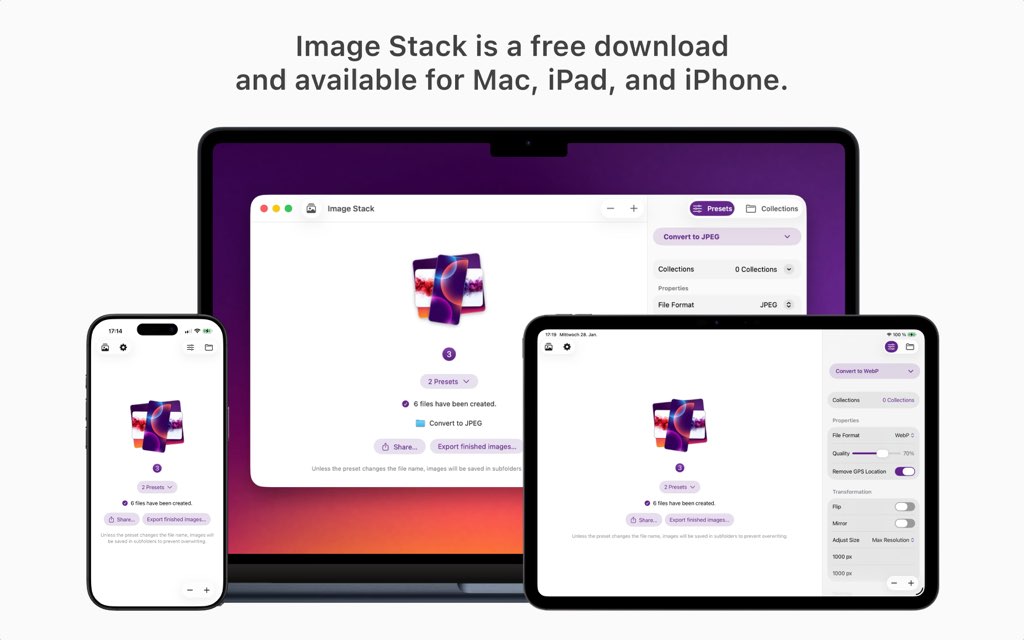
Image Stack is a preset-driven image processing app for macOS, iOS, and iPadOS that batch converts images, resizes them, renames files, and applies common output adjustments like overlays and metadata options. The core idea is simple: presets define your processing rules, and Image Stack Mac App applies those rules to one image or thousands with the same predictable result, every time, with clarity.
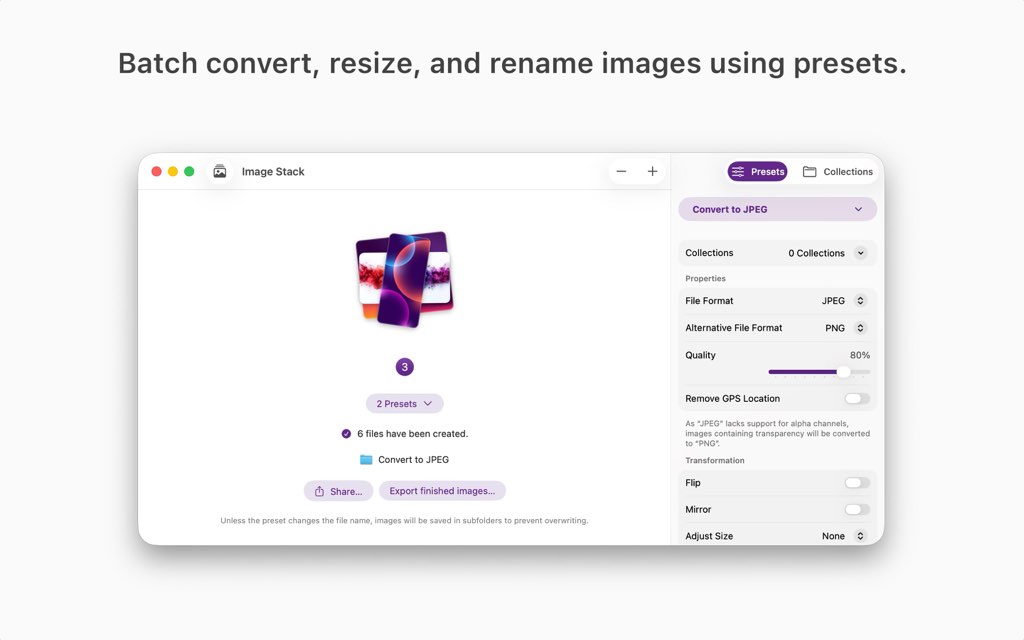
A preset can include output format choices, resizing requirements, file name changes (prefixes, suffixes, replacements), transformations, overlay elements (such as watermarks), and adjustable quality plus metadata handling. You can also combine multiple presets into a collection and run them together in one step—useful when you need multiple output variants for different channels. With iCloud sync, your presets and collections stay available across your Apple devices, so you can keep one consistent system for image prep regardless of where you’re working, with continuity.
Key Benefits
These benefits focus on the practical results you’ll notice as soon as you start using Image Stack for Mac in real workflows, from small personal batches to high-volume professional delivery, with control.
- Faster repeatable processing by applying saved presets instead of redoing settings each time
- Consistent output formats and sizes across projects, clients, and publishing channels
- Cleaner file organization with systematic renaming (prefix, suffix, replacements)
- Fewer manual steps thanks to batch handling for small sets or stacks of thousands
- Easy preparation for web, social media, delivery, and archiving using preset collections
- Cross-device workflow because presets and collections sync via iCloud
- Flexible output tuning with quality and metadata options for different needs
- Watermark and overlay support for branding and ownership marking
- Simple operation built around “input → preset → output” with minimal friction
- Scales from single-image edits to high-volume processing with stability

Instead of manually converting formats one-by-one or redoing the same resizing settings in multiple apps, Image Stack keeps your processing predictable. You create a preset once—defining format, size, file naming rules, transformations, overlays like watermarks, and metadata handling—then reuse it on any image set whenever you need. That consistency matters for professional delivery, brand presentation, and clean archives, because your outputs follow the same rules regardless of how big the batch is or which device you’re using. Your workflow becomes repeatable, and your results become reliable.
Image Stack Mac App is also designed for clarity. It focuses on what image processing should feel like: direct, quick, and free of unnecessary steps. Drag and drop on Mac, tap through on iPhone or iPad, apply one or more presets, and generate outputs that match your requirements. If you manage multiple destinations (web, social media, delivery folders, backups), preset collections make it easy to apply grouped processing in a single step—so you can create a “Web + Social + Archive” set and run it whenever needed with consistency.
Because presets sync via iCloud, your processing rules follow you. Create a naming rule on Mac, then use the same preset on iPad while you’re traveling. Build a watermark overlay for content publishing on iPhone, then apply it to a full stack later on your Mac. This cross-device approach keeps your setup centralized, so you spend less time reconfiguring and more time finishing work. Image Stack for Mac is built for creators, teams, and anyone who wants image prep to be a simple, repeatable part of the day—not a time sink with constant settings changes and file clean-up. For many users, the free core features are enough to get started immediately, and the Full Version removes limits for high-volume workflows and large preset libraries when you’re ready for scale.
Features
Below is a comprehensive list of the key features that make the software a valuable addition to your needs:
- Batch Image Processing — Process one image or thousands at once with the same settings.
- Large Batch Support — Handle small or very large image stacks without slowing down.
- Consistent Output — Apply identical rules to every image in a batch for predictable results.
- Preset-Based Workflow — Save processing rules once and reuse them anytime.
- Reusable Presets — Apply the same format, size, and naming rules to any image.
- Preset Collections — Group multiple presets and apply them together in one step.
- iCloud Preset Sync — Keep presets automatically available across all devices.
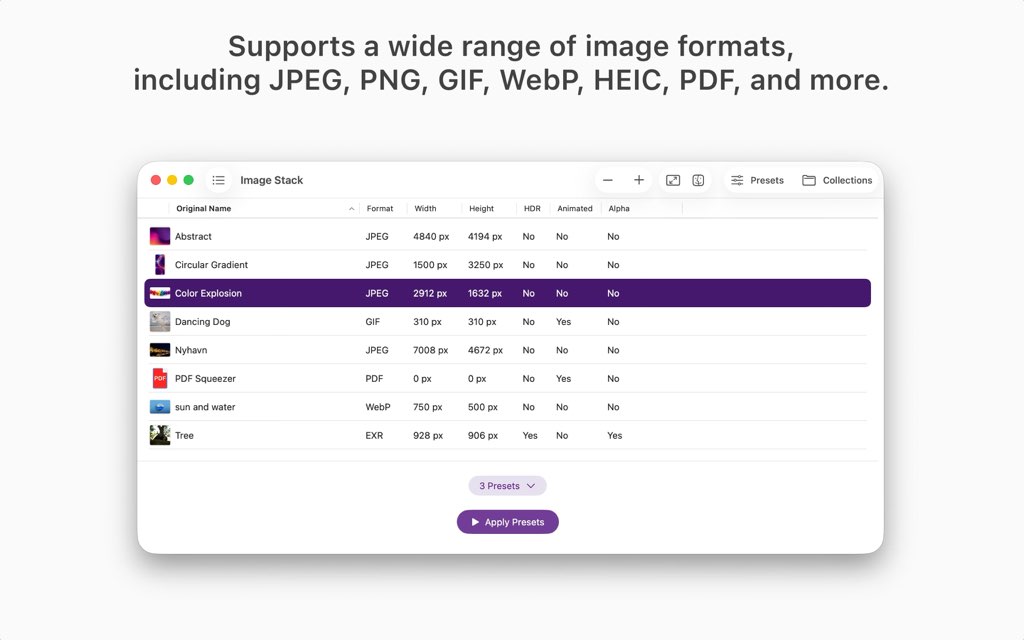
- Image Format Conversion — Convert images into different and modern file formats.
- Modern Format Support — Export images in optimized formats for current platforms.
- Quality Control — Adjust compression and output quality for each format.
- Image Resizing — Change image dimensions to meet specific size requirements.
- Custom Dimensions — Resize images to exact width and height values.
- Aspect Ratio Control — Maintain or adjust proportions as needed.
- File Renaming Tools — Rename images automatically during processing.
- Prefix and Suffix Options — Add text before or after file names.
- Text Replacement — Replace parts of file names in bulk.
- Overlays and Watermarks — Add visual elements on top of images.
- Watermark Support — Protect images by adding logos or text overlays.
- Overlay Positioning — Control where overlays appear on the image.
- Metadata Management — Control image metadata during export.
- Metadata Preservation — Keep original metadata when needed.
- Metadata Removal — Strip metadata for privacy or file size reduction.
- High-Speed Processing — Convert images quickly with optimized performance.
- Ultra-Fast Engine — Process large batches efficiently.
- Parallel Processing — Handle multiple images at the same time.
- Drag-and-Drop Interface — Add images quickly with minimal steps.
- Simple Import — Drag images directly into the app to start processing.
- Minimal Setup — No complex configuration required to begin.
Requirements
Before purchasing or installing, confirm these requirements so Image Stack Mac App runs smoothly on your devices, with compatibility.
- Requires
macOS 15.0or later (as stated for the Full Version) - iCloud is needed for preset sync across devices
- Languages: English, Deutsch
Downloads
Try the core features first so you can verify the workflow, speed, and output consistency on your own images, with confidence.
Get a feel for how Image Stack for Mac fits your process—download the free edition, run a small batch with a preset, and review the exported results by using the download button below in your store listing.
BUY NOW
Image Stack Full Version is available for $4.99. But, you can get Image Stack Mac App with a Lifetime License at a 80% Discount—this offer is available for a limited time, so it’s best to act now while the deal is active, with value.

" />
Convert HEIC/JPEG/PNG/WebP, Resize & Rename at Scale, Add Watermark Overlays, iCloud Presets Sync.
- Please Notes:
- You may be directed to the bundle page, but it is possible to purchase the software individually.
- If you're having difficulty locating the product on the bundle page, please utilize the browser's search feature.
- Get an additional $3 discount on all orders more that $30.
- LEGITIMATE: All apps are authentic and have original licenses obtained directly from the creators via contracts.
- INSTANT ACCESS: Fully activated macOS Apps & Windows Software with instant downloads & license key access.
- Device Activation: 5 Devices
- Minor Updates Included Only
- Lifetime License
Platforms: Mac OS
If you process content daily, deliver assets to clients, manage product photos, or keep a large archive organized, the Full Version is built to remove bottlenecks so you can keep your output steady and predictable—even when the stack gets big, with continuity.

TextSniper: Lifetime License BEST OFFER
![[NEW KEY #22] Giveaway – Aiarty Image Enhancer: Free Lifetime License Code, Free Updates | Upscale, Denoise, Deblur, Enhance AI-Generated Images – for Windows & Mac OS X](https://thesoftware.shop/wp-content/uploads/thumbs_dir/Aiarty-Image-Enhancer-Review-Download-Coupon-Giveaway-247kvjgix3k6vm8i87b1abt5iaid7k3m2lvfqhwoiz6c.png)
Aiarty Image Enhancer GIVEAWAY

Luminar Neo Pro BEST OFFER

HitPaw FotorPea BEST OFFER

Pippit AI BEST OFFER
Image Stack Giveaway
Unavailable at this moment!

To access the giveaway, kindly provide your email address. Please refrain from closing this page after signing in to receive instructions on how to access the offer at no cost.
NOTES:
– All prices shown here are in listed USD (United States Dollar).
– Such promotional programs are subject to change without notice, from time to time in our sole discretion.
– Data may vary based on different systems or computers.
Thanks for reading Image Stack Review & Enjoy the discount coupon. Please Report if Image Stack Discount Coupon/Deal/Giveaway has a problem such as expired, broken link, sold out, etc while the deal still exists.



![[2026 Giveaway #1] Giveaway – MobiKin HEIC to JPG Converter: Free 1-year License Code | Easy-to-use HEIC Photo File to PNG/JPG Converter – for Windows](https://thesoftware.shop/wp-content/uploads/thumbs_dir/MobiKin-HEIC-to-JPG-Review-Download-Discount-Giveaway-rfosmaovwlqug3zpm81w967o5qknpo0wj7ser5ymjc.png)

![[NEW LINK #4] Giveaway – reaConverter 8: Free Serial Number | Ultra-fast Batch Image Converter – for Windows](https://thesoftware.shop/wp-content/uploads/thumbs_dir/ReaSoft-ReaConverter-Pro-Review-Download-Free-Serial-number-Giveaway-rfosnoibytn1jfzcjbl4fbn3n5r41mioe2d56twrdk.png)

