Gievaway – Kaizen Fast Clicker Premium: Free License Key | Fully Customizable Auto Clicker – for Windows

Stop Clicking By Hand – Automate It in Seconds. Get Kaizen Fast Clicker Premium with a License Key For FREE!
Free Full Version!
BUY NOW
Kaizen Fast Clicker Premium normally costs $15. For a limited time, you can get the full version with a free license key through the Giveaway tab below.
Vovsoft AI Automator GIVEAWAY
Ashampoo Action Click GIVEAWAY

Vovsoft Auto Mouse Clicker GIVEAWAY
Software Giveaway – AutoMouse PRO V1.0.6: Free Serial Key | An Easy-to-Use Automatic Mouse Clicker and Recorder Software Tool – for Windows GIVEAWAY

Rofiles GIVEAWAY
RTILA Studio: Lifetime Deal GIVEAWAY
Pabbly ConnectL Lifetime Subscription GIVEAWAY
ASCOMP Synchredible Professional Edition BEST SELLER
Kaizen Fast Clicker Premium Key Giveaway
Available now: Free License Key For a Limited Time!

To access the giveaway, kindly provide your email address. Please refrain from closing this page after signing in to receive instructions on how to access the offer at no cost.

NOTES:
– All prices shown here are in listed USD (United States Dollar).
– Such promotional programs are subject to change without notice, from time to time in our sole discretion.
– Data may vary based on different systems or computers.
Kaizen Fast Clicker Premium Review at a Glance
Manual clicking is slow, inconsistent, and tiring, and it becomes a real bottleneck the moment a task demands hundreds of repetitions in a short window. Gamers grinding idle and clicker titles hit a wall when their hand simply cannot keep pace with what the game rewards. QA testers running repetitive UI checks lose hours to a task a machine could finish in minutes. Anyone trying to keep a laptop from locking during a long download or render ends up babysitting the mouse instead of doing something productive. Kaizen Fast Clicker Premium was built to remove that friction entirely.
What is Kaizen Fast Clicker Premium
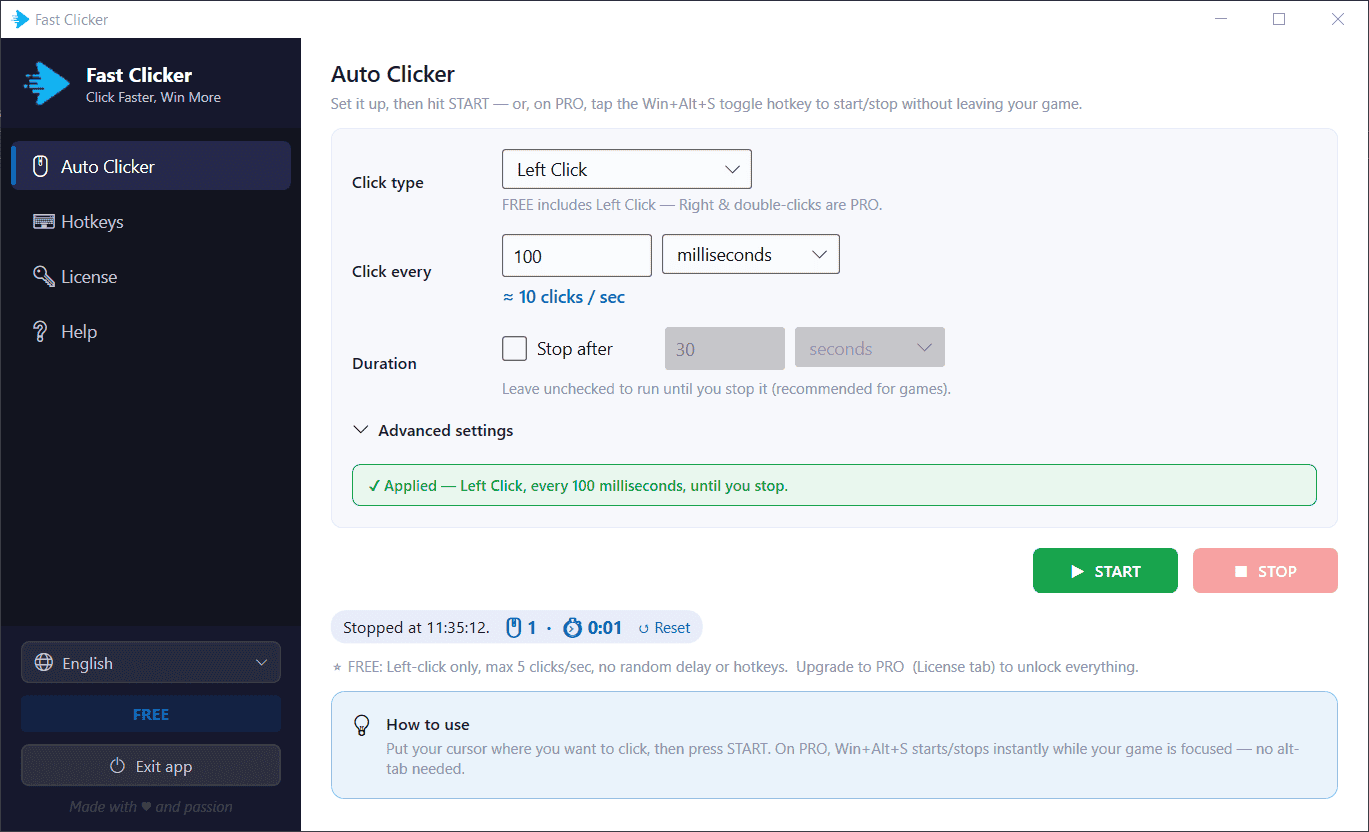
Kaizen Fast Clicker Premium is a native Windows application designed to automate mouse clicking at a precise, user-defined rate. You set the interval between clicks, choose the click type, and either start the process manually or trigger it with a system-wide hotkey. The app is purpose-built rather than bundled with unrelated features, so its interface stays simple: type a number, pick a click type, and go.
It runs quietly in the system tray, uses minimal system resources, and works entirely offline, meaning no data leaves your machine and no internet connection is required after installation. The Premium edition unlocks the full range of speed, click types, timing randomization, and the global hotkey that the free version does not include, making it the complete version of the tool for anyone who needs more than occasional light-duty clicking.
Key Benefits
Below is a breakdown of the practical advantages Kaizen Fast Clicker Premium brings to your daily workflow, whether you are gaming, testing software, or keeping a system active during long unattended jobs.
- Saves time and physical effort – clicking manually for extended periods is tiring and slow; the software sustains a steady rate far beyond human capability, freeing your hand and your attention for other tasks.
- Improves consistency and accuracy – the live clicks-per-second readout and exact millisecond timing remove the guesswork, so every click lands at the same interval without drift or fatigue-driven slowdown.
- Speeds up repetitive testing – QA workflows that once took hours of manual clicking can run unattended with an auto-stop limit, giving testers precise, repeatable results in a fraction of the time.
- Keeps workflow uninterrupted – the global hotkey starts and stops clicking without leaving your game or application, so there is no alt-tabbing, no lost focus, and no broken immersion.
- Adds flexibility for different tasks – four click types and adjustable timing mean the same tool covers gaming, testing, and idle-prevention scenarios instead of requiring separate utilities.
- Reduces detection risk in automated tasks – the randomized delay feature varies timing slightly so repetitive clicking looks less mechanically uniform.
- Protects your privacy and system – fully offline operation with no ads or bundled software means nothing is transmitted and nothing extra installs alongside the clicker.
At its core, this is a high-speed auto clicker application for Windows that lets you type an exact interval – in milliseconds, seconds, or minutes – and watch a live clicks-per-second readout update as you tune it. Instead of guessing at settings or fighting an interface full of unrelated options, you get one focused tool that does a single job with precision: firing clicks at wherever your cursor sits, at the rate you specify, for as long as you need it to run. The app supports rates up to roughly 100 clicks per second in the Premium edition, which is far beyond what any human hand can sustain reliably, and it holds that rate steady for the entire session.
What separates this tool from a generic clicking utility is the level of control layered on top of that core function. You choose between left click, right click, double-left click, and double-right click, so the software adapts to whatever the task actually requires rather than forcing you to work around a single click type. You decide whether it runs indefinitely until you stop it manually – ideal for open-ended gaming sessions – or whether it should fire for a fixed duration and then stop on its own, which suits testing scenarios where you need a precise, repeatable number of clicks. A short start countdown gives you a few seconds to position your cursor exactly where the clicking needs to happen before anything fires, removing the scramble of trying to click and switch windows at the same time.
The global hotkey feature is where the software becomes genuinely practical for gamers and multitaskers. Rather than alt-tabbing out of a game to press a start button, you toggle the clicker on and off from anywhere on your system using a key combination such as Win+Alt+S, and it works even while the app sits hidden in your system tray. Your game or application stays in focus the entire time. If the default combination conflicts with something else on your system, you can rebind it in seconds, and a confirmation check lets you know the shortcut registered correctly with Windows before you rely on it.
Kaizen Fast Clicker Premium benefits a wide range of users. Gamers rely on it to push through repetitive clicker and idle games, automate grinding sequences, and hold a steady click rate for titles like Roblox without fatiguing their hand over long sessions. QA testers and developers use it to drive stress tests and repetitive interface interactions with an exact interval and an automatic stop limit, which saves hours that would otherwise go into manual repetitive clicking. Professionals working with long unattended tasks – renders, downloads, batch processes – use a slow, steady click pattern to keep a system from going idle or locking mid-task. Anyone who values a lightweight, offline, ad-free utility that installs in seconds and does exactly what it promises will find this tool worth adding to their toolkit.
Choosing Kaizen Fast Clicker Premium over a free or generic alternative comes down to reliability and depth of control. The free version caps out at 5 clicks per second on left click only, which is fine for casual testing but limiting for anything demanding. Premium removes that ceiling, adds the click types that many workflows actually need, layers in a randomized delay for less predictable timing, and hands you a global hotkey so the whole workflow feels seamless rather than clunky. It runs fully offline, carries no ads, and installs with none of the bundled extras that often come with free utility downloads – a genuine, focused tool rather than a bloated suite.
Key Features
Below is a comprehensive list of the key features that make the software a valuable addition to your automation toolkit, covering every main capability along with the finer controls built into each one.
- Custom interval control – type the exact time between clicks in milliseconds, seconds, or minutes for precise control over your click rate.
- Live CPS readout – the interface calculates and displays clicks-per-second in real time as you adjust the interval, so you always know your current rate.
- Speeds up to ~100 clicks/sec – Premium removes the free-tier speed cap, giving access to the software’s full performance range.
- Multiple click types – choose from four distinct click behaviors depending on the task at hand.
- Left click – the standard click type, available in both free and Premium editions.
- Right click – a Premium-only click type useful for context menus and right-click-dependent actions.
- Double-left click – a Premium-only option that fires two rapid left clicks per interval for tasks requiring double-click activation.
- Double-right click – a Premium-only option combining rapid right clicks for specialized workflows.
- Cursor-position clicking – clicks fire wherever your mouse cursor currently sits, removing the need to configure fixed coordinates.
- Global hotkey system – a Premium feature that lets you start and stop clicking from anywhere on your system.
- Default Win+Alt+S toggle – one press starts clicking, a second press stops it, without touching the mouse.
- Works while minimized to tray – the hotkey remains active even when the app window is hidden, keeping your desktop uncluttered.
- Fully customizable binding – assign a different key combination if the default conflicts with another program.
- Registration confirmation – a green check verifies the shortcut registered correctly with Windows before you depend on it.
- Random delay – a Premium feature that adds a customizable random amount to each click interval.
- Adjustable variation range – set how much randomness gets added so timing never looks perfectly uniform.
- Reduced detectability – varied timing makes automated clicking harder for anti-automation systems to flag.
- Repeat and click limits – control exactly how long or how many times the clicker runs.
- Run until stopped – ideal for open-ended gaming sessions where you decide when to stop.
- Stop after set duration – tick a box to auto-stop after a defined number of seconds or minutes, useful for controlled testing.
- Start countdown – a short delay before clicking begins.
- Cursor positioning window – the countdown gives you a few seconds to move your cursor to the correct spot before clicks start firing.
- Lightweight and offline design – a small native Windows application built for speed and simplicity.
- Fast installation – the installer completes in seconds with no complicated setup steps.
- No ads or bundled extras – the software installs cleanly with nothing unrelated attached.
- Fully offline operation – no internet connection is required to run the app after installation, keeping your activity private.
- 13-language support – the interface adapts to a wide range of regions and users.
- Supported languages – English, Spanish, Portuguese (Brazil), German, French, Japanese, Italian, Korean, Dutch, Chinese (Simplified), Russian, Vietnamese, and Hindi.
Requirements
Before installing, confirm your system meets the following minimum requirements to run Kaizen Fast Clicker Premium smoothly.
- Operating system – Windows 10 or Windows 11 (64-bit recommended for best performance).
- Internet connection – only required during initial download and license activation; the app runs fully offline afterward.
- Storage space – minimal disk space needed due to the app’s lightweight, native design.
- Permissions – administrator rights may be needed during installation for the global hotkey to register correctly with Windows.
Downloads
Test how Kaizen Fast Clicker Premium performs on your own system before committing to a purchase. Download the free edition below to try left-click automation at up to 5 clicks per second, explore the interface, and confirm it fits your workflow ahead of upgrading.
The free version gives you a genuine feel for the app’s speed, simplicity, and reliability, with no sign-up required and no time limit on how long you can use it. Once you are ready for right click, double click, random delay, full 100-clicks-per-second speed, and the global hotkey, upgrading to Premium takes just a few seconds with your existing installation.
or
Buy now, the price start from:
Thank you for reading Kaizen Fast Clicker Premium review, and enjoy the discount coupon. If you notice any issues with Kaizen Fast Clicker Premium discount coupon, deal, or giveaway—such as an expired offer, broken link, or sold‑out promotion—please let us know while the deal is still available.