Giveaway – Vovsoft Log Analyzer: Free Full Version | Large Log File Viewer and Text Search Software – for Windows

Open and Search Massive Log Files Without the Freeze – Get Vovsoft Log Analyzer with a License Key For Free Today!
You can also get Vovsoft Log Analyzer with a Lifetime License, including free updates and support, at up to 81% off!
✔ Lifetime License. ✔ Free Product Updates ✔ Customer Support
BUY NOW
Vovsoft Log Analyzer is available for $19 as a one-time purchase covering a lifetime license. But you can now get Vovsoft Log Analyzer with our exclusive discount of up to 81% OFF, and this offer is available for a limited time only, so act before the promotional pricing ends.
By purchasing the full license, you unlock every feature without trial restrictions, including unlimited use of the search and live-monitoring functions across as many log files as your work requires. Your purchase includes a lifetime license key delivered immediately after checkout, free access to all future updates for the product, and the ability to activate the software on the computer of your choice. There is no recurring subscription fee involved – a single payment secures long-term, uninterrupted access to the complete toolset described above.
Software Giveaway: Get the full version of Vovsoft Log Analyzer 2.4 for free, including a license key, through the Giveaway tab below.

All VOVSOFT Programs Bundle - Get Universal license key for all Vovsoft applications
- Lifetime access to all VOVSOFT programs (103 software and counting)
- Lifetime license for all software with free updates
- Free support and instant activation of license key
- Full access to all features with no trial limitations or interruptions
- No ads while using the software
Platform: Windows

Large Log File Viewer and Text Search Software | Open, Search & Monitor Multi-Gigabyte Server Logs with Low Memory Usage and Real-Time Live Access
- Lifetime license for 1 PC
- Lifetime free updates
- Commercial use allowed
- Instant activation license key via e-mail.
- No trial limitations.
- No nag screen, no ads.
Platform: Windows
Large Log File Viewer and Text Search Software | Open, Search & Monitor Multi-Gigabyte Server Logs with Low Memory Usage and Real-Time Live Access
- Lifetime license for 5 PCs
- Lifetime free updates
- Commercial use allowed
- Instant activation license key via e-mail.
- No trial limitations.
- No nag screen, no ads.
Platform: Windows
Large Log File Viewer and Text Search Software | Open, Search & Monitor Multi-Gigabyte Server Logs with Low Memory Usage and Real-Time Live Access
- Lifetime license for 10 PCs
- Lifetime free updates
- Commercial use allowed
- Instant activation license key via e-mail.
- No trial limitations.
- No nag screen, no ads.
Platform: Windows
Large Log File Viewer and Text Search Software | Open, Search & Monitor Multi-Gigabyte Server Logs with Low Memory Usage and Real-Time Live Access
- Lifetime license for 30 PCs
- Lifetime free updates
- Commercial use allowed
- Instant activation license key via e-mail.
- No trial limitations.
- No nag screen, no ads.
Platform: Windows
Large Log File Viewer and Text Search Software | Open, Search & Monitor Multi-Gigabyte Server Logs with Low Memory Usage and Real-Time Live Access
- Lifetime license for 100 PCs
- Lifetime free updates
- Commercial use allowed
- Instant activation license key via e-mail.
- No trial limitations.
- No nag screen, no ads.
Platform: Windows
Vovsoft Coupon Code

30% OFF – Sitewide Coupon for All Vovsoft Products Coupon

Giveaway – Vovsoft Text Statistics Analyzer 4.0: Free License Key | Text Counting and Analyzer Software – for Windows GIVEAWAY

Vovsoft Compare Two Lists GIVEAWAY

Vovsoft AI Requester GIVEAWAY

Vovsoft Duplicate File Finder GIVEAWAY

Text Edit Plus: Lifetime License BEST OFFER
Vovsoft Log Analyzer Key Giveaway
Available now: Free License Key For a Limited Time!

To access the giveaway, kindly provide your email address. Please refrain from closing this page after signing in to receive instructions on how to access the offer at no cost.
NOTES:
– All prices shown here are in listed USD (United States Dollar).
– Such promotional programs are subject to change without notice, from time to time in our sole discretion.
– Data may vary based on different systems or computers.
Vovsoft Log Analyzer Review at a Glance
Opening a large log file with a standard text editor is one of the most common frustrations faced by anyone who works with servers, databases, or operating systems. A file that grows past 1GB, or one that is currently locked because a running application is actively writing to it, will often cause conventional tools like Notepad or WordPad to slow to a crawl, become unresponsive, or fail to open altogether. When a production issue needs immediate attention, this kind of delay is more than an inconvenience – it directly extends downtime and adds unnecessary stress to an already urgent situation.
Vovsoft Log Analyzer addresses this exact problem. It is a dedicated file viewer and analysis tool engineered from the ground up to examine large text files that fall outside the practical limits of everyday software.

What is Vovsoft Log Analyzer
Vovsoft Log Analyzer is a Windows-based file viewer and search utility built to open, read, and analyze extremely large text files, including live server logs and database dumps. It is compatible with Windows 11, Windows 10, Windows 8/8.1, Windows 7, and Windows Vista in both 32-bit and 64-bit configurations, making it accessible across most current and legacy Windows environments used in enterprise and small-business IT settings.
At its core, the software functions as a specialized alternative to standard text editors for one specific use case: files that are too large, too active, or too encoding-inconsistent for conventional tools to handle reliably. Instead of attempting to load a file entirely into memory, it streams data from the disk in manageable segments, which keeps the application responsive regardless of file size. This design choice is what allows Log Analyzer to comfortably display files with up to 100,000,000 lines of text without the lag or crashes typically associated with oversized documents.
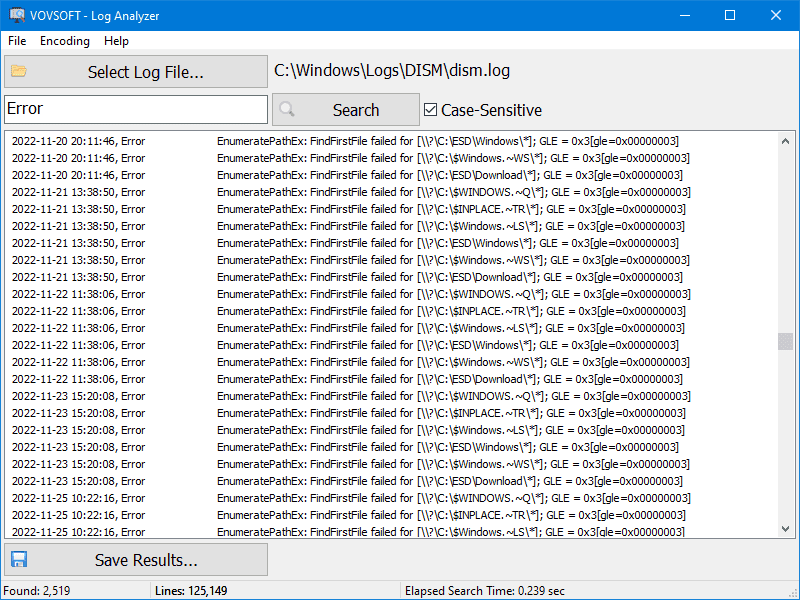
The included search function allows users to enter a value and immediately locate matching entries within the file, whether that means an HTTP error code, a specific timestamp, a user ID, or an IP address tied to suspicious network activity. Once relevant entries are found, results can be saved for further review, documentation, or sharing with a broader team. Combined with support for live file access and multiple character encodings, Vovsoft Log Analyzer functions as a complete, self-contained solution for anyone whose job involves regularly opening and searching large text-based records.
Key Benefits
Below is an overview of the practical advantages Vovsoft Log Analyzer brings to daily IT operations and troubleshooting work.
- Faster incident response: Open massive log files in moments instead of waiting through long load times, which directly reduces the time spent diagnosing server or application failures.
- Reduced system strain: Low memory consumption means other critical applications, virtual machines, and monitoring tools keep running normally in the background.
- Uninterrupted live monitoring: Real-time access to actively written logs removes the need to pause services or duplicate files just to check recent activity.
- Consistent readability: Broad encoding support prevents garbled text regardless of which system or platform originally generated the log file.
- Simplified auditing: A dedicated search tool makes it straightforward to trace specific errors, user actions, or network events across enormous datasets.
Rather than loading an entire document into system memory the way most text editors do, Log Analyzer relies on buffered file stream and memory caching technology to pull data directly from the disk as needed. This approach keeps RAM consumption low even when the file being examined is measured in gigabytes rather than megabytes, which means the rest of your system continues to run smoothly while the log file is open.
A log file itself is simply a chronological record of events generated by an operating system, a server, or a software application. These records typically include error messages, system events, user interactions, and network activity, and they form the backbone of most troubleshooting and monitoring workflows. IT professionals, system administrators, and developers depend on this data to diagnose system errors, track server health, and identify opportunities to optimize performance. The challenge is that because logs capture continuous activity, they accumulate quickly and can reach sizes that overwhelm general-purpose text editors within days or even hours of active use.
Vovsoft Log Analyzer was designed with this reality in mind. It supports a range of character encodings, including No Encoding (Raw), ANSI, UTF-8, and Unicode, so files generated by different operating systems, programming environments, and legacy applications all display as readable text rather than corrupted symbols. It can also safely open logs that are currently being written to in real time, which removes the need to stop a service or copy a file elsewhere just to see recent entries. With support for displaying up to 100,000,000 lines and a built-in search function for locating specific terms quickly, the software is suited to daily monitoring tasks as well as one-time deep dives into historical data.
Who benefits most from this software?
System administrators managing server infrastructure, developers debugging applications with verbose logging, network security teams auditing access records, database administrators reviewing large dump files, and any IT professional who regularly works with text-based records that exceed typical file size expectations. Anyone who has experienced a text editor crash mid-troubleshooting session will find immediate value in a tool built specifically to avoid that failure point.
Why choose Log Analyzer over a standard text editor?
The answer comes down to purpose-built engineering. General text editors are designed for everyday documents, not multi-gigabyte technical records, and they were never optimized for the memory demands or file-locking scenarios that server logs commonly present. Log Analyzer was created to solve that specific gap, offering a lightweight, focused utility instead of a bloated general-purpose application.
Key Features
Below is a comprehensive list of the key features that make the software a valuable addition to your IT and troubleshooting toolkit:
- Massive File Handling: Opens and displays text files containing up to 100,000,000 lines without freezing the application.
- Smooth Scrolling: Navigate through millions of entries with responsive scrolling and no input lag.
- Instant Load Times: Files open almost immediately rather than requiring lengthy processing before content appears.
- Buffered File Stream Technology: Reads data directly from the disk in segments instead of loading the full file into memory.
- Low RAM Usage: Keeps memory consumption minimal even when working with files that are tens of gigabytes in size.
- Background Stability: Other running applications remain unaffected by the demands of viewing a large log file.
- Memory Caching: Stores recently accessed data temporarily to speed up repeated navigation within the same file.
- Quicker Repeat Access: Returning to previously viewed sections of a file loads faster after the initial pass.
- Real-Time Live Log Access: Safely opens files that are currently locked or being written to by another running process.
- No Service Interruption: Monitor active logs without stopping the server or application generating them.
- Continuous Data View: New entries can be reviewed as they are written, supporting live monitoring workflows.
- Multi-Encoding Support: Reads files formatted in several different character encoding standards.
- No Encoding (Raw): Suited for unformatted or unstandardized output from custom applications.
- ANSI: Compatible with legacy Windows applications and older server environments.
- UTF-8: Matches the standard encoding used across modern web and Linux/Unix server logs.
- Unicode: Supports internationalized and double-byte character log formats.
- Built-In Search Function: Locates specific text values within the file quickly, regardless of overall file size.
- Direct Navigation: Jumps to matching entries without requiring a manual scroll through unrelated content.
- Save Results Option: Exports search findings to a separate file for documentation or team review.
- Simple Four-Step Workflow: Streamlines the process of opening and searching a log file from start to finish.
- Select Log File: Choose the target file directly from the interface.
- Enter Search Value: Type in the term, code, or keyword being investigated.
- Run Search: Retrieve matching entries with a single click.
- Save Results: Store the output for later reference when needed.
Requirements
- Operating System: Windows 11, Windows 10, Windows 8/8.1, Windows 7, or Windows Vista
- Architecture: 32-bit or 64-bit systems supported
- Sufficient disk space for the target log files being analyzed (the software itself has a small footprint)
- No specialized hardware required; standard desktop or laptop configurations are sufficient due to the software’s low memory design
Downloads
Explore how Vovsoft Log Analyzer performs with your own files before making a purchase decision. Download the free trial edition below and test its speed, search accuracy, and live file access directly on your own multi-gigabyte log files to confirm it fits your daily workflow.
The trial version allows you to evaluate the core functionality, including opening large files, running searches, and reviewing how the software handles live logs, so you can judge its performance in your own environment rather than relying on descriptions alone.
DOWNLOADS
Installer/Portable
or
Buy now, the price start from:
Thank you for reading Vovsoft Log Analyzer review, and enjoy the discount coupon. If you notice any issues with Vovsoft Log Analyzer discount coupon, deal, or giveaway—such as an expired offer, broken link, or sold‑out promotion—please let us know while the deal is still available.