

60% Off – PasteJet: Lifetime License | Powerful AI‑Powered Clipboard Manager – for macOS

Stop switching tabs and rewriting text: with PasteJet, your entire clipboard history and AI‑assisted answers are just a hold of Command+V away. Get PasteJet with a Lifetime License at a 60% Discount now and make your Mac workflow faster, cleaner, and smarter.
✔ Lifetime License. ✔ Free Product Updates ✔ 24×7 Customer Support
PasteJet Review at a Glance
Every day on macOS, you copy and paste more than you realize. A snippet of code, a link, a paragraph from a document, an image from a design file—each of these gets overwritten the moment you copy something new. Traditional clipboard managers either live in menus, add clutter, or force you to leave your app to search history.
That’s where PasteJet changes the game.
What is PasteJet?
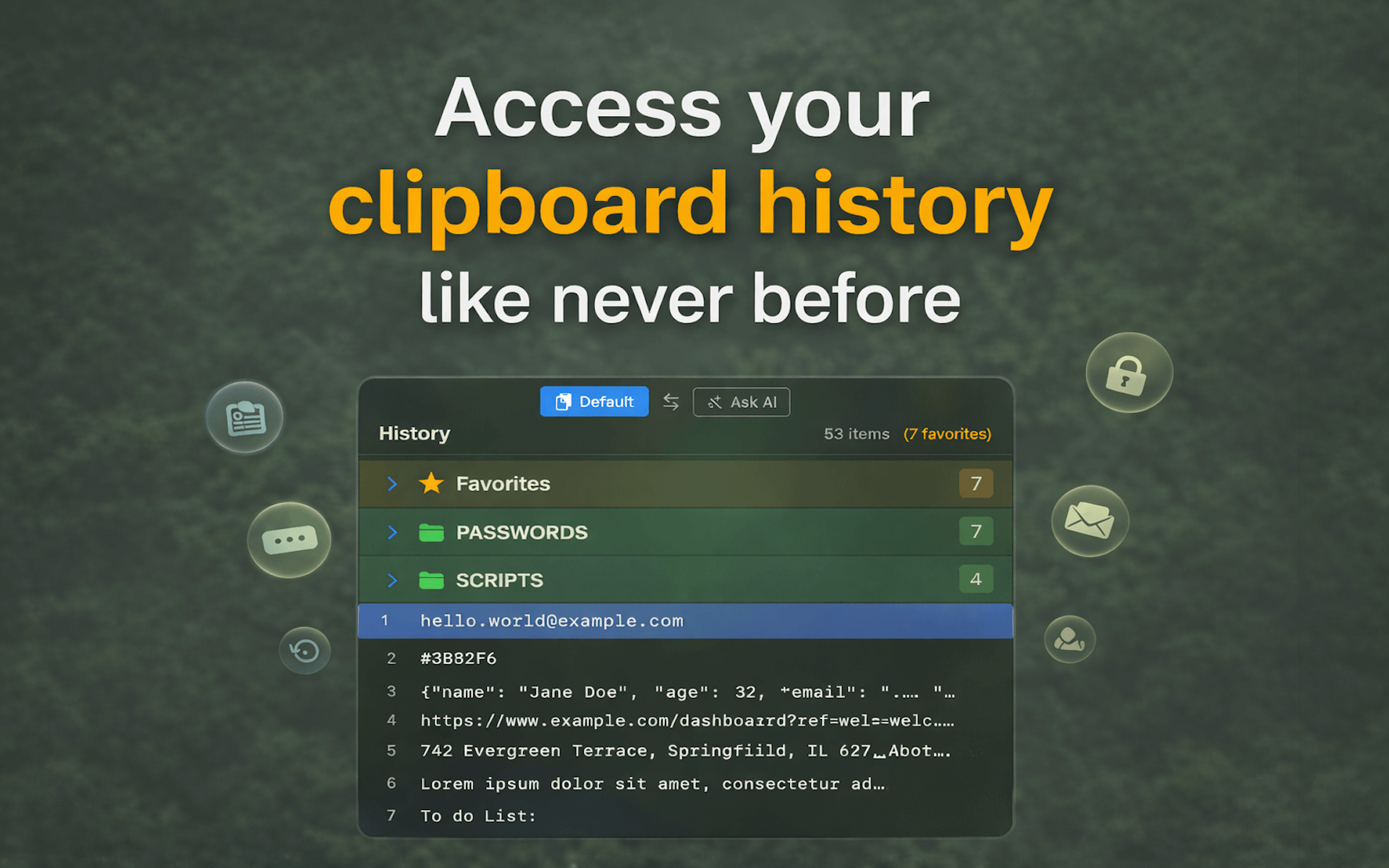
PasteJet is a macOS‑native clipboard manager that automatically tracks everything you copy and lets you access your entire clipboard history with a brief hold of Command+V. Instead of a static “paste” action, holding the shortcut for about 200ms opens a floating popup at your cursor, showing your clipboard history, favorites, and AI‑powered answers—without leaving your current application.

PasteJet works across text, rich text, images, files, folders, and even multi‑file selections, and it preserves custom formats from popular macOS apps like Figma, Sketch, Adobe XD, VS Code, and FileMaker. This means when you copy something complex, you can paste it back in the same format, instead of losing layout, styling, or metadata.
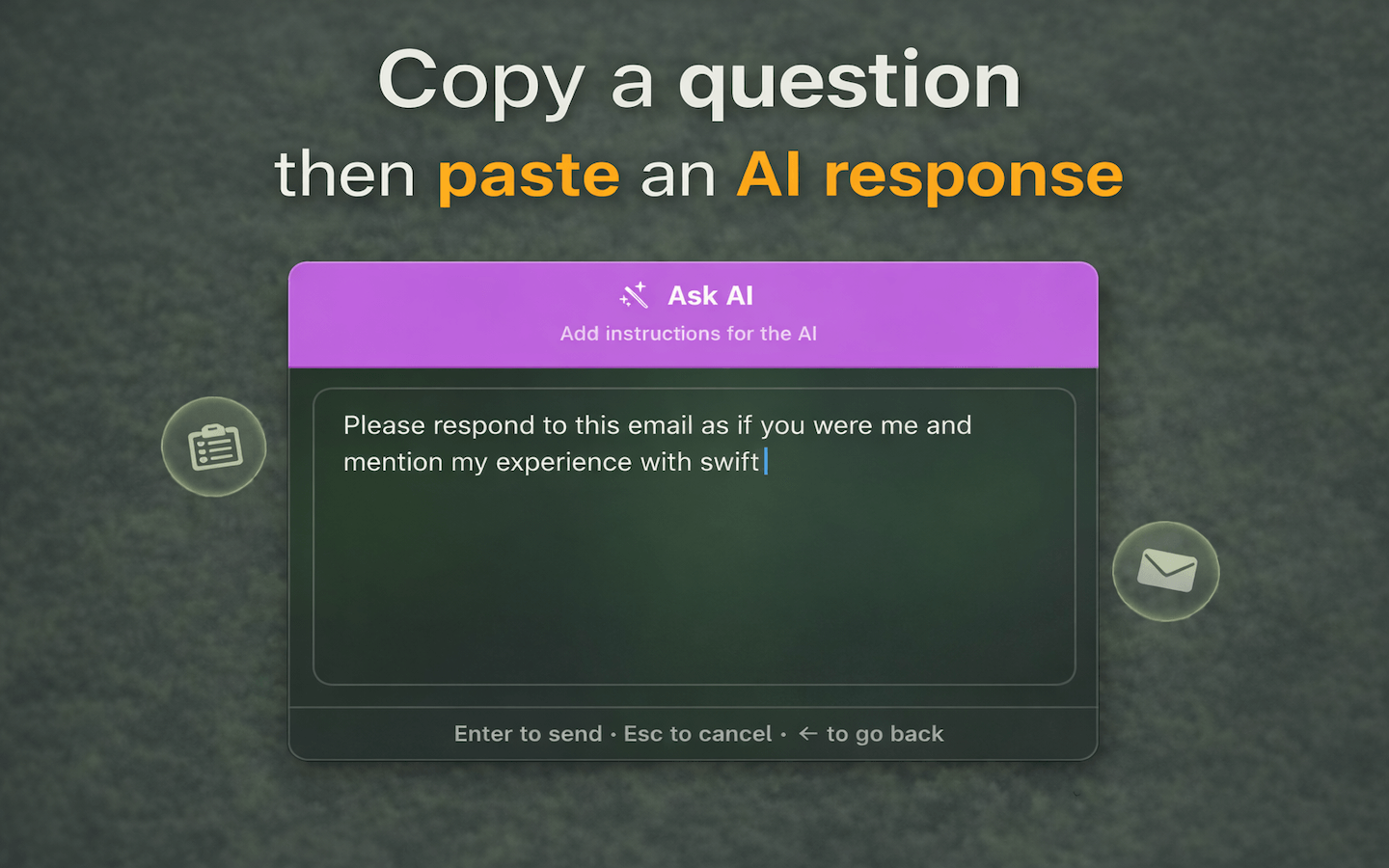
Beyond basic clipboard history, PasteJet integrates an AI assistant directly into the popup. You can ask AI to summarize, translate, fix grammar, or answer questions about any copied text, all without opening a browser or external app. The result is a single keyboard shortcut that unifies copying, history, and AI into one fluid gesture.
PasteJet is designed for macOS 14 (Sonoma) and later, runs as a universal binary on Apple Silicon (M1–M4) and Intel Macs, and works system‑wide with any app—whether you’re coding, designing, writing, browsing, or chatting.
Key Benefits
PasteJet gives you three major advantages that change how you interact with your Mac:
- Instant access to your entire clipboard history
Instead of copying the same snippet over and over, hold Command+V and choose any recent item directly from your cursor. This reduces repetition, saves time, and keeps your workflow inside the app you’re already using. - AI‑assisted answers without tab switching
With Ask AI, you can select any copied question or text and send it to an AI to get a summary, translation, grammar fix, or custom prompt response. The result appears in the PasteJet popup, ready to paste into your document, chat, or code editor. - Smart organization and favorites
PasteJet keeps up to 500 clipboard items, and lets you favorite up to 10 items so they stay pinned at the top of the history. You can star items from the Dashboard or directly while copying by holding Command+C, ensuring important snippets never get pushed out. - Privacy‑first, local storage design
By default, all clipboard data stays on your Mac, stored locally and never uploaded. Only the Ask AI feature requires external communication, giving you full control over what leaves your machine. - Muscle‑memory‑friendly shortcuts
PasteJet uses Command+V to browse history, Command+Shift+V to paste without formatting, and Command+C shortcuts to organize or favorite items. Because these are simple extensions of native shortcuts, you don’t need to learn complex key chords to get started. - System‑wide, macOS‑native performance
PasteJet runs as a native macOS app on both Apple Silicon and Intel Macs, works with any application, and integrates smoothly into the system appearance with Dark, Light, Auto, Space, Terminal, and Retro Blue themes.
These benefits make PasteJet especially useful for developers, designers, writers, power users, and anyone who copies and pastes frequently on macOS.
Features
PasteJet is a powerful clipboard manager for macOS 14.6+ that runs natively and silently in the background, tracking everything you copy and letting you browse your history with a simple hold of Command+V. Instead of losing clipboard items after one paste, you can instantly recall them, pin important ones, and even ask AI for answers—directly from your clipboard popup. No more hunting through browser tabs, documents, or apps to find that last copy.
Built specifically for Apple Silicon and Intel Macs, PasteJet respects your privacy: all standard clipboard data stays on your Mac, stored locally and never sent to any server. The only exception is the optional Ask AI feature, which sends text securely to an AI service to deliver summaries, translations, or custom‑prompt responses right inside PasteJet. With six themes, 500‑item history, and system‑wide compatibility, PasteJet becomes a seamless, almost invisible upgrade to how you work on macOS.
Below is a comprehensive list of the key features that make PasteJet a valuable addition to your macOS workflow:
- Clipboard History (500 items)Tracks your last 500 clipboard entries, including text, rich text, images, files, folders, and multi‑selections, so you can recall anything you’ve copied recently.
- Automatic tracking in the backgroundWorks silently once enabled, indexing new clipboard items without prompting or interrupting your workflow.
- Searchable historyLets you quickly filter and find specific items by typing into the search field inside the Dashboard.
- Favorites with sticky pinsLets you mark up to 10 items as favorites, ensuring they stay at the top of the history and never get removed by new additions.
- Manage favorites from the DashboardClick the star icon next to any clipboard item to add or remove it from Favorites.
- Quick favorite while copyingHold Command+C after copying to organize or favorite the item directly in one gesture.
- Command+V popup history at the cursorOpens a floating popup right at your cursor when you hold Command+V for about 200ms, letting you browse and select any item to paste instantly.
- Muscle‑memory navigationUse arrow keys (up/down) to move through items and press Enter or release V to paste the selected item.
- Dismiss without pastingPress Escape to close the popup and continue your original task unchanged.
- System‑wide compatibilityWorks with any macOS application, including code editors, design tools, browsers, email clients, and chat apps.
- Support for custom app formatsPreserves formats from apps like Figma, Sketch, Adobe XD, VS Code, and FileMaker, so you can copy and paste faithfully without losing data.
- Image, file, and multi‑file handlingTracks images, files, folders, and multi‑file selections, keeping them accessible in the history.
- Ask AI for instant text processingSends selected clipboard text to an AI for processing, giving you answers, summaries, or transformations directly in the PasteJet popup.
- Toggle into Ask AI from the popupWhile the history popup is open, press left or right arrow to switch into Ask AI mode and select an item to process.
- Custom prompts and use casesConfigure recurring prompts in Settings for tasks like summarizing paragraphs, translating text, fixing grammar, or creating code comments.
- Multiple themes and visual customizationOffers six themes that fit different workflows and moods, all adjustable from the Dashboard settings.
- Light and Dark themesStandard light and dark modes for common use.
- Auto (follow system)Automatically switches between Light and Dark based on your macOS system appearance.
- Space (deep black)Deep‑black theme with purple accents for a modern, focused look.
- Terminal (green‑on‑black)Classic terminal‑style theme for developers and coders.
- Retro Blue (vintage blue)Vintage‑inspired blue and orange accents for a nostalgic feel.
- Local‑first privacy and securityDesigned to keep your clipboard data on‑device, with minimal external traffic.
- Local storage of clipboard historyAll tracked clipboard items are stored locally on your Mac, with no automatic upload to any server.
- Separate handling for Ask AIOnly text sent to the Ask AI feature leaves your device, and you can disable this feature entirely if desired.
- Accessibility‑based shortcut integrationUses Accessibility permissions to monitor keyboard shortcuts and trigger the popup, without reading or storing unrelated content.
- No extra permissions requiredBeyond Accessibility for hotkeys, PastJet does not request access to files, messages, or other system data.
- Fast startup and universal binary supportBuilt as a universal binary for macOS 14.0 (Sonoma) and later, optimized for both Apple Silicon (M1/M2/M3/M4) and Intel Macs.
- Native performanceRuns directly on the native architecture of your Mac for low latency and smooth operation.
- System tray and Dashboard integrationProvides quick access to settings, themes, and clipboard history from the menu bar.
Requirements
Before installing PasteJet, make sure your Mac meets these requirements:
- macOS 14.0 (Sonoma) or later
- Apple Silicon (M1/M2/M3/M4) or Intel Mac (universal binary support)
- At least 100 MB of free storage (for the app and clipboard cache)
- Accessibility permission (required to monitor Command+V and related shortcuts)
- Internet connection (optional, for Ask AI feature)
PasteJet is a stand‑alone macOS app and does not require any additional frameworks or subscriptions to use basic clipboard and history features.
BUY NOW
PasteJet is available for a competitive one‑time price: $4.99 (lifetime license). But you can now get PasteJet with an exclusive 60% discount sale, available for a limited time.

" />
Powerful AI‑Powered Clipboard Manager for macOS 14.6+ | Smart History, System‑Wide Command‑V Access, Favorite Items, Custom Themes, Local Storage
- Please Notes:
- You may be directed to the bundle page, but it is possible to purchase the software individually.
- If you're having difficulty locating the product on the bundle page, please utilize the browser's search feature.
- Get an additional $3 discount on all orders more that $30.
- LEGITIMATE: All apps are authentic and have original licenses obtained directly from the creators via contracts.
- INSTANT ACCESS: Fully activated macOS Apps & Windows Software with instant downloads & license key access.
- Device Activation: 1 Device
- The license is for personal use only
- The license may be activated on 1 machine
- Redistribution, resale, or sharing of the software is not permitted.
- You may not modify, decompile, or reverse-engineer the software.
- Updates included: Free major and minor updates
- The software is provided 'as is' without warranty of any kind.
- Support is included for active versions of the app.
- Major & Minor Updates Included
- Lifetime License
Platforms: Mac OS X

Rocket Typist BEST OFFER

Dock Star BEST OFFER

DoneIt BEST OFFER

Fluent Mac App BEST OFFER

TextSniper: Lifetime License BEST OFFER
PasteJet Mac App Key Giveaway
Unavailable at this moment!

To access the giveaway, kindly provide your email address. Please refrain from closing this page after signing in to receive instructions on how to access the offer at no cost.
NOTES:
– All prices shown here are in listed USD (United States Dollar).
– Such promotional programs are subject to change without notice, from time to time in our sole discretion.
– Data may vary based on different systems or computers.
Thanks for reading PasteJet Review & Enjoy the discount coupon. Please Report if PasteJet Discount Coupon/Deal/Giveaway has a problem such as expired, broken link, sold out, etc while the deal still exists.





![[NEW KEY #2] Giveaway – iTop Easy Desktop PRO v4.x: Free License Key | Full Version – for Windows](https://thesoftware.shop/wp-content/uploads/thumbs_dir/iTop-Easy-Desktop-PRO-Review-Download-Discount-Coupon-rfosnoibytn1jfzcjbl4fbn3n5r41mioe2d56twrdk.png)

