Giveaway – ThunderSoft GIF Editor 5.7.1: Free Registration Code | Easy GIF Animation Editor & Maker for Windows

Edit, Create, and Perfect Every GIF Animation in Seconds — Get ThunderSoft GIF Editor 5.7.1 full verison with a License Key for FREE Today and Take Full Control of Your GIF Files!
Free Full Version!
ThunderSoft GIF Editor Review at a Glance
If you have ever tried to edit a GIF file using generic image editors, you already know the frustration: choppy frame previews, broken timing, washed-out colors after saving, and no easy way to add your own branding. Most tools simply were not built for the unique demands of animated GIF editing — and that forces users to waste hours on workarounds or settle for lower-quality results.
ThunderSoft GIF Editor was designed specifically to solve these problems, giving every user — from beginners to experienced designers — a dedicated, lightweight, and highly capable GIF editing solution for Windows.
What Is ThunderSoft GIF Editor?
ThunderSoft GIF Editor is a purpose-built desktop application for Windows (compatible with Windows XP, Vista, 7, 8, 8.1, 10, and 11) that lets you open, preview, edit, and export GIF animation files with precision and ease. Unlike all-purpose image editors that treat GIFs as an afterthought, this tool centers entirely on frame-by-frame control, giving you a real-time view of every frame in your animation alongside a full suite of editing tools.
Whether you want to remove a few unwanted frames, drop in your own logo, resize the output for a specific platform, or build a brand-new GIF from a folder of images, ThunderSoft GIF Editor handles every task cleanly and intuitively.
The software keeps original image quality as much as possible throughout the editing process, which means your output GIFs look sharp rather than degraded after each save. A standard license also removes the ThunderShare logo that appears on the last frame in the trial version, giving your output files a fully clean, professional finish — ideal for business use, social media content, tutorials, and personal projects alike.
Key Benefits
ThunderSoft GIF Editor delivers tangible advantages that make it the right choice for anyone who works with animated GIF files regularly. Here is why so many Windows users rely on it:
- Complete frame-level control — preview every single frame individually, so you know exactly what your animation looks like before exporting
- Non-destructive workflow — the editor preserves original image quality as much as possible, avoiding the quality loss that comes from repeated saves in generic tools
- Fast, intuitive frame management — add, remove, and reorder frames without navigating complex menus; right-click shortcuts and frame-number navigation save significant time on large GIFs
- Full branding support — insert custom text on specific frames and add your own logo overlay directly inside the editor, perfect for watermarking or branded content creation
- Flexible size and timing controls — change GIF dimensions, set replay count, and fine-tune each frame’s duration from a minimum of 3 to a maximum of 1000 (where 100 = 1 second), giving you precise animation speed control
- Built-in GIF maker — create GIF animations directly from JPG, BMP, and PNG image files without needing a separate application
- Broad Windows compatibility — runs on everything from Windows XP through Windows 11, making it accessible across both legacy and modern systems
- Lightweight and fast — a compact installation footprint means the editor launches quickly and runs without slowing down your system
Features
Below is a comprehensive list of the key features that make the software a valuable addition to your needs:
- Frame Preview — View every frame of a GIF file in real time before making any edits.
- Individual frame display: Scroll through each frame of the animation and inspect its visual content in full detail.
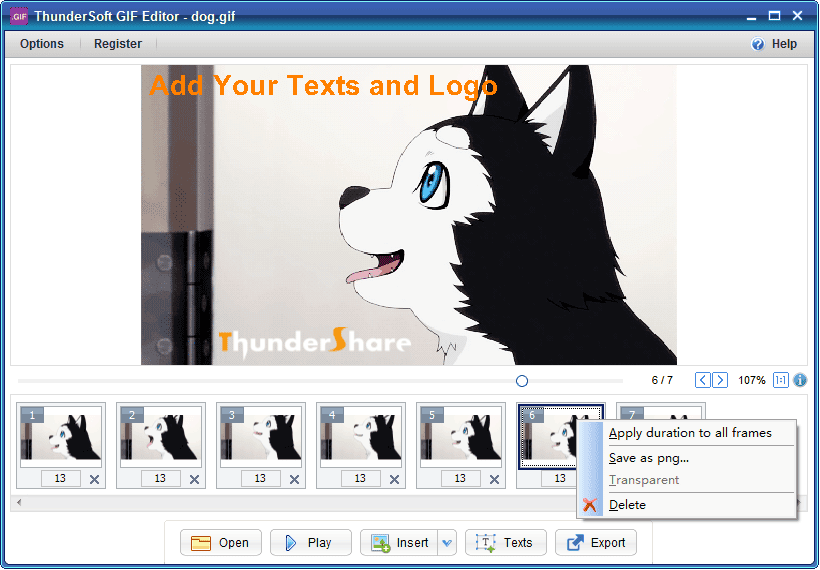
- Quick frame navigation: Click the frame counter field, type a specific frame number, and press Enter to jump directly to that frame — no scrolling through hundreds of frames manually.
- Save frames as PNG: Export any specified frame directly as a high-quality PNG image file for use outside the GIF.
- Frame Management — Add or remove frames to reshape the structure and timing of any GIF animation.
- Remove unwanted frames: Select and delete individual frames or groups of frames to trim unnecessary content from your GIF.
- Add custom image frames: Import your own JPG, BMP, or PNG pictures directly as new frames, inserting them at any position in the animation sequence.
- Duration Control — Adjust the playback speed of individual frames or the entire animation at once.
- Per-frame duration setting: Set a unique display duration (range: 3–1000; value 100 = 1 second) for each individual frame.
- Apply duration to all frames: Right-click any frame and choose “Apply duration to all frames” to instantly apply a single duration value across the entire GIF, saving significant time on long animations.
- Text Overlay — Add readable, styled text to any frame within the GIF.
- Multi-text support: Place multiple independent text elements on a single frame, each with its own positioning, size, and styling.
- Frame-specific targeting: Apply text to specific frames only, keeping other frames clean and untouched.
- Palette rebuild option: If the output text color does not match your selection due to the original GIF’s limited palette, enable the “Rebuild Palette” option to force the correct color — note that this may slightly affect original image quality.
- Logo Insertion — Embed a custom image logo directly into the GIF.
- Persistent logo overlay: Add your brand logo, watermark, or icon to the GIF so it appears consistently across the animation.
- Logo positioning control: Place the logo at your preferred location within the frame canvas.
- GIF Resizing — Change the pixel dimensions of the output GIF file.
- Custom output dimensions: Specify a new width and height to resize the GIF to fit any platform requirement, from messaging apps to web banners.
- Proportional scaling: Maintain consistent visual output while changing the file size.
- Replay Settings — Control how many times the GIF loops when played.
- Set replay count: Define the exact number of times the GIF animation repeats — or set it to loop indefinitely.
- Force Rebuild GIF Option — An advanced setting for users who need full frame reconstruction.
- Frame-level rebuild: Enabling this option forces the editor to rebuild every frame’s image data from scratch. Normally this should be left unchecked unless you are troubleshooting output rendering issues.
- GIF Maker (Create from Images) — Build a brand-new GIF animation from a collection of static image files.
- Multi-format image import: Load JPG, BMP, and PNG files as source material for your animation.
- Per-frame duration assignment: Set individual display durations for each image frame as part of the creation process.
- Quality-preserving output: The tool keeps the original image quality as much as possible when compiling frames into the final GIF file.
Requirements
To run ThunderSoft GIF Editor, your system should meet the following minimum requirements:
- Operating System: Windows 11, Windows 10, Windows 8.1, Windows 8, Windows 7, Windows Vista, or Windows XP
- Processor: Any standard x86 or x64 processor
- Storage: Minimal disk space required (compact installation)
- Display: Standard screen resolution supported
- Internet: Required for activation and license verification
Downloads
Ready to see ThunderSoft GIF Editor in action on your own GIF files? The trial version is fully functional so you can test the frame preview, editing tools, duration controls, and GIF maker features immediately after installation — no commitment required.
Start working with your GIF files right away by downloading the free trial version using the button below.
The trial output includes a ThunderShare logo on the last frame, which is removed automatically when you activate a standard license.
BUY NOW
ThunderSoft GIF Editor is available for $19.99. With our exclusive software Giveaway, you can get ThunderSoft GIF Editor 5.7.1 full verison with a license key for free in the Giveaway tab below— but this offer is available for a limited time only, so act now before the deal expires!

Video to GIF BEST OFFER

Coolmuster GIF Animator GIVEAWAY
Coolmuster PDF to JPG Converter GIVEAWAY

Video to Picture Converter BEST OFFER

30% Off + Free Gift: Duplicate Photo Cleaner – Make Room For Your Holiday Photos BEST SELLER

Renderforest BEST OFFER

PixioGraphics: Full Commercial License BEST OFFER

Save Up to 95% on Steve AI – Lifetime Access – AI-Powered Video Creator & Animation Maker BEST OFFER

Explaindio BEST OFFER

Remove Logo Now GIVEAWAY
ThunderSoft GIF Editor Giveaway
Available now: Free License Key for a Limited Time!
To access the giveaway, kindly provide your email address. Please refrain from closing this page after signing in to receive instructions on how to access the offer at no cost.

NOTES:
– All prices shown here are in listed USD (United States Dollar).
– Such promotional programs are subject to change without notice, from time to time in our sole discretion.
– Data may vary based on different systems or computers.
Thanks for reading ThunderSoft GIF Editor Review & Enjoy the discount coupon. Please Report if ThunderSoft GIF Editor Discount Coupon/Deal/Giveaway has a problem such as expired, broken link, sold out, etc while the deal still exists.


![[2026 Giveaway #4] Giveaway – MobiKin HEIC to JPG Converter: Free 1-year License Code | Easy-to-use HEIC Photo File to PNG/JPG Converter – for Windows](https://thesoftware.shop/wp-content/uploads/thumbs_dir/MobiKin-HEIC-to-JPG-Review-Download-Discount-Giveaway-rfosmaovwlqug3zpm81w967o5qknpo0wj7ser5ymjc.png)