Capture full webpages, preserving every detail including layout, images, CSS, and dynamic content. Get ArchiveKit with a License Key For Free today and never lose an important webpage again
You can also get an ArchiveKit Lifetime License with up to 70% off, including free upgrades and ongoing support.
✔ Lifetime License. ✔ Free Product Updates ✔ 24×7 Customer Support ✔ 30-day Money-back Guarantee.
ArchiveKit Review at a Glance
Every day, valuable webpages disappear — articles get deleted, social media posts are removed, competitor landing pages change without warning, and research resources go offline. Whether you are a researcher relying on specific studies, a marketer tracking competitors, or a professional keeping compliance records, losing access to a webpage at a critical moment can set you back significantly. The internet is not permanent, and most users have no reliable way to save and revisit web content exactly as it was when they first saw it. Standard browser bookmarks only save the link, not the page itself — and when the page changes or disappears, the bookmark becomes useless. ArchiveKit was built to solve this problem completely.
What is ArchiveKit?
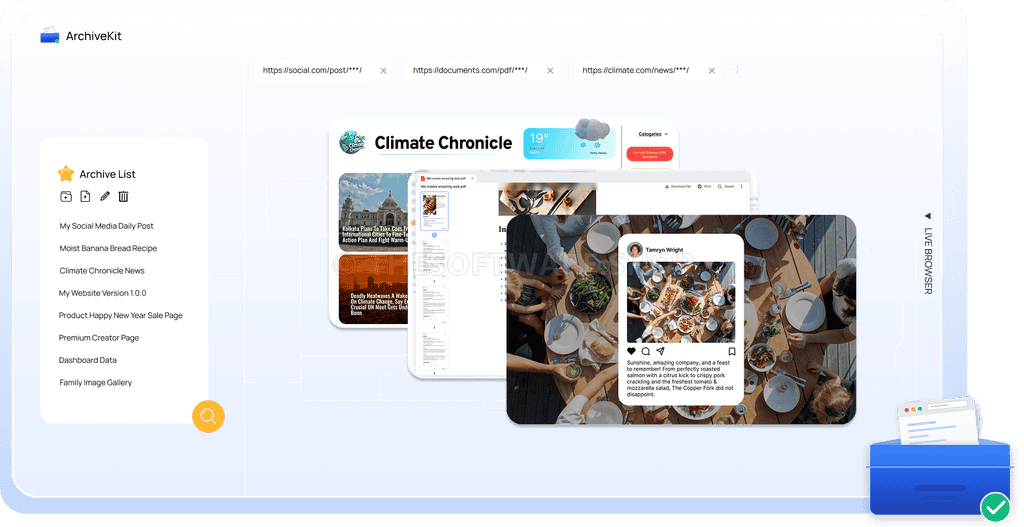
ArchiveKit is a professional-grade web archiving software that lets you save full webpages exactly as they appear, capturing every element including text, images, GIFs, CSS styles, fonts, page structure, and even dynamic and interactive content. Unlike simple screenshot tools or basic bookmarking apps, ArchiveKit stores a fully functional offline copy of any webpage, so you can open and interact with it anytime — even without an internet connection or if the original site has gone offline entirely.
ArchiveKit supports most modern websites, including those built with JavaScript-heavy frameworks and dynamic content. Files are stored locally or in your chosen storage location, giving you full control over your data. With its built-in organization system using folders and a powerful keyword-based search feature, ArchiveKit functions as a personal, fully searchable web archive that scales with your needs — from a handful of saved pages to a large, structured library of thousands of archived resources.
Key Benefits
ArchiveKit delivers real, practical advantages that make it a must-have tool for anyone who works with web content regularly. Here is why users and professionals across industries rely on ArchiveKit:
Permanent, Reliable Access to Web Content
Once a page is archived in ArchiveKit, it is permanently accessible whenever you need it. Even if the original website is taken down, the content is edited, or the URL stops working, your archived copy remains fully intact and available offline. This gives you a safety net that no bookmark or screenshot can provide.
Pixel-Perfect Page Preservation
ArchiveKit does not just save raw text — it captures the complete visual and functional experience of a webpage, including layout, design elements, embedded media, and interactive components. What you saved is exactly what you see when you open it later, with no degradation or missing elements.
One-Click Simplicity
There are no complicated workflows or technical steps required. ArchiveKit captures entire webpages with a single click, making it accessible for everyday users, professionals, and technical teams alike. The process is fast, accurate, and requires no manual intervention.
Full Support for Dynamic and Login-Protected Pages
Many archiving tools fail on modern websites that load content dynamically with JavaScript, or pages that require a login to access. ArchiveKit includes a Live Browser Mode that lets you log in to any website within the app and archive private or dynamic content just as easily as any public page.
Organized, Searchable Archive Library
ArchiveKit includes a built-in folder and search system that lets you organize archived pages by project, topic, or category. The search feature scans across both page titles and full page content, so you can locate any archived resource instantly, even within a collection of thousands of pages.
Who Can Benefit from ArchiveKit?
ArchiveKit is designed for a broad range of users who need reliable, offline access to web content:
- Researchers and academics who need to preserve sources, articles, and reference material
- Marketers and business analysts tracking competitor pages, campaigns, and product listings over time
- Legal and compliance professionals maintaining records of public policies, terms of service, and regulatory content
- Educators and students saving tutorials, course materials, and learning resources for offline study
- Designers and creatives collecting UI inspiration, landing page examples, and visual references
- Journalists and content creators archiving social media pages, news articles, and digital evidence before it disappears
Features
Below is a comprehensive breakdown of all the core capabilities that make ArchiveKit a powerful and indispensable tool for anyone serious about web archiving:
- One-Click Full Page Saving — Capture entire webpages instantly with a single click, with no manual steps or missing elements.
- Text content and formatting — All written content and its original formatting is captured and preserved exactly.
- Images, GIFs, and visual assets — Every image and animated element is saved as part of the archived page.
- CSS styles and design elements — The visual styling of the page, including colors, spacing, and layout rules, is fully retained.
- Fonts and typography — Custom fonts and text styling are preserved so the page looks identical to the original.
- Page layout and structure — The structural arrangement of the entire page is captured, maintaining the original reading experience.
- Embedded elements and media context — Embedded content such as iframes, media players, and contextual elements are included in the archive.
- Dynamic Content Preservation — ArchiveKit goes beyond static capture to archive JavaScript-rendered and interactive content.
- Deep Archive mode — Designed for pages with videos, scripts, or frequently changing interactive content for maximum fidelity.
- Static Archive mode — Optimized for simpler pages like articles and blogs where lightweight archiving is sufficient.
- Live Browser Mode — A built-in browser inside ArchiveKit that lets you navigate, log in, and archive pages requiring authentication.
- Login-protected page archiving — Access and archive private content by logging into accounts directly within the app.
- Real-time content loading — Scroll through a page in Live Browser to ensure all dynamic elements are fully loaded before saving.
- Archive Update / Cache Refresh — Refresh and overwrite existing archived pages when the source page changes.
- Update Cache feature — Navigate to a previously archived page, reload it via Live Browser, scroll to load all content, and click “Update Cache” to save the latest version.
- Folder-Based Organization — Structure your archive library using folders and projects for clean, easy navigation.
- Page renaming — Rename archived pages with custom labels for quick identification.
- Folder grouping — Group related pages into folders or project collections.
- Folder deletion — Remove unwanted folders and pages to keep the library clean.
- Keyword-Based Full Content Search — Instantly locate any archived page by searching across both page titles and full page content.
- Title search — Find pages by their names or saved labels quickly.
- Content search — Search within the actual archived page text to locate specific information across all saved pages.
- Local and Custom Storage — All archived files are stored locally or in a user-specified storage location, ensuring complete data ownership.
- Broad Website Compatibility — ArchiveKit supports most modern websites, including dynamic and JavaScript-heavy pages, for reliable across-the-board archiving.
Requirements
To use ArchiveKit, ensure your system meets the following requirements:
- Operating System: Windows (installer available from the official Swyshare website)
- Internet Connection: Required for initial page capture and Live Browser Mode
- Storage: Local disk space or a connected custom storage location for archived files
- Browser Access: Built-in browser engine included within ArchiveKit — no additional browser extensions required
Downloads
See firsthand how ArchiveKit captures, organizes, and preserves full webpages with total accuracy.
Get the free trial of ArchiveKit by clicking the button below and start building your personal web archive today.
A free trial edition is available so you can put every core feature to the test before committing — from one-click page saving to Live Browser archiving and full-content search.
BUY NOW
ArchiveKit is available at its standard listed price, but right now you can get your ArchiveKit license at an exclusive discounted rate through our special coupon offer. This limited-time deal won’t last — act now to lock in the best price available.
Software Giveaway: You can also get ArchiveKit full version with a license key for free in the Giveaway tab below
100% Secure Payment | 30 Days Money Back Guarantee | 7/24 Customer Support | Instant Delivery by Email

Web Archiving Software to Save, Organize & Search Full Webpages Offline | Capture Dynamic Content, CSS, Images & Layout | Local Storage | One-Click Page Capture Tool for Windows
- One-time purchase
- Lifetime access to all features
- Use for 1 device
- Free updates & support
Platforms: Windows
Web Archiving Software to Save, Organize & Search Full Webpages Offline | Capture Dynamic Content, CSS, Images & Layout | Local Storage | One-Click Page Capture Tool for Windows
- Family Plan
- Save 92% (compared to the cost of five Lifetime Licenses.)
- One-time purchase
- Lifetime access to all features
- Use for 5 devices
- Free updates & support
Platforms: Windows
Web Archiving Software to Save, Organize & Search Full Webpages Offline | Capture Dynamic Content, CSS, Images & Layout | Local Storage | One-Click Page Capture Tool for Windows
- Automatically renew, cancel any time
- 1-year access to all features
- Use for 1 device
- Free updates & support
Platforms: Windows
Web Archiving Software to Save, Organize & Search Full Webpages Offline | Capture Dynamic Content, CSS, Images & Layout | Local Storage | One-Click Page Capture Tool for Windows
- Automatically renew, cancel any time
- 1-month access to all features
- Use for 1 device
- Free updates & support
Platforms: Windows
Vovsoft Print Multiple Web Pages GIVEAWAY

Sososofty Archive Mate GIVEAWAY

Brizy Cloud Builder BEST OFFER
![[Re-run] Giveaway – Website Link Checker: Free License Key | Multi‑Threaded Broken Link Scanner & Site Crawler – for Windows](https://thesoftware.shop/wp-content/uploads/thumbs_dir/WebTweakTools-Website-Link-Checker-Review-Download-Discount-Coupon-247kvls2sn21968ov3f5ghg2hbfde4b1ro0zc9m4n638.png)
Website Link Checker GIVEAWAY

Cisdem Unarchiver BEST OFFER
ArchiveKit Key Giveaway
Available now: Free License Key For a Limited Time!
To access the giveaway, kindly provide your email address. Please refrain from closing this page after signing in to receive instructions on how to access the offer at no cost.
NOTES:
– All prices shown here are in listed USD (United States Dollar).
– Such promotional programs are subject to change without notice, from time to time in our sole discretion.
– Data may vary based on different systems or computers.
Thanks for reading ArchiveKit Review & Enjoy the discount coupon. Please Report if ArchiveKit Discount Coupon/Deal/Giveaway has a problem such as expired, broken link, sold out, etc while the deal still exists.