Giveaway – Vovsoft Text to PDF 1.2: Free License Key | Batch TXT to PDF Software – for Windows

Turn Your Text Files Into Professional PDFs in Seconds — Get a Full Version of Vovsoft Text to PDF 1.2 with a License Key For Free Today
You can also get Vovsoft Text to PDF with a lifetime license that includes free upgrades and support at a discount of up to 81% OFF!
✔ Lifetime License. ✔ Free Product Updates ✔ Customer Support
BUY NOW
Vovsoft Text to PDF is available for $19.0. But, you can now get Vovsoft Text to PDF with a Lifetime license using our discount coupon code of up to 81% OFF. This offer is available for a limited time!
Software Giveaway: You can also get Vovsoft Text to PDF 1.2 full version with a license key for free throuhg the Giveaway tab below!
When you purchase the licensed version, here is what you get:
- A permanent license key delivered immediately after checkout, valid for use on your chosen computer.
- Lifetime access to future updates, so new functions added down the line are included at no extra charge.
- Commercial use rights, making the license suitable for business, freelance, and client-facing document work.
- No nag screens or ads once activated, for an uninterrupted workflow.
- Support from the developer, so questions about setup or functionality can be addressed directly.
For anyone converting text documents to PDF on a regular basis, the one-time cost pays for itself quickly compared to the time spent on manual formatting or juggling multiple conversion tools. Purchase your license today and put the batch-processing workflow to work on your next set of documents.

All VOVSOFT Programs Bundle - Get Universal license key for all Vovsoft applications
- Lifetime access to all VOVSOFT programs (103 software and counting)
- Lifetime license for all software with free updates
- Free support and instant activation of license key
- Full access to all features with no trial limitations or interruptions
- No ads while using the software
Platform: Windows

Batch TXT to PDF Software for Fast Document Conversion with Single or Multiple PDF Export, Custom Font, Orientation and Paper Size.
- Lifetime license for 1 PC
- Lifetime free updates
- Commercial use allowed
- Instant activation license key via e-mail.
- No trial limitations.
- No nag screen, no ads.
Platform: Windows
Batch TXT to PDF Software for Fast Document Conversion with Single or Multiple PDF Export, Custom Font, Orientation and Paper Size.
- Lifetime license for 5 PCs
- Lifetime free updates
- Commercial use allowed
- Instant activation license key via e-mail.
- No trial limitations.
- No nag screen, no ads.
Platform: Windows
Batch TXT to PDF Software for Fast Document Conversion with Single or Multiple PDF Export, Custom Font, Orientation and Paper Size.
- Lifetime license for 10 PCs
- Lifetime free updates
- Commercial use allowed
- Instant activation license key via e-mail.
- No trial limitations.
- No nag screen, no ads.
Platform: Windows
Batch TXT to PDF Software for Fast Document Conversion with Single or Multiple PDF Export, Custom Font, Orientation and Paper Size.
- Lifetime license for 30 PCs
- Lifetime free updates
- Commercial use allowed
- Instant activation license key via e-mail.
- No trial limitations.
- No nag screen, no ads.
Platform: Windows
Batch TXT to PDF Software for Fast Document Conversion with Single or Multiple PDF Export, Custom Font, Orientation and Paper Size.
- Lifetime license for 100 PCs
- Lifetime free updates
- Commercial use allowed
- Instant activation license key via e-mail.
- No trial limitations.
- No nag screen, no ads.
Platform: Windows
Vovsoft Coupon Code

30% OFF – Sitewide Coupon for All Vovsoft Products Coupon
[/wpsm_list]

Vovsoft PDF to Text Converter GIVEAWAY
Vovsoft Image to PDF Converter GIVEAWAY
Batch PPT To PDF Converter PRO GIVEAWAY
ASCOMP Secure-PDF Professional BEST OFFER
ASCOMP PDF Imager Professional BEST OFFER
Vovsoft Text to PDF Converter Giveaway
Available now: Free License Key for a Limited Time!
To access the giveaway, kindly provide your email address. Please refrain from closing this page after signing in to receive instructions on how to access the offer at no cost.
NOTES:
– All prices shown here are in listed USD (United States Dollar).
– Such promotional programs are subject to change without notice, from time to time in our sole discretion.
– Data may vary based on different systems or computers.
Vovsoft Text to PDF Converter Review at a Glance
Anyone who regularly works with text-based files knows the frustration: you have a stack of .txt notes, logs, or drafts, and no quick way to turn them into a shareable, professional-looking document. Opening each file in a word processor, adjusting the layout, and exporting it one by one is slow and repetitive, especially when you are dealing with dozens of files at once. This bottleneck wastes time that could be spent on actual work, whether that’s finishing a report, organizing documentation, or getting deliverables out to a client on schedule.
Vovsoft Text to PDF Converter was built specifically to solve this problem. It is a lightweight Windows utility with one clear job: converting plain text documents into PDF files, quickly and without unnecessary complexity.
What is Vovsoft Text to PDF Converter
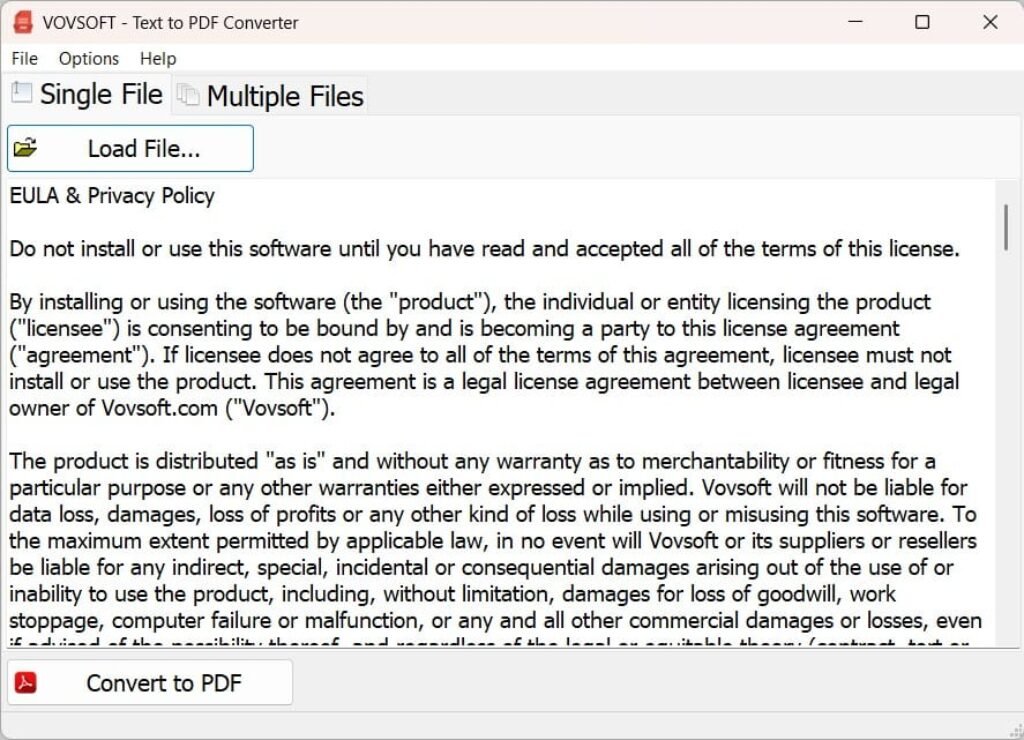
Vovsoft Text to PDF Converter is a desktop application for Windows that converts one or more .txt files into .pdf files. It is developed by Vovsoft, a software company known for producing small, purpose-built Windows utilities rather than large, complex suites. The program’s interface is designed around a simple idea: select your text files, choose your output preferences, and generate your PDFs, without extra dialogs or unrelated features cluttering the process.
The tool is aimed at everyday document tasks rather than advanced desktop publishing. It does not attempt to be a full PDF editor or a page-layout program. Instead, it focuses entirely on doing the text-to-PDF conversion step well, with batch processing and a handful of practical formatting controls layered on top. This narrow focus is part of why the software stays lightweight and starts up quickly, even on older Windows machines running Vista or Windows 7.
Key Benefits
Before listing the individual advantages, it helps to understand the overall value this software brings to a regular document workflow. The points below cover the practical, everyday reasons people choose this converter over manual formatting or juggling multiple apps.
- Saves time on repetitive conversions — batch processing handles multiple text files in one pass instead of one at a time.
- Keeps output flexible — choose between combining files into a single PDF or generating individual PDFs per file, depending on the task.
- Produces consistent formatting — font, orientation, and paper size settings apply uniformly across converted documents.
- Works offline and locally — no uploading text files to a third-party web service, which matters for privacy-sensitive documents.
- Runs on older and newer Windows systems alike — from Windows Vista through Windows 11, so it fits a wide range of existing setups.
- Low learning curve — the interface is built for quick use, so new users can convert their first file within minutes of installing.
- One-time purchase — a lifetime license with free future updates instead of a recurring subscription fee.
Instead of navigating a bloated office suite full of features you don’t need, you get a focused tool that opens fast, handles the conversion, and gets out of your way. The software supports batch processing, meaning you can select multiple text files at once and process them together rather than repeating the same steps over and over.
At its core, the software gives you control over how your files come together. You can combine every selected text file into a single continuous PDF, which is useful when you are compiling a set of notes or chapters into one document. Or you can generate a separate PDF for each file, which keeps individual documents distinct — a better fit when you’re archiving records or preparing multiple client files that need to stay separate. This flexibility means the tool adapts to the task rather than forcing you into one fixed output style.
Formatting matters too, and the software includes just enough customization to make output look intentional rather than generic. You can change the font to match the tone of the document, choose between Portrait or Landscape orientation, and pick from a full range of standard paper sizes including A5, A4, A3, A2, A1, A0, Letter, and Legal. These settings are presented in a simple interface, so adjusting them takes seconds rather than requiring you to dig through nested menus.
Who benefits from this tool?
Students converting lecture notes or research drafts into submission-ready PDFs. Writers and bloggers archiving drafts in a portable format. Small business owners and freelancers who need to package plain-text reports, logs, or documentation for clients. Administrative staff handling repetitive document conversion tasks. IT professionals converting configuration files, logs, or readme files into shareable PDF records. Anyone running a digital marketing or content business who regularly needs to hand off text-based deliverables in a polished PDF format will find this especially useful for saving time on repetitive formatting work.
Why choose this software over manually formatting in a word processor or using an online converter?
Three reasons stand out. First, it runs locally on your Windows machine, so there’s no uploading sensitive text files to a third-party website and waiting for a download link. Second, the batch feature means one operation can replace what would otherwise be dozens of manual export actions. Third, the lifetime license model means you pay once and receive all future updates, rather than being locked into a recurring subscription for a task this simple. For anyone converting text files regularly, even a small amount of saved time per file adds up fast across weeks and months of use.
Key Features
Below is a comprehensive list of the key features that make the software a valuable addition to your document workflow:
- Batch Processing: Select and convert multiple text files in a single operation instead of repeating the export process file by file.
- Multi-file Selection: Add several
.txtfiles to the queue at once through browsing or drag-and-drop. - Sequential Conversion: The software processes each queued file automatically without requiring manual confirmation between files.
- Multi-file Selection: Add several
- Flexible Export Options: Decide how your converted files should be organized based on the task at hand.
- Single PDF Output: Merge all selected text files into one continuous PDF document, useful for compiling related notes or chapters.
- Multiple PDF Output: Generate a separate PDF for each selected text file, keeping individual documents distinct.
- Font Customization: Adjust the text style used in the output PDF to match the purpose of the document.
- Font Selection Menu: Pick from available system fonts directly within the application.
- Consistent Text Rendering: Applied font settings carry through evenly across single or batch conversions.
- Page Orientation Control: Set how the PDF pages are laid out for readability.
- Portrait Mode: Standard vertical layout suited to most text documents and reports.
- Landscape Mode: Horizontal layout better suited for wide tables, logs, or specific document formats.
- Standard Paper Size Options: Match your PDF output to common printing and viewing standards.
- A-Series Sizes: Choose from A5, A4, A3, A2, A1, and A0 for international paper standards.
- US Sizes: Choose Letter or Legal for documents intended for US-standard printing or filing.
- UTF-8 Support: Convert text files containing non-English characters and special symbols without garbled output.
- Encoding Compatibility: Handles text saved with UTF-8 encoding for broader language support.
- Simple, Focused Interface: A streamlined layout designed around the conversion task itself.
- Reset to Defaults: Quickly return all formatting settings to their original state if adjustments need to be undone.
- No Unnecessary Clutter: The interface avoids unrelated tools, keeping the focus on file selection and PDF generation.
Requirements
Before installing, confirm your system meets the following basic requirements to ensure smooth operation:
- Operating System: Windows 11, Windows 10, Windows 8/8.1, Windows 7, or Windows Vista (both 32-bit and 64-bit supported).
- Input Format: Plain text files (
.txt). - Output Format: PDF documents.
- Disk Space: Minimal, given the lightweight installer size (a few megabytes).
- Installation Type: Available as both a standard Installer version and a Portable version that requires no installation.
Downloads
Explore how Vovsoft Text to PDF Converter fits into your document routine before committing to a purchase. Download the free trial edition to test the batch conversion, export options, and formatting controls firsthand, and click the button below to get started at no cost.
The trial version lets you experience the core conversion process directly, so you can confirm it handles your specific text files and formatting needs the way you expect. Testing before buying means no guesswork about compatibility or workflow fit.
or
Buy now, the price start from:
Thank you for reading the Vovsoft Text to PDF Converter review, and enjoy the discount coupon. If you notice any issues with Vovsoft Text to PDF Converter discount coupon, deal, or giveaway—such as an expired offer, broken link, or sold‑out promotion—please let us know while the deal is still available.