
Giveaway – Multi Monitor Viewer: Free Registration Code | Real-time Multi-Display Dashboard for Dual Screens & Video Walls – for Windows
Control all displays from one hub—monitor activity, track the mouse, and manage screens across rooms from your desktop. Get Multi Monitor Viewer with a registration code for free!
Free Full Version!
Multi Monitor Viewer Review at a Glance
Managing a complex computer setup involving multiple monitors can often lead to a disjointed and physically taxing workflow. Users frequently struggle with the need to constantly turn their heads, physically move to inspect screens located in different areas, or lose track of their mouse cursor across a vast digital desktop. Multi Monitor Viewer solves these ergonomic and logistical challenges by bringing every pixel of your extended desktop into a single, manageable interface. This software acts as a comprehensive dashboard for your hardware, mirroring the contents of every connected display in real time, regardless of where those monitors are physically located.
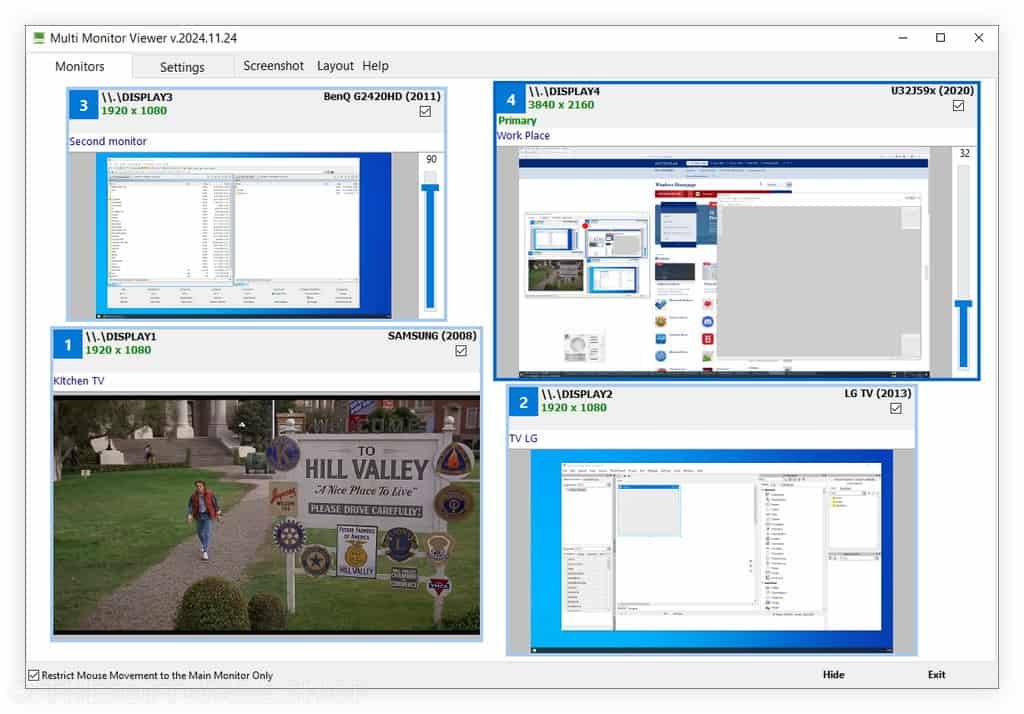
What is Multi Monitor Viewer
Multi Monitor Viewer is a specialized software utility engineered to replicate and display the real-time contents of multiple monitors connected to a single computer within one unified application window. It functions as a “monitor for your monitors,” aggregating separate video feeds into a coherent, user-defined layout. This tool removes the physical barrier between you and your displays, allowing you to view content on screens that may be turned away from you, mounted on a wall, or situated in a completely different room.
The core technology behind Multi Monitor Viewer focuses on high-performance mirroring. It captures the graphical output sent to your auxiliary screens and reproduces it with minimal latency in the main program window. This ensures that what you see in the viewer is exactly what is happening on the remote screen at that very second. It is not merely a screenshot tool; it is a live video feed of your desktop environment. This capability is paired with intelligent input tracking, specifically designed to highlight mouse cursor activity, ensuring you maintain control over your input devices even when navigating across a sprawling, multi-monitor canvas.
This robust utility is designed to eliminate the blind spots in your digital environment. By creating a virtual representation of your physical setup, it allows you to maintain constant vigilance over all running applications, status indicators, and visual feeds without requiring line-of-sight to the actual hardware. Multi Monitor Viewer processes the video output of your secondary, tertiary, or quaternary screens and renders them within a resizable, customizable window on your primary display. This capability is critical for users who manage digital signage, server racks, or multi-room display setups where walking to check a screen disrupts productivity.
The software functions as a centralized control hub, offering customizable viewing modes that adapt to your specific preferences. You are not forced into a static grid; instead, you possess the freedom to arrange the virtual monitor feeds in a way that mimics your physical layout or optimizes for specific tasks. This level of personalization ensures that the information most critical to your operations remains front and center. Furthermore, the application addresses the common annoyance of the “lost cursor” by superimposing a clear, red visual indicator exactly where your mouse is operating, saving you time and frustration during high-pressure tasks.
Key Benefits
Below is a detailed breakdown of the primary advantages that users gain when integrating this software into their daily computer operations:
- Total Visual Centralization: You can aggregate the visual output of unlimited connected displays into one master window, eliminating the need to physically scan a room to check different screens.
- Ergonomic Improvement: By viewing all monitors on your primary screen, you significantly reduce neck strain and eye fatigue caused by repetitive head-turning and refocusing on distant displays.
- Remote Visibility: The software allows you to see what is displayed on monitors located in other rooms or behind walls, which is perfect for managing public-facing displays or separate workstations.
- Instant Cursor Localization: A distinct red dot indicator overlays the specific monitor feed where your mouse resides, preventing the common frustration of losing the cursor on large, high-resolution desktops.
- Customizable Workflow: You have the power to resize, rename, and rearrange the monitor feeds within the viewer, creating a bespoke interface that aligns perfectly with your mental model of your workspace.
- Real-Time Monitoring: The content provided in the viewer is live, meaning you can react instantly to error messages, pop-ups, or status changes occurring on secondary screens without delay.
Why Choose Multi Monitor Viewer?
Selecting Multi Monitor Viewer means prioritizing efficiency and situational awareness. Unlike standard operating system display settings which only configure resolution and orientation, this software provides active, live monitoring. It is the ideal solution for professionals who need to verify that content is displaying correctly on screens that face customers, screens mounted high on walls, or monitors located in adjacent rooms. The ability to verify content playback, check for error messages, or simply monitor background processes without physical movement saves significant time throughout the workday.
Who Can Benefit from This Product?
The versatility of Multi Monitor Viewer makes it an essential tool for a wide range of computer users. System Administrators can monitor server status screens without needing a KVM switch for every glance. Video Editors and Graphic Designers can keep an eye on reference monitors or render queues without cluttering their main workspace. Day Traders can consolidate charts from four or five screens into a single summary window to spot trends instantly. Digital Signage Managers can verify that advertisements or announcements are displaying correctly on customer-facing screens without leaving the back office. Essentially, anyone employing two or more monitors will find their workflow optimized and their physical strain reduced.
Features
Below is a comprehensive list of the key features that make the software a valuable addition to your needs:
- Real-Time Multi-Monitor Mirroring: Displays the live content of all connected monitors within a single, unified program window on your main screen.
- Low-Latency Rendering: Ensures that the visual feedback in the viewer window matches the actual display output with no perceptible lag for accurate control.
- Fully Customizable Layout: Allows users to arrange the monitor feeds within the viewer window in any configuration that suits their workflow.
- Drag-and-Drop Positioning: Users can easily click and move monitor feeds to different areas of the window to prioritize specific screens.
- Variable Resizing Capabilities: Provides the ability to scale individual monitor feeds up or down to emphasize important displays or save space.
- Aspect Ratio Preservation: Automatically maintains the correct width-to-height ratio of the source monitor to prevent image distortion during resizing.
- Custom Monitor Naming: Enables users to assign unique, descriptive labels to each monitor feed (e.g., “Lobby Display,” “Editing Screen”) for quick identification.
- Text Overlay Controls: Users can toggle the visibility of monitor names to keep the interface clean or information-dense depending on preference.
- Mouse Cursor Tracking System: visualizes the exact location of the mouse pointer across all screens using a high-contrast indicator.
- Red Dot Overlay: A bright red graphical element mirrors the mouse movements in real-time within the viewer, making the cursor impossible to lose.
- Non-Line-of-Sight Monitoring: Facilitates the viewing of monitors that are physically obstructed, facing away from the user, or located in different rooms.
- Hidden Display Support: perfectly renders content from screens that are connected to the PC but not currently visible to the operator.
- Main Window Control Center: Consolidates all visual data into a standard application window that can be minimized, maximized, or snapped.
- Always-on-Top Option: capable of keeping the viewer window above other applications for persistent monitoring of critical background tasks.
Requirements
To ensure optimal performance and stability, please verify that your system meets the following technical specifications:
- Operating System: Windows 8 (x64), Windows 8.1 (x64), Windows 10 (x64), or Windows 11 (x64).
- Server Support: Windows Server 2016, Windows Server 2019, or Windows Server 2022.
- Architecture: 64-bit systems are required.
- Hardware: A computer with at least two monitors connected (physically or virtually) is recommended to utilize the full scope of the software’s features.
Downloads
Explore how Multi Monitor Viewer works according to your needs. Get/Download the trial/Free edition for free to test the software by clicking the button below. This generous 30-day evaluation period allows you to experience the full functionality of the software without any feature blocking.
The only difference you will observe during this trial phase is a visual DEMO text overlay on the monitor feeds; otherwise, the speed, customization, and tracking features are fully operational, allowing you to make a completely informed decision before committing to a purchase.
BUY NOW
Multi Monitor Viewer is available for $29.99. But, you can now get Multi Monitor Viewer full version with a registration code for free in the Giveaway tab below. This offer is available for a limited time!
![[SOLO KEY #2] Giveaway – AnyViewer 5 Solo Edition: Free License Key | A Comprehensive Remote Access, Remote Control, and Remote Support Software – for Windows](https://thesoftware.shop/wp-content/uploads/thumbs_dir/AnyViewer-Pro-review-download-Key-Giveaway-247kvhsh0ax8o4hdghz2seib24857cbrnyy79q49kgpg.png)
AnyViewer Professional GIVEAWAY

PCWinsoft Multiple Camera Monitor - for PC BEST OFFER

Multi Dock BEST OFFER

Mosaic Pro BEST OFFER
![[NEW KEY] Giveaway – Directory Monitor 2.1: Free License Key | Real‑Time Folder Monitor & Network Share File Tracking – for Windows](https://thesoftware.shop/wp-content/uploads/thumbs_dir/Vovsoft-Directory-Monitor-Review-Download-Discount-Coupon-Giveaway-247kvluosi1gtuhp2k6a36deretwitos4tpwktlsrst0.png)
Directory Monitor GIVEAWAY

Capture Boss GIVEAWAY

AceThinker Screen Grabber Pro: Lifetime Subscription BEST SELLER

RecMaster PRO: Lifetime License BEST OFFER

PCWinsoft ScreenBackTracker for Windows GIVEAWAY

Mouse Pro BEST OFFER
Multi Monitor Viewer Key Giveaway
Available now: Free License Key For a Limited Time!

To access the giveaway, kindly provide your email address. Please refrain from closing this page after signing in to receive instructions on how to access the offer at no cost.
NOTES:
– All prices shown here are in listed USD (United States Dollar).
– Such promotional programs are subject to change without notice, from time to time in our sole discretion.
– Data may vary based on different systems or computers.
User & Media Reviews
What are their users saying about #THE SOFTWARE? Why they loved it?
(Source: )
 ⭐⭐⭐⭐⭐
⭐⭐⭐⭐⭐(Source: )
⭐⭐⭐⭐⭐(Source: )
⭐⭐⭐⭐⭐(Source: )
⭐⭐⭐⭐⭐(Source: )
⭐⭐⭐⭐⭐Thanks for reading #THESOFTWARE Review & Enjoy the discount coupon. Please Report if #THESOFTWARE Discount Coupon/Deal/Giveaway has a problem such as expired, broken link, sold out, etc while the deal still exists.