
Giveaway – Watermark PDF Pro: Free Full Version | Batch PDF Watermarking Software – For Windows and Mac

Stop unwanted sharing before it starts—stamp text or image watermarks across entire PDF batches in minutes, then save protected copies with your identifier on every page. Get PCWinSoft Watermark PDF Pro with a lifetime license for free!
Free Full Version!
Watermark PDF Pro Review at a Glance
If you send proposals, training manuals, scripts, course handouts, invoices, internal policies, or client reports, you’ve probably faced the same headache: once a PDF leaves your hands, it can be copied, forwarded, or reposted with zero context and no credit. Watermarks solve a real business problem because they add a visible reminder that the file belongs to you, that it’s confidential, or that it was issued to a specific recipient—so “accidental sharing” becomes far less likely.
PCWinSoft Watermark PDF Pro is built for that exact moment: you have a folder full of PDFs and you need consistent stamping across all of them, quickly, with reliable placement and professional formatting.
What is PCWinsoft Watermark PDF Pro
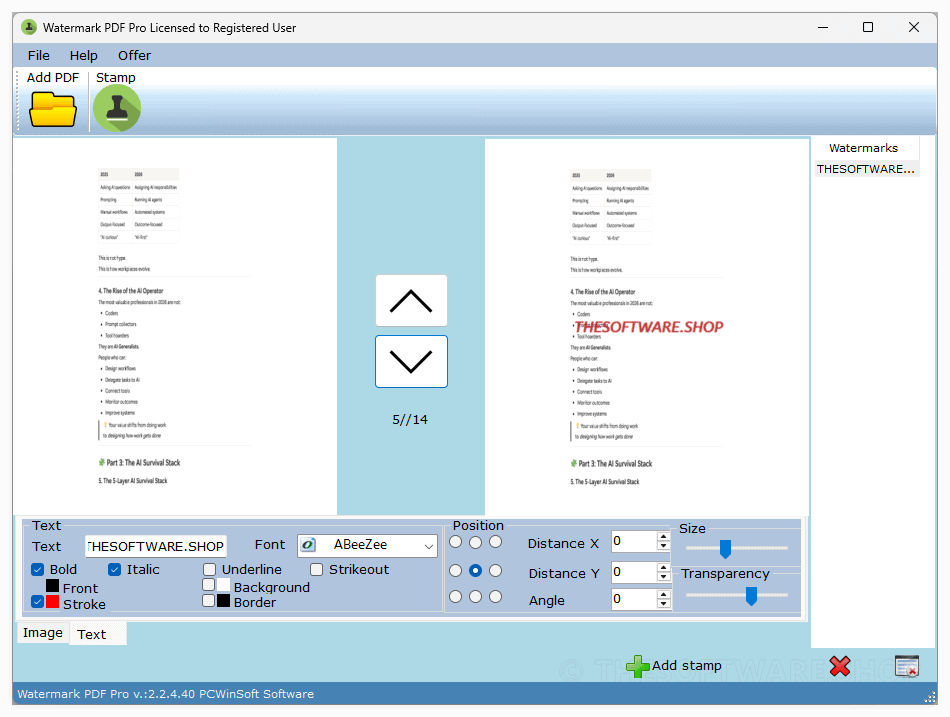
PCWinSoft Watermark PDF Pro is a desktop application that stamps watermarks onto PDF documents using text and image overlays, with controls for appearance and placement. It supports batch processing so you can mark many PDF files at once, and it includes functions like layered stamps, grid tiling (repeating a stamp across the page), and a preview area to verify results before exporting.
It’s made to be practical rather than complicated: you pick your PDFs, define one or more stamps, preview the look, then process the batch. Watermarks can include an email address, company name, project tag, or recipient identifier—helpful when you want accountability and traceability in distributed documents.
Key Benefits
Watermark PDF Pro is meant to reduce document misuse while keeping your workflow simple and fast. The benefits below describe how it helps in real day-to-day situations where PDFs are shared widely.
- Protect sensitive PDFs by discouraging casual forwarding and copying through visible stamps.
- Maintain brand presence with consistent logo/text stamping across exported documents.
- Save time on large jobs by watermarking entire batches instead of editing files one by one.
- Improve accountability by stamping identifiers like an email address or recipient tag onto pages.
- Reduce rework using a preview panel to confirm layout before running a full batch.
- Support complex layouts by using multiple layered stamps with adjustable order and transparency.
PCWinSoft Watermark PDF Pro is designed for batch stamping text and image watermarks over multiple PDF files at once, without forcing you to edit each document manually. You can apply stamps from a built-in image library, create text stamps using many fonts and colors, and adjust how each stamp looks and sits on the page—position, size, transparency, rotation, and stacking order—so the final output matches your use case (branding, confidentiality, proofing, review drafts, internal distribution, and more). The app also supports layering, so you can apply multiple stamps that appear superimposed, and it includes a WYSIWYG preview panel so you can see what the marked PDF will look like before committing the batch.
This tool is especially useful when time and consistency matter: marketing teams preparing media kits, HR teams distributing policy updates, educators sharing materials, legal teams sharing drafts, and small businesses sending client documentation can all benefit from repeatable watermark templates and fast processing. Instead of relying on inconsistent manual edits, you get a straightforward workflow that focuses on what matters: getting a clear, visible stamp onto every required page, across every selected file, in one run.
Features
Below is a detailed list of the key features that make the software a practical addition to your PDF protection workflow, especially when you manage many files and need consistent results.
- Batch PDF watermarking — Process multiple PDF files in one run for faster document preparation.
- Layer-based stamping — Add multiple stamps superimposed (stacked) on the same pages.
- Multi-stamp overlays — Combine text + logo + “CONFIDENTIAL” style stamps together.
- Stamp order control — Change which stamp appears on top by adjusting order.
- Text watermark creator — Stamp text using many fonts and custom colors for clear labeling.
- Font selection — Use a wide range of fonts to match branding or document style.
- Text color control — Set the stamp color so it is readable but not overpowering.
- Image watermark tools — Use image stamps (including transparent PNG support) for logos and seals.
- Built-in image library — Access free-to-use images included with the software for stamping.
- Custom image stamping — Add your own logo or mark as an image stamp.
- Precision layout controls — Adjust position, size, transparency, and rotation to fit any page style.
- Transparency adjustment — Make stamps subtle or bold by changing opacity.
- Rotation control — Angle stamps for classic diagonal “DRAFT/CONFIDENTIAL” layouts.
- Size and placement — Fit stamps to margins, corners, headers, or center page areas.
- Grid tiling mode — Repeat one symbol across the page in patterns like 3×3 or 5×5.
- Full-page coverage — Make removal harder by spreading marks across the document.
- Consistent spacing — Apply repeated stamps in a uniform grid pattern.
- WYSIWYG preview panel — See how the stamped PDF will look before you finalize the batch.
- Fewer mistakes — Confirm placement and visibility to avoid wasting time rerunning jobs.
- Faster approvals — Review drafts quickly before sending them to clients or teams.
- All-pages batch stamping — Mark all pages across all PDFs at once for complete coverage.
- Uniform output — Ensure every page carries the same message or branding stamp.
- Fast processing — Designed to work quickly even for large PDF collections.
- PDF restriction options — Prohibit printing and editing on stamped PDF files for stronger control.
Requirements
To plan your installation and compatibility, review the platform requirements below as stated for this product.
- Windows 10 and 11 (64-bit).
- macOS 7 to 15.
Downloads
Explore how PCWinSoft Watermark PDF Pro works for your needs. Download the trial/free edition to test the software by clicking the button below on the official product page.
Try the workflow first so you can confirm the watermark styles, preview behavior, and batch speed match your document process before you purchase.
BUY NOW
PCWinSoft Watermark PDF Pro is available for $19.90. But for a limited time, you can get the full version of PCWinSoft Watermark PDF Pro for Windows or Mac with a lifetime license for free in the Giveaway tab below.
iTop PDF VIP: Premium Subscription BEST OFFER
ASCOMP Secure-PDF Professional BEST OFFER
PDF Reader Pro BEST OFFER
ASCOMP PDF Imager Professional BEST OFFER

PDNob PDF Editor BEST OFFER
PCWinsoft File Sharing Pro GIVEAWAY

1AVCenter GIVEAWAY

Photo Slideshow Creator Pro GIVEAWAY
Hi-Q MP3 Recorder Pro GIVEAWAY
Capture Boss GIVEAWAY
PCWinSoft Watermark PDF Pro Key Giveaway
Available now: Free Full Version For a Limited Time!
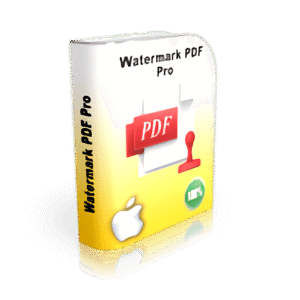
To access the giveaway, kindly provide your email address. Please refrain from closing this page after signing in to receive instructions on how to access the offer at no cost.

NOTES:
– All prices shown here are in listed USD (United States Dollar).
– Such promotional programs are subject to change without notice, from time to time in our sole discretion.
– Data may vary based on different systems or computers.
Thanks for reading PCWinSoft Watermark PDF Pro Review & Enjoy the discount coupon. Please Report if PCWinSoft Watermark PDF Pro Discount Coupon/Deal/Giveaway has a problem such as expired, broken link, sold out, etc while the deal still exists.



![[NEW KEY #5] Giveaway – Swifdoo PDF Pro: Free Redeem Code | Full Version – for Windows & Mac](https://thesoftware.shop/wp-content/uploads/thumbs_dir/SwifDoo-PDF-PRO-Review-Download-Full-Version-Code-Giveaway-rfosltrshl3on4oad0qm0ahdgsw1v45qgw1o46npnc.png)
![[KEY #4] Giveaway – SoftOrbits PDF Logo Remover: Free License Key | Easy-to-use PDF Watermark Remover Software – for Windows](https://thesoftware.shop/wp-content/uploads/thumbs_dir/SoftOrbits-PDF-Logo-Remover-Review-Download-Coupon-Giveaway-rfosmsjtigfakp9rpxrt2jpfg24mrwzsxo6mvf8594.png)

