Giveaway – SHARPEN Video #1: Free Registration Code | Easy-to-use Video Sharpening Software – for Windows

Get razor-sharp footage fast—fix blur, haze, and low contrast with AI-powered sharpening and GPU speed. Get SHARPEN Video #1 Full Version today and deliver cleaner, crisper videos in minutes.
You can also get SHARPEN Video 3 Professional with a license key that includes free updates and support at a special discounted price!
✔ Lifetime License. ✔ Free Product Updates ✔ 24×7 Customer Support
SHARPEN Video 3 Professional Review at a Glance
Soft focus, shaky motion, haze from drone flights, or low-contrast clips can ruin footage that matters—client work, travel highlights, family moments, or product videos. Many editors try to “save it” with generic sharpening tools, only to create halos, noise, or that harsh digital look.
SHARPEN Video 3 Professional is built for one job done extremely well: producing natural-looking sharpness by analyzing every frame and applying intelligent corrections that suit real-world blur and movement.

What is SHARPEN Video 3 Professional
SHARPEN Video 3 Professional is a Windows PC software application for precise video sharpening and clarity correction. It uses frame-by-frame analysis to detect blur and apply controlled sharpening that keeps edges clean and textures believable, even in scenes with motion.
Beyond sharpening, it includes tools for haze/fog removal, color and mood adjustments, LUT import for consistent looks, and a professional composing module with layers and masks for branding and overlays. It supports high-resolution production and modern export formats, making it suitable for social media creators, drone pilots, agencies, educators, and video teams that need reliable sharpness improvements on demanding footage.
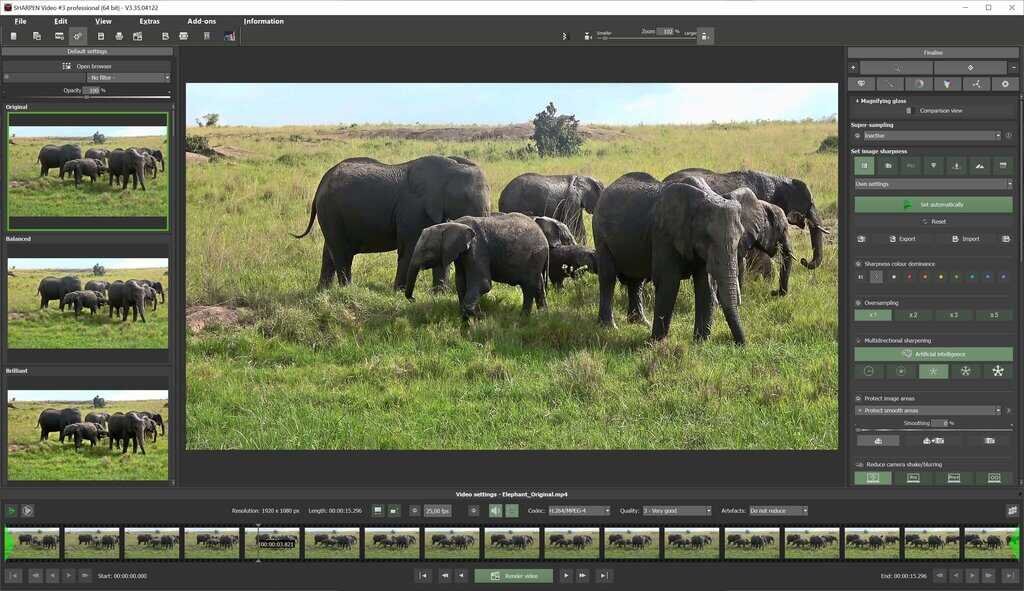
SHARPEN Video 3 Professional combines AI-driven blur analysis with multi-directional sharpening so moving elements (like faces turning, vehicles passing, or branches swaying) keep their detail instead of smearing. It also includes haze and fog correction to restore clarity when the scene looks washed out, plus creative AI effects for lighting moods and color adjustments so your footage looks polished, not just sharper.
Performance matters when you work with modern cameras. With GPU acceleration, SHARPEN Video 3 Professional is designed to handle high-resolution projects smoothly, including 4K, 8K, and even 12K workflows. You can also prepare footage with correction-image calculation (Darkframe & Flatframe), scale video material to freely selectable resolutions, and export using modern codecs like AV1 (including GPU AV1) and VP9—helpful for smaller files and clean online delivery.

This is a Windows-only professional tool made for creators who want fast results without spending weeks learning complex systems. Beginners get an intuitive layout with presets and tooltips, while professionals get deeper control—like quality level 4 in multi-directional sharpening, an expanded RAW module, LUT import, a real-time color module with 10 layers, PSF blur tools with comparison view, and advanced luminance/gradient sharpening. If you want a focused, efficient workflow that produces crisp video detail without turning your footage into a noisy mess, SHARPEN Video 3 Professional fits the job.
Key Benefits
These benefits explain what you gain in real editing situations, from quick fixes to professional delivery. Each point focuses on practical outcomes so you know exactly how SHARPEN Video 3 Professional helps.
- Produces cleaner sharpness by analyzing each frame instead of applying one harsh filter to the whole clip
- Keeps motion detail clearer with AI-supported multi-directional sharpening for complex movement
- Restores visibility in washed-out scenes using haze and fog correction for clearer aerial and outdoor footage
- Saves time with presets, automation, and an interface designed for fast results
- Speeds up processing using GPU acceleration for large 4K/8K projects and modern workflows
- Adds creative control with RAW tools, AI effects, LUT support, and multi-layer color adjustments
Why Choose SHARPEN Video 3 Professional?
The core value of this software lies in its ability to save footage that you thought was unusable. The intelligent blur analysis individually assesses every single frame of your video, applying precise adjustments exactly where they are needed. This is vastly superior to static sharpening methods. Furthermore, the inclusion of a comprehensive RAW development module and the new Composing module means you can do more than just sharpen; you can color grade, mask, and composite layers to produce a finished, polished product. Whether you are editing action cam footage from a mountain bike ride, stabilizing and clearing up drone shots from a misty morning, or restoring old digitized home movies, SHARPEN Video 3 Professional provides the tools to make those videos shine. It is designed to fit into a modern workflow, supporting the latest video codecs and leveraging your hardware to reduce rendering times significantly.
Features
The following comprehensive feature set makes SHARPEN Video 3 Professional a powerful and versatile tool for anyone seeking to improve video quality through advanced sharpening and enhancement capabilities.
Core Sharpening Technologies
- AI-Powered Multi-Directional Sharpening – Automatically analyzes movement patterns in video content and applies directional sharpening algorithms that maintain detail even when objects move in multiple directions simultaneously within the same frame
- Quality Level 4 (Professional Edition) – Highest intensity sharpening mode for maximum detail recovery in severely blurred footage
- AI Mode – Leverages artificial intelligence to automatically determine optimal sharpening parameters based on content analysis
- Multiple Quality Levels – Choose from four different processing intensities to balance sharpening strength with processing time and resource usage
- Super-Sampling Sharpening Function – Advanced edge enhancement technology that smooths contours while increasing perceived sharpness for natural-looking results
- 4 Quality Levels (Professional) – Provides granular control over contour smoothing intensity, from subtle enhancement to maximum detail recovery
- Optimal Contour Smoothing – Eliminates harsh edges and artifacts that can result from aggressive sharpening, maintaining natural appearance
- Individual Frame Blur Analysis – Examines each video frame separately to identify specific blur characteristics and apply precisely calibrated corrections rather than using generic sharpening across all frames
- Intelligent Automatic Sharpening – Analyzes video content and applies optimized sharpening parameters automatically, eliminating guesswork and reducing the need for manual adjustments
- Luminance/Gradient Sharpening Mode (Professional) – Applies sharpening based on brightness values and gradients for more refined control over which areas receive enhancement
- PSF Blur Function with Comparison Display (Professional) – Point Spread Function blur modeling with side-by-side comparison view for evaluating sharpening results against original footage
Video Enhancement and Correction
- Haze and Fog Correction – Specialized algorithms remove atmospheric distortion and improve clarity in footage affected by environmental conditions, particularly valuable for drone and outdoor videography
- Contour Improvement – Enhances edge definition and detail visibility without creating artificial-looking halos or oversharpening artifacts
- Video Artifact Reduction – Minimizes compression artifacts, noise, and other quality issues that can accumulate during video capture or editing
- Focus Peaking Display – Visual overlay shows which areas of the frame are in focus, helping users understand where sharpening will have the most impact
RAW Development Module
- Expanded RAW Module (Professional) – Comprehensive suite of photographic post-processing tools adapted for video content, providing professional-grade color and exposure control
- Artificial Intelligence Effects Category – Collection of AI-powered adjustments specifically designed for common video enhancement needs
- Blue Shadow Reduction – Corrects unwanted blue color casts in shadow areas
- Haze Reduction – Additional AI-based haze removal beyond the standard fog correction
- Seasonal Lighting Moods – Applies AI-generated color grading that mimics different seasonal atmospheres
- Color Angle Adjustments – Modifies color relationships for creative color grading effects
- Deep Shadow Control – Manages extreme shadow areas without crushing detail
- Highlight Management – Prevents blown-out highlights while maintaining natural tonal relationships
- Adaptive Color Dynamics – Intelligently adjusts color saturation and vibrancy based on content analysis
- Custom AI Effects Training (Professional) – Artificial Intelligence module allows users to train and apply their own custom AI effects for specialized processing needs
- Correction Image Calculation – Supports Darkframe and Flatframe correction images for advanced noise reduction and vignetting correction in video preparation workflows
- Horizon Straightening – Quickly corrects tilted horizons and camera alignment issues
- Exposure and Color Correction – Comprehensive tools for adjusting brightness, contrast, and color balance
Creative Composing Tools
- Composing Module with Layer System – Professional-grade compositing interface supporting up to 12 independent layers for complex visual compositions
- 12 Selective Masks – Create precise selections for applying adjustments to specific areas of your video while protecting other regions
- Integrated Image Collections – Access to 60 pre-loaded background images organized into three categories for quick creative enhancement
- Structures Category – Textural backgrounds and patterns
- Colors Category – Solid and gradient color backgrounds
- Light Category – Lighting effects and illumination backgrounds
- Logo and Graphics Overlay – Easily add branding elements, watermarks, or custom graphics to your video content through the layer system
- Real-Time Color Module with 10 Layers (Professional) – Advanced color grading system with multiple adjustment layers for complex color treatments
Professional Workflow Features
- LUT Style Module (Professional) – Import and apply Look-Up Tables (LUTs) for professional color grading and photo style effects matching film stocks or specific aesthetic looks
- Video Scaling with Freely Selectable Resolutions – Prepare video material by scaling to any custom resolution for specialized delivery requirements or creative effects
- Multiple Video Codec Support – Save projects using modern compression formats for optimal quality and file size
- AV1 Codec – Latest generation compression with superior quality-to-size ratio
- AV1 (GPU) – Hardware-accelerated AV1 encoding for faster export times
- VP9 Codec – Google’s high-quality open video format
- H.264/H.265 – Industry-standard MPEG-4 formats
- Uncompressed AVI – Lossless export for maximum quality preservation
- GPU Acceleration – Leverages graphics card processing power to significantly speed up video analysis, sharpening calculations, and export rendering, especially critical for 4K, 8K, and 12K videos
- 24 Preset Configurations – Quick-start templates for common video types and sharpening scenarios, providing instant results that can be further refined
- 45 Sharpness Presets – Extensive collection of pre-configured sharpening profiles optimized for different types of blur and video content
Interface and Usability
- HD and Ultra HD (4K) Display Optimization – Interface elements scale appropriately for high-resolution displays, ensuring crisp text and controls on modern monitors
- Individually Repositionable Panels – Customize workspace layout by moving preview, preset, adjustment, and control panels to match your preferred workflow and monitor configuration
- Interactive Tooltips – Every button and control features explanatory text that appears on hover, providing contextual help without cluttering the interface
- Structured Workspace Layout – Logical organization with presets on left, preview center, adjustments right, and playback controls bottom creates intuitive workflow
- 8 Additional Language Support – Software interface available in French, Spanish, Italian, Japanese, Polish, Portuguese, Dutch, and Chinese in addition to English and German
Version-Specific Professional Features
The Professional version includes exclusive capabilities not available in standard editions, specifically targeting advanced users and professional workflows.
- Quality Level 4 in Multi-Directional Sharpening – Maximum intensity processing mode for extreme detail recovery
- Expanded RAW Module – Additional photographic adjustments and controls
- AI Effects in RAW Module – Full suite of artificial intelligence-powered enhancement effects
- Custom AI Training Module – Create and apply user-trained AI effects
- Real-Time Color Module (10 Layers) – Advanced color grading with multiple adjustment layers
- PSF Blur Function – Point Spread Function modeling with comparison display
- LUT Style Module – Professional color grading through Look-Up Table import
- Luminance/Gradient Sharpening – Advanced sharpening mode based on brightness and gradient analysis
Requirements
To run #THE SOFTWARE with optimum reliability and performance, your system should match the following requirements:
Minimum Hardware Configuration
- Operating System – Windows 11, Windows 10, or Windows 8.1 (64-bit version required)
- Processor – Intel Core i3 or comparable AMD processor with adequate processing power
- Memory – 4 GB RAM for basic operation
- Graphics Card – DirectX-compatible graphics card with driver support
- Display – Screen resolution of 1600 x 900 pixels or higher
- Storage – Sufficient hard drive space for software installation and video file processing
Recommended Hardware Configuration
- Operating System – Windows 11, Windows 10, or Windows 8.1 (64-bit version)
- Processor – Intel Core i7 or comparable AMD processor for optimal performance
- Memory – 8 GB RAM or more for smooth operation with high-resolution videos
- Graphics Card – DirectX-compatible graphics card with robust GPU capabilities for hardware acceleration
- Display – Screen resolution of 1920 x 1080 pixels (Full HD) or higher, 4K displays supported
- Storage – Adequate hard drive space with fast read/write speeds for efficient video processing
Supported Video Formats
- Input Formats – MPEG-4 (H.264/H.265), WMV, WebM, AVI, FLV, ASF, MOV, MKV, MXF, MP2
- Output Formats – MPEG-4 (H.264), AV1, AV1 (GPU-accelerated), VP9, AVI (uncompressed)
Downloads
Test the full capabilities of SHARPEN Video 3 Professional with a risk-free trial that lets you evaluate whether the software meets your video enhancement needs.
The trial version provides access to all features so you can experience the AI-powered sharpening, RAW development tools, and Composing module before making a purchase decision. See firsthand how the software handles your specific video content and workflow requirements by downloading the free trial edition through the button below.
BUY NOW
SHARPEN Video 3 Professional is regularly priced at $99 for a lifetime license per PC. However, you can now obtain SHARPEN Video 3 Professional with a special discount coupon. This limited-time offer provides exceptional value for professional-grade video enhancement software!
Software Giveaway: As an added value in today’s software giveaway, you can also obtain SHARPEN Video #1 full version at no cost, providing additional sharpening tools for your video enhancement toolkit
BUY FROM ASHAMPOO
" />
AI-Powered Video Sharpening Software for Windows - 4K/8K/12K Support, Multi-Directional Blur Correction, RAW Module, Composing Tools & GPU Acceleration
- Lifetime License
- All Features from Version 3 Professional:
- NEW: Super-Sampling sharpening function with 4 quality levels
- NEW: AI mode in Multi-Directional Sharpening
- NEW: Quality level 4 in Multi-Directional Sharpening
- NEW: Video codecs for saving: AV1, AV1 (GPU), VP9
- NEW: Video preparation with correction image calculation (Darkframe & Flatframe)
- NEW: 8 additional languages: FR, ES, IT, JP, PL, PT, NL, CN
- NEW: Video preparation with scaling of video material to freely selectable resolutions
- NEW: AI effects in the RAW module under the 'Artificial Intelligence' category
- NEW: Artificial Intelligence module for your own trained AI effects
- NEW: Composing module with up to 12 masks
- NEW: Integrated image collections in 3 categories (backgrounds)
- Free Technical Support
Platforms: Windows

" />
AI-Powered Video Sharpening Software for Windows - 4K/8K/12K Support, Multi-Directional Blur Correction, RAW Module, Composing Tools & GPU Acceleration
- Lifetime License
- All Features from Version 3 (Standard):
- NEW: Super-Sampling sharpening function with 2 quality levels
- NEW: AI mode in Multi-Directional Sharpening
- NEW: Video codecs for saving: AV1, AV1 (GPU), VP9
- NEW: Video preparation with correction image calculation (Darkframe & Flatframe)
- NEW: 8 Additional languages: FR, ES, IT, JP, PL, PT, NL, CN
- NEW: Video preparation with scaling of video material to freely selectable resolutions
- NEW: Composing module with up to 12 masks
- NEW: Integrated image collections in 3 categories (backgrounds)
- Free Technical Support
Platforms: Windows
BUY FROM PROJECTS SOFTWARE (FRANZIS)

" />
AI-Powered Video Sharpening Software for Windows - 4K/8K/12K Support, Multi-Directional Blur Correction, RAW Module, Composing Tools & GPU Acceleration
- Upgrade License
- All Features from Version 3 Professional:
- NEW: Super-Sampling sharpening function with 4 quality levels
- NEW: AI mode in Multi-Directional Sharpening
- NEW: Quality level 4 in Multi-Directional Sharpening
- NEW: Video codecs for saving: AV1, AV1 (GPU), VP9
- NEW: Video preparation with correction image calculation (Darkframe & Flatframe)
- NEW: 8 additional languages: FR, ES, IT, JP, PL, PT, NL, CN
- NEW: Video preparation with scaling of video material to freely selectable resolutions
- NEW: AI effects in the RAW module under the 'Artificial Intelligence' category
- NEW: Artificial Intelligence module for your own trained AI effects
- NEW: Composing module with up to 12 masks
- NEU: Integrated image collections in 3 categories (backgrounds)
- Free Technical Support
Platforms: Windows
" />
AI-Powered Video Sharpening Software for Windows - 4K/8K/12K Support, Multi-Directional Blur Correction, RAW Module, Composing Tools & GPU Acceleration
- Lifetime License
- All Features from Version 3 Professional:
- NEW: Super-Sampling sharpening function with 4 quality levels
- NEW: AI mode in Multi-Directional Sharpening
- NEW: Quality level 4 in Multi-Directional Sharpening
- NEW: Video codecs for saving: AV1, AV1 (GPU), VP9
- NEW: Video preparation with correction image calculation (Darkframe & Flatframe)
- NEW: 8 additional languages: FR, ES, IT, JP, PL, PT, NL, CN
- NEW: Video preparation with scaling of video material to freely selectable resolutions
- NEW: AI effects in the RAW module under the 'Artificial Intelligence' category
- NEW: Artificial Intelligence module for your own trained AI effects
- NEW: Composing module with up to 12 masks
- NEU: Integrated image collections in 3 categories (backgrounds)
- Free Technical Support
Platforms: Windows

" />
AI-Powered Video Sharpening Software for Windows - 4K/8K/12K Support, Multi-Directional Blur Correction, RAW Module, Composing Tools & GPU Acceleration
- Lifetime License
- All Features from Version 3 (Standard):
- NEW: Super-Sampling sharpening function with 2 quality levels
- NEW: AI mode in Multi-Directional Sharpening
- NEW: Video codecs for saving: AV1, AV1 (GPU), VP9
- NEW: Video preparation with correction image calculation (Darkframe & Flatframe)
- NEW: 8 Additional languages: FR, ES, IT, JP, PL, PT, NL, CN
- NEW: Video preparation with scaling of video material to freely selectable resolutions
- NEW: Composing module with up to 12 masks
- NEW: Integrated image collections in 3 categories (backgrounds)
- Free Technical Support
Platforms: Windows

Topaz Studio BEST OFFER

VideoProc Converter AI: Lifetime License BEST SELLER

BLACK & WHITE Video #1 Professional GIVEAWAY

SHARPEN projects 5 Professional BEST OFFER

HitPaw VikPea: Lifetime License BEST OFFER

Ashampoo Video Optimizer Pro 3 BEST SELLER
Sharpen Video Key Giveaway
Available now: Free Serial Number For a Limited Time!
To access the giveaway, kindly provide your email address. Please refrain from closing this page after signing in to receive instructions on how to access the offer at no cost.

NOTES:
– All prices shown here are in listed USD (United States Dollar).
– Such promotional programs are subject to change without notice, from time to time in our sole discretion.
– Data may vary based on different systems or computers.
Thanks for reading Sharpen Video 3 Professional Review & Enjoy the discount coupon. Please Report if Sharpen Video 3 Professional Discount Coupon/Deal/Giveaway has a problem such as expired, broken link, sold out, etc while the deal still exists.



![[ENDING] Giveaway – Aiseesoft Slideshow Creator: Free 1-year License Code | Full Version – for Windows](https://thesoftware.shop/wp-content/uploads/thumbs_dir/Aiseesoft-Slideshow-Creator-Review-Download-Discount-Coupon-rfosm1ai09dz80dd53zmk8l27vuzkozl5x9jyeck9k.png)