88% Off – Spotless: Lifetime License | Auto Tidy Files, Drag & Drop File Sorting – for Mac

Effortless File Organization Awaits – Grab Spotless Lifetime License at 88% Off Now and Reclaim Your Mac!
✔ Lifeitme License. ✔ Free Product Updates ✔ 24×7 Customer Support
Spotless Review at a Glance
Files accumulate rapidly on your Mac, cluttering the Desktop, overwhelming the Downloads folder, and burying important documents under layers of digital mess. Searching for specific items wastes precious time, disrupts workflows, and creates frustration during daily tasks. Spotless solves this chaos by providing an intuitive tool that automatically organizes files exactly where they belong, saving hours of manual sorting and restoring control over your digital space.
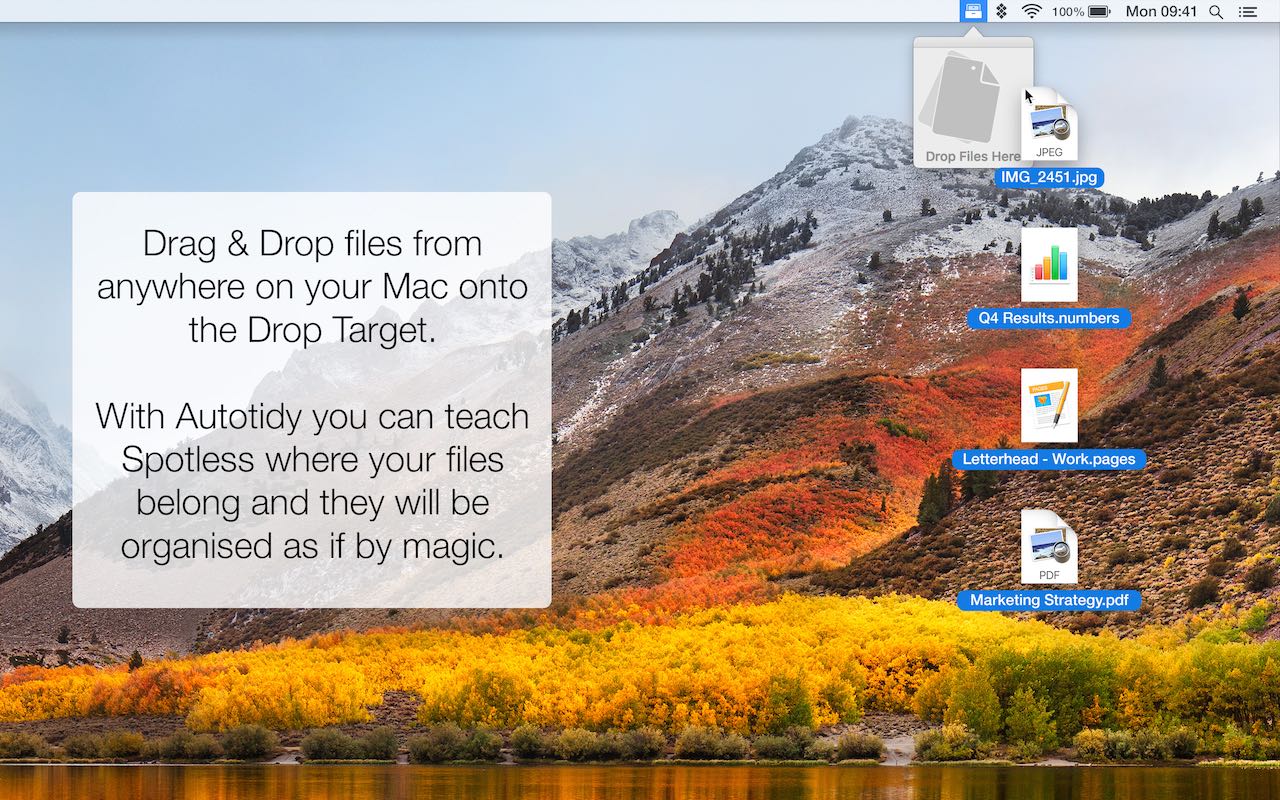
Spotless is a robust Mac application designed for effortless file management. It operates through a menu bar Drop Target that appears when dragging files from any application, allowing instant tidying. Users can teach the app preferred destinations for file types like .jpg to Pictures or .pages to Documents via simple interactions. Beyond basics, Spotless for Mac supports creating unlimited Tasks – collections of rules dictating file movements, copies, or deletions. Scheduling ensures folders tidy themselves at set intervals, while safety features like conflict resolution and action history protect data integrity. Available on platforms like Setapp, it integrates seamlessly into macOS workflows for users seeking automation without complexity.
Choosing Spotless Mac App delivers unmatched efficiency for file handling compared to manual methods or basic Finder tools. Professionals, creatives, and everyday users benefit from reclaimed storage, faster file retrieval, and reduced stress from disorganization. Developers manage project files precisely, photographers sort images by type, and office workers automate document flows. Its learning capability minimizes setup time, while advanced options satisfy power users needing custom automations. Reliability stems from built-in safeguards, making it suitable for critical data without risk of loss.
What is Spotless
Spotless stands as a dedicated file tidier for macOS, enabling quick organization through drag & drop or timed schedules. Core to its design is the Auto Tidy system, which remembers user-defined locations for file extensions after initial drags. The app launches a Drop Target from the menu bar for on-demand processing, configurable to run specific Tasks or prompt choices.
Tasks comprise rule sets targeting files by extension, modification date, name phrases, or age, performing moves, copies, or deletions. A Wizard guides initial setup for common areas like Desktop or Downloads, establishing automated Tasks instantly.
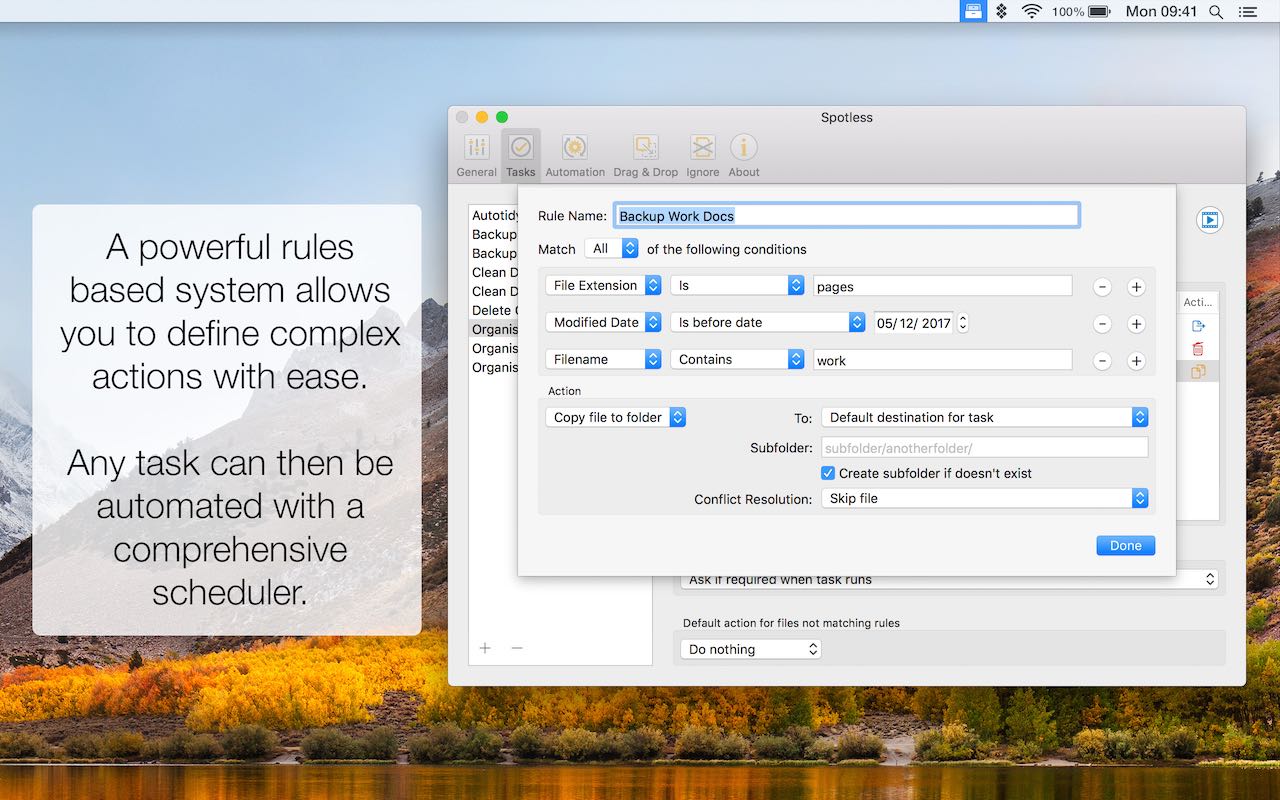
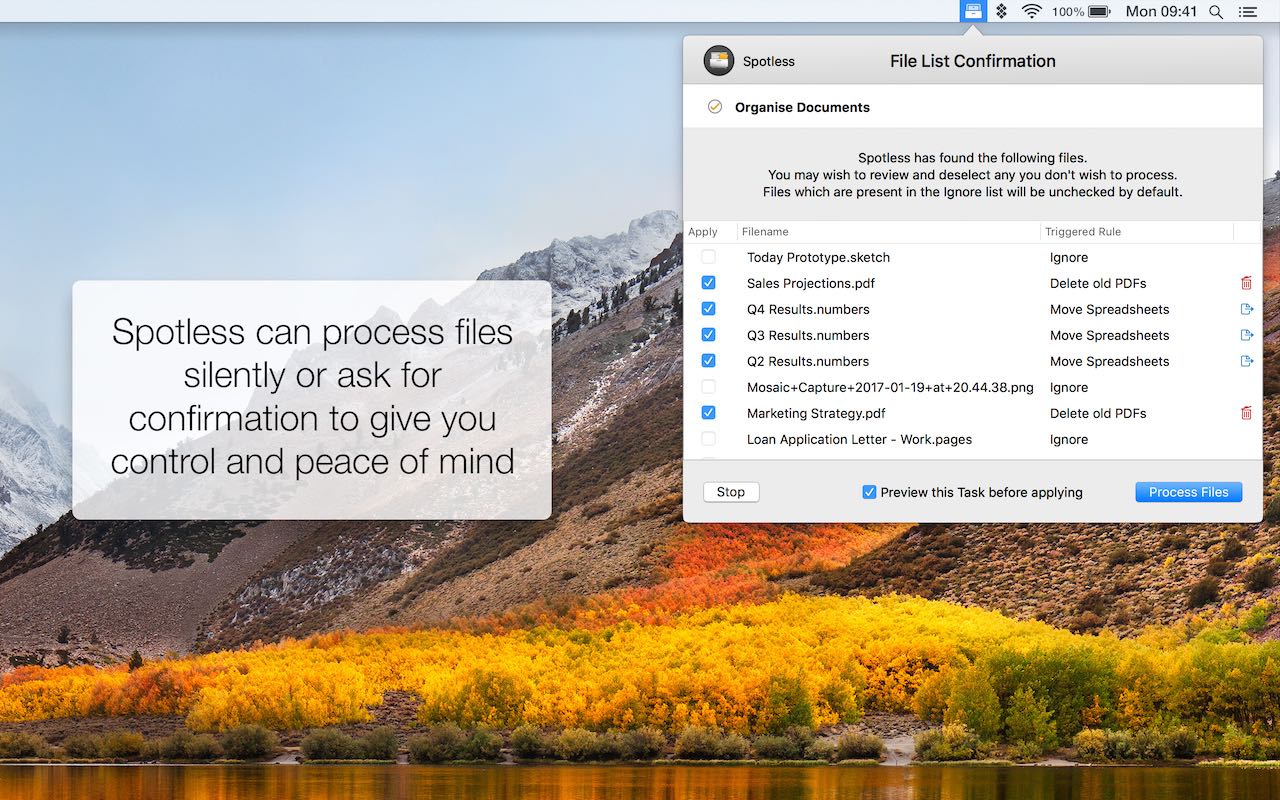
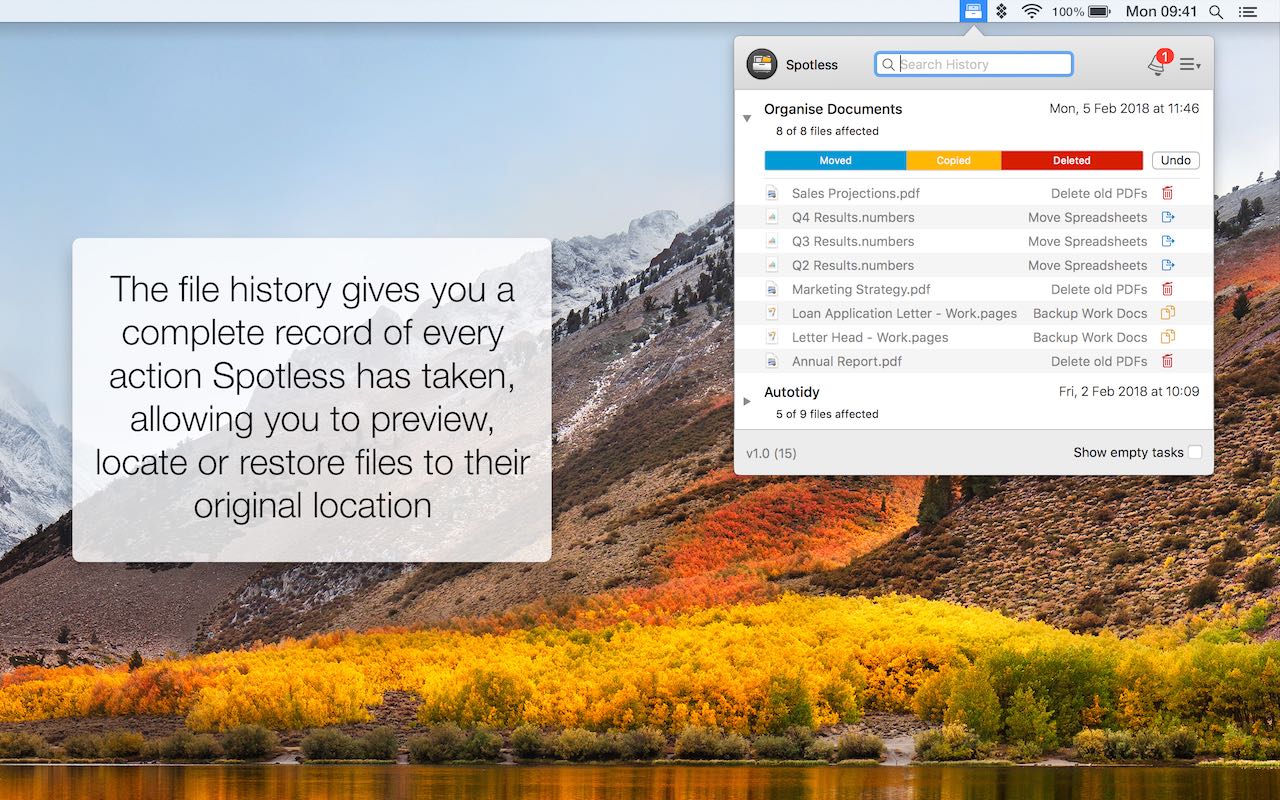
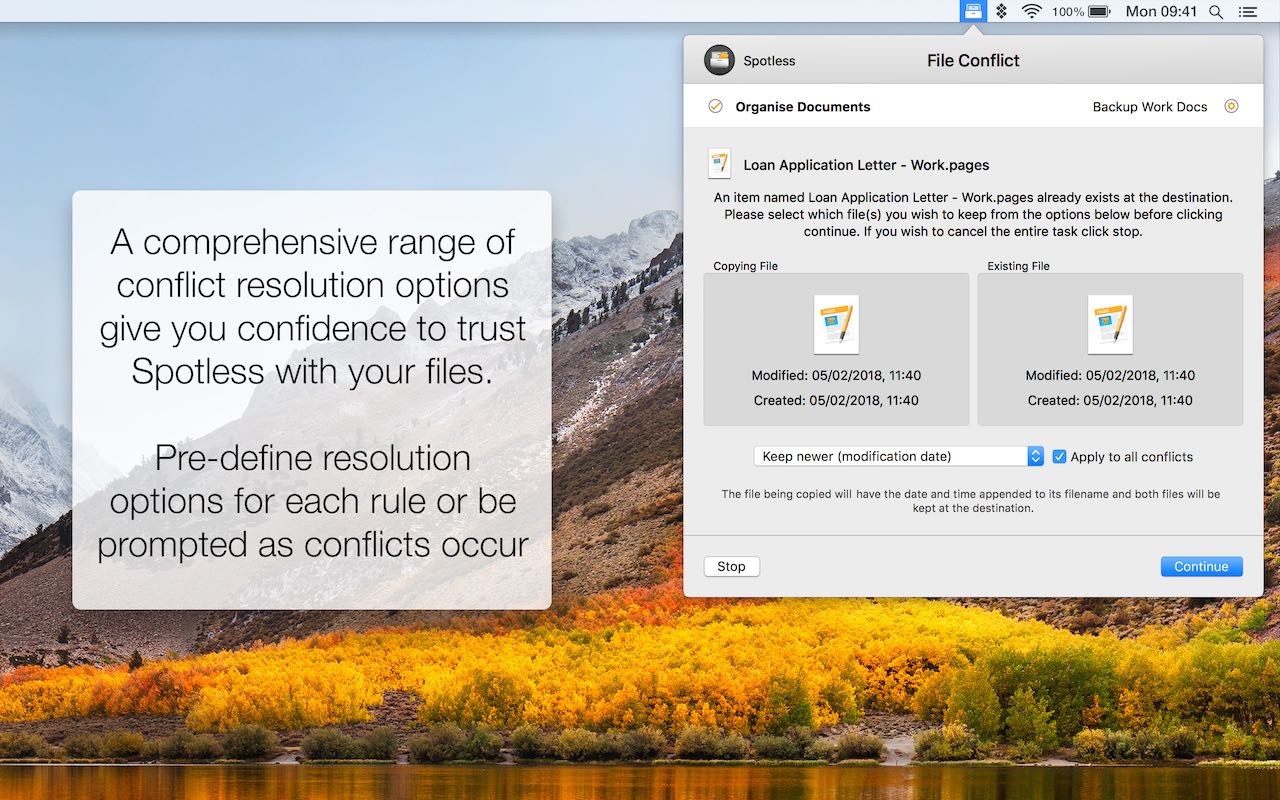
Safety integrates via conflict management options like skip, replace, or date-based keeps, plus a full history log for reviews and reversions. Silent operation runs in background with icon cues, or verbose mode confirms actions. As a bonus, it excels at backups by organizing copies into structured folders based on criteria.
This versatility extends to any scenario: clearing temporary downloads, archiving old documents, or mirroring folders to externals. Unlike generic cleaners, Spotless Mac App focuses on smart relocation rather than deletion, preserving everything intelligently.
Integration with macOS feels native, using familiar Smart Folder-style rules for pinpoint accuracy. Regular scheduling mimics a personal assistant, maintaining order passively.
Over time, its Auto Tidy evolves with usage, reducing interactions to mere drags. For backups, rules group files by type, date, or size, avoiding duplicates and easing navigation in archives. Comprehensive previews before execution build trust, especially with large batches.
The history feature logs every move with original paths, enabling one-click undos or task reversals. Conflicts trigger customizable responses, preventing overwrites. All this packs into a lightweight app compatible from macOS 10.12 onward, ensuring broad accessibility.
Key Benefits
Maintaining a tidy Mac boosts productivity, but manual efforts drain time. Spotless counters this with automation that learns and adapts.
- Saves hours weekly by auto-sorting Desktop and Downloads, freeing focus for core work.
- Prevents data loss through history tracking and easy reversions, offering peace of mind.
- Customizes to individual needs with unlimited Tasks, fitting any workflow from simple to complex.
- Automates backups into organized structures, simplifying recovery and storage management.
- Runs unobtrusively or with full notifications, balancing convenience and oversight.
- Targets specific clutter like old files or name patterns, achieving precise results.
Users report desktops staying clean effortlessly, with quick file location via Finder reveals from history. Creatives benefit from image/video sorting, while businesses streamline shared folders.
Compared to scripting or apps without learning, Spotless for Mac requires minimal input post-setup. Its Wizard accelerates onboarding, setting schedules for novices.
Long-term, it scales with file volume, handling thousands without slowdowns. Battery impact stays low during schedules, ideal for laptops. Cross-folder drags work universally, even from deep nests. Overall, it turns disarray into system, enhancing daily computing.
Features
Spotless packs advanced capabilities into an accessible interface, empowering precise file control. Below is a detailed overview of the key features that distinguish it for Mac users seeking reliable organization.
- Auto Tidy – Learns file type destinations for seamless automatic sorting on drag or schedule.
- Training Process – Initial drop prompts folder choice, building knowledge base instantly.
- New Extensions – Queries unknown types during processing for quick adaptation.
- Drag & Drop – Activates Drop Target from menu bar to process files from any app with chosen actions.
- Task Selection – Configures to auto-run, specific Task, or prompt for control.
- Universal Access – Works from deep folders, simplifying buried file handling.
- Scheduled Tidying – Sets recurring runs on folders at custom days, times, and frequencies for hands-free maintenance.
- Flexible Timing – Options from minutes to weeks, fitting any routine.
- Automation Setup – Pairs with Tasks for complete passive organization.
- Unlimited Tasks – Builds endless rule collections for targeted tidying jobs like images or desktops.
- Task Variety – Handles specific types, folders, or combinations freely.
- Grouping Rules – Combines steps for multi-action sequences.
- Powerful Rules – Identifies files via extensions, ages, names, or dates with macOS-like simplicity.
- Pinpoint Targeting – Matches phrases, modification times, or criteria chains.
- Action Options – Moves, copies, deletes per rule outcomes.
- Wizard – Guides creation of Tasks for cluttered spots like Desktop or Downloads with instant schedules.
- Quick Start – Welcome screens setup common automations effortlessly.
- Common Clutter – Pre-configures for typical mess areas.
- Versatile Backup Tool – Automates copies to externals with organization by type, date, or size.
- Archive Structure – Folders by criteria avoid duplicates and ease finds.
- Scheduled Copies – Regular runs ensure consistent protection.
- Conflict Management – Handles duplicates with skip, replace, both keep, date priority, or per-case asks.
- Preview Mode – Reviews changes pre-apply for verification.
- Custom Defaults – Sets behaviors per Task.
- Detailed History – Logs all actions with paths, allowing reviews, locates, or full reversions.
- Undo Feature – Restores files or entire Tasks one-click.
- Finder Reveal – Jumps to current locations instantly.
- Silent Mode – Processes quietly with icon signals, prompting only on conflicts or as chosen.
- Notification Control – Full verbose confirmations available.
- Background Runs – Minimal intrusion during schedules.
These features interconnect, like combining rules in Tasks for advanced flows, ensuring scalability.
Expanding on implementation, Auto Tidy observes patterns: drop PDFs once to Documents, and future ones go there automatically. Drag & Drop shines for one-offs, with the target always ready.
Schedules prevent buildup, e.g., daily Downloads sweep at midnight. Unlimited Tasks cover niches: one for photos by date, another for logs by age. Rules use AND/OR logic akin to Spotlight, e.g., “.tmp files older than 30 days to Trash.” Wizard outputs ready schedules, teaching via example.
Backups timestamp folders, nesting by extension. Conflicts preview lists changes, customizable globally. History searchable by date/file, with export options. Silent suits servers, interactive for desktops.
Together, they form a complete suite, outperforming partial tools.
Requirements
Spotless Mac App operates reliably on standard Mac hardware with these specs.
- macOS 10.12 or higher.
Downloads
Explore how #THE SOFTWARE works according to your needs. Download the trial version for free to test the software by clicking the button below. Also, Sample Spotless capabilities via the Setapp platform’s 7-day trial, allowing hands-on testing of core features like Auto Tidy and scheduling before committing.
BUY NOW
Secure Spotless for Mac at the regular $24.99 price, or claim the exclusive lifetime license including free updates, priority support, and activation on up to 3 devices for only $3.00 USD – that’s an 88% discount available briefly! Premium buyers receive perpetual access under the end-user license, ensuring ongoing enhancements without extra costs.

" />
Auto Tidy Files, Drag & Drop Sorting, Scheduled Automation, Custom Rules & Backups for Clutter-Free Desktop, Downloads & Folders - Lifetime License on 3 Devices
- Please Notes:
- You may be directed to the bundle page, but it is possible to purchase the software individually.
- If you're having difficulty locating the product on the bundle page, please utilize the browser's search feature.
- Get an additional $3 discount on all orders more that $30.
- LEGITIMATE: All apps are authentic and have original licenses obtained directly from the creators via contracts.
- INSTANT ACCESS: Fully activated macOS Apps & Windows Software with instant downloads & license key access.
- Number of devices: 3
- End user license agreement can be found at https://www.lightpillar.com/eula.html
- Minor Updates Included Only
- Lifetime License
Platforms: Mac

" />
Get Spotless and over 260 other Mac apps with a subscription starting at just $9.99 per month.
- Full access to Spotless and over 260 other Mac apps
- Install as many apps as you want
- Every Mac and iOS app you need
- Ever-growing collection, same price
- Free updates. No ads
- 7-day Free Trials, Easy cancellation
Platforms: Mac OS X
" />
Auto Tidy Files, Drag & Drop Sorting, Scheduled Automation, Custom Rules & Backups for Clutter-Free Desktop, Downloads & Folders - Lifetime License on 3 Devices
- Number of devices: 3
- End user license agreement can be found at https://www.lightpillar.com/eula.html
- Minor Updates Included Only
- Lifetime License
Platforms: Mac

83% Off – Path Finder: 1 Year License | The Best File Browser – for macOS BEST OFFER

Yoink for Mac BEST OFFER
Commander One Pro BEST OFFER

MenubarX Pro BEST OFFER

Finder Windows BEST OFFER
Spotless Mac App Key Giveaway
Unavailable at this moment!

To access the giveaway, kindly provide your email address. Please refrain from closing this page after signing in to receive instructions on how to access the offer at no cost.
NOTES:
– All prices shown here are in listed USD (United States Dollar).
– Such promotional programs are subject to change without notice, from time to time in our sole discretion.
– Data may vary based on different systems or computers.
Thanks for reading Spotless Review & Enjoy the discount coupon. Please Report if Spotless Discount Coupon/Deal/Giveaway has a problem such as expired, broken link, sold out, etc while the deal still exists.


![[NEW LINK #9] Giveaway – ASCOMP PC Internals Professional Edition v2.102: Free License Key | Real-Time PC Hardware Analysis and Drive Monitoring Tool – for Windows](https://thesoftware.shop/wp-content/uploads/thumbs_dir/ASCOMP-PC-Internals-Professional-Review-Download-Discount-Coupon-rfosnlotebj6km3fzsd8pucpv050ej7hdoeor00xw8.png)