

86% Off – AVS4You Unlimited Subscription: Lifetime License | The Ultimate Multimedia Editing Suite with Video Editor, Video Converter, Audio Editor, Audio Converter and AI Tools – for Windows

Get the complete AVS4YOU multimedia suite with a lifetime license at an incredible 86% discount. Edit, convert, and enhance videos and audio on Windows with powerful tools in one package—buy now before this deal ends.
✔ Lifetime License. ✔ Free Product Updates ✔ Customer Support
BUY NOW
AVS4You Unlimited Subscription normally costs $279. With our exclusive coupon, you can get the lifetime license for $79.00 $39.50, a saving of up to 86%. This offer runs for a limited time, so claim it before the price returns to normal.
AVS4You UNLIMITED Subscription:
if you have an AVS4You UNLIMITED subscription license, you are able to work with the installed programs without any limitations, download and install all the program updates from the AVS4YOU site and even install new programs on your computer. An unlimited subscription means that you pay for the subscription membership once and do not have to pay for any renewals. Such a license costs $79 instead of a regular price of $279.

Produce spectacular video, audio content and even more, without any limitations
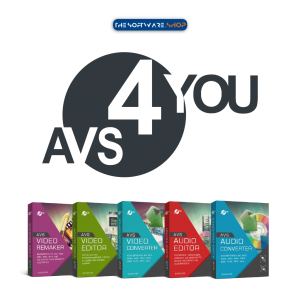
- Unlimited access to 5 AVS Premium Multimedia Tools
- AVS Video ReMaker - Lifetime (a $59.99 Value)
- AVS Video Editor - Lifetime (a $59.99 Value)
- AVS Video Converter - Lifetime (a $59.99 Value)
- AVS Audio Converter - Lifetime (a $59.99 Value)
- AVS Audio Editor - Lifetime (a $59.99 Value)
- Pay once, Unlimited subscription!
- Lifetime Product Upgrades
- Customer Support by AVS4You
- 30-day Money-back guarantee
Platform: Windows
AVS4You 1-YEAR Subscription:
If you have the AVS4You 1-YEAR Subscription license, you are able to work with the installed programs without any limitations, download and install all the programs updates from the AVS4YOU site and even install new programs, but during a 1-year period only. One year subscription means that you can use all software without any limitations during a one-year period. When the period is over, it is up to you to decide whether you prolong your license or stop using it. At the moment, we offer this subscription for $49 instead of regular price of $149.
- 1-Year access to 5 AVS Premium Multimedia Tools
- 1-Year subscription
- 1-Year free Upgrades
- Customer Support by AVS4You
- 30-day Money-back guarantee

Movavi Video Suite 2025: Lifetime License BEST SELLER

Nero Platinum Suite 2026 BEST SELLER

Roxio Creator NXT Pro 9 BEST SELLER

Roxio Toast 20 Titanium BEST OFFER

Roxio Toast 20 Pro BEST OFFER
AVS4You Premium Giveaway
Unavailable at this moment!
To access the giveaway, kindly provide your email address. Please refrain from closing this page after signing in to receive instructions on how to access the offer at no cost.
NOTES:
– All prices shown here are in listed USD (United States Dollar).
– Such promotional programs are subject to change without notice, from time to time in our sole discretion.
– Data may vary based on different systems or computers.
AVS4You Unlimited Subscription Review at a Glance
Video, audio, image and disc projects usually need a separate program each. That means a separate license, a separate interface, and a separate renewal bill. Many creators end up paying monthly for editors, converters and audio tools that overlap, and they still hit format limits or watermarks.
AVS4You Unlimited Subscription solves this with a single serial number. It opens every premium program on the AVS4YOU website, including the video editor, video converter, video remaker, audio editor and audio converter. You can also install new programs as they are released. The developer, Online Media Technologies Ltd. (UK), has been on the market for over 10 years, and its site reports more than 20,000,000 satisfied customers.
The suite now includes AI-powered plugins, so you can generate clips from text, create subtitles on your own computer, and split songs into stems. The sections below explain what the suite contains, how it helps different users, and how to get it at the discounted price.
What Is AVS4You Unlimited Subscription?
AVS4You Unlimited Subscription is a lifetime membership to the full AVS4YOU software library. Registering it works like buying one product on the website and receiving all the others free. You use the same serial number across every program, with no extra fees and no limits.
With this license you can work in the installed programs without restrictions. You can also download every update from the AVS4YOU site and install new programs on your computer. You pay once and never face a renewal.
The suite covers video editing, video conversion, video remaking, audio editing and audio conversion. It also adds AI plugins from the AVS4YOU Plugins Marketplace. Its main tools are:
- AVS Video Editor for movies, screen recordings and slideshows.
- AVS Video Converter for 150+ formats, devices, DVDs and Blu-ray.
- AVS Video ReMaker for editing without re-encoding.
- AVS Audio Editor for recording, mastering and effects.
- AVS Audio Converter for batch conversion, audiobooks and ringtones.
The website describes its awards and customer ratings, including a Softonic clean award and an “Excellent” rating on Informer. The subscription also gives you access to the free AVS4You tools, such as the media player, image converter, disc creator, photo editor and document editor.
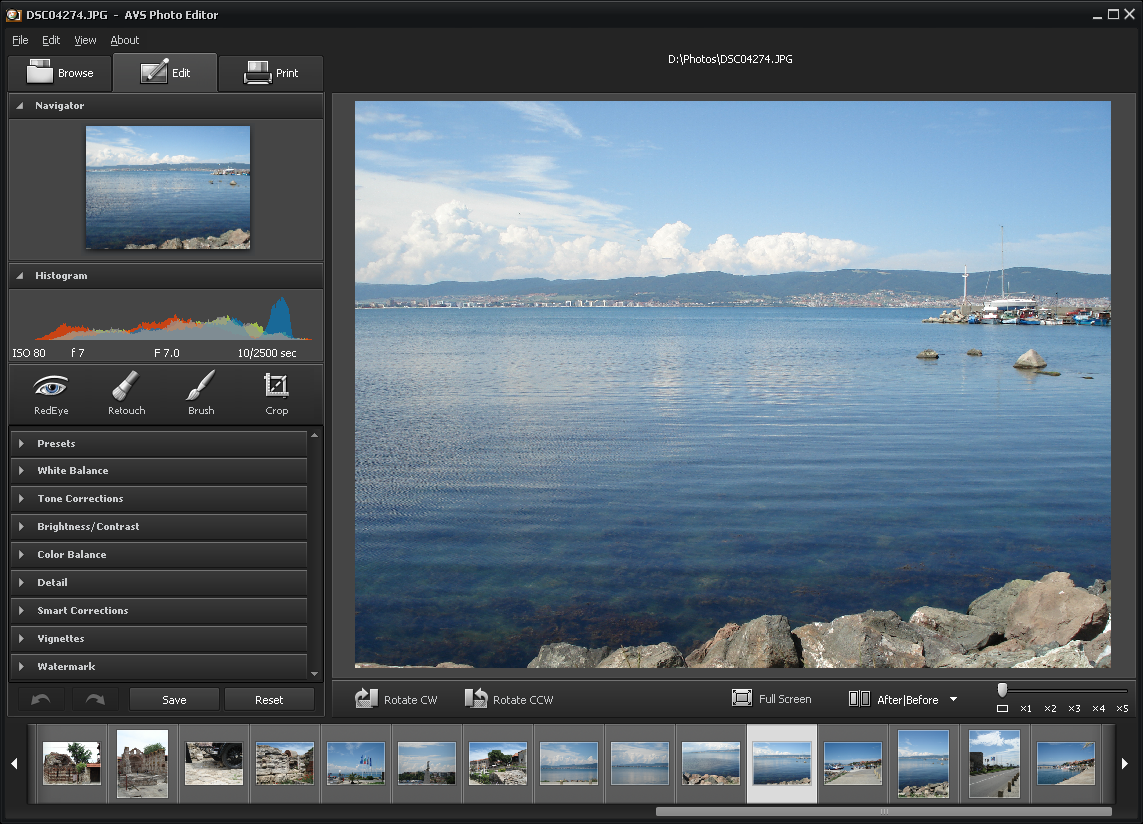
Screenshot




Why Choose This Suite?
One payment covers everything. Instead of buying five or six programs, you pay $79 once. The regular price of the lifetime license is $279, so you save up to 70% with the coupon. The 1-year plan costs $49 instead of $149, but it expires after twelve months. The lifetime plan never does.
No learning curve. The video editor uses simple drag-and-drop editing. Beginners can produce a finished movie in minutes. Experienced editors still get color correction, stabilization, overlays and chroma key.
Support and safety. You get a 30-day money-back guarantee, secure payment and 24×7 customer support. Free upgrades keep every program current.
Who Can Benefit?
- Content creators and YouTubers who need fast editing, subtitles and social media export presets.
- Digital marketers and agencies who produce ads, reels, product videos and tutorials for clients.
- Small business owners who want promotional videos and slideshows without hiring an editor.
- Teachers and trainers who record screens, narrate lessons and convert files for any device.
- Podcasters and musicians who record, clean and master audio, or build karaoke tracks.
- Families and hobbyists who digitize old VHS tapes or burn home movies to DVD.
Features
Below is a complete breakdown of the tools and capabilities packed into this suite, grouped by program:
- AVS Video Editor – Make movies with simple drag-and-drop tools, effects, menus and audio.
- AI Plugin Generate Video – Create short clips from text descriptions inside the editor and keep editing them.
- AI Effects Pack – Apply AI image restoration and dynamic effects such as Spiral and VHS.
- AI Subtitles – Build subtitles in dozens of languages with Whisper, locally with no account or upload.
- Restoration Gaterv3 – Improve image quality by reducing noise, JPEG compression and mild blur.
- Video Generators – Connect HeyGen, Sora 2 and Veo 3 to produce clips from prompts in your workflow.
- Nano Banana Image Generator – Generate, edit and iterate images through the Gemini API.
- Audio AI Plugins – Use Stable Audio 3, Suno API music generation and Supertonic 3 text to speech.
- Stem Splitter – Separate songs into vocals, instrumentals or 4 to 6 tracks for karaoke and remixes.
- Voice Clone – Re-sing or re-speak vocals in another voice using Seed-VC AI on your computer.
- YouTube Video Downloader – Download video and audio from supported sites directly into your project.
- All Key Formats and HD – Edit MP4, MOV, MKV, WEBM, AVI, DVD, WMV and more up to 4K and DCI 4K.
- Modern Codec Support – Open H.265/HEVC, AV1 and VP9 files alongside H.264, MPEG-4 and MPEG-2.
- Hardware Acceleration – Speed up HD editing with video cache and GPU decoding on Intel or NVIDIA.
- Video Recording – Capture from DV/HDV cameras, webcams and VHS sources.
- Screen Capture – Record the full screen or an area with or without audio.
- Drawing and Annotation – Add text, circles, rectangles and arrows to recordings.
- Mouse Click Effects – Highlight clicks with animation and take snapshots as JPEG, PNG or BMP.
- Recording Limits – Split recordings by size or duration, or stop them on a timer.
- Cut and Split – Remove shaky or unwanted scenes and split videos of any size.
- Join Clips – Merge as many video files as you need.
- Color Tuning – Correct white balance and color mismatches.
- Video Stabilization – Steady shaky footage.
- Chroma Key – Replace backgrounds with green screen effects.
- Slideshows – Combine photos, captions, transitions and your own voice or music.
- Sharing Presets – Export for iOS, Android, YouTube, TikTok, Instagram and Vimeo.
- AVS Video Converter – Convert video between 150+ formats for devices and websites.
- AI Video Conversion – Generate clips from text and convert them for mobile, tablet or social media.
- Format Coverage – Encode HD, MP4, MOV, MKV, WEBM, AVI, WMV, DVD, VOB and Blu-ray.
- Camera Formats – Convert AVCHD, MPEG-2 HD, TOD/MOD and M2TS/MTS recordings.
- Ultra HD Presets – Output Full HD, 2K QHD, 4K UHD and DCI 4K.
- Decoder Options – Choose Intel Quick Sync, software Intel Media, common, NVIDIA CUDA or Auto mode.
- Batch Mode – Convert many files at once with easy configurations.
- Command Line Mode – Automate routine work with ready conversion templates.
- Pre-Conversion Editing – Split, merge, crop aspect ratio, add effects and subtitles, and export audio or images.
- Device Presets – Save for iPhone, iPad, Samsung Galaxy, Sony PlayStation, Xbox and Xperia.
- Disc Creation – Burn DVD and Blu-ray discs with menus and chapters.
- Web Presets – Prepare video for YouTube, Facebook, Vimeo, DailyMotion, Flickr and Dropbox.
- AVS Video ReMaker – Edit video files quickly without re-encoding them.
- Lossless Editing – Cut parts, reorder scenes and keep the original quality.
- Merge Files – Join videos that share similar parameters.
- Smartphone and Camcorder Support – Edit iPhone, iPad, Android, AVCHD, MOD, MTS and HEVC files.
- Capture Video – Transfer from camcorders, webcams and DV cameras, and record the screen for tutorials.
- DVD and Blu-ray Menus – Choose templates, split chapters automatically and burn discs.
- AVS Audio Editor – Record, edit and master audio on Windows.
- Format Editing – Work with MP3, FLAC, WAV, M4A, WMA, AAC, MP2, AMR and OGG.
- Cut and Mix – Trim, join, delete, split and blend multiple tracks.
- Built-in Effects – Apply 20 effects including delay, flanger, chorus, reverb and echo.
- Multi-Input Recording – Record from microphones, vinyl and sound card inputs.
- Video Audio Extraction – Pull sound from video files for editing.
- Noise Removal – Clean hiss, crackle and roaring sounds.
- Bitrate and Equalizer – Change bitrate and shape volume by frequency.
- Text to Speech and Ringtones – Turn text into natural voice and make phone ringtones.
- AVS Audio Converter – Convert and prepare audio files in bulk.
- Broad Conversion – Handle MP3, WMA, WAV, M4A, AMR, OGG, ALAC, FLAC, AC3 and MP2.
- Quick Editing – Trim, merge and apply Fade in, Fade out and Normalize.
- Tag Editing – Change title, author, artist and album cover.
- Audiobooks – Create M4B files with chapters and bookmarks.
- iPhone Ringtones – Save edited audio as M4R.
- Batch and Scheduling – Compress many files and schedule conversions with command-line patterns.
- AVS4You Free Tools – Extra utilities included for everyday computer tasks.
- AVS Media Player – Play video and audio in MPEG-4, AVI, WMV, H.264, 3GP and more.
- AVS Image Converter – Batch convert, resize and rotate images.
- AVS Disc Creator – Back up discs, create ISO files and burn data discs.
- AVS Registry Cleaner – Scan and repair the Windows registry.
- AVS Document Converter – Convert documents between formats.
- AVS Photo Editor – Adjust size, color and sharpness, and apply effects.
- AVS Document Editor – Create documents, spreadsheets and presentations compatible with MS Office.
Requirements
Check your computer against the specifications below before installing. The suite runs on a modest machine, and a stronger one speeds up HD work.
Minimum:
- Processor: Dual core (Intel Core 2 Duo or AMD equivalent)
- RAM: 2 GB or higher
- Video: Intel HD Graphics, NVIDIA GeForce or AMD Radeon Graphics
- Sound: Windows-compatible sound card
- DirectX: Microsoft DirectX 9.0c or later
- Windows Media Player 11 or higher for WMV playback
- CD or DVD recorder for importing from discs and creating Video DVD
- Video capture device for capturing
Recommended:
- Operating system: Windows 11, 10, 8.x or 7
- Processor: Quad core (Intel Core i5 series or AMD equivalent)
- RAM: 4 GB or higher
- Video: Intel HD Graphics or NVIDIA GeForce for hardware acceleration
Installation needs administrative permissions, and activation needs an Internet connection. AVS4YOU programs do not copy protected material. Use them only with content you own or have permission to copy.
Free to Try
Test the programs on your own files before you commit. Download the free edition by clicking the button below, then see how the editor, converter and audio tools handle your formats and workflow. Some functions, such as pre-conversion editing and batch scheduling, work only in the full version.
The free tools, including the media player, image converter, photo editor and disc creator, are also available at no cost from the AVS4YOU website.
or
Buy now, the price start from:
Thank you for reading AVS4You Unlimited Subscription review, and enjoy the discount coupon. If you notice any issues with AVS4You Unlimited Subscription discount coupon, deal, or giveaway—such as an expired offer, broken link, or sold‑out promotion—please let us know while the deal is still available.



![[ENDING SOON] Giveaway – WonderFox DVD Ripper Pro: Free License Key | Full Version – for Windows](https://thesoftware.shop/wp-content/uploads/thumbs_dir/WonderFox-DVD-Ripper-Pro-boxshot-rfosjh6behvvm8363066rvtw04h0mctw59byxa557c.png)


Read Trustpilot reviews. The company is marketing as UNLIMITED something that is tied to one particular PC. Should you ever upgrade your PC your license is gone! When you buy the license there is no link to EULA (where this limitation is mentioned), only to general terms and agreement. So they mislead buyers on purpose!