
Giveaway – BeckerCAD 12 3D Pro: Free Serial Number | CAD Software with AutoCAD Compatible DWG/DXF Drafting – for Windows

Get production-ready 2D drawings and realistic 3D renderings faster—Get BeckerCAD 12 3D Pro at a no cost now and start your next plan, part, or model with confidence.
Free Full Version!
BeckerCAD 15 3D Pro Review at a Glance
When a design deadline is close, the last thing needed is a CAD tool that slows work down with complicated steps, limited import/export options, or missing documentation.
BeckerCAD 15 3D Pro is built to reduce that friction by bringing professional 2D drafting, practical 3D modeling, and presentation-quality visualization into one Windows-ready CAD solution—so sketches, manufacturing drawings, and 3D scenes can be created, revised, and shared without switching between multiple programs.

What is BeckerCAD 15 3D Pro
BeckerCAD 15 3D Pro is professional CAD software for creating 2D technical drawings and realistic 3D models on Windows, combining drafting, modeling, annotation, and visualization in one workspace. It supports workflows for architecture, electrical planning, and mechanical design using directly usable templates and a broad toolset for drawing and editing.
It is also built for data exchange and productivity: it includes a Python interface for automation and is presented as compatible with AutoCAD and CADdy++ Mechanical Design for collaboration and file sharing.
This software is aimed at people who want dimensionally accurate 2D manufacturing drawings as well as clean-looking 3D visuals for reviews, proposals, or client sign-off. It includes a large collection of drawing, editing, and annotation tools for everyday drafting tasks, plus 3D tools that support both modeling and realistic scene output. BeckerCAD 15 3D Pro also supports importing complex 3D graphics for presentations and offers a Python programming interface for users who want automation, repeatable workflows, or custom routines in their projects.

A major reason many users choose BeckerCAD is workflow compatibility. BeckerCAD 15 3D Pro is described as fully compatible with AutoCAD and CADdy++ Mechanical Design, supporting smoother collaboration and file exchange across teams or external partners who already rely on those ecosystems. Along with this, faster exchange is supported by features such as converters and common CAD formats used in technical drawing environments, helping reduce the “back-and-forth” that happens when drawings move between suppliers, contractors, and internal stakeholders.
For 3D work, the goal is not only building shapes—it is also reviewing designs quickly and presenting them clearly. BeckerCAD 15 3D Pro supports dynamic operations such as surface manipulation on 3D bodies, and it includes lighting, shadows, and photorealistic rendering options so a model can be shown in a way that communicates intent, form, and layout. If a project requires checks between parts or systems, the software includes collision display so interferences can be spotted early, when fixes are still easy and inexpensive.

This is also a strong fit for users who need CAD for multiple disciplines. Included templates and tools target architecture, electrical engineering, and mechanical engineering, making it practical for users who switch between building layouts, installation planning, and part design. In architectural workflows, walls, openings, and building creation tools support faster concept-to-visual steps. In mechanical workflows, transformation tools, precise dimensioning, and model management features support iteration and revision without rebuilding from scratch.
For makers and product teams, the STL workflow matters. BeckerCAD 15 3D Pro includes STL export for 3D printing to help move from modeling to printing without complicated conversions. This is useful for prototypes, fit checks, enclosures, brackets, concept models, or presentation mockups—especially when multiple versions need to be produced quickly.

BeckerCAD 15 3D Pro is designed for Windows environments and is optimized for Windows 11, matching the needs of modern PCs used in offices, workshops, classrooms, and home studios. It is also positioned as a perpetual (non-subscription) option that can be installed on three PCs, which is valuable for users who split time between a main workstation, a laptop, and a secondary device. That licensing approach can be especially practical for small teams, freelancers, and departments that prefer a clear one-time purchase instead of ongoing monthly expenses.
Finally, documentation and onboarding can make or break adoption. BeckerCAD 15 3D Pro includes a large PDF manual (950 pages) for guided learning and reference, helping new users become productive and helping experienced users quickly locate commands, options, and workflows when complex tasks come up. The result is a CAD package aimed at real projects: drawings that must be accurate, models that must look correct, and exports that must be usable by other systems.
Key Benefits
The points below describe the practical ways BeckerCAD 15 3D Pro supports faster output, clearer communication, and more consistent project delivery.
- Create dimensionally accurate 2D manufacturing drawings for production, documentation, and review.
- Produce realistic 3D visualizations with lighting and shadows to communicate form and layout.
- Reduce rework using collision display to detect interferences early.
- Save time on revisions with tools for transformations, surface edits, and quick selection.
- Support multiple disciplines using templates for architecture, electrical engineering, and mechanical engineering.
- Improve sharing using common CAD exchange formats and converters for smoother collaboration.
- Move designs to fabrication with STL import/export for 3D printing workflows.
- Keep work organized using model and folder management tools, plus view saving for consistent presentation.
- Standardize results through repeatable settings, materials lists, and documented workflows.
Features
Below is a detailed list of the key features that make BeckerCAD 15 3D Pro a practical addition for technical drawing, 3D modeling, and presentation workflows:
- AutoCAD & CADdy++ compatibility – Built to support collaboration and exchange in mixed-CAD environments.
- DWG/DXF workflow – Work with common CAD formats for drawing exchange.
- Converter tools – Faster data exchange when moving files between systems.
- 2D drafting & annotation tools – Large tool set for lines, geometry, dimensions, and labeling.
- Dimensioning options – Create clear measurements for manufacturing and planning.
- Text tools – Add notes, labels, and project information reliably.
- XML text formatting (extended) – More control for formatted text output.
- 3D modeling & body control – Create, move, rotate, and revise 3D objects efficiently.
- 3D axis cross settings – Fine control of axis behavior and orientation.
- 3D transformations – Move and rotate objects precisely in 3D space.
- Surface transformation tools – Extended options for editing body surfaces.
- Dynamic operation preview – See results before applying changes.
- Dynamic surface manipulation – Direct editing of surfaces on 3D bodies for rapid revisions.
- Convenient surface selection – Select faces quickly for edits and adjustments.
- Extended surface selection – Improved selection for complex models.
- Rendering & visualization – Present models with realistic output and scene controls.
- Photorealistic 3D rendering – Create presentation-ready visuals.
- Lighting perspective control – Change lighting direction and viewpoints.
- Lighting and shadows in 3D space – Improve depth perception and clarity.
- Physically based rendering (PBR) – Consistent materials and realistic shading.
- Improved light sources – More realistic preview with expanded configuration.
- Collision display – Detect and view collisions between different models down to small tolerances.
- Interference visibility – Make clashes easier to spot during reviews.
- Design correction support – Fix conflicts before production or installation.
- Architecture-ready building tools – Build structural layouts directly inside the CAD environment.
- Building creation – Start building models quickly from plan concepts.
- Wall creation and editing – Define and revise walls efficiently.
- Openings in 3D walls – Add doors/windows openings in the 3D wall context.
- Insert/edit opening elements – Adjust opening components without rebuilding.
- Walls/openings with foil assignment – Organize architectural elements by layers/foils.
- Section views & documentation – Generate views that support engineering review and detailing.
- Sectional views generation – Create section cuts for clearer technical communication.
- Dimetric views – Represent models in dimetric projections for technical layouts.
- Model management & teamwork – Support controlled collaboration and faster navigation.
- Model Explorer search – Find objects faster through search and selection.
- Quick dimensioning of 3D models – Reduce waiting time during dimension workflows.
- Simultaneous teamwork – Multiple employees can work on the same model.
- Protection against simultaneous access – Reduce accidental overwrites from different workstations.
- Automatic 3D view updating – 3D graphic objects update in the 3D window without separate loading.
- Smoother review cycle – Less time spent refreshing or reloading elements.
- More consistent visualization – Reduces mismatch between model state and viewport.
- Materials & appearance management – Keep visual standards consistent across projects.
- Copy materials from objects – Save colors/material properties into a reusable list.
- Material list reuse – Apply consistent styles across parts and scenes.
- 3D printing support – STL workflow for additive manufacturing and prototyping.
- STL import – Bring printable models into projects.
- STL export – Send models out for slicing and printing.
- Input device support – Work comfortably with professional navigation hardware.
- 3Dconnexion 3D mouse support – Improve navigation and control in 3D work.
- Output & publishing options – Share results across formats for documentation and web use.
- SVG export – Export vector graphics for documentation and diagrams.
- 3D view printing with stamp – Add header/footer stamps (project, location, date) for documentation.
- Customization & UI control – Adapt the interface to the way work is done.
- Custom toolbars – Build quick access to frequently used commands.
- Saved views – Store perspectives to reuse across projects.
- Optimized program control – More efficient handling for daily drafting tasks.
- CAD content access – Get manufacturer/standard components for projects.
- Partcommunity downloads – Access many CAD standard downloads (free and paid).
- Documentation & learning resources – Support quick onboarding and self-training.
- 950-page PDF manual – Detailed reference for features, workflows, and commands.
- Licensing & long-term value – Designed for buyers who prefer ownership instead of monthly fees.
- Perpetual license – No time limit for continued use after purchase.
- 3-PC installation – Install on up to three PCs for flexible work setups.
Requirements
Before purchase or installation, confirm the PC meets the requirements below so 3D performance and general responsiveness match expectations.
- Operating system: Windows 11 / 10 / 8.1 / 8
- Graphics card: OpenGL-capable GPU (nVIDIA chipset recommended); 1024 × 768 minimum, True Color; 3D/OpenGL accelerator recommended for CAD
- CPU: AMD AM3 Phenom II or Intel Core i3 (or better)
- Storage: 2.0 GB free disk space
- Memory: 1 GB RAM (2 GB or more recommended)
- Monitor: 19″ or larger
- Browser component: Internet Explorer 11 required
- Internet connection: Required for software registration
Downloads
See how BeckerCAD 15 3D Pro fits your projects—download the trial or demo edition (if offered in your purchase portal) and test core drafting, modeling, and export tasks by clicking the button below.
BUY NOW
BeckerCAD 15 3D Pro is available for €119.99. But you can now get BeckerCAD 12 3D Pro with a Registration Code for free in the Giveaway tab below.

Coohom Pro BEST OFFER

Daz 3D Memberships EXCLUSIVE
![[FLASH SALE] 92% Off – Ashampoo 3D CAD Professional 12: Lifetime License | Complete Architectural Design Suite with Electrical Planning, Floor Plan Tools & Object Catalogs – for Windows](https://thesoftware.shop/wp-content/uploads/thumbs_dir/Ashampoo-3D-CAD-Professional-Review-Download-Discount-Coupon-247kvlmusx363tqog5ww73ldx4mb4pjl1cn4v5msdwno.png)
Ashampoo 3D CAD Professional BEST OFFER
TerrainAxe EXCLUSIVE

Ashampoo Home Design 10: Perpetual License BEST OFFER
Live Home 3D Pro for Mac BEST OFFER

MindArchitect Pro BEST OFFER

Tenorshare PixPretty GIVEAWAY

Perfect PDF 12 Office Edition GIVEAWAY

Al-Soft Multi Monitor Viewer GIVEAWAY

Affinity: Photo, Designer, Publisher GIVEAWAY
BeckerCAD 12 3D Pro Key Giveaway
Available now: Free License Code For a Limited Time!
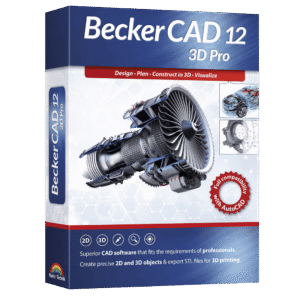
To access the giveaway, kindly provide your email address. Please refrain from closing this page after signing in to receive instructions on how to access the offer at no cost.



NOTES:
– All prices shown here are in listed USD (United States Dollar).
– Such promotional programs are subject to change without notice, from time to time in our sole discretion.
– Data may vary based on different systems or computers.
Thanks for reading BeckerCAD 15 3D Pro Review & Enjoy the discount coupon. Please Report if BeckerCAD 12 3D Pro License Key Giveaway has a problem such as expired, broken link, sold out, etc while the deal still exists.


![[NEW LINK #6] Giveaway – Ashampoo Home Design 10: Free License Key | Full Version – for Windows](https://thesoftware.shop/wp-content/uploads/thumbs_dir/Ashampoo-Home-Design-10-Review-Download-Discount-Coupon-rfosnmmnl5kgw822uarvac46ge0dm8b7pt2689zjq0.png)