Giveaway – CBackup Professional: Free License Key | All-in-One Cloud & PC Backup Software | Backup, Sync, Clone & Restore Files – for Windows

Protect Every File You Own — On Your PC and in the Cloud — With One Powerful Backup Solution. Get CBackup Professional with a License Key For Free Today and Never Lose Important Data Again!
You can also get CBackup Premium with a discount of up to 73% OFF!
✔ Free Product Updates ✔ 24×7 Customer Support ✔ 30-day Money-back Guarantee.
CBackup Review at a Glance
The Problem With Unprotected Data
Every day, millions of people lose critical files — irreplaceable photos, important business documents, years of hard work — due to sudden hardware failure, accidental deletion, system crashes, or cloud service disruptions. Most backup tools either protect only your local PC or only your cloud data, leaving a dangerous gap in your overall data protection strategy. What you need is a single, all-in-one solution that covers both your Windows PC and all your cloud storage accounts, keeping everything backed up, synced, and recoverable at a moment’s notice. That solution is CBackup.
What is CBackup?
CBackup is a comprehensive online and desktop cloud backup software designed to give individuals, professionals, and businesses complete control over their data safety. It combines a powerful Windows desktop application for local PC backup, system cloning, and file sync with a web-based cloud management platform that lets you back up and sync data directly between cloud services like Google Drive, Dropbox, OneDrive, and FTP/SFTP — without downloading or uploading a single file.
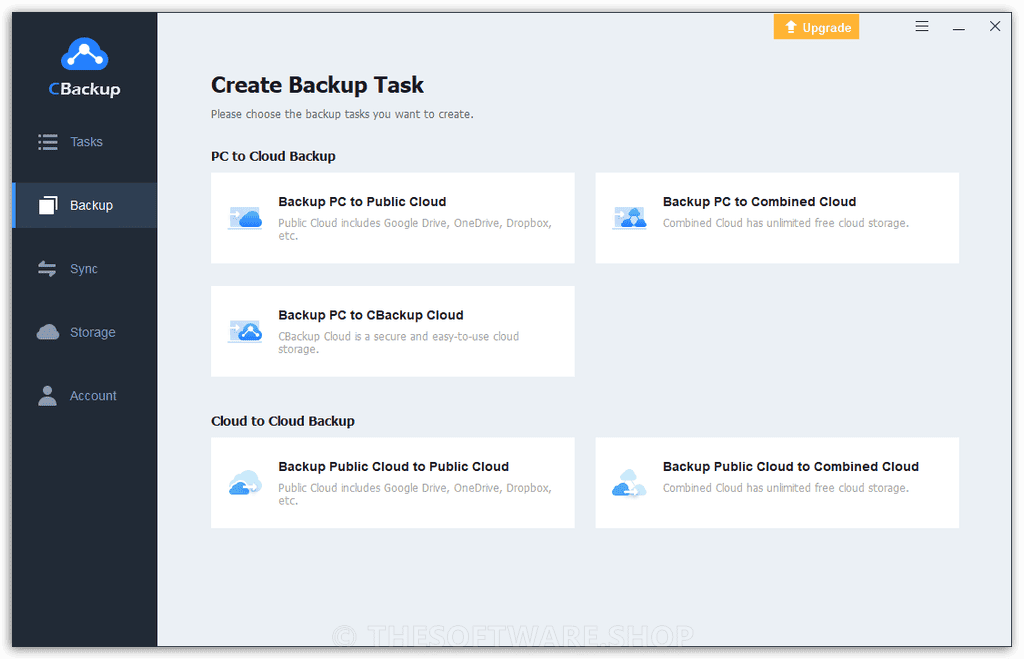
The desktop app lets you back up your system, disks, partitions, and files to local drives, external storage, USB devices, NAS, and the cloud. The web app lets you create cloud-to-cloud backup and sync tasks that run automatically, even when your computer is off. Together, they form a seamless, fully automated data protection ecosystem for Windows 11, 10, 8.1, 8, 7, and Windows Server 2003 through 2025.
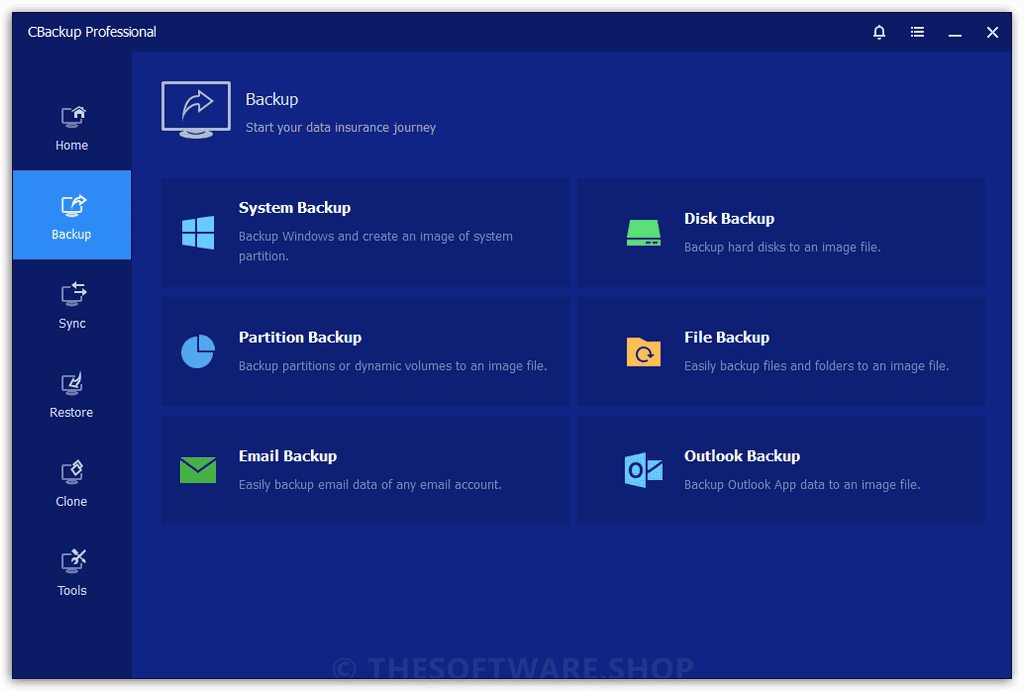
Key Benefits
CBackup addresses your most critical data protection needs in one unified platform. Below is a breakdown of the core benefits that make it the trusted choice for thousands of users worldwide:
- Total PC and cloud protection — Back up your Windows system, disks, partitions, and individual files, as well as your Google Drive, Dropbox, and OneDrive data, all from a single software platform.
- No data loss from cloud service issues — Cloud-to-cloud backup ensures your data is safely duplicated to another cloud even if one service goes down, gets hacked, or suspends your account.
- Combine multiple free cloud accounts into one large backup space — Merge the free storage from multiple Google Drive, Dropbox, and OneDrive accounts into one large, unified backup destination at zero cost.
- Fully automated backup and sync — Set it up once and CBackup handles everything on a custom schedule, with email notifications to keep you informed.
- Fast and seamless OS migration — Move your Windows OS from an HDD to a new SSD without reinstalling Windows. The cloned system stays fully bootable with all data intact.
- Military-grade security — All data transfers are protected with 256-bit AES Encryption and all cloud account connections use OAuth authorization, so CBackup never stores your login credentials.
Whether you are a home user trying to protect family photos, a freelancer safeguarding client project files, or a business IT administrator managing backup tasks across dozens of machines, CBackup is built for you. It is completely free to start, with a CBackup Cloud storage space available at no cost and no trial period.
The CBackup Difference: Why It Beats the Rest
Peace of Mind for Data Safety
Data loss can happen at any moment — a failing hard drive, a ransomware attack, an accidental deletion, or a cloud provider outage can wipe out years of important files in seconds. CBackup addresses this by delivering reliable, automated backups that protect both your local and cloud data continuously. With scheduled backups, incremental detection, and redundant cloud storage, your data is always protected and always recoverable — giving you genuine confidence that nothing important will ever be permanently lost.
Hassle-Free System Migration
Upgrading to a new SSD or replacing an old hard drive used to mean spending hours reinstalling Windows and reconfiguring applications. CBackup’s intelligent OS migration and disk cloning technology transfers your entire operating system — with all applications, settings, drivers, and personal data — exactly as it was to the new drive. The result is a fully bootable, ready-to-use system on the new hardware, with zero reinstallation time and no loss of data or personalization.
Integrate Free and Idle Cloud Storage
Most users have free storage sitting unused across multiple cloud accounts they signed up for over the years. CBackup’s Storage Pool feature lets you combine all that free and idle space into one large, unified backup destination. Instead of paying for extra cloud storage, you make full use of what you already own. Users with multiple free Google Drive, Dropbox, and OneDrive accounts can create effectively unlimited cloud backup space at absolutely no cost.
Features
Below is a thorough breakdown of every major capability CBackup offers, designed to give you full visibility into what this software delivers at every level:
- Backup and Restore Everything — Create full image backups of your entire Windows system for rapid recovery in any emergency situation.
- System Backup — Back up your complete Windows OS setup as a recoverable image, including all installed applications and settings.
- Disk and Partition Backup — Back up an entire hard drive or a specific partition for targeted, flexible protection.
- File and Folder Backup — Select specific files or directories for lightweight, space-efficient backup tasks.
- Automatic Scheduled Backup — Configure daily, weekly, monthly, or event-triggered backup schedules to keep protection fully hands-free.
- Incremental Backup — Back up only files that have changed since the last backup session, saving both time and storage space.
- System Restore — Roll back your Windows OS to a previous stable state in just a few clicks.
- File-Level Restore — Recover individual files from a backup image without restoring the entire backup set.
- Universal Restore — Restore a backup image to a different physical machine or migrate from physical to virtual (P2V).
- Advanced File Synchronization — Keep files consistent across multiple locations with flexible, intelligent sync modes.
- Mirror Sync — Automatically ensure the destination folder is an exact mirror of the source, removing any extra files from the target.
- Two-Way Sync — Replicate all changes, new folders, and deletions made in either the source or destination to the other location simultaneously.
- Real-Time Sync — Monitor the source folder continuously and sync any new or modified files to the destination instantly.
- Scheduled Sync — Automate sync tasks on a set timetable so files are always up to date without any manual action.
- Easy Disk Clone and OS Migration — Move your operating system or entire disk to a new drive without reinstalling Windows.
- System Clone — Migrate your live OS, applications, and settings to an SSD or HDD with a guaranteed bootable result.
- Disk Clone — Duplicate an entire hard drive to a larger or faster drive, preserving all data and structure.
- Partition Clone — Clone a specific partition with SSD alignment, on-the-fly resizing, and support for dynamic volumes.
- Sector-by-Sector Clone — Create a byte-for-byte duplicate for complete data accuracy, or clone only used sectors for transferring data from a large drive to a smaller one.
- Cloud-to-Cloud Backup and Sync — Back up and sync your cloud data between services directly, without using your local computer or bandwidth.
- Cloud-to-Cloud Backup — Copy your files from one cloud service to another automatically, adding a second layer of safety against account issues or service outages.
- Cloud-to-Cloud Sync — Keep cloud accounts synchronized without downloading and re-uploading files, saving time and computer resources.
- Offline Cloud Backup — Once a task is launched or scheduled via the web app, it runs on CBackup servers even if your PC is turned off.
- No File Size Restriction — Back up and restore files of any size without limitations.
- PC to Cloud Backup and Sync — Send your local files directly to cloud storage for off-site protection and multi-device access.
- Backup to Google Drive, OneDrive, Dropbox — Push local files to major cloud platforms directly from the desktop app.
- Encrypted Cloud Backup — Add password protection to cloud backups, securing them so only you can restore them through CBackup.
- Multi-Device File Access — Access your backed-up files from any device after syncing to cloud storage.
- Combined Cloud Storage Pool — Merge the free and unused storage from multiple cloud accounts into one large backup destination.
- Combine Free Cloud Drives — Link multiple Google Drive, Dropbox, or OneDrive free-tier accounts to create effectively unlimited free backup space.
- Merge Paid and Idle Storage — Consolidate unused storage from paid subscriptions to maximize value and reduce overhead costs.
- Enterprise-Grade Security — CBackup is built with data privacy and account security as core principles.
- 256-bit AES Encryption — All data transfers are protected with one of the most secure encryption standards available.
- OAuth Authorization — Cloud accounts are connected without ever saving your login credentials on CBackup servers.
- GDPR Compliance — CBackup processes only the minimum personal data necessary for its specific functionality.
- Data Ownership — All backup files are stored in your own cloud drives, and only you have access to them.
- Permanent Account Deletion — Delete your CBackup account at any time and all account data is permanently removed from the database.
- Automation and Personalization Tools — Fine-tune your backup experience with advanced scheduling and management options.
- 8 Schedule Options — Choose from daily, weekly, monthly, USB plug-in trigger, and other event-based automation settings.
- Differential Backup — Back up only the difference between the last full backup and the current state to minimize storage and time.
- Email Notifications — Receive automatic email alerts reporting the status of your backup and restore tasks.
- File Filter Setting — Include or exclude files by extension (e.g., .doc, .txt, .gif) to optimize backup scope and storage usage.
- Version Management — Selectively delete or restore specific backup versions for granular version control.
- Backup Scheme — Automatically remove outdated backup images based on retention rules by cycle count or image count.
- Manage Tasks — Flexibly manage, pause, restart, or reconfigure any backup or sync task from the software dashboard.
- Outlook and Email Backup — Protect email communications and contact data directly within the desktop app.
- Outlook Backup — Securely back up emails, contacts, calendars, notes, and tasks from Outlook to local drives, external storage, or NAS.
- Email Account Backup — Back up entire email accounts or specific folders with a single click, compatible with Gmail, Hotmail, and third-party accounts configured in Outlook.
- Recovery Environment and Bootable Media — Ensure system recovery is possible even when Windows fails to start.
- Create Bootable Media — Build a Windows PE or Linux bootable USB or CD to perform recoveries when the OS cannot load.
- Recovery Environment — Add a CBackup recovery option directly to the Windows boot menu for fast access during startup failures.
- Explore Image — Browse and copy files directly from backup images in Windows Explorer without performing a full restore.
Requirements
CBackup is compatible with the following environments:
- Operating Systems (Desktop App): Windows 11, Windows 10, Windows 8.1, Windows 8, Windows 7 (all editions, 32-bit and 64-bit)
- Windows Server: 2025 (including R2), 2022, 2019, 2016, 2012, 2011, 2008, 2003
- Supported Cloud Services: Google Drive, Dropbox, OneDrive, FTP/SFTP
- Web App: Any modern browser (Chrome, Firefox, Edge, Safari) — no installation required
- Internet Connection: Required for cloud backup, sync, and web app features
Downloads
Start protecting your data right now with CBackup’s fully free plan — no credit card required, no trial period, and no expiration date. Click the button below to download the CBackup desktop app or sign up for the CBackup web app and start your first backup in minutes.
Desktop App Cloud Desktop App FREE PLAN
BUY NOW
CBackup Paid Plan is available for just $3.99/month (billed at $47.88 per year for 1 computer license). But right now, you can get your CBackup license at an exclusive discounted price using our limited-time coupon offer — act fast before this deal expires!
Software Giveaway: You can also get CBackup Professional with a license key for free in the Giveaway tab below.
CBackup Cloud Backup and Software

" />
Get More Data Traffic and Advanced Features for Your Cloud Backup
- Unlimited data traffic per month
- 5 TB CBackup cloud storage
- Fastest backup and sync speed
- Scheduled backup and sync
- 14-Day Unconditional Money Back Guarantee
- 24x7 Lifetime Technical Support
Billed $539.64 $143.64 every 3 years
" />
Get More Data Traffic and Advanced Features for Your Cloud Backup
- 2TB data traffic per month
- 1 TB CBackup cloud storage
- Faster backup and sync speed
- Scheduled backup and sync
- 14-Day Unconditional Money Back Guarantee
- 24x7 Lifetime Technical Support
Billed $179.64 $71.64 every 3 years
" />
Get More Data Traffic and Advanced Features for Your Cloud Backup
- 2TB data traffic per month
- 1 TB CBackup cloud storage
- Faster backup and sync speed
- Scheduled backup and sync
- 14-Day Unconditional Money Back Guarantee
- 24x7 Lifetime Technical Support
Billed $71.64 $35.64 every 3 years
CBackup Software Only
" />
Reliable Data Backup, Restore, Sync and Clone for Computer
- 1 Computer / License
- Backup & Restore System, Disk, Files
- Backup & Sync with File Filter
- Advanced File Sync Modes
- Faster Task Execution Speed
- Email or Outlook Backup
- OS Migration & Disk Clone
- 90-Day Unconditional Money Back Guarantee
Billed $47.88 every 1 year
" />
Reliable Data Backup, Restore, Sync and Clone for Computer
- 99 Computer / License
- Backup & Restore System, Disk, Files
- Backup & Sync with File Filter
- Advanced File Sync Modes
- Faster Task Execution Speed
- Email or Outlook Backup
- OS Migration & Disk Clone
- Create Portable Version
- Billable Technical Support
- 90-Day Unconditional Money Back Guarantee
Billed $359.88 every 1 year
AOMEI Backupper 8 Professional: Lifetime Upgrades BEST SELLER

G Cloud Backup: Unlimited Storage BEST OFFER

Ashampoo Backup Pro 27: Perpetual License BEST SELLER
FolderFort Cloud Storage Pro BEST OFFER
EaseUS Todo Backup Home 2026: Lifetime Upgrades BEST SELLER
CBackup Professional Key Giveaway
Available now: Free License Key For a Limited Time!
To access the giveaway, kindly provide your email address. Please refrain from closing this page after signing in to receive instructions on how to access the offer at no cost.
NOTES:
– All prices shown here are in listed USD (United States Dollar).
– Such promotional programs are subject to change without notice, from time to time in our sole discretion.
– Data may vary based on different systems or computers.
Thanks for reading CBackup Review & Enjoy the discount coupon. Please Report if CBackup Discount Coupon/Deal/Giveaway has a problem such as expired, broken link, sold out, etc while the deal still exists.