Giveaway – ClipFrame Pro: Free 1-year Activation Code | AI Video Clipper for Podcasts, Gaming, Travel & Tutorials

Turn One Long Video into Attention-Grabbing Shorts. Get a 1-year full access to ClipFrame Pro for FREE!
Free Full Version!
BUY NOW
ClipFrame Pro is available for $89 per year. But, you can now get a 1-year full access to ClipFrame Pro with an exclusive activation code for free through the Giveaway tab below. This offer is available for a limited time!

Fast Video Downloader PRO BEST SELLER

TTSFree AI BEST OFFER

DeepClean Audio BEST OFFER

VideoProc Converter AI: Lifetime License BEST SELLER

iTop Voicy Pro GIVEAWAY

VSDC Video Editor Pro: 2-PC 1-Year License BEST SELLER

Hitpaw Video Editor: Lifetime License BEST OFFER

Fast Video Maker BEST OFFER

OpenArt AI GIVEAWAY
EaseUS Video Editor PRO BEST OFFER
ClipFrame Pro Free Code Giveaway
Available now: Free for a limited time!
To access the giveaway, kindly provide your email address. Please refrain from closing this page after signing in to receive instructions on how to access the offer at no cost.
NOTES:
– All prices shown here are in listed USD (United States Dollar).
– Such promotional programs are subject to change without notice, from time to time in our sole discretion.
– Data may vary based on different systems or computers.
ClipFrame Review at a Glance
reating short-form videos from long recordings can take more time than producing the original content. A podcast episode, gaming session, travel vlog, tutorial, or live stream may contain dozens of interesting moments, but finding the right sections requires patience and attention. After identifying those moments, creators still need to trim the footage, format it for vertical platforms, keep speakers in view, add subtitles, and prepare the final videos for publishing. Repeating this process for every recording can quickly become a demanding part of content production.
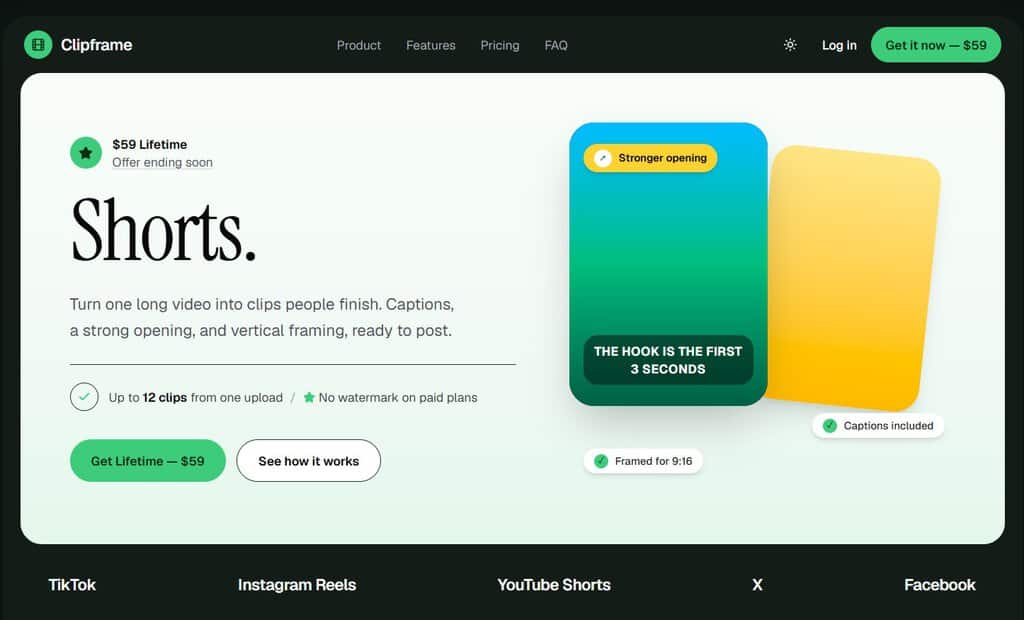
Clipframe is an AI-powered video clipping and editing solution designed to simplify this entire workflow. It analyzes long videos, identifies potentially engaging moments, and helps turn them into short-form content suitable for platforms such as TikTok, Instagram Reels, YouTube Shorts, and X. Instead of manually reviewing every second of a recording, users can rely on the ClipAnything engine to find moments that match their content goals.
What Is Clipframe?
Clipframe is an AI-assisted video repurposing platform that converts long recordings into short, vertical videos. It combines content analysis, clip selection, automated formatting, caption generation, and editing tools in one workflow. Its main purpose is to help users reuse existing footage instead of creating every short video from scratch.
At the center of the system is ClipAnything, Clipframe’s natural-language clip-finding engine. Traditional clipping workflows often require users to watch lengthy recordings, move through a timeline, and manually identify interesting sections. ClipAnything offers another approach: users describe the type of moment they want, and the AI analyzes the video to find relevant sections.
For example, a podcast creator could search for emotional reactions or controversial discussions. A gaming creator could look for funny fails or high-energy gameplay. A fitness educator might want short instructional moments, while a travel creator could look for memorable scenes and reactions. The goal is to make clip selection more specific and less dependent on manual timeline searching.
Clipframe also includes an AI Virality Score from 0 to 100. This score provides an assessment of a clip’s potential based on selected video characteristics, including its opening, speech pacing, and visual dynamics. It gives creators another reference point when deciding which clips deserve further editing or priority during publishing.
After the selection process, users can prepare their clips with animated captions, vertical framing, transcript editing, and trimming tools. Its active-speaker reframing feature automatically helps keep the current speaker centered in the frame. This is especially useful for interviews and podcast recordings in which participants may appear side by side.
The editing interface is designed to make video adjustments more approachable. Instead of depending entirely on a complex timeline, users can work directly with the transcript. Clicking on a word allows them to edit or remove it, and deleting transcript words can create corresponding cuts in the video. Users can also adjust subtitle styles, choose text sizes, change subtitle positions, and refine the clip’s start and end points.
In practical terms, Clipframe helps users turn existing video recordings into a collection of social-media-ready clips with fewer repetitive editing steps. It supports several common file formats and direct YouTube links, making it useful for different content production workflows.
Key Benefits
Clipframe is designed to address common challenges in video repurposing. The following benefits explain how its features can support a more efficient content workflow.
- Save Time on Manual Video Review: Searching through a long recording can consume hours. Clipframe analyzes the footage and identifies potentially useful moments, reducing the amount of manual searching required before editing begins.
- Produce More Short-Form Content: One long recording can provide material for multiple short videos. Clipframe is designed to generate a collection of clip candidates from one upload, helping users make better use of existing footage.
- Work with Multiple Video Genres: Unlike workflows built exclusively for interviews or podcasts, ClipAnything supports a wider range of content categories, including gaming, travel, comedy, cooking, tutorials, sports, fitness, and live streams.
- Find Moments with Natural-Language Prompts: Users can describe the moments they want in everyday language. Requests such as funny fails, emotional reveals, or high-energy tips help guide the AI toward relevant sections of the footage.
- Prioritize Clips with AI Scoring: The 0–100 AI Virality Score offers a reference for comparing potential clips. By considering characteristics such as opening strength, pacing, and visual activity, it helps users review their selections with additional context.
- Create More Readable Captions: Word-level animated captions emphasize individual words as they are spoken. This can make subtitles easier to follow and give short videos a more energetic visual presentation.
- Keep Speakers in the Frame: Smart active-speaker reframing automatically helps center the person speaking in a vertical video. It is particularly useful for podcast discussions and recordings featuring multiple participants.
- Simplify Editing for Beginners: Transcript-based editing removes some of the complexity associated with traditional video timelines. Users can make text-based cuts and adjust subtitles without requiring extensive editing knowledge.
- Prepare Videos for Social Platforms: Clipframe exports vertical 9:16 videos at up to 1080p and 60fps, according to the supplied product specifications. This format is intended for publishing on TikTok, Instagram Reels, YouTube Shorts, and X.
- Reuse Content More Effectively: Rather than allowing long recordings to remain unused after their original publication, creators can turn them into additional pieces of content for different social media channels.
- Reduce Repetitive Production Expenses: Automating parts of clipping, captioning, and reframing may reduce the need for routine manual editing work. This can be useful for creators and teams managing a regular publishing schedule.
- Keep Creative Control: AI selection is a starting point, not a replacement for human judgment. Users can review the selected moments, adjust the timing, edit the transcript, and customize the caption presentation before exporting.
What makes Clipframe particularly useful is its ability to work with more than podcast and interview recordings. Its AI is designed for a broad selection of video genres, including gaming, travel, comedy, cooking, tutorials, sports, fitness, talk shows, and live streams. Users can also describe the type of content they want in ordinary language. For example, a creator can request funny fails, emotional reactions, memorable discussions, high-energy advice, or other specific moments. The system then analyzes the supplied footage and selects matching sections.
The workflow begins with a video upload or a YouTube link. Clipframe processes the footage, evaluates individual moments, and provides AI-selected clips. Its AI Virality Score, displayed on a scale from 0 to 100, offers an additional way to compare clips based on factors such as speech pacing, opening strength, and visual activity. This score is intended to help users assess potential viewer-retention performance; it is not a guarantee of views, engagement, or virality.
Once clips have been selected, Clipframe assists with the editing process. Word-level animated captions highlight important words, while smart active-speaker reframing helps position the person speaking within a vertical 9:16 frame. Users can also edit the transcript, remove unwanted words to create cuts, trim video sections, adjust subtitle placement, and select different typography styles without relying on complicated editing timelines.
The result is a more organized approach to short-form video production. Creators can move from a long recording to several polished clip candidates while reducing repetitive editing tasks. Rather than spending most of their working hours searching footage and preparing subtitles, they can devote more attention to selecting the best moments, refining their message, and publishing consistently.
Clipframe is suitable for individual creators, podcast producers, social media managers, educators, gaming channels, marketing teams, and businesses that regularly work with video. Beginners can use its automated workflow without needing advanced editing experience, while experienced creators can use its transcript-based controls and customization options to refine their output.
Choosing Clipframe means choosing a workflow built around speed, content selection, and convenient editing. Its combination of natural-language AI clip finding, automated captions, speaker-aware reframing, and high-resolution vertical exports makes it a practical option for people who want to produce more short-form content from the recordings they already have.
Who Can Benefit from Clipframe?
Clipframe can support a variety of people and organizations that produce video regularly. Podcast hosts and interview producers can reuse conversations as short clips featuring memorable statements, emotional reactions, and interesting debates. Gaming creators can turn long sessions into shorter highlights, funny moments, and energetic gameplay segments.
Travel vloggers and lifestyle creators can repurpose longer recordings into short visual stories. Teachers, trainers, and tutorial creators can extract individual explanations or practical tips from longer lessons. Sports and fitness creators can prepare short demonstrations, highlights, and instructional moments. Meanwhile, social media managers and marketing teams can use the workflow to prepare additional video assets from existing brand recordings.
Beginners may appreciate the automated analysis and transcript editing, while experienced editors can benefit from the additional clip-selection and formatting tools. The most suitable users are those who already have long-form footage and want a more efficient way to create short-form content.
Features
Below is a closer look at the main features that make Clipframe a useful addition to a modern video production workflow. Each feature is designed to reduce a specific editing task while giving creators practical control over their final clips.
- ClipAnything AI Engine: Analyzes long videos and identifies sections that match the user’s content goals.
- Multi-Genre Video Analysis: Works with podcasts, gaming, travel, comedy, cooking, tutorials, sports, fitness, talk shows, and live streams.
- Natural-Language Clip Finder: Allows users to describe the moments they want instead of searching manually through a timeline.
- Prompt-Based Selection: Finds requested content such as funny fails, emotional reveals, memorable reactions, and high-energy tips.
- Automated Moment Detection: Reviews the uploaded footage and selects potentially useful sections for short-form editing.
- AI Virality Score (0–100): Provides a score to help users compare clips based on characteristics associated with viewer retention.
- Hook Strength Analysis: Assesses the opening of a clip to help users identify potentially compelling introductions.
- Speech Pacing Analysis: Considers the rhythm and delivery of spoken content when evaluating a clip.
- Visual Dynamics Analysis: Examines visual activity as another factor in the clip assessment.
- Clip Ranking: Helps users review and prioritize selected moments using a numerical score.
- Word-Level Animated Captions: Generates animated subtitles designed to make spoken content easier to follow.
- Automatic Caption Generation: Creates subtitles from the video’s speech without requiring manual word-by-word typing.
- Word Highlighting: Emphasizes key words as they appear in the spoken sequence.
- Karaoke-Style Presentation: Displays captions in a dynamic style that follows the speaker’s delivery.
- Neon Color Accents: Uses highlighted colors to draw attention to selected words.
- Pop Animations: Adds animated text effects to create a more active caption presentation.
- Smart Active Speaker Reframing: Helps keep the person speaking within the visible area of a vertical video.
- Automatic Speaker Centering: Adjusts the frame to position the active speaker near the center.
- 9:16 Vertical Cropping: Prepares landscape footage for vertical short-form platforms.
- Dual-Speaker Handling: Supports podcast and interview recordings with two speakers shown in split-screen layouts.
- Simplified Reframing: Reduces the need for manual keyframing when preparing vertical clips.
- Transcript-Based Video Editing: Lets users make adjustments through the video’s text transcript.
- Edit by Transcript: Select words in the transcript to make text-related editing changes.
- Word-Level Cuts: Delete unwanted words from the transcript to remove corresponding spoken sections.
- Text-Based Trimming: Refine the video by editing the transcript rather than depending entirely on a traditional timeline.
- Faster Revision Workflow: Make basic content adjustments directly in the text interface.
- Caption and Typography Customization: Gives users control over the appearance of subtitles in their exported videos.
- Caption Presets: Select from available subtitle styles to suit different content formats.
- Font Size Adjustment: Change text size to suit the visual layout.
- Subtitle Positioning: Adjust where captions appear within the video.
- Style Changes: Restyle captions to create a consistent look across multiple clips.
- Precision Video Trimming: Provides controls for adjusting the start and end points of each selected clip.
- Drag Handles: Move the trimming handles to refine the visible video section.
- Transcript-Based Adjustment: Edit the transcript to help determine the desired clip boundaries.
- Start-Point Control: Remove unnecessary footage before the main moment.
- End-Point Control: Finish the clip at a more suitable point in the conversation or action.
- Layout and Aspect-Ratio Controls: Helps prepare footage for different video placements.
- Smart Active Reframe: Automatically adjusts the composition around the active speaker.
- Vertical Layout: Prepares clips in a 9:16 format for short-form social media.
- One-Click Aspect-Ratio Switching: Changes the video layout using the available format controls.
- Manual Adjustment: Allows users to refine the framing when the automated result needs further editing.
- Video Upload and YouTube Link Input: Offers more than one way to provide source footage.
- Local Video Upload: Add supported video files directly to the platform.
- YouTube URL Input: Paste a YouTube video link to start the processing workflow.
- Large File Support: Accepts supported uploads up to 2 GB.
- Multiple File Formats: Supports MP4, MOV, WEBM, and AVI video files.
- Short-Form Video Export: Prepares finished clips for common social media publishing workflows.
- 1080p Resolution: Exports videos at up to the specified Full HD resolution.
- 60fps Output: Supports a frame rate of up to 60 frames per second.
- Vertical 9:16 Format: Creates portrait-oriented videos for short-form feeds.
- Multi-Platform Suitability: Prepares clips for TikTok, Instagram Reels, YouTube Shorts, and X.
From Long Video to Short Clips in Three Steps
Clipframe keeps the basic production process straightforward. You do not need to begin with a complicated timeline or manually review every section of your recording. Follow these three stages to prepare your short-form video content.
- Input – Upload a Video or Paste a YouTube Link: Start by uploading a supported MP4, MOV, WEBM, or AVI file up to 2 GB, or provide a YouTube video URL. Clipframe uses the supplied source footage as the starting point for its analysis.
- AI Processing – Find and Reframe Potential Highlights: The ClipAnything engine analyzes the recording and identifies moments based on their content and the requested prompts. The system evaluates selected clips, provides AI scoring, helps reframe active speakers for vertical video, and generates animated captions.
- Output – Review, Export, and Publish: Review the selected clips, adjust the transcript, refine the timing, and customize the captions or framing. Export the finished videos in vertical format for use on TikTok, Instagram Reels, YouTube Shorts, and X.
This process gives creators a practical starting point for turning a single long recording into several shorter pieces of content. Reviewing and refining the AI-selected clips before publishing remains important, since the creator is best placed to judge context, accuracy, tone, and suitability for the intended audience.
Tech Specs
Before using Clipframe, check the following compatibility details to ensure that your source videos and preferred publishing workflow meet the supplied product specifications.
- Supported Video Formats: MP4, MOV, WEBM, and AVI.
- Maximum Upload Size: Up to 2 GB per supported upload.
- Online Video Input: Direct YouTube video URL input is supported.
- Export Resolution: Up to 1080p.
- Export Frame Rate: Up to 60fps.
- Export Orientation: Vertical 9:16 video.
- Supported Publishing Platforms: TikTok, Instagram Reels, YouTube Shorts, and X.
- Supported Content Genres: Podcasts, talk shows, gaming streams, travel, comedy, cooking, tutorials, sports, fitness, and live streams.
- Editing Experience: Designed for users who want AI-assisted clip selection and accessible editing tools without relying entirely on traditional video timelines.
Important: The supplied product information does not specify minimum operating-system requirements, browser compatibility, internet-speed recommendations, or mobile application availability.
Free Trial
Want to see how the Clipframe workflow fits your content production needs? Check the official Clipframe website for the latest available trial, demo, or free-access option. Availability and access conditions may depend on the current plan or promotion.
or
Buy now, the price start from:
Thank you for reading Clipframe review, and enjoy the discount coupon. If you notice any issues with the Clipframe Pro discount coupon, deal, or giveaway—such as an expired offer, broken link, or sold‑out promotion—please let us know while the deal is still available.