
83% Off – cyberWriter: Lifetime License | Markdown Notes App with Live Charts, API Blocks, Built-In Terminal, Knowledge Graph and Custom AI – for Mac

A Markdown Studio That Writes, Charts and Thinks With You — Get cyberWriter with a Lifetime License that Includes Free Updates and Support at a 83% Discount!
✔ Lifetime License. ✔ Free Product Updates ✔ Customer Support
BUY NOW
cyberWriter is available for $17.99. But, you can now get cyberWriter with a Lifetime License that Includes Free Updates and Support at a 83% Discount!. This offer is available for a limited time!
By purchasing cyberWriter, you get a permanent license for the platform you buy it on, full access to every feature described above with nothing held back behind a higher paywall, and the peace of mind of a security and privacy white paper that documents exactly what the app can and cannot do. Mac and iOS purchases are separate because Apple provides no mechanism to bridge a purchase between the two platforms, so choose the version that matches where you write the most, or buy both to carry the same vault, mirrored through iCloud Drive, from your desk to your pocket.

Markdown Notes App with Live Charts, API Blocks, Built-In Terminal, Knowledge Graph and Custom AI
- Please Notes:
- You may be directed to the bundle page, but it is possible to purchase the software individually.
- If you're having difficulty locating the product on the bundle page, please utilize the browser's search feature.
- Get an additional $3 discount on all orders more that $30.
- LEGITIMATE: All apps are authentic and have original licenses obtained directly from the creators via contracts.
- INSTANT ACCESS: Fully activated macOS Apps & Windows Software with instant downloads & license key access.
- Device Activation: 3 Devices
- Major & Minor Updates Included
- Lifetime License
Platforms: macOS
Get cyberWriter with confidence that this price is the only one you will ever pay for that platform, since there is no renewal fee, no recurring subscription, and no seat count to track as your vault grows. This offer reflects a genuinely rare pricing model in a market full of monthly billing, so acting on it now locks in a tool that keeps working the same way years from now as it does today.

Markdown+ BEST OFFER

MonsterWriter Pro BEST OFFER
MadNotes Lifetime Deal BEST OFFER

Text Edit Plus: Lifetime License BEST OFFER

HERO BEST OFFER
cyberWriter Mac App Giveaway
Unavailable at this moment!
To access the giveaway, kindly provide your email address. Please refrain from closing this page after signing in to receive instructions on how to access the offer at no cost.
NOTES:
– All prices shown here are in listed USD (United States Dollar).
– Such promotional programs are subject to change without notice, from time to time in our sole discretion.
– Data may vary based on different systems or computers.
cyberWriter Review at a Glance
Most writing apps force an uncomfortable trade. You either accept a bloated, subscription-based tool that uploads your files to a server you do not control, or you cobble together a dozen plugins of unknown origin just to get a chart, a diagram, or a basic knowledge graph working. Clinicians, researchers, and anyone handling a document that qualifies as somebody’s record cannot accept either option, and most writers should not have to either.
cyberWriter was built to close that gap with a native, plugin-free application that keeps every file as a plain Markdown document on your own disk.
What is cyberWriter
cyberWriter is a native Markdown editor for Mac, iPad, and iPhone that stores every document as a plain .md file inside a folder you control, called a vault. It is compatible with existing Obsidian vaults, so you can point it at notes you already have and keep using both tools side by side. Beyond text editing, it functions as a data-aware writing environment: it can chart a CSV, run a live API call, render a Mermaid diagram, typeset KaTeX math, and visualize the relationships between your notes as an interactive 3D knowledge graph you search by concept instead of keyword.
Layered on top of the editor is GLOW, a real terminal with commands like ls, tree, grep, and a backlinks command, plus an AI on the prompt line that plans file operations before writing them so you can review, apply, or cancel every change. The AI layer is intentionally unbundled: you supply your own API key, point it at a local model, or use Apple Intelligence, and no prompt passes through cyberWriter’s own servers. The whole application is a single signed download with no plugin folder, no third-party extensions, and no background services, which is precisely why it is trusted in fields where a note is somebody’s medical or legal record.
Key Benefits
Before comparing features line by line, it helps to see the outcomes those features actually produce for a working writer, researcher, or business owner managing sensitive documents day to day.
- Total data ownership: your vault is a folder of plain Markdown files on your own disk, so nothing about your workflow depends on a company staying in business or a server staying online.
- No subscription fatigue: a single $14.99 payment per platform replaces the recurring billing that quietly drains budgets over a year of use.
- Verified privacy posture: an itemized list of every possible network call means you are not trusting a marketing slogan, you are trusting a document you can audit yourself.
- Faster research and writing: live charts, a knowledge graph, and concept search cut the time spent hunting for a related note or manually updating a stale chart.
- Freedom of AI provider: choosing between a cloud API, Apple Intelligence, or a fully offline local model means the AI features work even with no internet connection at all.
- Print-perfect exports: PDF, Word, and HTML output come from the same rendering engine as the live preview, so what you write is exactly what gets delivered.
- Cross-device continuity: the same full-featured engine, not a stripped companion viewer, runs on iPhone and iPad through iCloud Drive.

cyberWriter is a Markdown editor and knowledge management studio for Mac, iPad, and iPhone that combines true WYSIWYG editing with live data. It reads charts from a CSV in your vault or a URL on the web and redraws them the moment the source changes. It runs API blocks that fetch and render results directly inside the document. It ships with a full terminal, called GLOW, that is jailed to your notes folder and can carry on a conversation with an AI model of your choosing, whether that model lives in the cloud, on Apple Intelligence, or entirely offline on your own machine through Ollama or LM Studio.

The core idea behind cyberWriter is that a note is not just text. It is data, it is a diagram, it is a citation, it is a link to another idea somewhere else in the vault. The app treats all of those as first-class objects rendered in the same engine used to typeset the final PDF, so what you see on screen is exactly what prints. There is no separate export pipeline, no Pandoc, no LaTeX installation, and no dependency chain to maintain. Everything from Mermaid diagrams to KaTeX equations to Vega charts bound to live data lives inside one signed download.

Anyone who writes for a living or for their own thinking can benefit from this software, but three groups get the most out of it. Researchers and academics who need equations, citations, and a knowledge graph that grows with a project will find the graph view and concept search genuinely useful for surfacing connections between hundreds or thousands of notes. Healthcare and case workers who cannot risk uploading a record to a cloud service get a tool with zero analytics, zero telemetry, and no account requirement of any kind. Content creators, marketers, and technical writers — the audience building pitch decks, reports, and structured documentation — get slides, flash cards, snippets, and export options that remove the need for a second app entirely.
Choosing cyberWriter over a subscription-based competitor comes down to three practical reasons. First, the licensing model is a flat $14.99 per platform with no renewal, no seat count, and no risk of losing your tools mid-project when a billing cycle lapses. Second, the privacy model is not a policy statement, it is a literal list of every network request the app is capable of making, and if a capability is not on that list, the app does not do it. Third, the architecture is native SwiftUI rather than an Electron wrapper, which means it stays fast even at five thousand notes and works instantly with search built entirely on your machine.
Key Features
Below is a comprehensive list of the key features that make the software a valuable addition to your writing and research workflow:
- True WYSIWYG editing: write formatted text while the underlying file on disk stays a plain
.mddocument, with one tap to flip between rendered and raw source.- Formatting toolbar: quick access to headings, lists, and callouts without leaving the writing surface.
- Status bar feedback: a persistent indicator shows exactly which mode, Editing or Source, you are currently working in.
- Split view: syntax-highlighted Markdown source sits on the left while the rendered, scroll-synced document sits on the right.
- Scroll synchronization: moving through the source automatically scrolls the rendered pane to the matching section.
- Live typesetting: KaTeX equations and tables render in real time as you type on the source side.
- Live rendering engine: Mermaid diagrams, KaTeX math, Vega charts, and live API blocks all render directly inside the page rather than as static screenshots.
- Chart binding: a Vega chart can bind to a CSV stored in your vault or a URL on the web and redraw automatically when that source updates.
- Shared PDF engine: the exact engine that renders the live preview also generates the PDF, so the exported document matches the screen precisely.
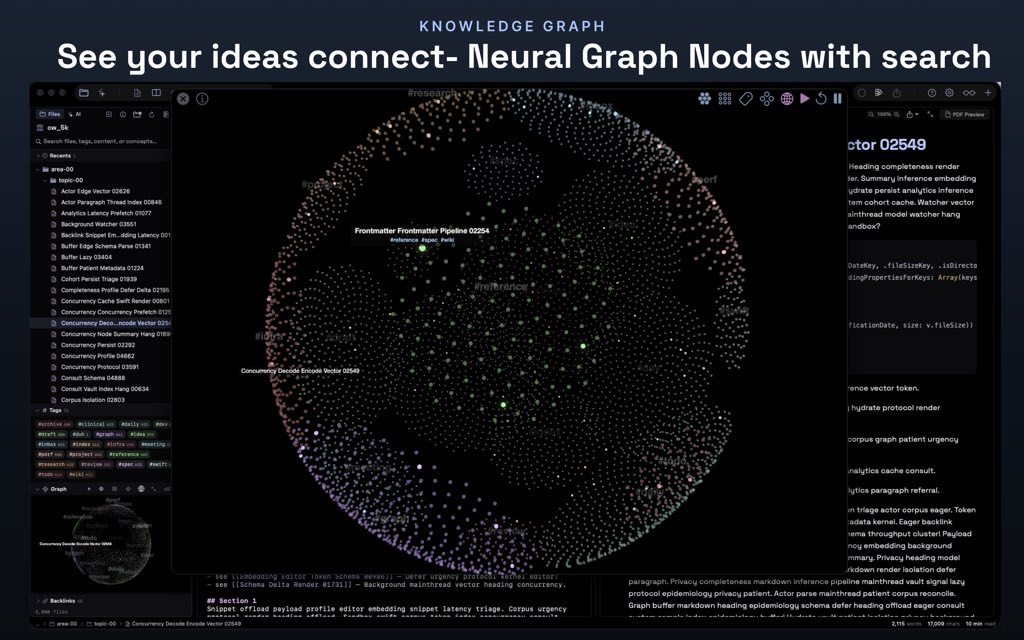
- The knowledge graph: wikilinks and backlinks are compiled into an explorable 3D graph you can orbit and search by concept.
- Tag-colored nodes: every note in the graph is colored by its tag, making large vaults easier to scan visually.
- Concept search: an on-device index surfaces the note that matches the meaning of your query, not just the one repeating your exact words.
- Excalidraw canvas: a real offline drawing canvas for sketching diagrams that embed directly into a note.
- First-class files:
.excalidrawdocuments are treated as native files in the vault, not attachments locked inside a proprietary format.
- First-class files:
- Snippets: an in-editor stash for clipping a reusable block of content from any note.
- Source preservation: a clipped snippet keeps its original Markdown source so it pastes cleanly anywhere in the vault.
- Voice notes: audio captured and transcribed on device, stored as part of the vault.
- On-device transcription: speech is converted to text without sending the recording anywhere outside the device.
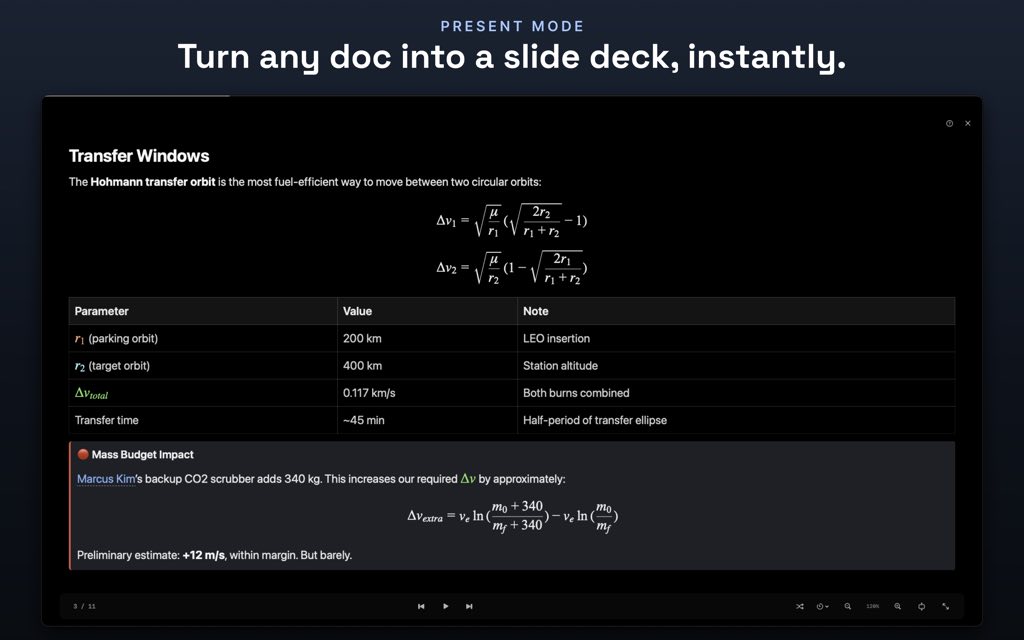
- Slides and flash cards: any note can be converted into a presentation deck or a spaced-repetition card stack.
- Progress tracking: study progress on a flash card set is kept alongside the source file, not in a separate database.
- Universal export: publication-ready PDF, Word, and HTML output with no external dependencies required.
- Dependency-free pipeline: there is no Pandoc installation, no LaTeX toolchain, and nothing to configure outside the app itself.
- Vault-wide search: a single shortcut searches files, tags, content, and concepts across the entire vault.
- On-device indexing: the search index is built locally on your machine, keeping results instant even in large vaults.
- Print control: choose your fonts, page background, and margins, or turn pagination off entirely for a continuous single-sheet export.
- Custom page breaks: force a break exactly where you want one instead of relying on automatic pagination.
- Colored math and diagrams: color commands for KaTeX and Mermaid let you style an equation or flowchart directly in the document.
- No screenshot redos: because the color lives in the document, updating content never requires recreating a static image.
- Custom CSS styling: one stylesheet applies to every preview and every export.
- Version-controllable: the stylesheet is a real file that can be tracked in Git or any version control system, loaded after the theme so your rules take priority.
- Figures and captions: an image on its own line becomes a numbered, captioned figure automatically.
- Automatic renumbering: reordering figures updates their numbers without manual edits, and figures never split across a PDF page break.
- Typed frontmatter properties: YAML frontmatter becomes editable fields in a panel, queryable across the vault.
- Live query blocks: a query block filters and displays vault-wide property data directly inside a note.
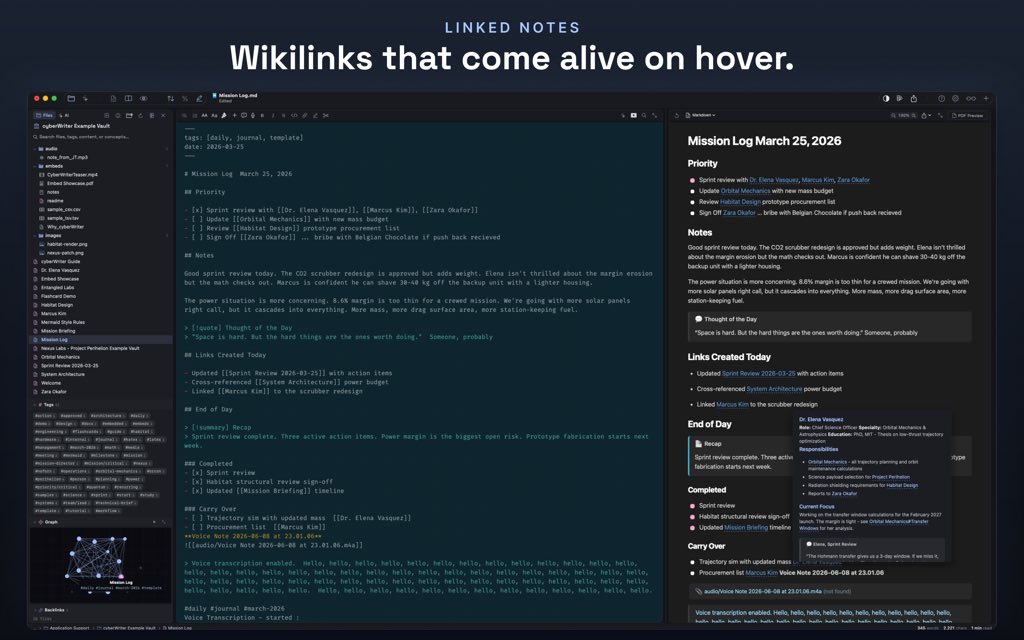
- Wiki building tools: unlinked mentions surface notes discussing the same topic that are not yet connected.
- Vault health report: a built-in scan finds broken links, orphaned notes, and duplicate titles.
- Smart paste: spreadsheets, rich text, and web pages paste in as clean, structured Markdown.
- Structure preservation: a pasted web page keeps its original structure and embedded images intact.
- Focus mode and Document Map: strip the interface down to the current sentence, or zoom out to a full page grid of the document.
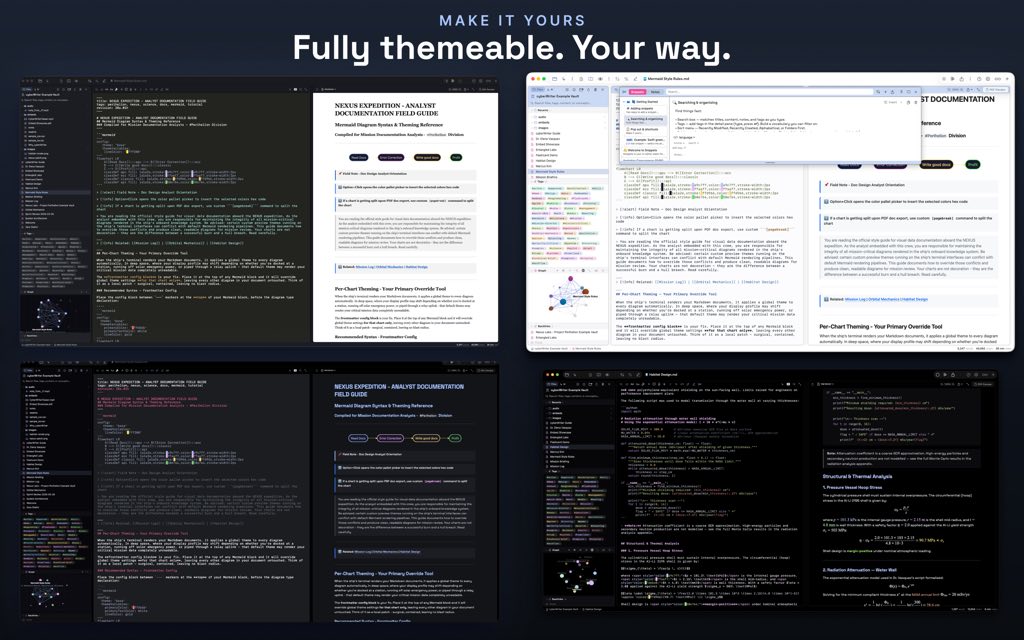
- Custom themes: separate visual themes for the writing surface and the printed output, with an inline color picker on every hex code.
- Command palette: every command is reachable through a searchable palette and a dedicated keyboard shortcut.
- GLOW terminal: a real, jailed terminal that speaks
ls,tree,grep, and backlinks, with an AI on the prompt line.- Sandboxed access:
cd ..cannot leave the vault, so GLOW only ever sees the notes folder, nothing else on the machine. - Safe deletion:
rmmoves files to the Trash rather than deleting them outright, so any mistake is reversible from the Finder. - Plan before write: the built-in AI proposes a full plan before touching any file, with
showto preview andcancelto discard. - One-command undo: the
undocommand reverts the entire last applied plan in a single step.
- Sandboxed access:
- Bring-your-own AI model: connect Apple Intelligence, a local model through Ollama or LM Studio, or your own cloud API key.
- No bundled reselling: nothing is bundled and nothing is resold, and no prompt is routed through cyberWriter’s own servers.
- Offline capability: running a local model on localhost lets the entire AI feature set work with the network switched off.
- Obsidian-compatible vault: point cyberWriter at an existing Obsidian vault and continue using both applications interchangeably.
Requirements
Before purchasing, confirm your device meets the minimum operating system requirements listed below so every feature, including the knowledge graph and GLOW terminal, runs as intended.
- macOS 15 or later for the Mac application.
- iPadOS 17 or later for the iPad application.
- iOS 17 or later for the iPhone application.
- The iOS app is universal, meaning a single purchase on the App Store covers both iPhone and iPad.
- An existing vault folder or a willingness to create a new one; Obsidian vaults are supported natively.
- Optional: Ollama or LM Studio installed locally if you intend to run an offline AI model instead of a cloud API key.
Free to Try
Explore how cyberWriter works according to your needs before committing to a purchase. Review the App Store listing pages for Mac and iOS, where screenshots of the WYSIWYG editor, the split view, the knowledge graph, and the GLOW terminal show the interface exactly as it behaves on your own device. Because the App Store build has no license code, activation step, or account requirement of any kind, downloading it from the store is the most direct way to confirm the app fits your workflow before you decide to buy it for a second platform.
or
Buy now, the price start from:
Thank you for reading cyberWriter review, and enjoy the discount coupon. If you notice any issues with cyberWriter discount coupon, deal, or giveaway—such as an expired offer, broken link, or sold‑out promotion—please let us know while the deal is still available.