

91% Off – Exportools Professional 2026: Lifetime License | Batch Export & Preflight InDesign and QuarkXPress – for macOS

The Only Batch Export and Preflight Tool Built for Both InDesign and QuarkXPress — Get More Done, Faster, with Zero Manual Effort. Get Exportools Professional 2026 with a Lifetime License at a 91% Off Today!
✔ Lifetime License. ✔ Free Product Updates ✔ Customer Support
BUY NOW
Exportools Professional 2026 is available for $129.99 per license (single perpetual license). But you can now get your Exportools Professional license with our exclusive 91% discount sale— this offer is available for a limited time, so act now before it expires.

Batch Export & Preflight InDesign and QuarkXPress | Multi-Format Output, Watched Folders, Document Automation for macOS
- Please Notes:
- You may be directed to the bundle page, but it is possible to purchase the software individually.
- If you're having difficulty locating the product on the bundle page, please utilize the browser's search feature.
- Get an additional $3 discount on all orders more that $30.
- LEGITIMATE: All apps are authentic and have original licenses obtained directly from the creators via contracts.
- INSTANT ACCESS: Fully activated macOS Apps & Windows Software with instant downloads & license key access.
- Device Activation: 1 Device
- License does not qualify for discounts in future upgrades
- Minor Updates Included Only
- Lifetime License
Platforms: Mac OS X

Markzware PDF2DTP BEST SELLER

$1 Only – Romantic Collection Font Bundle: 100 Elegant Script, Serif, Sans & Display Fonts | Commercial License BEST OFFER

Up to 30% Off – Creative Market Design Deals – Premium Design Assets: Fonts, Templates, Graphics & More on Sale BEST OFFER

Xara Designer Pro X BEST SELLER

FlightCheck BEST SELLER
Exportools Professional 2026 License Key Giveaway
Unavailable at this moment!

To access the giveaway, kindly provide your email address. Please refrain from closing this page after signing in to receive instructions on how to access the offer at no cost.
NOTES:
– All prices shown here are in listed USD (United States Dollar).
– Such promotional programs are subject to change without notice, from time to time in our sole discretion.
– Data may vary based on different systems or computers.
Exportools Professional 2026 Review at a Glance
Production teams in print, publishing, and design studios face a common challenge every day: exporting and preflighting large volumes of InDesign and QuarkXPress documents is time-consuming, error-prone, and deeply repetitive. Managing dozens — or even hundreds — of layout files manually means checking each one individually, running exports one at a time, and hoping nothing slips through the cracks. Missed fonts, overlooked low-resolution images, and forgotten preflight checks can cause costly delays in print production. There is no efficient, reliable way to handle this at scale without the right tool.
Exportools Professional 2026 solves this problem completely. Developed by Badia Software and trusted since 2010, it is the industry’s leading automation solution for batch exporting, preflighting, and processing InDesign and QuarkXPress documents in a single, streamlined workflow. Whether you manage a handful of files or an entire archive, Exportools Professional processes every document automatically — applying your presets, checking for errors, and delivering finished output without interruption. Now fully re-engineered for macOS 26 Tahoe and Apple Silicon, the 2026 version delivers faster performance, greater stability, and a smoother experience than any previous release.
What Is Exportools Professional?
Exportools Professional is a macOS plug-in and automation tool for Adobe InDesign and QuarkXPress that enables batch exporting, split-and-merge document processing, preflight checking, and watched-folder automation — all from a single, powerful interface. It supports over a dozen export formats, including PDF, PostScript, JPEG, TIFF, PNG, RTF, Microsoft Word, HTML, Apple Pages, and Plain Text, giving production professionals complete flexibility over how their output is delivered.
Unlike general export utilities, Exportools Professional was purpose-built for high-volume professional workflows. It integrates directly with both InDesign and QuarkXPress, meaning you do not need to switch between applications or maintain separate tools for each platform. Since its original release in 2010, it has been the go-to solution for printers, book publishers, creative studios, and print service providers worldwide.
The 2026 release is fully compatible with Adobe InDesign 2025–2026 and QuarkXPress 2025–2026, with native support for Apple Silicon and Intel Macs running macOS 12 or later.
Key Benefits
Exportools Professional 2026 delivers measurable advantages for anyone working with layout documents at scale. Here is why production teams around the world choose it over manual workflows and less capable alternatives:
- Save Hours of Production Time. Batch processing means you queue up your documents once and Exportools Professional handles the rest. What would take hours of manual work is completed in minutes — automatically, consistently, and without supervision.
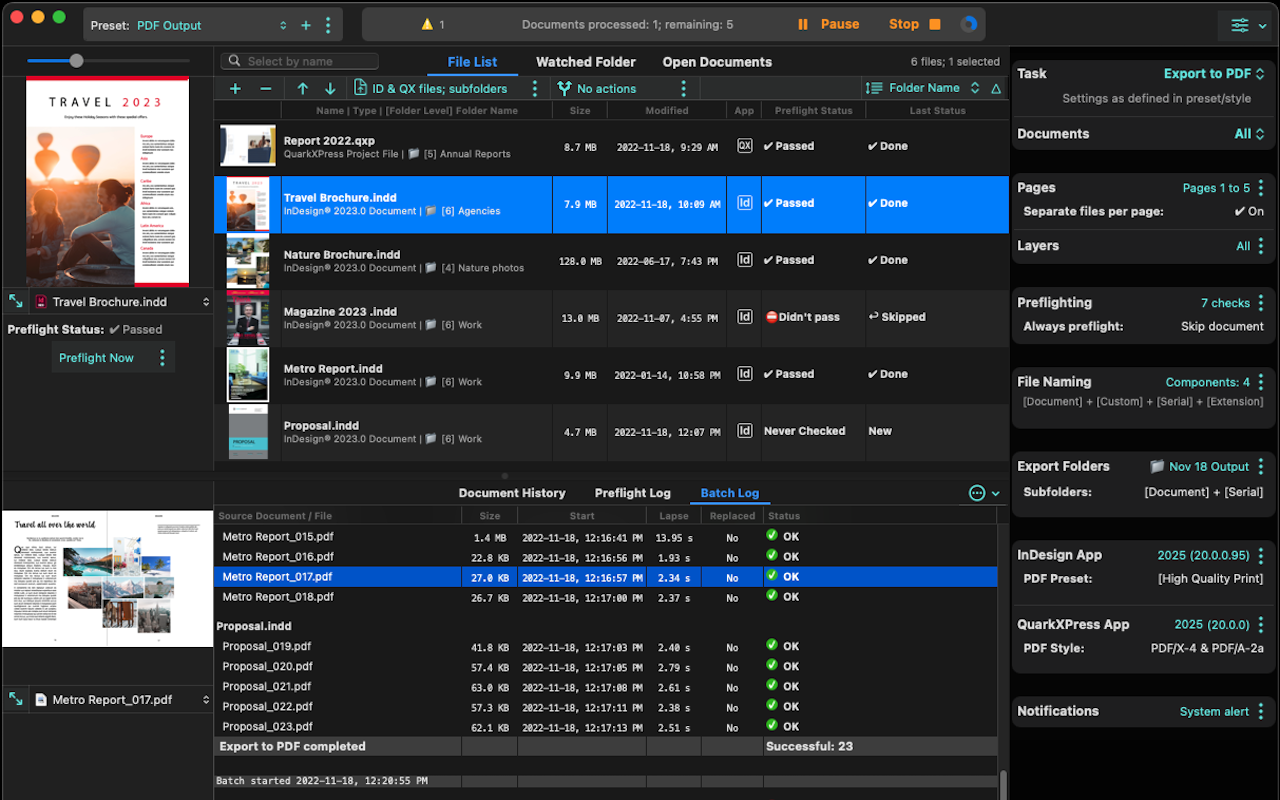
- Prevent Costly Print Errors. The built-in preflight engine catches missing fonts, overset text, non-printing graphics, RGB/CMYK conflicts, missing image links, and low-resolution images before output ever begins. Catching errors early prevents expensive reprints and client-facing mistakes.
- Work the Way You Want. Whether you prefer file lists, watched folders, or open documents, Exportools Professional adapts to your existing workflow without forcing you to change how your team operates.
- Full Control Over Problem Handling. When preflight finds issues, you are in charge. Choose to skip the problematic document, stop the batch, continue regardless, or pause to make a decision manually — a level of real-world control that no automated system should be without.
- Complete Audit Trails for Every Job. The Document History Log, Preflight Log, and Batch Log give you a full record of every export and preflight operation — including start times, durations, pass/fail status, and detailed check results. Nothing falls through the cracks.
- One Tool for Two Platforms. The same license covers both Adobe InDesign and QuarkXPress, eliminating the cost and complexity of managing separate tools for each application.
- Built for macOS 26 Tahoe and Apple Silicon. The 2026 release has been fully re-engineered for modern Mac hardware, delivering faster processing, smoother automation, and rock-solid reliability on the latest systems.
Key Features
Below is a thorough breakdown of the core capabilities that make Exportools Professional 2026 an essential tool for any production-focused design or publishing workflow:
- Flexible Batch Export Workflow — Process any number of InDesign or QuarkXPress documents in a single automated operation using one of three input methods.
- File Lists — Drag and drop any number of documents into the list and export them all at once using your chosen presets and settings.
- Watched Folders — Designate a folder for monitoring; Exportools Professional automatically exports any new document the moment it is added, enabling hands-free, always-on automation for collaborative teams.
- Open Documents — Instantly export all documents currently open in InDesign or QuarkXPress, or export only the items you have selected, without needing to build lists or set up folders.
- Multi-Format Export Support — Export documents to over a dozen industry-standard file formats to meet any production requirement.
- PDF and PostScript — Industry-standard print-ready output for press and digital distribution.
- Image Formats (JPEG, TIFF, PNG) — High-quality rasterized output for web, screen, and archiving purposes.
- Document Formats (RTF, Microsoft Word, HTML, Apple Pages, Plain Text) — Text and layout-oriented exports for repurposing content across different media.
- Single-Page and Multi-Page Output — Output multi-page documents as individual single-page files or consolidated multi-page exports, giving you complete control over how finished files are structured and delivered.
- Split and Merge Documents — Automatically split large documents into individual files per page or spread, or merge multiple documents into a single consolidated output — essential for managing large book projects and multi-chapter publications.
- Export Selected Objects — Export only the objects or elements you have selected within InDesign or QuarkXPress, enabling targeted output without processing an entire document.
- Built-In Preflight Engine — Thoroughly examines each document before and during export to identify production issues before they become costly problems.
- Missing Font Detection — Flags any fonts not available on the system before output begins.
- Overset Text Detection — Identifies text frames where content exceeds the frame boundaries.
- Missing and Non-Printing Graphics — Detects linked graphics that are missing, modified, or set to non-printing.
- RGB/CMYK Image Checks — Identifies images using color modes that may not be appropriate for the intended output.
- Low-Resolution Graphics Detection — Flags images that fall below acceptable resolution thresholds for print.
- Flexible Error Handling — When preflight finds problems, choose to skip the document, stop the batch, continue regardless, or pause for manual review.
- Automatic Preflight Before Export — Optionally enable preflight to run automatically as part of every batch export operation.
- Comprehensive Logging System — Three dedicated logs keep a persistent, detailed record of every operation performed.
- Document History Log — Records every export for each individual document, including start times, durations, and success or failure status, providing a lifecycle view of any file.
- Preflight Log — Logs every preflight check in full detail, showing which checks passed and which failed, with records retained until manually cleared.
- Batch Log — Archives every batch export or print operation, including formats, destinations, presets, configurations, and outcomes, giving production managers a full audit trail for any job.
- Preset-Based Automation — Define and save export presets for every format, destination, and configuration you use regularly, then apply them consistently across every batch operation without reconfiguring settings each time.
- Dual-Application Compatibility — A single license and a single interface covers both Adobe InDesign and QuarkXPress, eliminating the need for separate tools or workflows per application.
- macOS 26 Tahoe and Apple Silicon Optimization — Fully re-engineered for the latest macOS and Apple hardware, with native support for Apple Silicon and Intel processors for maximum speed and stability.
- QuarkXPress XTension Included — Processing QuarkXPress files requires an XTension, which is included in the Exportools Professional download at no additional cost.
Requirements
The following system and application requirements must be met to run Exportools Professional 2026:
- Adobe InDesign 2025 or 2026, or QuarkXPress 2025 or 2026
- macOS 12 or later (macOS 26 Tahoe recommended for best performance)
- Apple Silicon or Intel Mac processor
- QuarkXPress XTension required for QuarkXPress output (included in the download at no additional cost)
Free to Try
Before committing to a purchase, put Exportools Professional through its paces in your own workflow. The trial version gives you hands-on access to the full feature set — batch exporting, watched folders, preflight, logging, and all supported formats — so you can evaluate exactly how it performs with your documents and your team’s setup. Download the free trial of Exportools Professional 2026 directly from Badia Software’s website and see for yourself why production teams have relied on it for over 15 years. No guesswork, no surprises — just the real software, ready to test.
Thank you for reading Exportools Professional 2026 review, and enjoy the discount coupon. If you notice any issues with Exportools Professional 2026 discount coupon, deal, or giveaway—such as an expired offer, broken link, or sold‑out promotion—please let us know while the deal is still available.



![[2026 Giveaway #4] Giveaway – MobiKin HEIC to JPG Converter: Free 1-year License Code | Easy-to-use HEIC Photo File to PNG/JPG Converter – for Windows](https://thesoftware.shop/wp-content/uploads/thumbs_dir/MobiKin-HEIC-to-JPG-Review-Download-Discount-Giveaway-rfosmaovwlqug3zpm81w967o5qknpo0wj7ser5ymjc.png)

