58% off – Litur: Lifetime License | Color Picker, Palette Generator & Color Organizer App – for Mac

Your complete color workflow companion—pick, organize, and sync every color across all your Apple devices. Get Litur Mac app with a Lifetime License at a 58% Off today and take full control of your creative palette!
✔ Lifetime License. ✔ Free Product Updates ✔ Customer Support
BUY NOW
Litur is available at a $11.99, making it one of the most accessible professional color tools in the Apple ecosystem. For a limited time, you can get the Litur premium license at an exclusive discounted rate of up to 58% OFF—this offer will not last, so acting now means locking in the best possible price for a tool you will use every single day.

Color Picker, Palette Generator & Color Organizer App for Mac, iPhone & Apple Watch | Hex, RGB, HSB, SwiftUI Color Codes | Accessibility Contrast Checker | Sync Across All Apple Devices
- Please Notes:
- You may be directed to the bundle page, but it is possible to purchase the software individually.
- If you're having difficulty locating the product on the bundle page, please utilize the browser's search feature.
- Get an additional $3 discount on all orders more that $30.
- LEGITIMATE: All apps are authentic and have original licenses obtained directly from the creators via contracts.
- INSTANT ACCESS: Fully activated macOS Apps & Windows Software with instant downloads & license key access.
- Device Activation: 1 Device
- License Terms: https://litur.app/privacy
- Major & Minor Updates Included
- Lifetime License
Platforms: Mac

ColorHound (Mac) BEST OFFER
Corel Painter BEST SELLER

PaintShop Pro 2023 Ultimate: Perpetual License BEST SELLER

Excire Foto 2025: Lifetime License BEST SELLER

Paintstorm Studio BEST OFFER
Litur Mac App Giveaway
Unavailable at this moment!
To access the giveaway, kindly provide your email address. Please refrain from closing this page after signing in to receive instructions on how to access the offer at no cost.
NOTES:
– All prices shown here are in listed USD (United States Dollar).
– Such promotional programs are subject to change without notice, from time to time in our sole discretion.
– Data may vary based on different systems or computers.
Litur Review at a Glance
Every designer and developer knows the frustration: you spot the perfect shade on a website, in a photo, or on your screen, and within seconds it’s gone—lost because there was no fast, reliable way to capture it. You end up wasting precious minutes hunting for that exact color again, eyeballing hex codes, second-guessing RGB values, and piecing together palettes manually. Your workflow stalls. Your creative momentum breaks. And what should have been a seamless process turns into a time-consuming detour.
Litur was built specifically to solve this problem—giving designers, developers, and color enthusiasts a powerful yet intuitive tool to find, collect, and organize every color they encounter, right across all their Apple devices.
What is Litur?
Litur is a professional-grade color management application available on macOS, iOS/iPadOS, and watchOS that serves as your all-in-one color companion throughout the design and development process. At its core, Litur is a color picker, palette generator, and color library organizer combined into a single, beautifully designed app that works seamlessly across the Apple ecosystem.
Whether you are a UI/UX designer building visual systems, a front-end developer writing CSS or SwiftUI code, or a creative professional who simply works with color daily, Litur gives you the tools to capture any color from your screen instantly, generate full color palettes automatically, view complementary and harmonic color combinations, and access color codes in every major format. All of this is synchronized across your Mac, iPhone, iPad, and Apple Watch in real time—so your color library is always with you, no matter where inspiration strikes.

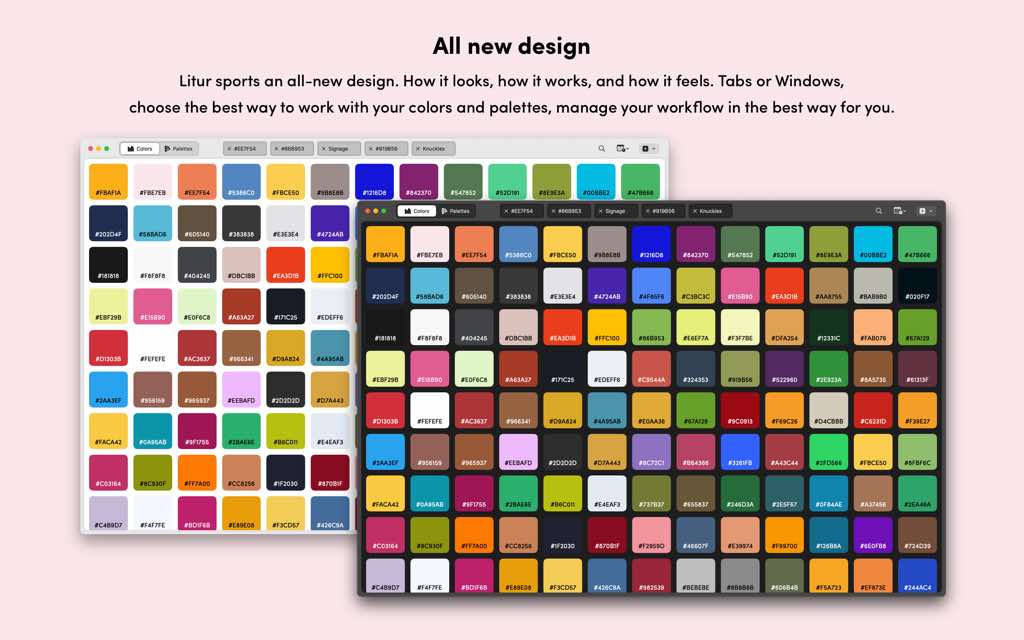
Litur is not just a utility app. It is a workflow accelerator. With its all-new design on macOS, the app has been rethought from the ground up—how it looks, how it operates, and how it integrates into your daily creative process. The result is an experience that feels natural, fast, and indispensable from the very first use.
The app caters to a broad audience: graphic designers who need consistent color references across projects, web developers who require precise hex and RGB codes, iOS and macOS developers who work with NSColor, UIColor, and SwiftUI Color APIs, accessibility specialists who need to verify that color combinations meet WCAG contrast standards, and any creative individual who wants to keep their color ideas organized and accessible at all times.

Key Benefits
Litur delivers tangible advantages that directly improve how you work with color every single day. Here is why professionals across design and development rely on it:
- Save significant time by capturing any color from your screen in a single click, eliminating the guesswork of manually identifying shades
- Maintain a consistent color language across all your projects by organizing your colors into named, custom palettes that are always within reach
- Access every color code format you need—HEX, RGB, HSB, CMYK, NSColor, UIColor, and SwiftUI Color—without switching apps or performing manual conversions
- Make better design decisions by instantly viewing complementary, analogous, monochromatic, triadic, and tetradic color combinations for every color you collect
- Speed up your development workflow with the Color Anchor docked window on Mac, which keeps your color library accessible without interrupting your active work
- Stay compliant with accessibility standards using the built-in Contrast Checker that validates color combinations against WCAG guidelines
- Work fluidly across all your Apple devices with real-time sync—capture a color on your iPhone while out, and it is ready on your Mac when you return
- Reduce cognitive load with a clean, organized History view that shows every color you have ever collected, synced and available across all devices
- Build smarter palettes with Litur’s automatic palette generation, which produces harmonious color sets for each individual color you save
Key Features
Below is a thorough breakdown of what makes Litur a must-have tool for any color-driven professional. Each feature has been crafted to address real workflow needs:
- Color Picker – Instantly capture any color visible on your screen with pixel-perfect precision.
- Hover & Identify – Move your cursor over any element on screen and Litur identifies the exact color in real time.
- Zoom for Precision – Use your mouse or trackpad to zoom in for accurate, pixel-level color selection.
- Quick Shortcut Access – Summon the color picker at any moment using a customizable keyboard shortcut.
- All-New macOS Design – A completely redesigned interface on Mac that reimagines how the app looks, operates, and feels.
- Tabs or Windows – Choose to work with colors and palettes in tabbed views or separate windows based on your preferred workflow style.
- Refined Interface – A polished visual experience that integrates naturally with macOS design conventions.
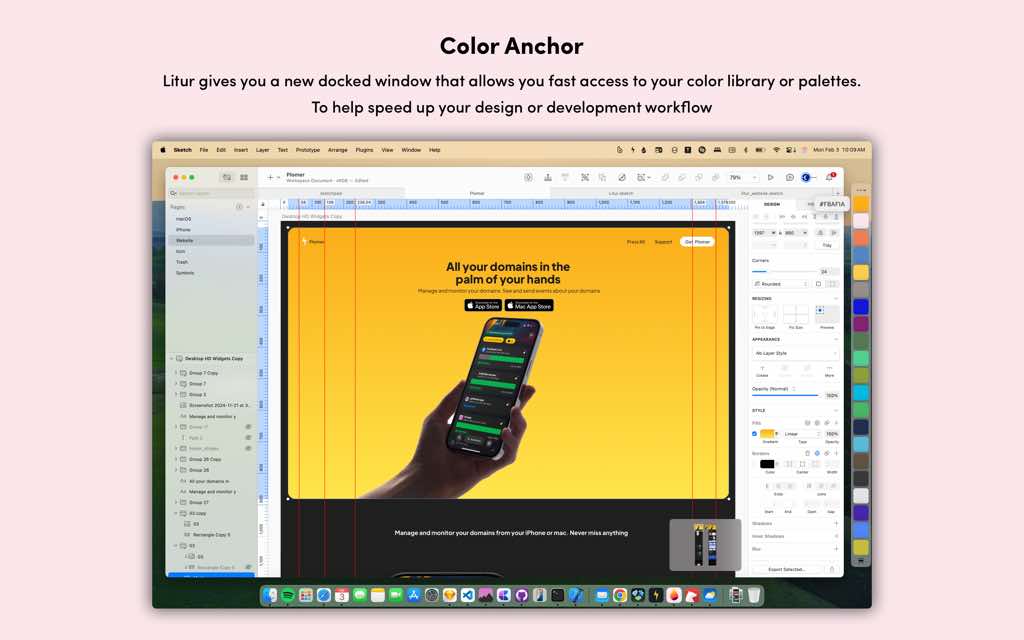
- Color Anchor (Mac) – A docked window that keeps your color library and palettes instantly accessible without interrupting your work.
- Always-Ready Library – Your full color collection is one glance away, no need to switch apps or open new windows.
- Workflow Speed – Designed specifically to reduce friction in both design and development tasks.

- Color Combinations – View a full set of harmonic color relationships for every color in your library.
- Complementary – The direct opposite hue on the color wheel for high contrast pairings.
- Analogous – Colors adjacent on the wheel for cohesive, natural-feeling schemes.
- Monochromatic – Shades and tints of the same hue for elegant, unified designs.
- Triadic – Three evenly spaced hues for vibrant, balanced compositions.
- Tetradic – Four hues forming a rectangle on the color wheel for rich, complex palettes.
- Color Codes – Copy color values in every major format used in design and development.
- HEX – Standard web and design format for universal compatibility.
- RGB – Red, Green, Blue values for screen-based design tools and CSS.
- HSB – Hue, Saturation, Brightness values preferred in many design applications.
- CMYK – Cyan, Magenta, Yellow, Key (Black) for print-ready color referencing.
- NSColor – Native macOS color format for AppKit development.
- UIColor – Native iOS and iPadOS color format for UIKit development.
- SwiftUI Color – Ready-to-use color declarations for modern Swift app development.
- Contrast Checker (iPhone) – A dedicated tool to evaluate color pair accessibility according to established standards.
- WCAG Compliance – Tests color combinations against Web Content Accessibility Guidelines for both normal and large text.
- Instant Results – Get pass/fail feedback immediately to ensure your designs are inclusive and accessible.

- Color Palette Generator – Automatically creates a palette for every color you collect.
- Auto-Generated Palettes – Each saved color produces a thoughtfully assembled matching palette.
- Custom Palettes – Build your own palettes manually from collected colors and assign custom names for easy reference.
- Palette Organization – Keep all palettes organized in one centralized, searchable location.

- Color History – A complete log of every color you have collected and saved, available across all your devices.
- Full Sync – History is automatically synced via iCloud across Mac, iPhone, iPad, and Apple Watch.
- Visual Reference – Browse your collected colors in a clear, organized view to revisit past choices easily.
- Cross-Platform Sync – Seamless continuity across every Apple device you own.
- iPhone & iPad – Capture colors on the go and access your full library from any iOS or iPadOS device.
- Apple Watch App – A companion app on watchOS keeps essential color data on your wrist.
- Mac Integration – Full-featured desktop experience that pulls all your captured data together in one powerful workspace.
Requirements
- macOS: macOS 13.0 (Ventura) or later
- iOS/iPadOS: Compatible iPhone or iPad required for iOS/iPadOS version
- watchOS: Compatible Apple Watch required for watchOS companion app
- iCloud: Required for cross-device sync functionality
- Platform: Exclusive to the Apple ecosystem (Mac, iPhone, iPad, Apple Watch)
Downloads
Take Litur for a spin before committing to a purchase. The best way to understand how Litur fits into your creative workflow is to use it yourself—capture real colors from your screen, build your first palette, and see how the automatic color combinations change the way you think about color relationships. Download Litur for free from the App Store and put it through its paces on your own projects. No complicated setup, no steep learning curve—just install it, open it, and start collecting colors right away. Click the button below to get started with the free version today.
Thank you for reading Litur review, and enjoy the discount coupon. If you notice any issues with Litur discount coupon, deal, or giveaway—such as an expired offer, broken link, or sold‑out promotion—please let us know while the deal is still available.