

93% Off – Fuse Caption Studio: Lifetime License | Mac Offline Subtitle Software – for Mac OS

Create captions faster and keep every file on your Mac — get Fuse Caption Studio at a 93% Discount now for private offline transcription, translation, review, and burn-in export.
✔ Lifetime License. ✔ Free Product Updates ✔ 24×7 Customer Support
Fuse Caption Studio Review at a Glance
Creating accurate captions can slow down a project, especially when you have to upload media, wait for processing, fix timing problems, manage version changes, and protect private footage at the same time. Many creators and editors need a tool that works locally, responds quickly, and keeps sensitive media off external servers.
That is exactly where Fuse Caption Studio fits. It gives Mac users a dedicated workspace for subtitle creation, transcript generation, translation, review, and export, all from one privacy-focused app built for serious production work.
What is Fuse Caption Studio?
Fuse Caption Studio is an offline captioning, subtitle editing, transcript, and review application built specifically for macOS. It helps users turn spoken content into subtitles or plain text transcripts, adjust and review those results, and export them in the format needed for editing, delivery, or publishing. Its central promise is simple: keep caption work local, private, and efficient.
Unlike browser-based subtitle tools that depend on remote processing, Fuse runs on-device and uses Apple system frameworks together with local AI models to handle work directly on your Mac. This means no forced uploads, no waiting for remote servers, and no need to stay online while working. For many users, that alone changes the pace of production in a very positive way.
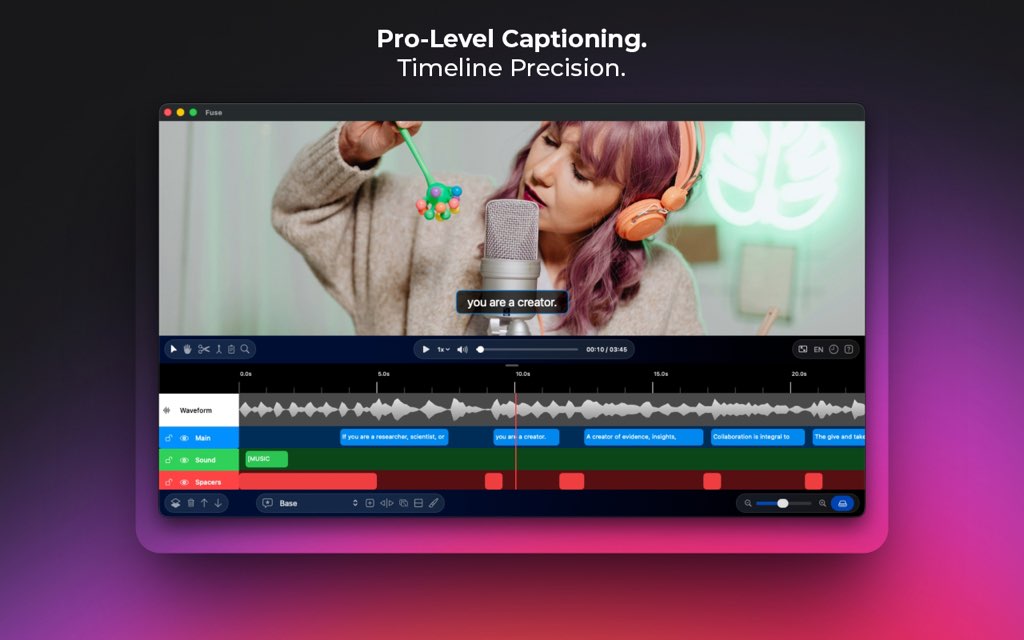
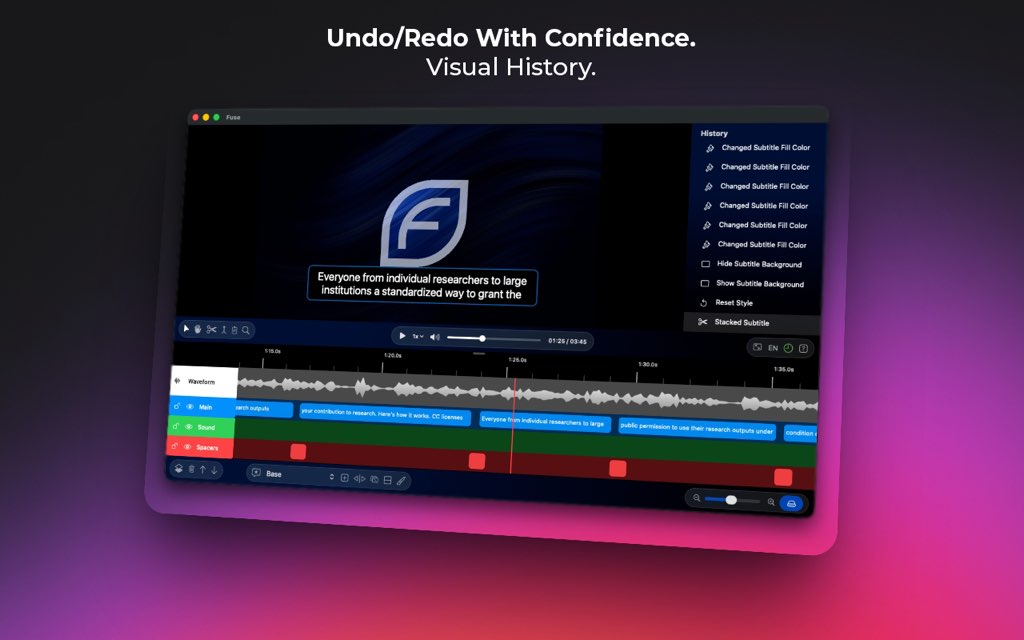
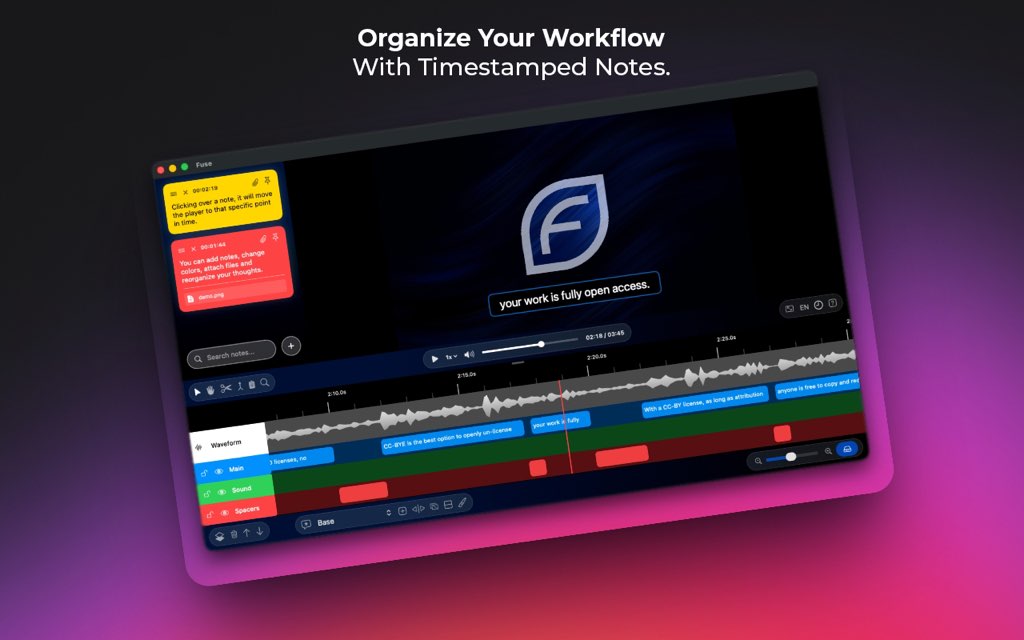
Fuse is also more than a raw transcription utility. It includes practical editing, review, history, and organization tools that help users shape captions into a polished result. You can work on a timeline, attach notes, pin key instructions, search feedback quickly, jump through edit history visually, and relink moved media without breaking the project. That combination makes it useful not only for one-person workflows, but also for agency, team, and client-facing environments.
Most importantly, Fuse Caption Studio for Mac is built for people who need dependable output without giving up privacy or control. It is a dedicated production tool for caption and transcript creation, not a cloud workspace that asks you to send media away first. If your workflow depends on speed, local processing, and professional editing control, Fuse is made for that exact use case.
Key Benefits
Here are the core advantages that make Fuse Caption Studio a practical choice for Mac users working with subtitles, transcripts, and review tasks.
- Private local processing keeps your files on your Mac instead of external servers.
- Offline usability lets you continue working without an internet connection after setup.
- Fast project start removes long upload delays and helps you begin editing sooner.
- Flexible transcription models let you pick the right balance of speed and accuracy.
- Plain text transcript output gives you clean text with no timestamps when that is all you need.
- Burn-in export options help you create ready-to-share videos for social media and direct delivery.
- Multilingual support makes it easier to prepare subtitles for broader audiences.
- Live Translation reduces duplicate editing by syncing changes across paired languages.
- Timeline-based editing gives editors familiar visual control over caption timing and placement.
- Review and note tools make client feedback and internal collaboration easier to organize.
- Visual history helps you reverse edits and recover earlier decisions with less stress.
- Mac-native performance is optimized for Apple Silicon for a smoother local workflow.
Fuse Caption Studio is a native macOS captioning and review application designed for people who want speed, control, and clean results without a cloud-first workflow. Instead of sending media away for transcription, Fuse uses on-device AI and Apple system frameworks to process your files directly on your machine. That means no upload wait, no cloud dependency while working, and no forced compromise on privacy. If your work includes interviews, podcasts, client edits, internal footage, training videos, films, or branded short-form content, Fuse gives you a reliable production setup that stays close to your media from start to finish.
At its core, Fuse Caption Studio Mac App helps users create, edit, and export subtitles and transcripts for video and audio projects. It can generate subtitle files for use in other software, create plain text transcripts when you only need the spoken content, and produce burned-in video exports ready for social sharing or direct delivery. This flexibility matters because many creators do not work in a single format. Some need SRT or VTT for editing suites and publishing tools, while others need hardcoded captions for quick posting. Fuse supports both paths inside the same workflow.

Fuse Caption Studio Mac App also supports multilingual work in a very practical way. You can export to 29 languages simultaneously, and bilingual users can edit two languages side by side with Live Translation. The do-it-once approach saves time because an edit made in one language can carry through to the other. For teams handling global audiences, regional marketing, subtitles for training content, or multilingual podcasts, that can remove a large amount of repetitive manual work.

A major reason to choose Fuse Caption Studio is its offline-first design. Your files remain on your Mac, your transcription models run locally, and your work can continue without an internet connection. For client work, legal content, unreleased media, internal communications, and sensitive interviews, this approach adds real practical value. It also removes the common bottleneck of long uploads and service-side processing. You open your media, start the job, and keep moving.
Another strong reason to choose Fuse is the app’s focus on precision editing and workflow control. Captioning is not just about turning speech into text. Editors also need to adjust timing, revise wording, review multiple versions, keep notes, organize feedback, and recover from mistakes without damaging the rest of the project. Fuse addresses these needs with a timeline view, visual history, notes, pinning, attachments, drag-and-drop organization, and media relinking. These are not filler tools; they solve real production problems that come up every day.
The transcription engine is powered by Whisper from OpenAI, running locally on your Mac. This gives Fuse access to a strong mix of speed and transcription accuracy while keeping the user experience centered on local privacy. You can choose from Tiny, Base, Small, Medium, and Large models based on the demands of the project. Short clips and rough drafts can move quickly with lighter models, while higher-stakes work can use the Large model for more refined output. Fuse also notes up to 2x faster performance for the Large model, which is especially useful for users who want high accuracy without wasting time waiting around.
This product is built for professionals, but it is approachable for everyday creators too. Video editors will appreciate the familiar timeline-based editing. Podcasters can generate clean transcripts without timestamps when they need readable text for show notes, archives, or repurposed content. Agencies can keep client files local and maintain a more controlled review process. Social media teams can style captions and export burned-in video for faster publishing. Even solo creators benefit because Fuse reduces the number of tools needed to get from raw media to finished captions.

It is also important to understand what Fuse is not. Fuse Caption Studio is a creation and review tool, not a file-hosting or publishing platform. It does not try to replace your storage service, video platform, or content distribution system. Instead, it focuses on the part of the workflow where many teams lose time: making captions accurate, readable, editable, organized, and ready for final use. That clear focus makes the app easier to fit into existing production setups.
Version 2.2.3 adds TagID and an embedded video converter, helping users start projects more quickly and manage incoming media with less setup friction. Combined with native Mac performance, strong editing tools, and an offline workflow, Fuse Caption Studio for Mac gives creators a practical way to handle captions and transcripts with greater speed and tighter privacy control.
If you need a captioning solution that is fast, private, Mac-native, and built for real production work, Fuse Caption Studio is an excellent fit. It serves creators who want clean transcripts, editors who need frame-aware control, agencies that must protect media, and multilingual teams that need caption output in more than one language. From short audio clips to demanding long-form projects, Fuse is built to keep pace with your work while keeping your files where they belong — on your Mac.
Features
Below is a detailed list of the main features that make Fuse Caption Studio a strong addition for editors, podcasters, agencies, and content teams that need a private Mac-based captioning workflow.
1. On-Device AI
Fuse Caption Studio for Mac processes core captioning tasks locally, giving users a faster start and tighter data control for sensitive media.
- On-Device AI — Runs transcription and processing directly on your Mac with no cloud upload requirement during work.
- Large Model Performance — Supports the Large model with up to 2x faster performance for high-accuracy caption jobs.
- Offline Operation — Lets you work completely offline because the processing models run locally on your device.
- Privacy-First Workflow — Keeps video and audio files on your machine for stronger project confidentiality.
- No Data Collection Focus — Keeps the app aligned with a privacy-first approach built around local work, not server storage.
2. Transcription and Transcript Tools
The app handles more than subtitle generation, making it useful for written transcripts, rough drafts, and polished delivery files.
- Subtitle Generation — Creates editable subtitle content for video and audio projects quickly on Mac.
- Plain Text Transcripts — Produces clean transcript output with no timestamps when you need readable text only.
- Whisper-Powered Transcription — Uses OpenAI Whisper locally for strong speech recognition quality.
- Model Choice — Offers Tiny, Base, Small, Medium, and Large models for different speed and accuracy needs.
- Tiny and Base Models — Give fast results for short clips, drafts, and quick internal review.
- Small and Medium Models — Provide a balanced mix of speed and accuracy for most creator and podcast workflows.
- Large Model — Delivers the highest transcription quality for critical work where precision matters most.
3. Translation and Multilingual Output
Fuse Caption Studio helps users manage multilingual subtitle work without forcing separate disconnected workflows.
- Live Translation — Lets you edit in one language and see updates reflected live in the paired translation workflow.
- Side-by-Side Bilingual Editing — Helps bilingual users manage two languages in the same working view.
- Multi-Language Support — Supports subtitle editing and management across multiple languages.
- 29-Language Export — Allows project export to 29 different languages simultaneously for wider distribution.
- Do-It-Once Editing Flow — Reduces repeat edits by carrying changes from one language workflow into another.
4. Precision Editing
For professional caption work, text quality alone is not enough. Fuse includes tools that help users control timing, structure, and revision details with more confidence.
- Timeline View — Provides a familiar waveform timeline for caption editing and timing adjustments.
- Dynamic Splitting — Helps users manage subtitle breaks in a more flexible way for cleaner readability.
- Visual Layers — Adds a production-friendly editing layer that is uncommon in many competing tools.
- Natural Speech Review Engine — Supports a more natural playback and review experience for checking edits.
- Caption Refinement — Makes it easier to adjust subtitle content before export or burn-in output.
- Readable Interface for Pros — Uses a familiar Mac-native layout so experienced editors can work comfortably from the start.
5. Review and Collaboration Tools
Fuse also supports review-heavy workflows, which is useful for agencies, editors, production teams, and client approval rounds.
- Smart Notes — Lets you leave feedback tied to exact timestamps for more accurate revision tracking.
- Color-Coded Notes — Helps create a visual punch list so priority items are easier to scan.
- Pinning — Keeps critical instructions, client requests, or brand rules at the top of the workspace.
- Attachments — Lets users attach files directly to notes for reference and review context.
- Fuzzy Search — Finds notes even when a search includes a typo, such as finding “test” from “tist.”
- Drag & Drop Organization — Lets users reorder feedback by priority instead of being locked to time order.
- Project Review Clarity — Makes it easier to separate edit requests, approvals, and production reminders in one place.
6. Styling, Burn-In, and Export
Output flexibility is one of Fuse Caption Studio’s strongest practical points, because users often need several delivery formats from one project.
- Burn-In Export — Creates videos with subtitles burned directly into the image for easy sharing.
- Flexible File Export — Exports captions as SRT, VTT, or TXT for use in other software.
- Social-Ready Output — Helps creators prepare hardcoded subtitle videos for social media posting.
- Font Control — Lets users customize caption fonts to fit brand or project style.
- Color Control — Lets users adjust caption colors for consistency and visibility.
- Brand Matching — Supports styling choices that fit agency guidelines or recurring content formats.
7. Project Management and Recovery
Long caption projects often need revision safety and reliable media handling, and Fuse includes useful tools for both.
- Visual History — Gives users a visual undo and redo timeline for easier edit recovery.
- Jump-Back Editing — Lets you return to an earlier stage when a change needs to be reversed.
- Media Relinking — Auto-detects missing media if a video file has been moved so projects are easier to recover.
- .fuse Project Sharing — Allows users to share the project file and continue work on another machine.
- TagID — Added in v2.2.3, helping users start and organize projects more quickly.
- Embedded Video Converter — Added in v2.2.3, giving users a faster path into a new project.
8. Native Mac Workflow
Fuse is designed specifically for modern Mac hardware, which helps it feel more direct and responsive for Apple users.
- Native macOS Design — Built specifically for Mac instead of being a generic cross-platform port.
- Apple Silicon Optimization — Tuned for Apple Silicon systems for better performance and efficiency.
- macOS Framework Integration — Uses Apple system frameworks to support a smoother local processing workflow.
- Fast Local Start — Removes cloud import waits so users can move into transcription and editing sooner.
- Offline Production Reliability — Keeps caption and review work available on the machine you already use for editing.
Requirements
Before installing Fuse Caption Studio Mac App, it helps to confirm that your Mac matches the current product requirements and recommended setup.
- Platform — macOS only.
- Processor — Apple Silicon is required for the intended optimized experience.
- Operating System — macOS 15.5 or later.
- Memory Recommendation — At least 16GB of unified memory is recommended for the best performance.
- Connectivity — Internet is not required for normal captioning work once the local workflow is set up.
- Use Case Note — Built as a captioning and review tool, not as a file-hosting or publishing platform.
- Storage Consideration — Local storage space is needed for your media files, project files, and model-related workflow needs.
Downloads
If the developer provides a trial or demo edition on the official product page, you can test Fuse Caption Studio on your own Mac before committing to the full purchase. This is a practical way to check speed, interface comfort, subtitle accuracy, and hardware compatibility with your real files. Trial availability can change over time, so it is best to review the current offer on the official source before installing.
If a free edition is available, use it to test key tasks such as transcribing a short clip, creating a plain text transcript, editing captions on the timeline, reviewing multilingual output, and exporting burn-in media. That hands-on check gives you a clearer picture of how well Fuse fits your workflow.
BUY NOW
Fuse Caption Studio is available for $5.99 per month or $59.99 for a lifetime license. For a limited time, you can get the Fuse Caption Studio Lifetime License for just $3.99, a 93% discount off the regular $59.99 price.
The paid version gives direct access for users who need private local captioning, fast Mac-native processing, and flexible subtitle export to the complete offline workflow built around production use.

" />
Mac Offline Subtitle Software with AI Transcription, Live Translation, Burn-In Export, Private Video Caption Editor for Apple Silicon
- Please Notes:
- You may be directed to the bundle page, but it is possible to purchase the software individually.
- If you're having difficulty locating the product on the bundle page, please utilize the browser's search feature.
- Get an additional $3 discount on all orders more that $30.
- LEGITIMATE: All apps are authentic and have original licenses obtained directly from the creators via contracts.
- INSTANT ACCESS: Fully activated macOS Apps & Windows Software with instant downloads & license key access.
- Device Activation: 1 Device
- Lifetime Access: One-time purchase of Fuse Caption Studio.
- Version Policy: Includes all future updates.
- Device Limit: 1 License code = 1 Mac.
- System Requirement: Requires macOS 15.6 or later.
- Offline Use: Software is downloaded locally; no internet connection required for use, other than to download and install the required models.
- Non-Transferable: License cannot be resold or shared.
- Major & Minor Updates Included
- Lifetime License
Platforms: Mac OS
" />
Mac Offline Subtitle Software with AI Transcription, Live Translation, Burn-In Export, Private Video Caption Editor for Apple Silicon
- Device Activation: 1 Device
- Lifetime Access: One-time purchase of Fuse Caption Studio.
- Version Policy: Includes all future updates.
- Device Limit: 1 License code = 1 Mac.
- System Requirement: Requires macOS 15.6 or later.
- Offline Use: Software is downloaded locally; no internet connection required for use, other than to download and install the required models.
- Non-Transferable: License cannot be resold or shared.
- Major & Minor Updates Included
- Lifetime License
Platforms: Mac OS
A lifetime plan is a one-time purchase that doesn’t expire. The term “lifetime” refers to the product’s lifespan, not an individual’s life. A lifetime license is only valid for one Apple account and cannot be transferred.
" />
With Pro, users have the option to remain subscribed for the period that the user sees fit, for an incredibly low monthly price.
- Device Activation: 1 Device
- Monthly Subscription
- Version Policy: Includes all future updates.
- Device Limit: 1 License code = 1 Mac.
- System Requirement: Requires macOS 15.6 or later.
- Offline Use: Software is downloaded locally; no internet connection required for use, other than to download and install the required models.
- Non-Transferable: License cannot be resold or shared.
- Major & Minor Updates Included
- Lifetime License
Platforms: Mac OS
A lifetime plan is a one-time purchase that doesn’t expire. The term “lifetime” refers to the product’s lifespan, not an individual’s life. A lifetime license is only valid for one Apple account and cannot be transferred.
Moviemator Video Editor Pro BEST OFFER

HitPaw Online BEST OFFER

Video deluxe 2026: Perpetual License BEST SELLER

CapUp Lifetime Deal BEST OFFER
Fuse Caption Studio Giveaway
Unavailable at this moment!

To access the giveaway, kindly provide your email address. Please refrain from closing this page after signing in to receive instructions on how to access the offer at no cost.
NOTES:
– All prices shown here are in listed USD (United States Dollar).
– Such promotional programs are subject to change without notice, from time to time in our sole discretion.
– Data may vary based on different systems or computers.
Thanks for reading Fuse Caption Studio Review & Enjoy the discount coupon. Please Report if Fuse Caption Studio Discount Coupon/Deal/Giveaway has a problem such as expired, broken link, sold out, etc while the deal still exists.


![[ENDING] Giveaway – Aiseesoft Slideshow Creator: Free 1-year License Code | Full Version – for Windows](https://thesoftware.shop/wp-content/uploads/thumbs_dir/Aiseesoft-Slideshow-Creator-Review-Download-Discount-Coupon-rfosm1ai09dz80dd53zmk8l27vuzkozl5x9jyeck9k.png)


![[NEW KEY #16] Giveaway – MiniTool MovieMaker 8.4: Free License Key | Full Version – for Windows](https://thesoftware.shop/wp-content/uploads/thumbs_dir/Minitool-MovieMaker-Review-Download-Discount-Coupon-Code-Giveaway-rfosm9r1prpk4i12rpn9oog7kcpahyx6734x9w00pk.png)

