95% Off – Total Video Tools: Lifetime License | All-in-One Video & Audio Converter, Screen Recorder, HD Player & Video Editor – for Mac

The Only Mac Tool You Need for Every Video Task — Convert, Record, Edit & Play All in One Place. Get Total Video Tools at a 95% Off Today and Save Hours on Every Project!
✔ Lifetime License. ✔ Free Product Updates ✔ 24×7 Customer Support
Total Video Tools Review at a Glance
Managing video and audio files on a Mac should be simple — but for most users, it is anything but. You download a video and your player refuses to open it. You record a screen session and the file is too large to share. You have dozens of audio clips at wildly different volume levels that need to be normalized before a presentation. You need to trim, rotate, or merge clips but you do not want to pay for three separate apps. Juggling multiple tools just to accomplish basic multimedia tasks wastes time, clutters your Mac, and costs more money than it should.
There has to be a smarter way — and that is exactly where Total Video Tools steps in.
What is Total Video Tools?
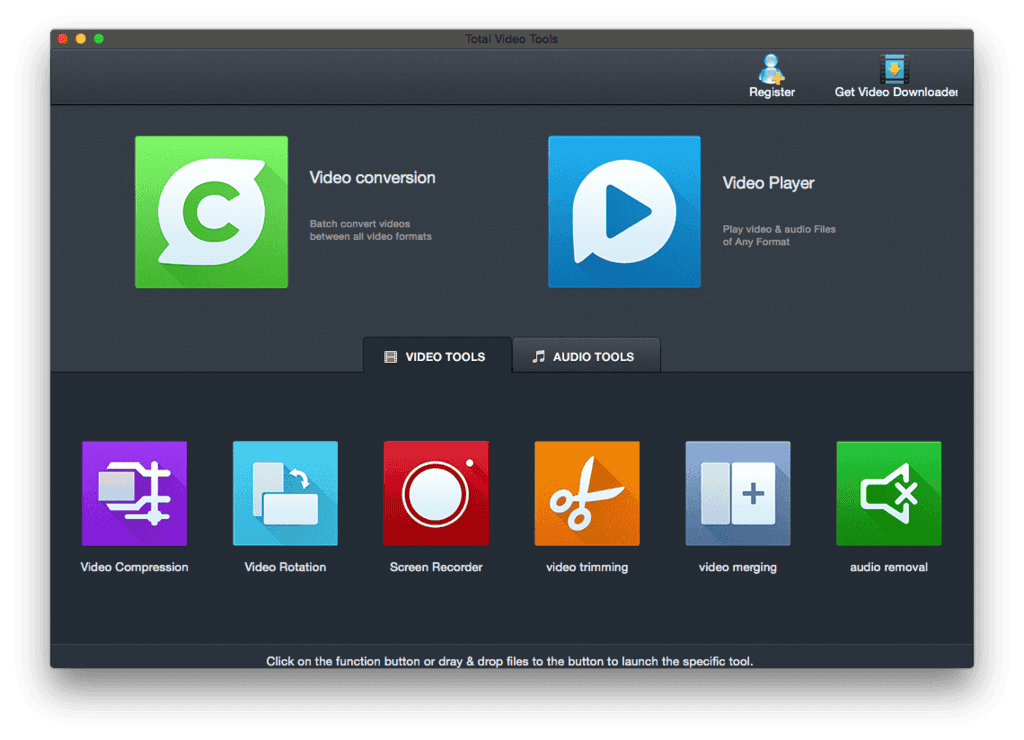
Total Video Tools by EffectMatrix is a comprehensive all-in-one video and audio toolset built exclusively for Mac users who demand professional-grade multimedia capabilities without the complexity of professional-grade software. Developed with Apple Silicon compatibility in mind, this powerhouse application combines a full-featured video and audio converter, a high-definition multimedia player, a lossless screen and voice recorder, and a rich set of video and audio editing tools — all under a single, clean Mac interface.
At its core, Total Video Tools is powered by the latest intelligent hardware acceleration technology, enabling conversion speeds up to 30X faster than standard software-based converters. It supports more than 200 audio and video formats and is preset for over 160 output devices, from iPhones and iPads to Xbox, PSP, and Android smartphones. Whether you are a content creator, educator, gamer, podcaster, or everyday Mac user, Total Video Tools is built to handle your multimedia workload from start to finish — with zero compromises on quality.
The application runs smoothly on Mac OS X 10.13 (High Sierra) and later, including full native support for Apple Silicon M1 and M2 chips with Arm64 architecture, ensuring that even the newest Mac hardware gets every ounce of performance this tool has to offer.
Key Benefits
Total Video Tools Mac App addresses the real, day-to-day pain points of Mac users who regularly work with video and audio. Here is why thousands of users rely on it as their go-to multimedia solution:
- Save Time with 30X Faster Conversion — Thanks to breakthrough hardware acceleration technology, batch conversions that used to take hours are completed in minutes. No more overnight rendering sessions just to convert a folder of videos.
- Eliminate Format Incompatibilities Forever — With support for 200+ input and output formats — including MP4, MKV, AVI, WMV, MOV, FLV, HEVC (H.265), and 4K video — you will never encounter an unsupported format again, regardless of where the file came from.
- Produce Sharper, Higher-Quality Output — The integrated intelligent image optimization technology actively improves output quality, so your converted videos look better than the source, not worse.
- Record Anything on Screen Without Quality Loss — The built-in lossless screen recorder captures everything from software tutorials and online lessons to gameplay and live streams, with synchronized microphone audio — all without compressing or degrading the recording.
- Edit Videos Without a Learning Curve — The video editing suite covers all essential operations: trimming, cutting, rotating, merging, splitting, muxing, audio extraction, and audio removal — all accessible through a straightforward interface that does not require professional editing knowledge.
- Play Any Media File Smoothly — The HD multimedia player handles 200+ formats including MTS, MKV, VOB, AVI, OGG, and M4A with smooth 1080p playback, frame-by-frame viewing, and intelligent media information display.
- Fix Volume Inconsistencies Across Your Audio Library — The Audio Normalization Tool analyzes and adjusts batch music files of any format to a consistent volume level, so you never have to manually adjust tracks one by one again.
- Ideal for a Wide Range of Users — Educators recording instructional content, YouTube creators processing raw footage, gamers archiving gameplay, podcasters editing audio, and everyday users managing personal media libraries all get direct, measurable value from this single application.
Features
Below is a thorough breakdown of every capability packed into Total Video Tools for Mac — each main feature followed by its detailed sub-features, so you know exactly what you are getting:
- Full-Featured Video & Audio Format Conversion — Industry-leading batch conversion engine with hardware-accelerated 30X speed across 200+ formats.
- 30X Hardware-Accelerated Speed — Utilizes the latest intelligent hardware acceleration to dramatically reduce conversion time compared to CPU-only converters.
- 200+ Format Support — Handles all major and niche video/audio formats including MP4, AVI, MKV, WMV, FLV, MOV, 3GP, VOB, TS, RMVB, MXF, DivX, and many more.
- HEVC (H.265) Codec Support — Converts to and from H.265 to save significant storage space while maintaining or improving visual quality.
- 4K Ultra-HD Video Conversion — Converts ultra-high-definition 4K video formats regardless of the input device or source format.
- Drag & Drop Interface — Directly drag and drop files into the Conversion Tool for an instant, frictionless workflow.
- Lossless Batch Conversion — Processes multiple files simultaneously with zero quality degradation, saving significant time on large projects.
- 160+ Device Presets — Pre-configured output profiles for iPhone, iPad, Apple TV, iPod, PSP, PS3, Xbox, Android phones, and more.
- High Definition Multimedia Player — A smooth, intelligent player capable of handling virtually any media format available.
- 200+ Format Playback — Plays MTS, MKV, VOB, MP4, AVI, MP3, OGG, M4A, and over 200 additional multimedia formats without requiring third-party codecs.
- Smooth 1080p HD Playback — Renders high-definition 1080p video without stuttering, lag, or dropped frames.
- Intelligent Media Information Display — Automatically detects and displays codec, frame rate, resolution, aspect ratio, audio track, sample rate, and bit rate for every file.
- Frame-by-Frame Playback — Advances video one frame at a time, allowing precise review of fast-motion scenes or technical inspection of footage.
- Full-Screen Mode — Supports full-screen playback for an immersive viewing experience.
- Lossless Screen & Voice Recorder — A professional-grade screen capture tool with synchronized audio recording.
- Long-Duration Screen Recording — Supports extended recording sessions without file size or time restrictions, ideal for lengthy tutorials or gameplay.
- Camera Recording Support — Records directly from your Mac’s built-in or external camera alongside the screen feed.
- Lossless Video Output — Exports recordings at full quality with no compression artifacts, preserving every detail of the captured screen.
- Microphone Audio Synchronization — Records voice narration through any connected microphone in perfect sync with the screen capture.
- Versatile Usage Scenarios — Suited for web-based instructional videos, software tutorials, game commentary, online video clip capture, and remote presentations.
- Full-Featured Audio/Video Editing Suite — A comprehensive set of editing tools covering all major multimedia modification tasks.
- Audio Normalization — Batch analyzes and adjusts multiple audio files of any format to a uniform volume level, eliminating the need for manual track-by-track adjustments.
- Audio Removal — Strips the original audio track from any video file to produce a clean, silent video stream ready for re-dubbing or background music replacement.
- Video Compression — Reduces video file sizes in batch mode with four selectable compression ratios, making files easier to store and share.
- Audio Compression — Compresses audio files across all popular audio formats to reduce storage usage without significant quality loss.
- Video Trimming — Cuts video files of any supported format to isolate the most important or exciting clips for saving and sharing.
- Audio Trimming — Freely trims audio files of any format to extract favorite music clips or specific segments.
- Rotation Tool — Offers real-time preview across four rotation modes: flip horizontal, flip vertical, rotate 90° clockwise, and rotate 90° counterclockwise.
- Merging Tool — Combines multiple video clips into a single seamless file and converts the output to any supported format.
- Video Mux (Video & Audio Combiner) — Merges separate video and audio streams, or replaces a video’s existing audio track with new background music.
- Audio Extraction — Extracts the audio track from any video as a lossless audio file in your chosen format.
- Intelligent Video/Audio Compression — Smart compression engine that minimizes file size while preserving perceptible quality.
- Batch Video Compression — Compresses multiple video files simultaneously using four levels of compression ratio for flexible quality-size tradeoffs.
- Universal Audio Format Compression — Supports compression across all major audio formats, giving full control over output file size.
Requirements
Before isntalling, please confirm your system meets the following specifications to ensure optimal performance:
- Operating System: Mac OS X 10.13 (High Sierra) and later
- Chip Compatibility: Apple Silicon M1 and M2 chips with Arm64 architecture are fully supported
- Processor: 1 GHz Intel processor or higher
- RAM: Minimum 512 MB physical RAM (1 GB or more recommended for 4K workflows)
Downloads
Curious about what Total Video Tools Mac App can do before committing to a purchase? Click the button below to download the free trial version and experience the full capability of Total Video Tools firsthand — no credit card required, no time pressure, just the software working for you.
A free trial edition is available so you can personally verify the 30X conversion speed, test the lossless screen recorder, evaluate the HD player, and run the editing tools against your own real-world files. You can put every feature of this all-in-one Mac multimedia toolkit to the test without spending a single dollar.
BUY NOW
Total Video Tools is available for $59.99. But right now, you can get your Total Video Tools license for Mac at a special discounted price of up to 95% — an offer available for a strictly limited time, so act before it expires.

" />
All-in-One Video & Audio Converter, Screen Recorder, HD Player & Video Editor | Batch Convert 200+ Formats | Supports 4K, H.265, M1/M2 Apple Silicon
- Please Notes:
- You may be directed to the bundle page, but it is possible to purchase the software individually.
- If you're having difficulty locating the product on the bundle page, please utilize the browser's search feature.
- Get an additional $3 discount on all orders more that $30.
- LEGITIMATE: All apps are authentic and have original licenses obtained directly from the creators via contracts.
- INSTANT ACCESS: Fully activated macOS Apps & Windows Software with instant downloads & license key access.
- Device Activation: 1 Device
- Free Lifetime Update
- License code is not for resale.
- Major & Minor Updates Included
- Lifetime License
Platforms: macOS
Moviemator Video Editor Pro BEST OFFER

VideoProc Converter AI: Lifetime License BEST SELLER

Hitpaw Video Editor: Lifetime License BEST OFFER

HitPaw Online BEST OFFER

Fuse Caption Studio BEST OFFER
Total Video Tools Mac App Giveaway
Unavailable at this moment!

To access the giveaway, kindly provide your email address. Please refrain from closing this page after signing in to receive instructions on how to access the offer at no cost.
NOTES:
– All prices shown here are in listed USD (United States Dollar).
– Such promotional programs are subject to change without notice, from time to time in our sole discretion.
– Data may vary based on different systems or computers.
Thanks for reading Total Video Tools Review & Enjoy the discount coupon. Please Report if Total Video Tools Discount Coupon/Deal/Giveaway has a problem such as expired, broken link, sold out, etc while the deal still exists.