

[NEW KEY #2] Giveaway – Tatasoft Video Tool 2.0: Free License Key | The Ultimate Video Download Toolkit – for Windows

Download Any Video From 1,200+ Sites, Extract Crisp MP3/WAV Audio in Seconds, and Preserve Every Pixel in 4K/8K — Grab Your Tatasoft Video Tool License for Free in today’s software Giveaway!
Free Full Version!
Tatasoft Video Tool Review at a Glance
The frustration is universal: you find an important tutorial on YouTube, a memorable clip on Facebook, or a trending video on TikTok, and the moment you go back to watch it again, it is gone — removed, restricted, or simply inaccessible without a reliable internet connection. For professionals, students, content creators, and everyday users alike, the inability to reliably save and access video content offline is a genuine obstacle. Existing tools are either too limited in scope, cluttered with intrusive ads, or so technically complex that the learning curve alone makes them unusable for most people.
Tatasoft Video Tool was built specifically to close that gap. It is a powerful, all-in-one video management application that combines a multi-platform video downloader, a high-quality audio extractor, and a flexible format converter into one clean, fast, and accessible interface. It puts you in full command of your digital video content — without technical expertise, without complications, and without compromise on quality.
What is Tatasoft Video Tool?
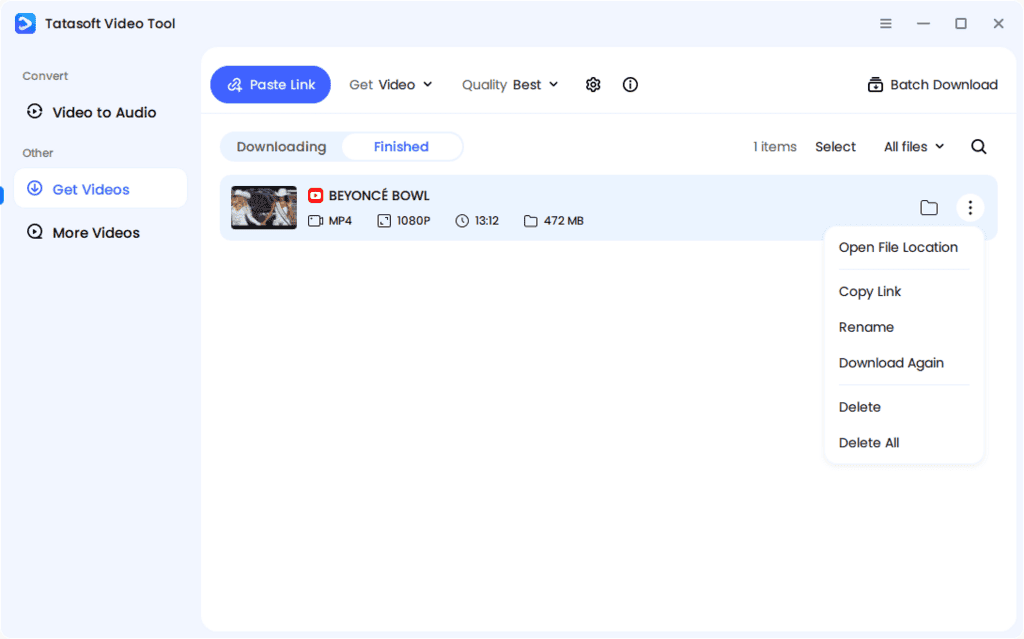
Tatasoft Video Tool is a professional-grade video downloader and audio converter designed for Windows and macOS users who need a reliable, fast, and comprehensive solution for managing online and offline video content. At its core, the software enables you to download videos directly from over 1,200 websites — including major platforms like YouTube, Facebook, TikTok, Instagram, Twitter/X, and many more — in their original resolution, preserving every detail of HD, 4K Ultra HD, and 8K quality without any compression or re-encoding loss.
Beyond downloading, Tatasoft Video Tool functions as a high-performance video-to-audio converter. With a simple drag-and-drop action, you can extract the audio track from any video file and save it as a high-fidelity MP3 or a lossless WAV file within seconds. This makes it an indispensable tool for anyone who wants to capture music, podcasts, lectures, or any audio content embedded in a video and enjoy it offline.
The software is engineered around the principle that powerful tools should not be complicated. Its streamlined interface guides you naturally through every task — paste a URL to start a download, drop a file to extract audio, or configure a batch download queue to save multiple videos simultaneously at maximum speed. Every step of the workflow is designed to be immediately clear, so even first-time users complete their first download or conversion within minutes of installation.
Tatasoft Video Tool is fully compatible with Windows 11, 10, 8.1, 8, 7, and Vista, as well as macOS from version 10.13 High Sierra through the latest macOS Tahoe 26, making it one of the most broadly supported video tools available for personal computers today.
Who benefits most from this tool? The answer covers nearly every type of video consumer. Content creators can archive and repurpose their own published work across platforms. Educators and students can save instructional videos for offline study sessions without relying on an internet connection. Music lovers can extract audio from live performance videos or music channels and build a personal audio library. Social media users can preserve reels, stories, and viral clips before they are taken down. Business professionals can save training videos and webinars for team use. And anyone who travels frequently or lives in an area with unreliable connectivity can build a robust offline media library that is always available, regardless of network conditions.
Key Benefits
Tatasoft Video Tool delivers a focused set of high-impact advantages that make it the right choice for anyone who regularly works with online video. The following benefits highlight exactly why this tool outperforms fragmented or single-purpose alternatives:
- Reliable, High-Speed Performance: Built for stability and speed, Tatasoft Video Tool handles large files and batch tasks without freezing, crashing, or consuming excessive system resources.
- Zero Quality Loss on HD/4K/8K Downloads: Every video you save retains its original resolution and visual clarity — from standard 1080p clips to full 8K productions, the output file is pixel-perfect.
- Access to 1,200+ Websites: Extensive site compatibility ensures you are never limited to just one or two platforms; from the world’s largest video networks to niche video hosts, the tool covers them all.
- Instant MP3 and WAV Audio Extraction: Drag any video file into the converter and receive a high-fidelity audio file in seconds, with multiple bitrate options for MP3 or lossless WAV output.
- Batch Download at Full Speed: Queue dozens of video URLs and download them all simultaneously without throttling, maximizing efficiency for large-scale download tasks.
- Watermark-Free Output: Videos downloaded from TikTok, Instagram, Twitter/X, and other platforms are saved cleanly, without any embedded platform watermarks cluttering the footage.
- Beginner-Friendly Interface: The entire workflow is designed to be immediately intuitive — new users complete their first download or conversion with no prior training required.
- Cross-Platform Availability: Full support for both Windows and macOS means you are not locked into a single operating system.
- Offline Access Without Limits: Once downloaded, your content is entirely yours — accessible anytime, on any device, with no internet connection required.
- Flexible Format and Quality Selection: Before saving, choose your preferred video format, audio format, and quality setting to match your exact storage and playback requirements.
Videos disappear from the internet every single day — deleted, geo-blocked, or locked behind unstable connections. Tatasoft Video Tool puts you back in control, giving you the ability to download, save, and convert videos from over 1,200 websites in HD, 4K, and 8K quality, and extract crystal-clear audio to MP3 or WAV — all from one powerful, easy-to-use application. Claim your discounted license now before this special offer closes.
Features
Here is an in-depth look at every core capability that makes Tatasoft Video Tool a truly complete solution for video downloading and conversion — organized with each main feature and its supporting sub-features for full clarity:
- Video Saver — Download video and audio files from over 1,200 websites worldwide.
- Multi-Site Compatibility: Covers all major social media platforms, video hosting services, and thousands of lesser-known online video sources in a single unified tool.
- Audio Stream Download: Directly save audio streams from supported websites in their best available quality without requiring a separate conversion step afterward.
- Video Quality Control — Download HD, 4K Ultra HD, and 8K videos with no quality loss.
- Full Resolution Support: Captures 720p, 1080p, 2160p 4K, and 8K video in the original codec and container format with no re-encoding or compression artifacts.
- Original Format Preservation: The downloaded file mirrors the source upload exactly, maintaining every detail of the original visual production quality.
- Easy Downloading — Paste the URL and your download begins immediately.
- One-Click URL Fetch: Copy any video link, paste it into the application, and the download starts automatically with no additional configuration steps required.
- Pre-Download Format Selection: A simple dropdown menu lets you choose your exact output format and resolution before the download begins.
- Batch Download — Save multiple videos simultaneously at maximum speed.
- Unlimited Queue Support: Add as many URLs as needed to the download queue and process all of them at once without any performance degradation.
- Full Bandwidth Utilization: The tool intelligently distributes your connection speed across all active downloads, ensuring every job completes as quickly as possible.
- Video to Audio Converter — Extract high-quality MP3 and WAV audio from any video file.
- Drag-and-Drop Workflow: Drop any video file directly into the conversion window, select your output format, and click once to receive a finished audio file.
- Multiple Output Quality Settings: Choose from a range of MP3 bitrate options or select WAV for lossless, studio-grade audio fidelity.
- Automatic Extraction Engine: The entire conversion process runs automatically with no manual configuration, making high-quality audio capture accessible to all users.
- YouTube Video Downloader — Download YouTube videos with customizable quality options.
- Resolution Selection: Pick from all available resolutions — including 360p, 720p, 1080p, and 4K — before downloading, to match your storage capacity and display needs.
- Audio-Only YouTube Mode: Download just the audio track from any YouTube video directly as an MP3 or WAV file, bypassing the video entirely.
- Twitter/X Video Downloader — Save videos from Twitter/X posts quickly and without watermarks.
- Clean, Watermark-Free Output: Files are pulled directly from the source server, resulting in downloads free of any platform-added overlays or branding.
- Fast Retrieval Speed: The tool fetches and downloads Twitter/X video files rapidly, regardless of the video’s original upload quality or file size.
- Facebook Video Downloader — Fetch and store Facebook videos with high-resolution playback.
- Public Post Access: Download videos from publicly available Facebook posts at full resolution with no quality reduction applied.
- HD Playback-Ready Files: All saved Facebook videos are formatted for immediate high-definition playback on any compatible media player.
- Instagram Video Downloader — Download videos, Reels, and Stories from Instagram easily.
- Reels and Stories Capture: Save Instagram Reels and Stories — including time-limited Stories before they expire — with a single click.
- No Platform Branding: Downloaded Instagram content is clean and completely free of any Instagram-applied watermarks or overlays.
- TikTok Video Downloader — Get TikTok videos in various formats for offline viewing.
- Multiple Format Output: Save TikTok content in MP4 and other compatible formats suitable for playback across mobile and desktop devices.
- Watermark-Free Saves: TikTok videos are downloaded cleanly without the platform’s embedded watermark, giving you a polished, professional-looking file.
- Multi-Platform OS Support — Fully compatible with both Windows and macOS.
- Full Windows Compatibility: Runs smoothly on Windows 11, 10, 8.1, 8, 7, and Vista, covering both modern and legacy PC systems without additional drivers.
- Full macOS Compatibility: Supports macOS 10.13 High Sierra through the latest macOS Tahoe 26, keeping pace with every major Apple operating system update.
Requirements
Before installing Tatasoft Video Tool, ensure your system meets the following minimum specifications for optimal performance and stability:
- Operating System: Windows 11 / 10 / 8.1 / 8 / 7 / Vista — or — macOS 10.13 High Sierra through macOS Tahoe 26
- Processor (CPU): At least 1 GHz (multi-core processor recommended for batch downloads and conversions)
- Disk Space: Minimum 100 MB free storage for installation (additional space required for all downloaded media files)
- RAM: 512 MB minimum (1 GB or more recommended for smooth and stable performance)
- Internet Connection: Required for video downloading features; the audio converter can operate offline
Downloads
Seeing is believing — Tatasoft Video Tool is available as a fully functional trial edition so you can put every feature to the test before making a purchase decision.
Click the button below to download your free trial copy and find out firsthand how seamlessly it fits into your workflow.
DOWNLOADS
Windows / Mac
Run real downloads, try the audio extractor, process a batch queue, and confirm full compatibility with your favorite platforms — completely free of charge and with no credit card required.
BUY NOW
Tatasoft Video Tool is now available for a one‑time price of $34.99. For a limited time, you can get Tatasoft Video Tool 2.0 (Full Version) free, including a license key, from the Giveaway tab below. This is a limited‑time offer, so don’t miss it.

Renderforest BEST OFFER

EaseUS VideFlow GIVEAWAY

Video deluxe 2026: Perpetual License BEST SELLER

HitPaw Online BEST OFFER

Winxvideo AI BEST OFFER

Fast Video Downloader PRO BEST SELLER

Allavsoft Video Downloader Converter BEST SELLER

VCap Downloader: Lifetime License BEST SELLER

EaseUS Video Downloader BEST OFFER

StreamFab All-in-One: Lifetime License BEST SELLER
Tatasoft Video Tool Key Giveaway
Available now: Free License Key For a Limited Time!
![[NEW KEY #2] Giveaway – Tatasoft Video Tool 2.0: Free License Key | The Ultimate Video Download Toolkit – for Windows](https://thesoftware.shop/wp-content/uploads/2026/04/Tatasoft-Video-Tool-Review-Download-Sale-Giveaway-300x300.png)
To access the giveaway, kindly provide your email address. Please refrain from closing this page after signing in to receive instructions on how to access the offer at no cost.

NOTES:
– All prices shown here are in listed USD (United States Dollar).
– Such promotional programs are subject to change without notice, from time to time in our sole discretion.
– Data may vary based on different systems or computers.
Thanks for reading Tatasoft Video Tool Review & Enjoy the discount coupon. Please Report if Tatasoft Video Tool Discount Coupon/Deal/Giveaway has a problem such as expired, broken link, sold out, etc while the deal still exists.
![[NEW KEY #2] Giveaway – Tatasoft Video Tool 2.0: Free License Key | The Ultimate Video Download Toolkit – for Windows](https://thesoftware.shop/wp-content/uploads/thumbs_dir/ChatPlayground-AI-Review-Discount-Coupon-rmgvxwmihgqho19f0fdld46gzhdtn5jaice1gqi7gc.png)
![[NEW KEY #2] Giveaway – Tatasoft Video Tool 2.0: Free License Key | The Ultimate Video Download Toolkit – for Windows](https://thesoftware.shop/wp-content/uploads/thumbs_dir/Cute-Handwriting-Font-Bundle-Discount-Sale-rfosnloq5nyxf63vvq4s8zszjsc10oimtb9xzie5a4.png)

![[ENDING SOON] Giveaway – OKMusi Pro MP3 Downloader: Free Annual License | MP3 Music Downloader Software – for Windows](https://thesoftware.shop/wp-content/uploads/thumbs_dir/OKMusi-Pro-Review-Download-Discount-Coupon-Giveaway-rfosm28c73f9jmbzzme94qcit9qcse3bi1x1fob63c.png)


This is BAD. They make sure you wont complete the download in time. Waste of time. The worst download EVER!!!!!