85% Off – WonderPen Pro: Lifetime License | Professional Writing App – for Mac

Write More, Worry Less — WonderPen Gives Every Author the Focused, Fluid Writing Experience They Deserve. Get It at a 85% Discount Today and Take Control of Your Creative Work!
✔ Lifetime License. ✔ Free Product Updates ✔ 24×7 Customer Support
BUY NOW
WonderPen Pro is available $20.00, but right now you can secure your WonderPen Pro Lifetime license at a special discounted rate of up to 85% OFF— valid for a limited time only, so act now before this deal expires.

Professional Writing App for Authors | Novel, Paper & Story Writing with Focus Mode, Cloud Sync, Multi-Format Export | Windows, macOS, Linux, iOS & Android
- Please Notes:
- You may be directed to the bundle page, but it is possible to purchase the software individually.
- If you're having difficulty locating the product on the bundle page, please utilize the browser's search feature.
- Get an additional $3 discount on all orders more that $30.
- LEGITIMATE: All apps are authentic and have original licenses obtained directly from the creators via contracts.
- INSTANT ACCESS: Fully activated macOS Apps & Windows Software with instant downloads & license key access.
- Device Activation: 3 Devices
- Major & Minor Updates Included
- Lifetime License
Platforms: Mac OS X

1min AI Lifetime Deal BEST OFFER

MonsterWriter Pro BEST OFFER
50% Off on Scrivener 3: Lifetime License | An Award-Winning Writing Tool – for Windows / Mac OS X BEST OFFER
Writing Outliner BEST SELLER
UPDF Pro: Lifetime Deal BEST OFFER
WonderPen Pro Giveaway
Unavailable at this moment!
To access the giveaway, kindly provide your email address. Please refrain from closing this page after signing in to receive instructions on how to access the offer at no cost.
NOTES:
– All prices shown here are in listed USD (United States Dollar).
– Such promotional programs are subject to change without notice, from time to time in our sole discretion.
– Data may vary based on different systems or computers.
WonderPen Pro Review at a Glance
Every writer knows the frustration of losing focus mid-sentence, misplacing chapters in a cluttered folder system, or losing hours of work to an unexpected crash. Scattered tools, constant interface distractions, and the lack of a reliable backup system break the creative flow that authors need to produce their best work.
WonderPen Mac App was built specifically to solve these problems — offering a clean, professional, and thoughtfully designed writing environment that keeps you in the zone from the first word to the final chapter.
What is WonderPen Pro for Mac?
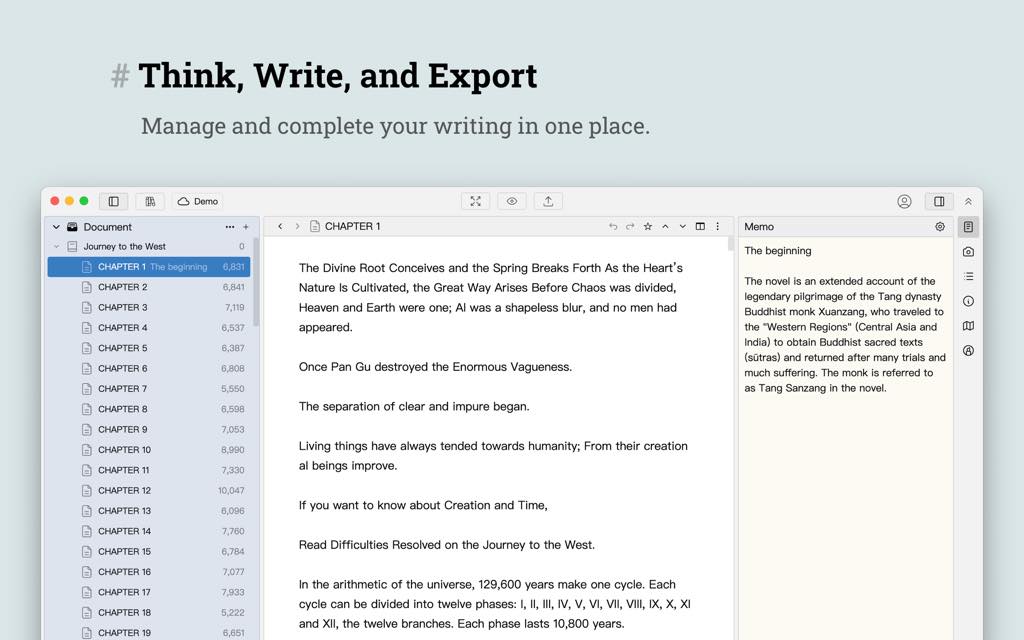
WonderPen Pro is a dedicated professional writing application designed to give authors, novelists, journalists, academics, and everyday writers a focused and fluid writing experience. Unlike general-purpose word processors that pack in spreadsheet tools, presentation functions, and countless irrelevant features, WonderPen is purpose-built for writing. Every feature, every design decision, and every interface element exists to serve one goal: helping you write better and more efficiently.
Whether you are crafting a full-length novel, working through a research paper, jotting down a short story, or maintaining a personal diary, WonderPen for Mac provides the structure, tools, and environment to match your creative pace. The app is available across all major platforms — Windows, macOS, Linux, iOS, and Android — so your writing is always within reach, no matter which device you pick up.
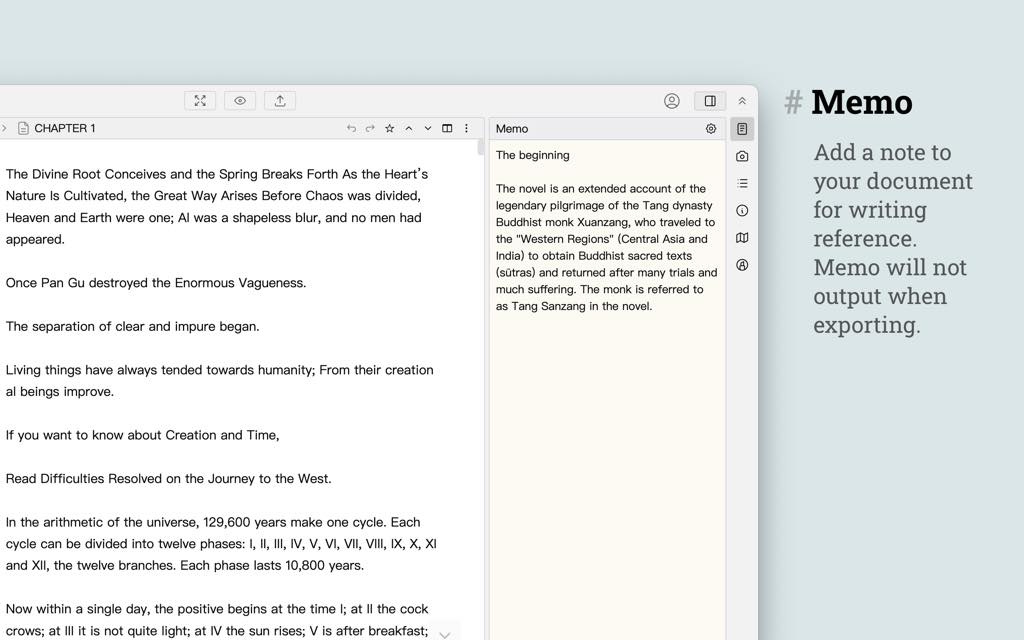
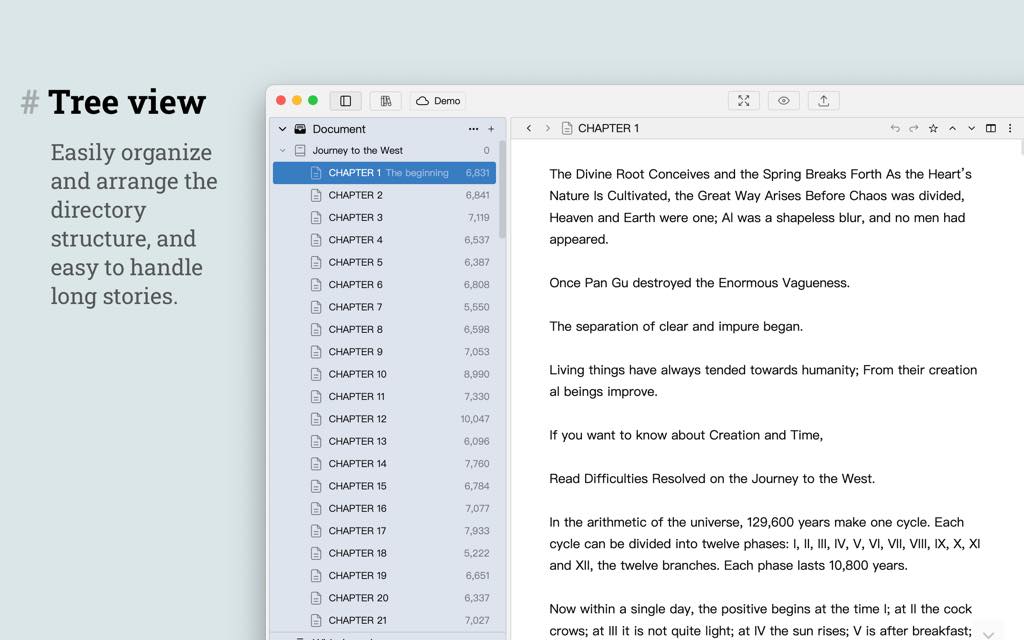
At its core, WonderPen combines powerful document organization through an unlimited-level tree directory, a distraction-free writing editor with typewriter and focus modes, robust backup and cloud sync, and flexible multi-format export — all wrapped in a clean, customizable interface that adapts to your personal writing style.
Key Benefits
WonderPen delivers real, practical value to writers at every level. Here is why thousands of authors choose WonderPen Mac App as their go-to writing tool and how it can benefit a wide range of users:
WonderPen is ideal for:
- Novelists and fiction writers who need to manage complex, multi-chapter long-form projects with character notes, plot outlines, and chapter structures
- Academic writers and researchers who require clean document organization, footnotes, and reliable export to Word or PDF formats
- Short story and essay writers who want a distraction-free environment for bursts of focused creative output
- Diary and journal writers who need a private, secure, and easy-to-use daily writing space
- Content creators and bloggers who benefit from WonderPen’s WYSIWYG editor and web export capabilities
- Students who need to organize lecture notes, write assignments, and back up their work automatically
Why choose WonderPen over other writing tools?
First, focus is built into the core design. WonderPen’s full-screen Compose Mode, Minimalist Mode, and Typewriter Mode are not afterthoughts — they are central features engineered to keep distractions out and your writing in. Second, WonderPen’s document tree structure supports unlimited levels, making it possible to organize even the most sprawling 300,000-word novel without losing track of a single chapter. Third, the automatic backup system runs every 15 minutes by default, and document snapshots mean you can always roll back to a previous version of your work — giving you complete peace of mind.
Beyond these core strengths, WonderPen’s cloud sync keeps your library consistent across desktop and mobile devices, so you can write at your desk and continue on your phone during your commute without missing a beat. The offline-first design ensures that even without an internet connection, your work is fully accessible and any changes sync automatically the moment you reconnect.
Finally, deep customization means WonderPen fits your writing habits, not the other way around. Adjust fonts, line spacing, background color, editor width, and even write your own custom CSS to create a writing environment that feels perfectly tailored to you.
Key Features
Below is a detailed breakdown of the powerful features that make WonderPen a standout writing tool for serious authors and everyday writers alike. Each feature is designed with practical, real-world writing needs in mind:
- Thoughtful Editor — A carefully designed writing interface that keeps your workflow smooth and uninterrupted from start to finish.
- One-Click Formatting — Instantly clean up and organize your document’s typography with a single click or a keyboard shortcut.
- Auto Replace — Set custom replacement rules so that entering specific characters automatically inputs the content you define; includes punctuation matching, extended abbreviations, and quick-input shortcuts.
- Typewriter Mode — Keeps the cursor fixed in the vertical center of the editor and optionally highlights the active line, reducing the need to track your eye up and down the screen.
- Highlighted Dialogue — Automatically highlights dialogue text in a distinct color, making it visually easier to review conversation flow in your manuscript.
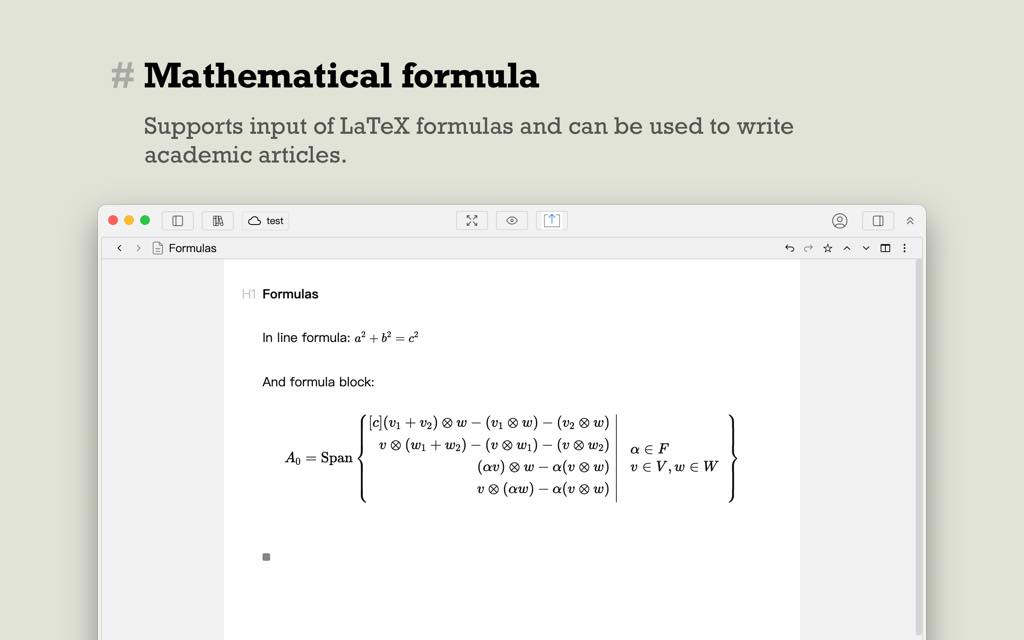
- WYSIWYG Editing — Insert bold text, bullet lists, mathematical formulas, and other formatting elements exactly as they will appear in the final document.
- Editor Split View — Split the editor into a two-column layout for easy side-by-side comparison or reference while writing.
- Long-Form Writing Support — Built to handle novels, technical books, and any other extended writing projects without performance or organizational compromise.
- Tree Directory — Organize documents in an unlimited-level hierarchical tree structure, making it easy to manage both short articles and multi-part long-form works.
- Chapter Split and Merge — Split a long document into separate chapters at any point with a right-click, or merge multiple chapters back into one with equal ease.
- Outline View — View your entire work in a tabular outline format, get an overview of every chapter at a glance, and add custom metadata to track your writing progress in multiple dimensions.
- Writing Targets — Set daily or project-level word count targets and monitor your real-time progress to keep your writing on schedule and on track.
- Distraction Reduction Modes — Multiple interface modes designed to hide irrelevant controls and keep your full attention on the writing itself.
- Compose Mode — Full-screen focus mode that hides all extraneous controls and fills the display entirely with the editor.
- Minimalist Mode — Windowed mode that hides all interface controls, leaving only the editor visible for a clean, minimal writing experience.
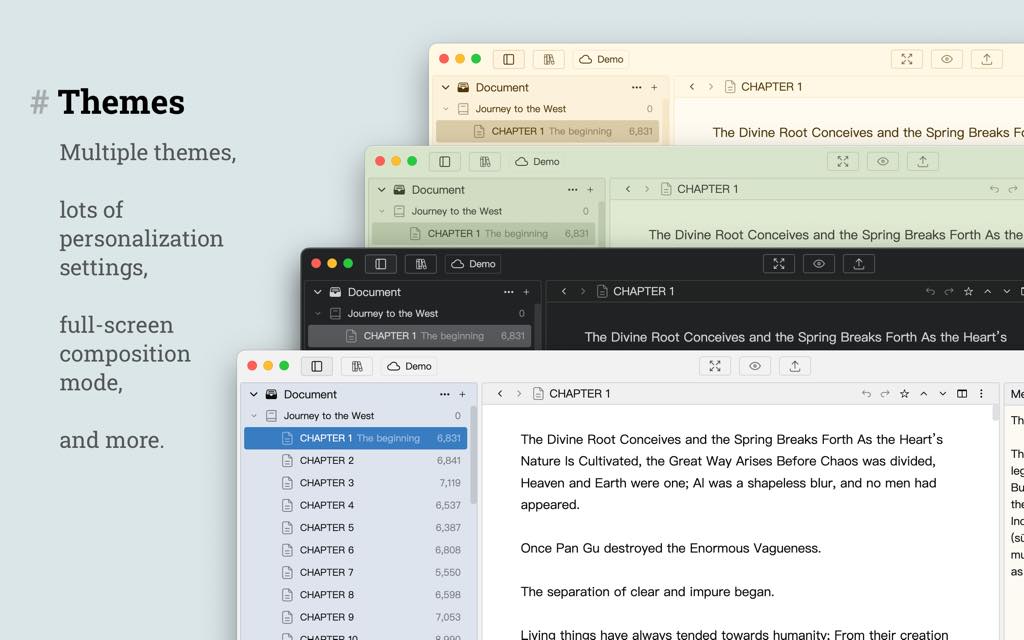
- Rich Themes and Customization — Personalize every aspect of WonderPen’s visual environment to match your creative preferences.
- Built-In Themes — Choose from multiple pre-designed themes to set the right mood and aesthetic for your writing sessions.
- Editor Customization — Adjust editor width, line height, font family and size, and background color independently.
- Custom CSS Support — Write and apply your own CSS rules for complete control over the editor’s visual appearance.
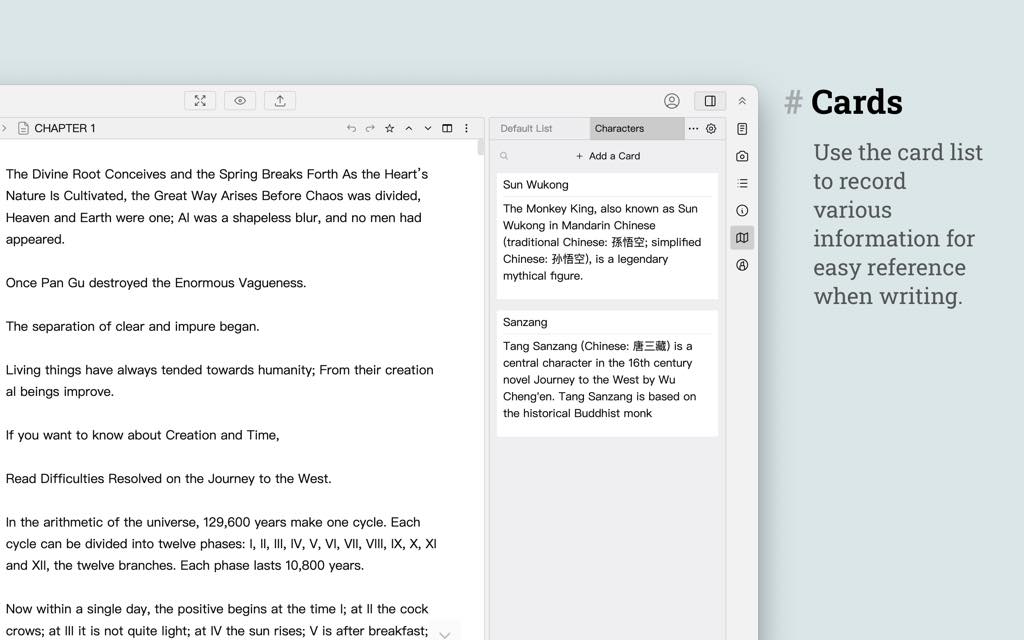
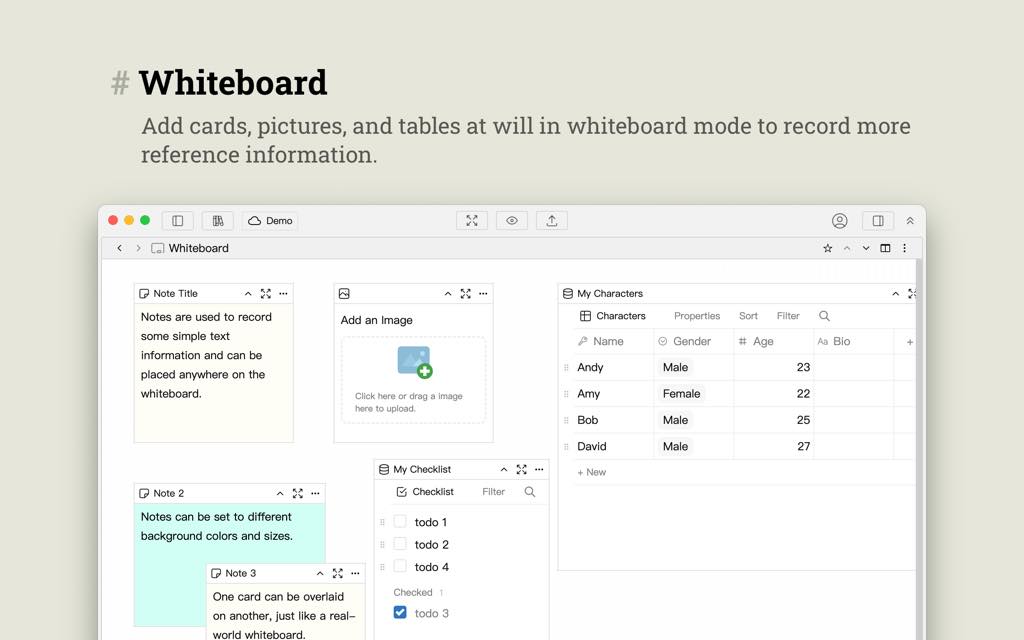
- Card-Style Notes and Whiteboard — Capture ideas, references, and planning notes without ever leaving your writing environment.
- Card List — Use the right-sidebar card list to store global notes, sudden inspirations, character references, and any information you want to keep close while writing.
- Highlight Cards — Reference specific cards directly within the editor by highlighting their titles for instant visual recall.
- Memo per Document — Each individual document has its own dedicated memo field for storing chapter-specific notes and ideas.
- Whiteboard — A global space for planning, brainstorming, recording character settings, creating checklists, and organizing the structural elements of your work.
- Secure Backup — Multiple layers of data protection ensure your work is never lost due to crashes, accidental deletion, or device failures.
- Automatic Backup — Performs a full database backup every 15 minutes by default, running quietly in the background without interrupting your writing.
- Document Snapshots — Automatically saves snapshots of recently modified documents so you can view and restore any historical version at any time.
- Manual Backup — Trigger a manual backup whenever you choose, giving you direct control over when your data is saved.
- Cloud Sync — Keep your writing synchronized and accessible across all your devices without manual file transfers.
- Cloud Library — Store your documents in a cloud library that syncs automatically across every device where WonderPen is installed.
- Offline First — A complete local copy of your cloud library is always maintained on your device, so you can write without an internet connection and sync when you reconnect.
- All-Platform Support — WonderPen works seamlessly across every major operating system and device type.
- Desktop — Fully supported on Windows, macOS, and Linux.
- Mobile — Available on iOS and Android; search for “WonderPen” in any major app store to download.
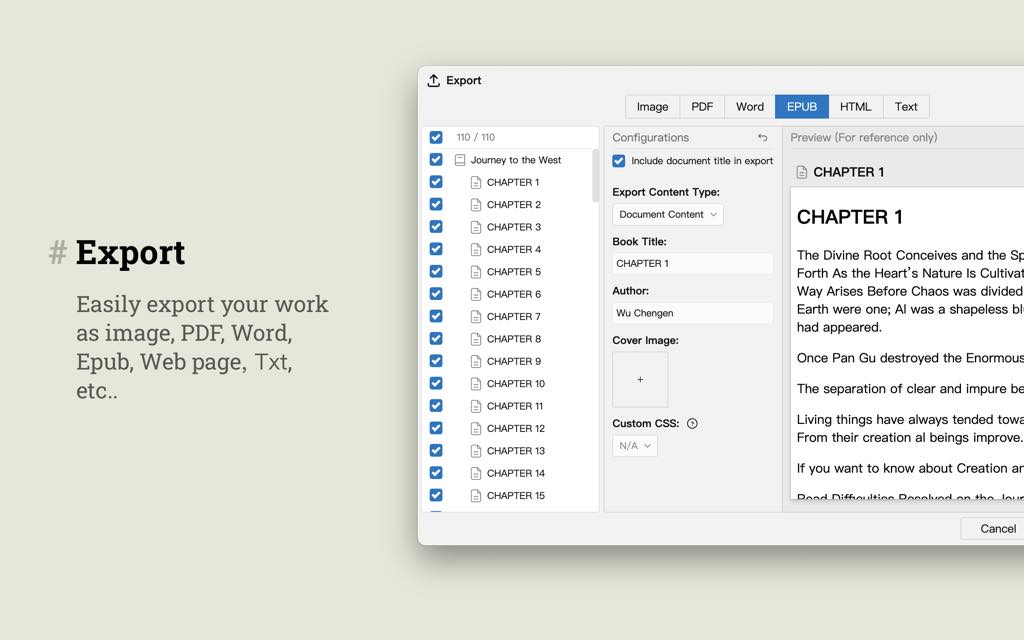
- Export to Multiple Formats — Share, publish, or archive your work in the format that suits your audience or platform.
- Supported Formats — Export to plain text, web pages (HTML), PDF, EPUB, Word (DOCX), and image files.
- Batch Export — Export multiple chapters together as a single compiled book in one operation.
- Statistics and Progress Tracking — Stay motivated and informed about your writing habits and productivity.
- Typing Statistics — View a detailed breakdown of how many words you wrote each day, with clear daily progress visualization.
- Share Typing Statistics — Generate a shareable image card of your daily word count to share your writing achievements with your community.
- Interface Lock — Lock the WonderPen interface with a password when stepping away from your device to keep your writing private and secure from unintended viewers.
For writers who demand reliability, flexibility, and a genuinely pleasant writing experience, WonderPen is the professional-grade tool that delivers — on every platform, in every situation, at every stage of the writing process.
Requirements
- Windows: Windows 10 or later (64-bit)
- macOS: macOS 10.13 (High Sierra) or later
- Linux: Major distributions supported (64-bit)
- iOS: iOS 13.0 or later
- Android: Android 6.0 or later
- Storage: Minimum 200 MB free disk space recommended
- Internet Connection: Required for cloud sync features; offline writing is fully supported without a connection
Free to Try (Trial / Demo)
Take WonderPen for a spin before committing to a purchase. WonderPen offers a free version that gives you direct, hands-on access to its core writing features so you can experience the focused writing environment firsthand. Test the tree directory, experiment with Compose Mode, write a few chapters, and see how WonderPen fits into your creative workflow — all at no cost. Click the button below to download WonderPen for free and start writing today.
Thanks for reading WonderPen Pro Review & Enjoy the discount coupon. Please Report if WonderPen Pro Discount Coupon/Deal/Giveaway has a problem such as expired, broken link, sold out, etc while the deal still exists.