
91% Off – MPKitX: Lifetime License | MP3 Converter, Audio Splitter & Merger – for Mac

The All-in-One Audio Editing Solution You’ve Been Looking For — Split, Merge, Convert & Tag Your Audio Files in Minutes. Get MPKitX for Mac at a 91% Discount Today and Take Full Control of Your Sound!
✔ Lifetime License. ✔ Free Product Updates ✔ Customer Support
BUY NOW
MPKitX is available at $29.00, but right now you can secure your license at an exclusive discounted rate of up to 91% Discount — valid for a limited time only. Do not miss this opportunity to get one of the most capable audio editing tools on the market at a fraction of the regular cost.

MP3 Converter, Audio Splitter & Merger | Trim, Split, Merge & Edit Audio Files | Supports 60+ Formats Including MP3, WAV, FLAC, M4A | ID3 Tag Editor | Batch Audio Conversion Tool
- Please Notes:
- You may be directed to the bundle page, but it is possible to purchase the software individually.
- If you're having difficulty locating the product on the bundle page, please utilize the browser's search feature.
- Get an additional $3 discount on all orders more that $30.
- LEGITIMATE: All apps are authentic and have original licenses obtained directly from the creators via contracts.
- INSTANT ACCESS: Fully activated macOS Apps & Windows Software with instant downloads & license key access.
- Device Activation: 1 Device
- Major & Minor Updates Included
- Lifetime License
Platforms: Mac

Roxio Toast 20 Pro BEST OFFER

Picmal BEST OFFER

DearMob iPhone Manager: Family / Single Lifetime License BEST SELLER

VideoProc Converter AI: Lifetime License BEST SELLER

Leawo Music Recorder: Lifetime License BEST SELLER
MPKitX Giveaway
Unavailable at this moment!

To access the giveaway, kindly provide your email address. Please refrain from closing this page after signing in to receive instructions on how to access the offer at no cost.
NOTES:
– All prices shown here are in listed USD (United States Dollar).
– Such promotional programs are subject to change without notice, from time to time in our sole discretion.
– Data may vary based on different systems or computers.
MPKitX Review at a Glance
Managing audio files has never been simple. Whether you’re a musician trying to extract a specific segment from a long recording, a podcaster who needs to merge multiple clips into one seamless episode, or a music lover who wants to convert an audio library into a compatible format — the process is often slow, complicated, and frustrating. Most tools either do only one job or demand technical expertise just to get started.
MPKitX was built specifically to solve all of these problems in one clean, efficient, and user-friendly package.
What is MPKitX?
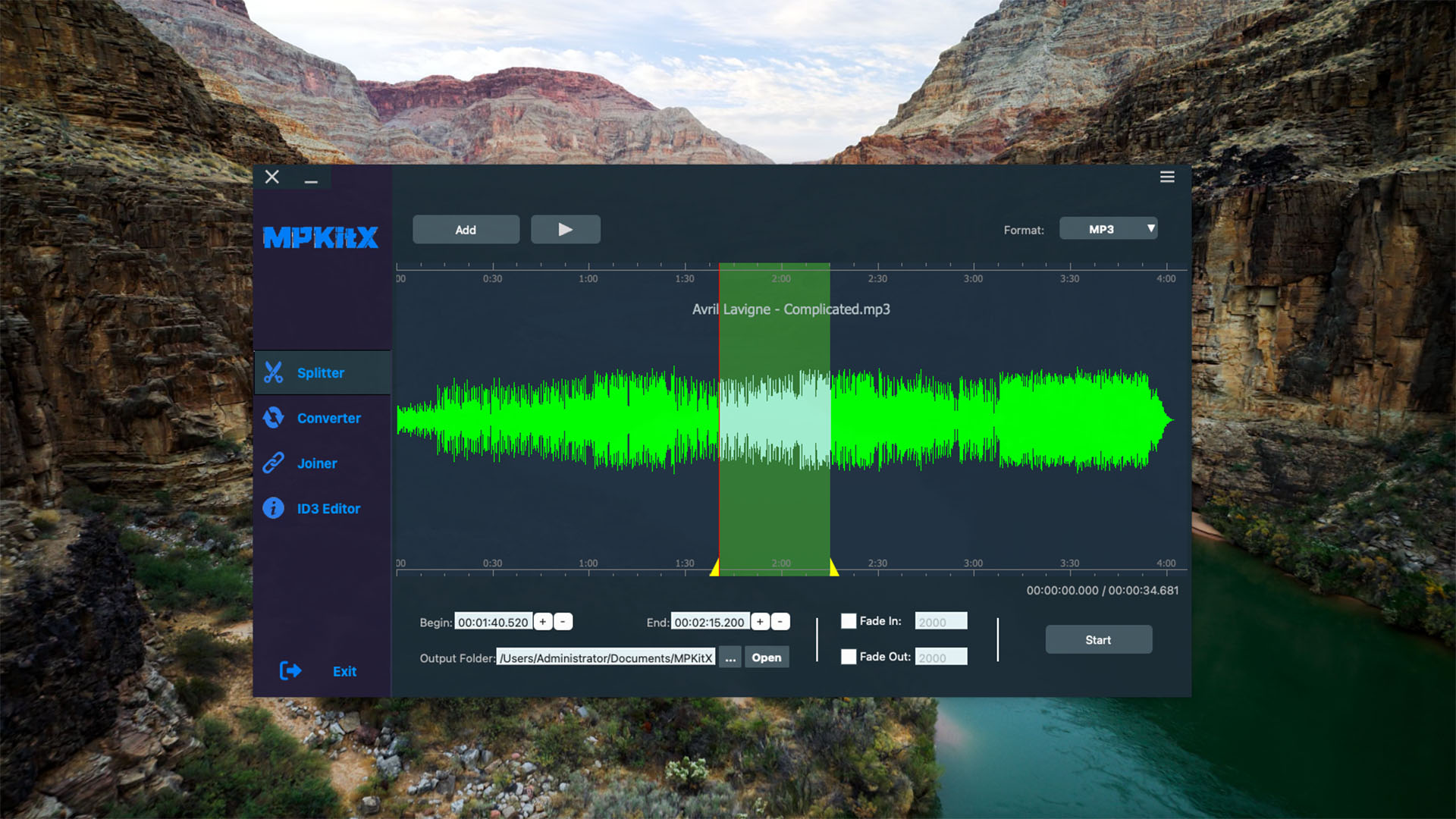
MPKitX is a powerful, all-in-one MP3 converter and audio editor designed for users who need fast, accurate, and professional-quality audio management without the steep learning curve. It brings together four essential audio tools — a precision audio splitter, a multi-format converter, an audio merger, and a full ID3 tag editor — into a single, streamlined application.
Built for both casual users and audio professionals, MPKitX gives you complete control over your audio files from start to finish. You can trim audio with sample-level accuracy, convert between 60+ audio formats, merge multiple tracks into a polished single file, and manage music metadata including cover art, artist names, track titles, and more — all from one interface.
MPKitX is ideal for musicians, podcasters, content creators, DJs, teachers, voice-over artists, and everyday music enthusiasts who want to organize and edit their audio efficiently. There is no need for complex setups or professional audio engineering knowledge — MPKitX is designed to be accessible, intuitive, and powerful at the same time.
Key Benefits
MPKitX delivers real, practical advantages that make everyday audio editing faster and more effective. Here is why thousands of users rely on MPKitX for their audio workflow:
- Save time with an all-in-one solution — No more switching between different apps for cutting, converting, or merging. MPKitX handles every task in one place, dramatically reducing your editing workflow time.
- Achieve sample-accurate results — The precision audio splitter uses waveform visualization so you can make exact cuts without guesswork, preserving the quality and timing of your audio.
- Maintain audio quality throughout conversion — MPKitX ensures high-fidelity output when converting between formats, giving you full control over bitrate, sample rate, and audio channels to match your exact requirements.
- Batch process your entire library — Convert or edit dozens of files at once using the batch conversion feature, saving you hours of repetitive manual work.
- Keep your music metadata organized — With the built-in ID3 tag editor, you can properly label every track in your library, making it easy to find, sort, and play your music on any device.
- Perfect for podcasters and content creators — The audio merger lets you seamlessly combine recordings, intros, outros, and music beds into a single polished audio file ready for publishing.
- Intuitive drag-and-drop interface — Arrange, reorder, and manage audio files without technical expertise. MPKitX is designed for anyone, regardless of experience level.
- Broad format compatibility — With support for 60+ audio formats, MPKitX works with virtually any audio file you throw at it, from common formats like MP3 and WAV to specialized ones like FLAC, OGG, AAC, and M4A.
Features
Below is a thorough breakdown of the core capabilities that make MPKitX a must-have tool for anyone working with audio files. Each feature is designed to deliver precision, speed, and ease of use:
- Trim Audio — Cut and split audio files with sample-level accuracy for precise editing.
- Sample-Accurate Cutting — Trim audio down to the exact sample point with no rounding or approximation errors.
- Segment Extraction — Extract your favorite or most important segment from any audio file quickly and easily.
- Unwanted Parts Removal — Remove silence, noise, intros, or any unwanted section with a simple selection.
- Waveform Preview — Visually inspect and interact with the audio waveform for accurate placement of cut points.
- Playback Preview — Preview your selected clip before saving to confirm you have the exact section you want.
- Convert Audio — Convert between 60+ audio formats with full quality control.
- Multi-Format Support — Supports MP3, WAV, FLAC, AAC, M4A, OGG, and dozens more for maximum compatibility.
- Batch Conversion — Convert entire folders of audio files simultaneously to save time.
- Bitrate Control — Manually set the output bitrate to balance file size and audio quality.
- Sample Rate Adjustment — Choose the sample rate that fits your target device or platform.
- Channel Configuration — Set audio output to mono or stereo depending on your use case.
- High-Quality Output — MPKitX maintains maximum audio fidelity throughout the conversion process.
- Merge Audio Clips — Combine multiple audio files into one seamless output file.
- Drag-and-Drop Arrangement — Reorder your audio clips intuitively by simply dragging and dropping them into position.
- Seamless Transitions — Merge clips with smooth, uninterrupted transitions for a professional finish.
- Multi-Format Merging — Combine audio files from different formats into a single unified output.
- Podcast & Mix Creation — Ideal for building podcast episodes, music mixes, or continuous playlist files.
- Voice Memo Editing — Combine voice recordings from multiple sessions into one clean file.
- One-Click Export — Finalize and save your merged audio in just a few clicks.
- Edit ID3 Tags — Manage and organize your music metadata with a built-in tag editor.
- Track Title Editing — Add or update the title of each audio track directly within the app.
- Artist & Album Info — Enter and modify artist names, album titles, and release details.
- Cover Art Management — Attach, replace, or remove album cover artwork for any audio file.
- Genre Tagging — Assign genre labels to help organize your library and improve search results.
- Batch Tag Editing — Apply metadata changes to multiple files at once for faster library management.
- Audio Splitter — Quickly extract perfect audio clips using a visual waveform interface.
- Visual Segment Selection — Use the intuitive waveform display to click and drag your selection with precision.
- Instant Playback — Play your selected region before saving to ensure accuracy.
- Multiple Output Formats — Save split clips in any supported audio format for maximum flexibility.
- Non-Destructive Editing — Original audio files remain intact; only the exported clip is modified.
Requirements
MPKitX is designed for maximum compatibility and minimal system requirements. Please review the following before installation:
- Operating System: macOS (compatible with modern macOS versions)
- Storage: Minimum free disk space required for installation and temporary file processing
- RAM: At least 2GB RAM recommended for smooth batch processing
- Audio Formats Supported: MP3, WAV, FLAC, AAC, M4A, OGG, and 55+ additional formats
- Internet Connection: Required for license activation and software updates
- Processor: Intel or Apple Silicon (M1/M2/M3) compatible
Free to Try
See exactly how MPKitX fits into your audio workflow before making any commitment. You can put every feature to the test — trim a clip, run a batch conversion, merge recordings, and edit your metadata tags — all without spending a cent.
Click the button below to download the free trial edition of MPKitX and experience the full power of precision audio editing firsthand.
or
Buy now, the price start from:
Thank you for reading MPKitX review, and enjoy the discount coupon. If you notice any issues with MPKitX discount coupon, deal, or giveaway—such as an expired offer, broken link, or sold‑out promotion—please let us know while the deal is still available.


![[ENDING SOON] Giveaway – Amoyshare ID3Genius: Free 1-year License | Music Tag Editor – for Windows](https://thesoftware.shop/wp-content/uploads/thumbs_dir/Amoyshare-ID3Genius-Review-Download-Coupon-Giveaway-rfosnmmnl5kgw822uarvac46ge0dm8b7pt2689zjq0.png)