84% Off – TaskPaper: Lifetime License | Plain Text To-Do List App | Outliner, Task Manager & Productivity Planner – for Mac

Tired of bloated task managers slowing you down? TaskPaper keeps it simple — plain text, zero clutter, total control. Get organized today and start getting things done the way you’ve always wanted.
✔ Lifetime License. ✔ Free Product Updates ✔ Customer Support
BUY NOW
TaskPaper is available as a one-time purchase of $24.99 — no subscriptions, no recurring fees, just a single payment for a tool you will use for years. Right now, you can get your TaskPaper license with an exclusive limited-time discount of up to 84% Off, so act quickly before this offer expires.

Plain Text To-Do List App for Mac | Outliner, Task Manager & Productivity Planner | Auto-Formatting, Tag Filtering & Apple Reminders Integration | Getting Things Done Since 2006
- Please Notes:
- You may be directed to the bundle page, but it is possible to purchase the software individually.
- If you're having difficulty locating the product on the bundle page, please utilize the browser's search feature.
- Get an additional $3 discount on all orders more that $30.
- LEGITIMATE: All apps are authentic and have original licenses obtained directly from the creators via contracts.
- INSTANT ACCESS: Fully activated macOS Apps & Windows Software with instant downloads & license key access.
- Device Activation: 3 Devices
- Minor Updates Included Only
- Lifetime License
Platforms: Mac
This is a one-time investment in a tool that has been trusted by productive people since 2006 — and it will keep working for you for years to come. Click Buy Now to secure your license at the discounted price before the offer ends.

Get TaskPaper and over 260 other Mac apps with a subscription starting at just $9.99 per month.
- Full access to TaskPaper and over 260 other Mac apps
- Install as many apps as you want
- Every Mac and iOS app you need
- Ever-growing collection, same price
- Free updates. No ads
- 7-day Free Trials, Easy cancellation
Platforms: Mac OS X

BusyCal BEST OFFER

DoneIt BEST OFFER

BusyContacts: Perpetual License BEST OFFER
MadNotes Lifetime Deal BEST OFFER

Notepad.exe BEST OFFER
TaskPaper Mac App Giveaway
Unavailable at this moment!

To access the giveaway, kindly provide your email address. Please refrain from closing this page after signing in to receive instructions on how to access the offer at no cost.
NOTES:
– All prices shown here are in listed USD (United States Dollar).
– Such promotional programs are subject to change without notice, from time to time in our sole discretion.
– Data may vary based on different systems or computers.
TaskPaper Review at a Glance
Most productivity apps today are overloaded with features you never use. You open them to add a quick task and end up spending ten minutes clicking through menus, setting priorities, configuring reminders, and choosing colors for labels. The result? More time managing your system than actually doing your work. There is a growing demand for a tool that strips everything back to the essentials — something that gets out of your way and lets you focus on what actually matters: the work itself.
TaskPaper was built to solve exactly this problem, and it has been doing so reliably since 2006.
What is TaskPaper?
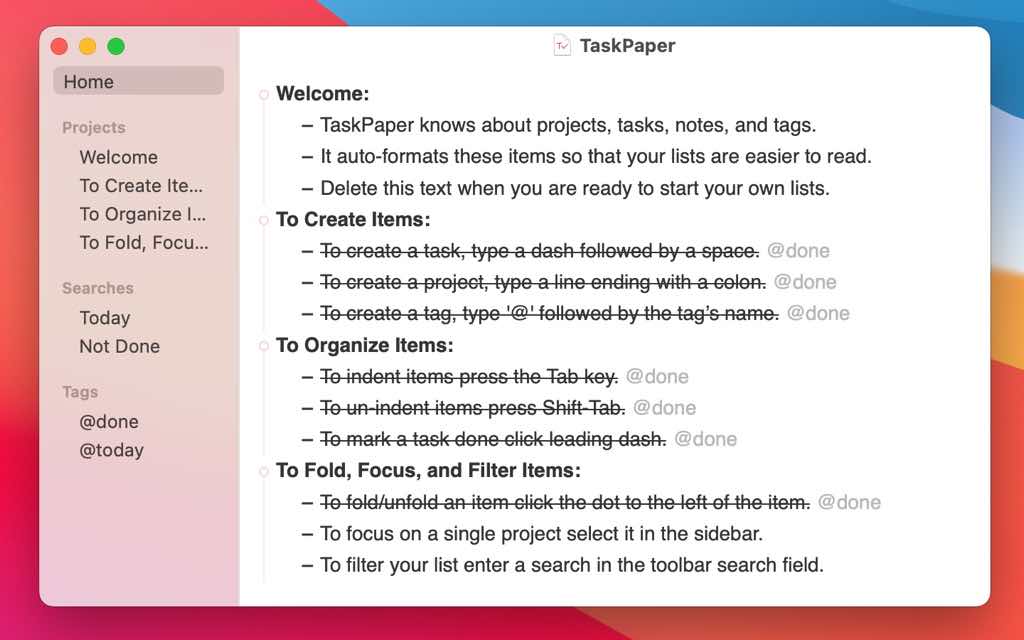
TaskPaper is a plain text to-do list application designed exclusively for Mac that combines the simplicity of a text editor with the organizational power of a full-featured outliner. Unlike conventional task management tools that lock your data into proprietary formats, TaskPaper stores everything in plain text files — readable, portable, and future-proof. You simply type your tasks, and TaskPaper automatically formats each line into a project, task, or note based on simple syntax rules.

The concept behind TaskPaper is elegantly straightforward. A line ending with a colon becomes a project header. A line beginning with a dash and a space becomes a task. Everything else is treated as a note. That’s the entire syntax. No steep learning curve, no manual to study, no onboarding process. Just open the app, start typing, and your list is already organized.

TaskPaper 3 represents a thoroughly modernized version of the original app, rebuilt from the ground up while preserving the plain text foundation that has made it trusted by professionals, writers, developers, and everyday users for nearly two decades. It brings powerful new outlining capabilities, a refined interface, advanced search functionality, and deep integration with macOS — all without sacrificing the lightweight, distraction-free experience that defines the TaskPaper philosophy.

Key Benefits
TaskPaper offers a wide range of practical advantages that make it a standout choice for anyone looking to bring clarity and structure to their daily workflow. Here is why TaskPaper deserves a place in your productivity toolkit and who stands to benefit most from using it.
- TaskPaper is built for people who think in plain text. If you are a developer, writer, researcher, student, or professional who already lives inside a text editor, TaskPaper feels completely natural. There is no need to context-switch into a complex app just to jot down what needs to get done. You type in the same familiar way you always have, and the app quietly handles the organization for you.
- The absence of data lock-in is one of TaskPaper’s most compelling advantages. Your task files are stored as standard
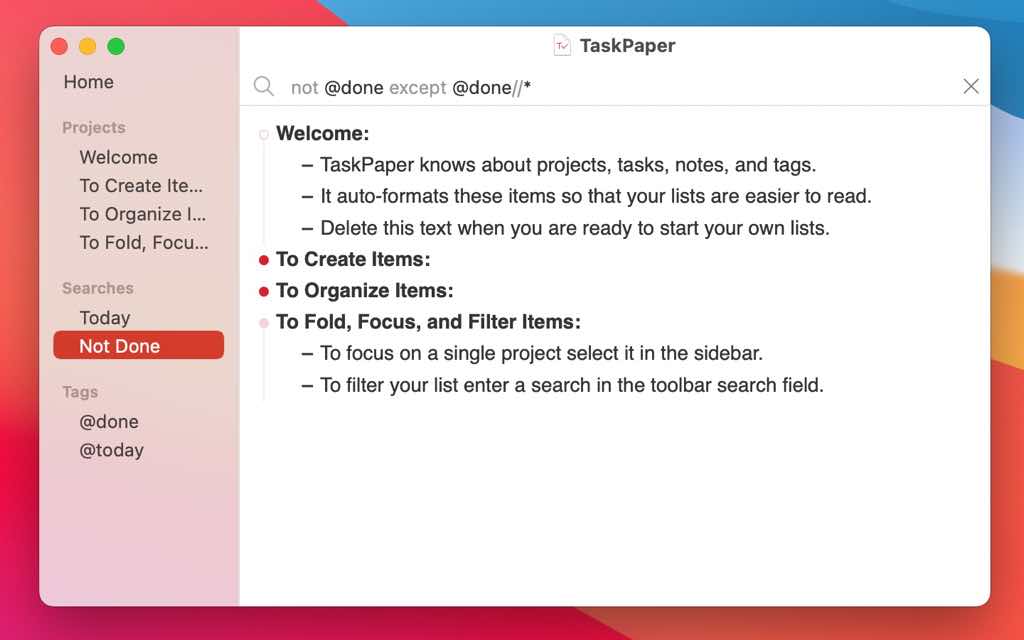
.taskpaperplain text files that can be opened, edited, and read in any text editor on any platform. You are never dependent on a subscription, a server, or a company staying in business. Your data belongs to you — permanently. A growing ecosystem of TaskPaper-compatible apps and developer tools also means you can integrate your lists into virtually any workflow. - For professionals managing complex projects, TaskPaper’s outlining features provide the structure needed to keep large task lists under control. The ability to fold, focus, and filter means you can hide everything except what is relevant right now, eliminating the cognitive overhead of seeing everything at once. Saved searches let you instantly surface the tasks that matter at any given moment, whether you are looking for everything tagged
@urgent, all tasks due today, or every item related to a specific client project. - TaskPaper is also ideal for minimalists and productivity purists who follow methodologies like GTD (Getting Things Done), Bullet Journaling, or other plain-language planning systems. The app does not impose any particular framework on you. It provides the building blocks — projects, tasks, tags, and notes — and leaves the system design entirely up to you. You can keep it as simple as a grocery list or build out a multi-level project management environment with advanced search queries and custom scripts.
- Students and freelancers benefit from TaskPaper’s lightweight nature and zero monthly cost model. There are no recurring fees, no feature paywalls, and no premium tier required to access the full functionality of the app. Pay once and use it for as long as you need.
- Teams and power users will appreciate the extensive JavaScript API that allows for deep customization and automation. Combined with LESS/CSS-powered stylesheets for theming, TaskPaper can be adapted to suit virtually any workflow or visual preference. Whether you prefer a dark, minimal aesthetic or a bright, colorful interface, the app can be configured to match your working style exactly.
Key Features
Below is a detailed breakdown of the core capabilities that make TaskPaper a genuinely powerful tool for task management and daily planning:
- Plain Text Files — Edit your lists in any application, on any device, at any time, with no proprietary format restrictions.
- Future-proof format; your data will always be accessible regardless of platform changes
- Compatible with a wide range of third-party TaskPaper apps built by independent developers
- No dependency on cloud services or vendor lock-in
- Auto-Formatting Syntax — Type naturally and watch TaskPaper instantly structure your content.
- Lines ending with a colon are automatically formatted as project headers
- Lines beginning with a dash and space are formatted as tasks
- All other lines are treated as plain notes for additional context
- Projects, Tasks, Tags, and Notes — Four simple building blocks that give your lists complete organizational flexibility.
- Use
@tagsto categorize items by context, priority, or any custom attribute you define - Apply
@doneto mark completed tasks with a satisfying visual strikethrough - Nest tasks under projects or sub-projects using the Tab key for multi-level structuring
- Use
- Fold, Focus, and Filter — Reduce large, complex lists to exactly what you need to see right now.
- Collapse individual projects or sections to reduce visual clutter
- Use Focus mode to isolate a single section of your list
- Apply filters to show only the tasks that match specific criteria
- Saved Searches and Advanced Query Language — Go beyond basic tag filtering with a full-featured search syntax.
- Filter tasks by tag, type, content, or any combination of attributes
- Save frequently used searches for instant one-click access
- Use special expressions and logical operators for complex, precise queries
- Fast Keyboard Navigation and Commands — Control your entire workflow without reaching for the mouse.
- Keyboard shortcuts for creating, moving, completing, and organizing tasks
- Tab and Shift-Tab for quick indentation and nesting of items
- Arrow key navigation with full outline-aware movement
- Drag and Drop Organization — Rearrange your tasks and projects intuitively with a simple drag.
- Move individual tasks or entire project blocks with ease
- Reorganize nested structures without losing hierarchy
- Date and Time Management in Plain Text — Attach dates directly to your tasks using natural language.
- Schedule tasks with flexible date syntax directly in the text
- Manage deadlines and reminders without leaving the app
- Apple Reminders Integration — Sync your TaskPaper tasks with Apple’s native Reminders app via Siri.
- Export tasks with dates directly to Reminders.app for cross-device visibility
- Import items from Reminders back into TaskPaper for centralized management
- Keep your schedule synchronized across Mac, iPhone, and iPad via iCloud
- LESS/CSS Stylesheet Editor — Customize the visual appearance of the app to match your preferences.
- Adjust fonts, colors, background, and layout using standard stylesheet syntax
- Browse and install community-created themes available online
- Create and share your own custom themes with the TaskPaper community
- JavaScript API for Scripting and Automation — Extend TaskPaper’s functionality far beyond its built-in features.
- Write custom scripts to automate repetitive list operations
- Integrate TaskPaper with other macOS apps and workflows
- Access and manipulate the full document structure programmatically
- Active Support Community — Tap into a dedicated user community with years of collective knowledge.
- Forum and community resources with extensive documentation
- Developer support for scripting and customization questions
- Regular contributions of scripts, themes, and workflow templates from experienced users
Requirements
- Operating System: macOS (compatible with modern macOS versions)
- Platform: Mac only
- Storage: Minimal disk space required (plain text file storage)
- Integration: Apple Reminders app for sync features (optional)
- Internet: Not required for core functionality
Downloads
The best way to know if TaskPaper fits the way you work is to use it yourself. Give your workflow a real test run with the TaskPaper trial — no commitment, no credit card required. Experience the plain text approach to task management firsthand and see how naturally it fits into your daily routine. Click the button below to download the free trial and get started immediately.
or
Buy now, the price start from:
Thank you for reading TaskPaper review, and enjoy the discount coupon. If you notice any issues with TaskPaper discount coupon, deal, or giveaway—such as an expired offer, broken link, or sold‑out promotion—please let us know while the deal is still available.