
90% Off – Notepad.exe: Lifetime License | Instant Code Execution, AI Coding Assistant, iOS Simulator – for Mac

Stop wrestling with project wizards and config files — Notepad.exe lets you open a file, hit Run, and see results in seconds. Get your lifetime license at a 90% Discount today and start building immediately.
✔ Lifetime License. ✔ Free Product Updates ✔ 24×7 Customer Support
BUY NOW
Notepad.exe is available for $19 per year or $79 as a one-time purchase (Lifetime License) with no recurring subscription. You pay once and own the software. But right now, for a limited time, you can grab a Notepad.exe Lifetime license using our exclusive discount sale and save up to 90% on the standard price — this offer will not last, so act while it is available.

Lightweight Native macOS IDE for Swift, Python & JavaScript | Instant Code Execution, AI Coding Assistant, iOS Simulator, No Project Setup Required
- Please Notes:
- You may be directed to the bundle page, but it is possible to purchase the software individually.
- If you're having difficulty locating the product on the bundle page, please utilize the browser's search feature.
- Get an additional $3 discount on all orders more that $30.
- LEGITIMATE: All apps are authentic and have original licenses obtained directly from the creators via contracts.
- INSTANT ACCESS: Fully activated macOS Apps & Windows Software with instant downloads & license key access.
- Device Activation: 3 Devices
- Minor Updates Included Only
- Lifetime License
Platforms: Mac OS X

Text Edit Plus: Lifetime License BEST OFFER

CodeLobster Professional for Windows BEST SELLER

AllMyNotes Organizer Deluxe Edition: Lifetime License, 12-month Free Upgrades GIVEAWAY

ShadowGit BEST OFFER

Vovsoft HTML Stripper BEST OFFER
CodeSmash: Lifetime Deal BEST OFFER
Notepad.exe Mac App Giveaway
Unavailable at this moment!

To access the giveaway, kindly provide your email address. Please refrain from closing this page after signing in to receive instructions on how to access the offer at no cost.
NOTES:
– All prices shown here are in listed USD (United States Dollar).
– Such promotional programs are subject to change without notice, from time to time in our sole discretion.
– Data may vary based on different systems or computers.
Notepad.exe Review at a Glance
The Problem Every Developer Knows Too Well
You have a quick idea — a script to automate a task, a SwiftUI prototype to test, a JavaScript utility to try out. You open your IDE, and then it begins: create a new project, configure build targets, wait for indexing, resolve a missing dependency, click through three setup dialogs, and by the time you are finally ready to type a single line of code, the momentum is gone. The friction of modern IDEs is not a minor inconvenience — it is a creativity killer. Developers spend more time configuring their tools than using them, and that is a problem that has gone unsolved for far too long.
Notepad.exe exists specifically to fix this.
What is Notepad.exe?
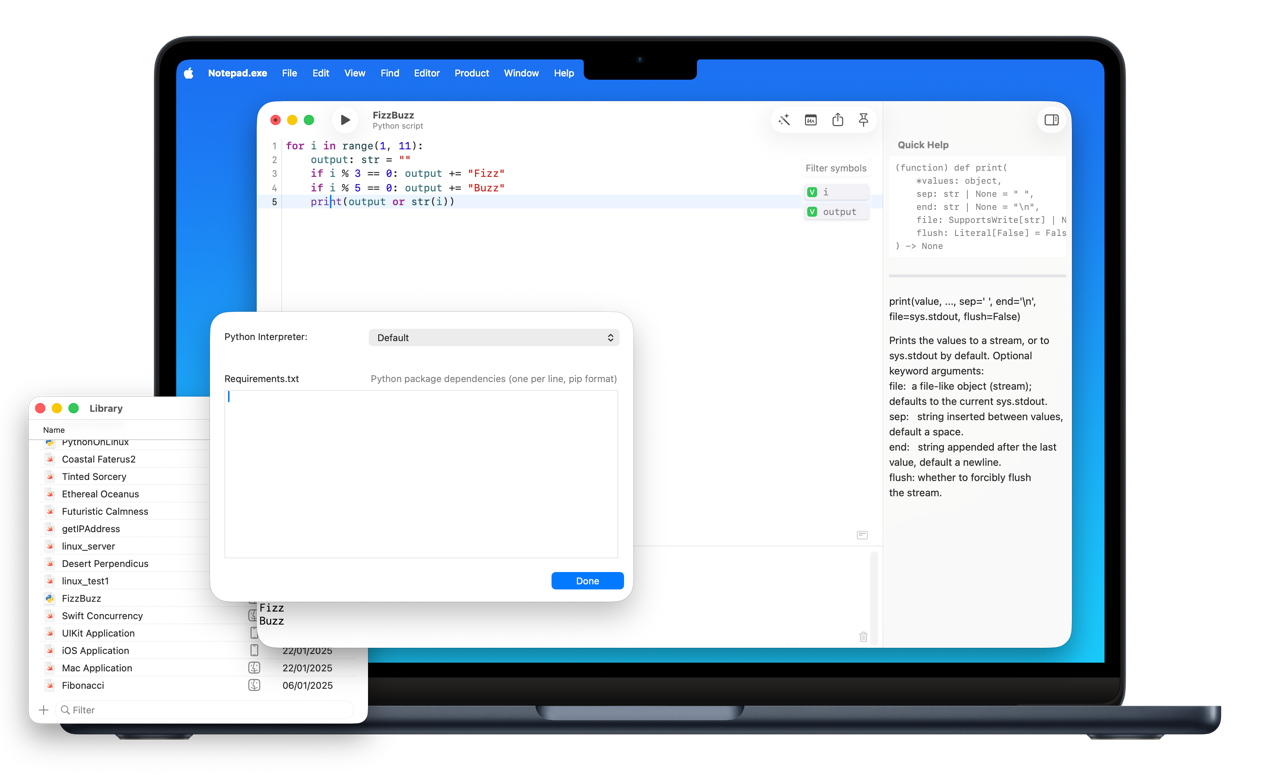
Notepad.exe is a native macOS code editor and lightweight IDE designed from the ground up to eliminate the setup friction that plagues traditional development environments. Launched in May 2025 by independent developer Marcin Krzyzanowski, Notepad.exe treats your code the same way a notes app treats your thoughts — open it, start typing, and run. There is no project wizard, no configuration file, no indexing phase, and no waiting.
Built as a Universal Binary for macOS 15 and later, Notepad.exe runs natively on both Apple Silicon and Intel Macs, delivering the kind of native performance you expect from a Mac-first application. It supports Swift, Python, and JavaScript — three of the most widely used languages across mobile development, scripting, and web work — all accessible from a single, instantly launching window.
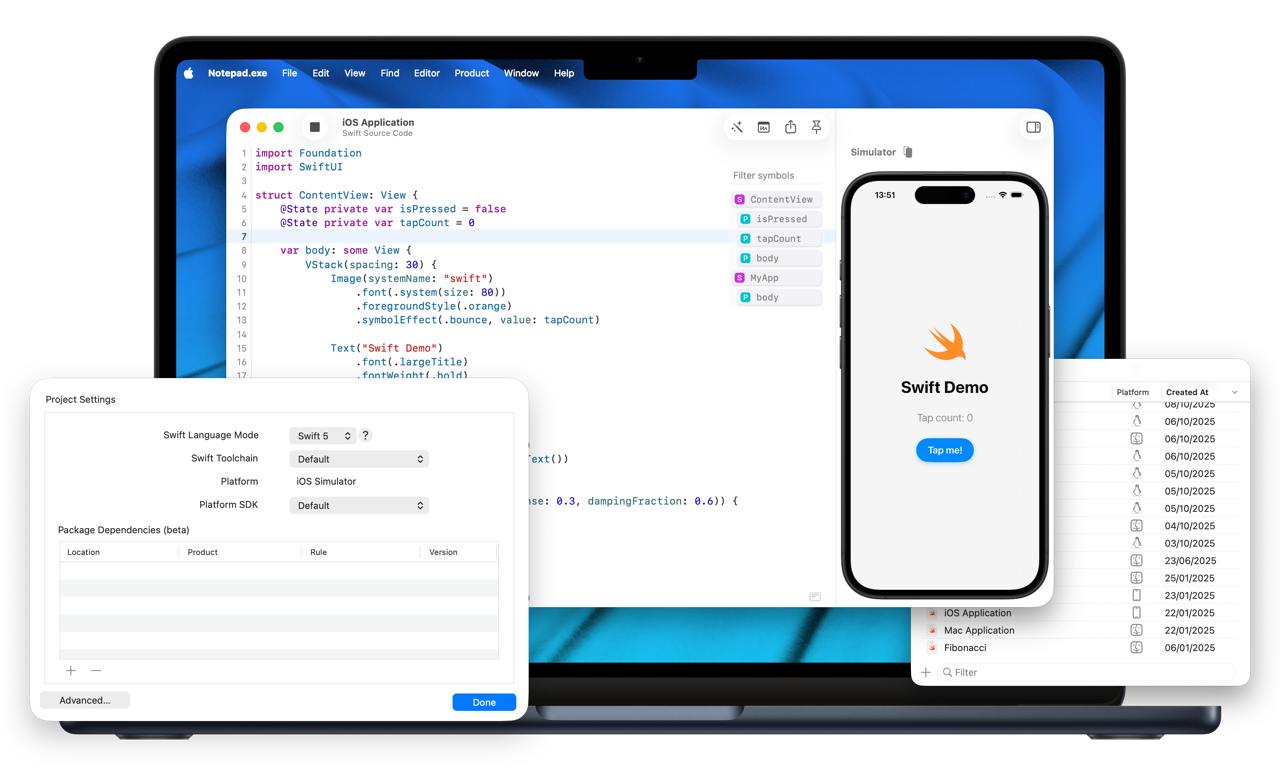
Despite its minimal surface area, Notepad.exe is not a toy. It packs code completion, live error detection, and instant execution into a focused interface. It integrates directly with the iOS Simulator, supports Swift Package Manager without requiring Xcode, offers AI-powered coding assistance that runs entirely on your Mac, and even lets you export a runnable .app when your scratch project grows into something worth shipping. With Bun-powered JavaScript execution added in version 1.5 and Linux cross-platform support via a self-installing subsystem, Notepad.exe bridges the gap between heavyweight IDEs and simple text editors in a way nothing else on macOS currently does.
Think of it as Xcode Playgrounds done right — but for Swift, Python, and JavaScript simultaneously, with none of the rough edges.
Key Benefits
Notepad.exe delivers meaningful advantages for developers at every level, from beginners running their first Python script to experienced engineers prototyping production-ready SwiftUI interfaces. Here is why developers choose Notepad.exe over traditional IDEs and basic text editors:
- Zero setup friction — Open the app, open a file, and run code immediately. No project creation, no configuration step, no indexing delay standing between you and your first line of output
- Instant execution across three languages — Swift, Python, and JavaScript all run with a single keyboard shortcut, giving you a consistent, fast workflow regardless of the language you are working in
- Privacy-first AI assistance — The built-in AI coding assistant processes everything locally on your Mac. Your code never leaves your machine, which means no cloud dependency, no data exposure, and no subscription required for on-device completions
- Progressive complexity that scales with your project — Start with sensible defaults and zero configuration. When your project grows serious, per-language interpreters, custom build flags, and export targets are available without switching to a different tool
- iOS Simulator access without Xcode overhead — Prototype SwiftUI and UIKit screens, test live API calls, and see your app on a realistic iPhone bezel without ever opening a project file or launching Xcode’s full environment
- Native Mac performance — No splash screen, no Electron overhead, no Java runtime. Notepad.exe launches instantly and runs at the speed your Mac hardware is capable of delivering
- Ideal for scripts and automation — Python developers get custom interpreter settings, built-in documentation access, and a simple requirements panel for pip dependencies — all without leaving the editor
- Built for real workflows — Features like Pin to Front let you keep a scratch window floating above the app you are actively debugging, and Share as Image turns any code snippet into a polished, syntax-highlighted image in one keystroke
Who benefits from Notepad.exe? Independent developers who prototype apps on the side, engineers who want a fast scratchpad alongside their main IDE, students learning Swift or Python without the intimidation of Xcode, automation enthusiasts running daily Python scripts, and JavaScript developers experimenting with Bun-powered execution — all of them gain a tool that respects their time and removes the barriers between an idea and running code.
Key Features
Below is a thorough breakdown of every major capability built into Notepad.exe, including the specific sub-features that make each one practical and powerful in real-world use:
- Instant Code Execution — Run Swift, Python, or JavaScript files with a single shortcut (⌘R), with no project setup required before you can see output
- Sensible defaults — Out-of-the-box configuration handles the common case automatically so you never need to touch a settings panel just to run a script
- Per-language interpreters — Point Notepad.exe to any custom Swift toolchain, Python binary, or Bun runtime installed on your system
- Custom build flags — Pass additional compiler or interpreter arguments for advanced use cases without leaving the editor
- Swift Support — Full support for Swift development including compilation, execution, and package management, all without requiring Xcode to be open
- SwiftUI prototyping — Write and run SwiftUI views directly, seeing results rendered in the iOS Simulator in real time
- UIKit support — Test UIKit-based screens alongside SwiftUI in the same environment
- Mac app export — Build a SwiftUI application complete with animations and interactive UI, then export a redistributable .app bundle when you are ready
- iOS Simulator Integration — Launch and interact with iPhone and iPad simulator instances directly from Notepad.exe without a project file
- API testing in simulator — Make live network calls and inspect responses from within the simulated device environment
- Real device bezel preview — View your interface inside an accurate iPhone or iPad bezel for realistic design feedback
- Swift Package Manager Support — Edit and run SwiftPM packages natively, with full dependency management handled inside the app
- Add packages inline — Search for and add Swift package dependencies without switching to Xcode or editing Package.swift by hand
- macOS and Linux targets — Build and run SwiftPM executables targeting macOS or a Linux environment, with the Linux subsystem installing itself automatically on first use
- Python Support — Execute Python scripts instantly with rich tooling built directly into the editor
- Custom interpreter settings — Select any Python version or virtual environment installed on your Mac
- Built-in documentation — Access Python standard library documentation inline without leaving the editor window
- Requirements panel — Install and manage pip dependencies through a simple UI panel rather than the terminal
- Notes Library organization — Store and organize Python scripts in a dedicated library for quick access across sessions
- JavaScript Support (Bun-powered) — Run modern JavaScript using the Bun runtime for fast, Node-compatible execution introduced in version 1.5
- Bun runtime integration — Leverage Bun’s speed and npm compatibility for scripts, utilities, and web-adjacent projects
- AI Coding Assistant — On-device AI model provides intelligent coding support without sending any code to external servers
- Code completions — Context-aware suggestions that understand the structure of your current file
- Refactoring assistance — Receive suggestions for restructuring code for clarity or performance
- Inline explanations — Ask the AI to explain a function, an error, or a concept and receive a plain-language answer inside the editor
- Privacy-first architecture — The model runs entirely on your Mac; no internet connection is required and no data is transmitted
- Live Error Detection — Syntax and type errors are flagged in real time as you type, before you ever attempt to run the code
- Code Completion — Language-aware autocomplete suggestions speed up typing and reduce errors for Swift, Python, and JavaScript
- Pin to Front — Float any Notepad.exe window above all other applications so you can reference or edit code while working in a different app
- Share as Image — Convert any code snippet into a shareable PNG image with full syntax highlighting and window chrome in a single keyboard shortcut
- Native macOS Design — Built with AppKit and SwiftUI for a genuinely native experience with no splash screen, no indexing on launch, and instant startup
- Universal Binary — Runs natively on both Apple Silicon (M1 and later) and Intel Macs on macOS 15 Sequoia and later
- Notes-style File Handling — Open any supported source file directly and begin editing immediately, with no workspace or project wrapper required
Requirements
- macOS 15 Sequoia or later (required)
- Apple Silicon or Intel Mac (Universal Binary — runs natively on both architectures)
- Xcode Command Line Tools (required for Swift compilation; can be installed from within Notepad.exe on first run)
- Python 3.x (system Python or any custom interpreter for Python execution)
- Bun runtime (for JavaScript execution; installable from within the app)
- iOS Simulator (installed as part of Xcode or Xcode Command Line Tools for Simulator features)
- Internet connection not required for core functionality or AI assistant
Free to Try
Before committing to a purchase, take Notepad.exe for a full test drive at absolutely no cost. The free edition gives you direct access to the core editing and execution experience so you can feel the difference that zero-friction coding makes in your actual workflow — running Swift, Python, and JavaScript files, experiencing the instant launch, and getting a real sense of how the tool fits into how you already work. No credit card is required, no time limit is imposed on the trial, and no feature is hidden behind a paywall just to evaluate the basics. Click the button below to download Notepad.exe and run your first file in under a minute.
GET NOW
Stop losing momentum to setup screens and bloated IDEs. Get Notepad.exe now and turn ideas into running Swift, Python, or JavaScript code in seconds with a lifetime license and no subscriptions. Grab the 90% discount while it’s available and start building today.
Making Every Second of Coding Count
Notepad.exe is the editor that gets out of your way. It does not ask you to learn a new paradigm, reorganize your file system, or watch a loading screen before your first keystroke. It opens. You code. You run. That simplicity is not a limitation — it is a carefully engineered feature built on top of a genuinely capable foundation that includes AI assistance, iOS prototyping, package management, and cross-platform execution. For any macOS developer who has ever lost a good idea to setup friction, Notepad.exe is the answer that has been missing from the Mac App Store.
Thanks for reading Notepad.exe MAc App Review & Enjoy the discount coupon. Please Report if Notepad.exe Discount Coupon/Deal/Giveaway has a problem such as expired, broken link, sold out, etc while the deal still exists.
lightweight macOS IDE, Swift code editor Mac, Python IDE macOS, JavaScript editor Mac, no setup IDE macOS, instant code execution Mac, SwiftUI prototyping tool, iOS Simulator without Xcode, Swift Package Manager editor, Bun JavaScript runtime Mac, AI coding assistant macOS, local AI code completion, native macOS developer tool, macOS 15 IDE, Universal Binary code editor, Python script runner Mac, Mac app export tool, Xcode alternative macOS, code editor no configuration, Swift Python JavaScript editor, lightweight developer tool Mac, on-device AI programming, macOS code scratchpad, fast IDE macOS Sequoia, Notepad exe Mac IDE