
83% Off – iClip: Lifetime License | Advanced Clipboard Manager – for Mac

Never Lose a Copied Item Again — iClip Gives Your Mac a Supercharged Clipboard That Saves Everything. Get It Today at a 83% Off and Work Smarter!
✔ Lifetime License. ✔ Free Product Updates ✔ Customer Support
BUY NOW
iClip is available for a one-time purchase price of $14.99. Right now, you can secure your iClip license with our exclusive limited-time discount offer of up to 83% OFF — a special offer available only for a short window, so acting now means getting maximum value. This is your opportunity to add a professional-grade clipboard manager to your Mac toolkit at the best possible price.
By purchasing iClip, you receive:
- Full perpetual license for personal and professional use on your Mac
- Complete access to all features including clip sets, keyboard shortcuts, skins, and scripting support
- Free updates to keep iClip running smoothly with the latest macOS releases
- Dedicated customer support to help with installation, setup, and any questions along the way
Do not let a limited-time offer pass you by. Click Buy Now to claim your discounted iClip license today and make every copy-and-paste session on your Mac faster, smarter, and more productive from day one.

Advanced Clipboard Manager for Mac | Multi-Clipboard History Recorder, Copy & Paste Multiple Items, Customizable Skins & Hotkeys, AppleScript Support | Boost Mac Productivity
- Please Notes:
- You may be directed to the bundle page, but it is possible to purchase the software individually.
- If you're having difficulty locating the product on the bundle page, please utilize the browser's search feature.
- Get an additional $3 discount on all orders more that $30.
- LEGITIMATE: All apps are authentic and have original licenses obtained directly from the creators via contracts.
- INSTANT ACCESS: Fully activated macOS Apps & Windows Software with instant downloads & license key access.
- Device Activation: 1 Device
- Unlimited license for personal use, or one per computer in a company environment
- Major & Minor Updates Included
- Lifetime License
Platforms: Windows

PasteJet BEST OFFER

AllClips BEST OFFER

List Validator Pro BEST OFFER
Inseries BEST OFFER

VibeSonic Pro BEST OFFER

Fluent Mac App BEST OFFER

TextSniper: Lifetime License BEST OFFER
iClip Giveaway
Unavailable at this moment!

To access the giveaway, kindly provide your email address. Please refrain from closing this page after signing in to receive instructions on how to access the offer at no cost.
NOTES:
– All prices shown here are in listed USD (United States Dollar).
– Such promotional programs are subject to change without notice, from time to time in our sole discretion.
– Data may vary based on different systems or computers.
iClip Review at a Glance
Every Mac user has experienced that sinking feeling: you copy something important, copy something else a moment later, and suddenly that first item is gone forever. The built-in Mac clipboard holds only one item at a time, which forces you into an inefficient cycle of copy, paste, go back, copy again — a workflow that quietly wastes hours of your day. Whether you are writing content, filling out web forms, managing code snippets, or handling dozens of emails with similar responses, a single-item clipboard simply cannot keep up with the demands of modern productivity.
iClip was built specifically to solve this problem for Mac users who refuse to let a basic system limitation slow them down.
What is iClip?
iClip is a powerful clipboard recorder and multi-clipboard manager designed exclusively for macOS. Unlike the standard Mac clipboard, iClip automatically captures and stores a complete history of everything you copy — plain text, rich text, images, files, URLs, code, and virtually anything else that can be placed on the clipboard.

The moment you copy something, iClip Mac App records it silently in the background, so nothing is ever lost. You can copy multiple items in sequence and then paste them one by one at your own convenience, completely breaking free from the one-at-a-time limitation that has always held Mac users back.
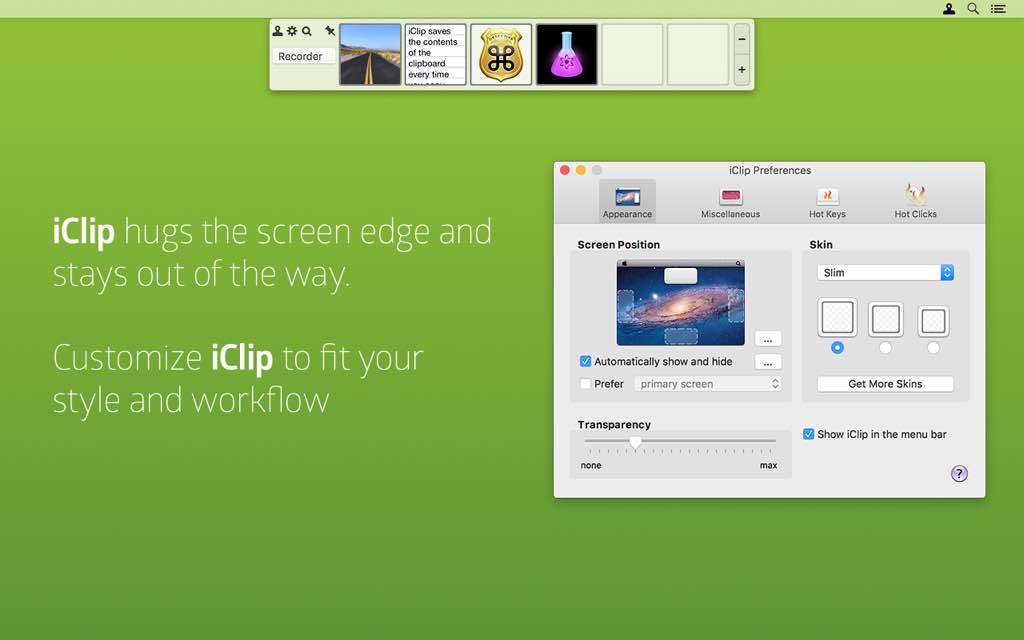
Accessible directly from the side of your screen — much like the Mac Dock — iClip slides out instantly when you move your cursor to the screen edge. Its gorgeous, meticulously designed interface makes retrieving and managing your clips fast and intuitive.

With support for multiple clip sets, fully customizable keyboard shortcuts, adjustable visual skins, and scripting via AppleScript and JavaScript, iClip for Mac is not just a clipboard replacement — it is a complete clipboard productivity system built for the way serious Mac users actually work.
Key Benefits
iClip Mac App delivers real, measurable advantages that make it an indispensable tool for anyone who copies and pastes regularly on a Mac. Here is why thousands of Mac users rely on iClip every single day:
- Stop losing copied content forever — iClip’s automatic history recording means you will never overwrite an important clip by accident again, saving you from frustration and wasted time.
- Copy multiple items before pasting anything — work at your own pace by copying several things in a row and pasting them in any order, exactly when you need them.
- Speed up repetitive tasks dramatically — store frequently used responses, URLs, logos, code snippets, and form data in organized clip sets, then paste them with a single click or keyboard shortcut.
- Stay in your flow with keyboard-first control — power users can perform every iClip function without lifting their hands off the keyboard, keeping momentum and focus intact.
- Works with every content type — plain text, rich text, images, files, and more are all captured and stored faithfully, exactly as copied.
- Fits your visual preferences — customizable skins, bin shapes, sizes, and transparency settings let iClip blend seamlessly into your personal workspace aesthetic.
- Automate and script your clipboard — built-in AppleScript and JavaScript support gives developers and power users full control over how clipboard content is captured, cleaned, and modified.
- Ideal for professionals across all fields — writers, developers, designers, customer support agents, marketers, and students all benefit from having a structured, searchable clipboard history at their fingertips.
Key Features
Below is a thorough breakdown of everything iClip for Mac brings to your Mac clipboard experience. Each feature has been crafted to address a real productivity need, making iClip a genuinely powerful tool from the moment you install it:
- Automatic Clipboard History Recording — iClip silently records every item you copy in the background, building a complete clipboard history without any manual action required.
- Plain Text Capture — captures plain, unformatted text exactly as copied from any source.
- Rich Text Capture — preserves formatting, fonts, and styling from rich text sources.
- Image Capture — stores copied images, screenshots, and graphics for instant retrieval.
- File Capture — records copied files and folders so they remain accessible for future paste operations.
- Multi-Clipboard Copy & Paste Workflow — copy multiple items back-to-back and paste them individually at any time, completely replacing the one-item clipboard limitation.
- Sequential Copy Support — copy as many items as needed without any item overwriting another.
- On-Demand Pasting — paste any stored clip into any application at the exact moment you need it.
- Instant Screen-Edge Access — move your cursor to the edge of the screen and iClip slides out immediately, providing access as fast and natural as using the Mac Dock.
- Configurable Screen Position — choose which screen edge iClip appears on to match your personal workflow preference.
- Pop-Up Clip Preview — hover over any clip bin to see a live preview of its contents before pasting.
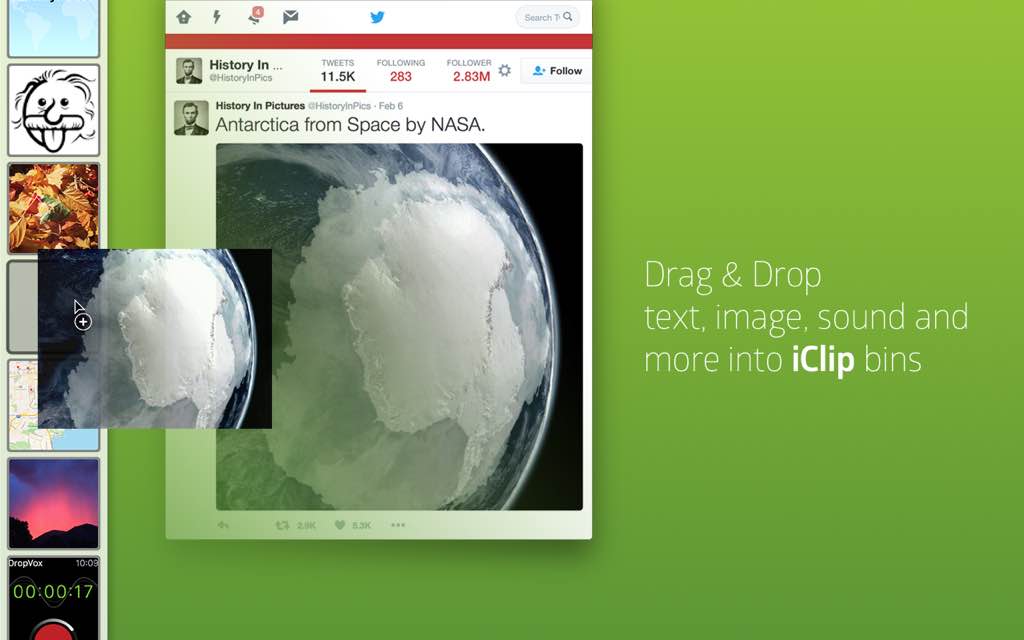
- Drag & Drop Interaction — drag clips directly from iClip into any document or application, and drag content from documents into iClip bins for quick storage.
- Bidirectional Drag Support — content flows both in and out of iClip via drag and drop with no extra steps.
- One-Click Copy & Paste Arrows — each clip bin includes arrow controls that let you copy or paste its contents into your active document with a single click, no keyboard required.
- Fully Customizable Keyboard Shortcuts — every iClip function can be operated entirely from the keyboard, and all shortcuts are fully remappable to suit your personal preferences.
- Keyboard-Only Workflow — perform every copy, paste, and navigation action without removing your hands from the keyboard.
- Custom Hotkey Assignment — assign any key combination to any iClip action for a personalized speed workflow.
- Clip Sets for Organization — organize your stored clips into named sets grouped by project, task type, or topic, keeping your workspace clean and your most-used clips instantly available.
- Project-Based Sets — maintain a separate clip collection for each active project to avoid clutter.
- Reusable Content Storage — store frequently used items like email templates, signatures, web addresses, code snippets, and logos for rapid reuse.
- Instant Set Switching — switch between clip sets with a single click or keyboard shortcut.
- Gorgeous Customizable Interface — iClip features a polished, visually refined UI that can be personalized to match your taste and workspace.
- Multiple Skins — choose from a variety of visual themes to change the overall look of the iClip panel.
- Bin Shape & Size Options — adjust the shape and size of clip bins to fit more or fewer items on screen.
- Transparency Control — fine-tune the transparency level of the iClip window so it blends naturally with your desktop.
- AppleScript & JXA (JavaScript for Applications) Support — iClip is fully scriptable, allowing developers and power users to automate clipboard handling, record additional metadata, clean up data on capture, or build custom workflows.
- AppleScript Integration — write AppleScript commands to control iClip behavior and automate repetitive clipboard tasks.
- JavaScript for Applications (JXA) — use modern JavaScript syntax to script iClip actions within macOS automation workflows.
- Custom Clip Modification Scripts — apply operations to clip content, such as converting text to lowercase, stripping formatting, or appending timestamps.
- Automator & macOS Services Integration — iClip connects with macOS Automator and the Services menu, making it part of your broader Mac automation ecosystem.
- Automator Actions — incorporate iClip into multi-step Automator workflows for advanced productivity automation.
- Services Menu Access — trigger iClip operations directly from the right-click Services menu in any application.
Requirements
- Operating System: macOS (compatible with recent macOS versions)
- Architecture: Designed exclusively for Mac
- Storage: Minimal disk space required for application and clip history storage
- Permissions: Accessibility permissions required for clipboard monitoring and keyboard shortcut functionality
Downloads
Ready to see what a smarter clipboard feels like in your daily workflow? iClip offers a free trial so you can put every feature to the test before committing. Copy multiple items, organize your clip sets, customize your shortcuts, and experience the full iClip interface at zero cost. There is no better way to understand the difference iClip makes than to use it yourself on real tasks. Click the button below to download the free trial version and start working with a clipboard that actually keeps up with you.
or
Buy now, the price start from:
Thank you for reading the iClip review, and enjoy the discount coupon. If you notice any issues with the iClip discount coupon, deal, or giveaway—such as an expired offer, broken link, or sold‑out promotion—please let us know while the deal is still available.