
80% Off – Inseries 4: Lifetime License | Smart Menu Bar Calculator – for Mac

Act Smarter, Calculate Faster — Get Inseries 4 with a Lifetime License at 80% Discount Today and Stop Wasting Time on Spreadsheets for Simple Business Math!
✔ Lifetime License. ✔ Free Product Updates ✔ 24×7 Customer Support
BUY NOW
Inseries is available on the Mac App Store at . You can now get your Inseries license with our exclusive discount coupon — but this offer is available for a limited time only, so act now!
By purchasing Inseries, you receive:
- Full lifetime license — One-time purchase, no subscription required
- Complete feature access — Every feature including date functions, scientific functions, memory operations, persistent history, and global hotkey configuration
- Free updates — Receive all future updates and new features at no additional cost
- Responsive developer support — Access to the developer team at Elemental Tools GmbH for any questions or issues

- Please Notes:
- You may be directed to the bundle page, but it is possible to purchase the software individually.
- If you're having difficulty locating the product on the bundle page, please utilize the browser's search feature.
- Get an additional $3 discount on all orders more that $30.
- LEGITIMATE: All apps are authentic and have original licenses obtained directly from the creators via contracts.
- INSTANT ACCESS: Fully activated macOS Apps & Windows Software with instant downloads & license key access.
- Device Activation: 1 Device
- Minor Updates Included Only
- Lifetime License for current version.
- LICENSE. The developer grants you a non-exclusive, non-transferable license to install and use the application on any number of devices owned or controlled by you, for your personal use.
- SCOPE. This license is granted to you as an individual purchaser. You may not: share, sublicense, sell, rent, or distribute the app to others, or allow use by multiple unrelated users under a single purchase.
- OWNERSHIP. The application is licensed, not sold. All rights, title, and interest in the software remain with the developer.
- RESTRICTIONS. You agree not to: reverse engineer, decompile, or attempt to extract source code (except where legally permitted), modify or create derivative works, or circumvent licensing or security mechanisms.
- UPDATES. Updates may be provided at the developer’s discretion and may be subject to additional terms.
- DISCLAIMER. The software is provided “as is”, without warranty of any kind, express or implied, including but not limited to fitness for a particular purpose and non-infringement.
- LIABILITY. To the maximum extent permitted by law, the developer shall not be liable for any damages arising from the use or inability to use the software.
- TERMINATION. This license terminates automatically if you violate its terms. Upon termination, you must cease use of the software and delete all copies.
- GOVERNING LAW. This agreement is governed by the laws of Austria, excluding conflict-of-law rules.
Platforms: Mac OS X

Vovsoft Container Loading Calculator GIVEAWAY

Alzex Personal Finance - for Windows BEST SELLER

MoneySpire 2026: Perpetual License BEST SELLER

TMetric Business / Professional: Yearly Subscription EXCLUSIVE

Android-ERP Business (ERPdroid) BEST OFFER
Inseries Mac App Giveaway
Unavailable at this moment!

To access the giveaway, kindly provide your email address. Please refrain from closing this page after signing in to receive instructions on how to access the offer at no cost.
NOTES:
– All prices shown here are in listed USD (United States Dollar).
– Such promotional programs are subject to change without notice, from time to time in our sole discretion.
– Data may vary based on different systems or computers.
Inseries Review at a Glance
Stop Fighting Your Calculator for Simple Business Math
Every day, business professionals waste precious time juggling between basic calculators that can’t handle percentages naturally and complex spreadsheet apps like Excel that take too long to open for a quick calculation. Sales tax, VAT, discounts, date deadlines, running totals — these are the building blocks of daily business math, yet most tools force you into clunky workarounds. You end up either calculating percentages manually in your head or firing up a full spreadsheet just to add 20% to a price. There has to be a better way — and there is Inseries for Mac.
What is Inseries?
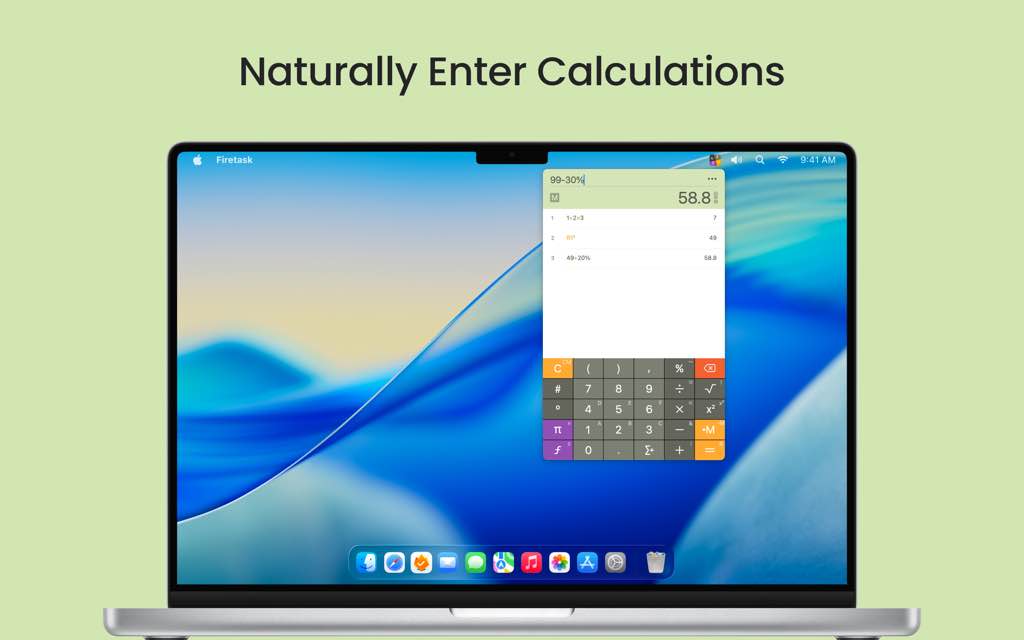
Inseries is a smart, modern, and elegant professional calculator app designed specifically for the Mac menu bar, built to bridge the gap between basic calculators and full spreadsheet applications like Excel. It is the slightly different calculator app that allows you to naturally enter calculations and clearly browse your previous results — all from a lightweight, always-accessible menu bar interface.
Unlike standard calculators that blindly compute 100 + 20% = 120.2, Inseries intelligently interprets your intent: typing 100+20% means “add 20% of 100 to 100,” giving you the correct result of 120 for tax calculations. Whether you are a business owner calculating VAT, a salesperson working out discounts, or an accountant running quick financial figures, Inseries gives you a powerful, focused tool that respects your time and intelligence.
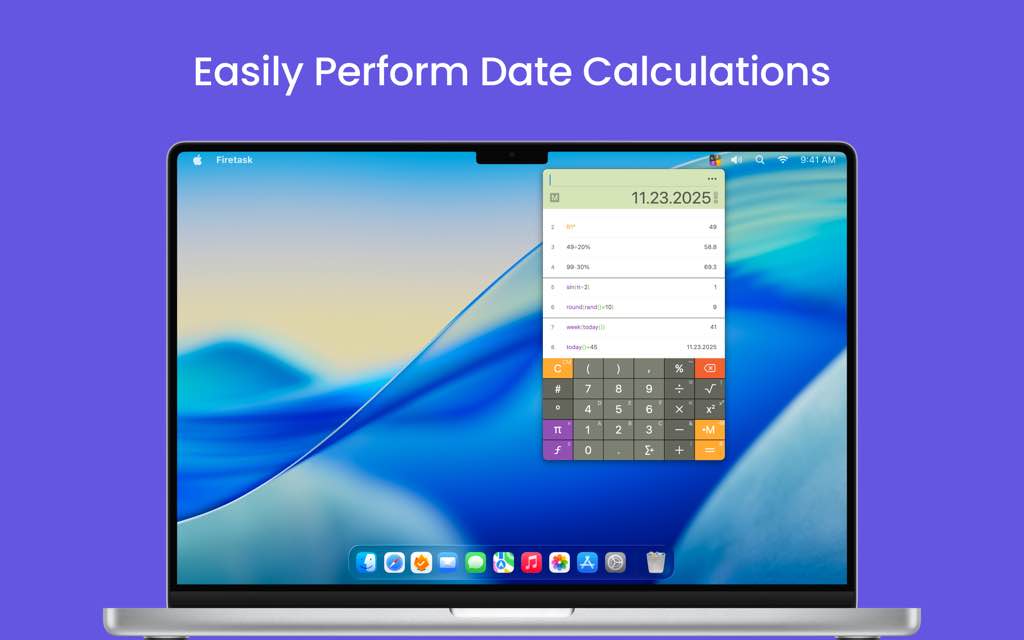
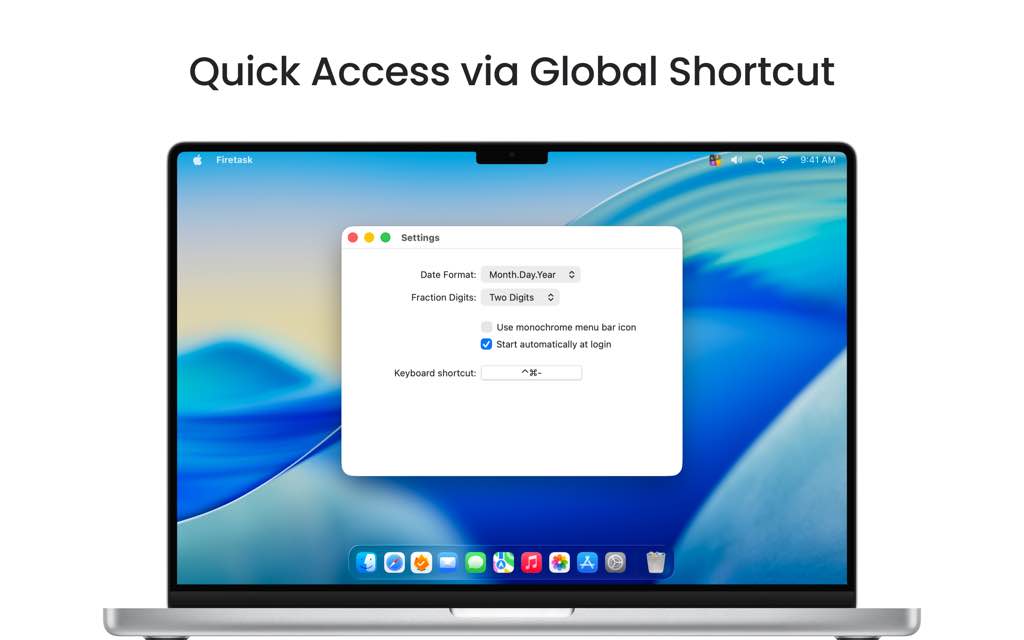
Inseries lives in your Mac’s menu bar, making it available at a moment’s notice with a configurable global hotkey so you never have to break your workflow. It stores a persistent history of all your calculations and results, letting you scroll back, reuse previous entries, and track every figure you’ve entered — just like a professional paper tape calculator, but smarter.
The app is optimized for desktop power users, with keyboard shortcuts for all major actions, swipe gestures for memory operations, and a configurable interface that adapts to how you work. From scientific functions like sin, cos, and tan, to built-in date arithmetic, to a true random number generator, Inseries packs everything a modern business professional needs into a clean, distraction-free interface.
Key Benefits
Inseries delivers tangible, everyday advantages that make it a must-have tool for any professional who performs calculations regularly. Here is why thousands of Mac users trust Inseries as their go-to calculator:
- Natural percentage handling saves time: Simply type
99+20%to add sales tax or79-30%to apply a discount — Inseries intuitively knows you want to work with the percentage of the left operand, not the raw decimal - Always one hotkey away: Configured with a global hotkey like
CTRL+CMD+-, Inseries appears instantly from any application, so you never lose your place in your workflow - Full calculation history that persists: Every calculation and result is saved in a built-in database, so you can scroll back, click to reuse prior entries, and always know how you arrived at a number
- Built-in date calculations eliminate manual counting: Calculate the number of days, weeks, or months between two dates, add days to a date, or find the current calendar week — no external tool needed
- Scientific and business functions in one place: Access trigonometric functions, modulo operations, random number generation, and mathematical constants like
piandewithout switching apps - Designed for keyboard-first professionals: All important actions have logical keyboard shortcuts, and the memory system uses intuitive swipe gestures that make storing and recalling values feel second nature
- Fraction digit control for financial precision: Instantly switch between all digits, 2 decimal places, or 4 decimal places with a double-tap — perfect for currency and financial reporting
Key Features
Below is a thorough breakdown of the powerful capabilities that make Inseries a standout professional tool in its category. Each feature has been thoughtfully designed to serve the needs of real business users:
- Intelligent Professional Calculator — A smart calculator engine that goes beyond basic arithmetic to understand business context.
- Natural percentage addition and subtraction — Type
100+20%or100-30%and Inseries correctly adds or subtracts the percentage of the operand, not a raw decimal - Quick-sum function — Rapidly add multiple numbers by pressing the quick-sum key after each entry, keeping a clear running total on screen
- Modulo operator — Built-in
%modulo support to calculate the remainder of any division (e.g.,5 % 2 = 1) - Real random value generator — The
rand()function returns a true random decimal between 0 and 1;dice6simulates a 6-sided die, anddice(n)supports any number of sides - Menu-bar app with global hotkey activation — Lives in your Mac menu bar and activates instantly from anywhere using a fully configurable keyboard shortcut
- Natural percentage addition and subtraction — Type
- Scientific and Date Functions — A comprehensive library of built-in functions covering both scientific computing and practical business date math.
- Trigonometric functions — Full access to
sin,cos,tan, and related functions via the function chooser; supports both radians and degrees using the°key - Mathematical constants — Access
pi,e, and other constants directly; Inseries displays them as real named constants, not just numeric approximations - Date subtraction — Subtract two dates to find the exact number of days between them (e.g.,
2.11.2014 - 2.6.2014) - Week and month calculation — Use
dweek()anddmon()functions to calculate the number of weeks or months between two dates - Today function — The
today()function instantly inserts the current date, and combining it withweek()gives you the current calendar week - Date addition — Add any number of days to a date using the standard
+operator to calculate a future or past date
- Trigonometric functions — Full access to
- Simple and Clear User Interface — A thoughtfully designed interface that prioritizes speed, clarity, and minimal friction for power users.
- Spreadsheet-style calculation entry — Enter calculations naturally as you would type them, with a clear, readable display of each expression
- Copy and paste support — Long-tap the result field to copy any result to the clipboard; paste values directly into the calculation field
- Fraction digit switching — Double-tap the result field to toggle between all, 2, and 4 fraction digit display modes — ideal for currency formatting
- Swipe gestures for memory — Swipe left to store a result in memory, swipe right to recall it, and swipe up to clear it — all without touching a keyboard
- Black-and-white or color menu bar icon — Switch between a colored or monochrome icon from the preferences panel to match your personal desktop aesthetic
- Clickable indicator icons — Starting from version 3.5, directly click the fraction digit and date format indicator icons to toggle those settings instantly
- Persistent Calculation and Result History — A powerful history engine that makes Inseries feel more like a professional audit trail than a simple calculator.
- Built-in calculation database — Every calculation and its result are stored persistently, surviving app restarts and system reboots
- Click-to-reuse previous calculations — Click any entry in your history to instantly reuse it in a new calculation, eliminating redundant re-entry
- Undo functionality — Step back through previous calculations to revisit earlier work without manually retyping anything
- Variable-style memory access — Use
Mto reference the stored memory value andRto reference the current result anywhere within a calculation expression - Persistent app settings — Preferences such as fraction digit mode, date format, and global hotkey are saved permanently across sessions
- Mac Power User Optimizations — Features specifically built to integrate deeply into a professional Mac workflow.
- Configurable global hotkey — Set any keyboard shortcut to activate Inseries from anywhere on your Mac (recommended:
CTRL+CMD+-) - Auto-startup at login — Enable Inseries to launch automatically when you log into your Mac via the preferences window
- ESC to hide without quitting — Press
ESCto instantly dismiss the calculator without closing it, keeping it ready for your next calculation - Keyboard shortcuts for all actions — Every major action — function access, memory store/recall, clearing history — is mapped to logical, easy-to-remember keyboard shortcuts
- Configurable global hotkey — Set any keyboard shortcut to activate Inseries from anywhere on your Mac (recommended:
Inseries: The Smarter Calculator That Pays for Itself in Saved Time
If you perform calculations regularly as part of your professional work, Inseries is not a luxury — it is a productivity tool. It eliminates the daily friction of opening Excel just to add a tax, manually computing what 30% off a price is, or counting days between deadlines on a calendar. With its natural percentage handling, built-in date math, scientific functions, and persistent history, Inseries gives you a professional-grade calculator that fits seamlessly into your Mac workflow and is always one keystroke away. Business owners, accountants, salespeople, consultants, and any desktop power user who values precision and speed will find Inseries to be an indispensable part of their daily toolkit.
System Requirements
- Platform: macOS (menu bar app)
- Device: Mac (designed for Mac)
- Interface: Menu bar app with global hotkey support
- Input methods: Keyboard shortcuts, swipe gestures, mouse/trackpad
- Language support: Locale-aware (supports comma and semicolon as argument separators based on regional settings)
Free to Try
See for yourself how Inseries fits into your daily workflow before committing to a purchase. The smart, professional calculator that business users rely on for natural percentage math, date calculations, and persistent history is ready for you to test right now. Get the free version of Inseries from the App Store and put it through its paces with your real-world calculations by clicking the button below.
Thank you for reading the Inseries review, and enjoy the discount coupon. If you notice any issues with the Inseries discount coupon, deal, or giveaway—such as an expired offer, broken link, or sold‑out promotion—please let us know while the deal is still available.