
Giveaway – Vovsoft Compare Two Texts: Free License Key | Text Comparison Software, Document Comparison, Code Comparison, Text Diff Tool, Side-by-Side Comparison – for Windows

Put your attention on what changed, not on repeatedly switching between drafts. Get Vovsoft Compare Two Texts with a License Key for FREE! Check its side-by-side comparison, highlighted differences, and review controls using your own documents.
You can also get a full version of Vovsoft Compare Two Texts with a lifetime license that includes free updates and support at a discount of up to 81% OFF!
✔ Lifetime License. ✔ Free Product Updates ✔ Customer Support
BUY NOW
Vovsoft Compare Two Texts is available for $19.00. But, you can now get Vovsoft Compare Two Texts with a lifetime license that includes free updates and support with a discount of up to 81% Off. This offer is available for a limited time!
Software Giveaway: You can also get a full version of Vovsoft Compare Two Texts 1.5 with a license key for free through the Giveaway tab below!

All VOVSOFT Programs Bundle - Get Universal license key for all Vovsoft applications
- Lifetime access to all VOVSOFT programs (115 software and counting)
- Lifetime license for all software with free updates
- Free support and instant activation of license key
- Full access to all features with no trial limitations or interruptions
- No ads while using the software
Platform: Windows

A handy screen capture software to record the ongoing activities on your computer screen easily
- Lifetime license for 1 PC
- Lifetime free updates
- Commercial use allowed
- Instant activation license key via e-mail.
- No trial limitations.
- No nag screen, no ads.
Platform: Windows
A handy screen capture software to record the ongoing activities on your computer screen easily
- Lifetime license for 5 PCs
- Lifetime free updates
- Commercial use allowed
- Instant activation license key via e-mail.
- No trial limitations.
- No nag screen, no ads.
Platform: Windows
A handy screen capture software to record the ongoing activities on your computer screen easily
- Lifetime license for 10 PCs
- Lifetime free updates
- Commercial use allowed
- Instant activation license key via e-mail.
- No trial limitations.
- No nag screen, no ads.
Platform: Windows
A handy screen capture software to record the ongoing activities on your computer screen easily
- Lifetime license for 30 PCs
- Lifetime free updates
- Commercial use allowed
- Instant activation license key via e-mail.
- No trial limitations.
- No nag screen, no ads.
Platform: Windows
A handy screen capture software to record the ongoing activities on your computer screen easily
- Lifetime license for 100 PCs
- Lifetime free updates
- Commercial use allowed
- Instant activation license key via e-mail.
- No trial limitations.
- No nag screen, no ads.
Platform: Windows
Vovsoft Coupon Code

30% OFF – Sitewide Coupon for All Vovsoft Products Coupon

Vovsoft Compare Two Lists GIVEAWAY

Text-R Professional: Lifetime License , Free 2-Year Updates BEST OFFER

Text Edit Plus: Lifetime License BEST OFFER
Vovsoft Compare Two Texts Giveaway
Available now: Free License Key for a Limited Time!

To access the giveaway, kindly provide your email address. Please refrain from closing this page after signing in to receive instructions on how to access the offer at no cost.
NOTES:
– All prices shown here are in listed USD (United States Dollar).
– Such promotional programs are subject to change without notice, from time to time in our sole discretion.
– Data may vary based on different systems or computers.
Vovsoft Compare Two Texts Review at a Glance
Comparing two nearly identical documents can be more demanding than writing the first draft. A missing sentence, revised instruction, or changed code line can blend into familiar wording, leaving you to scan both versions again just to feel confident about the result. For work that involves repeated revisions, a clear view of the differences is a practical starting point for a more organized review.
Vovsoft Compare Two Texts addresses this task by placing two texts next to each other and automatically highlighting their differences, including additions, deletions, and modifications . Instead of relying on memory as you move between separate documents, you can use its line-by-line color coding to focus your review on the areas that changed .

What Is Vovsoft Compare Two Texts?
Vovsoft Compare Two Texts is a Windows text comparison utility in the System Utilities / Text/Document Editors category, designed to display two texts side by side and show the differences between them . Its core workflow supports loading files or pasting text, reviewing highlighted changes, and moving between differences with Previous and Next controls .
The program supports .txt, .doc, and .docx files, bringing plain text and Microsoft Word document content into its comparison workflow . It also provides a status bar showing counts for matches, modifications, additions, and deletions, giving you a compact summary alongside the detailed comparison .
Its appeal is the combination of a focused purpose and a straightforward interface, rather than a promise to replace every tool involved in document production . Choose it for the task its name describes: comparing two texts and making their differences easier to inspect.
For a sensible evaluation, select examples from your actual work rather than relying on a short sample containing obvious edits. Include a small correction, a removed paragraph, and a passage with altered spacing. Realistic test material helps you decide how comfortably the comparison process fits your habits and how much context you prefer to inspect around each change.
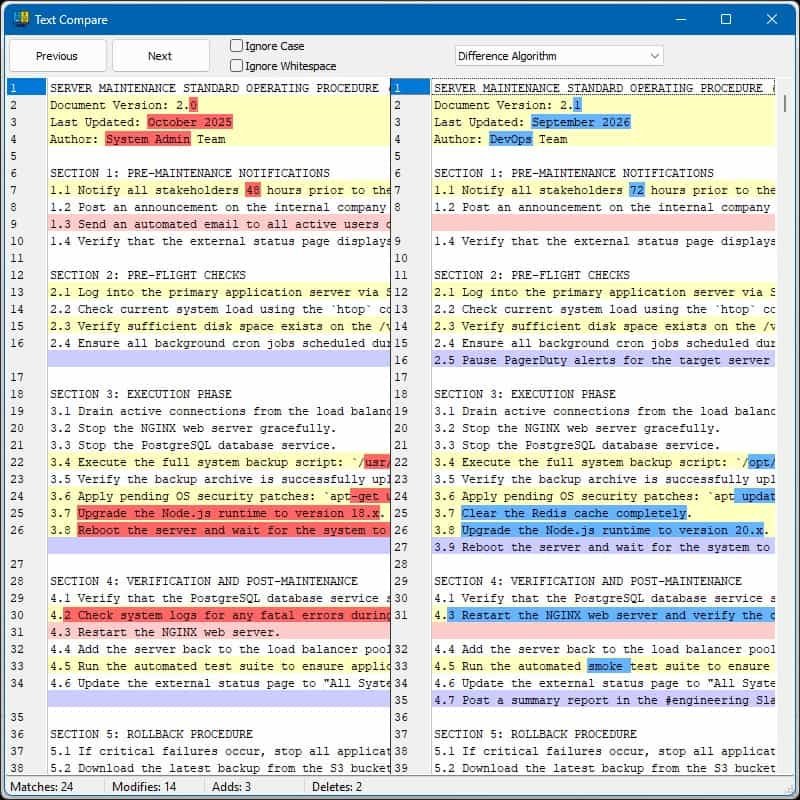
The application combines drag-and-drop file loading, clipboard input, and dedicated Load buttons with comparison settings that can ignore whitespace or letter case . Its support for plain text and Microsoft Word documents makes it relevant to code checks, document revisions, and content analysis without requiring every comparison to start from the same file format .
Think of a product description returned by a client after several rounds of feedback. Your review question might be simple: did the latest draft retain the approved wording, and what else was edited? A difference-focused review gives that task a useful structure: establish the two versions, inspect the changed passages, and decide which revisions belong in the final copy.
The same approach is useful when checking instructions, reviewing a colleague’s draft, or comparing an earlier code sample with a revised one. The important distinction is between identifying a textual change and judging that change. Keep editorial and technical decisions in your hands, using comparison results as a guide rather than treating every highlighted revision as an error.
Why Choose a Dedicated Text Comparison Tool?
A comparison task benefits from a clear question. You may want to locate every textual revision, or you may want to check substantive edits without being distracted by spacing and capitalization. Vovsoft’s ignore-whitespace and ignore-case options let you adjust those aspects of the comparison to suit the review .
The program also offers selectable comparison algorithms through a dropdown menu, giving you another way to tailor the process for different comparison tasks . Try the available settings on representative material and judge the resulting presentation before settling on a routine.
Good settings depend on the purpose of the work, not simply on producing fewer highlights. In a prose review, capitalization changes might be secondary to revised wording. In another task, case and spacing could be part of the information you need to check. Set your review priorities first, then use the available controls to match them.
Key Benefits
The strongest reason to consider a dedicated comparison workflow is the opportunity to direct your attention more deliberately. The following benefits connect the program’s documented controls with practical review situations, without promising that software can replace the judgment required to approve a document.
- A clearer view of revisions: Side-by-side text and highlighted differences provide a direct way to inspect changes between two versions .
- Less repetitive scrolling: Previous and Next buttons let you move between differences instead of locating each changed area manually .
- More relevant comparisons: Whitespace and case options let you exclude those differences when they are not important to the task .
- Flexible starting points: File loading, drag-and-drop input, and clipboard pasting support several ways to bring text into the application .
- A quick numerical overview: Status-bar totals summarize matches, modifications, additions, and deletions alongside the visual results .
- Support for common document formats: TXT, DOC, and DOCX support makes the tool relevant to both plain-text work and Word document revisions .
- A one-time purchase option: The paid license includes lifetime use and free future updates without a subscription.
Who Can Benefit From This Review Approach?
For writers and editors, a useful test is to compare an approved draft with a revised submission. Look for changed claims, removed explanations, and additions that need another read. Build your review around the content decisions that matter, rather than assuming that a short document requires only a quick glance.
For marketers and online sellers, consider product descriptions, promotional copy, campaign briefs, and customer-facing instructions. Small edits in these materials can deserve careful attention, especially when several people contribute to the same draft. Keep your original approval criteria beside the comparison task so that checking changes remains separate from accepting them.
For developers and technical reviewers, the product is documented as suitable for code comparison, alongside document revision and content analysis . Treat textual comparison as one review aid, then continue with the testing and technical checks appropriate to the work.
For administrators, students, and independent professionals, a practical use case is comparing two versions of notes, procedures, or written submissions. Start with material you understand well, then check how easily you can interpret the differences. The best purchase decision comes from a trial that reflects your own review workload.
Features
The feature groups below explain how text enters the program, how changes are presented, and how you move through the results. Each main feature includes its relevant subfeatures so you can assess the workflow without confusing convenience controls with separate products.
- Side-by-side text comparison: Displays two texts next to each other for direct visual review .
- Paired text views: Keeps both versions visible within the comparison interface .
- Automatic difference highlighting: Marks differences between the supplied texts .
- Flexible text input: Offers file-based and clipboard-based ways to supply comparison material .
- Windows Explorer drag and drop: Lets you drag files from Explorer into the application .
- Built-in Load buttons: Provides controls for loading files through the interface .
- Clipboard pasting: Accepts text pasted directly from your clipboard .
- Color-coded change identification: Uses line-by-line color coding to distinguish textual differences .
- Addition highlighting: Identifies text added between the compared versions .
- Deletion highlighting: Identifies text removed between the compared versions .
- Modification highlighting: Identifies text that differs between the versions .
- Difference navigation: Provides buttons for moving between the identified differences .
- Previous button: Moves back to an earlier difference .
- Next button: Moves forward to a later difference .
- Configurable comparison settings: Lets you adjust selected comparison behavior for the task .
- Ignore whitespace: Excludes whitespace differences when the option is selected .
- Ignore letter case: Excludes uppercase and lowercase differences when selected .
- Algorithm selection: Offers different comparison algorithms through a dropdown menu .
- Common text and document formats: Supports plain text and Microsoft Word document files .
- TXT support: Accepts standard plain-text files for comparison .
- DOC support: Accepts the older Microsoft Word document format .
- DOCX support: Accepts the newer Microsoft Word document format .
- Comparison status summary: Displays totals for the comparison in the bottom status bar .
- Match count: Reports the total number of matches .
- Modification count: Reports the total number of modifications .
- Addition count: Reports the total number of additions .
- Deletion count: Reports the total number of deletions .
- Installer and portable downloads: Provides two download editions for evaluating the application .
- Installer package: Has a published download size of 4.21 MB .
- Portable package: Has a published download size of 3.43 MB .
- Multilingual interface availability: Lists English and numerous additional interface languages .
- European language choices: Includes French, German, Italian, Portuguese, Spanish, and other listed languages .
- Additional regional choices: Includes Arabic, Chinese, Hindi, Japanese, Korean, Turkish, and Vietnamese .
A Practical Comparison Routine
Begin by choosing a clear baseline and a revised version. Keep the source filenames understandable, and decide which document represents the wording you are checking against. A deliberate starting point helps prevent confusion when you later decide that a passage should be restored, rewritten, or retained.
Next, select the comparison settings that match your purpose. Use the documented whitespace, case, and algorithm controls as appropriate, then inspect the highlighted results and move between differences with the navigation buttons . Read enough surrounding context to judge each revision, rather than approving a change solely because it appears small.
Finish by separating your review findings into decisions: acceptable revisions, changes needing clarification, and passages requiring another check. Keep a final human read-through in your process, particularly for material involving prices, instructions, commitments, or technical details. This gives the comparison task a clear role without asking it to certify the document’s overall quality.
Requirements
Check Windows compatibility, supported file types, and download edition before choosing the application. The following details reflect Vovsoft’s published product information; use your trial to assess performance on your own computer and documents .
- Operating systems: Windows 11, Windows 10, Windows 8/8.1, Windows 7, and Windows Vista, with 64-bit support specified in the publisher’s compatibility listing .
- Supported document formats: TXT, DOC, and DOCX .
- Software category: System Utilities / Text/Document Editors .
- Published version: Version 1.5, with a September 24, 2026 release date .
The publisher lists these interface languages: English, Abkhazian, Albanian, Arabic, Bulgarian, Catalan, Chinese, Czech, Dutch, Finnish, French, German, Greek, Hebrew, Hindi, Hungarian, Italian, Japanese, Korean, Norwegian, Persian, Polish, Portuguese, Romanian, Russian, Slovak, Slovenian, Spanish, Swedish, Turkish, Ukrainian, and Vietnamese . Check your preferred language during evaluation so that the interface feels comfortable before you commit to a regular workflow.
The product page does not specify minimum RAM or processor requirements in its published specification section . Avoid treating the download size as a statement of installed disk usage, and test a representative document rather than making a performance assumption from package size alone.
Downloads
Give Vovsoft Compare Two Texts a practical test with the files you actually review, from a short piece of copy to a revised Word document. The publisher offers the application as free to try, with installer and portable downloads available through its product page .
Use Download the free trial to reach the publisher’s download choices. Start with two versions containing changes you already know about, then check how clearly the comparison presents them and how comfortably you can move through the results.
or
Buy now, the price start from:
Thank you for reading Vovsoft Compare Two Texts review, and enjoy the discount coupon. If you notice any issues with Vovsoft Compare Two Texts discount coupon, deal, or giveaway—such as an expired offer, broken link, or sold‑out promotion—please let us know while the deal is still available.