50% Off – AIDA64 Extreme: Perpetual License, Free 1-year Updates | System Information Software, PC Diagnostics, CPU Benchmarking, Hardware Monitoring, Stress Testing – for Windows 11 and 10

Get detailed hardware information, live sensor readings, and practical performance tests in one Windows utility. Choose AIDA64 Extreme for a clearer view of your personal computer, and check the supplied 50% OFF promotional offer at $32.97 before purchasing!
✔ Perpetual License. ✔ Free Product Updates ✔ Customer Support
BUY NOW
AIDA64 Extreme’s regular listed price is $65.95 with one year of maintenance. The supplied promotional offer lists a 50% discount and a purchase price of $32.97; check the seller’s purchase page for availability and final checkout terms before paying.
This is a perpetual license with 12 months of maintenance, not a one-year rental of the application. You pay for the license once and can continue using versions released during the covered maintenance period after that period ends.

System Information Software, PC Diagnostics, CPU Benchmarking, Hardware Monitoring, Stress Testing for Windows 11 and 10
- Perpetual Use: Continue using the latest version released during your active maintenance period.
- One Year of Updates: Install eligible new releases while the included 12-month maintenance period remains active.
- One Year of Upgrades: Receive upgrades covered by the active maintenance period.
- One Year of Technical Support: Access support through the stated email, forum, and website channels during maintenance.
- Home-Use Coverage: The standard Extreme license permits one user to install the software on up to three computers.
Platforms: Windows

HARDiNFO 8 PRO BEST OFFER
Ashampoo WinOptimizer Pro 29 BEST SELLER

iolo System Mechanic: Standard, 1 Year License BEST SELLER
O&O Defrag 31 Professional Edition: Perpetual License BEST SELLER
SecuPerts Rescue Stick BEST OFFER

Hard Disk Sentinel Professional: Lifetime Family License BEST SELLER
AIDA64 Extreme Free Key Giveaway
Unavailable at this moment!

To access the giveaway, kindly provide your email address. Please refrain from closing this page after signing in to receive instructions on how to access the offer at no cost.
NOTES:
– All prices shown here are in listed USD (United States Dollar).
– Such promotional programs are subject to change without notice, from time to time in our sole discretion.
– Data may vary based on different systems or computers.
AIDA64 Extreme Review at a Glance
Unexpected crashes, rising temperatures, and disappointing performance can leave you searching for answers across several Windows menus and utilities. AIDA64 Extreme brings system information, hardware monitoring, diagnostics, and benchmarking into one application, giving you useful evidence when investigating how your personal computer behaves.
What Is AIDA64 Extreme?
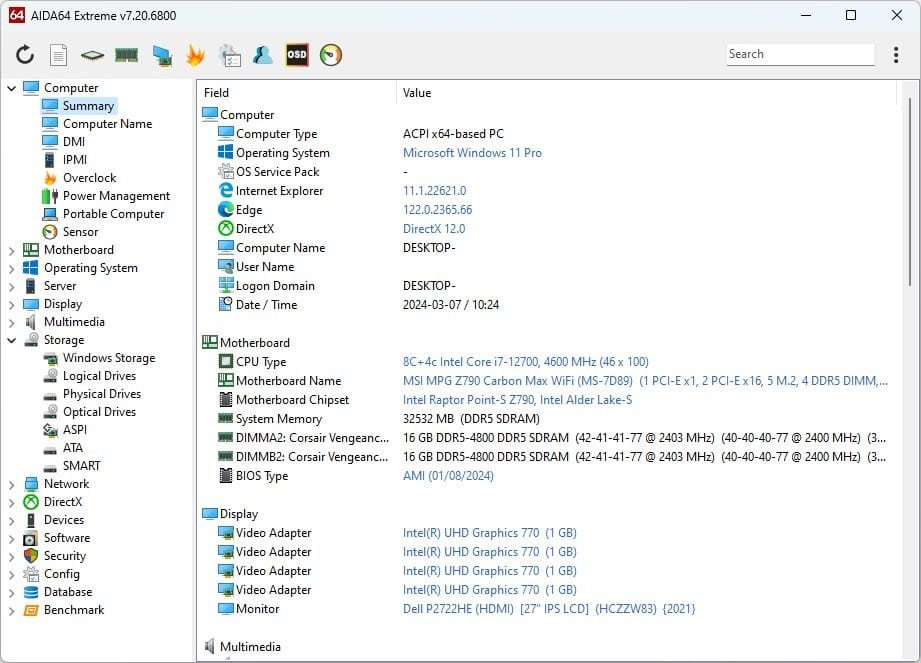
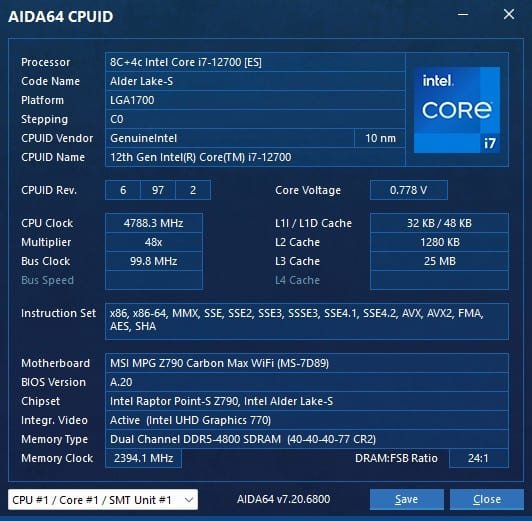
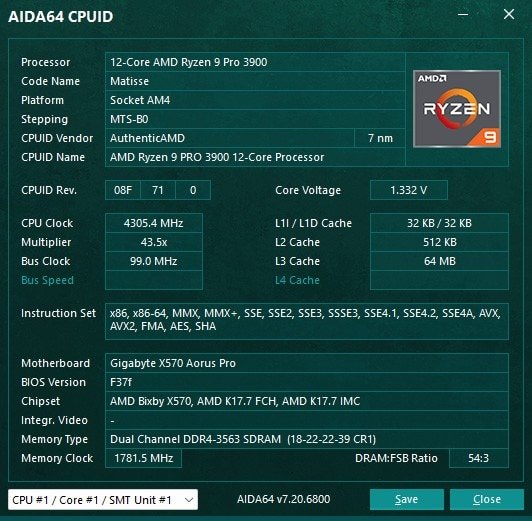
AIDA64 Extreme is a Windows system information, diagnostic, monitoring, and benchmarking application developed for home users and PC enthusiasts. It combines a detailed hardware detection engine with software information pages, real-time measurements, customizable monitoring displays, and demanding stability tests.
Its hardware information helps you examine the components inside your computer without opening the case merely to identify them. The detection engine uses a database containing more than 250,000 entries, while the software information sections cover installed applications, relevant license information, security software, and Windows settings.
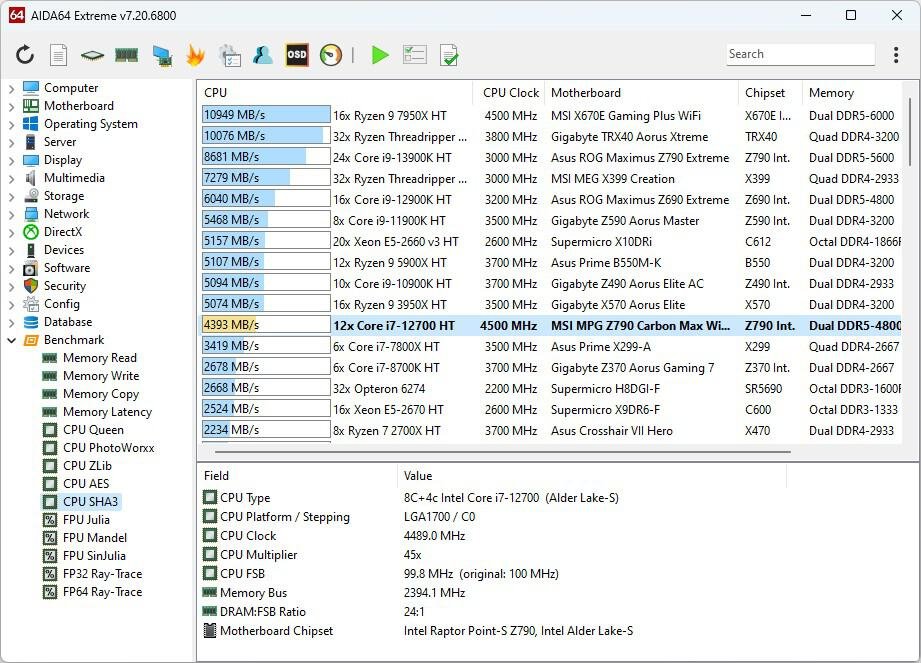
The benchmarking tools provide another perspective by measuring selected processing tasks, mathematical calculations, and memory performance. Meanwhile, the System Stability Test applies demanding workloads to selected components so you can investigate reliability under load, rather than judging the computer only while it sits idle.
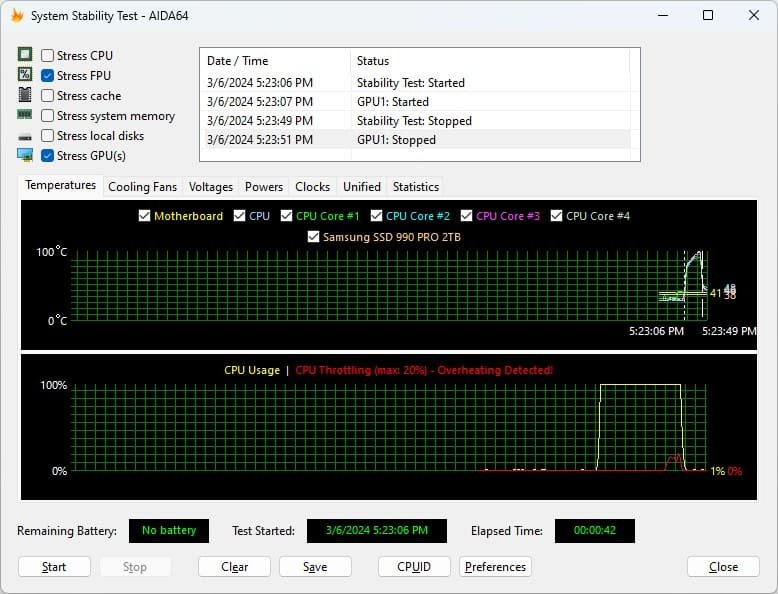
Instead of relying on a component name alone, you can examine detailed hardware specifications and installed software information, then compare those details with live measurements and test results. This connected view gives your troubleshooting a practical starting point: identify the configuration, observe its behavior, and use the relevant test to investigate further.
For a home-built gaming PC, a personal editing computer, or a laptop used for everyday projects, the appeal is straightforward: know more before changing more. AIDA64 Extreme supplies information about the system, measures supported sensors, and provides tests for investigating performance and stability; it does not promise an automatic speed increase or a repair simply from being installed.
AIDA64 Extreme is licensed for home use only, with one user permitted to install the standard license on up to three computers; business use is not permitted under this edition. Professional technicians, businesses, and freelancers providing client services should review the appropriate AIDA64 edition instead of assuming that Extreme includes commercial usage rights.
Key Benefits
The value of AIDA64 Extreme comes from connecting technical detail with practical questions about your PC: what is installed, how it performs, and how it behaves when the workload increases.
Replace Guesswork With System Details
AIDA64 Extreme provides more than 50 pages of hardware configuration information, giving you a detailed reference when checking your computer’s specifications. This information can support a more informed investigation before you change settings, replace components, or ask for technical advice, because you can start with the configuration actually reported by the software.
Keep Important Readings Visible
With support for more than 250 sensor device types, AIDA64 Extreme can report temperatures, voltages, fan speeds, and power readings from supported hardware. These measurements let you inspect the values your system makes available, instead of treating every slowdown or noisy fan as proof of the same underlying problem.
Measure Selected Performance Changes
The 64-bit benchmarks provide measurable results for processing tasks and mathematical calculations, while memory and cache tests examine bandwidth and latency. If you are investigating a configuration change on your personal PC, these tools offer a way to check the relevant performance area rather than relying entirely on a subjective impression of responsiveness.
Investigate Stability Under Load
A computer can appear normal during light use yet behave differently under a demanding workload, which is why AIDA64 includes a selectable System Stability Test. Its CPU, FPU, cache, memory, storage, and GPU options help you investigate load-related behavior, with graphs and measurements available during testing. Treat the results as troubleshooting evidence, not a guarantee that every possible fault has been ruled out.
Build a Personal Monitoring Layout
SensorPanel lets you organize supported sensor data using graphs, gauges, images, and text on a configurable canvas. A compact layout can prioritize a few readings, while a larger panel can show a broader collection of cooling and usage information; the choice of arrangement is yours. That flexibility makes the display useful as both a practical monitor and a visual part of a custom PC setup.
Inspect the Software Environment
Hardware is only part of a computer’s configuration, so AIDA64 Extreme also provides more than 50 pages of software-related information. Installed programs, Windows settings, security applications, running processes, services, DLL files, and startup entries give you additional context when investigating the system. This inventory complements the hardware pages without claiming to replace antivirus protection or automatically repair Windows.
Keep an Eligible Version Indefinitely
A perpetual license means that the end of maintenance does not disable the latest version released during your active coverage period. You can keep using that eligible version, then decide separately if another maintenance period is worthwhile for newer releases and continued support. This distinction makes the purchase easier to evaluate: continued software use and ongoing update entitlement are separate benefits.
Who Benefits From AIDA64 Extreme?
Home PC builders can use hardware identification, sensor readings, and stability testing when examining a newly assembled personal computer. The combination lets them review the reported configuration and then observe behavior under a selected workload, rather than treating successful startup as the only useful check.
Gaming enthusiasts and personal-use content creators can use the monitoring tools to keep supported temperatures, fan speeds, and other readings visible on their own home systems. SensorPanel is particularly relevant for users who want those readings arranged around their preferred priorities instead of accepting a fixed monitoring layout.
Overclocking hobbyists can use the benchmarks and stability tools as part of evaluating settings on their personal hardware. AIDA64 supplies measurements and test workloads; it should not be presented as an automatic overclocking service or a promise that any selected settings are safe.
IT professionals considering commercial work need a different licensing decision: Extreme’s home-use license does not cover business use, even if its diagnostic functions appear relevant to a professional task. AIDA64 Engineer is the edition identified for professional technicians and eligible client-service work.
Features
The following feature guide groups AIDA64 Extreme’s main tools with their supporting functions, making it easier to identify the information, tests, and monitoring options relevant to your personal setup.
- Hardware Diagnostics: Review detailed information about the computer’s installed hardware and configuration.
- Extensive Hardware Pages: Access more than 50 pages of hardware configuration information.
- Component Identification: Examine reported component details without opening the computer solely to identify its internals.
- Large Detection Database: Benefit from a hardware database containing more than 250,000 entries.
- 64-Bit Benchmarking: Measure selected processing and mathematical workloads with dedicated performance tests.
- CPU Performance Tests: Evaluate processor performance in supported computational workloads.
- Memory Bandwidth Tests: Measure how quickly system memory handles the tested data operations.
- Memory Latency Tests: Examine memory access delay through the available benchmark tools.
- Cache Benchmarks: Analyze cache performance alongside system memory measurements.
- Multi-Threaded Testing: Use benchmarks designed to take advantage of multiple processing threads.
- System Stability Testing: Apply demanding workloads to selected components while reviewing system behavior.
- CPU and FPU Stress Options: Select processor-focused tests for investigating demanding computational loads.
- Cache and Memory Stress Options: Include cache and system memory in the stability investigation.
- Storage Stress Options: Test supported local storage devices, including hard drives and SSDs.
- OpenCL GPU Stress Testing: Apply supported GPGPU workloads to compatible graphics hardware.
- Live Test Graphs: Follow CPU usage and component temperatures during the test.
- Test Activity Log: Review when individual stress tests start and stop.
- Software Audit Information: Inspect the installed software environment alongside the hardware configuration.
- Installed Applications: View reported information about programs installed on the PC.
- Software License Details: Review license information made available through the software inventory.
- Security Application Information: Check reported details about installed security applications.
- Windows Settings: Examine operating system configuration information.
- Processes, Services, and DLLs: Inspect these parts of the running software environment.
- Startup Programs and Browser History: Review available startup entries and visited web page information.
- Customizable SensorPanel: Create a monitoring panel with the layout and visual elements you prefer.
- Graphs: Present supported sensor values in a graphical format.
- Gauges: Use gauge-style indicators for selected readings.
- Custom Images: Add visual elements that suit your panel design.
- Dynamic Text: Connect text displays to sensor data that AIDA64 can read.
- Static Labels: Add fixed text to identify readings and organize the layout.
- Freeform Arrangement: Position panel elements on a blank canvas.
- Real-Time Measurements: Read supported sensors for a detailed view of operating conditions.
- Temperature Monitoring: Follow available thermal readings from supported components.
- Voltage Monitoring: Inspect voltage readings exposed by compatible hardware.
- Fan Speed Monitoring: Track reported fan rotation speeds.
- Power Measurements: View power draw readings where the hardware provides them.
- Broad Sensor Support: Use compatibility covering more than 250 sensor device types.
- Desktop Monitoring Outputs: Place measurements on supported desktop and peripheral displays.
- System Tray Icons: Keep selected readings visible in the Windows notification area.
- OSD Panel: Display measurements through the available on-screen panel.
- Desktop Gadget: Use the supported gadget-style display option.
- Gaming Peripheral LCDs: Send readings to compatible Logitech G15/G19 and Razer SwitchBlade displays.
- External Display Support: Present vital system readings beyond the main application window.
- LCD and VFD Compatibility: Use support covering more than 50 LCD and VFD screens.
- Wireless Remote Monitoring: View supported sensor values remotely on smartphones and tablets.
- Flexible Display Placement: Choose a compatible external display arrangement that fits your monitoring needs.
Requirements
Check the requirements for the exact version being supplied, especially if your computer runs an older Windows release; the current download guidance is more restrictive than the broad legacy list on the product overview page.
- Current Windows Guidance: AIDA64 v8.xx officially supports 64-bit Windows 10 or newer operating systems.
- Windows 11 Support: Windows 11 is included in the product’s stated compatibility.
- Processor: A 64-bit AMD or Intel processor is required.
- Installation Space: The product overview lists 97.5 MB of required installation space; confirm the requirement for the supplied build.
- Sensor Readings: Available measurements depend on the sensor data AIDA64 can read from your hardware.
- External Displays: LCD, VFD, and peripheral monitoring features require compatible devices.
- Usage Rights: The standard Extreme license covers one user on up to three computers for home use only.
Legacy Windows compatibility is version-dependent. The overview includes Windows PE, Vista, 7, 8, 8.1, and several Windows Server generations, including Server 2025, but the current v8.xx download notice specifically directs older-system users to legacy compatibility guidance. Do not assume that every historical Windows entry applies unchanged to the latest installer.
Supported Languages
AIDA64 Extreme provides a multilingual interface, including English and Indonesian, alongside the additional languages listed below.
Available languages: Albanian, Arabic, Azerbaijani, Belarusian, Bosnian, Bulgarian, Catalan, Croatian, Czech, Danish, Dutch, English, Estonian, Finnish, French, German, Greek, Hungarian, Icelandic, Indonesian, Irish, Italian, Japanese, Korean, Latvian, Lithuanian, Macedonian, Norwegian, Polish, Portuguese (Brazil), Portuguese (Portugal), Romanian, Russian, Serbian (Cyrillic), Serbian (Latin), Simplified Chinese, Slovak, Slovenian, Spanish, Swedish, Traditional Chinese, Turkish, and Ukrainian.
Downloads
Put AIDA64 Extreme to work on your own PC before making a purchase. Download the free 30-day trial to review the interface, inspect available system details, and check how the monitoring tools fit your personal requirements.
The trial is an evaluation edition, not a permanently free license: some functionality or information may be limited, and certain information pages or benchmark results may not show every value. Continued use after the trial requires a purchased license.
You can also compare the self-installing EXE and portable ZIP packages offered on the official download page. After purchasing a license, entering the supplied product key activates the licensed functionality without requiring reinstallation.
or
Buy now, the price start from:
Thank you for reading AIDA64 Extreme review, and enjoy the discount coupon. If you notice any issues with AIDA64 Extreme discount coupon, deal, or giveaway—such as an expired offer, broken link, or sold‑out promotion—please let us know while the deal is still available.