

40% Off – Hard Disk Sentinel 6 Professional: Lifetime Upgrades | The Best Hard Disk Monitoring Software – for Windows

Keep Your Hard Disk Running Smoothly with the Best Disk Analyzer Application. Get Hard Disk Sentinel 6 PROFESSIONAL with a Lifetime Upgrade License that includes free updates & support with our exclusive 40% discount coupon and Save Up to 78% Off on the Lifetime Family License!
Lifetime License | Free Software Update | Free Support by H.D.S Hungary
BUY NOW
Hard Disk Sentinel 6 for 1 PC retails for $22.00/Standard, $33.00/Professional. But, on our website, THE Software Shop, you can Get Hard Disk Sentinel 6 PROFESSIONAL with a Lifetime Upgrade License that includes free updates & support with our exclusive 40% discount coupon and Save Up to 78% Off on the Lifetime Family License!
Benefits of Registration
- Obtain the registration code to enable all functions in minutes. Unlock many more features, functions and configurable options.
- Free life-of-product technical support and help.
- Lifetime License! Never pay again for any new versions (of the same type)!
- Recover lost registration key at any time.
- No annoying registration notices.
- No time or other forms of limitations on usage.
BUY FROM THE VENDOR

Latest Version, 1 Computer
Complete data protection solution
- Professional License
- 1 Computer
- Lifetime Upgrades
Developed for the needs of home users, system administrators and small companies with the most complete set of features to ensure maximum data protection by alerts, hard disk tests and repair, scheduled and automatic backup projects.
Hard Disk Sentinel Professional Portable version is available to use from a pen drive or other removable media without installation to diagnose, test and repair hard disks and SSDs.
Latest Version, 5 Computers
Complete data protection solution for Entire Family
- Professional Family License
- Save up to 78% (compared to 1-computer professional license fee x 5 Pcs)
- Up to 5 Computers
- Lifetime Upgrades
Developed for the needs of home family users, system administrators and small companies with the most complete set of features to ensure maximum data protection by alerts, hard disk tests and repair, scheduled and automatic backup projects.
Latest Version, 1 Computer
Failure prevention and hard disk analysis
- Standard License
- 1 Computer
- Lifetime Upgrades
Hard disk drive monitoring: health and temperature information, alerts and limited set of hard disk tests available to diagnose hard disk drive issues.
BUY FROM BITSDUJOUR
Latest Version, 1 Computer
Complete data protection solution
- 1 Computer
- Lifetime Upgrades
Developed for the needs of home users, system administrators and small companies with the most complete set of features to ensure maximum data protection by alerts, hard disk tests and repair, scheduled and automatic backup projects.
Hard Disk Sentinel Professional Portable version is available to use from a pen drive or other removable media without installation to diagnose, test and repair hard disks and SSDs.
Latest Version, 5 Computers
Complete data protection solution for Entire Family
- Save up to 84% (compared to 1-computer professional license fee x 5 Pcs)
- Up to 5 Computers
- Lifetime Upgrades
Developed for the needs of home family users, system administrators and small companies with the most complete set of features to ensure maximum data protection by alerts, hard disk tests and repair, scheduled and automatic backup projects.
System Mechanic Ultimate Defense BEST SELLER

GOM Player Plus BEST SELLER

IObit Advanced SystemCare 20 PRO with Super Valur Pack: 6 Items included! BEST SELLER

Giveaway #5 – IObit Malware Fighter PRO Key 13.2: Free License Code | Full Version – for Windows GIVEAWAY

iolo System Mechanic Pro BEST SELLER
Hard Disk Sentinel 6 Full Version Giveaway
Available now Free license for a limited time!
Please note that once you have signed in, do not close this page. You will be shown how to get this offer for free.
Also, check out the latest software giveaways that are available here on the software giveaway page.
Hard Disk Sentinel PRO 6 Review at a Glance
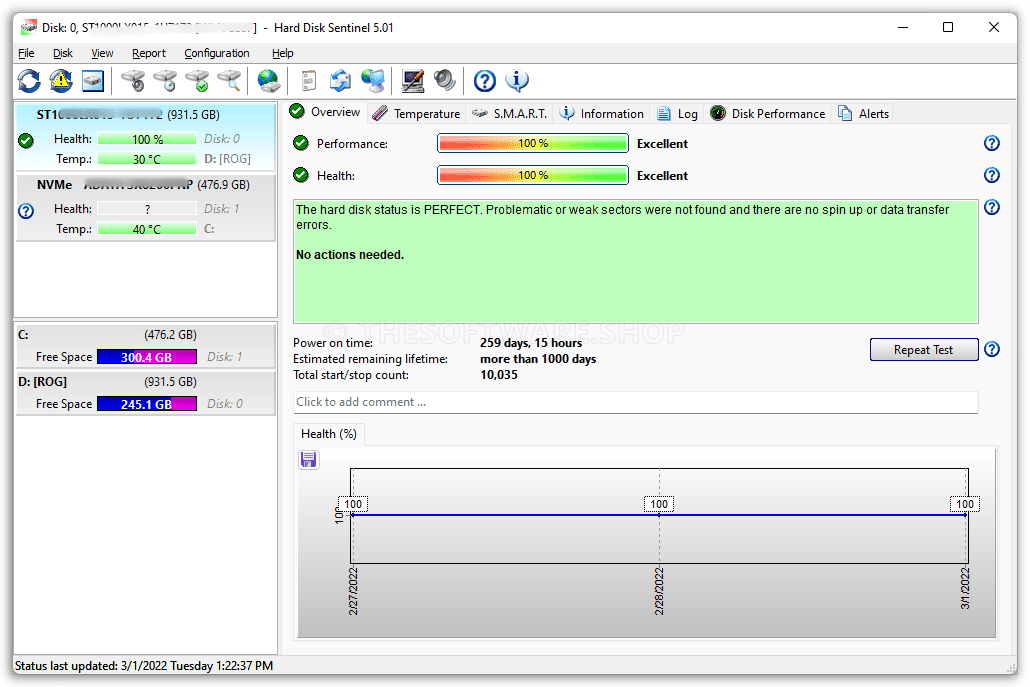
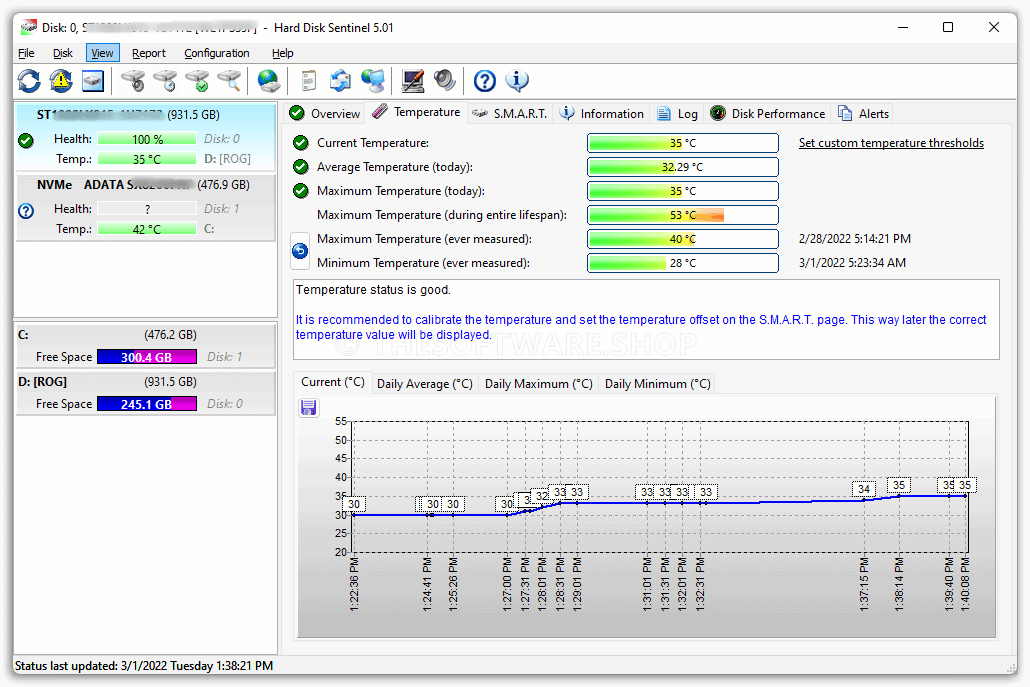
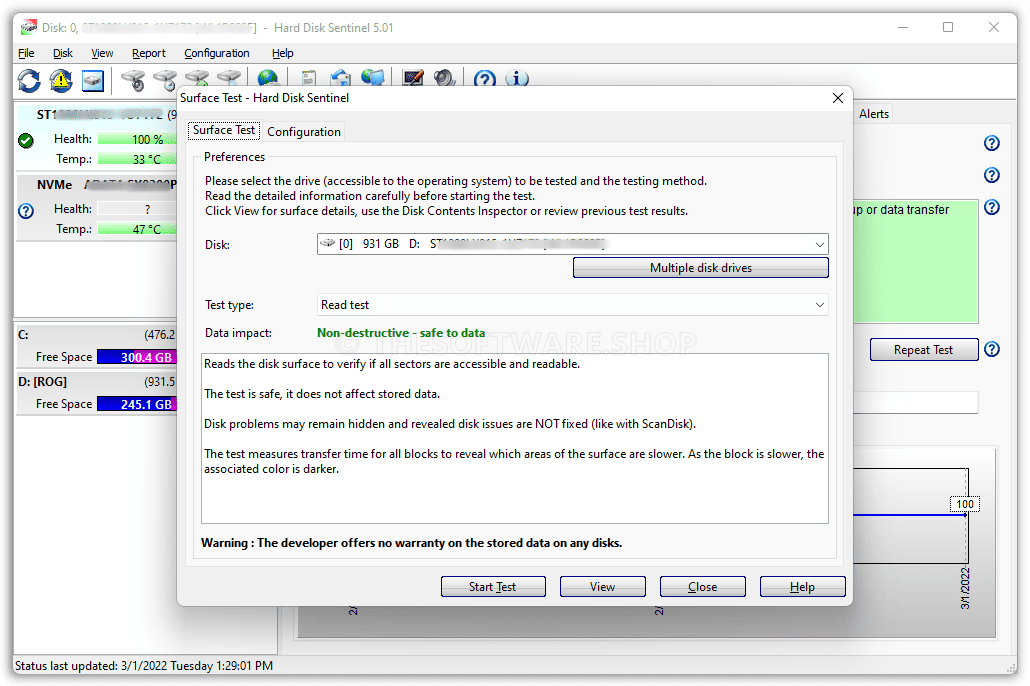
Hard Disk Sentinel 6 is a hard disk analyzer application, created to monitor the hard disk status, temperature, and health. Moreover, Hard Disk Sentinel can reveal possible problems and performance degradations and predict hard disk failures. By using this software, it is possible to avoid serious data loss.
Hard Disk Sentinel monitors and analyzes your hard disk and solid-state drives, giving you valuable feedback on the health of the drive, any performance degradations, and warning of impending failure. With THIS HARD DISK SOFTWARE, you’ll be able to find, test, diagnose, and even repair disk drive issues before they escalate to catastrophic status.
Hard Disk Sentinel supports not only hard disks, but numerous other devices including SSDs, flash media in general, and also provides a method to monitor Network Attached Storage (NAS) devices too. The goal was (instead of making separate tools for different devices) to provide one single solution with a standard environment, to allow users to diagnose, monitor, report, and repair problems with all kinds of storage devices. Using different tools for hard disks, SSDs and many other devices may require more resources and could be confusing – this is why it is better to have a single solution and a standard way to keep an eye on the disk drives storing valuable data.
Hard Disk Sentinel supports over 10000 different device models, hard disks, SSDs, hybrid drives, RAID controllers, internal/external enclosures and so.
What’s New
source: https://www.hdsentinel.com/revision.php
Hard Disk Sentinel 6.40 (23/2/2026)
Improvements and new features:
- added button to save screenshot about Hard Disk Sentinel main window (CTRL+Print Screen)
- options to configure screenshot settings (screenshot folder, file name template, file format (PNG/JPG/BMP), single-click screenshot)
- added button to safely eject (remove/disconnect) the selected removable drive (CTRL+F5)
- right click on the safely eject (remove/disconnect) button to allow re-activate a previously safely removed drive if possible (CTRL+F6)
- display Drive Recording Type: CMR or SMR for hard disk drives on Information page
- added date/time of alert in alert pop up window
Improved hardware support:
- faster and improved NVMe RAID detection with Intel VROC controller / RAID configurations
- added hardware self test function (Disk menu -> Short self test, Extended self test) for USB-NVMe adapters/converters/docks with Realtek chipset
- added support of Sandisk SD Express card reader, SD Express memory cards: detect and report health, temperature, lifetime status, S.M.A.R.T. details of SD Express cards
- added support of TEAMGROUP T-CREATE EXPERT S.M.A.R.T. Micro SDXC Memory Card (128 GB-2 TB): detect micro SD card Health %, total amount of written data (lifetime writes).
To enable: select Control device-specific detection on the right side of the main window and use the Auto detect button - added support of TEAMGROUP T-CREATE EXPERT V60 SDXC Memory Card (64 GB-1 TB): detect card Health %, erase count, endurance, power cycle count
To enable: select Control device-specific detection on the right side of the main window and use the Auto detect button - added support of LSI Nytro WarpDrive: detect complete status (health, temperature, lifetime writes, power on time and complete S.M.A.R.T. details) of all SSDs
- added support of 2230 USB-NVMe enclosure with write protect switch
- added support of UGREEN 4 drive RAID USB box: detect health, temperature, S.M.A.R.T. status of disk drives in RAID configuration
- added support of NVMe2K NVMe driver: detect complete NVMe status under Windows XP / 2000, thanks to Techomancer for the NVMe2K driver
- detect/report of additional NVMe S.M.A.R.T. attributes (if available): Thermal Management Transition Count, Total Time For Thermal Management Temperature
- detect/report FARM LOG / status information on OOS (recertified) drives if available
- improved NVMe, SAS, SATA status detection with Broadcom 9400 and 9500 series tri-mode HBAs
- improved detection and support of LSI SAS3 Cutlass and various Broadcom, Lenovo SATA/SAS controllers
- improved detection/health reporting of Lenovo SAS drives on Lenovo SAS RAID controllers
- improved compatibility and detection of SATA and SAS drives with Highpoint Rocket 720L controller
- improved detection/health reporting of some Hitachi HGST SAS drives
- improved detection/reporting of Intel DC3500 series SSDs
- improved support of some ADATA, Sandisk, WD, Kingspec, Lite-On, Toshiba, Kioxia, SHAREVDI, Faspeed SSDs
- improved disk short / extended self test and support of 4Kn SAS drives with non-standard sector sizes (4160/4224 bytes/sector)
- improved hardware self tests (Disk menu -> short self test, extended self test) with various USB adapters, USB docks
- improved compatibility with ACASIS 5 bay USB-SATA enclosure
- improved compatibility with ORICO NS500, ORICO 9558, ORICO 9858RU3, Mediasonic and various USB RAID hard disk enclosures
- improved support of Kingston Fury Renegade NVMe SSDs
- improved detection with various Adaptec RAID controllers with SAS SSDs
- added support of SSK NVMe SSD Cloner M.2 Duplicator Dual Bay NVMe Enclosure
- added/improved support of Crucial X10 USB SSD, Lexar ES4, Lexar ES5 USB-SSD
- improved support of various USB-NVMe adapters, enclosures, docks
- improved detection and disk status reporting with different USB-SATA hard disk docks, converters, enclosures
- improved support of ATP mSATA SSDs
- improved detection and status, Health reporting of Silicon Power MS60 pendrive
- improved lifetime writes on Samsung SM951 SSD
- improved detection, status reporting and error logging of various Micron SATA SSDs
- improved text report of SK HYNIX SATA SSDs with errors
- improved compatibility with various USB devices with card readers
- improved detection when multiple FusionIO ioDrive SSDs / ioDrive Duo drives used
Bug fixes, further modifications:
- improved registration information / licensing messages
- improved network operation
- added Dutch Help and minor changes in Dutch language support, thanks to Jaap Kramer for the translation
- added Portuguese language support, thanks to Filipe Mota (BlackSpirits) for the translation
- fixed message dialogs if high number of disks present and S.M.A.R.T. offset used
- minor changes, modifications, optimizations
Features
Key Features of Hard Disk Sentinel:
- Easy to use interface – 1. Install > 2. Configure > 3. Stay protected
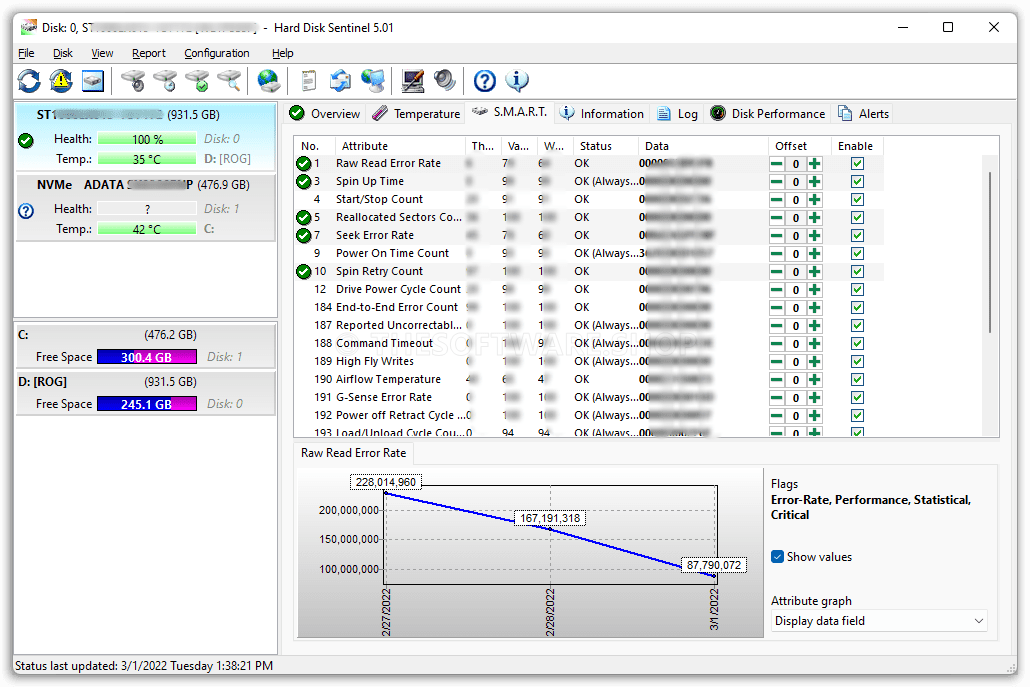
- Instant S.M.A.R.T. analyzing – Hard Disk Sentinel interprets the performance and fitness related S.M.A.R.T. values and displays the calculated Performance and Health percentage, total power on time, and estimated lifetime remaining.
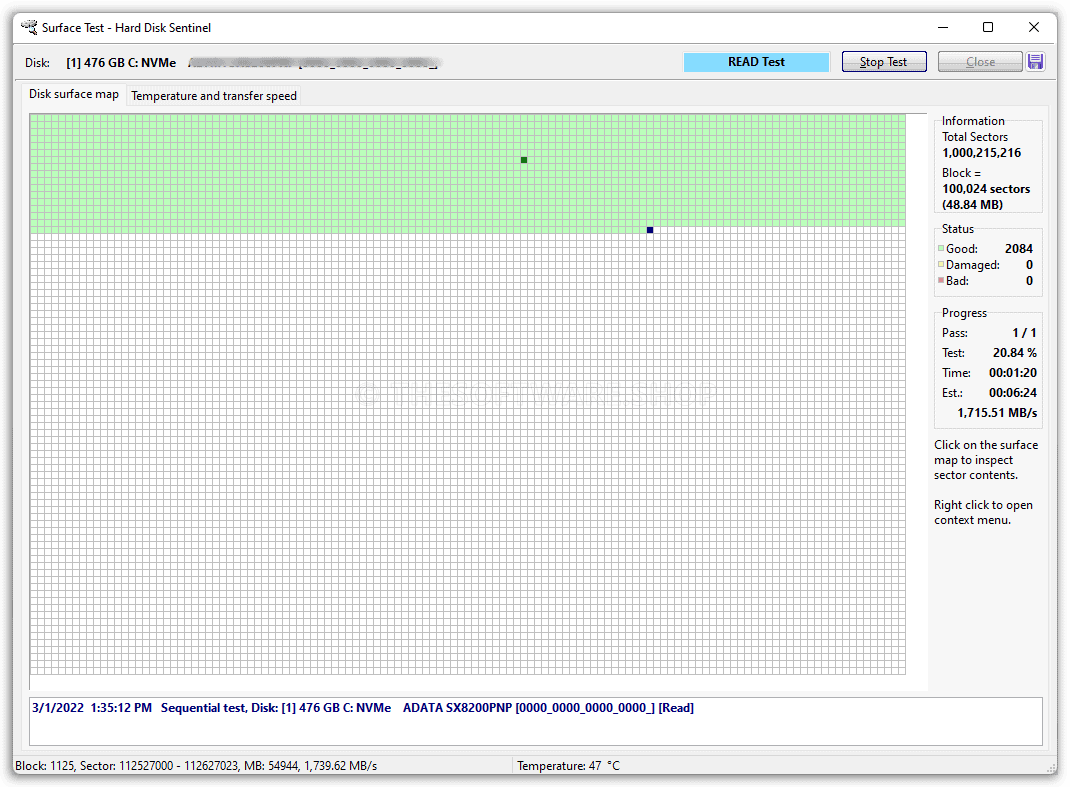
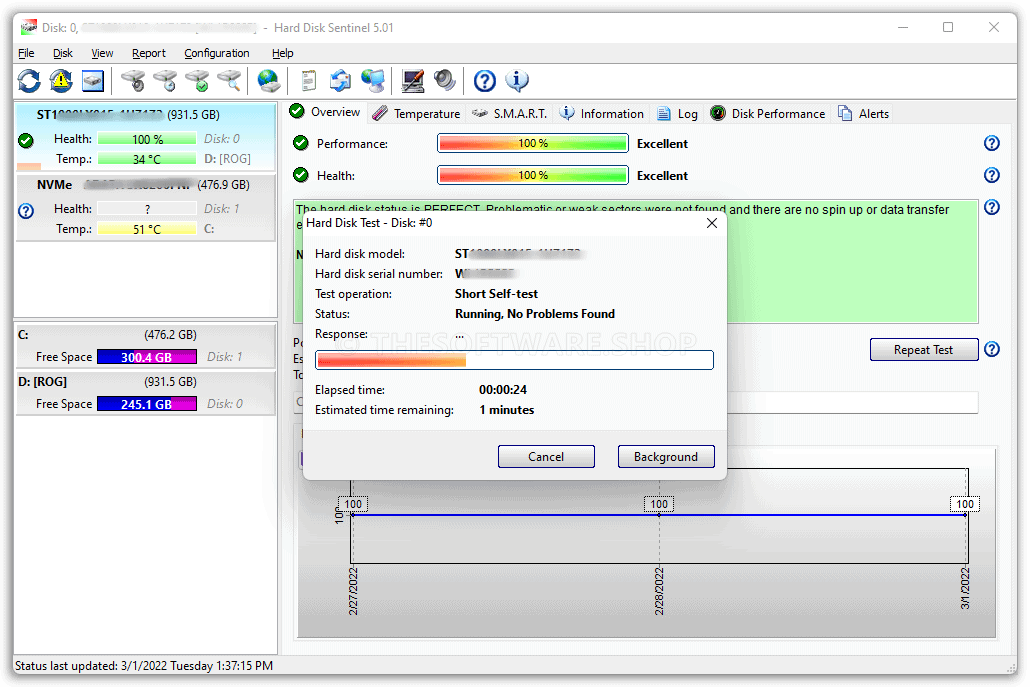
- Hard Disk Hardware and Software Tests – Effectively find all hard disk problems because built-in hardware methods are used to verify hard disk components (for example heads, servo, the internal buffer in the Short self-test).
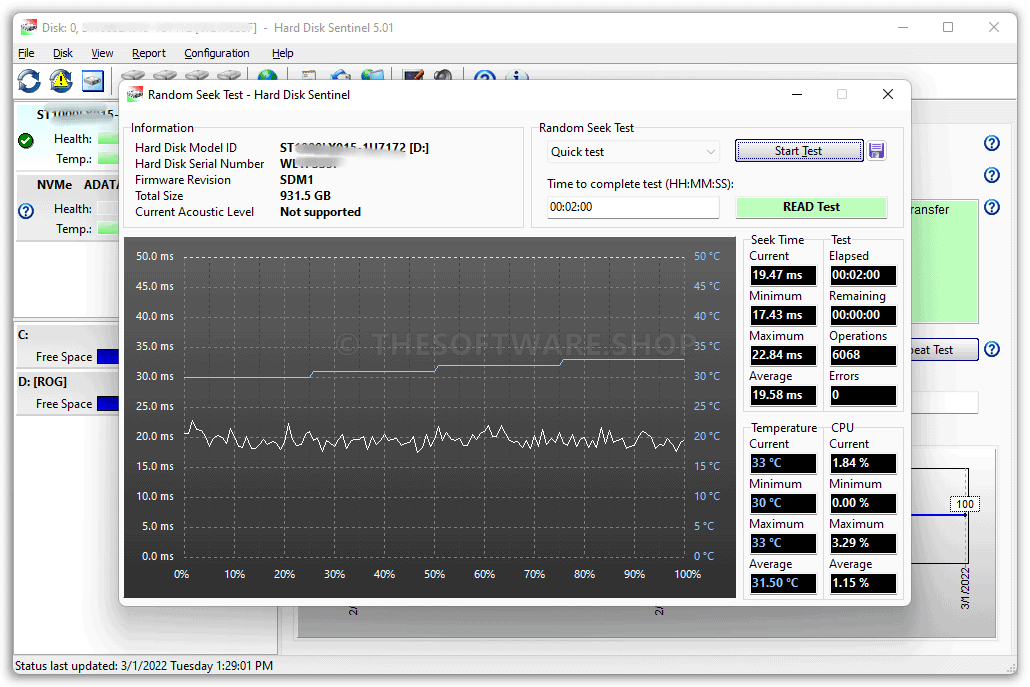
- Seek Noise Test – Seek Test – to verify hard disk noise, seek time performance and temperature.
- Logging – Logs all degradations in all SMART parameters and issues alerts in such cases to maximize data protection.
- Alerts – Wide range of alerts: send e-mail (with e-mail->SMS gateway it can be SMS warning to your mobile), network message, can play sound alerts and so.
- Shutdown – Shut down the computer on hard disk failure, HDD overheats or health degradation.
- Hard Disk Details – Detects and displays every information about the hard disk, from the revision number and buffer size to all features it has.
- HDD status in Windows Explorer – View the current health status and used space in Windows Explorer or in any other application,
- Information on demand – Current hard disk temperatures and health are displayed on the system tray and can be displayed in a small status window, the desktop itself or in a sidebar gadget (under Windows Vista or newer operating system).
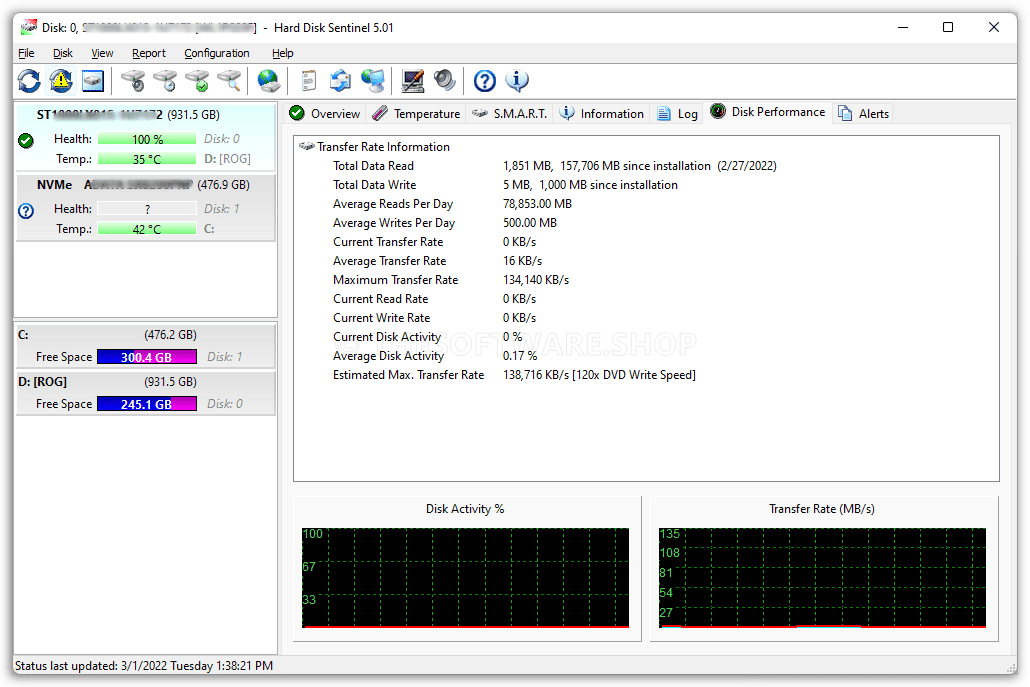
- Hard Disk Performance – Logs how much data were read from or written to the hard disk.
- Hard Disk Partitions – Displays partitions for each physical hard disk and type and usage information about them so you cannot run out of space.
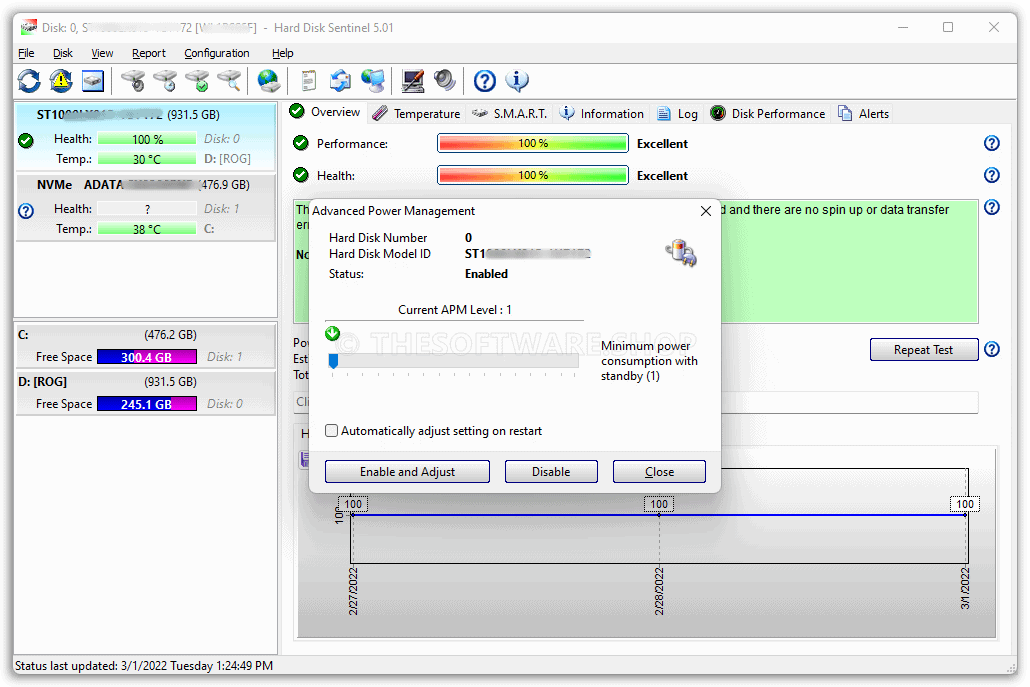
- Acoustic Management – Control the acoustic level of IDE/S-ATA hard disk. It is possible to increase performance or make the hard disk drive more silent.
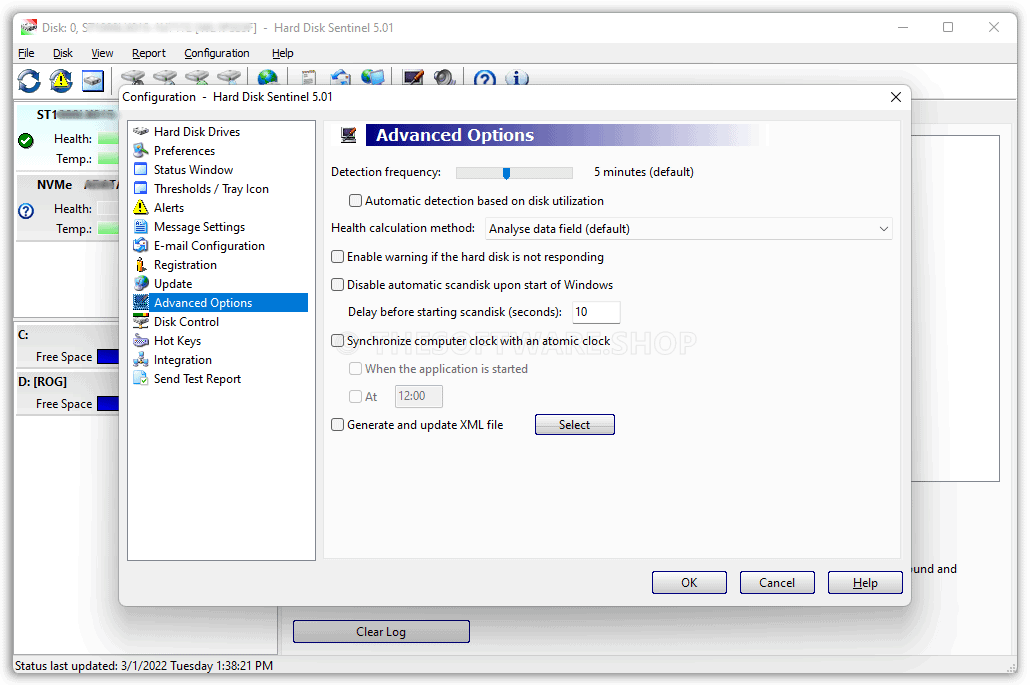
- Clock Synchronization – It offers the option to synchronize the PC clock with an atomic clock via NTP (Network Time Protocol).
- Improvements – Hard Disk Sentinel is constantly improving. More features will be available soon.
| Feature | Trial | Standard | Professional | Enterprise | |
|---|---|---|---|---|---|
| Displaying disk and partition information | ✅ | ✅ | ✅ | ✅ | |
| Support IDE/SATA/SCSI/SAS/USB drives | ✅ | ✅ | ✅ | ✅ | |
| Display status on a tray, disk icons, sidebar | ✅ | ✅ | ✅ | ✅ | |
| Run as Application or Service | ✅ | ✅ | ✅ | ✅ | |
| Hardware disk tests | ☒ | ✅ | ✅ | ✅ | |
| Hard disk seek time, stress tests | ☒ | ✅ | ✅ | ✅ | |
| XML export, API for developers | ☒ | ✅ | ✅ | ✅ | |
| Information by the web browser | ☒ | ✅ | ✅ | ✅ | |
| Customizable interface and reports | ☒ | ✅ | ✅ | ✅ | |
| Backup and restore configuration, statistics | ☒ | ✅ | ✅ | ✅ | |
| Password protection | ☒ | ✅ | ✅ | ✅ | |
| Wide range of alerts (e-mail, sound, message, etc.) | ☒ | ✅ | ✅ | ✅ | |
| Daily status reports | ☒ | ✅ | ✅ | ✅ | |
| Clock synchronization with atomic clock | ☒ | ✅ | ✅ | ✅ | |
| Hotkeys to reach features | ☒ | ✅ | ✅ | ✅ | |
| SMART parameter offset calibration | ☒ | ✅ | ✅ | ✅ | |
| Surface check | ☒ | ✅ | ✅ | ✅ | |
| Complete surface analysis, refresh, reinitialize, repair | ☒ | ☒ | ✅ | ✅ | |
| Industry-standard data destruction | ☒ | ☒ | ✅ | ✅ | |
| Monitor Network Attached Storage (NAS) | ☒ | ☒ | ✅ | ✅ | |
| Monitor Windows disk-related events/errors | ☒ | ☒ | ✅ | ✅ | |
| Portable version (no installation required) | ☒ | ☒ | ✅ | ✅ | |
| Perform scheduled backup projects | ☒ | ☒ | ✅ | ✅ | |
| Panic backup – backup upon failure or problem | ☒ | ☒ | ✅ | ✅ | |
| Burn data to CD/DVD by NERO | ☒ | ☒ | ✅ | ✅ | |
| Compress files by WinRAR or 7-ZIP | ☒ | ☒ | ✅ | ✅ | |
| Export registry sections | ☒ | ☒ | ✅ | ✅ | |
| Transfer files by FTP or e-mail | ☒ | ☒ | ✅ | ✅ | |
| Scheduled hardware disk tests | ☒ | ☒ | ✅ | ✅ | |
| Tray icon/report in service mode with non-admin user | ☒ | ☒ | ✅ | ✅ | |
| Provide complete status by WMI or XML for developers | ☒ | ☒ | ✅ | ✅ | |
| Remote monitoring over the network | ☒ | ☒ | ☒ | ✅ | |
| Remote disk management (tests, acoustics) | ☒ | ☒ | ☒ | ✅ | |
| Remote disk and system information | ☒ | ☒ | ☒ | ✅ | |
| Global and individual logs for remote systems | ☒ | ☒ | ☒ | ✅ |
Requirements
To run Hard Disk Sentinel with optimum reliability and performance, your system should match the following requirements:
- Windows 11,10,8,7, Vista,2012,2008, XP,2003,2000, NT4: no preparations (for example installing third party packages) required before installation of Hard Disk Sentinel, it can be installed immediately after the operating system first starts.
Downloads
Not sure if Hard Disk Sentinel does what you need? Try it out now. Please feel free to download Hard Disk Sentinel for Windows here. Hard Disk Sentinel by H.D.S. Hungary has been tested professionally and we are assured that no viruses, Trojans, adware, or malware are contained.
or
Buy now, the price start from:
Please Report if Hard Disk Sentinel Deal/Discount Coupon/Giveaway has a problem such as expired, broken link, sold out, etc.





yes please thank you please
Too Many Downloads
This promotion has been downloaded too many times from this link.
You can get this download by making a purchase from this page.