Giveaway – Clumi AI Vocal Remover: Free 6-month License | AI-Powered Vocal Isolation Software – for Windows

Turn any song into a karaoke-ready instrumental or a crisp acapella in minutes. Get Clumi AI Vocal Remover with a 6-month License for FREE
Free Full Version!
BUY NOW
Clumi AI Vocal Remover plans start at $9.99 per month. For a limited time, you can get a free 6-month license through the Giveaway tab below.

HitPaw VoicePea BEST SELLER

HitPaw Online BEST OFFER

HitPaw Univd: Lifetime License BEST OFFER

Hitpaw Video Editor: Lifetime License BEST OFFER

ImagineArt EXCLUSIVE

iTop Voicy Pro GIVEAWAY
![[NEW KEY #5] Giveaway – EaseUS VoiceWave 3: Free License Key | Real-Time AI Voice Changer – for Windows](https://thesoftware.shop/wp-content/uploads/thumbs_dir/EaseUS-VoiceWave-Review-Downlaod-Discount-Coupon-Giveaway-247kvil6yrqzzj8fqm9hq0p255nzn3itopkcvu0mzel0.png)
EaseUS VoiceWave: Lifetime License GIVEAWAY

HitPaw VikPea BEST OFFER

FocuSee VIP Access BEST OFFER

FineShare FineCam Pro BEST OFFER
Clumi AI Vocal Remover Giveaway
Available now: Free License Key For a Limited Time!
To access the giveaway, kindly provide your email address. Please refrain from closing this page after signing in to receive instructions on how to access the offer at no cost.

NOTES:
– All prices shown here are in listed USD (United States Dollar).
– Such promotional programs are subject to change without notice, from time to time in our sole discretion.
– Data may vary based on different systems or computers.
Clumi AI Vocal Remover Review at a Glance
Separating a vocal track from a finished song used to require expensive plugins, technical audio engineering knowledge, or hours spent hunting for a rare acapella version online. Musicians who want to practice against a clean backing track, DJs preparing a mashup, and content creators who need royalty-safe instrumentals often hit the same wall: the tools available are either too complicated, too slow, or too damaging to audio quality. Clumi AI Vocal Remover was built to remove that friction entirely.
What is Clumi AI Vocal Remover
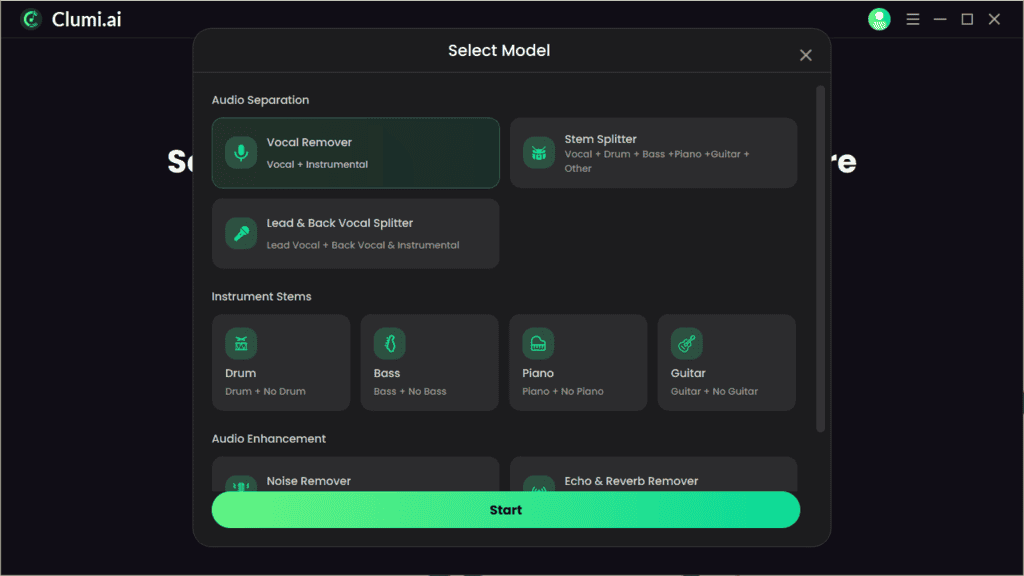
Clumi AI Vocal Remover is an online audio separation tool that isolates vocals from instrumental music using deep-learning source separation technology. Rather than relying on basic frequency filtering, which often leaves behind muddy artifacts, Clumi’s AI model identifies vocal and instrumental patterns within the mix and separates them with what the company describes as studio-level precision. The result is two clean outputs: an instrumental track suitable for karaoke or remixing, and an isolated vocal or acapella track suitable for sampling, mashups, or vocal training.
Beyond basic two-track separation, Clumi extends into full stem splitting, dividing a song into up to six individual layers, including vocals, drums, bass, piano, guitar, and other instruments. This level of detail is normally reserved for paid digital audio workstation plugins, but Clumi delivers it through a simple browser upload with no software installation required. Combined with its key and BPM detection feature, the platform doubles as a lightweight music analysis tool for producers who need quick reference data before building a remix or DJ set.
Key Benefits
Before comparing individual features, it helps to understand the practical advantages this software brings to everyday music workflows. The following benefits summarize why creators, musicians, and hobbyists choose Clumi over manual editing or older separation tools.
- Faster project turnaround: Most files process within minutes, so creative momentum is not interrupted by long rendering queues.
- Professional-grade output quality: Support for 24-bit WAV export keeps instrumentals and vocals detailed and balanced rather than compressed or distorted.
- No technical skill required: The upload-and-download workflow removes the need for audio engineering knowledge or complex plugin setups.
- Works on any device: A fully browser-based platform means the tool runs the same way on a laptop, tablet, or phone without installation.
- Privacy-focused processing: Uploaded files are automatically deleted after separation, with no third-party sharing or long-term storage.
- Broad format compatibility: Support for MP3, WAV, FLAC, M4A, MP4, and MOV means files rarely need to be converted before use.
- All-in-one audio toolkit: Vocal removal, stem separation, noise reduction, and key/BPM detection are combined in a single subscription instead of requiring multiple apps.
Key Features
Below is a comprehensive list of the key features that make the software a valuable addition to your needs:
- AI Vocal Isolation – The core engine separates vocals from instrumentals using deep-learning models trained to recognize vocal frequency patterns even in dense mixes.
- High-Precision Separation: Preserves vocal tone and clarity while avoiding the muddy artifacts common in basic filtering tools.
- Works on Imperfect Audio: Delivers consistent results on studio recordings, live performance captures, and vintage or low-fidelity source files.
- Multi-Instrument Stem Splitter – Breaks a single audio file into up to six separate layers instead of just vocals and instrumental.
- Drum, Bass, Guitar, Piano Isolation: Extracts each instrument into its own track for individual editing or study.
- Six-Stem Output: Provides vocals, drums, bass, piano, guitar, and other instruments as distinct downloadable files.
- Karaoke Track Creator – Converts any song into a vocal-free version suitable for singing along or performance practice.
- Balanced Instrumental Output: Keeps background music natural-sounding after vocal removal instead of thin or hollow.
- Customizable Sample Rate: Lets users select their preferred sample rate for optimal karaoke playback quality.
- Background Noise and Reverb Remover – Cleans up unwanted sound artifacts from both audio and video files.
- Noise Reduction: Strips hiss, hum, and static from recordings without stripping natural tone.
- Echo and Reverb Cleanup: Reduces room echo and reverb buildup for clearer dialogue or vocal tracks.
- Key and BPM Detector – Automatically analyzes a track’s musical key and tempo without manual calculation.
- Instant Song Analysis: Useful for DJs syncing tracks or producers matching tempo across a set.
- No Manual Input Needed: The AI reads the audio file directly, removing guesswork from key-matching.
- Free Audio-to-MIDI Converter – Converts isolated instrumental or vocal parts into MIDI data at no additional cost.
- Melody Extraction: Useful for transcribing a vocal line or instrument part into notation software.
- Production Ready: Generated MIDI can be dropped directly into a digital audio workstation for further editing.
- Multi-Format File Support – Accepts a wide range of audio and video formats without requiring pre-conversion.
- Audio Formats: Supports MP3, WAV, FLAC, and M4A files directly.
- Video Formats: Processes MP4 and MOV files, extracting and separating audio without a separate conversion step.
- Cross-Device Browser Access – Runs entirely online, so no downloads or installations are needed on any device.
- Desktop and Mobile Ready: Functions the same way on Windows, macOS, Android, and iOS browsers.
- Zero Setup Time: Users can start separating audio immediately after visiting the site.
- Privacy-First File Handling – Protects user data throughout the upload and processing cycle.
- Automatic File Deletion: Uploaded tracks are removed from servers after processing completes.
- No Account Required: Vocal isolation can be performed without creating a login or sharing personal details.
Requirement List
- Stable internet connection for uploading and processing audio or video files
- Modern web browser (Chrome, Safari, Firefox, or Edge) on Windows, macOS, Android, or iOS
- Audio or video file in a supported format: MP3, WAV, FLAC, M4A, MP4, or MOV
- No dedicated software installation, account signup, or additional hardware required
Downloads
Explore how Clumi AI Vocal Remover works according to your needs. Get the trial edition for free to test the software by clicking the button below before making a purchase decision.
The free version allows users to process files without creating an account, giving a genuine preview of separation quality, processing speed, and interface simplicity. This makes it easy to confirm the software fits a specific project, whether that is a karaoke track for a home party or a stem breakdown for a remix, before upgrading to a paid plan for extended file limits and additional features.
or
Buy now, the price start from:
Thank you for reading Clumi AI Vocal Remover review, and enjoy the discount coupon. If you notice any issues with Clumi AI Vocal Remover discount coupon, deal, or giveaway—such as an expired offer, broken link, or sold‑out promotion—please let us know while the deal is still available.