Giveaway – SoundLatch: Free Lifetime License | Smart Windows Audio Manager – for Windows 10 & Windows 11

Get SoundLatch for FREE today and reclaim the one setting Windows never lets you keep steady: your sound.
Free Full Version!
BUY NOW
SoundLatch is available for $9.99. But, you can now get a full version of SoundLatch with a Lifetime License for FREE through the Giveaway tab below. This offer is available for a limited time!

Krisp AI Meeting Assistant BEST OFFER
Boom 3D BEST SELLER
Krisp Pro BEST SELLER
Soundop Audio Workstations BEST OFFER
AutoAudioRecorder PRO BEST OFFER

Zortam Mp3 Media Studio PRO: Lifetime License BEST OFFER
Ashampoo Music Studio Pro 27: Lifetime License BEST OFFER
Abelssoft MP3 Cutter BEST OFFER
Ashampoo Burning Studio 27: Perpetual License BEST SELLER
Groove Box Drum Machine BEST OFFER

74% Off – Ashampoo Burning Studio 25: A Polished, Rock-solid Burning and Multimedia Suite – for Windows BEST SELLER
SoundLatch Giveaway
Available now: Free Lifetime License for a Limited Time!

To access the giveaway, kindly provide your email address. Please refrain from closing this page after signing in to receive instructions on how to access the offer at no cost.

NOTES:
– All prices shown here are in listed USD (United States Dollar).
– Such promotional programs are subject to change without notice, from time to time in our sole discretion.
– Data may vary based on different systems or computers.
SoundLatch Review at a Glance
If you have ever joined a video call only to realize your laptop speakers were blasting instead of your headset, or lost your carefully set volume level after switching from a wired headphone to a Bluetooth one, you already know the frustration this product solves. Windows treats every new audio device as a candidate for “default,” and it frequently swaps your active output or input the moment something else connects. For streamers, gamers, remote workers, and anyone who juggles multiple microphones or speakers throughout the day, this constant reshuffling is more than an annoyance — it interrupts calls, ruins recordings, and wastes time re-adjusting settings that should have stayed put.
SoundLatch is a lightweight Windows audio management utility built specifically to fix this problem at its source.
What is SoundLatch
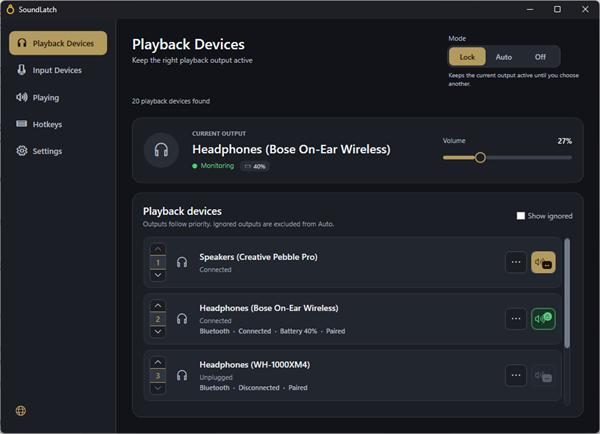
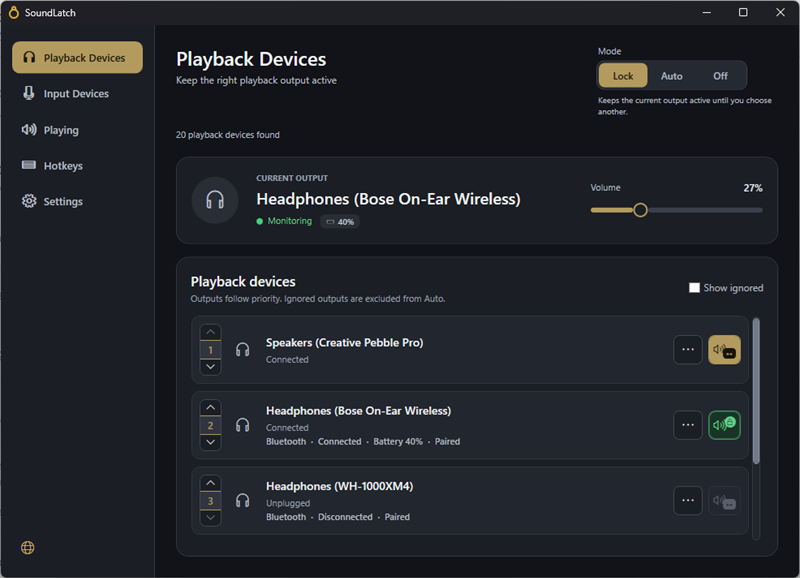
SoundLatch is a lightweight, tray-based Windows application that manages which audio playback and recording device is active on your system at any given moment. Instead of relying on Windows’ default behavior — which simply activates whichever device connected most recently — SoundLatch introduces a structured, rule-based system. You assign priorities to your devices, choose how strictly those priorities should be enforced, and the app takes care of the rest in the background.
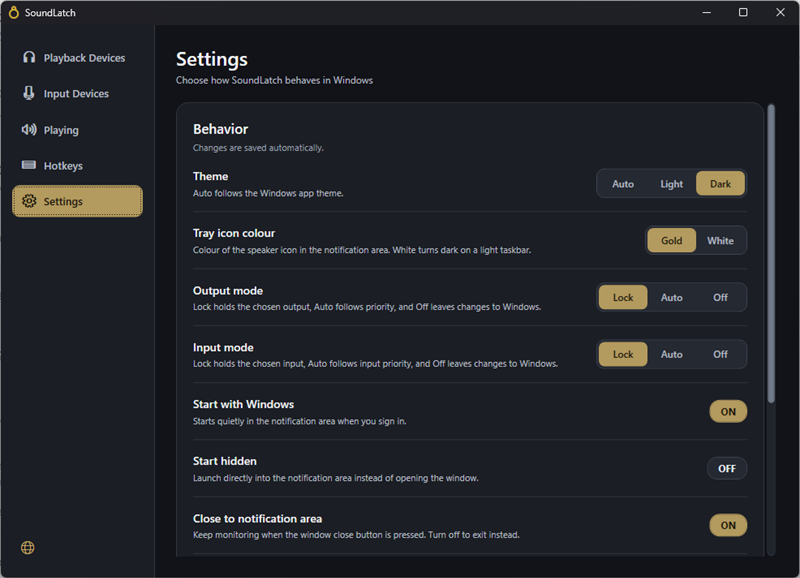
At its core, SoundLatch operates through three distinct modes for both playback and input devices: Lock, Auto, and Off. This mode-based structure means the app can behave as a strict gatekeeper for critical devices, a smart assistant for devices you don’t mind switching automatically, or completely hands-off for devices you want to manage yourself. Alongside this switching logic, SoundLatch also remembers and restores your volume level whenever the active output changes, so you never have to re-adjust your sound after a device switch.
The application lives in your system tray, showing a live volume icon and offering a quick-access popup for fast adjustments without opening a full settings window. This makes SoundLatch feel like a natural extension of Windows itself rather than a separate program you have to think about managing.
Key Benefits
Choosing the right audio management tool can save you from repeated interruptions during calls, recordings, and gaming sessions. Below are the core advantages that make SoundLatch a practical addition to any Windows setup involving multiple audio devices.
- Consistent audio experience: Your preferred output and input devices stay active exactly as you configured them, removing the guesswork every time you connect or disconnect a device.
- Time saved on manual adjustments: No more digging through Windows sound settings mid-call or mid-recording to fix a device that switched itself.
- Protected volume levels: Your carefully set volume is preserved across device changes, so you are never caught off guard by a sudden volume spike or drop.
- Reduced call and stream disruptions: Streamers, remote workers, and gamers avoid the embarrassment of dead air or the wrong microphone picking up audio.
- Minimal system footprint: As a lightweight tray application, SoundLatch runs efficiently without weighing down system performance.
- Flexible control levels: The Lock, Auto, and Off modes give you the choice between strict control and automatic convenience, depending on the situation.
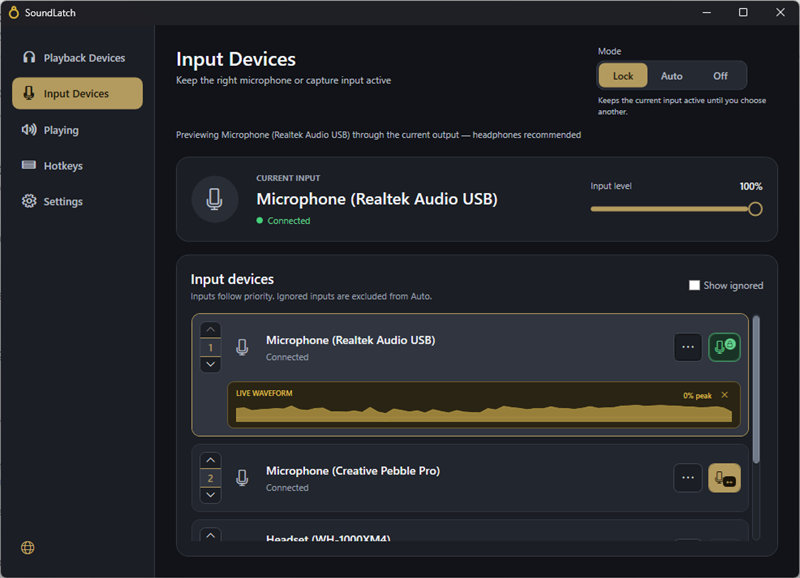
Rather than leaving device selection to chance, it lets you define a priority order for both your playback (output) and recording (input) devices. Once that order is set, SoundLatch actively monitors your system and automatically switches to the correct device whenever something connects or disconnects — and just as importantly, it can lock a device in place so nothing else is allowed to override your choice, even temporarily.
Developed by Form and Element, SoundLatch runs quietly in the system tray, staying out of your way until you need it. It combines automatic intelligence with manual override, giving you the flexibility to let the app manage switching on its own or to take full command when a specific device absolutely must stay active. This dual approach is what separates SoundLatch from Windows’ built-in sound settings, which offer no memory, no prioritization logic, and no way to prevent unwanted switching.
Who benefits from this product?
Remote professionals who move between a headset and desktop speakers throughout the workday, streamers and content creators who rely on a specific microphone for recording quality, gamers who switch between gaming headsets and monitor speakers, and anyone who regularly connects Bluetooth or USB audio accessories will all find real, immediate value in SoundLatch. If your daily routine involves more than one audio device, this tool removes a recurring irritation and replaces it with dependable, predictable behavior.
Why choose SoundLatch over manually adjusting Windows sound settings?
Because manual adjustment is reactive — you only notice the wrong device is active after a call has already started or a recording has already begun. SoundLatch is proactive: it anticipates device changes and reacts to them instantly, based on rules you define once. That single difference saves repeated frustration and protects your volume levels and device preferences across every session.
Key Features
Below is a comprehensive list of the key features that make the software a valuable addition to your needs:
- Priority-based device switching: SoundLatch lets you arrange your playback and recording devices in a defined priority order, so the correct device activates automatically as connections change.
- Automatic detection: The app recognizes when devices connect or disconnect and reacts instantly based on your saved priority list.
- Custom ordering: You decide which device takes precedence, whether that’s a headset, USB microphone, or built-in speaker.
- Lock, Auto, and Off modes: Three distinct control modes are available separately for both playback and input devices, giving granular command over switching behavior.
- Lock mode: Keeps a chosen device active and prevents it from being overridden by newly connected devices.
- Auto mode: Allows SoundLatch to manage switching automatically according to your priority settings.
- Off mode: Disables SoundLatch’s intervention for that category, leaving control entirely to Windows or manual selection.
- Volume memory: The app preserves your set volume level across device changes, so switching outputs never means resetting your sound levels.
- Cross-device consistency: Volume settings carry over smoothly whether you switch from speakers to headphones or between two different headsets.
- No repeated adjustments: Once you set a comfortable volume, SoundLatch keeps it intact through every subsequent switch.
- System tray integration: SoundLatch sits quietly in your Windows system tray for constant, unobtrusive access.
- Live volume icon: The tray icon reflects your current volume level at a glance, without needing to open the app.
- Quick-access popup: A fast popup menu lets you check status or make adjustments without navigating through full Windows settings menus.
- Separate input and output control: Playback and recording devices are managed independently, so you can apply different modes and priorities to each category.
- Independent priority lists: Set one priority order for microphones and a completely different one for speakers or headphones.
- Tailored mode selection: Choose Lock for your microphone during recordings while leaving your speakers on Auto for convenience.
- Lightweight performance: Built to run efficiently in the background without noticeable impact on system resources.
- Low resource usage: The app is designed to stay light, so it does not compete with other applications for memory or processing power.
- Fast responsiveness: Device switching and volume restoration happen quickly, without lag between connecting a device and hearing the correct audio source.
Requirements
Before installing, check that your system meets the following requirements to ensure smooth operation of the software.
- Operating system: Windows 10 version 17763.0 or higher, or Windows 11.
- Distribution platform: Available exclusively through the Microsoft Store.
- Device compatibility: Works with standard playback and recording devices recognized by Windows, including USB, Bluetooth, and built-in audio hardware.
Buy now, the price start from:
Thank you for reading the SoundLatch review, and enjoy the discount coupon. If you notice any issues with the SoundLatch discount coupon, deal, or giveaway—such as an expired offer, broken link, or sold‑out promotion—please let us know while the deal is still available.


![[NEW LINK #5] Giveaway – Audials Music 2026 SE: Free Lifetime License | Full Version – for Windows](https://thesoftware.shop/wp-content/uploads/thumbs_dir/Audials-Music-2026-Special-Edition-Review-Download-Free-Giveaway-rfy5w62nqt1wed8um44g6por66u091ewvwgo4935i0.png)