
ExpiredGiveaway – Vovsoft SVG Converter 2.0: Free License Key | Full Version – for Windows

Free Full-Version License Key | Offline Batch SVG Conversion | Raster-to-Vector Image Vectorization | Vector-to-Raster Multi-Format Export | Lifetime Non-Commercial Use
Batch SVG to PNG JPEG WEBP BMP HTML PDF Vector Image Converter with Watermark Overlay, Grayscale Filter and Offline Privacy Protection. Get Vovsoft SVG Converter 2.0 full version with a license key for free !
Special Offers
Don’t miss out on handpicked offers by Vovsoft created especially for you.
Vovosft SVG Converter BEST OFFER
Vovsoft Picture Downloader GIVEAWAY
Vovsoft Image Splitter GIVEAWAY
Vovsoft Watermark Image GIVEAWAY

Vovsoft Batch Image Converter GIVEAWAY
Vovsoft Batch Image Upscaler GIVEAWAY
Vovsoft SVG Converter Key Giveaway
Vovsoft SVG Converter normally costs $19, but for a limited time, you can get the full version free with a license key through this week’s Software Shop giveaway!
- Click the big GET NOW button at the top of this page to visit the deal page.
- On the deal page, go to the BUY NOW section and open the GIVEAWAY tab.
- Enter your email address there to unlock the offer box, which contains the BUY BUTTON for downloading the full version of the program.
- Read the HINTS in the offer box for the next instruction.
- Enjoy all the program’s features!
Overview
Vovsoft SVG Converter is a standalone Windows desktop application built for anyone who regularly moves images between raster and vector formats. This listing gives you access to a free license key for the full version, normally priced at $19.00, so you can use every feature without restriction. The program is aimed at graphic designers, e-commerce sellers, marketing professionals, print shops, and hobbyists who need a fast, private, and reliable way to convert JPEG or PNG photos into scalable SVG artwork, or to turn existing SVG files into PNG, WEBP, JPEG, BMP, HTML, and PDF outputs.
Unlike browser-based conversion tools that limit the number of files you can process per session and often require you to upload personal images to a remote server, this application runs entirely on your own computer. Nothing you convert is ever transmitted over the internet, which matters a great deal if you work with client logos, branded product photography, or any visual asset that needs to remain confidential.
Turning Raster Photos Into Scalable Vector Art
The core function of the program is vectorization, the process of converting a bitmap image made of fixed pixels into a mathematically described SVG file that can be resized to any dimension without losing sharpness. This is especially useful for logos originally saved as low-resolution JPEGs or PNGs that now need to appear on large banners, vehicle wraps, or printed signage.
To make this conversion accurate, the software includes customizable presets along with clustering and hierarchical processing modes. Clustering groups similar colors and shapes together before tracing outlines, producing cleaner results for images with flat color regions such as icons and simple logos. Hierarchical mode builds vector paths in layered detail, better preserving subtle gradients and complex shading found in photographic source material. Because both approaches are available, you can experiment with the setting that best matches the visual style of your original file rather than being locked into a single algorithm.
Bulk Rasterization to Multiple Output Formats
The application also works in the opposite direction, converting SVG vector files back into common raster formats. Supported outputs include PNG, WEBP, JPEG, BMP, HTML, and PDF, giving you flexibility depending on where the finished asset will be used. PNG and WEBP suit situations needing transparent backgrounds preserved for web graphics, JPEG and BMP suit cases where a compact universal file is required, HTML output is convenient for quick previews or embedding, and PDF is well suited for print-ready documents.
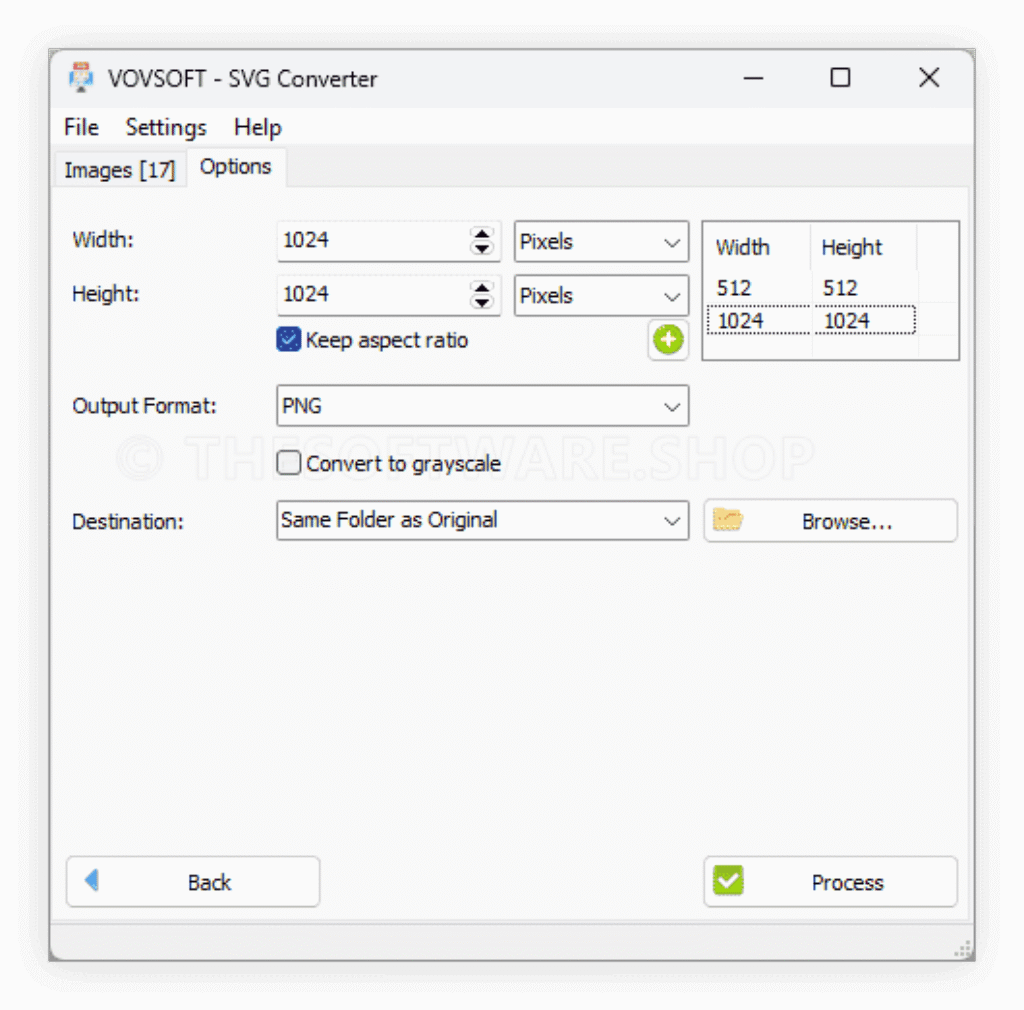
You control the exact pixel width and height of the rasterized output, so a single vector source file can be exported at multiple sizes for different placements, such as a small icon for a mobile app and a large graphic for a website banner, all without any loss of clarity since the scaling happens from the original vector data rather than from an already-compressed bitmap.
Transparency, Grayscale, and Watermark Overlay Options
Background transparency is preserved automatically during rasterization, which is essential for logos, product cutouts, and any graphic meant to sit on top of another background without a visible box around it. A grayscale filter is also included, letting you instantly produce black and white versions of a converted image for print layouts, mockups, or design comparisons without opening a separate photo editor.
For anyone who needs to protect or brand their converted graphics, the overlay feature lets you place a transparent PNG image directly on top of the output. This is a practical way to add a watermark, a company logo, or a copyright mark across a batch of images in one pass, saving the manual work of adding the same overlay one file at a time in a different program.
Built for High-Volume Batch Processing
Many free online converters cap the number of files or the file size you can process, forcing repeated uploads and long waiting times. Vovsoft SVG Converter removes that restriction entirely. Because it runs locally on your PC, the only real limit on how many images you convert at once is your own computer’s storage and processing capacity, making it a practical choice for design agencies, print businesses, and e-commerce teams that need to process large product catalogs, icon sets, or logo variations in a single session.
The interface is organized so that setting source files, choosing an output format, and adjusting conversion parameters like dimensions, clustering mode, grayscale filter, and overlay image can all be configured before running a batch job, so repetitive conversion tasks that used to take hours of manual work can be completed in a single pass.
Complete Offline Privacy
Every conversion happens locally on the machine where the software is installed. No image data is uploaded to any external server, no account registration is required to process files, and no internet connection is needed once the program is installed and licensed. This matters for freelancers and agencies handling unreleased branding, confidential client material, or any visual content covered by a non-disclosure agreement, since there is no risk of files sitting on a third-party server or being intercepted in transit.
Who Should Use This Software
This tool fits a wide range of practical use cases. Graphic designers can vectorize hand-drawn or scanned logo sketches into clean SVG files for client delivery. Online sellers can convert product photography into scalable graphics for storefront banners and marketing material of varying sizes. Print shop operators can prepare vector artwork for large-format output such as posters or vehicle graphics. Web developers can rasterize SVG icon sets into PNG or WEBP at the exact pixel dimensions their layout requires. Anyone managing a personal or small business brand can quickly add a consistent watermark across a batch of images before publishing them online.
System Requirements and Access to the Free License
The application is built for the Windows operating system and installs as a standard desktop program. The free license key gives you full access to the paid version’s features, including unrestricted batch conversion, both vectorization modes, all six output formats, the grayscale filter, and the overlay watermark tool, without the time limits or feature restrictions found in trial software. The license covers one non-commercial computer, does not include free updates or ongoing support, and cannot be resold or redistributed, so it is intended for personal or small-scale project use rather than for large commercial redistribution.
Conclusion
Vovsoft SVG Converter brings together vectorization and rasterization in one uncomplicated Windows application, giving designers, sellers, and everyday users a practical way to move images between formats without uploading a single file to the internet. From turning a pixelated logo into a crisp scalable SVG to batch-exporting vector artwork into PNG, WEBP, JPEG, BMP, HTML, or PDF at any custom resolution, the software covers both directions of the conversion process with real control over grayscale filtering, transparent backgrounds, and watermark overlays. Getting the full version at no cost through this license key offer removes the only real barrier, the $19.00 price tag, leaving you with a capable, private, offline batch conversion tool ready to handle everyday design and image-preparation work.


![[2026 Giveaway #4] Giveaway – MobiKin HEIC to JPG Converter: Free 1-year License Code | Easy-to-use HEIC Photo File to PNG/JPG Converter – for Windows](https://thesoftware.shop/wp-content/uploads/thumbs_dir/MobiKin-HEIC-to-JPG-Review-Download-Discount-Giveaway-rfosmaovwlqug3zpm81w967o5qknpo0wj7ser5ymjc.png)

