

Giveaway – AnyWebP WebP Converter: Free License Key | Fast Batch Image Converter – For Windows

Convert Every Image Format Without Uploading a Single File. Get a Full Version of AnyWebP – WebP Converter with a License Key for free!
Free Full Version
BUY NOW
AnyWebP WebP Converter is available for $9.90. But, you can now get AnyWebP WebP Converter with a license key for free through the Giveaway tab below. This offer is available for a limited time!

Vovosft SVG Converter BEST OFFER

Vovsoft Batch Image Converter GIVEAWAY

Ashampoo Image Compressor GIVEAWAY
![[NEW KEY] Giveaway – UltraPic Pro/Pro+: Free Activation Code | Instant Background Remover, Batch Processing, AI Backgrounds, Pro E-commerce Photo Editing Tool](https://thesoftware.shop/wp-content/uploads/thumbs_dir/UltraPic-Pro-Free-Credits-Activation-Code-Giveaway-2485hak007vdtdebobh7jg3jtw8nb809zolgzlemf638.png)
UltraPic Pro GIVEAWAY

Vovsoft Batch Image Upscaler GIVEAWAY

Vovsoft OCR Reader: lifetime License GIVEAWAY

Ashampoo Photo Commander 19: Lifetime License (One-time Fee, No Time Limit) BEST SELLER
Ashampoo Photo Optimizer Pro 26 BEST OFFER

Vovsoft Text to Image Converter: Lifetime License GIVEAWAY
Ashampoo Snap Pro 26: Perpetual License BEST OFFER

HitPaw Online BEST OFFER
AnyWebP Key Giveaway
Available now: Free License Key for a limited time!

To access the giveaway, kindly provide your email address. Please refrain from closing this page after signing in to receive instructions on how to access the offer at no cost.

NOTES:
– All prices shown here are in listed USD (United States Dollar).
– Such promotional programs are subject to change without notice, from time to time in our sole discretion.
– Data may vary based on different systems or computers.
AnyWebP WebP Converter Review at a Glance
Anyone who works with images on a regular basis has run into the same frustration: a photo, product image, or design asset arrives in WebP format, and it simply will not open in a photo viewer, editor, or older software. Browsers and websites increasingly save images as WebP because the format is small and efficient, but many everyday tools, printers, and content platforms still expect a standard JPG, PNG, or GIF file. Converting these files one at a time is slow, and many online converters require uploading personal or client images to an unknown server, which raises real privacy concerns for designers, marketers, and everyday users who handle sensitive or proprietary content.
AnyWebP – WebP Converter was built to solve exactly this problem.
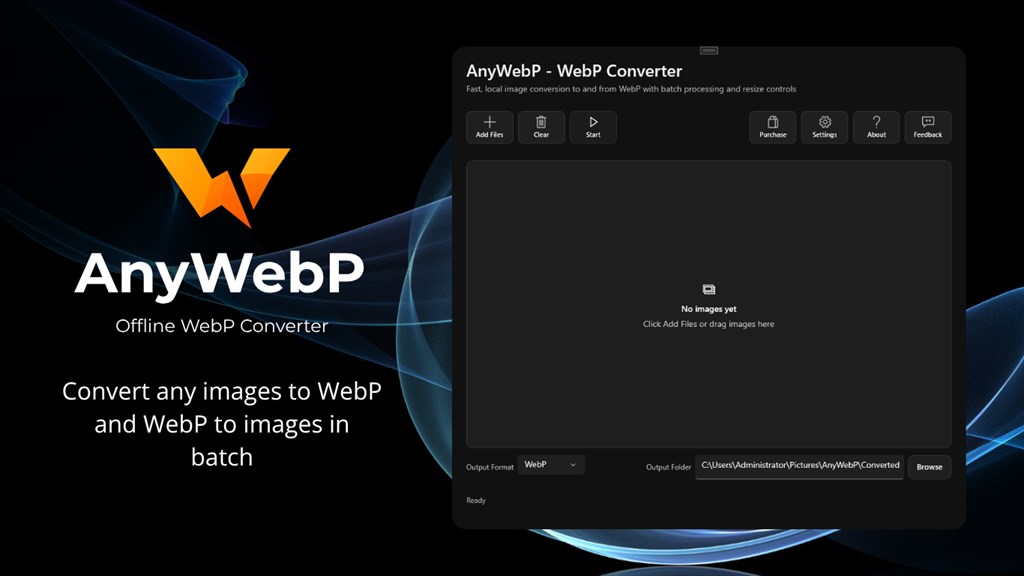
What is AnyWebP
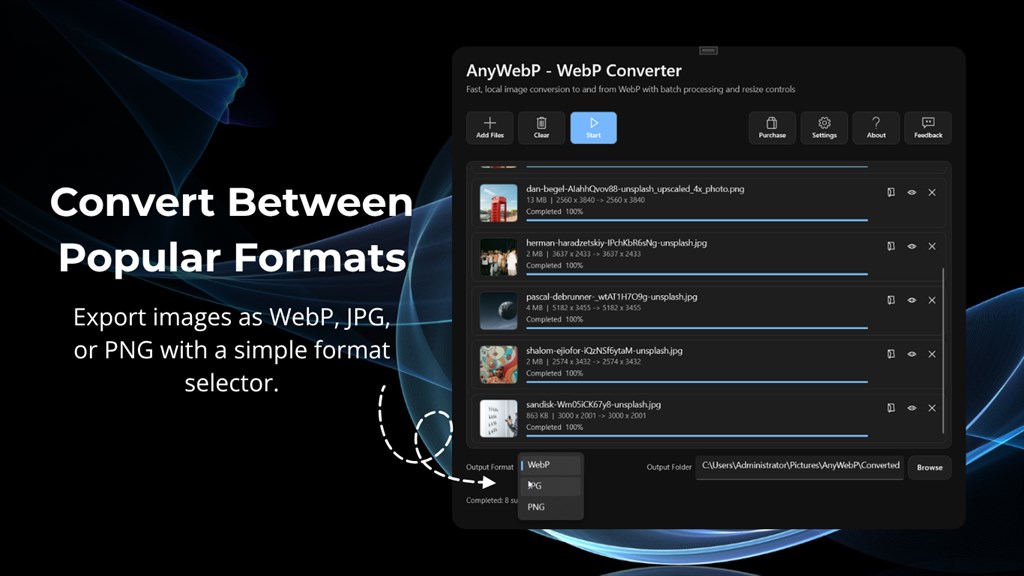
AnyWebP is a desktop image conversion application designed specifically to handle the WebP format alongside the most common image types used today. At its core, the software reads image files in WebP, JPG, PNG, GIF, HEIC, BMP, TIFF, and ICO formats and rewrites them into WebP, JPG, or PNG output, depending on what the user needs. Every step of this process, from reading the original file to saving the converted one, happens on the local machine rather than through a cloud service, which is a meaningful distinction compared to many browser-based converters that require uploading files to a third-party server.
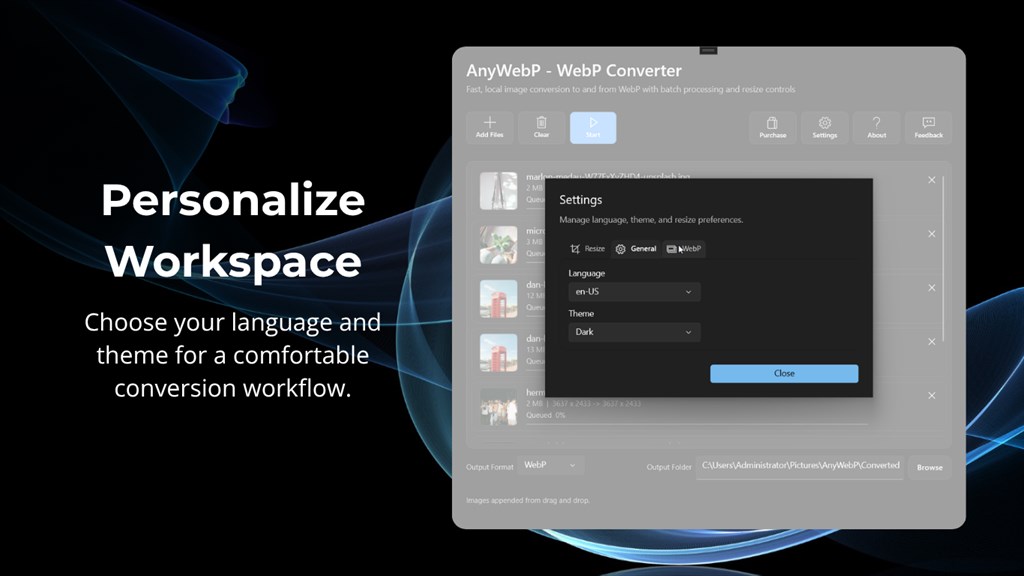
The application is built for Windows 10 and Mac OS 11 or later, and it is designed to run comfortably on modest hardware, which means users do not need a high-end computer to convert large batches of images quickly. Beyond basic conversion, AnyWebP includes a detail comparison view so users can visually check the before-and-after result of a conversion, along with support for both light and dark interface themes so the software fits comfortably into any working environment, day or night.
Key Benefits
Before listing the advantages of AnyWebP in detail, it helps to understand the everyday situations these benefits are designed to address, from opening a stubborn WebP file to preparing dozens of product photos for a store listing.
- Works completely offline, so images never leave your computer, which matters for private photos, client work, and confidential design files.
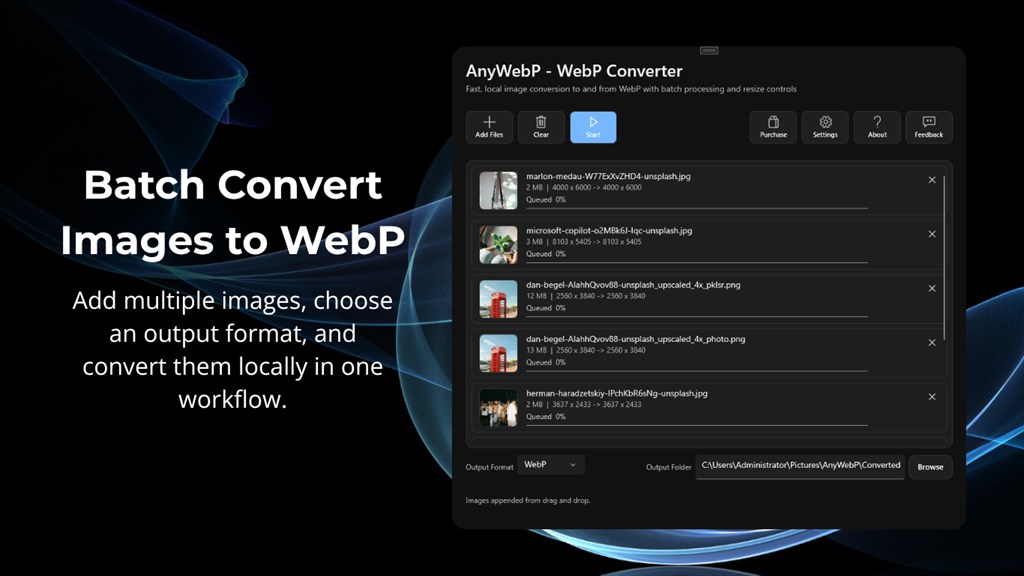
- Saves time on repetitive tasks by allowing batch conversion of hundreds of images in a single session instead of converting files one by one.
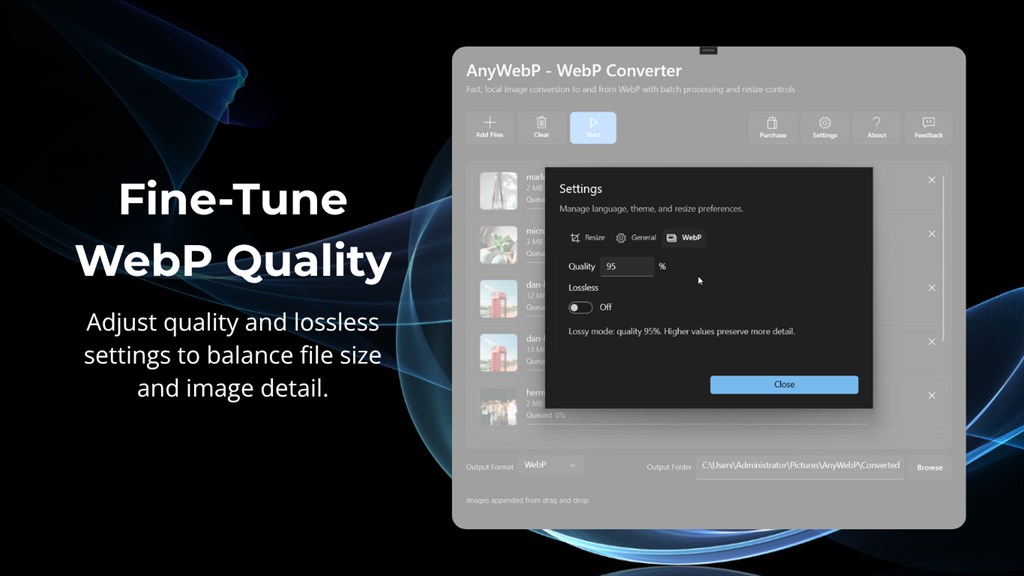
- Keeps image quality under your control through adjustable WebP quality settings and a lossless conversion option for cases where compression is not acceptable.
- Reduces file sizes when needed using the percentage-based compression tool, which is useful for websites, email attachments, and storage-limited devices.
- Supports a wide range of formats, covering WebP, JPG, PNG, GIF, HEIC, BMP, TIFF, and ICO, so users rarely need a second conversion tool.
- Fits any workflow thanks to a simple interface, light and dark themes, and a comparison view that removes the guesswork from choosing settings.
It is a lightweight, offline desktop application for Windows and Mac that converts images between WebP, JPG, PNG, GIF, HEIC, BMP, TIFF, and ICO formats without ever touching the internet during the conversion process. Instead of juggling browser tabs or worrying about upload limits, users simply add their files, pick an output format, and let AnyWebP process everything locally. The interface is intentionally simple, so both casual users and professionals working on tight deadlines can get from “image will not open” to “image is ready” in a matter of clicks.
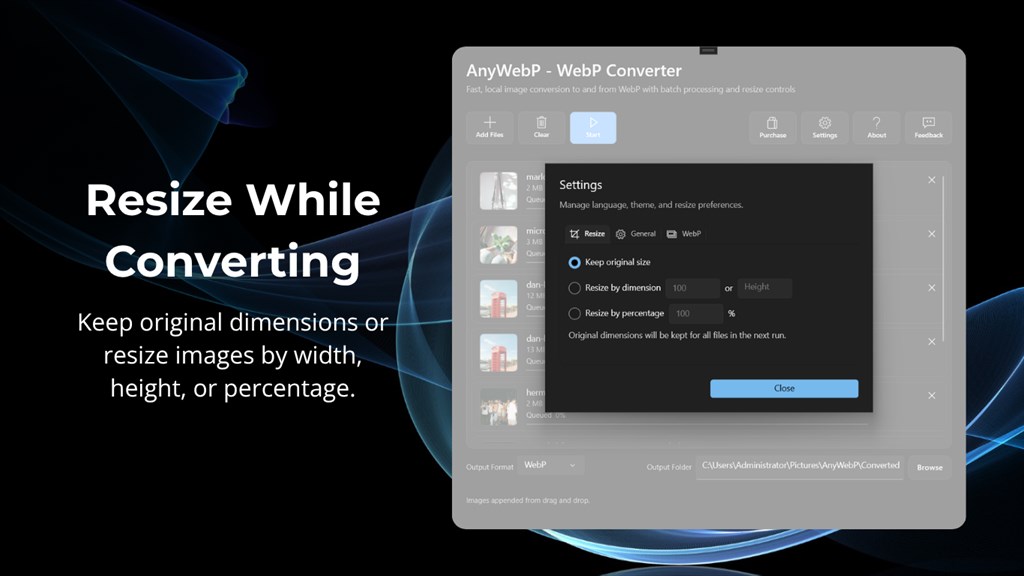
What makes AnyWebP genuinely useful is the balance it strikes between simplicity and control. Casual users who just want to convert a downloaded WebP picture into a JPG can do that in seconds. At the same time, photographers, graphic designers, e-commerce sellers, and content creators who need more precision get access to advanced settings: resizing by custom dimensions, compressing by percentage, choosing quality-based or lossless WebP output, and comparing the original and converted image side by side before committing to the export. This makes AnyWebP suitable for a wide range of tasks, from cleaning up a personal photo library to preparing hundreds of product images for an online store.
The people who benefit most from AnyWebP include digital marketers and online sellers who receive product photos in WebP format and need standard JPG or PNG files for listings, graphic designers who work with mixed image formats across client projects, photographers who want a fast way to batch-convert screenshots or camera exports, and everyday computer users who simply want to open a WebP image without installing a browser plugin. Because the software works entirely offline, it is also a strong choice for anyone handling confidential design assets, internal business images, or personal photos that should never leave their own device. Choosing AnyWebP means choosing a tool that respects both your time and your privacy, while still giving you enough control over quality and file size to get professional results.
Key Features
Below is a comprehensive list of the key features that make the software a valuable addition to your everyday image workflow:
- Batch Conversion – Convert hundreds of WebP or other image files at once instead of handling them individually.
- Fast Processing – Each file is processed in roughly one second, keeping large batches fast even on modest hardware.
- Mixed Format Input – Add files of different formats into the same batch and export them together.
- Wide Format Support – Convert between WebP, JPG, PNG, GIF, HEIC, BMP, TIFF, and ICO without needing separate tools for each format.
- WebP to Standard Formats – Turn WebP images into JPG or PNG so they open in any photo viewer, editor, or printer software.
- Standard Formats to WebP – Convert JPG, PNG, GIF, HEIC, BMP, TIFF, or ICO files into WebP for smaller, web-friendly file sizes.
- Offline, Local Processing – All conversion work happens directly on the device, with no files uploaded to any server.
- No Internet Requirement – Convert images even without an active internet connection.
- Private by Design – Personal photos, client files, and business assets stay on the user’s own computer at every step.
- Adjustable Output Settings – Fine-tune how each image is exported instead of relying on a single fixed setting.
- Custom Resizing – Change image dimensions manually to match specific size requirements for websites or print.
- Percentage-Based Compression – Reduce file size by a chosen percentage while keeping the overall image intact.
- WebP Quality Control – Choose between quality-based compression and lossless output for WebP exports.
- Detail Comparison View – Review the original and converted image side by side before finalizing the export.
- Visual Quality Check – Spot compression artifacts or resizing issues before saving the final file.
- Confidence Before Export – Adjust settings and re-check the comparison until the result meets expectations.
- Light and Dark Theme Support – Switch the interface appearance to match personal preference or working environment.
- Light Theme – A brighter interface suited for daytime or well-lit workspaces.
- Dark Theme – A dimmer interface designed for extended sessions or low-light conditions.
- Cross-Platform Availability – Use the same core functionality on either operating system.
- Windows Version – Runs on Windows 10 build 17763.0 or later, compatible with PC, Surface Hub, and HoloLens devices.
- Mac Version – Runs on Mac OS 11 or later for users working in an Apple environment.
Reliable Support Whenever You Need It
AnyWebP is backed by a support team that responds to inquiries within 24 hours, so if a conversion does not behave as expected or a question comes up about a specific format, help is only an email away. This kind of dependable, human-backed support matters for users who rely on AnyWebP as part of a regular workflow, whether that is preparing product images for an online store or organizing a personal photo library. Combined with the fact that no files are hosted or stored by the software, the overall experience is designed around trust: trust that the software will do the conversion correctly, and trust that private images stay private throughout the process.
Why AnyWebP Belongs in Your Toolkit
Managing images across multiple formats does not have to mean juggling several apps or handing personal files over to an unfamiliar website. AnyWebP brings WebP conversion, format flexibility, and batch processing together in one straightforward desktop application that respects both your time and your privacy. Whether the task is opening a single downloaded WebP picture or preparing hundreds of product photos for a listing, the combination of adjustable quality settings, resizing, compression, and a detail comparison view gives users the control they need without adding unnecessary complexity. For photographers, designers, marketers, and everyday computer users alike, AnyWebP offers a practical answer to a problem almost everyone runs into sooner or later: an image in the wrong format at the wrong time.
Requirement List
Before installing AnyWebP, it is worth checking the following system requirements to confirm the software will run smoothly on your device.
- Operating System: Windows 10 version 17763.0 or higher, or Mac OS 11 or later
- Devices: Compatible with PC, Mobile, Surface Hub, and HoloLens
- Memory: 300 MB minimum, 1 GB recommended
- Processor: 1 GHz or faster minimum, Intel Core i3 or AMD Ryzen 3 (or equivalent) recommended
- Graphics: Integrated graphics minimum, any DirectX-compatible graphics adapter recommended
Free to Try (Trial/Demo)
Test how AnyWebP handles your own images before making any commitment. Get the free edition of AnyWebP by clicking the button below and see for yourself how quickly WebP files convert into JPG, PNG, or back again, right on your own Windows or Mac computer.
or
Buy now, the price start from:
Thank you for reading AnyWebP review, and enjoy the discount coupon. If you notice any issues with the AnyWebP discount coupon, deal, or giveaway—such as an expired offer, broken link, or sold‑out promotion—please let us know while the deal is still available.



![[2026 Giveaway #4] Giveaway – MobiKin HEIC to JPG Converter: Free 1-year License Code | Easy-to-use HEIC Photo File to PNG/JPG Converter – for Windows](https://thesoftware.shop/wp-content/uploads/thumbs_dir/MobiKin-HEIC-to-JPG-Review-Download-Discount-Giveaway-rfosmaovwlqug3zpm81w967o5qknpo0wj7ser5ymjc.png)


The license for the AnyWebP giveaway doesn’t activate on my computer. Please help. Thank you.