
Giveaway – Cutline: Free Lifetime License | Fast Local Video Trimmer, Cropper, and Rotator Tool – for Windows

Stop wasting hours on bloated editing suites just to trim a clip or fix its orientation. Get a full version of Cutline with a lifetime license for free!
Free Full Version!
BUY NOW
Cutline is available for $8.99. But, you can now get a full version of Cutline for free through the Giveaway tab below. This offer is available for a limited time!

Hitpaw Video Editor: Lifetime License BEST OFFER

Wonderfox HD Video Converter Factory Pro: Lifetime License BEST SELLER

Winxvideo AI BEST OFFER

HitPaw Online BEST OFFER

EaseUS Video Editor PRO BEST OFFER

VideoProc Converter AI: Lifetime License BEST SELLER

MiniTool MovieMaker BEST OFFER

Ashampoo Movie Studio Pro 3 BEST OFFER

iDealshare VideoGo: Lifetime License BEST OFFER

HitPaw Univd: Lifetime License BEST OFFER
Cutline Giveaway
Available now: Free License for a Limited Time!

To access the giveaway, kindly provide your email address. Please refrain from closing this page after signing in to receive instructions on how to access the offer at no cost.

NOTES:
– All prices shown here are in listed USD (United States Dollar).
– Such promotional programs are subject to change without notice, from time to time in our sole discretion.
– Data may vary based on different systems or computers.
CutLine Review at a Glance
Every content creator eventually runs into the same wall: a video that just needs a quick trim, a crop, or a rotation, but every editor available seems built for feature films rather than a five-minute fix. Big-name software takes forever to load, buries basic tools under menus, and often forces a video upload to the cloud before it will even preview a clip. That last part matters more than it seems — nobody editing sensitive footage, client material, or personal recordings wants their files leaving their own machine. This is the exact problem that Cutline, built by Form and Element, was designed to solve.
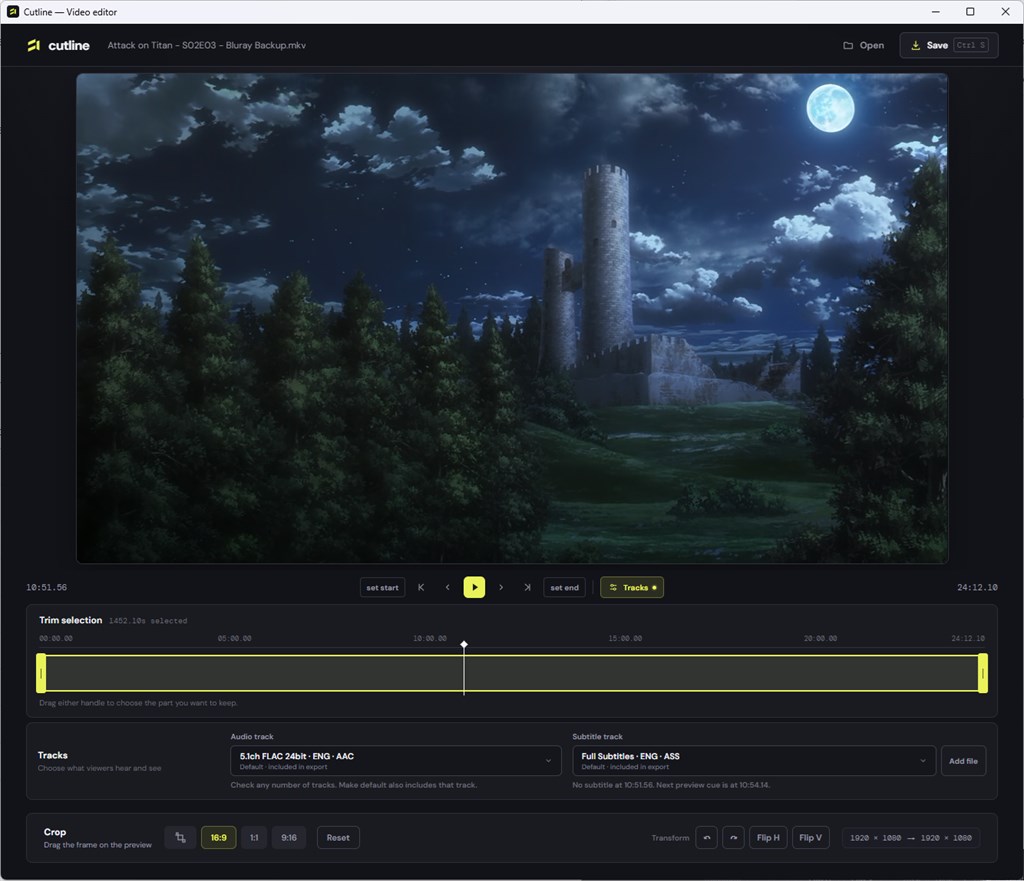
What is Cutline
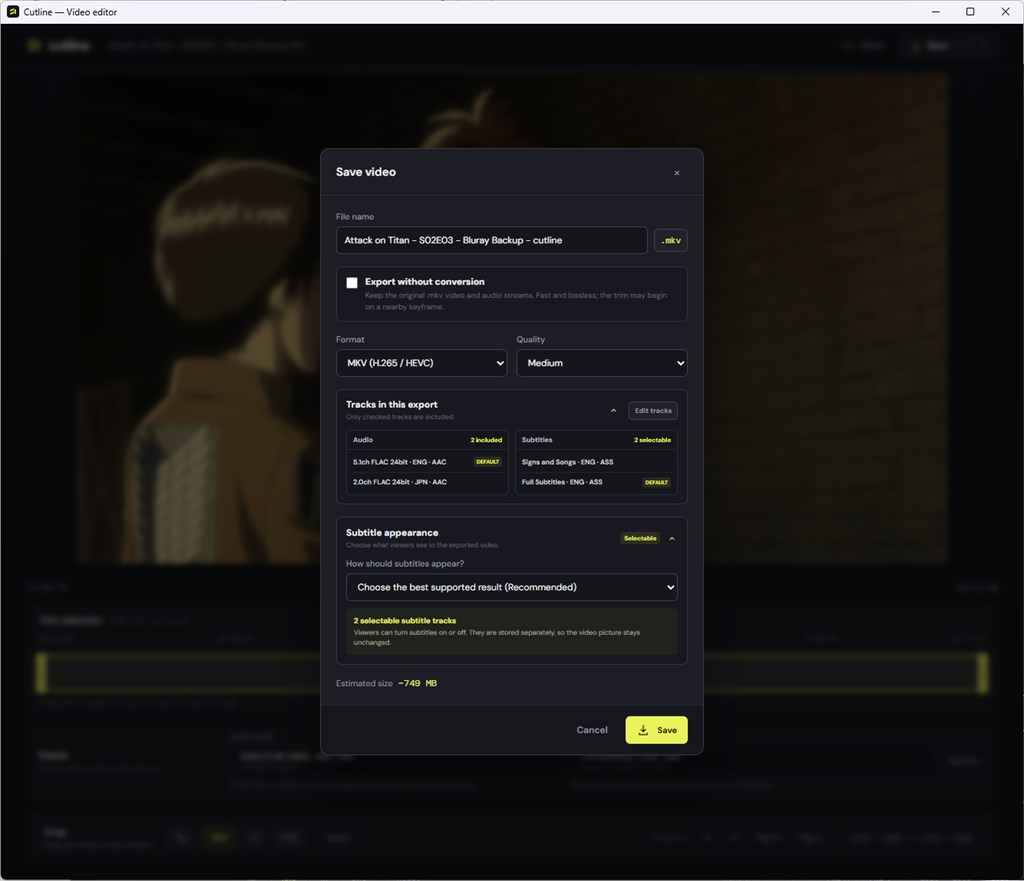
Cutline is a Windows desktop video editor developed by Form and Element, built around a focused set of tools rather than an all-purpose production suite. At its core, the application opens footage in almost any common format, lets a user mark exact in and out points for a trim, adjusts framing through cropping, and applies rotation or flip transformations to correct orientation issues. Once the edit is set, Cutline exports the result with a chosen format, codec, and quality level, using the GPU for hardware-accelerated encoding when the system supports it.
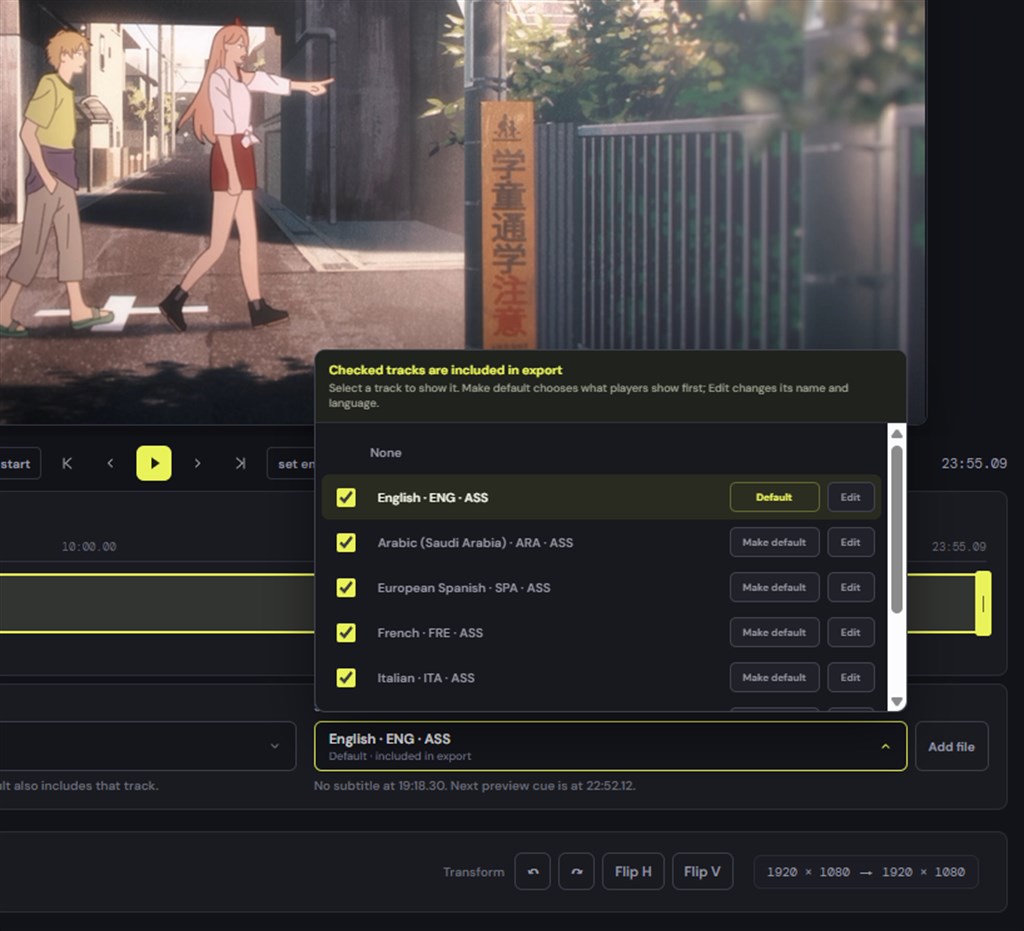
What makes Cutline distinct from many consumer video tools is that it treats audio and subtitle handling as a first-class feature rather than an afterthought. Instead of forcing a single flattened audio track and burned captions on every export, Cutline exposes the individual tracks contained in a source file, letting a user preview each one, choose which to keep, and configure playback and subtitle behavior before the export even begins.
The application also solves a specific frustration familiar to Windows users: media files that will not play through the operating system’s native tools at all. Rather than failing outright, Cutline generates a compatibility preview for those files so editing can proceed normally, and the eventual export can still target a widely supported format. According to its developer listing, Cutline is compatible with Windows 10 version 17763.0, Windows 11, or higher, making it accessible on the vast majority of current Windows desktops and laptops.
Key Benefits
Below is a rundown of the practical advantages that make Cutline worth adding to a Windows video workflow, especially for anyone who edits footage regularly but does not want the overhead of a full production suite.
- Faster turnaround on simple edits: trimming, cropping, and rotating are handled in a focused interface, so basic fixes get done in minutes instead of navigating a full timeline-based editor.
- Local-only processing for privacy: footage never gets uploaded anywhere during editing, which matters for client work, personal recordings, or any content that should not touch a third-party server .
- Lossless export option: eligible edits can be exported without re-encoding, preserving the original quality of the source file entirely.
- Broad format compatibility: a wide range of video formats are supported directly, and files that Windows cannot normally open get a compatibility preview instead of an error message.
- Hardware-accelerated exports: when the PC has a supported GPU, Cutline uses it to speed up the rendering process rather than relying purely on the CPU.
- Granular audio and subtitle control: multiple tracks can be reviewed, included or excluded, set as default, or burned into the video permanently as needed.
- Low system overhead: the app is described as lightweight with a fast startup, avoiding the long load times associated with heavier editing suites.
Cutline Windows App is a lightweight Windows application made specifically for the everyday jobs that eat up disproportionate time: setting precise start and end points on a clip, adjusting the frame through cropping, flipping or rotating footage that came out sideways, and exporting the result in the format and codec that actually matches your project needs. It runs entirely on the local machine. Nothing gets sent anywhere, nothing needs an account, and nothing waits on a network connection to finish processing.
Beyond the basic trim-and-crop workflow, Cutline gives users real control over audio and subtitle tracks. Multiple tracks can be previewed and managed at once, so a file with several language dubs or commentary tracks does not turn into a guessing game. Users decide which tracks make it into the final export, set which one plays by default, edit subtitle metadata directly, or burn subtitles permanently into the video when a hard-coded caption is required for the platform being targeted.
One detail that separates Cutline App for Windows 11 from a typical trimming utility is its handling of format compatibility. The application supports a wide range of video formats out of the box, and when it encounters a file that Windows cannot play natively, it builds a compatibility preview so the footage is still viewable and editable inside the app rather than throwing an error. Export speed benefits from hardware-accelerated encoding whenever the host PC has a compatible GPU, and for edits that do not require re-encoding, Cutline can output the result without conversion at all, giving a fast, lossless result that keeps original quality fully intact.
So who actually benefits from a tool like this? Freelance video editors juggling client deliverables in mixed formats, social media managers who need to crop a landscape clip into a vertical Reel or Short in minutes, YouTubers preparing multi-language subtitle tracks, podcasters converting long recordings into short highlight clips, and everyday Windows users who just need to fix a rotated phone video before sending it to family. Anyone who has ever opened a full-scale editing suite just to perform a two-minute task will recognize the gap that Cutline fills.
Choosing Cutline over a heavier editor comes down to three things: speed, privacy, and simplicity. The interface avoids the sprawling toolbars and timeline complexity of professional suites, the local-only processing model means private footage never leaves the device, and the export engine is tuned to get a finished file out the door quickly rather than making users sit through long render queues. For quick, everyday edits, that combination is difficult to match.
Features
Below is a Comprehensive List of the Key Features That Make Cutline a Valuable Addition to Your Editing Toolkit
Cutline groups its capabilities into a handful of core areas, each built around one part of the editing process, from opening footage to exporting the finished file. The list below breaks down every main feature along with the sub-features that support it.
- Precision trimming: set exact start and end points on any clip to cut down long footage to exactly the section needed.
- Frame-accurate markers: place in and out points precisely rather than relying on rough drag-based estimates.
- Quick preview scrubbing: move through the timeline to confirm the trimmed section before committing to the export.
- Frame adjustment tools: crop the visible area of a video to remove unwanted edges or change the aspect ratio.
- Custom crop regions: define exactly which part of the frame stays in the final export.
- Aspect ratio correction: reshape footage to match target platforms without distorting the image.
- Orientation controls: rotate or flip video that was recorded incorrectly or needs to be mirrored.
- 90-degree rotation: fix sideways phone recordings in a single action.
- Horizontal and vertical flip: mirror footage when the composition calls for it.
- Format and codec export options: choose the exact output format, codec, and quality level for the finished file.
- Codec selection: pick the encoding standard that fits the destination platform or device.
- Quality presets: balance file size against visual fidelity depending on the project.
- Audio track management: preview and choose which audio tracks are included in the export.
- Multi-track preview: listen through every audio track bundled in a file before deciding what stays.
- Default playback assignment: set which audio track plays automatically when the file is opened later.
- Subtitle handling: manage subtitle tracks bundled with a video, including their metadata.
- Metadata editing: adjust subtitle labels and language tags directly inside the app.
- Burned-in subtitles: permanently embed captions into the video frame when a platform requires hard-coded text.
- Format compatibility engine: work with video files that Windows cannot normally open or preview.
- Compatibility previews: generate a viewable version of otherwise unsupported files so editing can proceed.
- Wide format support: handle a broad range of common and less common video formats without extra codec installs.
- Export performance tools: speed up rendering using available hardware.
- Hardware-accelerated encoding: use a compatible GPU to cut down export times significantly.
- Lossless, conversion-free export: skip re-encoding entirely for eligible edits, keeping original quality untouched.
Requirements
Before installing, confirm the target machine meets the following baseline requirements, as listed by the developer:
- Operating System: Windows 10 version 17763.0, or Windows 11, or higher.
- Device: PC (desktop or laptop running a supported Windows build).
- GPU: a compatible graphics processor is recommended to take advantage of hardware-accelerated export, though the app runs without one.
- Storage: sufficient free disk space for source footage and exported output files, scaled to project size.
Buy now, the price start from:
Thank you for reading Cutline review, and enjoy the discount coupon. If you notice any issues with Cutline discount coupon, deal, or giveaway—such as an expired offer, broken link, or sold‑out promotion—please let us know while the deal is still available.