ExpiredGiveaway – DoYourData Recovery Pro 8.3: Free License Key | Full Version – for Windows

Lifetime License | Full Pro Features Unlocked | Recover Deleted & Formatted Data | Deep & Quick Scan Modes | Works with Many Storage Devices
Data Recovery Software with Deep Scan, Quick Scan, Partition Recovery, HDD/SSD/USB Restore. Get DoYourData Recovery Pro 8.3 with a lifetime license key for free!
Overview
DoYourData Recovery Professional 8 is a Windows data recovery application built to help you restore files that were deleted, formatted, or become inaccessible due to common storage and system problems. It fits personal, at-home use on a single PC, and the giveaway promotion provides a lifetime license for the licensed version you activate during the campaign period.
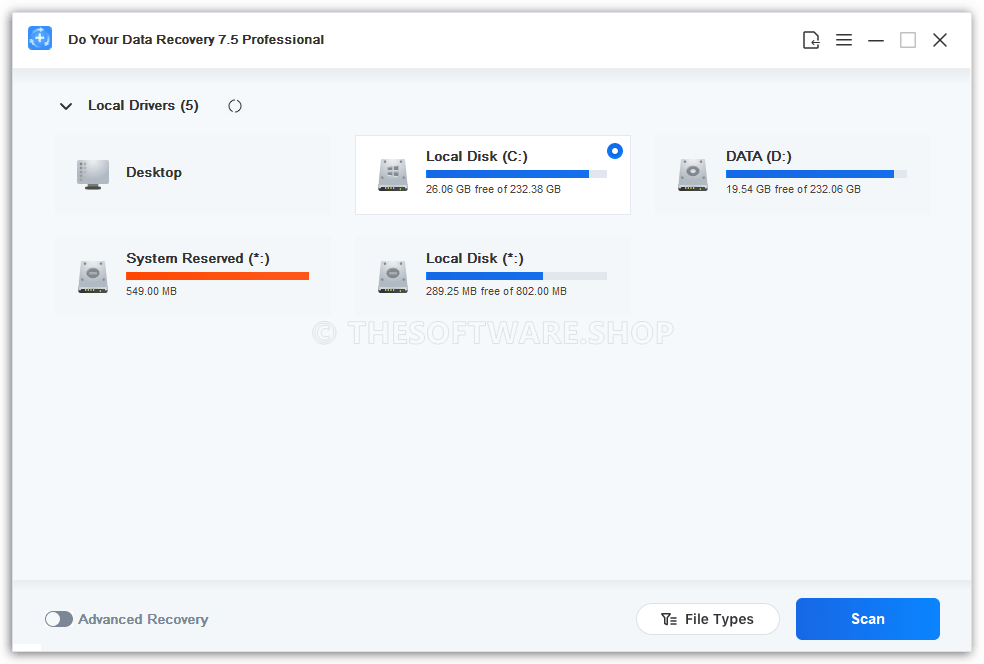
When files disappear, speed and clarity matter. This software uses a guided, step-based workflow: select a location, run a scan, preview results, then recover the items you want to keep. The vendor’s user guide describes this scan-and-preview approach and notes that saving recovered files requires activation for unlimited recovery.

Features that matter
Recovering data is rarely just about “deleted files.” Real-world loss often comes from formatting a drive, an OS crash, malware activity, power loss during file transfers, or a storage device that suddenly shows as unreadable. DoYourData Recovery Professional is designed to address these scenarios by scanning for recoverable traces and presenting results in a way that’s easy to filter and review.
Quick Scan for recently deleted data helps when the file system structure is still in good condition and you want results fast. The vendor explains that its quick mode looks for existing directory structures to locate recently lost files and can rebuild folder structure for easier retrieval.
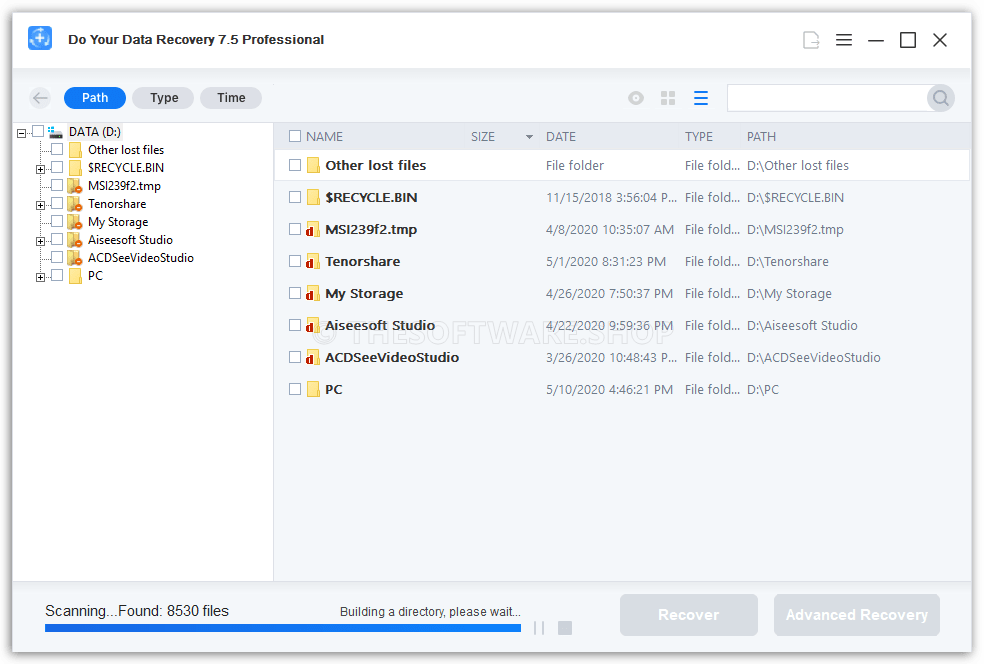
Deep Scan is intended for more severe cases, including older deletions, formatted volumes, and devices that need a thorough sector-by-sector check. The vendor describes its advanced mode as a deeper scan that reads the device sector by sector and usually takes longer, but can find more recoverable files.
Other practical benefits for day-to-day use:
- Preview before recovery so you can confirm a file is the right one prior to saving it.
- Support for a wide range of file categories, including documents, photos, video, audio, archives, folders, and more (helpful when you are not sure what is missing).
- A read-focused scanning approach paired with good recovery habits (covered below) to reduce the risk of overwriting data you still need.
Devices, files, and file systems
A recovery tool is only useful if it works with the devices you actually use. DoYourData Recovery Professional supports recovery from common Windows storage and removable media used at home and in small offices, including internal drives and portable devices.
The vendor’s documentation lists supported devices such as desktop/laptop/server computers, HDD, SSD, memory cards, digital cameras, USB flash drives, external hard drives, and RAID, along with other storage media. That coverage makes it suitable for recovering camera photos, deleted work documents from a laptop, or files lost from a USB drive used for transfers.
File system support is also key when you deal with different partitions, external drives, or cross-platform disks. The vendor’s user guide lists FAT12/16/32, exFAT, NTFS/NTFS 5, ReFS, and ext2/3/4 (plus additional formats) as supported file systems.
DoYourData Recovery Pro 8 Key Giveaway
DoYourData Recovery Pro 8 is available for $69.00 but for a limited time you can get Do Your Data Recovery Pro 8 full version with a lifetime license key for free!
- Click on the GET NOW button above and you will go to the deal page of Do Your Data Recovery Pro.
- On the deal page, go to the BUY NOW section and open the Giveaway tab
- On the giveaway tab, enter your email to open the offering box that contains the license key to activate the software.
- Read the hints on the offering box for the next instructions.
- Enjoy the full-featured software.
Activation, license terms, and best practices
This promotion is positioned as a giveaway for personal use: one license for one Windows PC, with lifetime use of the activated version during the promotion window. The giveaway terms also note that free lifetime updates and free lifetime technical support are not included, so it’s smart to keep your installer and license details stored safely after activation.
Activation tip: complete activation before the promo key expires, and do it on a stable connection. The vendor’s guide notes that activation requires a network connection, and it also suggests turning off VPN during activation if you run into issues.
Recovery best practices (important for better success rates):
- Do not install the recovery app onto the same drive you plan to recover from; installing can write new data and reduce the chance of successful recovery.
- Save recovered files to a different drive than the one you are scanning, so the restored data does not overwrite the remaining recoverable content. The vendor explicitly warns against saving recovered files back to the drive where the loss occurred.
- If the device is not detected, reconnect it and confirm it appears in Windows Disk Management before scanning.
- Start with Quick Scan for recent deletions, then run Deep Scan if results look incomplete.
Compatibility note: the vendor lists Windows 11/10/8/8.1/7/Vista and Windows Server 2003/2008/2012/2016/2019 in its published system requirements. The same document also lists at least 200 MB of disk space.
Conclusion
DoYourData Recovery Professional 8 is a practical giveaway choice for personal Windows recovery tasks, especially if you want a one-time activation and a lifetime license for the version provided during the promotion. Follow the safe recovery steps—scan first, preview carefully, and recover to a separate drive—to keep the best chance of restoring your files successfully.


![[NEW KEY #12] Giveaway – SoftOrbits Flash Drive Recovery: Free License Key | Easy-to-use Data Recovery Software – for Windows](https://thesoftware.shop/wp-content/uploads/thumbs_dir/SoftOrbits-Flash-Drive-Recovery-Review-Download-Discount-Coupon-rfosmsjtigfakp9rpxrt2jpfg24mrwzsxo6mvf8594.png)
![[NEW KEY #7] Giveaway – iTop Data Recovery Pro : Free License Code | Full Version – for Windows](https://thesoftware.shop/wp-content/uploads/thumbs_dir/iTop-Data-Recovery-Pro-Free-Key-Giveaway-Discount-Sale-rfosm28c73f9jmbzzme94qcit9qcse3bi1x1hbuil4.png)