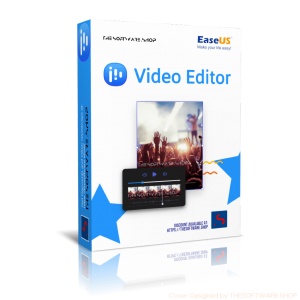
70% Off – EaseUS Video Editor PRO: 1 Year | A Simple but Powerful Video Creator & Editing Software – for Windows

Turn your biggest ideas into creative videos, tell unforgettable stories, and express yourself with confidence. Get EaseUS Video Editor PRO with a 1-year license, free upgrades, and ongoing support—now available with a 70% discount coupon.
EaseUS Video Editor PRO Review at a Glance
Creating high-quality videos has become essential for content creators, social media managers, educators, and businesses, but many struggle with complicated software that requires extensive training and technical expertise. The frustration of dealing with complex interfaces, limited creative resources, and time-consuming editing processes often prevents people from producing the professional-looking content they envision.
EaseUS Video Editor PRO solves these challenges by providing an intuitive, feature-rich platform that makes professional video editing accessible to everyone.

What is EaseUS Video Editor PRO
EaseUS Video Editor PRO is a comprehensive video editing software designed for Windows users who want to create cinema-quality videos without the steep learning curve associated with professional editing tools. This pro-level editing solution combines an accessible interface with advanced features, enabling both beginners and experienced editors to produce impressive results efficiently. The software provides a complete multimedia editing environment with over 400 songs and sound effects, 100+ video effects and transitions, 100+ text and subtitle options, 100+ colorful filters, and 100+ diverse stickers to fuel your creative vision.
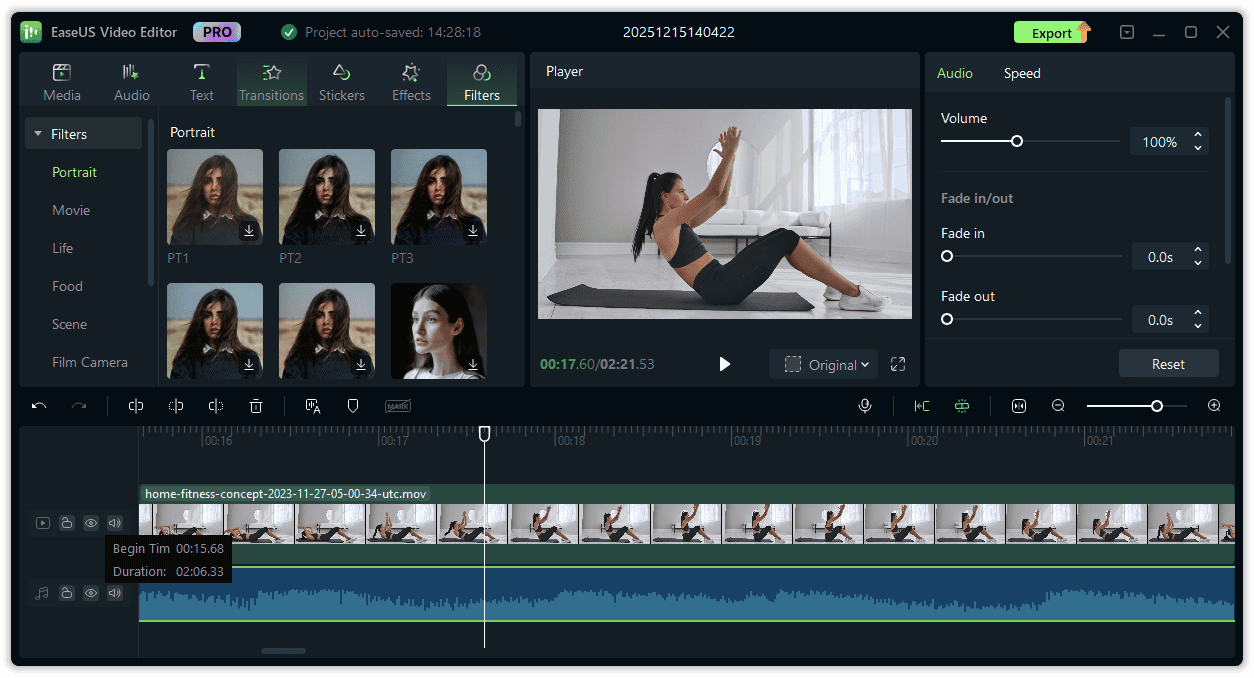
The platform supports multiple video and audio formats, giving you the flexibility to work with various media files without compatibility concerns. Whether you’re editing homemade videos, creating content for YouTube, producing marketing materials, or crafting educational tutorials, EaseUS Video Editor PRO delivers the tools necessary to bring your creative concepts to life. The software’s real-time preview capabilities allow you to see changes instantly, streamlining your workflow and saving valuable time during the editing process.
Built specifically for Windows 7/8/8.1/10/11 operating systems, this versatile editing solution handles everything from basic trimming and cutting to advanced features like AI-powered speech-to-text conversion and noise reduction. The software’s multi-track timeline enables you to layer multiple elements seamlessly, creating professional productions that captivate audiences and communicate your message effectively.
Key Benefits
Understanding why EaseUS Video Editor PRO should be your preferred choice for video editing requires examining the substantial advantages it offers to content creators across various industries and skill levels.
Accelerated Content Creation Process
The software’s user-friendly interface dramatically reduces the time needed to produce finished videos. Instead of spending hours learning complicated systems, you can start editing immediately with intuitive drag-and-drop functionality and clearly organized tools. The real-time preview feature eliminates the frustrating wait times associated with rendering, allowing you to make adjustments on the fly and see results instantly. This efficiency means you can produce more content in less time, maintaining consistency in your publishing schedule and meeting tight deadlines without compromising quality.
AI-Powered Efficiency

The Speech-to-Text technology automatically transcribes spoken dialogue into editable text, significantly reducing the manual effort required for subtitle creation. This automation not only saves time but also improves accessibility, allowing your content to reach hearing-impaired audiences and viewers who watch videos without sound. The Noise Reduction tool removes unwanted background sounds with minimal effort, ensuring your audio maintains professional quality without requiring expensive recording equipment or post-production services.
Professional Results Without Professional Costs
Compared to expensive alternatives like Adobe Premiere Pro, which costs $20.99 per month for individuals, EaseUS Video Editor PRO offers a lifetime license option at $79.95, providing permanent access to the software with free upgrades. This one-time investment eliminates recurring subscription fees while delivering professional-grade features including advanced color correction, motion effects, and a comprehensive library of creative assets. You gain access to the same quality of effects, transitions, and editing capabilities found in premium software without the financial burden of ongoing payments.
Versatility for Multiple Applications
Whether you’re creating content for social media platforms, producing business presentations, editing family videos, or developing educational materials, the software adapts to your specific needs. The Fill Background feature optimizes videos for different platform requirements, ensuring your content looks polished on Instagram, YouTube, TikTok, or professional presentations. This adaptability eliminates the need for multiple specialized tools, consolidating your video production workflow into a single, capable platform.
Clean, Professional Output
The Watermark Removal feature allows you to eliminate distracting logos and text from your videos, creating polished final products that reflect your brand identity. Combined with the extensive library of filters, effects, and customization options, you can establish a consistent visual style that distinguishes your content and builds recognition with your audience. The various output options and customizable export settings ensure your videos maintain optimal quality across different platforms and devices.
Suitable for All Skill Levels
Beginners appreciate the straightforward workflow and helpful tools that guide them through the editing process without overwhelming technical jargon. Meanwhile, more experienced editors can leverage advanced features like the multi-track timeline, precise speed control, and layering capabilities to create sophisticated productions. This scalability means the software grows with your skills, remaining relevant as your editing expertise develops rather than becoming obsolete as you progress.
Features
Key Features of EaseUS Video Editor Pro:
Below is a comprehensive collection of the powerful capabilities that make EaseUS Video Editor PRO an invaluable tool for video production, offering both fundamental editing functions and advanced creative options to support your content creation journey.
Main Features and Capabilities:
- Extract Audio: Pull crystal-clear audio from any video file effortlessly, allowing you to repurpose soundtracks, memorable dialogue, or ambient sounds for other projects or as standalone audio files
- Speech-to-Text (AI): Automatically convert spoken dialogue in your videos to editable text using advanced artificial intelligence, creating subtitles quickly and making your content searchable while saving significant time
- Automatic Transcription: The AI analyzes spoken words and generates accurate text without manual typing
- Accessibility Enhancement: Creates subtitles that make content available to hearing-impaired viewers and those watching without sound
- Time-Saving Automation: Eliminates hours of manual subtitle creation work
- Searchable Content: Converts video dialogue into text that can be indexed and searched
- Watermark Removal: Effortlessly remove watermarks, logos, or unwanted text from your videos to ensure clean, professional-looking content with an unobstructed viewing experience
- Noise Reduction: Clean up audio by removing unwanted background noise, improving speech clarity and overall sound quality to make your content more professional and pleasant to listen to
- Background Noise Elimination: Removes ambient sounds that detract from audio quality
- Speech Clarity Enhancement: Improves the intelligibility of dialogue and narration
- Professional Audio Quality: Achieves studio-quality sound without expensive equipment
- Automatic Processing: Applies noise reduction with minimal manual adjustment
- Fill Background: Perfect videos for social media uploads and professional presentations by selecting background styles that create polished, cohesive looks with instant backdrop transformations
- Platform Optimization: Adjusts aspect ratios and backgrounds for different social media requirements
- Style Selection: Choose from various background options to match your aesthetic
- Instant Transformation: Applies background changes quickly without complex editing
- Professional Polish: Ensures videos look complete and intentional on any platform
- Video Dubbing: Replace original audio or add voiceovers to improve storytelling without professional equipment, syncing new audio perfectly with visuals for dynamic, engaging content
- Audio Replacement: Substitute existing audio tracks with new recordings
- Voiceover Integration: Add narration to guide viewers through your content
- Synchronization Tools: Align audio precisely with visual elements
- Enhanced Storytelling: Create multilingual versions or improve narrative delivery
- Multi-Track Timeline: Drag and drop clips, music, and graphics into different tracks, adjusting timing and syncing all elements perfectly for complete control over your multimedia composition
- Layer Management: Work with multiple video, audio, and graphic layers simultaneously
- Drag-and-Drop Interface: Intuitively position elements on the timeline
- Precise Timing Control: Adjust the duration and placement of each element
- Synchronization Capabilities: Align multiple tracks perfectly for professional results
- Speed Control: Adjust video pace by slowing down footage to emphasize important moments or speeding it up to create energy and control narrative rhythm
- Slow Motion Effects: Highlight critical moments with reduced playback speed
- Fast Motion Creation: Compress time to maintain viewer engagement
- Narrative Pacing: Control the emotional impact through speed adjustment
- Easy-to-Use Tool: Simple interface for precise speed modifications
- Real-Time Preview: View changes instantly without waiting for rendering, allowing you to fine-tune edits efficiently and maintain creative momentum
- Instantaneous Feedback: See edits immediately as you make them
- Workflow Efficiency: Eliminate time-consuming render waits during editing
- Creative Flow: Maintain focus by avoiding interruptions from processing delays
- Quick Iterations: Test multiple approaches rapidly to find the best solution
- Color Correction: Adjust color levels, brightness, and visual tone to create the desired mood and ensure consistent color grading throughout your video
- Crop/Trim: Remove unwanted portions of your footage, focusing viewer attention on the most important elements while eliminating unnecessary content
- Merge: Combine multiple video clips into a single seamless production, creating longer narratives from separate footage segments
- Layer: Stack multiple visual elements to create composite effects, picture-in-picture displays, and sophisticated visual compositions
- Motion: Add dynamic movement to static elements, creating animated titles, graphics, and visual interest throughout your video
- Mosaic: Apply privacy protection by blurring or pixelating sensitive information, faces, or areas that require discretion
- Resize: Adjust video dimensions to meet specific platform requirements or aspect ratio specifications without quality loss
- Fade In/Out: Create smooth transitions at the beginning and end of clips, providing professional polish and seamless scene changes
- Zoom: Focus viewer attention on specific details by magnifying portions of your video or creating dynamic zoom effects
- Rotate: Correct orientation issues or create intentional rotational effects to add visual variety
- Picture-in-Picture: Display multiple video sources simultaneously, ideal for reaction videos, tutorials with demonstrations, or multi-perspective presentations
- Mix Audio: Blend multiple audio tracks, balancing music, dialogue, and sound effects for optimal audio composition
- Adjust: Fine-tune various video parameters including contrast, saturation, and exposure for optimal visual quality
- Cut: Remove unwanted sections from the middle of clips with precise frame-level accuracy
- Split: Divide clips into separate segments for individual editing or rearrangement within your timeline
- 400+ Songs and Sound Effects: Access an extensive library of royalty-free audio content to add professional soundtracks and effects to your productions
- 100+ Video Effects and Transitions: Choose from numerous visual effects and smooth transitions to create engaging, dynamic videos that maintain viewer interest
- 100+ Texts and Subtitles: Select from diverse text styles and subtitle options to add information, context, and accessibility to your videos
- 100+ Colorful Filters: Apply cinematic filters to establish mood, create visual consistency, and give your videos a professional, polished appearance
- 100+ Diverse Stickers: Add fun, engaging visual elements that increase viewer engagement and express creativity
- Multiple Format Support: Work with various video and audio formats without conversion hassles, ensuring compatibility with footage from different sources
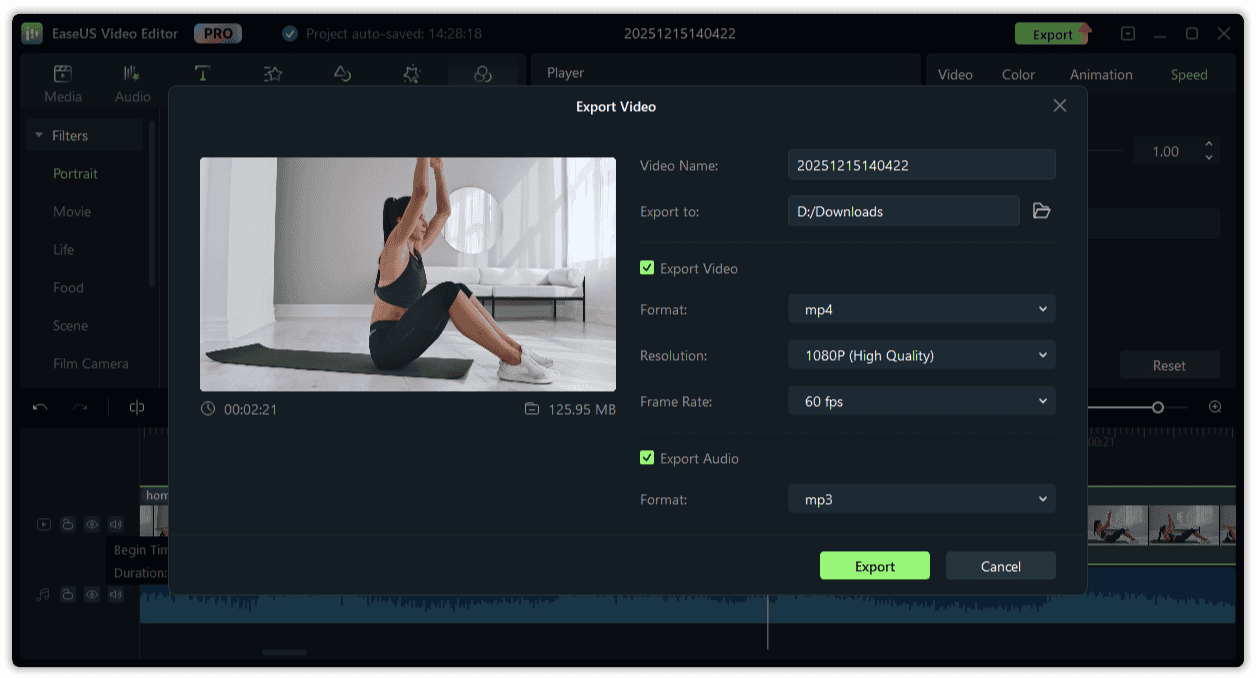
- Flexible Export Options: Output your finished videos as video files, audio files, or animated GIFs with customizable encoders and bitrate settings
Requirements
Before installing EaseUS Video Editor PRO, ensure your device meets the following technical specifications to guarantee optimal performance and a smooth editing experience:
- Processor: 500 MHz or faster processing speed
- RAM: A minimum of 1GB required, with 2GB recommended for Windows 8/8.1/10 systems
- Hard Disk Space: At least 1GB of available storage for software installation
- Optical Drive: CD-R/RW, DVD-R/RW, DVD+R/RW, or DVD+R DL drive for disc-based media
- Input Devices: Compatible keyboard, mouse, and pointing devices for navigation and control
System Requirements
EaseUS Video Editor PRO provides full compatibility with the following Windows operating systems, ensuring broad accessibility across different system versions:
- Windows® 7 (all editions)
- Windows® 8 (all editions)
- Windows® 8.1 (all editions)
- Windows® 10 (all editions)
- Windows® 11 (all editions)
Downloads
Experience the full capabilities of EaseUS Video Editor PRO according to your specific needs before making a purchase decision. Test the software’s comprehensive features by obtaining the free trial edition, which allows you to evaluate the interface, experiment with editing tools, and determine if the platform aligns with your content creation requirements.
This risk-free opportunity ensures you can make an informed decision about investing in the software, confirming that it meets your expectations before committing financially. Access the trial version to personally assess how the multi-track timeline, AI-powered features, and extensive creative resources work with your actual projects and workflow.
BUY NOW
EaseUS Video Editor PRO is available with exceptional value pricing options tailored to different usage patterns and budget considerations.
Pricing Options:
- Yearly License: $59.95 per year with one-year free upgrades and annual renewal
- Lifetime License: $79.95 one-time payment with permanent access and lifetime free upgrades
- Monthly License: $29.95 per month for flexible short-term usage
This investment provides exceptional value compared to subscription-based alternatives that accumulate costs over time, making EaseUS Video Editor PRO a financially smart choice for content creators committed to producing high-quality videos consistently.
Currently, you can obtain the EaseUS Video Editor PRO license through our exclusive promotional offer up to 70% Off, providing substantial savings for a limited time! This special opportunity makes professional video editing more accessible than ever, delivering premium features at a competitive price point.

- One license for one computer
- Use the software full version for 1 year
- Lifetime free upgrades
- Free Technical Support by EaseUS
- 30-Day Money-Back Guarantee
Platform: Windows
Pro-level video editor software for beginners and pros
- One license for one computer
- Use the software full version for a lifetime
- Lifetime free upgrades
- Free Technical Support by EaseUS
- 30-Day Money-Back Guarantee
Platform: Windows
- One license for one computer
- Use the software full version for 1 month
- Lifetime free upgrades
- Free Technical Support by EaseUS
- 30-Day Money-Back Guarantee
Platform: Windows

Movavi Video Suite 2025: Lifetime License BEST SELLER

VSDC Video Editor Pro: 2-PC 1-Year License BEST SELLER
Movavi Video Editor 2025: Lifetime License BEST SELLER

ApowerEdit (Apowersoft Video Editor): Lifetime License BEST OFFER

Fast Video Downloader PRO BEST SELLER

Allavsoft Video Downloader Converter BEST SELLER

Ondesoft Spotify Music Converter GIVEAWAY
EaseUS Video Editor PRO Key Giveaway
Available now: Free License Code for a Liited time!

Also, check out the latest software giveaways that are available here on the software giveaway page.
NOTE:
– All prices shown here are in listed USD (United States Dollar). Your local currency will be converted automatically, You can also switch to any other currencies during the checkout process.
– The discount coupon & your local VAT (Value added tax – if available, vary by country) will be applied at checkout automatically.
– The order(s) for the software are processed by the CleverBridgecompany. This company accepts paying on-line, via PayPal, by fax, bank-wire transfer, check, cash, or purchase order.
– You will receive a notification e-mail from CleverBridge/EaseUSwhen your order is processed which will also include your license information.
– Such promotional programs are subject to change without notice, from time to time in our sole discretion.
– Data may vary based on different system or computer.
Thanks for reading EaseUS Video Editor PRO Review & Enjoy the discount coupon. Please Report if EaseUS Video Editor PRO Discount Coupon/Deal/Giveaway has a problem such as expired, broken link, sold out, etc while the deal still exists.


![[ENDING SOON] Giveaway – AnyMP4 Video Repair: Free 1-year License Code | A Damaged-Video Fixer Tool – for Windows](https://thesoftware.shop/wp-content/uploads/thumbs_dir/ANYMP4-Video-Repair-Review-Download-Free-License-Key-Giveaway-rsy902fozpca6uy1ojqpa8xjtjzjwxrg4mgpem28wo.jpg)