75% Off – Folder Preview Pro: Lifetime License | Quick Look Folder Preview Tool, Archive Viewer for ZIP RAR 7z TAR GZ BZ2 – for Mac

Press Space on any folder and see what’s inside. Get Folder Preview Pro today for just $2.50 (regular price $9.99) and save 75% before the offer ends!
✔ Lifetime License. ✔ Free Product Updates ✔ Customer Support
BUY NOW
Folder Preview Pro normally costs $9.99, but you can now get it for just $2.50. That is a 75% saving on the regular price. This discounted offer is available for a limited time, so order now to lock in the lowest price.

Quick Look Folder Preview Tool, Archive Viewer for ZIP RAR 7z TAR GZ BZ2, Press Space Bar to See Inside Folders, macOS 12+ Lifetime License
- Please Notes:
- You may be directed to the bundle page, but it is possible to purchase the software individually.
- If you're having difficulty locating the product on the bundle page, please utilize the browser's search feature.
- Get an additional $3 discount on all orders more than $30.
- LEGITIMATE: All apps are authentic and have original licenses obtained directly from the creators via contracts.
- INSTANT ACCESS: Fully activated macOS Apps & Windows Software with instant downloads & license key access.
- Device Activation: 2 Devices
- Major & Minor Updates Included
- Lifetime License
Platforms: Mac
Folder Colorizer for Mac EXCLUSIVE

Nektony Duplicate File Finder BEST OFFER

Softorino Universal License BEST OFFER

RenameMe Mac App BEST OFFER

Tidier BEST OFFER
Folder Preview Pro Giveaway
Unavailable at this moment!

To access the giveaway, kindly provide your email address. Please refrain from closing this page after signing in to receive instructions on how to access the offer at no cost.
NOTES:
– All prices shown here are in listed USD (United States Dollar).
– Such promotional programs are subject to change without notice, from time to time in our sole discretion.
– Data may vary based on different systems or computers.
Folder Preview Pro Review at a Glance
The Problem Every Mac User Knows
You select a folder in Finder and press the Space bar, expecting a quick look. Nothing useful appears. Quick Look shows only a generic folder icon and a size, so you have to open the folder in yet another Finder window just to find one file. Archives are worse. You extract a ZIP or RAR file to check its contents, wait for it to unpack, and then discover it was the wrong one. These small interruptions add up over a working day, especially for designers, editors, developers, and anyone who handles large numbers of files.
Meet Folder Preview Pro, A Faster Way to Look Inside!
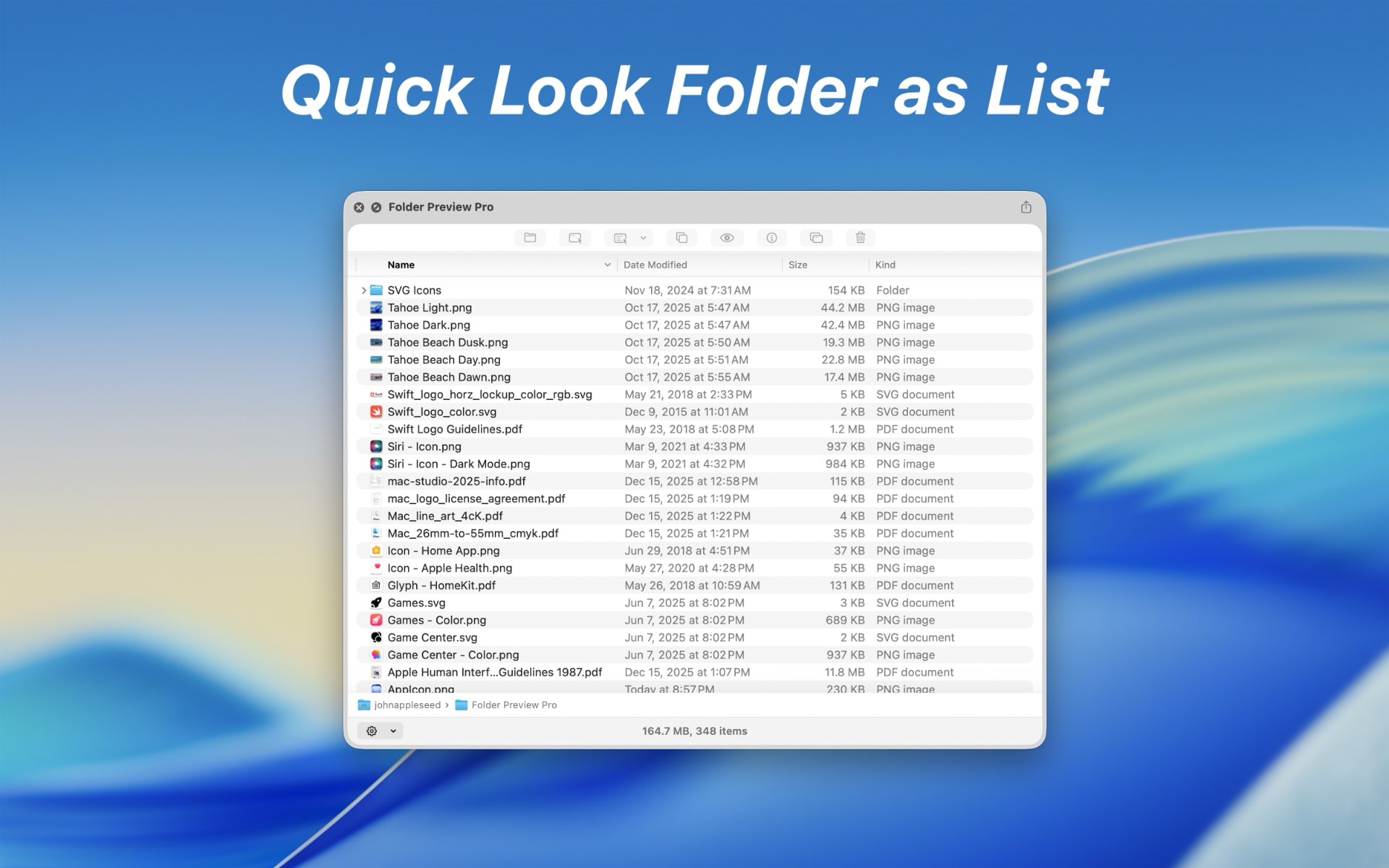
Folder Preview Pro by Anybox Ltd. fixes this gap in macOS. It brings Quick Look to folders and archives, so pressing Space shows every file with a thumbnail. You can move through subfolders, switch between list and icon views, and open or copy the file you need without leaving the preview window. The experience feels like Finder, so there is nothing new to learn.
What Is Folder Preview Pro?
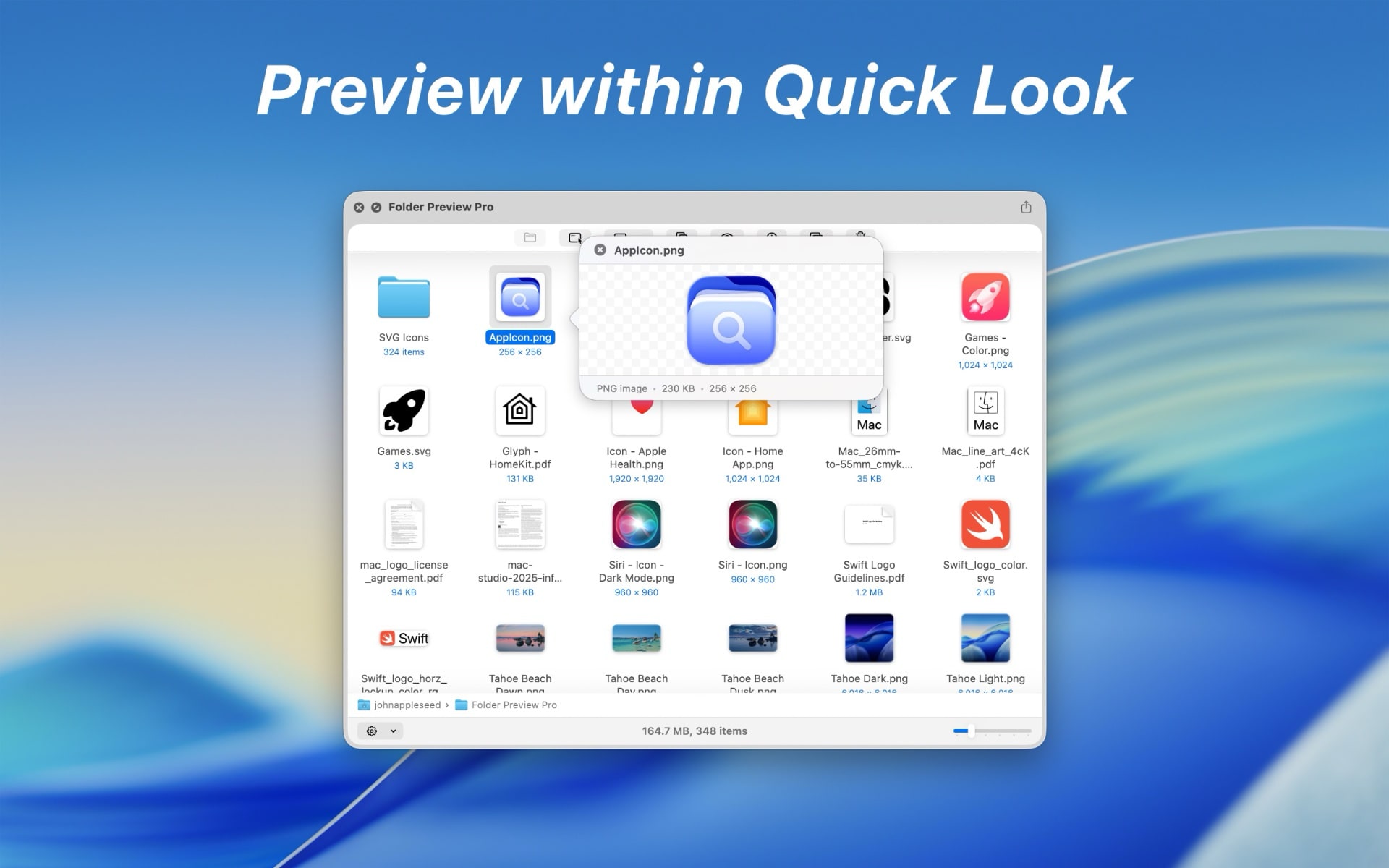
Folder Preview Pro is a macOS Quick Look extension that adds folder and archive previews to the system. Standard Quick Look handles single files well, but it does not show what a folder contains. This tool fills that gap. When you press the Space bar on a folder, a preview window opens with thumbnails for all file types that Finder supports. You can browse the files in list view or icon view, depending on how you like to work.
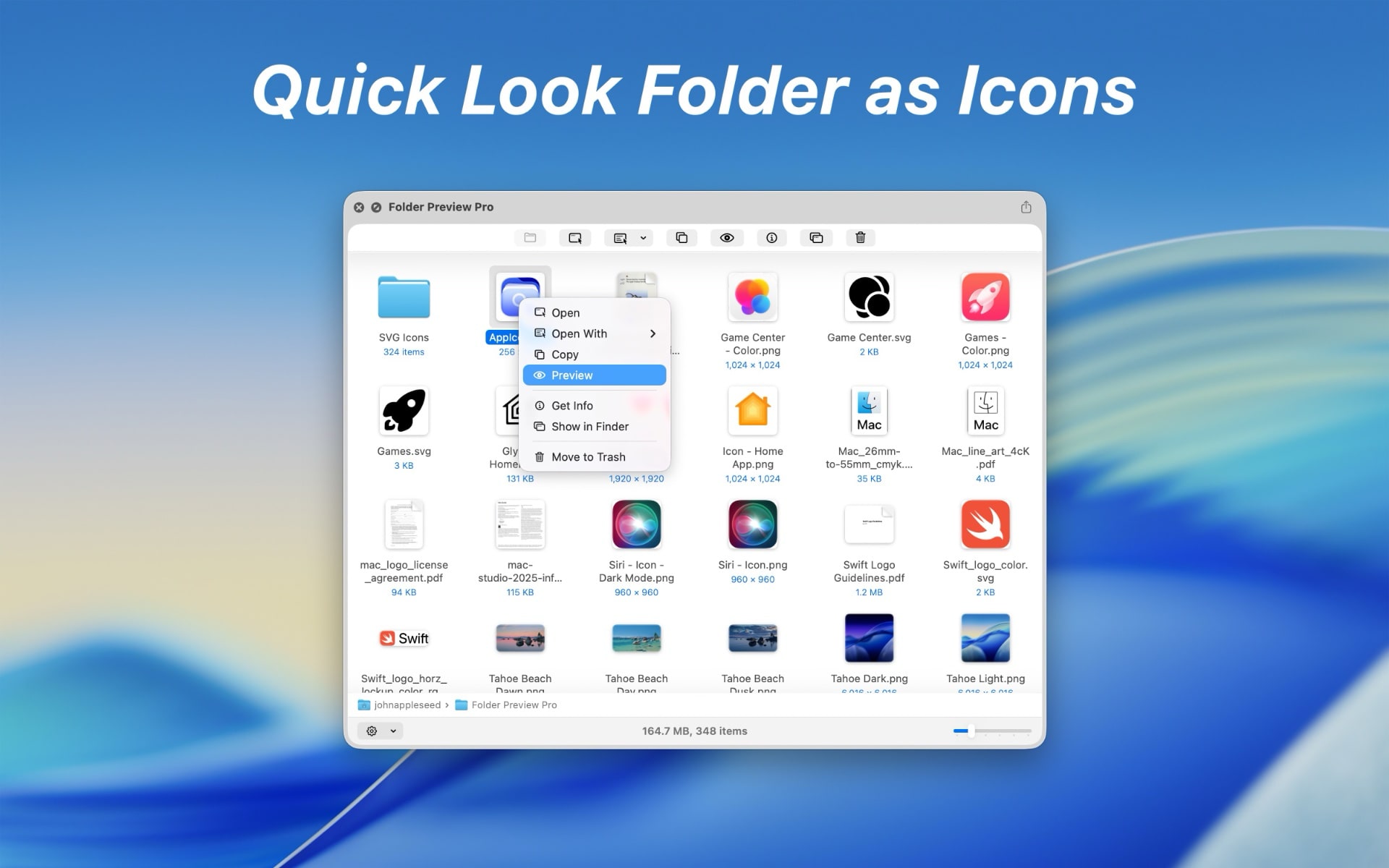
The same preview works for archive files in ZIP, RAR, 7z, TAR, GZ, and BZ2 formats. You can check what is inside before you unpack anything, which saves time and disk space. You can double-click a file to open it, right-click to copy it or open it with another app, and drag it from the Quick Look window straight into another application.
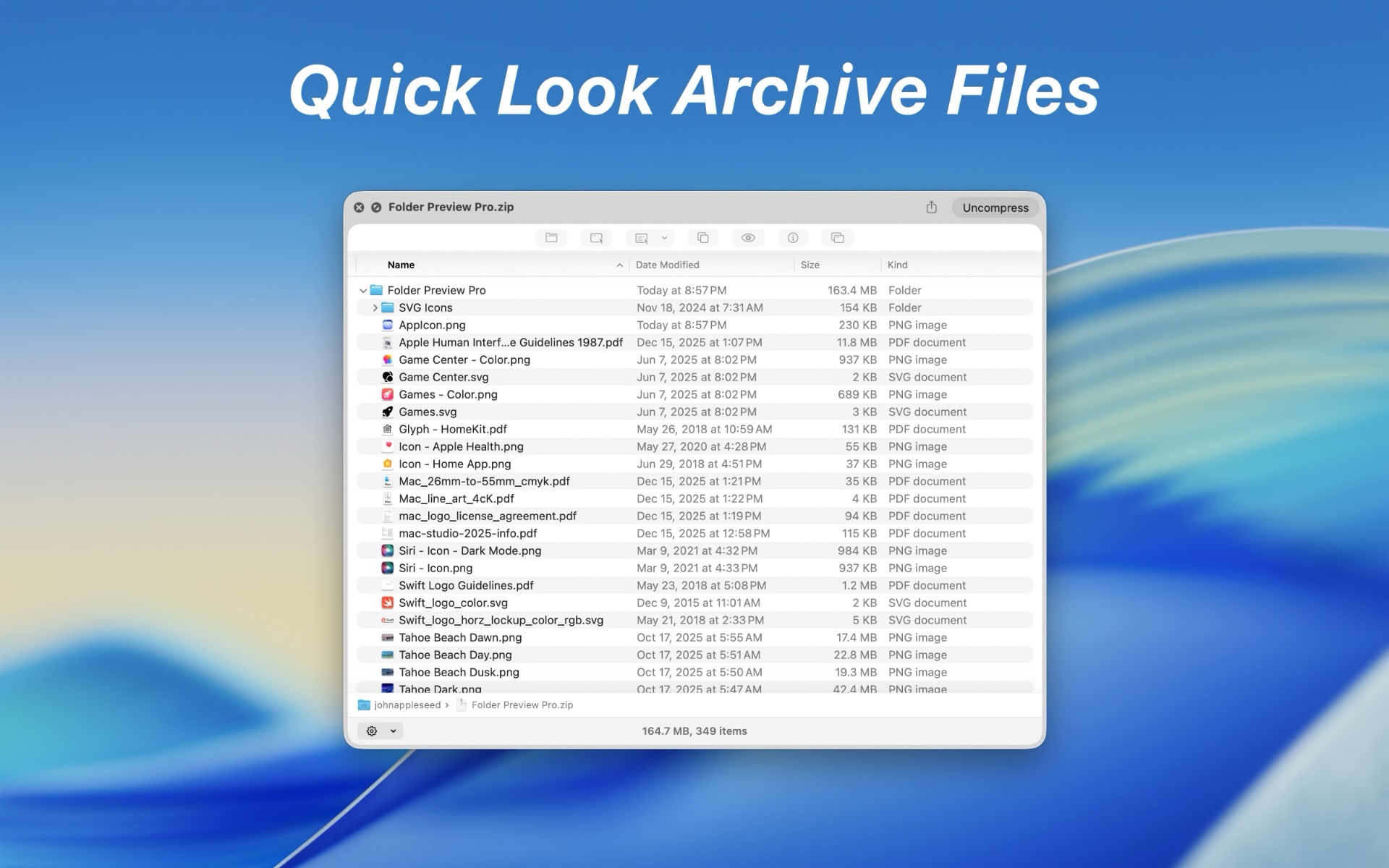
One point to note: to preview archives, the app extracts them to a temporary location on your disk. Depending on the size and number of archives you preview, this can use a noticeable amount of space. These temporary files are deleted automatically after a set period, so you do not need to clean them up yourself.
Why Choose Folder Preview Pro
Folder Preview Pro does one job and does it well. It is a lightweight Mac utility with no complicated setup. It works in Finder and in supported third-party file managers, so your habits stay the same. It also supports Apple Silicon and Intel Macs, so it runs on both new and older hardware. The lifetime license with major and minor updates included means you pay once and keep receiving improvements.
Who Can Benefit
- Designers and photographers who keep project folders full of images, PSD files, and exports.
- Video editors who sort footage, music, and assets across nested directories.
- Developers and IT professionals who inspect archives and build folders every day.
- Students and researchers who download course materials, papers, and compressed bundles.
- Digital marketers and content creators who manage campaign assets, templates, and client deliveries.
- Office professionals who need to find one document inside a large shared folder.
Key Benefits
Folder Preview Pro saves time on a task you repeat many times a day. The points below describe what you gain in practice.
- Save time: Check a folder’s contents with one key press instead of opening a new window.
- Avoid needless extraction: Preview archives first and skip the “why did I extract this?” moment.
- Keep your focus: Open, copy, and preview files without leaving the Quick Look window.
- Reduce clutter: Fewer Finder windows stay open on your desktop.
- Work with your existing tools: Use it in Finder and in supported file managers such as ForkLift, Path Finder, and Commander One.
- Find files faster: Thumbnails make images, documents, and media easy to recognize at a glance.
- Move files easily: Drag and drop from the preview window into any other app.
- Pay once: A lifetime license with major and minor updates avoids recurring fees.
- Use it in your language: The interface supports English, French, German, Italian, Japanese, Korean, Simplified Chinese, Spanish, and 30 more languages.
Key Features
Below is a comprehensive list of the key features that make Folder Preview Pro a useful addition to your Mac:
- Look Inside Folders – Press the Space bar on any folder to see its contents right away.
- Thumbnail Previews – Every file appears with a thumbnail for all file types Finder supports.
- Nested Folder Navigation – Move into subfolders from inside the Quick Look window without opening another Finder window.
- List and Icon Views – Switch between a compact list and a visual icon layout to suit the folder.
- Peek Inside Archives – Preview compressed files before you unpack them.
- Wide Format Support – View the contents of ZIP, RAR, 7z, TAR, GZ, and BZ2 archives.
- Pre-Extraction Check – Confirm what an archive holds before you commit to unpacking it.
- Automatic Temporary Cleanup – Temporary files created for previews are deleted after a certain period of time.
- Act Right There – Handle files directly from the preview window.
- Double-Click to Open – Open any file or folder with a double-click, just as in Finder.
- Right-Click Copy – Copy a file from the context menu without locating it in Finder.
- Open With Another App – Choose a different application for a file from the right-click menu.
- Preview a File in Place – Right-click a file inside a folder to preview it on the spot.
- Drag and Drop – Move files out of the preview window and into other apps.
- Drag From Quick Look – Drag any file from the Quick Look window to a destination of your choice.
- Drop Into Other Apps – Place the file in an email, design project, document, or chat window.
- Works Beyond Finder – Use the same preview in supported third-party file managers.
- Finder Integration – Press Space in Finder for the standard Quick Look experience, now with folder support.
- Third-Party Manager Support – Use it in ForkLift, Bloom, Path Finder, Commander One, and QSpace.
- Broad Compatibility – Run the app on a wide range of Macs.
- Universal Binary – Runs natively on both Apple Silicon and Intel Macs.
- macOS 12 or Later – Supports current and recent macOS releases starting from version 12.0.
- Multilingual Interface – Use the app in your preferred language.
- Major Language Coverage – English, French, German, Italian, Japanese, Korean, Simplified Chinese, and Spanish are included.
- 30 Additional Languages – More than 30 other languages are supported.
- License and Updates – Buy once and stay current.
- Two-Device Activation – Use one license on up to 2 devices.
- Lifetime License – Pay one time with no subscription.
- Major and Minor Updates – All future updates are included at no extra cost.
Requirement List
Before you buy, check that your Mac meets the following requirements for running Folder Preview Pro smoothly:
- Operating system: macOS 12.0 or later
- Processor: Universal app for Apple Silicon and Intel
- Languages: English, French, German, Italian, Japanese, Korean, Simplified Chinese, Spanish, and 30 more
- Device activation: 2 devices per license
- Disk space: Extra temporary space may be needed when previewing large archives
Downloads
Test Folder Preview Pro with your own folders and archives before you decide. Check the product page for a trial or demo edition, and if one is offered, download it and press the Space bar on a folder to see the difference. (No trial details were included in the product information supplied, so confirm availability on the official page.) Use the button below to visit the page.
or
Buy now, the price start from:
Thank you for reading Folder Preview Pro review, and enjoy the discount coupon. If you notice any issues with Folder Preview Pro discount coupon, deal, or giveaway—such as an expired offer, broken link, or sold‑out promotion—please let us know while the deal is still available.