

Overcome the physical limitations of computer screens by creating a scrolling virtual desktop. Get GiMeSpace Desktop Extender 1D with a license key for free!
The Exclusive Giveaway Opportunity
For a strictly limited time, computer users have the unique chance to acquire the GiMeSpace Desktop Extender 1D completely free of charge. Normally priced at $15.00, this software is currently being offered with a full license key through the Giveaway of the Day promotion. This deal represents a significant saving for anyone looking to upgrade their digital workspace without spending money on expensive hardware. By securing this license now, you gain permanent access to a tool that radically changes how you interact with your computer screen. This is not merely a trial version or a demo; it is the fully functional standard edition of the virtual desktop manager. Users who act quickly can bypass the cost barrier and immediately begin enjoying the benefits of a limitless desktop environment. This offer is time-sensitive, meaning that once the promotion window closes, the software will return to its regular price. It is a rare opportunity to equip your Windows system with a powerful utility that pays dividends in saved time and reduced frustration every single day.
Overcoming the Limits of Physical Screens
Working on a computer often involves juggling multiple applications simultaneously. Whether you are a student researching for a paper, a programmer writing complex code, or a business professional managing spreadsheets and emails, the physical size of your monitor acts as a hard limit on your efficiency. When the screen fills up, you are forced to minimize windows, shuffle through the taskbar, or constantly Alt-Tab between tasks. This constant context switching breaks concentration and slows down workflows. While desktop computers can support multiple physical monitors, this hardware solution is expensive, bulky, and energy-consuming. Laptop users face an even stricter limitation, confined to a small screen that makes multitasking difficult.
GiMeSpace Desktop Extender 1D offers a software-based solution that removes these barriers completely. It provides a scrolling virtual desktop that allows you to place windows side-by-side without being constrained by the physical edges of your display.
A Continuous Horizontal Workspace
The core functionality of GiMeSpace Desktop Extender 1D centers on its ability to create a seamless, horizontally expanding workspace. Standard virtual desktop managers, such as the ones built into modern operating systems, segregate your open programs into isolated “rooms” or distinct desktops. To see a different set of windows, you must switch contexts entirely.
GiMeSpace Desktop Extender 1D takes a different approach by treating your desktop as a single, continuous canvas. This canvas extends horizontally as far as you need it to go. You can place your web browser on the left, your document editor in the center, and your email client on the right. Accessing these applications does not require clicking buttons or pressing hotkeys to switch screens. Instead, you perform a natural, intuitive action: moving your mouse. When your cursor reaches the edge of your physical screen, the desktop smoothly scrolls to reveal the hidden space, just as if you were panning a camera across a panoramic image.
Replicating the Multi-Monitor Experience
For users who are accustomed to dual or triple monitor setups at their office, transitioning to a single laptop screen while traveling or working from home can be jarring. The loss of screen real estate feels restrictive. GiMeSpace Desktop Extender 1D effectively emulates the functionality of a multi-monitor array without requiring extra hardware.
By pushing the boundaries of your desktop outward, it mimics the setup of having monitors placed side-by-side. You can slide your mouse from one “monitor” area to another effortlessly. This makes it the ideal tool for digital nomads, business travelers, and anyone who needs to maintain high productivity levels outside of their primary workspace. You get the operational benefits of a massive command center on a device that fits in your backpack.
Intelligent Window Management and Auto-Arrange
Managing a virtually infinite desktop requires smart tools to keep things organized. GiMeSpace Desktop Extender 1D includes features specifically designed to help you track your open applications. One of the standout features is the “Auto-arrange” option.
With a single command, the software automatically aligns all your open windows next to each other horizontally. This eliminates the hassle of manually resizing and dragging windows into position. It creates an instant, organized panorama of your active tasks.
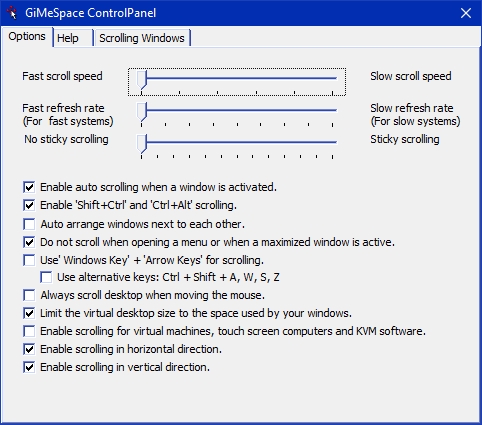
Furthermore, the software is intelligent enough to manage the size of your virtual space. You can configure it to limit the virtual desktop size to the space actually used by your application windows. This prevents you from scrolling into empty, unused void space, ensuring that your navigation remains tight and efficient.
Persistence and Customization
A major pain point with many desktop utilities is that they reset when you reboot your computer, forcing you to reconstruct your workspace from scratch. GiMeSpace Desktop Extender 1D addresses this by offering robust save and restore capabilities.
The software remembers your window positions and sizes, allowing you to pick up exactly where you left off after a restart. This persistence is crucial for professionals who work on long-term projects and need their tools ready immediately.
Additionally, the software supports the multiple desktop interfaces found in Windows 10 and 11, integrating smoothly with the operating system’s native architecture while adding its unique scrolling capabilities on top.
Optimization for Modern and Legacy Systems
The software is engineered to be lightweight and unobtrusive. It runs quietly in the background without consuming significant system resources, making it suitable for powerful modern workstations as well as older laptops running Windows XP.
Because the virtual desktop relies on efficient rendering, it does not cause system lag or drain laptop batteries the way powering an external portable monitor would. This efficiency makes it a green, cost-effective alternative to hardware upgrades.
You gain the utility of extra pixels without the electricity bill or the carbon footprint associated with manufacturing and powering additional electronic displays.
Crucial Configuration for Best Results
To ensure the smoothest experience, GiMeSpace Desktop Extender 1D requires a specific adjustment to Windows settings. Modern Windows versions use a feature called “Snap” which attempts to lock windows to the edges of the physical screen.
Since GiMeSpace expands the desktop beyond these physical edges, the “Snap” feature can interfere with the intended scrolling behavior. Users are highly recommended to disable “Snap” to allow for unrestricted movement. This is easily done by navigating to Windows Settings, selecting “System,” then “Multitasking,” and turning off the Snap toggle. Once this conflict is removed, windows can slide freely across the virtual horizon, and the software’s internal window management tools take over to provide a superior organizing experience.
A Specialized Tool for Focused Workflows
While there are other editions of GiMeSpace that offer vertical scrolling or window resizing (such as the 2D edition), the 1D edition is purpose-built for simplicity and specific horizontal workflows. It is the “standard” edition, focusing purely on the left-to-right expansion that most users find intuitive. This linear approach aligns with how we read and how timelines are structured in video or audio editing software.
For traders watching stock tickers, writers cross-referencing sources, or administrators monitoring log files, the horizontal layout is often the most logical arrangement. By focusing on this single dimension, the 1D edition provides a streamlined, clutter-free interface that does exactly what it promises without overwhelming the user with unnecessary complexity.
Special Offers

GiMeSpace Desktop Extender 3D BEST OFFER

Tipard Screen Capture: Lifetime License BEST OFFER

Dock Star BEST OFFER
Parallels Desktop for Mac BEST SELLER

iTop Easy Desktop PRO BEST OFFER

Winstep Nexus Ultimate BEST OFFER
![[PRO KEY #11] Giveaway – AnyViewer 5 Pro / Solo: Free 1-year License Key | A Comprehensive Remote Access, Remote Control, and Remote Support Software – for Windows](https://thesoftware.shop/wp-content/uploads/thumbs_dir/AnyViewer-Pro-review-download-Key-Giveaway-247kvhsh0ax8o4hdghz2seib24857cbrnyy79q49kgpg.png)
AnyViewer Professional GIVEAWAY
Giveaway
GiMeSpace Desktop Extender 1D is available for $15.00, but you can now get GiMeSpace Desktop Extender 1D with a license key for free!
The giveaway is on the deal page of the GiMeSpace Desktop Extender 3D.
- Click the GET NOW button above to visit the deal page for the product, GiMeSpace Desktop Extender 3D.
- On the GiMeSpace Desktop Extender 3D deal page, scroll down to the BUY NOW section and open the Giveaway tab.
- That’s it. The GiMeSpace Desktop Extender 1D giveaway is located in the Giveaway tab within the BUY NOW section.
- Simply enter your email address to unlock the offer box, which contains the license key.
- Read the HINTS shown in the offer box for further instructions.
- Done. Enjoy the full features!
Conclusion
GiMeSpace Desktop Extender 1D giveaway is a rare chance to radically improve your computing experience without cost. By breaking the physical barriers of your monitor, this software grants you the freedom of an infinite workspace, boosting efficiency and reducing the stress of a cluttered screen. It effectively replicates the advantages of a costly multi-monitor setup through a lightweight, intelligent software solution. With features like seamless scrolling, auto-arrange, and session restoration, it turns even the smallest laptop screen into a panoramic command center. Do not miss this limited-time opportunity to download the standard edition for free. Claim your license key today, disable Windows Snap for the best results, and enjoy the limitless potential of your new virtual desktop.
GiMeSpace Desktop Extender 1D is an essential utility for anyone feeling constrained by their screen size, offering a practical and economical solution to workspace limitations. By enabling a scrolling, unlimited horizontal desktop, it allows users to organize their digital environment more effectively, maintain focus, and replicate the productivity of a multi-monitor setup on a single screen. With its low resource impact, intuitive mouse-based navigation, and intelligent window management features, it represents a significant upgrade to the standard Windows interface. Try it today to stop managing windows and start managing your work.
Virtual Desktop Manager, Screen Extender, Horizontal Scrolling Desktop, Multi Monitor Alternative, Windows Productivity Tool, Desktop Pan and Scan, Laptop Screen Expander, Unlimited Workspace, Infinite Desktop, Windows 11 Utility, Seamless Scrolling, Software Monitor, Wide Screen Simulator, Virtual Screen, Desktop Organization, Window Management Software, Panoramic Desktop, Workspace Efficiency, Travel Tech Tool, Single Monitor Multitasking, Digital Nomad Gear, Screen Real Estate, System Tray Utility, Desktop Navigation, Windows Interface Utility.





![[NEW KEY #2] Giveaway – iTop Easy Desktop PRO v4.x: Free License Key | Full Version – for Windows](https://thesoftware.shop/wp-content/uploads/thumbs_dir/iTop-Easy-Desktop-PRO-Review-Download-Discount-Coupon-rfosnoibytn1jfzcjbl4fbn3n5r41mioe2d56twrdk.png)

