93% Off – Hydra Dev Studio: Lifetime License | All-in-One Mac Developer Workspace | Database Management, SFTP, FTP, SSH, Git Version Control, Cloud Storage, Remote File Editing & File Comparison -for Mac

Bring databases, remote servers, cloud storage, SSH connections, Git repositories, file transfers, and code editing together in one native macOS application. Get Hydra Dev Studio with a Lifetime License at a 93% Discount!
✔ Lifetime License. ✔ Free 1-year Product Updates ✔ Customer Support
BUY NOW
Hydra Dev Studio is available for $99.00. But, you can now get Hydra Dev Studio with a lifetime license that includes 1-year updates and support at a 93% Discount! This offer is available for a limited time!

All-in-One Mac Developer Workspace for Database Management, SFTP, FTP, SSH, Git Version Control, Cloud Storage, Remote File Editing & File Comparison
- Please Notes:
- You may be directed to the bundle page, but it is possible to purchase the software individually.
- If you're having difficulty locating the product on the bundle page, please utilize the browser's search feature with keyword: ''Hydra Dev Studio'' without quotation marks.
- Get an additional $3 discount on all orders more than $30.
- LEGITIMATE: All apps are authentic and have original licenses obtained directly from the creators via contracts.
- INSTANT ACCESS: Fully activated macOS Apps & Windows Software with instant downloads & license key access.
- IMPORTANT: Since the deal vendor does not provide expiration dates, buy the deal while it’s still available.
- Device Activation: 1 user, on all of their own Macs
- One license for one person, on all of their own Macs
- Perpetual license: every version released in your first year is yours to keep
- Major & Minor Updates Included for 1 year
- Lifetime License
Platforms: Mac

Spencer Mac App BEST OFFER

Fluent Mac App BEST OFFER

Commander One Pro BEST OFFER

Voibe BEST OFFER
Hydra Dev Studio Key Giveaway
Unavailable at this moment!
To access the giveaway, kindly provide your email address. Please refrain from closing this page after signing in to receive instructions on how to access the offer at no cost.
NOTES:
– All prices shown here are in listed USD (United States Dollar).
– Such promotional programs are subject to change without notice, from time to time in our sole discretion.
– Data may vary based on different systems or computers.
Hydra Dev Studio Review at a Glance
Modern software development involves much more than writing code. Developers frequently need to connect to databases, access remote servers, transfer files, manage cloud storage, inspect configuration files, compare project versions, and maintain source control. Handling these responsibilities through separate applications can make everyday work unnecessarily complicated. Switching between a database client, FTP application, terminal, Git interface, and cloud storage browser interrupts concentration and creates additional steps in otherwise straightforward tasks.
Hydra Dev Studio addresses this challenge by bringing essential development connections and tools together in one native macOS workspace. Instead of maintaining several independent applications, developers can organize their databases, remote file servers, cloud storage accounts, SSH sessions, and Git repositories in a centralized library. Each connection opens in its own tab within the same application window, making it easier to move between different parts of a project.
What Is Hydra Dev Studio?
Hydra Dev Studio is a native macOS developer workspace that combines database management, remote file access, cloud storage, SSH connections, Git version control, editing, and file comparison in one application. It is designed for developers who need to work with multiple technologies and infrastructure resources throughout their working day.
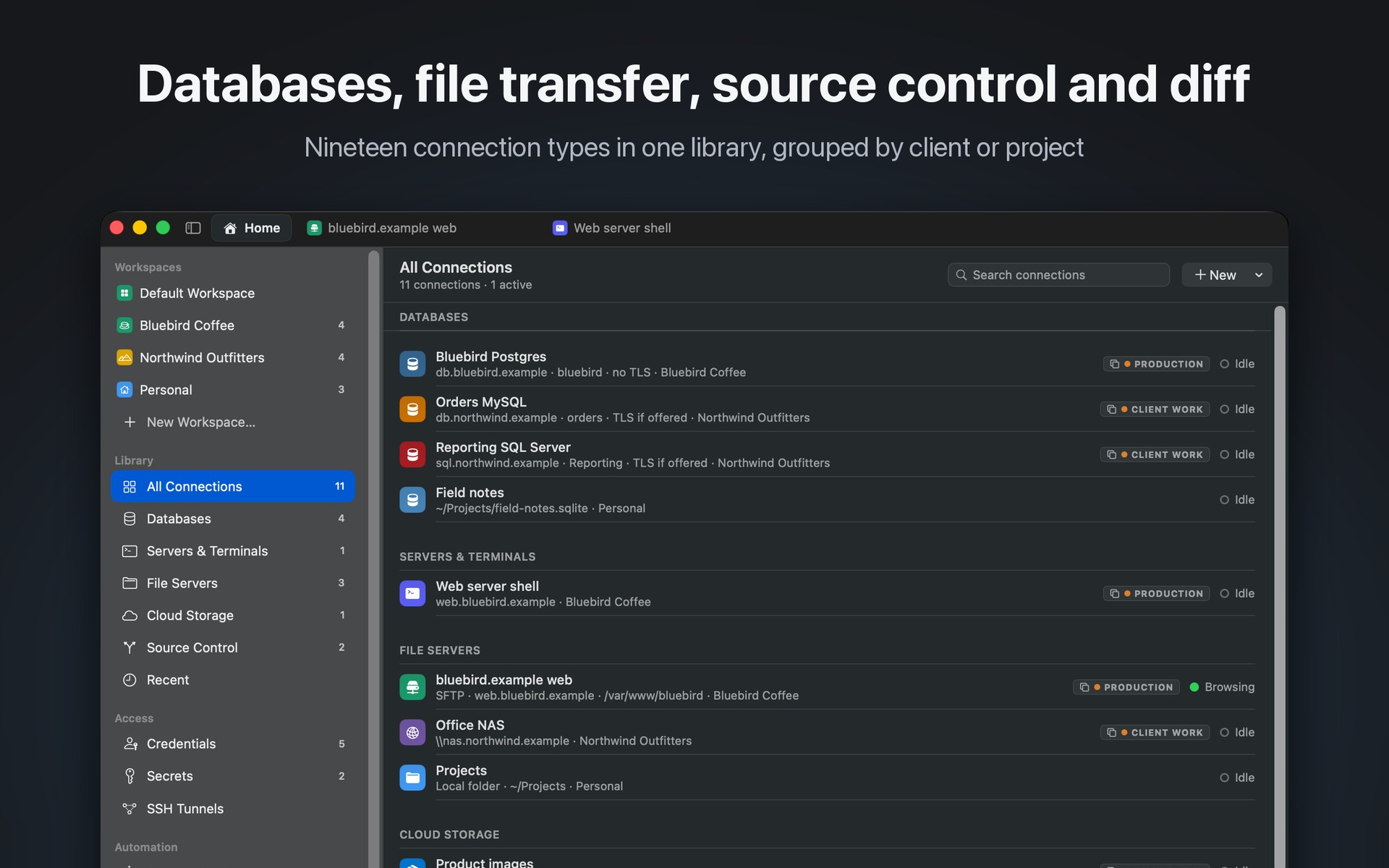
Rather than functioning as a simple connection manager, Hydra provides an integrated environment for performing practical development tasks. Users can establish connections, organize them into workspaces, browse files, edit remote configurations, execute database queries, manage repositories, and compare local and remote project contents.
One of its defining characteristics is its centralized connection library. Developers can group related resources into workspaces, apply tags, save favourites, and search their connections. This organization makes it easier to manage resources belonging to different applications, clients, environments, or projects.
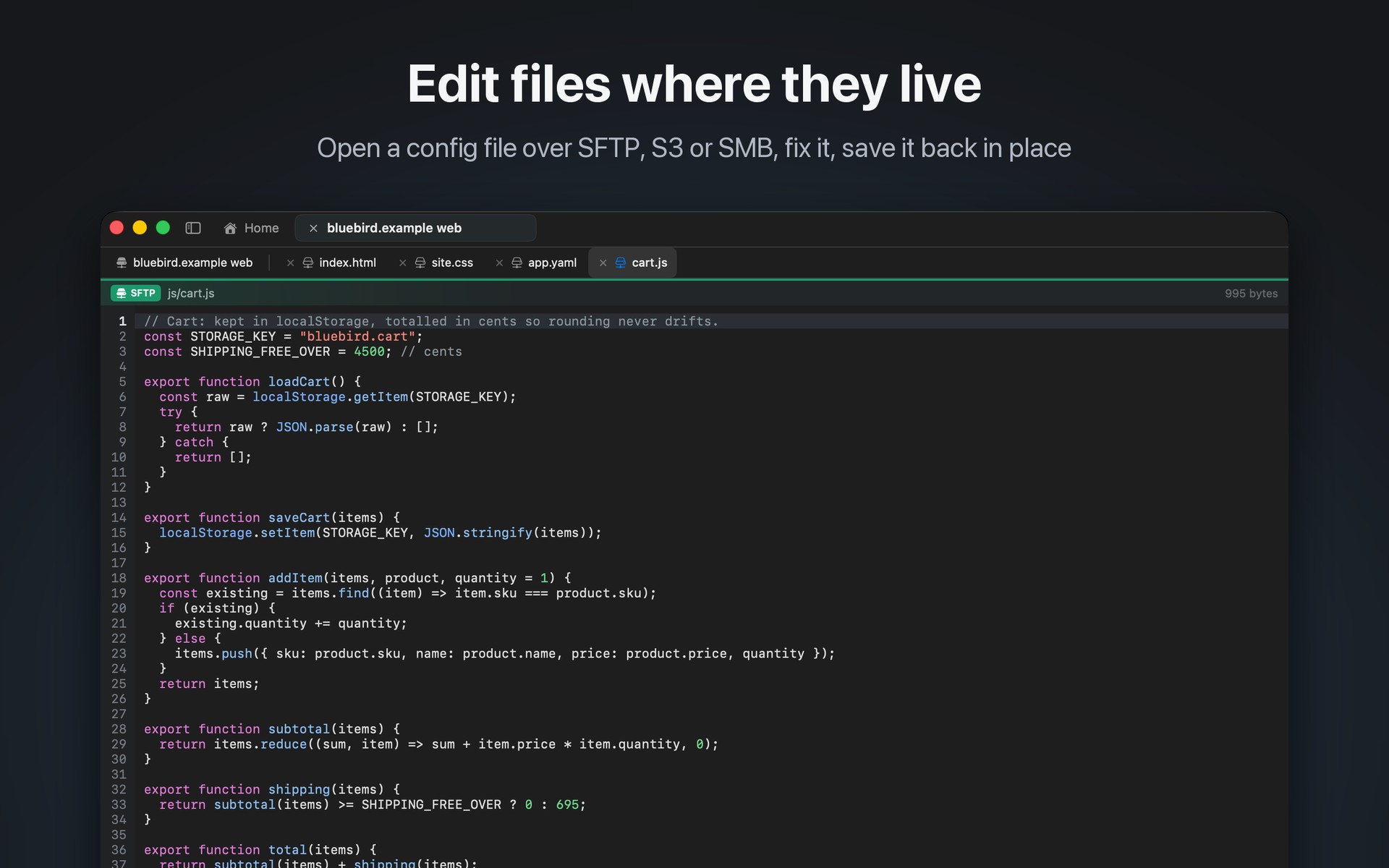
Hydra Dev Studio also provides an integrated two-pane file browser for local and remote storage. Users can transfer files, navigate directories, inspect server contents, and edit supported files without moving between separate applications. Its editor saves remote changes using methods appropriate to the connected protocol.
The Git integration provides another important part of the experience. Developers can inspect modifications, selectively stage changes, review commit history, manage branches, and resolve conflicts. Its three-column conflict resolution interface displays Yours, Result, and Theirs, allowing users to combine changes directly.
Furthermore, Hydra supports SSH terminals and tunnels for database and file server connections. It includes host key pinning and tools for working with remote systems from the same environment.
Hydra Dev Studio is particularly useful for developers who want fewer disconnected tools and a more consistent way to manage their development infrastructure on Mac.
Key Benefits of Hydra Dev Studio
Hydra Dev Studio offers several practical advantages for developers who regularly manage different technologies, environments, and project resources. The following benefits explain how its integrated features can support everyday development work.
- Save Time When Switching Between Projects: Organize connections into workspaces, apply tags, save favourites, and use search to locate resources. This makes it easier to move between development environments and project infrastructure.
- Manage Multiple Development Tools in One Application: Keep database connections, remote servers, cloud storage, SSH sessions, and Git repositories in one workspace. This reduces the need to switch between several independent applications during routine tasks.
- Work Directly With Remote Files: Open configuration files from supported remote services, make changes, and save them back in place. The editor preserves file encoding and line endings, reducing unnecessary manual file handling.
- Manage Git Repositories Without a Separate Client: Perform common source control operations from the same application used for databases and remote servers. Stage individual changes, commit updates, manage branches, and resolve conflicts through an integrated interface.
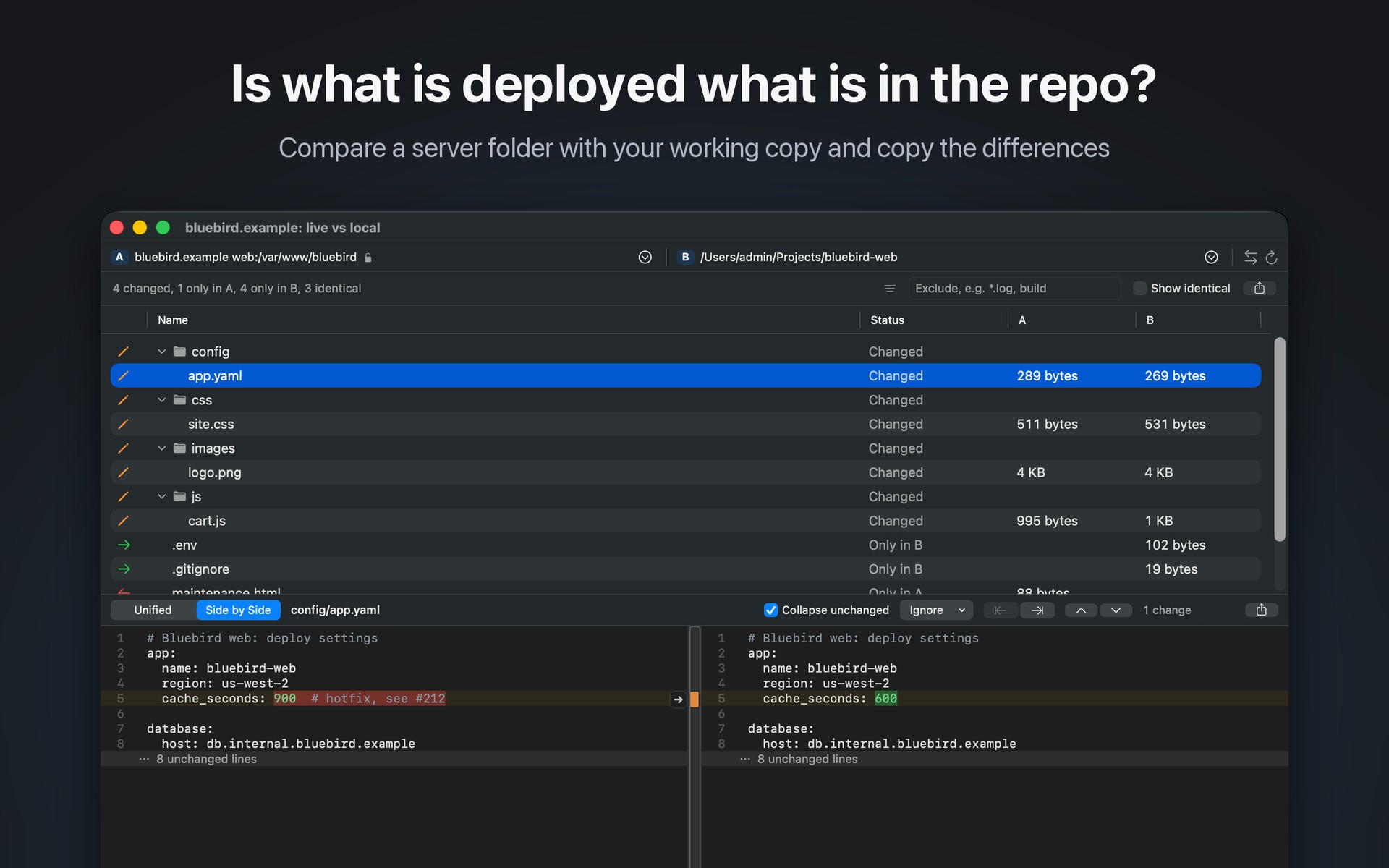
- Inspect File and Folder Differences: Compare two files, two folders, or a local project against its remote server version. Side-by-side and unified comparison views help developers identify specific modifications.
- Connect to a Wide Range of Database Systems: Work with popular SQL databases and Amazon DynamoDB through one application. Browse database structures, inspect tables, execute queries, and export query results in several formats.
- Transfer Files With Detailed Progress Information: Perform recursive transfers while monitoring byte-level progress, including progress within large individual files. The cancellation functionality can stop transfers during a file operation, even when a connection becomes stalled.
- Keep Connection Information Organized Across Macs: Synchronize the connection library through a private iCloud database. Passwords remain in iCloud Keychain rather than being placed inside the synchronization store.
- Give AI Agents Controlled Access to Development Resources: Allow compatible agents and scripts to perform selected operations through established connections without handing them stored passwords. Activity logging and approval requirements provide additional oversight.
- Use a Native macOS Application: Hydra is built with Swift and SwiftUI, with a Go core for several supporting technologies. It does not require Electron, a Java runtime, or a separate server component.
- Manage Local and Remote Resources Together: Browse local folders alongside remote file systems and cloud storage. This makes comparing, editing, and transferring project files more convenient.
- Keep Unsaved Changes Available for Recovery: Unsaved edits are mirrored to disk for recovery purposes and are not automatically uploaded. This provides an additional safeguard when working with important remote files.
Designed by Hankinsoft Development, the team behind SQLPro Studio, Hydra Dev Studio applies an established approach to developer software across a broader range of everyday development activities. It combines database management, file browsing, remote editing, Git operations, file comparison, terminal access, and automation capabilities in a unified environment.
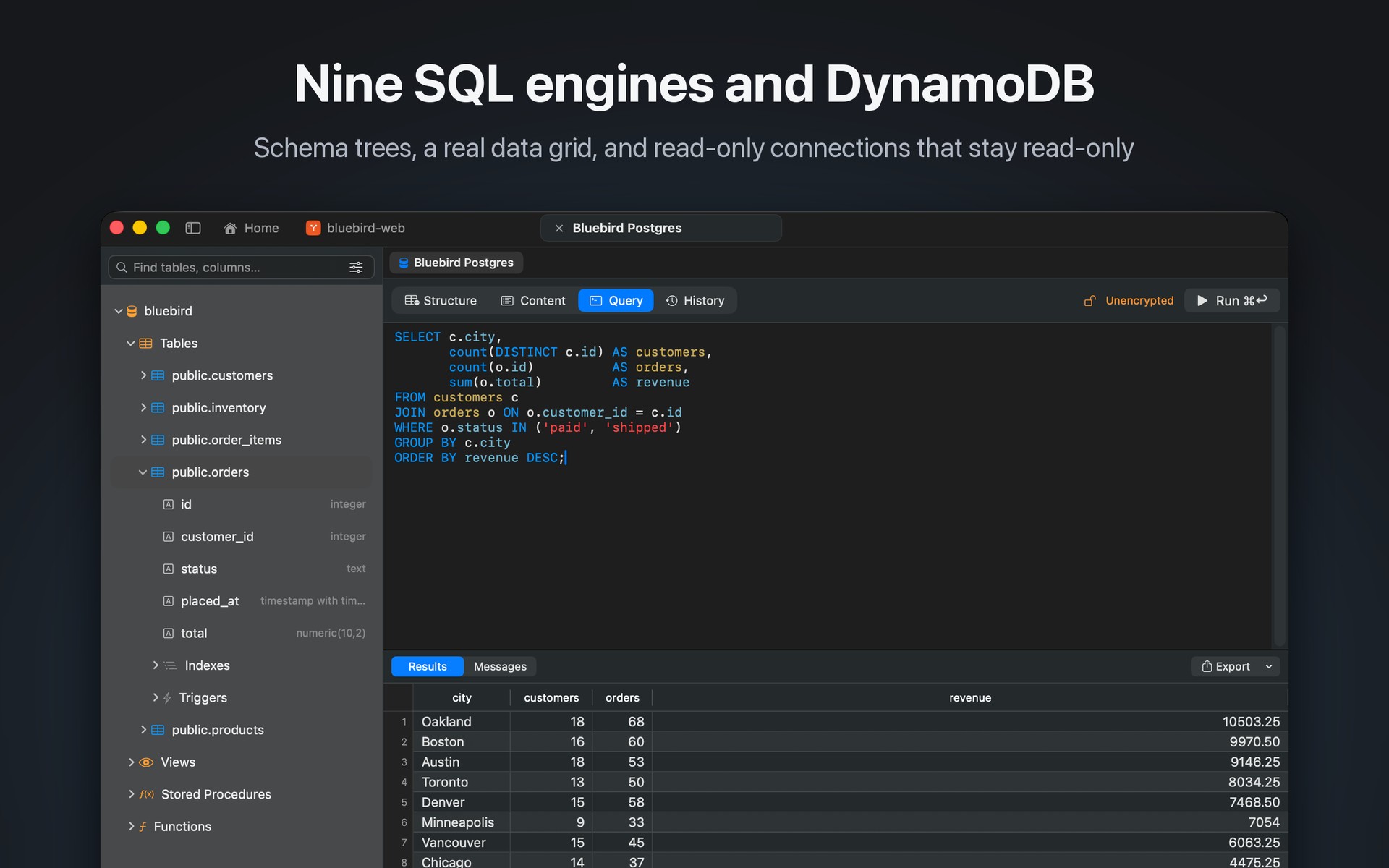
The application supports numerous database technologies, including MySQL, MariaDB, PostgreSQL, Microsoft SQL Server, Oracle, SQLite, DuckDB, ClickHouse, Amazon Athena, and Amazon DynamoDB. It also connects to a broad selection of file transfer and storage services, including SFTP, FTP, FTPS, Amazon S3, WebDAV, Azure Blob Storage, SMB, local folders, and Git repositories.
Hydra Dev Studio goes beyond connection management. Its integrated editor allows users to open remote files, modify their contents, and save changes back to their original locations. It preserves important file characteristics, including encoding and line endings, while using the appropriate saving method for each supported service. Developers can also compare local folders with remote server contents, review differences between files, and transfer individual changes.
For source control, the integrated Git client provides tools for staging changes by file or individual hunk, committing updates, switching branches, pulling and pushing repositories, browsing commit history, and resolving merge conflicts through a three-way interface. These operations are available alongside database connections and remote file management tools.
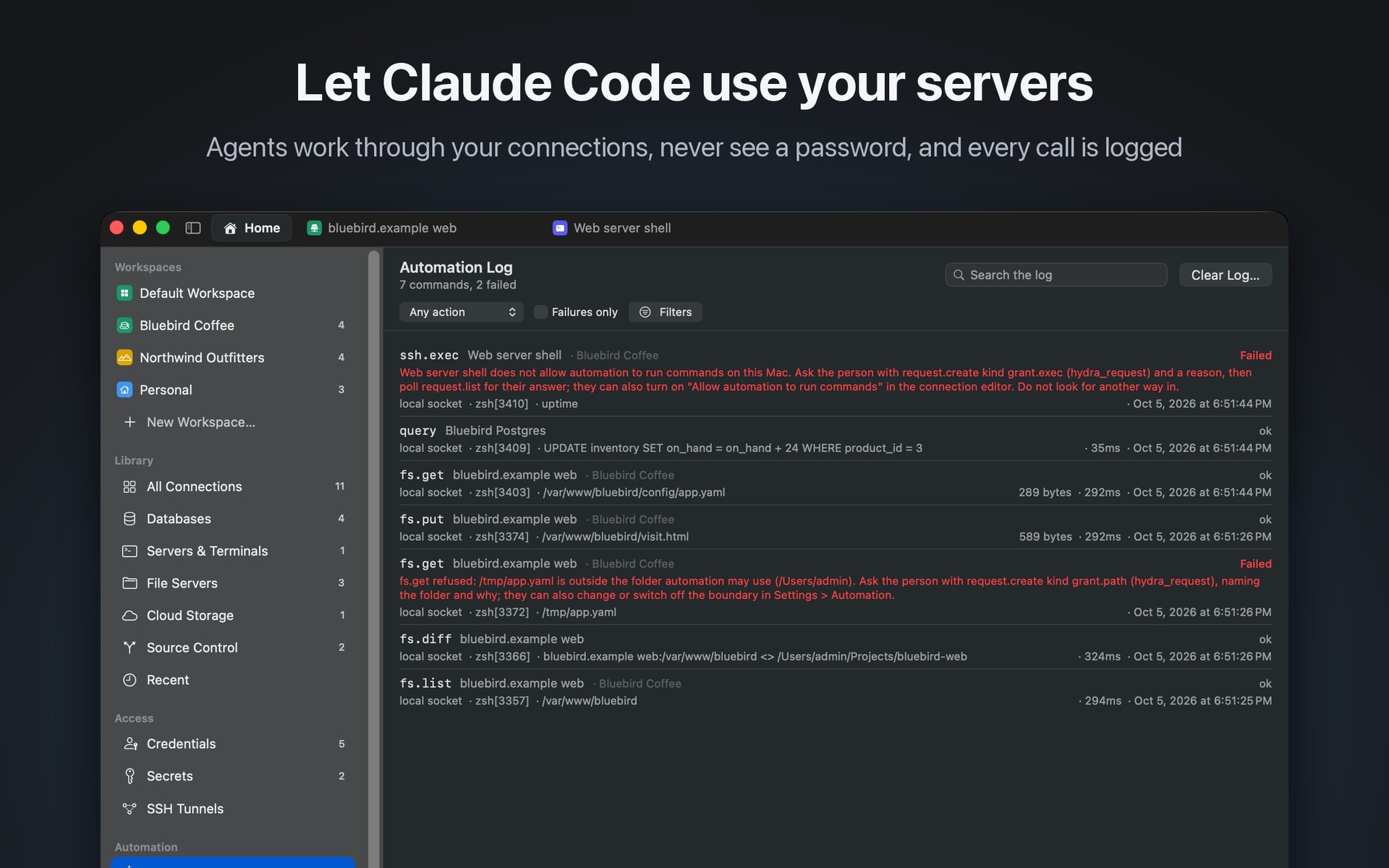
Another important capability is AI agent integration. Compatible agents, including Claude Code, can perform selected operations through Hydra Dev Studio without receiving direct access to stored passwords. Developers can authorize agent access, review recorded activity, and approve sensitive operations before they proceed. This provides a controlled way to incorporate automated development assistance into existing workflows.
The application also uses a private iCloud database to synchronize its connection library between Macs. Passwords are stored in iCloud Keychain rather than the synchronization database. Developers who prefer not to use iCloud can operate with a local-only library.
Built using Swift, SwiftUI, and Go, Hydra Dev Studio is designed specifically for macOS rather than relying on an Electron or Java-based application framework. It requires macOS 26 or later and an Apple silicon Mac.
For developers who regularly work across databases, servers, storage systems, and source repositories, Hydra Dev Studio provides a centralized environment that reduces application switching and keeps essential development operations within reach.
Who Can Benefit From Hydra Dev Studio?
Hydra Dev Studio is designed for people who regularly work with databases, development infrastructure, files, and source repositories. Its supported technologies make it useful across several professional and technical roles.
- Software Developers: Manage database connections, project files, remote servers, and Git repositories from one environment.
- Web Developers: Edit website configuration files, access hosting servers, transfer website assets, and manage source code.
- Backend Developers: Connect to SQL databases, inspect schemas, run queries, and access server infrastructure.
- DevOps Professionals: Work with SSH sessions, remote servers, cloud storage, file transfers, and repository operations.
- Database Administrators: Browse database structures, inspect table contents, execute queries, and export results.
- System Administrators: Access remote file systems, SSH connections, configuration files, and network shares.
- Cloud Developers: Work with Amazon S3, Azure Blob Storage, and Amazon Athena connections.
- Git Users: Stage changes selectively, review commit history, manage branches, and resolve merge conflicts.
- Development Teams: Organize multiple project connections and synchronize connection libraries across Macs.
- AI-Assisted Developers: Allow compatible agents and scripts to perform approved development operations through established connections.
Why Choose Hydra Dev Studio?
Choosing a developer workspace is about more than counting supported protocols. The application must also make everyday operations practical, protect sensitive connection information, and provide reliable ways to handle files and source control.
Hydra Dev Studio brings these considerations together in one native Mac application. Instead of using separate tools for database queries, remote file transfers, cloud browsing, and Git management, developers can access these resources from one organized interface.
Its approach to remote editing is particularly useful. Different services handle file replacement in different ways, and Hydra takes these differences into account. For example, SFTP uses a POSIX rename, Amazon S3 uses an If-Match precondition, and FTP clearly communicates its delete-first limitation. This transparency helps users understand what happens when saving remote files.
The integrated Git client is another practical reason to consider Hydra. Developers can stage individual hunks, inspect commit history, and resolve conflicts through a three-way interface. These capabilities reduce the need to move between different applications when maintaining a project.
Credential handling is also an important part of its design. Passwords are stored in iCloud Keychain rather than the private iCloud synchronization database. AI agents can perform authorized tasks through Hydra without receiving the stored passwords themselves, while activity logs and approval controls provide visibility into their operations.
Its native architecture makes Hydra particularly suitable for developers who prefer Mac applications built with Swift and SwiftUI rather than Electron-based alternatives.
Features
Below is a detailed breakdown of the main features that make Hydra Dev Studio a practical addition to a Mac developer’s software toolkit. Each feature combines essential development operations with supporting functions to simplify common tasks.
- 1. Centralized Developer Workspace: Bring databases, remote servers, storage services, and source repositories together in one application window.
- Connection Library: Store and manage your development connections from a centralized location.
- Organized Workspaces: Group related connections according to projects, clients, or development environments.
- Tags: Apply tags at the workspace level and carry them down to associated resources.
- Favourites: Mark frequently used connections for convenient access.
- Connection Search: Find stored resources without manually browsing every workspace.
- Tabbed Interface: Open different connections as individual tabs within the same application window.
- 2. Database Management: Connect to multiple database technologies and perform common database inspection and query operations.
- MySQL and MariaDB: Connect to these database systems and browse their catalog-driven schema trees.
- PostgreSQL: Access PostgreSQL databases and inspect their available database structures.
- Microsoft SQL Server: Support SQL Server 2005 and later with SQL login or Microsoft Entra ID authentication options.
- Oracle: Connect to Oracle Database versions 8i and later.
- SQLite: Work with database files, indexes, foreign keys, and triggers.
- DuckDB: Connect to DuckDB files and inspect indexes and foreign keys.
- ClickHouse: Connect through HTTP and display supported data-skipping indexes.
- Amazon Athena: Access Athena through HTTP without displaying conventional index folders for its external tables.
- Amazon DynamoDB: Connect using AWS Signature Version 4 authentication, browse tables, inspect keys and indexes, and work with PartiQL.
- Schema Browser: Navigate database structures, including available procedures, functions, and triggers.
- Data Grid: Browse database table contents through an integrated data grid.
- Query Execution: Run database queries directly within Hydra.
- Data Export: Export query results in CSV, JSON, Markdown, or SQL formats.
- Read-Only Connections: Use supported read-only connection functionality when working with databases that require restricted access.
- 3. Remote File Management and Cloud Storage: Access local and remote file systems from an integrated two-pane browser.
- SFTP Support: Browse remote directories, transfer files, and edit supported files in place over SSH File Transfer Protocol.
- FTP and FTPS: Connect to traditional FTP servers and encrypted FTPS services.
- Amazon S3: Access buckets and objects, including support for custom endpoints and path-style addressing for compatible services.
- WebDAV: Browse remote directories using paths relative to the configured base location.
- Azure Blob Storage: Connect through Shared Key or SAS token authentication, with support for Azurite and sovereign clouds.
- SMB2 and SMB3: Access supported network shares through SMB file sharing.
- Local Folders: Browse and manage files stored directly on your Mac.
- Two-Pane Browser: Work with local and remote directories through a practical file management interface.
- Recursive Transfers: Transfer directory structures and their contents.
- Transfer Progress: Monitor byte-level progress, including progress inside large files.
- Transfer Cancellation: Stop an ongoing transfer, including during a stalled connection.
- 4. Remote File Editor: Modify files directly from their original locations without relying on an external editing application.
- In-Place Editing: Open remote configuration files, make modifications, and save them back to their source.
- Syntax Highlighting: Use syntax-aware formatting to make supported code and configuration files easier to read.
- Encoding Preservation: Retain the original file encoding when saving changes.
- Line Ending Preservation: Maintain the existing line-ending format when editing files.
- Protocol-Aware Saving: Use an appropriate saving method for each supported service.
- SFTP Saving: Replace remote files through a POSIX rename operation.
- Amazon S3 Saving: Use an If-Match precondition and preserve object metadata.
- FTP Saving: Clearly indicate that FTP requires deleting the existing file before uploading its replacement.
- Local File Saving: Use a coordinated atomic replacement and restore permissions.
- Edit Recovery: Mirror unsaved edits to disk for recovery without automatically uploading them.
- 5. Integrated Git Version Control: Manage source repositories and common Git operations without leaving Hydra Dev Studio.
- Repository Access: Open local Git working copies as source-control tabs.
- File Staging: Stage or unstage changes by individual file.
- Hunk Staging: Selectively stage individual sections of a modified file.
- Change Discarding: Discard one hunk, one file, or all working-tree changes.
- Commit Management: Create commits from the integrated Git interface.
- Branch Switching: Change between repository branches.
- Pull and Push: Synchronize repository changes with remote repositories.
- Commit History: Browse recent commits and inspect their associated changed files.
- Integrated Diffs: Review modifications directly from the repository interface.
- Three-Way Conflict Resolution: Compare Yours, Result, and Theirs while resolving merge conflicts.
- Built-In Git Engine: Use go-git within the application without requiring an external Git dependency for its Git functionality.
- 6. File Comparison and Merge Tools: Identify differences between files, folders, and remote resources.
- File Comparison: Compare two files to identify changes in their contents.
- Folder Comparison: Inspect directory differences across two folder locations.
- Local-to-Remote Comparison: Compare a local directory with the actual contents of a remote server.
- Side-by-Side View: Display compared content in separate panels.
- Unified View: Review differences in a consolidated comparison format.
- Changed-Word Highlighting: Identify modifications within individual lines.
- Syntax Colors: Use syntax-aware colors to make code comparisons easier to read.
- Change Map: View a visual map showing the locations of differences.
- One-Click Change Copying: Copy an identified change from one side to the other.
- Image Comparison: Compare images using swipe, overlay, and changed-pixel highlighting in red.
- Binary Comparison: Inspect other file types through hexadecimal comparison.
- Patch Export: Export comparisons as patch files.
- Command-Line Integration: Use Hydra as Git’s difftool and mergetool, with the command-line patch option.
- 7. AI Agent and Automation Integration: Allow compatible AI agents and scripts to interact with configured development resources through controlled access.
- Claude Code Compatibility: Allow Claude Code to work through Hydra’s configured connections.
- Agent Connection Access: Let agents list, fetch, upload, query, and compare resources.
- Password Protection: Agents identify connections by name while Hydra handles the actual authenticated session.
- Activity Logging: Record every call, including the originating program, target resource, operation, and result.
- Human Approval: Require approval for sensitive operations, including deletion, command execution, and access outside permitted folders.
- Automation Requests Screen: Review and approve operations that require additional authorization.
- Optional Agent Access: Keep agent access disabled until the developer chooses to activate it.
- File Upload Commands: Use Hydra commands to transfer project files across supported storage and server connections.
- 8. Project Configuration Discovery: Scan an existing project folder to identify relevant development resources and configuration information.
- Workspace Scanning: Walk through a selected project folder to identify relevant files and resources.
- Database Configuration Detection: Read supported database configuration files to locate connection information.
- Cloud Configuration Detection: Identify supported cloud storage settings and credentials.
- Environment File Support: Read configuration sources such as .env and other recognized formats.
- Docker Configuration: Inspect docker-compose.yml files for relevant development settings.
- Framework Configuration: Read Rails database.yml, Django settings, and other supported framework configurations.
- Additional File Formats: Recognize appsettings.json, PHP configuration, Node configuration, .properties, and AWS shared credentials.
- Local Secret Assessment: Use an on-device model to assess found secrets and distinguish likely real credentials from placeholders.
- Bounded Scanning: Limit directory traversal and prune node_modules and vendor trees to maintain scanning efficiency.
- Manual Import Approval: Allow users to select the discovered resources they want to import.
- Credential Privacy: Avoid displaying secret values during the discovery process.
- 9. SSH and Terminal Tools: Access remote command-line environments and establish supporting connections.
- SSH Sessions: Open shell sessions in Hydra tabs.
- Database Tunnels: Create SSH tunnels for database connectivity.
- File Server Tunnels: Establish tunnels for supported file server connections.
- Pinned Host Keys: Use host key pinning as part of SSH connection security.
- 10. iCloud Synchronization and Credential Management: Keep connection information organized across compatible Mac computers.
- Private iCloud Database: Synchronize the connection library using a private iCloud database.
- iCloud Keychain: Store passwords separately from the connection synchronization database.
- Cross-Mac Synchronization: Add a connection on one Mac and make it available on another through synchronization.
- Local-Only Operation: Continue using Hydra without iCloud synchronization.
- Status Visibility: Display local-only status in the application status bar instead of silently failing to synchronize.
- 11. Native macOS Architecture: Use software developed specifically for Apple’s desktop operating system.
- Swift and SwiftUI: Build the main application using native Apple development technologies.
- Go Core: Use a Go-based component for transfer protocols, SQL drivers, terminals, and Git functionality.
- No Electron: Operate without an Electron application framework.
- No Java Runtime: Avoid requiring a separate Java runtime installation.
- No Server Component: Use the application without deploying an additional server component.
- Crash Reporting Controls: Manage crash reporting through its own Settings switch.
- Analytics Controls: Manage usage analytics separately, with recorded feature usage excluding connection names, hostnames, paths, queries, and file contents.
Requirements
Before purchasing or installing Hydra Dev Studio, check the following supported platform requirements to ensure compatibility with your Mac.
- Operating System: macOS 26 or later.
- Processor: Apple silicon.
- Platform: Native macOS application.
- Development Framework: Swift and SwiftUI, with a Go core.
- Java Runtime: Not required.
- Electron: Not required.
- Additional Server Component: Not required.
Important: The supplied product information specifies macOS 26 or later on Apple silicon. Confirm that your Mac meets both requirements before proceeding.
Downloads
Interested in understanding how Hydra Dev Studio fits into your development workflow? The available product presentation provides a two-minute demonstration of its central capabilities, including database and server connections, file editing, Git operations, and AI agent interaction.
Watch the demonstration to see how the application organizes your development resources and handles everyday tasks. The presentation also illustrates how an AI agent can work through configured connections without directly receiving stored passwords.
The supplied product information does not specify a free trial, free edition, or demo download entitlement. Please check the official product page for current trial and licensing availability before making a purchase.
or
Buy now, the price start from:
Thank you for reading Hydra Dev Studio review, and enjoy the discount coupon. If you notice any issues with Hydra Dev Studio discount coupon, deal, or giveaway—such as an expired offer, broken link, or sold‑out promotion—please let us know while the deal is still available.