93% Off – MAX Messages: Lifetime License | Message Archiving App | Backup, Save, Search, and Export iMessage Conversations, Preserve Chat History, View Attachments, and Create Long-Term Archives – for Mac

Keep your valuable conversations, personal memories, and important business exchanges safe for the years ahead. Get MAX Messages with a Lifetime License at a 93% Discount!
✔ Lifetime License. ✔ Free 12-month Product Updates ✔ Customer Support
BUY NOW
MAX Messages is available for $80. But, you can now get MAX Messages with a lifetime license that includes 12-month free updates and support at a 93% Discount!. This offer is available for a limited time!

Message Archiving Software to Backup, Save, Search, and Export iMessage Conversations, Preserve Chat History, View Attachments, and Create Long-Term Archives
- Please Notes:
- You may be directed to the bundle page, but it is possible to purchase the software individually.
- If you're having difficulty locating the product on the bundle page, please utilize the browser's search feature with keyword: ''MAX Messages'' without quotation marks.
- Get an additional $3 discount on all orders more than $30.
- LEGITIMATE: All apps are authentic and have original licenses obtained directly from the creators via contracts.
- INSTANT ACCESS: Fully activated macOS Apps & Windows Software with instant downloads & license key access.
- IMPORTANT: Since the deal vendor does not provide expiration dates, buy the deal while it’s still available.
- Device Activation: unlimited
- Starting from the purchase the user has 12 months of updates. The app doesn't stop working but for newer versions an update license needs to be purchased.
- Only the messages of the buyer can be archived.
- Major & Minor Updates Included for 12 month
- Lifetime License
Platforms: Mac
Aiseesoft MobieSync 2: Lifetime License BEST OFFER

DearMob iPhone Manager: Family / Single Lifetime License BEST SELLER

EaseUS MobiSaver Pro for iOS BEST OFFER
Aiseesoft Mac FoneLab - iPhone Data Recovery for Mac BEST SELLER

Aiseesoft FoneLab - iPhone Data Recovery: Lifetime License BEST SELLER

WALTR PRO BEST SELLER
MAX Messages Giveaway
Unavailable at this moment!
To access the giveaway, kindly provide your email address. Please refrain from closing this page after signing in to receive instructions on how to access the offer at no cost.
NOTES:
– All prices shown here are in listed USD (United States Dollar).
– Such promotional programs are subject to change without notice, from time to time in our sole discretion.
– Data may vary based on different systems or computers.
MAX Messages Review at a Glance
Some conversations become more valuable as time passes. A message from a business partner might contain an important agreement, a discussion with a customer might include the details of a project, and a conversation with a family member might hold memories you never want to lose. However, keeping years of message history inside a messaging application or on a single device can make long-term access difficult. Devices get replaced, applications change, accounts are migrated, and important conversations can become harder to retrieve. Without an independent archive, valuable information may eventually become inaccessible.
MAX Messages provides a practical solution for preserving and managing your macOS Messages conversations. This message archiving software connects to your existing iMessage history and creates a readable archive of your conversations directly on your Mac. Instead of relying entirely on your everyday messaging application to keep years of communication available, you can maintain a separate archive that is designed for convenient browsing, searching, and long-term reference.
What Is MAX Messages?
MAX Messages is a macOS message archiving and management application that helps users create independent, readable archives of their Messages conversations. Its primary purpose is to preserve communication history so that important discussions remain accessible beyond the everyday use of a messaging application or device.
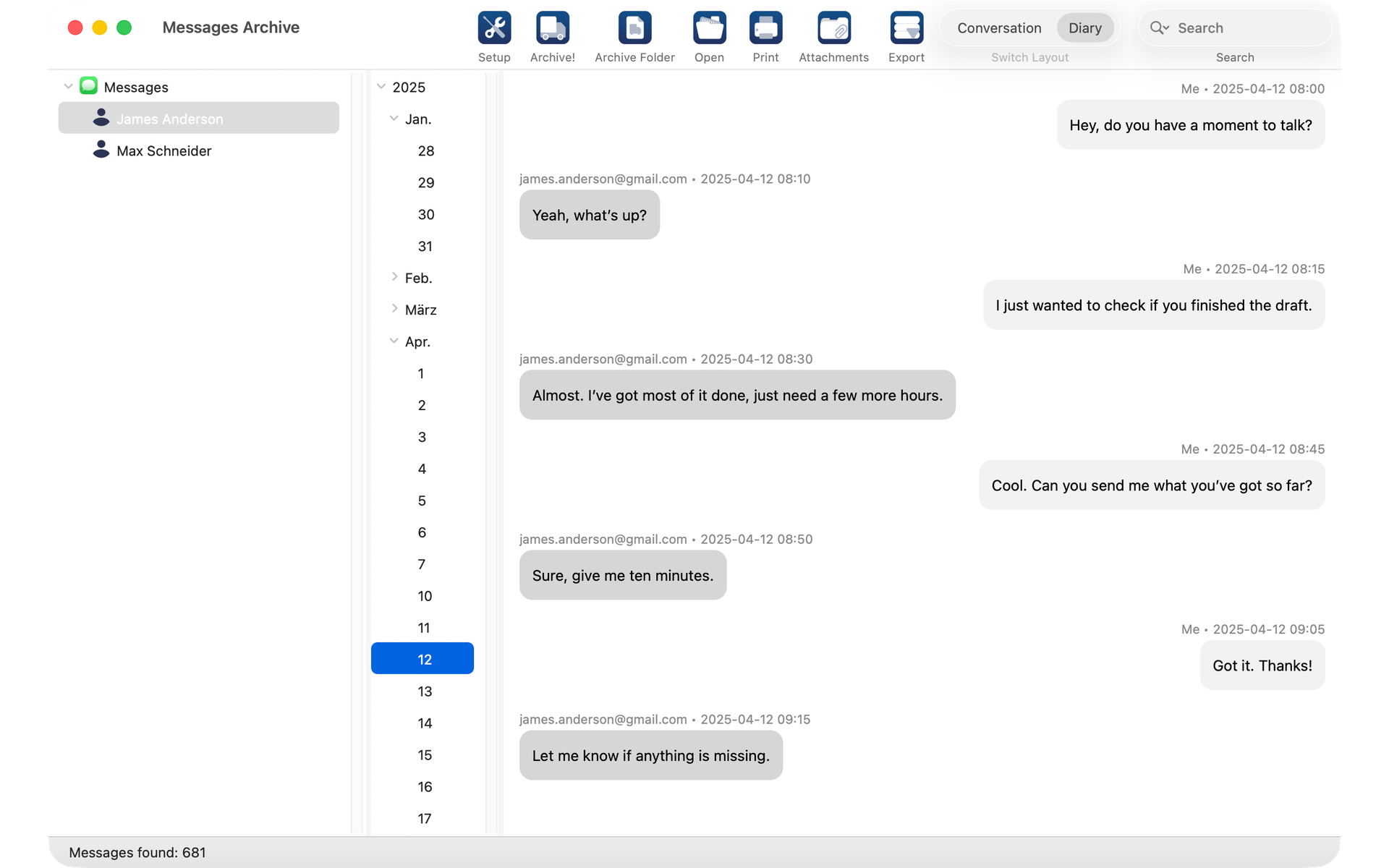
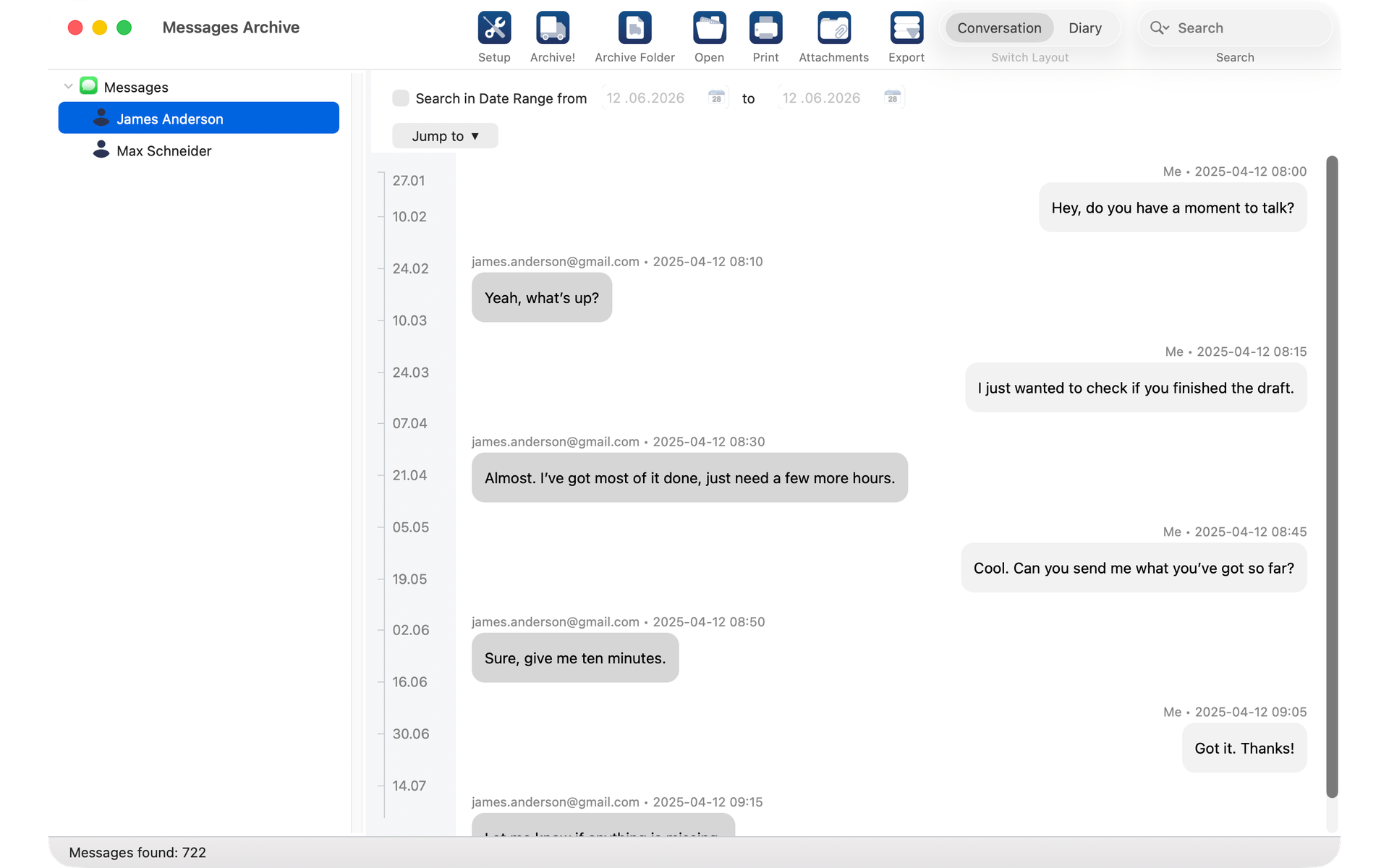
The software connects to your existing iMessage history and captures conversations for archiving. It organizes saved discussions into complete threads, keeping their chronological sequence and associated participants. This approach allows you to review conversations as they originally unfolded rather than dealing with disconnected messages or isolated fragments.
Unlike a traditional messaging application, MAX Messages is focused on preserving and accessing historical communication. It does not replace your existing Messages application, and you can continue communicating in your usual way. The archive provides a separate place to retain and review your previous conversations.
The software supports three archive formats:
- Internal Database: The primary working archive, designed for browsing complete conversation threads while preserving their sequence, timestamps, and participants.
- PDF: A human-readable document format suitable for documentation, sharing, and long-term reference without requiring MAX Messages to read the archived document.
- HTML: A browser-friendly format that allows archived conversations to be viewed using a modern web browser.
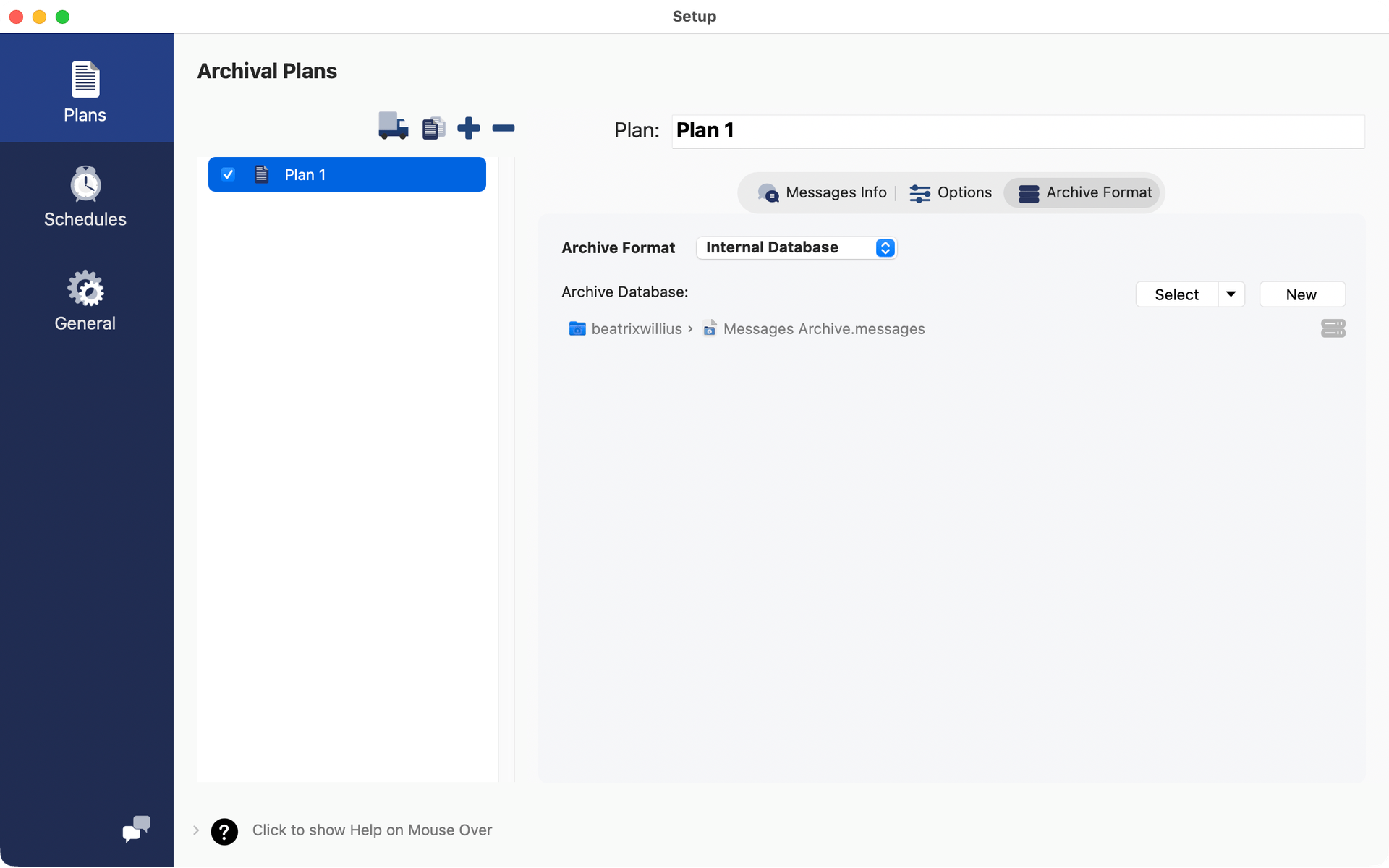
You can also choose where your archive is stored. Available locations include your Mac’s internal drive, an external hard disk, and network storage such as a NAS. This flexibility helps you manage local storage according to your available space and archiving preferences.
Another important aspect of MAX Messages is its approach to preserving original information. Archived messages are not rewritten, summarized, or interpreted by the software. Conversation content, participants, and timestamps are retained as part of the historical record. MAX Messages does not attempt to determine what a conversation means or make decisions about which messages are important.
In addition, the software does not require an iPhone connection to archive or view messages on your Mac. This makes it a useful option for users who want to manage their existing message history directly from their computer.
In simple terms, MAX Messages gives you a dedicated environment for collecting, preserving, browsing, and retrieving important conversations while keeping your archived history separate from your everyday messaging activities.
Key Benefits of MAX Messages
Your message history can contain information that is difficult or impossible to recreate. MAX Messages helps reduce the risk of losing access to that information by providing a dedicated archiving environment. Here are the main advantages that make this application useful for personal and professional communication records.
- Preserve Important Conversations: Create independent archives of your message history so valuable discussions remain available even if the original conversation is deleted or your messaging environment changes.
- Keep Complete Conversation Context: Retain messages in chronological order so you can understand how a discussion developed, including the exchanges that came before and after an important message.
- Maintain Original Message Details: Preserve senders, recipients, and timestamps, making it easier to identify who participated in a discussion and when an exchange took place.
- Find Old Messages Faster: Use the built-in search to locate specific conversations and messages by contact name, keyword, or part of a conversation instead of manually scrolling through lengthy chat histories.
- Access Your Archive Without an iPhone: Work with your Mac’s existing message history without connecting or synchronizing an iPhone for archiving and viewing.
- Keep Your Archive Separate: Maintain an independent archive alongside your everyday messaging application, giving you another place to retain and access historical conversations.
- Choose Your Storage Location: Save archives to an internal Mac drive, external hard disk, or network storage such as a NAS to suit your storage arrangements.
- Select a Suitable Archive Format: Use the internal database for regular browsing, PDF for document-based reference, or HTML for browser-based access.
- View Shared Attachments: Return to images, videos, and documents exchanged in conversations, helping you review more than just the written messages.
- Simplify Repeated Archiving Tasks: Save commonly used configurations through Plans and reuse them as templates for more consistent archiving.
- Preserve Personal Memories: Keep years of everyday conversations with family members, friends, and loved ones as a personal communication record.
- Maintain Business Communication Records: Retain discussions with partners, customers, and colleagues that may contain important commitments, project details, or other useful information.
- Prepare Long-Term Documentation: Keep readable records of important exchanges without depending entirely on the continued availability of the original messaging platform.
- Keep Control of Your Records: Store your archive locally or in a storage location you choose, rather than relying on a separate cloud archiving service.
- Maintain Original Meaning: Avoid automatic summaries and interpretations that could remove context. You remain responsible for reviewing and understanding the conversations.
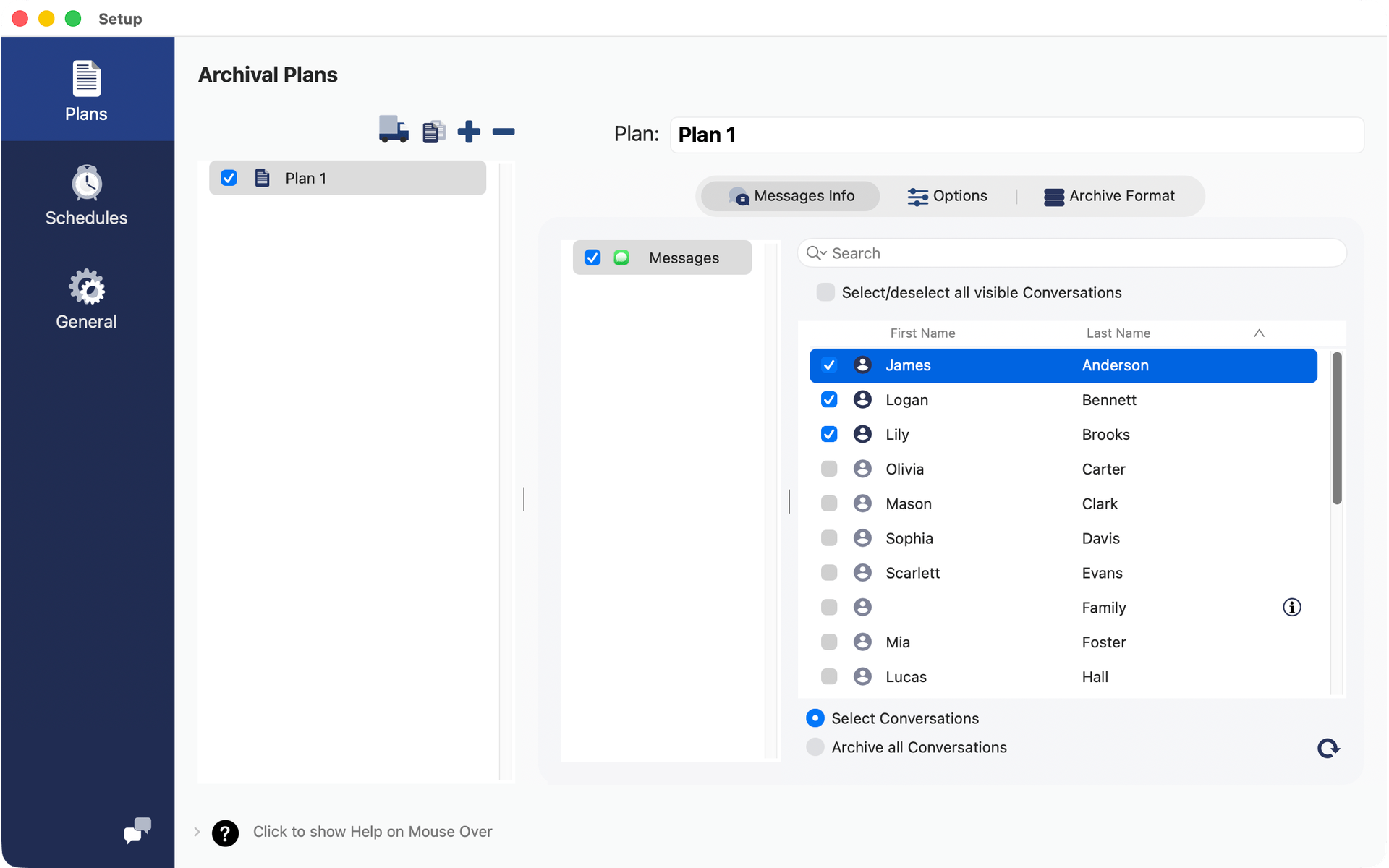
With MAX Messages, you can preserve complete conversation threads, retain the original sequence of exchanges, and keep important details such as senders, recipients, and timestamps intact. This makes it easier to understand the context of past discussions and return to specific exchanges when you need them. You can also browse archived conversations by contact or group, search for messages using names and keywords, and view shared images, videos, and documents.
One of the practical advantages of MAX Messages is that it works directly with your Mac. You do not need to connect or synchronize your iPhone to archive or view your message history. The software operates alongside your existing messaging application rather than replacing the way you communicate. You can continue using Messages as usual while building an independent record of your conversations.
The software also provides flexible archive storage options. Keep your archive on your Mac’s internal drive, move it to an external hard disk, or use network storage such as a NAS. You can select from an internal archive database, PDF, or HTML formats according to your intended use. These options make it easier to maintain a personal record, prepare documentation, or access conversations outside the original messaging application.
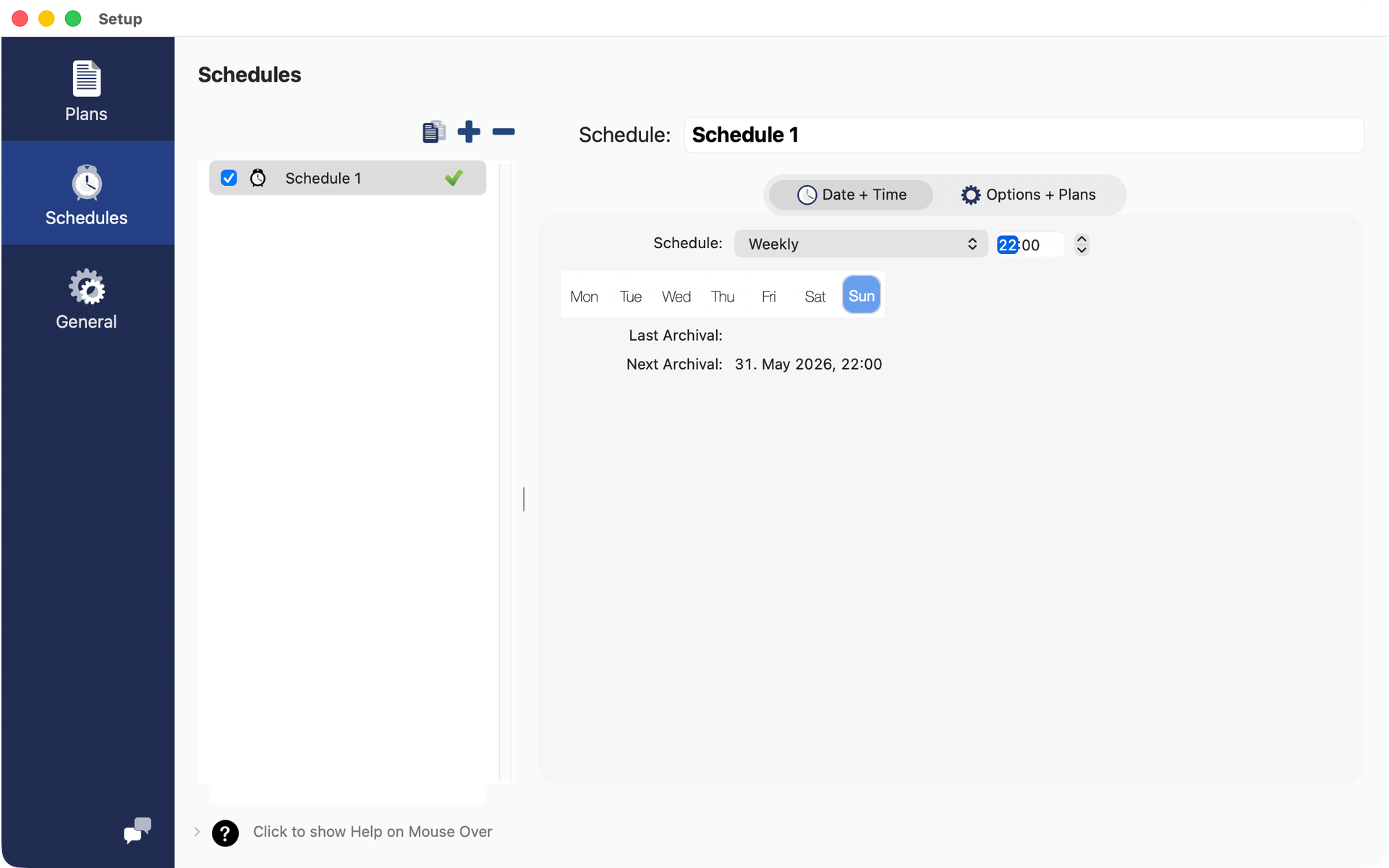
Another useful capability is the Plans feature. It allows you to save frequently used archiving configurations as templates. If you regularly archive conversations by contact, topic, or schedule, saved Plans help make repeated archiving tasks more consistent and convenient.
MAX Messages is designed for people who believe their conversations deserve to remain accessible over time. Individuals can preserve personal memories, professionals can maintain records of important discussions, and businesses can keep useful communication history for reference. Rather than changing or interpreting your conversations, the software focuses on preserving the original record and allowing you to decide how it should be used.
If you want a dedicated way to archive, organize, and search your Mac message history, MAX Messages offers the essential tools in one practical application.
Who Can Benefit from MAX Messages?
MAX Messages is suitable for Mac users who want to maintain a reliable, accessible record of their message history. Its features can support different personal and professional archiving needs.
- Individuals and Families: Preserve conversations with family members, friends, and loved ones. Years of everyday exchanges can contain memories that become increasingly meaningful over time.
- Business Owners: Maintain records of discussions with partners, customers, and suppliers, particularly when conversations contain important project details or commitments.
- Freelancers and Consultants: Keep historical communication with clients so previous instructions, discussions, and agreements are easier to retrieve.
- Customer Service Professionals: Retain useful customer interactions for documentation and future reference.
- Project Managers: Review conversations that contain project-related discussions, decisions, and information exchanged between participants.
- Professionals and Office Workers: Maintain a searchable record of important communication that might be needed for later reference.
- Mac Users with Years of Message History: Organize and preserve long-running conversations instead of depending entirely on the original messaging application.
Why Choose MAX Messages?
Choosing message archiving software is about more than simply keeping a copy of old conversations. The important consideration is how easily you can retrieve information and how faithfully the archived record represents the original discussion.
MAX Messages focuses on preserving conversations in their original context. It keeps messages in chronological order and retains relevant participant and timestamp information. This makes historical discussions easier to understand when you revisit them months or years later.
Another reason to consider the software is its straightforward purpose. MAX Messages is not designed to replace your messaging application, introduce another communication platform, or interpret your personal conversations. It focuses on creating and maintaining archives that you can browse and search when needed.
Its combination of saved Plans, contact-based browsing, keyword search, attachment viewing, and multiple archive formats provides practical tools for managing a growing message history. You can also select where the archive is stored, giving you more flexibility over your local storage arrangements.
The software is particularly useful for users who prefer to maintain control over their communication records. It does not automatically summarize conversations, rewrite messages, or make judgments about their content. The original record remains the focus, while you decide what information matters and how to use it.
If your Mac contains conversations that you want to retain for personal memories, professional documentation, or future reference, MAX Messages provides a dedicated solution for that purpose.
Features
MAX Messages combines message archiving, conversation browsing, search tools, flexible storage, and multiple archive formats. Below is a detailed breakdown of the main features and their supporting capabilities that make the software a practical addition to your Mac.
- Complete Message Archiving: Create an independent archive of your existing macOS Messages history to preserve conversations for future reference.
- iMessage History Capture: Connect to your existing message history and capture conversations for archiving.
- Historical Conversation Preservation: Include years of existing conversations in your archive, subject to the available message history.
- Ongoing Archive Growth: Run the software alongside your messaging application so the archive can grow as additional conversations accumulate.
- Independent Archive: Keep archived messages separate from your everyday messaging application.
- Complete Conversation Preservation: Maintain the structure and important details of your original conversations.
- Chronological Message Order: Preserve exchanges in their original sequence so discussions remain easy to follow.
- Original Message Content: Keep the archived message text without rewriting or changing its meaning.
- Sender and Recipient Details: Retain participant information to help identify the people involved in each conversation.
- Original Timestamps: Preserve message dates and times as part of the historical record.
- Continuous Conversation Threads: Review entire discussions rather than searching through disconnected message fragments.
- Flexible Archiving Plans: Make repeated archiving tasks more convenient with reusable configurations.
- Saved Plans: Store frequently used archiving configurations as templates.
- Daily Archiving Configurations: Set up reusable configurations for users who regularly archive their message history.
- Weekly Archiving Configurations: Use saved arrangements for recurring weekly archiving routines.
- Contact-Based Archiving: Organize archiving tasks around frequently used contacts.
- Topic-Based Archiving: Create configurations based on subjects or discussion categories.
- Conversation Browsing: Navigate your archived message history through a dedicated viewing environment.
- Contact-Based Organization: Browse archived conversations according to the people involved.
- Group Conversation Browsing: Access archived group discussions without treating every message as an unrelated entry.
- Conversation List: View archived threads with their associated dates and participants.
- Dedicated Conversation View: Open a selected thread and review its messages in chronological order.
- Historical Reference: Return to older discussions whenever you need to check previous communication.
- Built-In Message Search: Locate important information without manually reviewing every archived conversation.
- Name-Based Search: Search using a contact’s name to find relevant discussions.
- Keyword Search: Enter a particular word or phrase to locate messages containing the information you need.
- Conversation Content Search: Search using part of a conversation to help identify relevant exchanges.
- Faster Information Retrieval: Reduce the time spent scrolling through long message histories.
- Attachment Viewing: Access shared media and documents associated with your archived conversations.
- Image Viewing: Review pictures shared during previous discussions.
- Video Viewing: Return to video attachments included in your archived chats.
- Document Viewing: Access documents shared through your conversations.
- Quick Attachment Access: Open available attachments with a simple click when reviewing a conversation.
- Multiple Archive Formats: Choose an archive format according to your preferred way of accessing and maintaining message records.
- Internal Archive Database: Use the primary working format for browsing complete conversations while retaining their sequence, participants, and timestamps.
- PDF Export: Maintain a human-readable document that can be opened without MAX Messages and used for documentation or reference.
- HTML Export: Create browser-readable archives that can be viewed using a modern web browser.
- Format Flexibility: Select the format that best matches your archiving and reference requirements.
- Flexible Archive Storage: Decide where your message history should be maintained.
- Internal Mac Drive: Store archives directly on your computer for convenient local access.
- External Hard Disk: Move archives to external storage to help free up space on your Mac’s internal drive.
- Network Attached Storage (NAS): Use supported network storage as another location for maintaining your archive.
- Storage Independence: Keep archived conversations separate from the messaging application itself.
- No iPhone Connection Required: Manage message archives directly from your Mac.
- Mac-Based Archiving: Access your message history through your computer without connecting an iPhone for the archiving process.
- Independent Viewing: Review archived conversations on your Mac without relying on an active iPhone connection.
- Convenient Desktop Workflow: Maintain your archive alongside your regular computer activities.
- Original Conversation Integrity: Keep the historical record faithful to the messages you archived.
- No Automatic Rewriting: Preserve original message content rather than modifying conversations for readability.
- No AI Conversation Summaries: MAX Messages does not summarize or interpret your archived discussions.
- No Automatic Conclusions: The software does not generate judgments or decide what your conversations mean.
- User-Controlled Actions: Irreversible actions require your decision rather than being initiated silently in the background.
- Long-Term Readability: Maintain access to historical communication beyond the everyday use of your messaging application.
- Independent Archive Format: Keep archived records separate from the original messaging environment.
- Readable PDF Records: Access document-based archives without needing MAX Messages.
- Browser-Based HTML Records: Review suitable archives using a modern web browser.
- Flexible Storage Options: Keep your records on internal, external, or network storage according to your needs.
Requirements
Before installing MAX Messages, check that your Mac meets the supported operating system and hardware requirements.
The available compatibility information includes:
- Operating System: macOS Golden Gate (27), Tahoe (26), Sequoia (15), Sonoma (14), and Ventura (13).
- Processor Compatibility: Intel processors and Apple Silicon.
- Platform: macOS.
- Required Device: A compatible Mac with access to the existing Messages history you intend to archive.
- Internet or iPhone Connection: An iPhone connection is not required for archiving or viewing messages on your Mac.
For the best installation experience, check the software provider’s current documentation for any additional installation, permissions, storage, or version-specific requirements.
Downloads
The best way to evaluate an archiving application is to see how it works with your own message history. MAX Messages offers a trial version so you can test its archiving and browsing capabilities before deciding to purchase.
Download the trial edition, connect MAX Messages to your existing messaging history, and see how your conversations are collected and organized into an archive. Try browsing archived threads, searching for particular names or keywords, and reviewing the available conversation information.
You can also assess how the software fits into your regular Mac workflow and decide which archive format and storage location suit your requirements.
The trial gives you an opportunity to evaluate the application using the type of conversations you actually need to preserve. You can determine how useful its search, browsing, and archiving tools are for your personal or professional needs.
Download the MAX Messages trial version and start building your message archive today. Check the official product page for the current trial download and any applicable trial limitations.
or
Buy now, the price start from:
Thank you for reading MAX Messages Mac App review, and enjoy the discount coupon. If you notice any issues with MAX Messages discount coupon, deal, or giveaway—such as an expired offer, broken link, or sold‑out promotion—please let us know while the deal is still available.