Giveaway – Kaizen OCR: Free License Key | Text Extractor, AI Table OCR, Screenshot OCR, PDF Merge/Split & Convert Toolkit – for Windows

Get Kaizen OCR with a license key for free today and start turning images, scans, and PDFs into editable text in minutes.
Free Full Version
Kaizen OCR Review at a Glance
Paperwork and scanned files can slow you down when the text you need is trapped inside images, screenshots, or scanned PDFs, forcing manual typing and copy-paste failures. Kaizen OCR solves this problem with a desktop Windows app built to extract text accurately, handle common PDF tasks, and keep your files on your own computer.
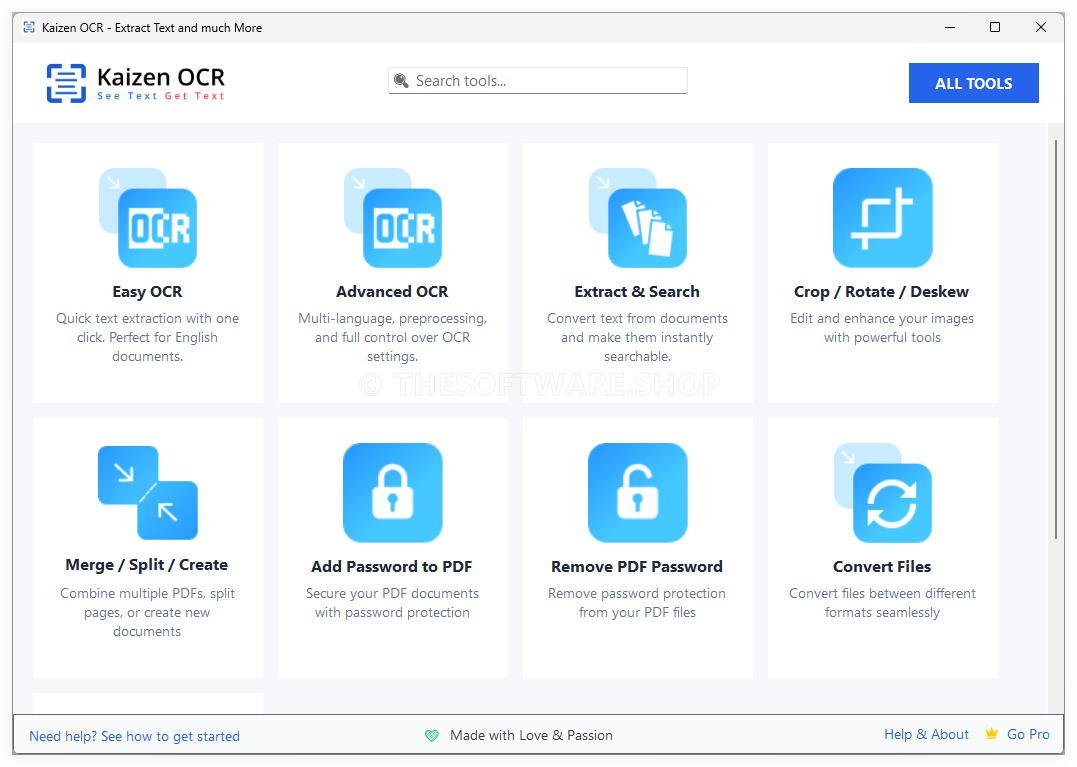
What is Kaizen OCR
Kaizen OCR is a Windows desktop software application that extracts text from images and PDF documents using OCR technology, plus a set of PDF utilities for merging, splitting, converting, and password protection. It includes a Tesseract OCR option (fast and flexible) and an AI/ML OCR option (better for complex layouts and tables).
Tesseract is an OCR engine that “can recognize more than 100 languages out of the box,” which supports multilingual extraction when your documents are not all in one language. Kaizen OCR also supports common input image formats, and Tesseract itself supports various image formats including PNG, JPEG, and TIFF, which aligns well with everyday document scans and screenshots.
All-in-One OCR & PDF Toolkit (10 Offline Features)
Kaizen OCR combines text extraction and PDF management so you can keep tasks in one place and reduce time spent moving files between apps.
- Extract Text from Image (Tesseract OCR; 100+ languages)
- AI Text Extraction (offline AI/ML OCR engine)
- Extract Text from PDF (native + OCR modes)
- Screenshot OCR (capture and extract instantly)
- Crop/Rotate/Deskew (auto-correct document photos)
- Merge/Split PDF (combine and customize PDFs)
- Add PDF Password (protect documents)
- Remove Password (create unprotected copies when you know the password)
- Convert Files (13+ format conversions)
- Extract Images (save embedded images from PDF)
Why choose Kaizen OCR
If you work with scans, screenshots, or PDFs every week, you need OCR that is quick to run, simple to repeat, and consistent. Kaizen OCR is built around offline processing, batch support, and two OCR engines so you can handle clean documents and complex layouts without changing tools.
It is also a practical choice for teams or individuals who handle sensitive information and prefer local processing. With Kaizen OCR, your content stays on your computer after activation, which supports privacy-focused workflows and offline environments.
Key Benefits
The benefits below focus on real outcomes you can expect from Kaizen OCR in daily document work, from faster copy-ready text to better handling of tables and scanned PDFs.
- Offline processing for OCR and PDF tools, designed to keep your documents local.
- Faster document turnaround by replacing retyping with OCR text extraction.
- Flexible OCR options: Tesseract for clean text and speed, AI/ML OCR for complex layouts and tables.
- Better accuracy through image cleanup tools like crop, rotate, and deskew for photographed pages.
- Batch processing support so you can run many files in one session.
- Reduced tool switching with built-in PDF merge, split, convert, and password utilities.
- Useful for multilingual work with broad language support and multi-language OCR selection.
- Helps many roles: business, legal, healthcare admin, accounting, research, translation, archiving, and home organization.
Kaizen OCR is an all-in-one OCR \& PDF toolkit designed for people who need fast, dependable text extraction without sending documents to an online server. It runs offline for day-to-day work, so contracts, invoices, research papers, medical documents, and archived records stay on your machine while you extract, convert, and organize content.
You can choose the OCR method that fits your document: use Tesseract OCR for speed and clean prints, or use an AI/ML OCR engine for complex layouts, tables, and several Asian languages. The result is control—you decide how to process files, how many to process at once, and how your output is used in Word docs, spreadsheets, notes, databases, or translation workflows.
Kaizen OCR also includes practical PDF tools that reduce “app switching.” Instead of extracting text in one program and then editing, merging, splitting, converting, and securing PDFs in another, you can handle the most common document tasks in a single workflow—especially helpful for offices, small businesses, students, and home users who want straightforward results.
Privacy is a key advantage of Kaizen OCR. All OCR features and utilities work locally after activation, so routine processing stays private and you can work even without internet access (internet is only needed once for initial license validation when activating a Pro license).
Features
Below is a detailed list of the key features that make Kaizen OCR a valuable addition to your workflow:
- Extract Text from Image (Tesseract) — Convert printed text in images into editable text with fast OCR.
- 100+ Languages — Recognize many languages for global documents.
- Multi-language OCR — Select up to 3 languages at the same time for mixed-language pages.
- Image preprocessing — Use up to 11 preprocessing steps to improve OCR accuracy.
- Unlimited batch images — Process large folders of images in one run.
- AI Text Extraction (Offline AI/ML OCR) — Handle complex layouts with an AI/ML engine that runs locally.
- Offline engine — Keep OCR processing on your PC for privacy-focused work.
- Table extraction — Capture rows/columns for structured output.
- Key-value detection — Identify form-like fields for faster review.
- Asian language focus — Supports English, Chinese, Arabic, Japanese, Korean.
- Extract Text from PDF — Pull text from native PDFs or scanned PDFs using OCR modes.
- Native PDF text mode — Extract embedded text without OCR when available.
- Tesseract OCR mode — OCR scanned pages for straightforward documents.
- AI/ML OCR mode — Better results for complex formatting and tables.
- Batch PDF processing — Queue multiple PDFs at once.
- Screenshot OCR — Capture part of your screen and convert it into text immediately.
- Snipping tool — Select the exact area you want to capture.
- Fast results — Get OCR output in seconds for quick copy needs.
- F6 hotkey option — Trigger capture faster when you repeat this task often.
- Table detection — Identify structured content in captured tables.
- Crop, Rotate \& Deskew — Clean up photographed documents so OCR works better.
- Border detection — Find document edges for cleaner crops.
- Auto-rotate — Correct sideways pages and rotated photos.
- Deskew correction — Straighten tilted text lines for improved recognition.
- Paper presets — Use output size presets like A4 and Legal.
- Merge, Split \& Create PDFs — Organize documents into the exact PDF you need.
- Merge pages — Combine pages from multiple PDF files.
- Drag-and-drop reorder — Rearrange pages quickly.
- Add blank pages — Insert new pages where needed.
- Text annotations — Add custom text notes with styling options.
- Add Password to PDF — Apply password protection to PDFs for safer sharing.
- Encryption options — Choose Strong or Standard encryption.
- Batch protection — Apply passwords to many PDFs at once.
- Offline security — Password handling stays on your PC.
- Private storage — Keep protected copies for internal workflows.
- Remove Password from PDF — Make an unprotected copy when you already know the password.
- Password-known workflow — Designed for legitimate access scenarios.
- Create unlocked copy — Save a version without protection for easier internal use.
- Batch processing — Remove protection for multiple files in one session.
- Standard encryption support — Works with common PDF protection methods.
- Convert Files (13+ Formats) — Convert documents and images into formats your tools accept.
- Document outputs — PDF, DOCX, DOC, RTF, HTML, TXT, ODT, EPUB.
- Image outputs — PNG, JPEG, TIFF, BMP, GIF.
- Batch conversion — Convert many files at the same time.
- Flexible workflows — Useful for editing, sharing, and archiving.
- Extract Images from PDF — Save embedded images from PDFs in original quality.
- Bulk extraction — Pull all images from a PDF in one go.
- Output choices — Save as PNG, JPEG, TIFF, or BMP.
- Quality preserved — Keep original image clarity for reuse.
- Batch PDFs — Extract images from multiple PDFs at once.
Requirements
confirm your PC meets these requirements so installation and batch processing run smoothly.
- Windows 10 (x32/x64) or Windows 11
- Processor (CPU): Dual-core 2.0 GHz or higher
- Memory (RAM): 4 GB
- Storage: ~500 MB free disk space (installer size ~255 MB)
- Internet connection for activation (if applicable)
Downloads
See how Kaizen OCR works with your documents by installing the trial or demo edition (when available on the product page) and running a few real files through both OCR modes.
BUY NOW
Kaizen OCR is available for $21 per year. For a limited time, you can get the full version of Kaizen OCR with a one-year license key for free in the Giveaway tab below.

PDNob Image Translator BEST OFFER

Text-R Professional: Lifetime License , Free 2-Year Updates BEST OFFER
Vovsoft OCR Reader: lifetime License GIVEAWAY

Cisdem OCRWizard BEST OFFER

OwlOCR BEST OFFER

ABBYY FineReader PDF BEST SELLER

TextSniper: Lifetime License BEST OFFER
EaseUS PDF Editor BEST OFFER
Wondershare DemoCreator: Perpetual License BEST SELLER
Aiseesoft PDF Converter Ultimate (Windows/Mac Os) BEST OFFER
Kaizen OCR Key Giveaway
Available now: Free License Key for a Limited Time!
To access the giveaway, kindly provide your email address. Please refrain from closing this page after signing in to receive instructions on how to access the offer at no cost.

NOTES:
– All prices shown here are in listed USD (United States Dollar).
– Such promotional programs are subject to change without notice, from time to time in our sole discretion.
– Data may vary based on different systems or computers.
Thanks for reading Kaizen OCR Review & Enjoy the discount coupon. Please Report if Kaizen OCR Discount Coupon/Deal/Giveaway has a problem such as expired, broken link, sold out, etc while the deal still exists.