

83% Off – Tab Finder: Lifetime License | Ultimate Browser Tab Manager and Switcher Utility – for Mac

Stop Drowning in Browser Chaos—Instantly Locate, Switch, and Manage Thousands of Open Tabs Across All Your Browsers with a Single Keystroke! Get Tab Finder for Mac Today, with a Lifetime License, at a 83% Discount!
✔ Lifetime License. ✔ Free Product Updates ✔ 24×7 Customer Support
Tab Finder Review at a Glance
The Modern Digital Struggle: Information Overload
We have all been there. You start your day with good intentions, opening a single window to check your email. Two hours later, you are staring at a cluttered screen filled with dozens of tiny, unidentifiable favicons squeezed together at the top of your browser. You know the crucial research article or that important Google Doc is open somewhere, but finding it feels like searching for a needle in a digital haystack. You click through window after window, wasting precious minutes and breaking your concentration flow. This fragmented workflow is not just annoying; it is a significant drain on your cognitive resources. When your digital workspace is cluttered, your mind feels cluttered, leading to decreased efficiency and increased stress levels.
What is Tab Finder?
Tab Finder is the definitive solution to the “too many tabs” syndrome that plagues modern computer users. It is a powerful, lightweight Mac utility designed specifically for power users, researchers, students, and professionals who live their lives in the browser.
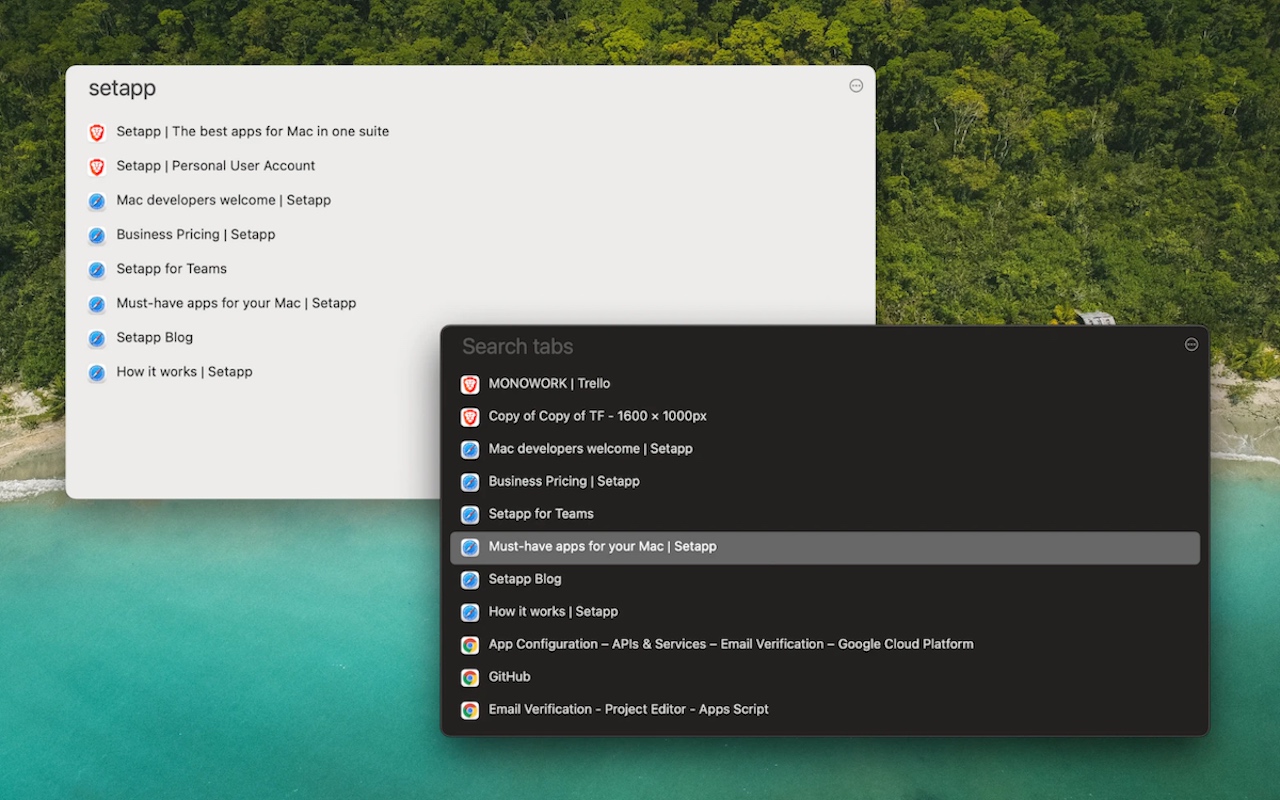
Unlike basic history searchers, Tab Finder Mac App acts as a centralized command center for your current browsing session. It aggregates every single open tab from multiple supported browsers—including Safari, Google Chrome, Brave, and Opera—and presents them in a clean, unified list.
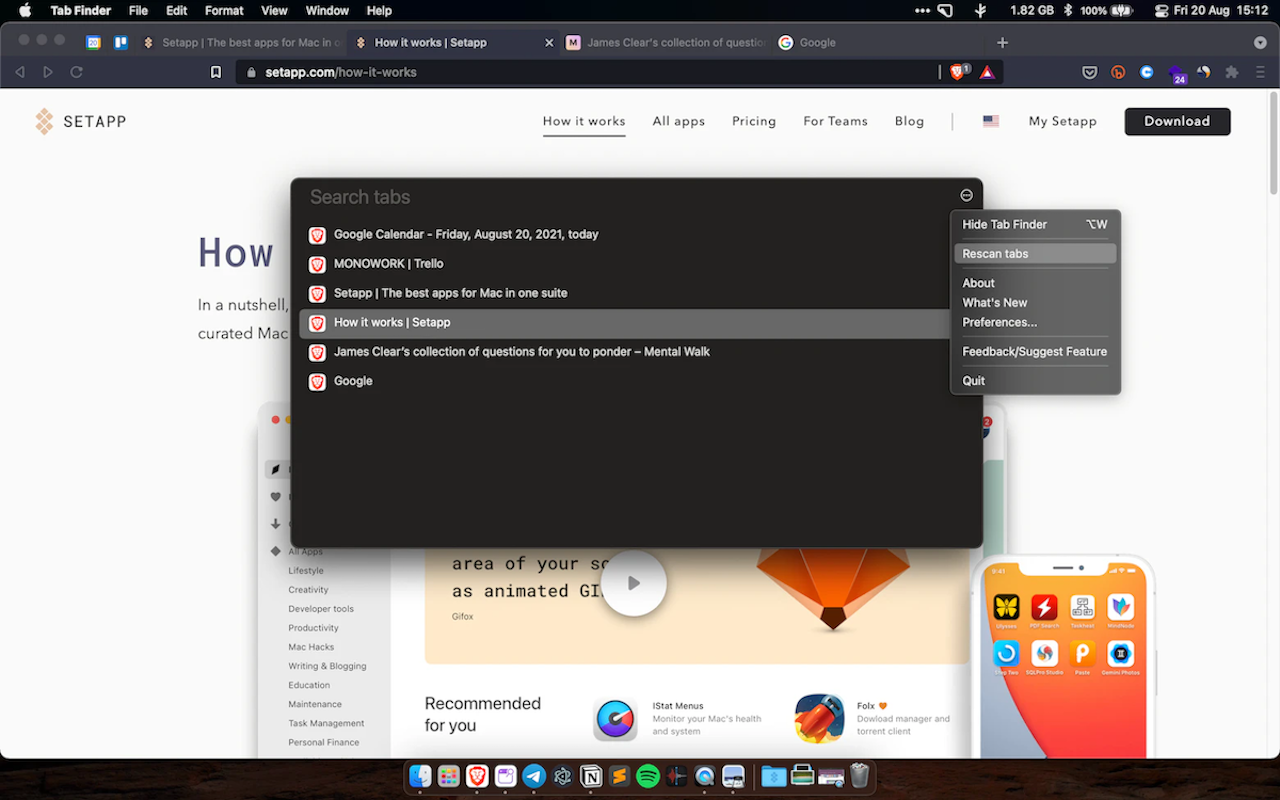
With a simple keyboard shortcut, you can summon the interface, type a few keywords, and instantly jump to the exact page you need, regardless of which window or browser it is hiding in. It transforms the chaotic mess of 294,584+ open tabs into a searchable, organized database, putting you back in control of your digital environment.
Streamlining Your Digital Workspace: The Philosophy of Tab Management
The Psychology of Clutter
Digital clutter functions similarly to physical clutter. When your desk is covered in papers, it is hard to work; when your browser is covered in tabs, it is hard to think. Each open tab represents an “open loop” in your brain—a task unfinished or a piece of information pending review. Tab Finder helps close these loops.
By organizing the chaos into a structured list, it changes the way you interact with the internet. You stop reacting to the visual noise of 50 open tabs and start proactively managing your tasks. This shift in perspective is crucial for maintaining focus in an era of constant digital distraction.
The Problem with Native Browser Solutions
While browsers like Chrome and Safari have attempted to solve tab overload with features like “Tab Groups” or “Vertical Tabs,” these solutions are siloed. Chrome does not know what is open in Safari, and Edge does not care about Brave.
If you are a user who compartmentalizes work across different browsers—perhaps using Safari for its battery efficiency and Chrome for its extension library—native solutions fail you. Tab Finder for Mac is the bridge. It sits above the browser layer, providing a meta-view of your entire computing session. This holistic approach is the only way to truly solve the problem for advanced users who refuse to be tied to a single piece of software.
Efficiency in Information Retrieval
Consider the “switching cost” of losing a tab. You are writing a report, and you need to reference a statistic you found earlier. You click your browser icon. It is not in the current window. You right-click the dock icon to see other windows. You click the second window. Not there. You click the third. You find it, but now you have forgotten the exact sentence you were writing.
This micro-interruption took 15 seconds, but the recovery of your train of thought can take minutes. With Tab Finder, the process is: Hit Shortcut -> Type “Statistic” -> Enter. Total time: 2 seconds. Zero cognitive drift. The cumulative effect of these saved moments over a year is massive.
Why Choose Tab Finder Mac App?
Choosing Tab Finder Mac App means choosing sanity over chaos. It is built for speed and simplicity, designed to run quietly in the background until you need it. By consolidating your web activity into a single access point, it eliminates the friction of context switching.
You no longer need to remember if you opened that recipe in Safari or that financial report in Chrome; Tab Finder sees them all equally. It is particularly beneficial for users with multi-monitor setups or those who use spaces/desktops on macOS, where browser windows often get lost in the background.
Furthermore, the application respects your visual preferences with native Dark Mode support, ensuring it looks right at home on your macOS desktop, whether you are working late at night or in a bright office.
Key Benefits
Below is a detailed breakdown of how integrating this utility into your daily workflow will tangibly improve your digital life and efficiency:
- Drastic Productivity Increase: By reducing the time spent hunting for lost tabs from minutes to seconds, you save hours over the course of a week.
- Reduced Cognitive Load: Free your brain from the task of remembering “where” information is located, allowing you to focus entirely on “what” the information is.
- Cross-Browser Synergy: It bridges the gap between different browsers, allowing you to use Safari for personal browsing and Chrome for work while managing them from a single interface.
- Keyboard-Centric Workflow: Keep your hands on the keyboard and maintain your flow state; no need to reach for the mouse to click through tiny tabs.
- Visual Clarity: The list view provides readable titles and URLs, which is far superior to the compressed tab icons that modern browsers display when overloaded.
- Resource Management: By easily seeing what is open, you can quickly identify and close duplicate or unnecessary tabs that are hogging your RAM and CPU power.
Who Can Benefit?
- Students and Academics: Keep track of dozens of sources, journals, and reference pages without losing your place during intense writing sessions.
- Developers and Designers: Seamlessly switch between documentation, Stack Overflow threads, and design inspiration boards across different browser engines.
- Digital Marketers: Manage multiple campaigns, analytics dashboards, and social media tools without getting overwhelmed by browser clutter.
- General Power Users: Anyone who feels a sense of panic when they look at their tab bar will find immediate relief and improved workflow with this essential utility.
Features
Below is a comprehensive list of the key features that make the software a valuable addition to your needs:
- Unified Tab Aggregation
- Centralized Dashboard: Instantly pulls data from every active browser window and compiles it into a single, easy-to-read list, removing the need to check apps individually.
- Real-Time Syncing: The list updates dynamically as you open and close tabs in your browsers, ensuring the data you see is always current and accurate.
- Multi-Browser Compatibility
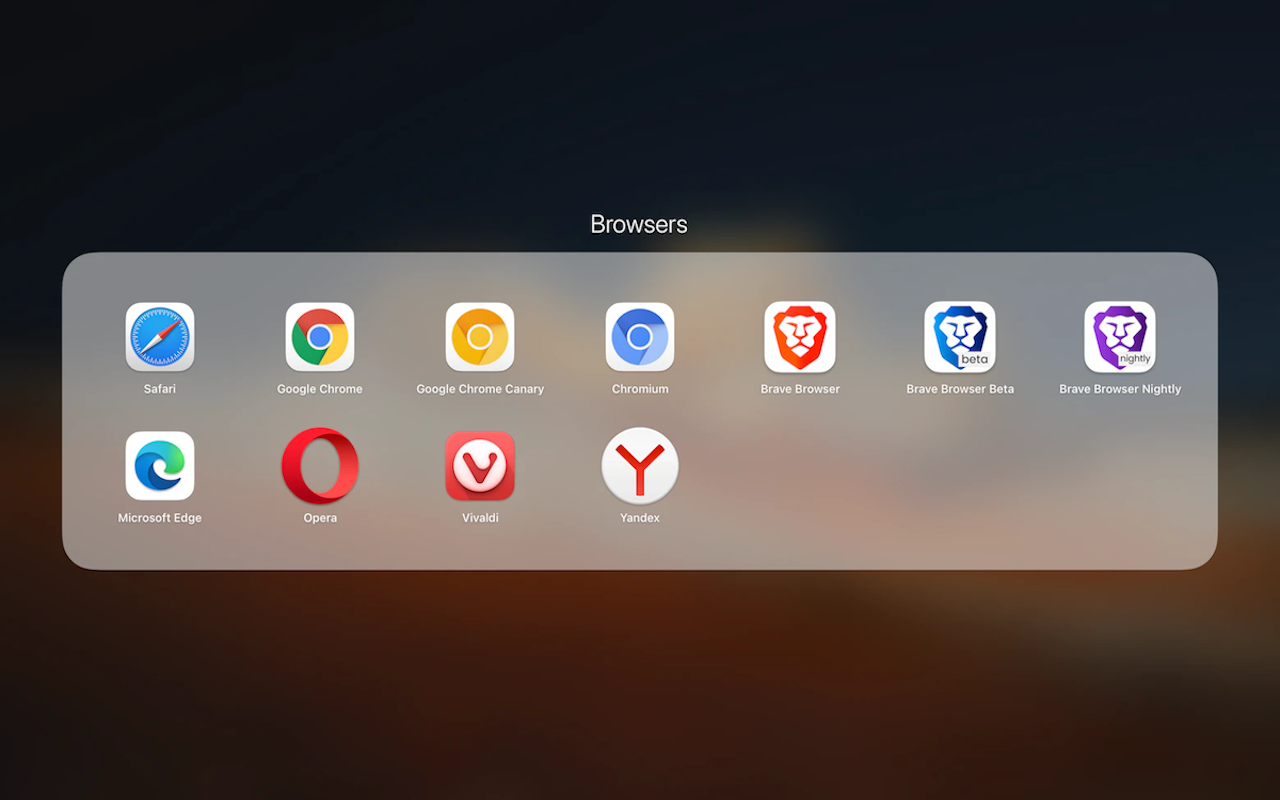
- Broad Browser Support: Works seamlessly with major browsers including Safari, Safari Technology Preview, Google Chrome, Chrome Canary, Chromium, Vivaldi, Brave, and Microsoft Edge.
- Engine Agnostic: Whether the browser is based on WebKit or Chromium, the software handles the communication perfectly to retrieve your tab data.
- Instant Search and Switch
- Fuzzy Search Capability: Type part of a title or URL to filter the list instantly, finding tabs even if you only remember a specific keyword or website name.
- One-Click Navigation: Selecting a tab from the list immediately brings that specific browser window to the front and activates the correct tab.
- User Interface Customization
- Adaptive Dark Mode: The interface automatically detects your system settings to switch between light and dark themes, or can be manually forced to your preferred style.
- Minimalist Design: The app features a clean, distraction-free interface that focuses solely on the text and content of your tabs without unnecessary visual clutter.
- Optimized Performance
- Lightweight Footprint: Designed to run efficiently on macOS without consuming significant system resources, ensuring your computer remains fast.
- Native macOS Integration: Built specifically for the Mac ecosystem, requiring macOS 11.5 or later to leverage the latest operating system technologies.
Requirements
Built for the Apple Ecosystem
Tab Finder is not a lazy port of a Windows app; it is crafted for the Macintosh experience. It requires macOS 11.5 (Big Sur) or later, ensuring it takes advantage of modern Apple Silicon and Intel architecture optimizations. The application feels snappy, responsive, and native.
Browser Support Details
The developers understand that browser loyalty is fierce and varied. That is why support is extensive:
- Mainstream: Safari and Google Chrome are fully supported, covering the vast majority of Mac users.
- Privacy-Focused: Users of Brave and Vivaldi are not left behind, allowing privacy advocates to enjoy superior organization.
- Developer Editions: Support for Safari Technology Preview and Chrome Canary means web developers can manage their testing environments just as easily as their daily browsing.
- Microsoft Ecosystem: Microsoft Edge users on Mac are fully integrated.
- Note on Limitations: Currently, Firefox is not supported due to technical constraints in how it exposes tab data. Additionally, support for Yandex Browser has been discontinued to focus on more widely used platforms.
System Requirements
- Operating System: macOS 11.5 (Big Sur) or newer.
- Hardware: Compatible with both Intel-based Macs and Apple Silicon (M1/M2/M3) Macs.
- Supported Browsers: Safari, Safari Technology Preview, Google Chrome, Chrome Canary, Chromium, Vivaldi, Brave, Microsoft Edge.
- Disk Space: Minimal space required (Lightweight installation).
Downloads
Explore how Tab Finder works according to your needs and experience the clarity of an organized browser firsthand. Get the trial edition for free to test the software and see how much time you can save by clicking the button below.
BUY NOW
Tab Finder is available for $14.99 for a lifetime license, offering incredible value for a tool you will use every day. But, you can now get Tab Finder Mac App license with our exclusive discount sale for just $2.50—that is a massive 83% Discount! This offer is available for a limited time!

" />
Ultimate Browser Tab Manager and Switcher Utility to Organize Multiple Windows, Boost Productivity, and Quickly Search Open Tabs Across Chrome, Safari, and Brave
- Please Notes:
- You may be directed to the bundle page, but it is possible to purchase the software individually.
- If you're having difficulty locating the product on the bundle page, please utilize the browser's search feature.
- Get an additional $3 discount on all orders more that $30.
- LEGITIMATE: All apps are authentic and have original licenses obtained directly from the creators via contracts.
- INSTANT ACCESS: Fully activated macOS Apps & Windows Software with instant downloads & license key access.
- Number of devices: 1
- Minor Updates Included
- Standard License for v 1.xx
- Minor Updates Included Only
- Lifetime License
Platforms: Mac
" />
Ultimate Browser Tab Manager and Switcher Utility to Organize Multiple Windows, Boost Productivity, and Quickly Search Open Tabs Across Chrome, Safari, and Brave
- Number of devices: 1
- Minor Updates Included
- Standard License for v 1.xx
- Minor Updates Included Only
- Lifetime License
Platforms: Mac

" />
Get Tab Finder and over 260 other Mac apps with a subscription starting at just $9.99 per month.
- Full access to Tab Finder and over 260 other Mac apps
- Install as many apps as you want
- Every Mac and iOS app you need
- Ever-growing collection, same price
- Free updates. No ads
- 7-day Free Trials, Easy cancellation
Platforms: Mac OS X

Mountain Duck 5: Perpetual License BEST OFFER

Yoink for Mac BEST OFFER

Finder Windows BEST OFFER

83% Off – Path Finder: 1 Year License | The Best File Browser – for macOS BEST OFFER

Spotless BEST OFFER

Dock Star BEST OFFER

RenameMe Mac App BEST OFFER

Multi Dock BEST OFFER

Tidier BEST OFFER
Tab Finder Mac App Giveaway
Unavailable at this moment!

To access the giveaway, kindly provide your email address. Please refrain from closing this page after signing in to receive instructions on how to access the offer at no cost.
NOTES:
– All prices shown here are in listed USD (United States Dollar).
– Such promotional programs are subject to change without notice, from time to time in our sole discretion.
– Data may vary based on different systems or computers.
Thanks for reading Tab Finder Mac App Review & Enjoy the discount coupon. Please Report if Tab Finder Discount Coupon/Deal/Giveaway has a problem such as expired, broken link, sold out, etc while the deal still exists.





![[NEW KEY #2] Giveaway – iTop Easy Desktop PRO v4.x: Free License Key | Full Version – for Windows](https://thesoftware.shop/wp-content/uploads/thumbs_dir/iTop-Easy-Desktop-PRO-Review-Download-Discount-Coupon-rfosnoibytn1jfzcjbl4fbn3n5r41mioe2d56twrdk.png)

